partition problem

Do you have a UEFI BIOS? Determining this is a step preceding Diskpart so did you skip steps?

If so are you booting the disk as a UEFI device? With a UEFI BIOS you should try that first. But you would not convert to MBR to install to UEFI.

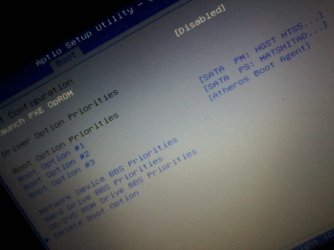
If you are in doubt boot into BIOS setup to look for settings for UEFI, CSM, Legacy BIOS and BIOS Boot Priority. Report back those settings as they exist now and the other choices.

We deal with these cases every day and not a one has failed to get installed if there is close cooperation.
 
anyone found a solution???? NEED HELP!!!!!!!
 

My Computer

Computer type
Laptop
OS
window 7 ultimate 32 bit system
ok wait a minute please dont leave i check
 

My Computer

Computer type
Laptop
OS
window 7 ultimate 32 bit system
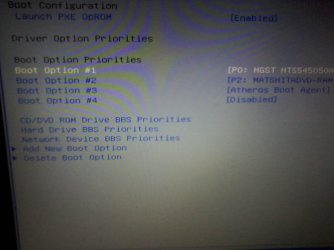
here i post a picture i have 4 options which should i chose
 

Attachments

  • 1422392387174-995745069.jpg
    1422392387174-995745069.jpg
    98.2 KB · Views: 1

My Computer

Computer type
Laptop
OS
window 7 ultimate 32 bit system
can u see????
 

My Computer

Computer type
Laptop
OS
window 7 ultimate 32 bit system
can u tell me other easy choice and faster way to create a partition please
 

My Computer

Computer type
Laptop
OS
window 7 ultimate 32 bit system
What about the other settings I asked for?

Do you see any UEFI, CSM, Legacy BIOS on any of the BIOS tabs?
 
Last edited:
i was on that settings but i cantt find uefi legacy .... can u give me screenshot plase and i m not skip the steps
 

My Computer

Computer type
Laptop
OS
window 7 ultimate 32 bit system
ok i post now vedeo
 

My Computer

Computer type
Laptop
OS
window 7 ultimate 32 bit system
k give me please another easyidea please im trying
 

My Computer

Computer type
Laptop
OS
window 7 ultimate 32 bit system
have u now solution and aa im on android phone i am not getting u r messagr quickly i think
 

My Computer

Computer type
Laptop
OS
window 7 ultimate 32 bit system
If you see no UEFI, CSM, Legacy BIOS settings after checking every single tab in BIOS (especially Advanced) then start at the top of http://www.sevenforums.com/tutorials/324687-windows-7-installation-failure-overcome.html and report back the results of each step without missing a single step. If you cannot do a step then Ask back for more help.

There is a step to download a new ISO to burn to disk. Do not skip
That step this time.

If you get the same error then test the hard drive using the maker's Hard Drive Diagnostics Tools and Utilities (Storage) - TACKtech Corp..
 
Last edited:
lease look at picture which is ufe or legacy
 

Attachments

  • 1422394751401-365590782.jpg
    1422394751401-365590782.jpg
    94.2 KB · Views: 1

My Computer

Computer type
Laptop
OS
window 7 ultimate 32 bit system
have u viber we can talk on viber??
 

My Computer

Computer type
Laptop
OS
window 7 ultimate 32 bit system
r u searching maybe solution?????
 

My Computer

Computer type
Laptop
OS
window 7 ultimate 32 bit system
hmm what to do i now??
 

My Computer

Computer type
Laptop
OS
window 7 ultimate 32 bit system
i dont have reset my bios settings and im rally sorry that i irritating u guys im really sorry im telling u that i am on android phone i dont get u r message full or quickly
 

My Computer

Computer type
Laptop
OS
window 7 ultimate 32 bit system
What about the Advanced tab of BIOS? You've posted a picture of only the Boot tab 3 times.
 
obut sorry i dont have another computer i have only 1 how can i download or can u please telll me another idea plz i m focus
 

My Computer

Computer type
Laptop
OS
window 7 ultimate 32 bit system
Waiting for the BIOS Advanced tab picture.

There are tabs across the top to choose. Look on every tab.

Please try to keep up and stop with the spamming.
 
Back
Top