Solved Partition problem

buytick

New member
Local time
8:03 AM
Messages
17
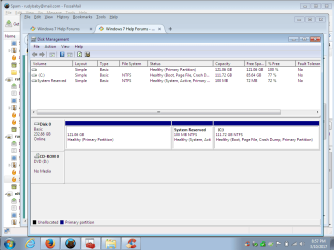
How do I get rid of the first partition and add it to my C: partition? Baby steps please.
 

Attachments

  • Desktop.png
    Desktop.png
    38.4 KB · Views: 1

My Computer

Computer type
Laptop
Computer Manufacturer/Model Number
Dell
OS
win 7 32bit
CPU
i5-m560
Memory
4gb
Hard Drives
230gb
Antivirus
me
Browser
firefox

My Computer

Computer type
PC/Desktop
Computer Manufacturer/Model Number
Custom assembled by me :}
OS
Win-7-Pro64bit 7-H-Prem-64bit
CPU
i7-5930K 2nd i9-9940x both water blocked VRM's too
Motherboard
ASUS SABERTOOTH X99 2nd ASUS x299 Apex
Memory
Trident-z 3200C14 2nd Trident-z 3600C16
Graphics Card(s)
EVGA 1080ti ftw3 2nd Titan Xp both water blocked
Sound Card
Built-in Realtek
Monitor(s) Displays
1-AOC G2460PG 24"G-Sync 144Hz/ 2nd 1-ASUS VG248QE 24" 144Hz
Screen Resolution
1920 x 1080 144Hz
Hard Drives
2-Samsung M.2 Evo & Evo Plus
2-Samsung 850 EVO 500GB SSD's/ 3-2.5 W.D. Black 1tb-&3-1tb/3-3.5 WD Black 1tb hdd's
PSU
EVGA SuperNOVA 1000-P2 2nd 1200-P2
Case
2-Corsair Obsidian Series 450D Black ATX Mid Tower
Cooling
Custom water loops
Keyboard
Logitech G710+/ 2nd Logitech G910
Mouse
2-RedDragon M901 Perdition 16400 dpi Gaming mouse = wired
Internet Speed
Comcast Ping 19ms 89.31mbps download speed 6.12mbps upload
Antivirus
Malwarebytes Pro/ Superantispyware Pro
Browser
FireFox & Pale moon
Other Info
2nd ASUS X299 Apex/Intel i9-9940x with Custom water loop/7H-Prem-x64/Corsair 450D case/Ram Trident-z 3600C16 4x8gb / Samsung970Evo plus 500gb SSD/Dual ssd EZ swap evo/PSU EVGA SuperNova 1200w-P2 80+Platinum/GPU Titan Xp /8-ML-140 on push-pull on 2-280GTX rads
How could I have 2 primary partitions?
Is that normal?
Can I do anything in Disk Management?
 

My Computer

Computer type
Laptop
Computer Manufacturer/Model Number
Dell
OS
win 7 32bit
CPU
i5-m560
Memory
4gb
Hard Drives
230gb
Antivirus
me
Browser
firefox
Hi,
No disk management is useless in this situation.
Quite frankly looks like you installed windows recently and chose the wrong partition to install on to me ?

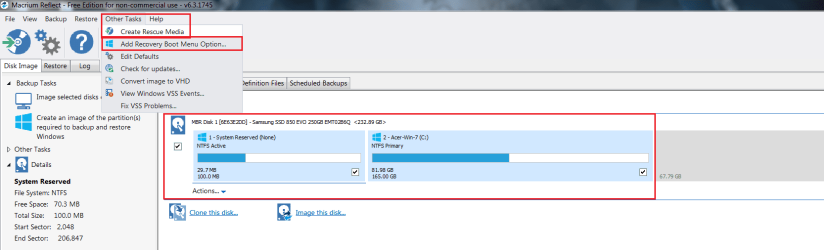
If it were me and I had an additional external hard drive I'd create a system image of the 100mb system reserved and the C partition to it
Create the recovery winpe cd that macrium reflect prompts a person to create after first opening it and use it to restore the system image to a cleaned hard drive windows is on now.

Create Backup Image with Macrium Reflect by Britec - YouTube


Otherwise use free mini tool

Click on the C partition and select expand
It will show you you partitions you can take space from choose the first one which doesn't seem to have a partition letter assigned to it that I noticed.
 

My Computer

Computer type
PC/Desktop
Computer Manufacturer/Model Number
Custom assembled by me :}
OS
Win-7-Pro64bit 7-H-Prem-64bit
CPU
i7-5930K 2nd i9-9940x both water blocked VRM's too
Motherboard
ASUS SABERTOOTH X99 2nd ASUS x299 Apex
Memory
Trident-z 3200C14 2nd Trident-z 3600C16
Graphics Card(s)
EVGA 1080ti ftw3 2nd Titan Xp both water blocked
Sound Card
Built-in Realtek
Monitor(s) Displays
1-AOC G2460PG 24"G-Sync 144Hz/ 2nd 1-ASUS VG248QE 24" 144Hz
Screen Resolution
1920 x 1080 144Hz
Hard Drives
2-Samsung M.2 Evo & Evo Plus
2-Samsung 850 EVO 500GB SSD's/ 3-2.5 W.D. Black 1tb-&3-1tb/3-3.5 WD Black 1tb hdd's
PSU
EVGA SuperNOVA 1000-P2 2nd 1200-P2
Case
2-Corsair Obsidian Series 450D Black ATX Mid Tower
Cooling
Custom water loops
Keyboard
Logitech G710+/ 2nd Logitech G910
Mouse
2-RedDragon M901 Perdition 16400 dpi Gaming mouse = wired
Internet Speed
Comcast Ping 19ms 89.31mbps download speed 6.12mbps upload
Antivirus
Malwarebytes Pro/ Superantispyware Pro
Browser
FireFox & Pale moon
Other Info
2nd ASUS X299 Apex/Intel i9-9940x with Custom water loop/7H-Prem-x64/Corsair 450D case/Ram Trident-z 3600C16 4x8gb / Samsung970Evo plus 500gb SSD/Dual ssd EZ swap evo/PSU EVGA SuperNova 1200w-P2 80+Platinum/GPU Titan Xp /8-ML-140 on push-pull on 2-280GTX rads
I had Linux Mint on this laptop and wanted to put Win 7 back on it. I probably did put it in the wrong partition, but it is working well. I would be scared to go the macrium root, so I will make a system image from control panel on a USB drive. Then I will try to use mini-tool (free, I hope) and expand the C partition. Sounds ok?
 

My Computer

Computer type
Laptop
Computer Manufacturer/Model Number
Dell
OS
win 7 32bit
CPU
i5-m560
Memory
4gb
Hard Drives
230gb
Antivirus
me
Browser
firefox
Hi,
I would not use windows to make a system image it is not nearly as reliable as free reflect :)
You can right click the first 121.06gb partition and select delete it is empty and that will change it to Unallocated space.
Lease the 100mb partition as is it is your boot loader
If you want it on the C partition you'd have to use this
Bootmgr - Move to C:\ with EasyBCD
 

My Computer

Computer type
PC/Desktop
Computer Manufacturer/Model Number
Custom assembled by me :}
OS
Win-7-Pro64bit 7-H-Prem-64bit
CPU
i7-5930K 2nd i9-9940x both water blocked VRM's too
Motherboard
ASUS SABERTOOTH X99 2nd ASUS x299 Apex
Memory
Trident-z 3200C14 2nd Trident-z 3600C16
Graphics Card(s)
EVGA 1080ti ftw3 2nd Titan Xp both water blocked
Sound Card
Built-in Realtek
Monitor(s) Displays
1-AOC G2460PG 24"G-Sync 144Hz/ 2nd 1-ASUS VG248QE 24" 144Hz
Screen Resolution
1920 x 1080 144Hz
Hard Drives
2-Samsung M.2 Evo & Evo Plus
2-Samsung 850 EVO 500GB SSD's/ 3-2.5 W.D. Black 1tb-&3-1tb/3-3.5 WD Black 1tb hdd's
PSU
EVGA SuperNOVA 1000-P2 2nd 1200-P2
Case
2-Corsair Obsidian Series 450D Black ATX Mid Tower
Cooling
Custom water loops
Keyboard
Logitech G710+/ 2nd Logitech G910
Mouse
2-RedDragon M901 Perdition 16400 dpi Gaming mouse = wired
Internet Speed
Comcast Ping 19ms 89.31mbps download speed 6.12mbps upload
Antivirus
Malwarebytes Pro/ Superantispyware Pro
Browser
FireFox & Pale moon
Other Info
2nd ASUS X299 Apex/Intel i9-9940x with Custom water loop/7H-Prem-x64/Corsair 450D case/Ram Trident-z 3600C16 4x8gb / Samsung970Evo plus 500gb SSD/Dual ssd EZ swap evo/PSU EVGA SuperNova 1200w-P2 80+Platinum/GPU Titan Xp /8-ML-140 on push-pull on 2-280GTX rads
You're losing me. OK I will make a system image with Macrium and pray I don't have to use it. Then I will try to expand the C: drive. I will leave the boot they way it is b/c it's working. Thanks for your help.
 

My Computer

Computer type
Laptop
Computer Manufacturer/Model Number
Dell
OS
win 7 32bit
CPU
i5-m560
Memory
4gb
Hard Drives
230gb
Antivirus
me
Browser
firefox
Hi,
Actually you should restore the image after cleaning the disk :)
 

My Computer

Computer type
PC/Desktop
Computer Manufacturer/Model Number
Custom assembled by me :}
OS
Win-7-Pro64bit 7-H-Prem-64bit
CPU
i7-5930K 2nd i9-9940x both water blocked VRM's too
Motherboard
ASUS SABERTOOTH X99 2nd ASUS x299 Apex
Memory
Trident-z 3200C14 2nd Trident-z 3600C16
Graphics Card(s)
EVGA 1080ti ftw3 2nd Titan Xp both water blocked
Sound Card
Built-in Realtek
Monitor(s) Displays
1-AOC G2460PG 24"G-Sync 144Hz/ 2nd 1-ASUS VG248QE 24" 144Hz
Screen Resolution
1920 x 1080 144Hz
Hard Drives
2-Samsung M.2 Evo & Evo Plus
2-Samsung 850 EVO 500GB SSD's/ 3-2.5 W.D. Black 1tb-&3-1tb/3-3.5 WD Black 1tb hdd's
PSU
EVGA SuperNOVA 1000-P2 2nd 1200-P2
Case
2-Corsair Obsidian Series 450D Black ATX Mid Tower
Cooling
Custom water loops
Keyboard
Logitech G710+/ 2nd Logitech G910
Mouse
2-RedDragon M901 Perdition 16400 dpi Gaming mouse = wired
Internet Speed
Comcast Ping 19ms 89.31mbps download speed 6.12mbps upload
Antivirus
Malwarebytes Pro/ Superantispyware Pro
Browser
FireFox & Pale moon
Other Info
2nd ASUS X299 Apex/Intel i9-9940x with Custom water loop/7H-Prem-x64/Corsair 450D case/Ram Trident-z 3600C16 4x8gb / Samsung970Evo plus 500gb SSD/Dual ssd EZ swap evo/PSU EVGA SuperNova 1200w-P2 80+Platinum/GPU Titan Xp /8-ML-140 on push-pull on 2-280GTX rads
I tried

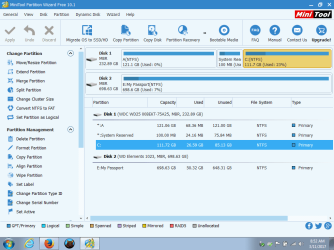
OK. I did an image copy to my passport drive. Then i downloaded Mini tool and I added the drive A name to the first partition. When I tried to merge the A to the C partition, it wasn't next to C so it wouldn't do it. I also tried to merge the C to the little partition next to it, but it said I wouldn't be able to boot.

I know I could wipe the HD, then reinstall win 7, but that would be a mess. I have too much stuff already on the c partition. If I wipe the HD, can I then restore the image? If yes, how?

see next post
 

My Computer

Computer type
Laptop
Computer Manufacturer/Model Number
Dell
OS
win 7 32bit
CPU
i5-m560
Memory
4gb
Hard Drives
230gb
Antivirus
me
Browser
firefox
See the Minitool screen print

See attachment
 

Attachments

  • Untitled.png
    Untitled.png
    37.3 KB · Views: 1

My Computer

Computer type
Laptop
Computer Manufacturer/Model Number
Dell
OS
win 7 32bit
CPU
i5-m560
Memory
4gb
Hard Drives
230gb
Antivirus
me
Browser
firefox
Hi,
As long as you only had the 100mb and C partition selected to make a system image out of the first would of been excluded
Then just create the recovery media cd/ flash drive and boot to it after cleaning the disk of all partitions
SSD / HDD : Optimize for Windows Reinstallation

Refect also has a add recovery to your boot menu options but with the recovery media created you can simply boot to it
reflect selected partitions.png
 

My Computer

Computer type
PC/Desktop
Computer Manufacturer/Model Number
Custom assembled by me :}
OS
Win-7-Pro64bit 7-H-Prem-64bit
CPU
i7-5930K 2nd i9-9940x both water blocked VRM's too
Motherboard
ASUS SABERTOOTH X99 2nd ASUS x299 Apex
Memory
Trident-z 3200C14 2nd Trident-z 3600C16
Graphics Card(s)
EVGA 1080ti ftw3 2nd Titan Xp both water blocked
Sound Card
Built-in Realtek
Monitor(s) Displays
1-AOC G2460PG 24"G-Sync 144Hz/ 2nd 1-ASUS VG248QE 24" 144Hz
Screen Resolution
1920 x 1080 144Hz
Hard Drives
2-Samsung M.2 Evo & Evo Plus
2-Samsung 850 EVO 500GB SSD's/ 3-2.5 W.D. Black 1tb-&3-1tb/3-3.5 WD Black 1tb hdd's
PSU
EVGA SuperNOVA 1000-P2 2nd 1200-P2
Case
2-Corsair Obsidian Series 450D Black ATX Mid Tower
Cooling
Custom water loops
Keyboard
Logitech G710+/ 2nd Logitech G910
Mouse
2-RedDragon M901 Perdition 16400 dpi Gaming mouse = wired
Internet Speed
Comcast Ping 19ms 89.31mbps download speed 6.12mbps upload
Antivirus
Malwarebytes Pro/ Superantispyware Pro
Browser
FireFox & Pale moon
Other Info
2nd ASUS X299 Apex/Intel i9-9940x with Custom water loop/7H-Prem-x64/Corsair 450D case/Ram Trident-z 3600C16 4x8gb / Samsung970Evo plus 500gb SSD/Dual ssd EZ swap evo/PSU EVGA SuperNova 1200w-P2 80+Platinum/GPU Titan Xp /8-ML-140 on push-pull on 2-280GTX rads
Hi,
Also the first partition you would want to select it and select delete so it would be unallocated space.
 

My Computer

Computer type
PC/Desktop
Computer Manufacturer/Model Number
Custom assembled by me :}
OS
Win-7-Pro64bit 7-H-Prem-64bit
CPU
i7-5930K 2nd i9-9940x both water blocked VRM's too
Motherboard
ASUS SABERTOOTH X99 2nd ASUS x299 Apex
Memory
Trident-z 3200C14 2nd Trident-z 3600C16
Graphics Card(s)
EVGA 1080ti ftw3 2nd Titan Xp both water blocked
Sound Card
Built-in Realtek
Monitor(s) Displays
1-AOC G2460PG 24"G-Sync 144Hz/ 2nd 1-ASUS VG248QE 24" 144Hz
Screen Resolution
1920 x 1080 144Hz
Hard Drives
2-Samsung M.2 Evo & Evo Plus
2-Samsung 850 EVO 500GB SSD's/ 3-2.5 W.D. Black 1tb-&3-1tb/3-3.5 WD Black 1tb hdd's
PSU
EVGA SuperNOVA 1000-P2 2nd 1200-P2
Case
2-Corsair Obsidian Series 450D Black ATX Mid Tower
Cooling
Custom water loops
Keyboard
Logitech G710+/ 2nd Logitech G910
Mouse
2-RedDragon M901 Perdition 16400 dpi Gaming mouse = wired
Internet Speed
Comcast Ping 19ms 89.31mbps download speed 6.12mbps upload
Antivirus
Malwarebytes Pro/ Superantispyware Pro
Browser
FireFox & Pale moon
Other Info
2nd ASUS X299 Apex/Intel i9-9940x with Custom water loop/7H-Prem-x64/Corsair 450D case/Ram Trident-z 3600C16 4x8gb / Samsung970Evo plus 500gb SSD/Dual ssd EZ swap evo/PSU EVGA SuperNova 1200w-P2 80+Platinum/GPU Titan Xp /8-ML-140 on push-pull on 2-280GTX rads
Geez, isn't there an easier way to wipe the drive? Clonezilla? Gparted?
 

My Computer

Computer type
Laptop
Computer Manufacturer/Model Number
Dell
OS
win 7 32bit
CPU
i5-m560
Memory
4gb
Hard Drives
230gb
Antivirus
me
Browser
firefox
Hi,
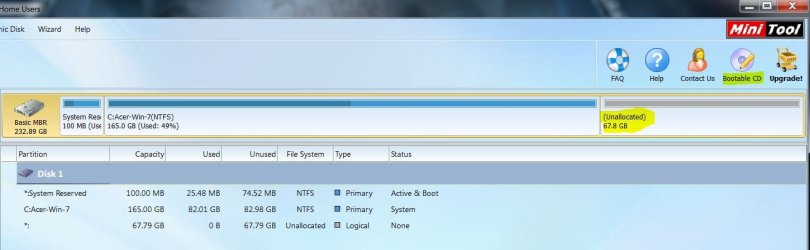
Yes you can also create a mini cd and boot to it and clean it
Which adding a letter to the first partition was a mistake and never use A-B-C-D but mostly that partition needs to be deleted down to Unallocated space to be able to use it for C.
I'm still on version 9
minitool bootable cd.JPG
 

My Computer

Computer type
PC/Desktop
Computer Manufacturer/Model Number
Custom assembled by me :}
OS
Win-7-Pro64bit 7-H-Prem-64bit
CPU
i7-5930K 2nd i9-9940x both water blocked VRM's too
Motherboard
ASUS SABERTOOTH X99 2nd ASUS x299 Apex
Memory
Trident-z 3200C14 2nd Trident-z 3600C16
Graphics Card(s)
EVGA 1080ti ftw3 2nd Titan Xp both water blocked
Sound Card
Built-in Realtek
Monitor(s) Displays
1-AOC G2460PG 24"G-Sync 144Hz/ 2nd 1-ASUS VG248QE 24" 144Hz
Screen Resolution
1920 x 1080 144Hz
Hard Drives
2-Samsung M.2 Evo & Evo Plus
2-Samsung 850 EVO 500GB SSD's/ 3-2.5 W.D. Black 1tb-&3-1tb/3-3.5 WD Black 1tb hdd's
PSU
EVGA SuperNOVA 1000-P2 2nd 1200-P2
Case
2-Corsair Obsidian Series 450D Black ATX Mid Tower
Cooling
Custom water loops
Keyboard
Logitech G710+/ 2nd Logitech G910
Mouse
2-RedDragon M901 Perdition 16400 dpi Gaming mouse = wired
Internet Speed
Comcast Ping 19ms 89.31mbps download speed 6.12mbps upload
Antivirus
Malwarebytes Pro/ Superantispyware Pro
Browser
FireFox & Pale moon
Other Info
2nd ASUS X299 Apex/Intel i9-9940x with Custom water loop/7H-Prem-x64/Corsair 450D case/Ram Trident-z 3600C16 4x8gb / Samsung970Evo plus 500gb SSD/Dual ssd EZ swap evo/PSU EVGA SuperNova 1200w-P2 80+Platinum/GPU Titan Xp /8-ML-140 on push-pull on 2-280GTX rads
Hi,
Here probably why you could not expand C to it as I said it needs to be Unallocated first

mini tool select and delete.png
 

My Computer

Computer type
PC/Desktop
Computer Manufacturer/Model Number
Custom assembled by me :}
OS
Win-7-Pro64bit 7-H-Prem-64bit
CPU
i7-5930K 2nd i9-9940x both water blocked VRM's too
Motherboard
ASUS SABERTOOTH X99 2nd ASUS x299 Apex
Memory
Trident-z 3200C14 2nd Trident-z 3600C16
Graphics Card(s)
EVGA 1080ti ftw3 2nd Titan Xp both water blocked
Sound Card
Built-in Realtek
Monitor(s) Displays
1-AOC G2460PG 24"G-Sync 144Hz/ 2nd 1-ASUS VG248QE 24" 144Hz
Screen Resolution
1920 x 1080 144Hz
Hard Drives
2-Samsung M.2 Evo & Evo Plus
2-Samsung 850 EVO 500GB SSD's/ 3-2.5 W.D. Black 1tb-&3-1tb/3-3.5 WD Black 1tb hdd's
PSU
EVGA SuperNOVA 1000-P2 2nd 1200-P2
Case
2-Corsair Obsidian Series 450D Black ATX Mid Tower
Cooling
Custom water loops
Keyboard
Logitech G710+/ 2nd Logitech G910
Mouse
2-RedDragon M901 Perdition 16400 dpi Gaming mouse = wired
Internet Speed
Comcast Ping 19ms 89.31mbps download speed 6.12mbps upload
Antivirus
Malwarebytes Pro/ Superantispyware Pro
Browser
FireFox & Pale moon
Other Info
2nd ASUS X299 Apex/Intel i9-9940x with Custom water loop/7H-Prem-x64/Corsair 450D case/Ram Trident-z 3600C16 4x8gb / Samsung970Evo plus 500gb SSD/Dual ssd EZ swap evo/PSU EVGA SuperNova 1200w-P2 80+Platinum/GPU Titan Xp /8-ML-140 on push-pull on 2-280GTX rads
Will this work? If I do below, then reboot with the rescue disc and choose Macrium and use the image?
Windows 7 and Vista

  1. Insert the Windows 7/Vista installation CD in the CD-ROM drive and restart the computer.
  2. When you see the message "Press any key to boot from CD," press a key on the keyboard.
  3. Press the Enter key at the Windows Setup welcome screen.
  4. When prompted, press any key on your keyboard.
  5. On the "Install Windows" page, select your preferred language and other preferences, then click Next.
  6. On the License Agreement page, accept the terms and agreements and click Next.
  7. On the Installation Type screen, choose the Custom option.
  8. Select the Drive Options (advanced) option.
  9. For Disk 0, delete all partitions. When all partitions have been deleted, you should see a single entry named "Unallocated space."
  10. Click on Disk 0 and select Next.
The Windows installation process will start by creating a new partition, formatting the partition, and installing Windows on the hard drive. The formatting process will erase the hard drive before installing Windows.
 

My Computer

Computer type
Laptop
Computer Manufacturer/Model Number
Dell
OS
win 7 32bit
CPU
i5-m560
Memory
4gb
Hard Drives
230gb
Antivirus
me
Browser
firefox
Hi,
Yes that should work too :)

As I said as long as the only 2 partitions that you created a system image of is the 100mb & C partition than it's all good the first partition you called A would of been excluded from the system image :party:
If not you'd be back to square 1.


Remove the drive with the system image BEFORE cleaning the disk.
 

My Computer

Computer type
PC/Desktop
Computer Manufacturer/Model Number
Custom assembled by me :}
OS
Win-7-Pro64bit 7-H-Prem-64bit
CPU
i7-5930K 2nd i9-9940x both water blocked VRM's too
Motherboard
ASUS SABERTOOTH X99 2nd ASUS x299 Apex
Memory
Trident-z 3200C14 2nd Trident-z 3600C16
Graphics Card(s)
EVGA 1080ti ftw3 2nd Titan Xp both water blocked
Sound Card
Built-in Realtek
Monitor(s) Displays
1-AOC G2460PG 24"G-Sync 144Hz/ 2nd 1-ASUS VG248QE 24" 144Hz
Screen Resolution
1920 x 1080 144Hz
Hard Drives
2-Samsung M.2 Evo & Evo Plus
2-Samsung 850 EVO 500GB SSD's/ 3-2.5 W.D. Black 1tb-&3-1tb/3-3.5 WD Black 1tb hdd's
PSU
EVGA SuperNOVA 1000-P2 2nd 1200-P2
Case
2-Corsair Obsidian Series 450D Black ATX Mid Tower
Cooling
Custom water loops
Keyboard
Logitech G710+/ 2nd Logitech G910
Mouse
2-RedDragon M901 Perdition 16400 dpi Gaming mouse = wired
Internet Speed
Comcast Ping 19ms 89.31mbps download speed 6.12mbps upload
Antivirus
Malwarebytes Pro/ Superantispyware Pro
Browser
FireFox & Pale moon
Other Info
2nd ASUS X299 Apex/Intel i9-9940x with Custom water loop/7H-Prem-x64/Corsair 450D case/Ram Trident-z 3600C16 4x8gb / Samsung970Evo plus 500gb SSD/Dual ssd EZ swap evo/PSU EVGA SuperNova 1200w-P2 80+Platinum/GPU Titan Xp /8-ML-140 on push-pull on 2-280GTX rads
Success!!!!!!!!!

Thank you so much for your help. It's wonderful to learn a new skill:D

A summary of what I did:

1. Downloaded Marcium Reflect Free and made a rescue disc DVD and then did an system image to a USB Passport Drive.
2. Put Windows 7 reinstallation disc from Dell and rebooted into Win 7 installation
3. I followed these instructions

  1. Insert the Windows 7/Vista installation CD in the CD-ROM drive and restart the computer.
  2. When you see the message "Press any key to boot from CD," press a key on the keyboard.
  3. Press the Enter key at the Windows Setup welcome screen.
  4. When prompted, press any key on your keyboard.
  5. On the "Install Windows" page, select your preferred language and other preferences, then click Next.
  6. On the License Agreement page, accept the terms and agreements and click Next.
  7. On the Installation Type screen, choose the Custom option.
  8. Select the Drive Options (advanced) option.
  9. For Disk 0, delete all partitions. When all partitions have been deleted, you should see a single entry named "Unallocated space."
  10. Click on Disk 0 and select Next
4. This reinstalled Win 7
5. I put the Macrium Rescue disc in the drive and rebooted to it
6. I chose the Macrium image file restore option
7. I restored my image
8. When I rebooted, a reboot message came up, so I put the Win 7 Installation disc in and chose repair this computer which repaired the boot
9. Booted into the restored Win7

10. Went to my computer and saw the unallocated space still there
11. Went into mini-tool and expanded the correct partition to include the unallocated space

IT WORKED THANKS TO TRASHZONE's INVALUABLE ASSISTANCE
 

My Computer

Computer type
Laptop
Computer Manufacturer/Model Number
Dell
OS
win 7 32bit
CPU
i5-m560
Memory
4gb
Hard Drives
230gb
Antivirus
me
Browser
firefox
Hi,
You're very welcome :)
There are many ways to skin a cat all could of been done with minitool bootable cd and reflect free system image :)
Cheers.
 

My Computer

Computer type
PC/Desktop
Computer Manufacturer/Model Number
Custom assembled by me :}
OS
Win-7-Pro64bit 7-H-Prem-64bit
CPU
i7-5930K 2nd i9-9940x both water blocked VRM's too
Motherboard
ASUS SABERTOOTH X99 2nd ASUS x299 Apex
Memory
Trident-z 3200C14 2nd Trident-z 3600C16
Graphics Card(s)
EVGA 1080ti ftw3 2nd Titan Xp both water blocked
Sound Card
Built-in Realtek
Monitor(s) Displays
1-AOC G2460PG 24"G-Sync 144Hz/ 2nd 1-ASUS VG248QE 24" 144Hz
Screen Resolution
1920 x 1080 144Hz
Hard Drives
2-Samsung M.2 Evo & Evo Plus
2-Samsung 850 EVO 500GB SSD's/ 3-2.5 W.D. Black 1tb-&3-1tb/3-3.5 WD Black 1tb hdd's
PSU
EVGA SuperNOVA 1000-P2 2nd 1200-P2
Case
2-Corsair Obsidian Series 450D Black ATX Mid Tower
Cooling
Custom water loops
Keyboard
Logitech G710+/ 2nd Logitech G910
Mouse
2-RedDragon M901 Perdition 16400 dpi Gaming mouse = wired
Internet Speed
Comcast Ping 19ms 89.31mbps download speed 6.12mbps upload
Antivirus
Malwarebytes Pro/ Superantispyware Pro
Browser
FireFox & Pale moon
Other Info
2nd ASUS X299 Apex/Intel i9-9940x with Custom water loop/7H-Prem-x64/Corsair 450D case/Ram Trident-z 3600C16 4x8gb / Samsung970Evo plus 500gb SSD/Dual ssd EZ swap evo/PSU EVGA SuperNova 1200w-P2 80+Platinum/GPU Titan Xp /8-ML-140 on push-pull on 2-280GTX rads
One last question. I have 3 computers running Win 7 - 2 pro 1 home. Do I have to make 3 different rescue discs on Macrium?
 

My Computer

Computer type
Laptop
Computer Manufacturer/Model Number
Dell
OS
win 7 32bit
CPU
i5-m560
Memory
4gb
Hard Drives
230gb
Antivirus
me
Browser
firefox
Back
Top