Solved Partition problem

kustoM

New member
Local time
2:49 PM
Messages
17
Location
South Africa
D8KX2tbut6gJgAAAABJRU5ErkJgggA=


Hi everyone

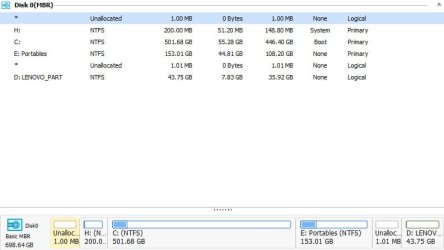
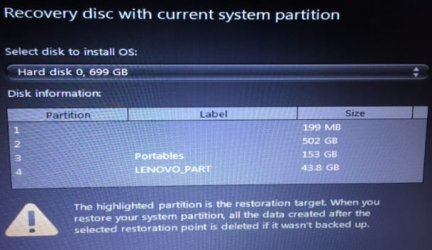
The problem I have is that when trying to do a system restore from my recovery disks, the "H" partition is selected without a option to change the partition. Obviously this is the wrong partition and way too small. I did try to delete the partition with EaseUS , but it is stating that it is a "System" partition.

I will really appreciate any help offered.

kustoM
 

My Computer

Computer type
Laptop
Computer Manufacturer/Model Number
LENOVO V570c
OS
Windows 7 Ultimate x64
Antivirus
AVG
Browser
Firefox
Welcome to the forum. You dontgive much detail but it sounds as if the parition your speaking of is the small parition that windows actually boots from before c
 

My Computer

Computer type
PC/Desktop
OS
win 8 32 bit
Thank you very much for the reply. This partition was only created a couple of days ago by the restore process when I was trying to do the restore and contain a "Temp" folder with some text documents. I have noticed one of the documents contains the disk layout which wrongly identify the small partition as the "C" drive as per below.

Volume ### Ltr Label Fs Type Size Status Info
---------- --- ----------- ----- ---------- ------- --------- --------
Volume 1 C NTFS Partition 200 MB Healthy
Volume 2 E NTFS Partition 501 GB Healthy
Volume 3 F Portables NTFS Partition 153 GB Healthy
Volume 4 D LENOVO_PART NTFS Partition 43 GB Healthy

Disk management is actually showing it to be like this,

Volume ### Ltr Label Fs Type Size Status Info
---------- --- ----------- ----- ---------- ------- --------- --------
Volume 1 H NTFS Partition 200 MB System
Volume 2 C NTFS Partition 501 GB Boot
Volume 3 E Portables NTFS Partition 153 GB None
Volume 4 D LENOVO_PART NTFS Partition 43 GB None


Screen shots attached.


Recovery image.jpg

Disk management.jpg
 
Last edited:

My Computer

Computer type
Laptop
Computer Manufacturer/Model Number
LENOVO V570c
OS
Windows 7 Ultimate x64
Antivirus
AVG
Browser
Firefox
Where did you get the recovery disks?
Did you created E: Portables partition?
Did you assign H: letter to partition 2?
Did you backed up your files? Factory recover formats the C: drive so you'll loose all your data.
Try to launch Factory recover from BIOS.
 

My Computers

System One System Two

  • Computer type
    PC/Desktop
    Computer Manufacturer/Model Number
    custom build
    OS
    Windows 7 HP 64
    CPU
    i5 6600K - 800MHz to 4200MHz
    Motherboard
    GA-Z170-HD3P
    Memory
    4+4G GSkill DDR4 3000
    Graphics Card(s)
    IG - Intel 530
    Monitor(s) Displays
    Samsung 226BW
    Screen Resolution
    1680x1050
    Hard Drives
    (1) -1 SM951 – 128GB M.2 AHCI PCIe SSD drive for Windows 7 and Lubuntu
    (2) -1 WD SATA 3 - 1T for Data
    (3) -1 WD SATA 3 - 1T for backup
    PSU
    Thermaltake 450W TR2 gold
    Keyboard
    Old and good Chicony mechanical keyboard
    Mouse
    Logitech mX performance - 9 buttons (had to disable some)
    Internet Speed
    500Mb/s
    Browser
    Firefox 64
    Other Info
    TinyWall firewall
  • Computer type
    Laptop
    System Manufacturer/Model Number
    Asus Q550LF
    OS
    Windows 7 Pro
    CPU
    i7-4500U 800MHz to 3.0GHz
    Motherboard
    Asus Q550LF
    Memory
    (4+4)G DDR3 1600
    Graphics Card(s)
    IG intel 4400 + NVIDIA GeForce GT 745M
    Sound Card
    Realtek
    Monitor(s) Displays
    LG Display LP156WF4-SPH1
    Screen Resolution
    1920 x 1080
    Hard Drives
    BX500 120G SSD for Windows and programs +
    1T HDD for data
    Internet Speed
    500 Mb/s
    Browser
    Firefox
    Other Info
    TinyWall firewall
1.The recovery disks were created when I bought the laptop.
2.Partition E was created by myself after the disks was created
3.Yes i did
4.Yes all my files are backed up
5.Will try to see if it is possible.

Thanks
 

My Computer

Computer type
Laptop
Computer Manufacturer/Model Number
LENOVO V570c
OS
Windows 7 Ultimate x64
Antivirus
AVG
Browser
Firefox
Most Factory recover programs, recover the C: partition by formatting C: and then installing the image from the recover partition (D: ) into C: Partition.
As you resized C: to create E: Portables partition, the recover partition image don't "fit" into the C: as it is now smaller than originally was.
 

My Computers

System One System Two

  • Computer type
    PC/Desktop
    Computer Manufacturer/Model Number
    custom build
    OS
    Windows 7 HP 64
    CPU
    i5 6600K - 800MHz to 4200MHz
    Motherboard
    GA-Z170-HD3P
    Memory
    4+4G GSkill DDR4 3000
    Graphics Card(s)
    IG - Intel 530
    Monitor(s) Displays
    Samsung 226BW
    Screen Resolution
    1680x1050
    Hard Drives
    (1) -1 SM951 – 128GB M.2 AHCI PCIe SSD drive for Windows 7 and Lubuntu
    (2) -1 WD SATA 3 - 1T for Data
    (3) -1 WD SATA 3 - 1T for backup
    PSU
    Thermaltake 450W TR2 gold
    Keyboard
    Old and good Chicony mechanical keyboard
    Mouse
    Logitech mX performance - 9 buttons (had to disable some)
    Internet Speed
    500Mb/s
    Browser
    Firefox 64
    Other Info
    TinyWall firewall
  • Computer type
    Laptop
    System Manufacturer/Model Number
    Asus Q550LF
    OS
    Windows 7 Pro
    CPU
    i7-4500U 800MHz to 3.0GHz
    Motherboard
    Asus Q550LF
    Memory
    (4+4)G DDR3 1600
    Graphics Card(s)
    IG intel 4400 + NVIDIA GeForce GT 745M
    Sound Card
    Realtek
    Monitor(s) Displays
    LG Display LP156WF4-SPH1
    Screen Resolution
    1920 x 1080
    Hard Drives
    BX500 120G SSD for Windows and programs +
    1T HDD for data
    Internet Speed
    500 Mb/s
    Browser
    Firefox
    Other Info
    TinyWall firewall
C: partition is actually more than 400 gig ,but thank you very much for your assistance.
 

My Computer

Computer type
Laptop
Computer Manufacturer/Model Number
LENOVO V570c
OS
Windows 7 Ultimate x64
Antivirus
AVG
Browser
Firefox
If you do a image of an almost empty Partition, 50G out of a 500G, when you try to recover the image on a smaller partition (450G) it will give you an error as you're trying to install a 500G partition image on a 450G Partition.
Did you tried to recover from BIOS?
With Disk manager, delete the E: Portables partition and expand the C: to maximum. Then try to do the Factory recover.
 

My Computers

System One System Two

  • Computer type
    PC/Desktop
    Computer Manufacturer/Model Number
    custom build
    OS
    Windows 7 HP 64
    CPU
    i5 6600K - 800MHz to 4200MHz
    Motherboard
    GA-Z170-HD3P
    Memory
    4+4G GSkill DDR4 3000
    Graphics Card(s)
    IG - Intel 530
    Monitor(s) Displays
    Samsung 226BW
    Screen Resolution
    1680x1050
    Hard Drives
    (1) -1 SM951 – 128GB M.2 AHCI PCIe SSD drive for Windows 7 and Lubuntu
    (2) -1 WD SATA 3 - 1T for Data
    (3) -1 WD SATA 3 - 1T for backup
    PSU
    Thermaltake 450W TR2 gold
    Keyboard
    Old and good Chicony mechanical keyboard
    Mouse
    Logitech mX performance - 9 buttons (had to disable some)
    Internet Speed
    500Mb/s
    Browser
    Firefox 64
    Other Info
    TinyWall firewall
  • Computer type
    Laptop
    System Manufacturer/Model Number
    Asus Q550LF
    OS
    Windows 7 Pro
    CPU
    i7-4500U 800MHz to 3.0GHz
    Motherboard
    Asus Q550LF
    Memory
    (4+4)G DDR3 1600
    Graphics Card(s)
    IG intel 4400 + NVIDIA GeForce GT 745M
    Sound Card
    Realtek
    Monitor(s) Displays
    LG Display LP156WF4-SPH1
    Screen Resolution
    1920 x 1080
    Hard Drives
    BX500 120G SSD for Windows and programs +
    1T HDD for data
    Internet Speed
    500 Mb/s
    Browser
    Firefox
    Other Info
    TinyWall firewall
I did try from the BIOS , but unfortunately there is no option available.
I did notice something when trying to do a restore again that the problem seems to be that a actual partition is not selected during the process and giving a partition too small indication.I just thought that the first partition is automatically selected.My sincere apologies as this will definitely be something different.
There is no partition "highlighted" to do the install to as per the attached screen shot.

2017-07-14_045746.jpg
 

My Computer

Computer type
Laptop
Computer Manufacturer/Model Number
LENOVO V570c
OS
Windows 7 Ultimate x64
Antivirus
AVG
Browser
Firefox
The image you posted doesn't ask to select a partition. It ask to select a Disk (Select disk to install OS)
The listed partitions are Disk information, not to be selected.

The Portables partition is still there.
Once again, with Disk manager, delete the E: Portables partition and expand the C: to maximum. Then try to do the Factory recover.
 

My Computers

System One System Two

  • Computer type
    PC/Desktop
    Computer Manufacturer/Model Number
    custom build
    OS
    Windows 7 HP 64
    CPU
    i5 6600K - 800MHz to 4200MHz
    Motherboard
    GA-Z170-HD3P
    Memory
    4+4G GSkill DDR4 3000
    Graphics Card(s)
    IG - Intel 530
    Monitor(s) Displays
    Samsung 226BW
    Screen Resolution
    1680x1050
    Hard Drives
    (1) -1 SM951 – 128GB M.2 AHCI PCIe SSD drive for Windows 7 and Lubuntu
    (2) -1 WD SATA 3 - 1T for Data
    (3) -1 WD SATA 3 - 1T for backup
    PSU
    Thermaltake 450W TR2 gold
    Keyboard
    Old and good Chicony mechanical keyboard
    Mouse
    Logitech mX performance - 9 buttons (had to disable some)
    Internet Speed
    500Mb/s
    Browser
    Firefox 64
    Other Info
    TinyWall firewall
  • Computer type
    Laptop
    System Manufacturer/Model Number
    Asus Q550LF
    OS
    Windows 7 Pro
    CPU
    i7-4500U 800MHz to 3.0GHz
    Motherboard
    Asus Q550LF
    Memory
    (4+4)G DDR3 1600
    Graphics Card(s)
    IG intel 4400 + NVIDIA GeForce GT 745M
    Sound Card
    Realtek
    Monitor(s) Displays
    LG Display LP156WF4-SPH1
    Screen Resolution
    1920 x 1080
    Hard Drives
    BX500 120G SSD for Windows and programs +
    1T HDD for data
    Internet Speed
    500 Mb/s
    Browser
    Firefox
    Other Info
    TinyWall firewall
Back
Top