Partitioning a HDD

flogit

New member
Member
VIP
Local time
5:49 AM
Messages
359
Location
south wales uk
Hi,I'm using windows 7 home premium with two HDD one is C and the other is E. The C is of course the main one with the OS on it,Also has all my programs. That's all is on that drive,It's a 500gb and the OS takes up 54gb now the rest is just empty space.
Drive E,That's where all my Documents/Music/Pictures/Video are.That drive is a 2TB HDD. Now regarding the empty space on the C drive,Would it be possible to partition that off from the OS section and have about 300gb of spare to store something rather than leave it empty.
Also I have a weekly backup of the OS by means of a Macrium backup software,That is backed up to the E drive. Then also the E drive is also backed up to an external HDD.
Is there any help on this if possible,Its got to be easy I'm not very technically minded regarding computing.


Thanks
 

My Computer

Computer Manufacturer/Model Number
compaq presario CQ61
OS
windows 7 home premium 64bit
Can you post a screenshot of disk management? I know you tried your best but your description of your setup is hard to follow.

Thanks.
 

My Computer

Computer type
PC/Desktop
Computer Manufacturer/Model Number
Apple 17" iMac MA199LL (Early 2006)
OS
Windows 8 Pro (32-bit)
CPU
1.83GHz Intel Core Duo
Memory
2GB 667MHz DDR2 SDRAM (PC2-5300) (upgrade)
Graphics Card(s)
ATI Radeon X1600 with 128MB GDDR3 memory
Monitor(s) Displays
17-inch TFT active-matrix LCD, millions of colors
Screen Resolution
1440 x 900
Hard Drives
Hitachi 320GB HDT721032SLA360 7200RPM SATA II (upgrade)
Keyboard
Microsoft Wired Keyboard 600
Mouse
Microsoft Basic Optical Mouse v2.0
Internet Speed
4 Mbps
Antivirus
Microsoft Security Essentials
Browser
Google Chrome
Other Info
WEI:
Base Score: 3.9 Processor: 4.4 Memory 4.7
Graphics: 3.9 Gaming Graphics: 4.1 Primary HD: 5.9
Screen shot here...
AAftE.jpg


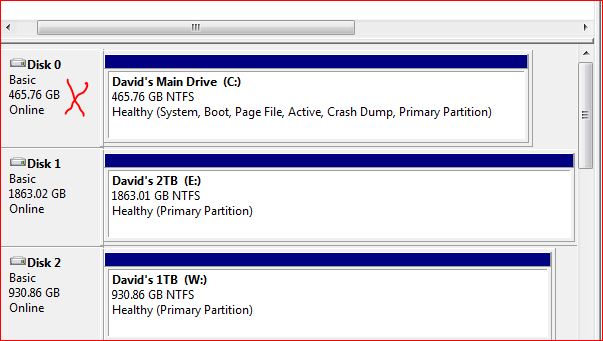
The one that I want to partition is the one with the red cross C drive,Have tried with using the windows set up but I can only get a partition of 40.22GB for some reason when trying the set up the available to shrink is 41186.I thought that I could leave the OS on a 100GB and then have a 300GB partition but failed to get beyond the 40.22GB.

Thanks.
Any help please
 

My Computer

Computer Manufacturer/Model Number
compaq presario CQ61
OS
windows 7 home premium 64bit
use Paragon Partition Manager to do so...
 

My Computer

OS
Windows 7 Ultimate x64
CPU
core i7.

My Computer

Computer type
PC/Desktop
Computer Manufacturer/Model Number
Skylake Special #666
OS
Windows 10 Pro x64
CPU
Intel Core i7 6700K
Motherboard
Asus Sabertooth Z170 Mark 1
Memory
GSkill TridentZ RGB 16GB 3600 16-16-16-36
Graphics Card(s)
EVGA GTX 980 Ti SC x2
Sound Card
Realtek High Definition
Monitor(s) Displays
AOC G2460PG
Screen Resolution
1920 x 1080 144Hz
Hard Drives
Samsung 860 Pro 256GB, Seagate Barracuda 4TB x2
PSU
EVGA 1000 P2, EVGA White Custom Braided Cables
Case
Corsair Vengeance C70 Gunmetal Black
Cooling
Corsair H100i v2, Corsair ML120 x2, Thermal Grizzly Kryonaut
Keyboard
Logitech G910 Orion Spectrum
Mouse
Logitech G700s
Internet Speed
Verizon Fios Quantum Gateway 75/75
Antivirus
Windows Defender, Malwarebytes Free 3.8.3
Browser
Chrome
Other Info
Corsair SP120 x4, LG Blu-ray Drive, Durabrand HT-395 100 Watt Dolby Digital Amp, Corsair H2100 Wireless 7.1 Headset
I'm not a big fan of partitions either and the only time I do use/create a partition is for dual booting for testing an OS.

That being said, there are plenty of videos on youtube showing exactly how to partition a drive using the above mentioned and using MS native partition.
 

My Computer

Computer Manufacturer/Model Number
Custom built
OS
Windows 7 Ultimate 64 bit
CPU
AMD Phenom II X4 965 Black Edition
Motherboard
Gigabyte GA-MA790X-DS4
Memory
GSkill 4 X 2 GB PC 8500
Graphics Card(s)
XFX Radeon HD 6790 D
Sound Card
On board RealTek HD
Monitor(s) Displays
Dual monitors:Samsung SyncMaster S20B300
Screen Resolution
1600 X 900
Hard Drives
Seagate Barracuda 1TB (primary)
Seagate Barracuda 2 X 320 GB
PSU
Ultra X4 750 watt fully modular
Case
Thermaltake Overseer RX 1 full tower
Cooling
Core-Contact 92 mm CPU Cooler
Keyboard
Logitech G510
Mouse
Razor DeathAdder
Internet Speed
50/5 Mbps UL/DL
Other Info
Optical: Super Muliti DVD burner w/lightscribe, Hauppauge WinTV HVR-1800
There might be some unmovable files on your C: drive. Try running disk defragmenter, and show us the result (that graph thing)
 

My Computer

Computer type
PC/Desktop
Computer Manufacturer/Model Number
Apple 17" iMac MA199LL (Early 2006)
OS
Windows 8 Pro (32-bit)
CPU
1.83GHz Intel Core Duo
Memory
2GB 667MHz DDR2 SDRAM (PC2-5300) (upgrade)
Graphics Card(s)
ATI Radeon X1600 with 128MB GDDR3 memory
Monitor(s) Displays
17-inch TFT active-matrix LCD, millions of colors
Screen Resolution
1440 x 900
Hard Drives
Hitachi 320GB HDT721032SLA360 7200RPM SATA II (upgrade)
Keyboard
Microsoft Wired Keyboard 600
Mouse
Microsoft Basic Optical Mouse v2.0
Internet Speed
4 Mbps
Antivirus
Microsoft Security Essentials
Browser
Google Chrome
Other Info
WEI:
Base Score: 3.9 Processor: 4.4 Memory 4.7
Graphics: 3.9 Gaming Graphics: 4.1 Primary HD: 5.9
It's possible for sure, but I would not do it. Partitioning the system drive with an OS running on it is generally a dangerous operation if anything happens to go wrong.
And besides, the free space you have right now can be occupied by just putting files on that drive, nothing prevents you to use it for data files in addition to system. What I generally do is to create a few folders in a separate location, like from the root, and throw your data there. For your system backup, simply skip that folder, and for data backups, include that folder too.
 

My Computer

Computer type
Laptop
Computer Manufacturer/Model Number
Toshiba Sattelite A665-S6092
OS
Windows 7 Ultimate x64
CPU
Intel Core i7-740QM
Memory
8 GB DDR3
Graphics Card(s)
NVIDIA GeForce 330GT
Screen Resolution
1366x768
Hard Drives
Samsung 840 SSD 500GB
1TB USB3 external HD
Cooling
Coolermaster Notepal U3 notebook cooling pad
Internet Speed
3mbps ASDL
Antivirus
ClamWin 0.98.7
Browser
Opera 12.17 x86 (main), Firefox 38 (sec), IE11 (last resort)

My Computer

Computer type
PC/Desktop
Computer Manufacturer/Model Number
Golden Mk. I.4
OS
Windows 10 Pro x64 ; Xubuntu x64
CPU
Intel i7 860 @ 2.80 GHz O/C'ed to 4.0GHz
Motherboard
Gigabyte P55A-UD3R Rev.1. Award BIOS F13
Memory
16GB Corsair Vengance DDR3 @ 661 MHz Dual Channel (9-9-9-24)
Graphics Card(s)
EVGA NVidia GTX 560 1024MB
Sound Card
Realtek Integrated
Monitor(s) Displays
Dual Samsung SyncMaster 2494HS
Screen Resolution
1920*1080 and 1920*1080
Hard Drives
1*Samsung 840 EVO 120GB SSD;
1*OCZ Vertex 2 60GB SSD;
2*Samsung F3 SpinPoint 1TB in RAID0;
1*Samsung F1 SpinPoint 1TB;
2*Western Digital 1TB External USB 3.0
1*Western Digital 500GB External USB 3.0
1*Seagate 500GB External USB 2.0
PSU
Thermaltake ToughPower QFan 750W
Case
Thermaltake Element S VK60001W2Z
Cooling
Corsair H60 Water Cooling, 2*230mm and 2*80mm case fans
Keyboard
Logitech G110
Mouse
Logitech MX518
Thanks all for all the support,Think its getting rather complicated for me.
If I decide to make a folder in the C drive and called Spare then I could save some items there.The only problem that would be there,I use Macrium backup to back up my OS & program files that runs once a week and saves the backup to another drive.
Now with this new folder called 'Spare' on the C drive will the Macrium backup pick up that folder under the backup procedure every week,That's something I'm trying to avoid by means of making a new partition in the C drive.:confused:
If Macrium wont backup that folder just the OS as normal,All will be okay.
Any thoughts on that Please.

Thanks.
 

My Computer

Computer Manufacturer/Model Number
compaq presario CQ61
OS
windows 7 home premium 64bit

My Computer

Computer type
PC/Desktop
Computer Manufacturer/Model Number
Custom Build
OS
Windows 7 Home Premium 32-Bit - Build 7600 SP1
CPU
Intel Core i3-2120 3.30Ghz
Motherboard
Asus P8Z68-V LX Intel Z68 Socket H2 ATX
Memory
Kingston 4 GB DDR3 1333 mhz
Graphics Card(s)
AMD Radeon HD6670
Sound Card
Sound Blaster Audigy SE 24-Bit
Monitor(s) Displays
Asus VE228
Screen Resolution
1440 X 900
Hard Drives
OCZ Vertex 3 120 GB Sata 3 SSD ==
Kingston SH103/S3 120 G Hyper X 120 GB SSD ==
Western Digital 500 GB Caviar Green 7200 RPM ==
PSU
Corsair CX600M == 600 Watt
Case
NZXT Apollo - Silver with Clear Side Panel
Cooling
Three 120 mm Fans
Keyboard
Microsoft Natural 4000
Mouse
Microsoft Custom Optical 3000
Internet Speed
AT&T Fiber Optic Wireless Network
Antivirus
Microsoft Security Essentials
Browser
Chrome
Other Info
120 mm Blue LED Fan -- Three Blue LED Lazer Light Sticks
Many thanks to all regarding my issue.
Someone asked for an image of the C drive.As the image shows there is plenty of space there so why cant I get more than 40.22GB.:confused:
Well Xmas is upon us,So think we all need a rest think I will look further into this after the holiday.
Any comments regarding the image would be most appreciated.
Thanks all & have a Merry Xmas to all.


Image....
HVRxW.jpg
 

My Computer

Computer Manufacturer/Model Number
compaq presario CQ61
OS
windows 7 home premium 64bit
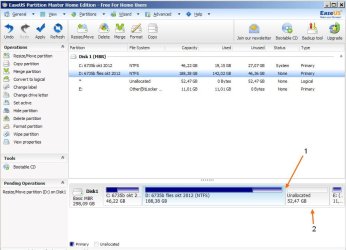
Hi, the reason windows won't do the job is very probably because of data scattered all over the drive, and windows won't (can't) move it to create free space for the new partition. Am using EaseUS Partition Master Home Edition - CNET Download.com for these jobs, has been excellent even when doing complex tasks. Your job is very basic, and easy to do.

Click on the drive you want to work on.

1. Click on the right edge of the drive and drag it to the left to shrink the drive as much as wanted, an Unallocated part will appear.
2. Right click on Unallocated and choose Create Partition (in the settings window that appear you have some options, in your case the default will be fine, maybe label it or choose another letter, click OK).

Then click Apply (top right). The pc will restart, partition master will move data as needed, the partition will be created.

After reboot, if you use System Restore, check and eventually reset the settings.
btw, I always do this first when doing work on any drive: check drive for errors, defrag, complete backup\image (all this is up to you). Good luck.
 

Attachments

  • resize.jpg
    resize.jpg
    65.4 KB · Views: 12

My Computer

Computer type
Laptop
Computer Manufacturer/Model Number
Dell \ Lenovo\ HP \ Toshiba
OS
W7, W8.1
Antivirus
MSE, Malwarebytes
Browser
FF
That's why I want you to run disk defragmenter.

In Windows XP it used to show a visual graph of the location of fixed files, but at the bare minimum it should move files closer to the beginning of the drive.
 

My Computer

Computer type
PC/Desktop
Computer Manufacturer/Model Number
Apple 17" iMac MA199LL (Early 2006)
OS
Windows 8 Pro (32-bit)
CPU
1.83GHz Intel Core Duo
Memory
2GB 667MHz DDR2 SDRAM (PC2-5300) (upgrade)
Graphics Card(s)
ATI Radeon X1600 with 128MB GDDR3 memory
Monitor(s) Displays
17-inch TFT active-matrix LCD, millions of colors
Screen Resolution
1440 x 900
Hard Drives
Hitachi 320GB HDT721032SLA360 7200RPM SATA II (upgrade)
Keyboard
Microsoft Wired Keyboard 600
Mouse
Microsoft Basic Optical Mouse v2.0
Internet Speed
4 Mbps
Antivirus
Microsoft Security Essentials
Browser
Google Chrome
Other Info
WEI:
Base Score: 3.9 Processor: 4.4 Memory 4.7
Graphics: 3.9 Gaming Graphics: 4.1 Primary HD: 5.9
4wd.Well I took on the challenge followed your info,btw this job is on my desktop I'm on the laptop here with this update.
Well downloaded the software you suggested and installed it,then came to the nitty gritty of the job.
Took a few minutes to work out the drag from one side to the other but got threre in the end.

Its now in the process of moving data after reboot,There are 146722 files and when I left it to get this msg to you it was on 387 a while to go.
I have all fingers and legs crossed.Will get back to you with good news or bad news,I do hope that it will be the first one ''good''

Will be back Thanks very much.
 

My Computer

Computer Manufacturer/Model Number
compaq presario CQ61
OS
windows 7 home premium 64bit
FuturDreamz Thank you also.
 

My Computer

Computer Manufacturer/Model Number
compaq presario CQ61
OS
windows 7 home premium 64bit
If you can't shrink C enough in DIsk Mgmt, then you were given the best tool to do it, the one which has helped countless thousands of users here without a single failure: Partition Wizard boot CD.

Since several senior-most members (we wear badges) recommended Partition Wizard I don't know why you would use another partition manager known to fail with total data loss, but even more importantly why you would use the Home version when you were repeatedly advised to use the boot CD which cannot fail.

Only Disk Mgmt cannot fail during resizing without using a boot disk. You should always use Disk Mgmt, then if it won't resize enough after defragmenting as suggested, use Partition Wizard boot CD.
 
Sorry
 

My Computer

Computer Manufacturer/Model Number
compaq presario CQ61
OS
windows 7 home premium 64bit
No need to apologize. It was posted as much for others who find this thread.

I'm just glad you didn't lose your data, as I did years ago when using Easeus - and the boot CD, at that. Since then I've seen several more users lose all data during resizing with Easeus Home Edition, once using Partition Wizard home edition - but never once using Partition Wizard CD in countless thousands of operations we've helped with.
 
Well good news all round here,Job just completed without any loss of data.
The C drive now contains the OS That partition is 120GB left it open for extra programs etc.
New partition is now 345GB and named as K,Empty at the moment but who knows.

Well I must thank all concerned in this major job of mine,Very much appreciated all the assistance from you all.
Have a Merry Christmas & a Happy new year.

David South Wales UK. :thumbsup:
 

My Computer

Computer Manufacturer/Model Number
compaq presario CQ61
OS
windows 7 home premium 64bit
Back
Top