Partitioning before Install

MPREv

New member
Member
VIP
Local time
8:51 PM
Messages
136
Hi,

I'm going to make a clean install of my Windows 7 including a Linux dual boot.
I want to do a pre partitioning and have some Questions about that.

1) Does Windows 7 accept pre partitioned Harddrives?
Last time I tried this, the result was that I got a Second 100 MB Boot partition of Windows 7.
This Time I want to do this (got only one hard drive in my Notebook):
Code:
[W 7 boot (100MB)] [W 7 System (60GB)] [Linux (40GB)] {[Win Data] [Linux Data] [Swap]}.

Is this possible in a prepartitioning step with for example PartedMagic/Gparted live without having Windows 7
messing that up with trying create an additional 100 MB boot partition.

2) What is with the partion Type "dynamic"?
I was thinking, that a Hard drive can only contain 4 primary partitions.
If I want more, I have to create instead of one of them a extended partition, which can contain further logical partitions.
On my actual windows 7 (only) sytem I see five! partitions on one hard drive without a extended one.
All of the them with type called "Dynamic".
During my Image BackUp experiments I tried some live CDs to create image backUps.
My old Arconis True Image can't back up, because it says:
E000101F: Acronis Tru Image Workstation has detected unsupported hard disk drives. Acronis True Image Workstation does not support Windows Dynamic Disks, EZ-Drives, etc.
Also tried it with a new version. But the new one does not find my Hard drive: Toshiba MK2529GSG.

What is up with this “dynamic” Partitions?
Can I pre create them?
 

My Computer

OS
Windows 7
Do you have two Hd Drives?
One for Windows 7 & one Linux.
 

My Computer

OS
ME/XP/Vista/Win7
Hello mate.


You want to stay away from a Dynamic disk as it is known to cause Windows to become unbootable after a while and it is a very difficult situation to resolve, keep all a Basic disk.

After you have copied out or made back-ups of the data you need to save to external media, it would be best to do a complete wipe clean all of the entire HDD, this will do 2 things, over-write the old Dynamic disk configuration data and remove the Grub loader, both can cause serious Windows installation errors.

Have a look at Step One of this tutorial linked below for that process and then Step Two to see how best to create partitions in any manner you like using Windows without the use of any 3rd party software.
 

My Computer

Computer Manufacturer/Model Number
* BFK Customs *
OS
W 7 64-bit Ultimate
CPU
Intel Q9550 Yorkfield
Motherboard
ASUS P5Q Pro
Memory
8GB Dominator 8500C5D
Graphics Card(s)
ATI : XFX 5870
Sound Card
Realtek HD Audio 7-1
Monitor(s) Displays
1x 47" LCD HDMI & 3x 26" LCD HDMI
Screen Resolution
1920x1080P & 1920x1200
Hard Drives
1x 80GB Intel X25-M G2 SSD : 1x 500GB & 1x 640GB WD Caviar Black(s)
PSU
Corsair 620HX
Case
Cooler Master RC-690
Cooling
Tuniq Tower 120, 2x 140mm and 3x 120mm case fans
Keyboard
Microsoft 500
Mouse
Razer Diamondback 3G
Internet Speed
14 Mb/s
Other Info
1x Koutech 3Gb/s SATA HDD Hot Swap Rack
Do you have two Hd Drives?
One for Windows 7 & one Linux.
As mentioned in my Post: No
It is a Notebook

Hello mate.
You want to stay away from a Dynamic disk as it is known to cause Windows to become unbootable after a while and it is a very difficult situation to resolve, keep all a Basic disk.
Oh, I didn't know that. I run my Windows 7 System since about 18 month without any boot problems ...

After you have copied out or made back-ups of the data you need to save to external media, it would be best to do a complete wipe clean all of the entire HDD, this will do 2 things, over-write the old Dynamic disk configuration data and remove the Grub loader, both can cause serious Windows installation errors.
Im intended to make a clean install for my dual boot.
At the moment I got only Windows 7. So no grub.
Data is BackUped.
Pre partitioning is exactly what I now want to do.


Have a look at Step One of this tutorial linked below for that process and then Step Two to see how best to create partitions in any manner you like using Windows without the use of any 3rd party software.
Looks complicated ... but I will take a look at that.
What is the advantage of It beyond the 3rd Party tools?


Goal is to kill remove everything an all from the HD.
Then Partitioning it.
Then Install W7 and Linux in dual boot.
 

My Computer

OS
Windows 7
Generally to have more than four partitions you must convert one to Logical using free Partition Wizard bootable CD so that additional Logical subpartitions can be added without problem.

Best to convert back to Basic disk using free Partition Wizard bootable CD's older version since it's still a free feature: partition wizard 4.2 free.zip - Windows Live

You may need to remove all but 4 partitions for this to work.

If you want to start fresh, then I'd use free PW CD to prepartition as desired keeping in mind that Win7 needs a Primary partition to boot.

You could also follow these steps to Dual Boot Win7 with Linux, making your partitions as you go, then add the data partitions later in Disk mgmt: Dual-Boot Windows 7 and Ubuntu in Perfect Harmony
 
Last edited:
If you do want to convert back to Basic before the new install have a look at this post for information though if it boots good now I don't see the necessity before the clean install you are planning.

I would strongly suggest you convert back to a Basic disk before you start the new install.

There's a lot of useful information contained in these tutorials linked below, Method One of this first one and the whole process in the second.


My Computer

Computer Manufacturer/Model Number
* BFK Customs *
OS
W 7 64-bit Ultimate
CPU
Intel Q9550 Yorkfield
Motherboard
ASUS P5Q Pro
Memory
8GB Dominator 8500C5D
Graphics Card(s)
ATI : XFX 5870
Sound Card
Realtek HD Audio 7-1
Monitor(s) Displays
1x 47" LCD HDMI & 3x 26" LCD HDMI
Screen Resolution
1920x1080P & 1920x1200
Hard Drives
1x 80GB Intel X25-M G2 SSD : 1x 500GB & 1x 640GB WD Caviar Black(s)
PSU
Corsair 620HX
Case
Cooler Master RC-690
Cooling
Tuniq Tower 120, 2x 140mm and 3x 120mm case fans
Keyboard
Microsoft 500
Mouse
Razer Diamondback 3G
Internet Speed
14 Mb/s
Other Info
1x Koutech 3Gb/s SATA HDD Hot Swap Rack
If you want to start fresh, then I'd use free PW CD to prepartition as desired keeping in mind that Win7 needs a Primary partition to boot.
Yes, my gool is a real full and absolut clean new Install.

If you want to start fresh, then I'd use free PW CD to prepartition as desired keeping in mind that Win7 needs a Primary partition to boot.

You could also follow these steps to Dual Boot Win7 with Linux, making your partitions as you go, then add the data partitions later in Disk mgmt: Dual-Boot Windows 7 and Ubuntu in Perfect Harmony
A loot to read just for a simple dualboot clean Install.

though if it boots good now I don't see the necessity before the clean install you are planning.
The actuall Installation does not full fill my reuqirements,
as there is no Dualboot as I want.
Also the Partitions Space is not like I want, it would be a maraton of resizing.
So it is much more easy to format the whole Harddisk.

If you do want to convert back to Basic before the new install have a look at this post for information though if it boots good now I don't see the necessity before the clean install you are planning.

I would strongly suggest you convert back to a Basic disk before you start the new install.
As I think creating the partions (wanted like shown in first post) using the guide you posted,
using the diskpart tool will work creating basic partitins.

There is a little question ...
Why this tool is not included in the standard Installation DVD :(

There's a lot of useful information contained in these tutorials linked below, Method One of this first one and the whole process in the second.

Thanks, I'll also read this.


I want to PRE partition all and than Install.
 

My Computer

OS
Windows 7
You said you want to prepartition for Dual Boot clean install of Win7 and Ubuntu, so we provide you the bare basic information to do those tasks and you complain that it is a lot to read? :rolleyes: Hello?

If you use Diskpart Clean All on the Disk first then it won't require converting to Basic.
 
You said you want to prepartition for Dual Boot clean install of Win7 and Ubuntu, so we provide you the bare basic information to do those tasks and you complain that it is a lot to read? :rolleyes: Hello?
Not complaining about you.
Complaining about the masses to account for ;)
Thought I would be not that much. :cry:
 

My Computer

OS
Windows 7
As I think creating the partions (wanted like shown in first post) using the guide you posted,
using the diskpart tool will work creating basic partitins.

There is a little question ...
Why this tool is not included in the standard Installation DVD :(


The diskpart tool is part of the Windows 7/Vista installation media, actually is even a part of XP, it can even be used while using Windows; have a look at this tutorial.


My Computer

Computer Manufacturer/Model Number
* BFK Customs *
OS
W 7 64-bit Ultimate
CPU
Intel Q9550 Yorkfield
Motherboard
ASUS P5Q Pro
Memory
8GB Dominator 8500C5D
Graphics Card(s)
ATI : XFX 5870
Sound Card
Realtek HD Audio 7-1
Monitor(s) Displays
1x 47" LCD HDMI & 3x 26" LCD HDMI
Screen Resolution
1920x1080P & 1920x1200
Hard Drives
1x 80GB Intel X25-M G2 SSD : 1x 500GB & 1x 640GB WD Caviar Black(s)
PSU
Corsair 620HX
Case
Cooler Master RC-690
Cooling
Tuniq Tower 120, 2x 140mm and 3x 120mm case fans
Keyboard
Microsoft 500
Mouse
Razer Diamondback 3G
Internet Speed
14 Mb/s
Other Info
1x Koutech 3Gb/s SATA HDD Hot Swap Rack
Summing up I got following to options to prepare the partitions:

  1. Use Windows Diskpart:DISKPART : At PC Startup
  2. Use Linux (GParted): Dual-Boot Windows 7 and Ubuntu in Perfect Harmony
And also for booting the system there are two options.
  1. Using Windows Boot manager (Easy BCD)
  2. Using Linux Boot manager (Grub)
For Grub I heard that it could sometimes wrack up Windows 7.
So I was thinking about the Windows 7 boot manager.
Now I read @ the lifehacker that there Grub is used without problems ...
so atm I’m unsure.
But thinking of W7 Boot manager, cause I probably would more often change the Linux System for testing purposes ;)

The diskpart tool is part of the Windows 7/Vista installation media, actually is even a part of XP, it can even be used while using Windows; have a look at this tutorial.

DISKPART : At PC Startup
Oh, thats great! I've misunderstood that it is only included in the Rescue CD.
But so. Perfect.

Hmm no real dual boot.
But It would be great if it is possible to be able to boot the OS installed on the Hard drive also in the VM :)
 

My Computer

OS
Windows 7
You could use WUBI it runs and boots from a virtual HDD from within Windows.

Wubi - Ubuntu Installer for Windows

   Information

Wubi is an officially supported Ubuntu installer for Windows users that can bring you to the Linux world with a single click. Wubi allows you to install and uninstall Ubuntu as any other Windows application, in a simple and safe way. Are you curious about Linux and Ubuntu? Trying them out has never been easier!
 

My Computer

Computer Manufacturer/Model Number
* BFK Customs *
OS
W 7 64-bit Ultimate
CPU
Intel Q9550 Yorkfield
Motherboard
ASUS P5Q Pro
Memory
8GB Dominator 8500C5D
Graphics Card(s)
ATI : XFX 5870
Sound Card
Realtek HD Audio 7-1
Monitor(s) Displays
1x 47" LCD HDMI & 3x 26" LCD HDMI
Screen Resolution
1920x1080P & 1920x1200
Hard Drives
1x 80GB Intel X25-M G2 SSD : 1x 500GB & 1x 640GB WD Caviar Black(s)
PSU
Corsair 620HX
Case
Cooler Master RC-690
Cooling
Tuniq Tower 120, 2x 140mm and 3x 120mm case fans
Keyboard
Microsoft 500
Mouse
Razer Diamondback 3G
Internet Speed
14 Mb/s
Other Info
1x Koutech 3Gb/s SATA HDD Hot Swap Rack
You could use WUBI it runs and boots from a virtual HDD from within Windows.

Wubi - Ubuntu Installer for Windows

   Information

Wubi is an officially supported Ubuntu installer for Windows users that can bring you to the Linux world with a single click. Wubi allows you to install and uninstall Ubuntu as any other Windows application, in a simple and safe way. Are you curious about Linux and Ubuntu? Trying them out has never been easier!


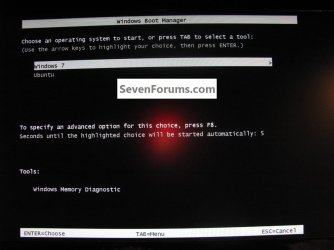
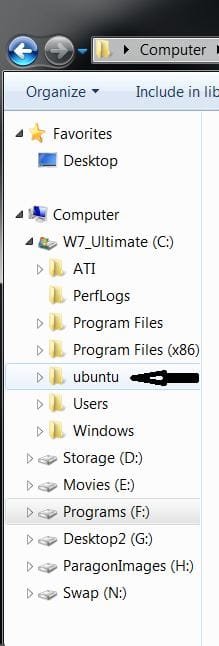
I just dl'd and installed Ubuntu from the link above to my actual PC.

click to enlarge
wubi.jpg wubi2.JPG
 
Last edited:

My Computer

Computer Manufacturer/Model Number
* BFK Customs *
OS
W 7 64-bit Ultimate
CPU
Intel Q9550 Yorkfield
Motherboard
ASUS P5Q Pro
Memory
8GB Dominator 8500C5D
Graphics Card(s)
ATI : XFX 5870
Sound Card
Realtek HD Audio 7-1
Monitor(s) Displays
1x 47" LCD HDMI & 3x 26" LCD HDMI
Screen Resolution
1920x1080P & 1920x1200
Hard Drives
1x 80GB Intel X25-M G2 SSD : 1x 500GB & 1x 640GB WD Caviar Black(s)
PSU
Corsair 620HX
Case
Cooler Master RC-690
Cooling
Tuniq Tower 120, 2x 140mm and 3x 120mm case fans
Keyboard
Microsoft 500
Mouse
Razer Diamondback 3G
Internet Speed
14 Mb/s
Other Info
1x Koutech 3Gb/s SATA HDD Hot Swap Rack
BFK

Can you install Wubi to a separate partition same HD as windows or does it have to go onto your windows partition.

Danny
 

My Computer

Computer Manufacturer/Model Number
acer aspire 5935g
OS
Windows 7 Home Premium x64 SP1
CPU
intel(R)core(TM)2 duo CPU T6600 @ 2.20GHz
Motherboard
intel gm45/gm47 revision 07
Memory
3 gb ddr3
Graphics Card(s)
ati radeon hd4570/512mb
Monitor(s) Displays
lop156wh2-tle1 15.3 flat
Screen Resolution
1366x768
Hard Drives
OCZ-Agility3 60gig ssd
320gig external hdd
500gig external hdd
Mouse
Optical
Internet Speed
30Mbps Down/30Mbps Up
BFK

Can you install Wubi to a separate partition same HD as windows or does it have to go onto your windows partition.

Danny

Hello Danny.

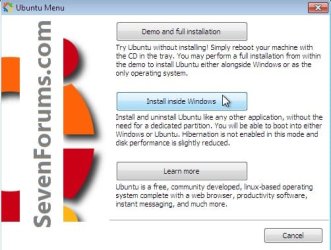
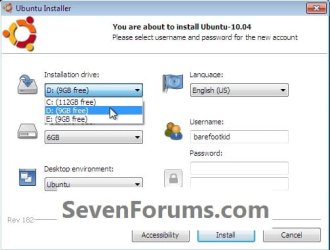
I just worked this out for you, run the Ubuntu installer in Windows 7, have a look at these.

click to enlarge
wubi5.jpgwubi6.jpg
 

My Computer

Computer Manufacturer/Model Number
* BFK Customs *
OS
W 7 64-bit Ultimate
CPU
Intel Q9550 Yorkfield
Motherboard
ASUS P5Q Pro
Memory
8GB Dominator 8500C5D
Graphics Card(s)
ATI : XFX 5870
Sound Card
Realtek HD Audio 7-1
Monitor(s) Displays
1x 47" LCD HDMI & 3x 26" LCD HDMI
Screen Resolution
1920x1080P & 1920x1200
Hard Drives
1x 80GB Intel X25-M G2 SSD : 1x 500GB & 1x 640GB WD Caviar Black(s)
PSU
Corsair 620HX
Case
Cooler Master RC-690
Cooling
Tuniq Tower 120, 2x 140mm and 3x 120mm case fans
Keyboard
Microsoft 500
Mouse
Razer Diamondback 3G
Internet Speed
14 Mb/s
Other Info
1x Koutech 3Gb/s SATA HDD Hot Swap Rack

My Computer

Computer Manufacturer/Model Number
* BFK Customs *
OS
W 7 64-bit Ultimate
CPU
Intel Q9550 Yorkfield
Motherboard
ASUS P5Q Pro
Memory
8GB Dominator 8500C5D
Graphics Card(s)
ATI : XFX 5870
Sound Card
Realtek HD Audio 7-1
Monitor(s) Displays
1x 47" LCD HDMI & 3x 26" LCD HDMI
Screen Resolution
1920x1080P & 1920x1200
Hard Drives
1x 80GB Intel X25-M G2 SSD : 1x 500GB & 1x 640GB WD Caviar Black(s)
PSU
Corsair 620HX
Case
Cooler Master RC-690
Cooling
Tuniq Tower 120, 2x 140mm and 3x 120mm case fans
Keyboard
Microsoft 500
Mouse
Razer Diamondback 3G
Internet Speed
14 Mb/s
Other Info
1x Koutech 3Gb/s SATA HDD Hot Swap Rack
Hi Ted

I went ahead earlier and installed it to a spare partition (25gig) at the end of my drive and it ran awfully slow and occasionally wouldn't boot into Ubuntu properly.So uninstalled it and put it onto my windows drive allocating the same amount of space and it runs much better that way.Can't really see a reason for this but that's how it was for me.Did you try it on a separate partition.I would rather have it there to reduce image sizes.

Danny
 

My Computer

Computer Manufacturer/Model Number
acer aspire 5935g
OS
Windows 7 Home Premium x64 SP1
CPU
intel(R)core(TM)2 duo CPU T6600 @ 2.20GHz
Motherboard
intel gm45/gm47 revision 07
Memory
3 gb ddr3
Graphics Card(s)
ati radeon hd4570/512mb
Monitor(s) Displays
lop156wh2-tle1 15.3 flat
Screen Resolution
1366x768
Hard Drives
OCZ-Agility3 60gig ssd
320gig external hdd
500gig external hdd
Mouse
Optical
Internet Speed
30Mbps Down/30Mbps Up
Back
Top