
Partitioning before Install

Hi Ted

I went ahead earlier and installed it to a spare partition (25gig) at the end of my drive and it ran awfully slow and occasionally wouldn't boot into Ubuntu properly.So uninstalled it and put it onto my windows drive allocating the same amount of space and it runs much better that way.Can't really see a reason for this but that's how it was for me.Did you try it on a separate partition.I would rather have it there to reduce image sizes.

Danny

Hello mate, I didn't install it, I just did that to see for you, I wasn't aware that bit was in the tutorial; I could really care less about Linux.
 

My Computer

Computer Manufacturer/Model Number
* BFK Customs *
OS
W 7 64-bit Ultimate
CPU
Intel Q9550 Yorkfield
Motherboard
ASUS P5Q Pro
Memory
8GB Dominator 8500C5D
Graphics Card(s)
ATI : XFX 5870
Sound Card
Realtek HD Audio 7-1
Monitor(s) Displays
1x 47" LCD HDMI & 3x 26" LCD HDMI
Screen Resolution
1920x1080P & 1920x1200
Hard Drives
1x 80GB Intel X25-M G2 SSD : 1x 500GB & 1x 640GB WD Caviar Black(s)
PSU
Corsair 620HX
Case
Cooler Master RC-690
Cooling
Tuniq Tower 120, 2x 140mm and 3x 120mm case fans
Keyboard
Microsoft 500
Mouse
Razer Diamondback 3G
Internet Speed
14 Mb/s
Other Info
1x Koutech 3Gb/s SATA HDD Hot Swap Rack
Hi,
I did the following:
start diskpart
clean all
create partition primary size=250
create partition primary size=80000
exit
select 2 Partition for Windows 7 Install.

Now windows is installed in the second partition.
But how do I know that the first one is the boot/rescue Partition?
The file System is shown as RAW. But a Drive letter 'D:\' is assigned ....
 

My Computer

OS
Windows 7
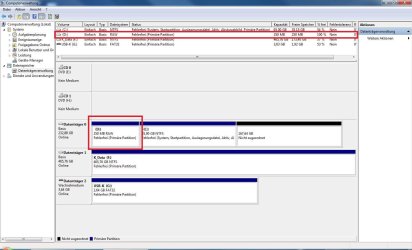
Here:
DTMGN.jpg

As there is 100% free space, I would say there went something wrong ...

But what was it?
 
Last edited:

My Computer

OS
Windows 7
I'm not sure why you created the 250 mb Primary partition - were you attempting to create a System Reserved partition to contain the Win7 boot files? If so that requires marking the partition active before install so the installer will write the System boot files onto it instead of Win7 partition where they are now.

Or was there some other plan for a "boot rescue" partition - what is that exactly?
 
Here's what to do.


Remove the drive letter in disk management, format and name (label) the partition System Reserved using Windows disk management, then mark the new SysResv partition Active and run the 3 separate startup repairs to (re)create the Windows System boot files to that space.

To me 250MB is a good size for the System Reserved partition.


My Computer

Computer Manufacturer/Model Number
* BFK Customs *
OS
W 7 64-bit Ultimate
CPU
Intel Q9550 Yorkfield
Motherboard
ASUS P5Q Pro
Memory
8GB Dominator 8500C5D
Graphics Card(s)
ATI : XFX 5870
Sound Card
Realtek HD Audio 7-1
Monitor(s) Displays
1x 47" LCD HDMI & 3x 26" LCD HDMI
Screen Resolution
1920x1080P & 1920x1200
Hard Drives
1x 80GB Intel X25-M G2 SSD : 1x 500GB & 1x 640GB WD Caviar Black(s)
PSU
Corsair 620HX
Case
Cooler Master RC-690
Cooling
Tuniq Tower 120, 2x 140mm and 3x 120mm case fans
Keyboard
Microsoft 500
Mouse
Razer Diamondback 3G
Internet Speed
14 Mb/s
Other Info
1x Koutech 3Gb/s SATA HDD Hot Swap Rack
Good evening all; quester12 here.
thank you for the warm welcome.
i have sent 3 posts and have been searching for some info.

This is a installation series of questions i have.

I have read countless of posts all great ideas and suggestions.

this is a new build : Asus p8p67le motherboard(efi) rev3 b3rev
bios ver 1003 (out of the box) not flashed
cpu used intel [email protected] clk speed 3300mhz
total memory: 8192mb ddr3 @1333mhz
powered by a thermaltake tr2 rx 750w modular powersupply
standard on board sound (high def)
video card installed is a evga9500gt @1gb ddr
2 seagate 1tb hard drives (raw) shows up in bios as 937.5gb each
2 dvd rw drives
1 various sd drive
housed in a blk thermaltake case fan cooled by 6 fans and heatpipe cpu cooler.
its quiet as a mouse except for 1 beep at startup.

now you know what i am building (install of win7 64bit os)

refering to MPREV'S post 8/2010

"partitioning before install"

i have a few questions for greghacker and barefoot kid and brink.

here goes.
barefootkid..... i have sata raw disks you werwe talking about basic disks is it better to format as ntfs or can i format my raw disk in the gui format and still install win 7?

gregracker... can i use partition wizard to format and partition my drive or drives for win 7 install for either ntfs
or gui what is better.

ps. i forgot to mention the setup is in the default of ahci i have the capability to setup as ahci ide and raid.

read all the post on raid..... scare's me to bluescreen) not sure if i want to play with raid. espically with 7.

all i need is a simple way to formatand partition either drive .... install win7 ultimate install all the drivers and enjoy win7.

brink..... i enjoyed all the tuits i love em to all that created em surpurb.
is it possible to get a simple basic format and partition tuit say before you install windows use blh blh then .
if a real newb comes in and wants to learn you may not get so many basic question posts.

i have looked at a number of other win7 sites and they all asume you know how to install windows 7 i a basic way.

thanks for everyone's time
quester12
 

My Computer

Computer Manufacturer/Model Number
all custom built computers from scratch all intel boards
OS
multiple operating systems xp pro 32bit win7 64 bit pro and ultimate
CPU
all intel cpus
Motherboard
asus p8p67le p4p800 etc
Memory
kingston memory
Graphics Card(s)
ati nvidia evga xfx
Sound Card
soundblaster type or on board sound
Monitor(s) Displays
acer hp
Hard Drives
maxtor ides seagate ides and sata's western digital's
PSU
corsair ultra's pc and powercooling thermaltake's
Case
antec thermaltake cheiftec's
Cooling
cpu 's or fans various types used
Back
Top