Partitioning Error: Basic disk will be converted to dynamic disks

siddhant19feb

New member
Local time
5:54 AM
Messages
10
Hi everyone,

I am using Windows 7 home edition, 64 bit OS. My C: drive had 254 gb. I wanted to partition it and went to disk management. OS suggested to break 19gb only and I partitioned it. Now when I nall"New simple volume" on this unallocated space, everything went fine and on pressing finish button I was prompted the message:

"The operation I selected will convert basic disk(s) to dynamic disk(s). If you convert the disk(s) to dynamic, you will not be able to start installed OS from any volume on the disk(s) (except the current boot volume). Do you wish to continue?"

I pressed yes. I was again prompted an error:
"Dynamic disks are not selected on this OS or server configuration. Dynamic disks are not supported by clusters."

Please let me know what should I do? I want to partition C: I also want to know how to increase the partition size of the partitioned size?
 

My Computer

OS
Windows 7 Home Basic 64 bit OS
Do not convert to Dynamic disk.

Please post back a screenshot of your maximized Disk Management drive map and listings:

1. Type Disk Management in Start :orb: Search box.
2. Open Disk Mgmt. window and maximize it.
3. Type Snipping Tool in Start Search box.
4. Open Snipping Tool, choose Rectangular Snip, click New, draw a box around full drive map and all listings.
5, Save Snip, attach using paper clip in Reply Box.

Tell us what is on each partition and what you'd like to change/add.
 
Disk Management.jpg

My Computer.jpg

Hi,

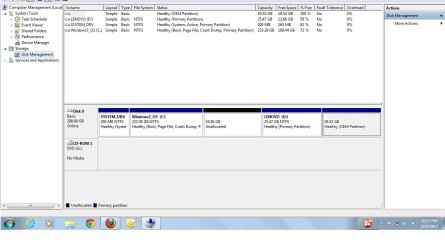
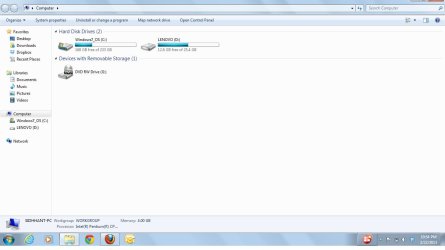
Thank you for your reply. I have attached the jpegs of "my computer" and "disk management"
19.8 GB in "Disk management" is still not reflected in My computer.
 

My Computer

OS
Windows 7 Home Basic 64 bit OS
No solution yet. First want to what you really want. You have 4 PRIMARY partitions and that's the maximum in case of basic disk.

You want to keep the RECOVERY partitions I assume?
But do you really want to keep SYSTEM_DRV (bootmanager and bootmenu). It can be merged to C.

Do you want to make a new partition? If so.. why so small (19GB)?
 

My Computer

Computer type
Laptop
Computer Manufacturer/Model Number
ACER ASPIRE 5742G
OS
Microsoft Windows 7 Home Premium 64-bits 7601 Multiprocessor Free Service Pack 1
CPU
Intel(R) Core(TM) i3 CPU M 370 @ 2.40GHz
Motherboard
Acer Aspire 5742G
Memory
4,00 GB
Graphics Card(s)
ATI Mobility Radeon HD 5400 Series
Sound Card
(1) AMD High Definition Audio Device (2) Realtek High Defi
Screen Resolution
1366 x 768 x 32 bits (4294967296 colors) @ 60 Hz
Hard Drives
WDC WD5000BEVT-22ZAT0
If System_DRV (bootmanager and bootmenu) can be merged I will be more than happy to do so. But how? I do not know.

Secondly, I want to know what is this 19.5 gb unallocated and 19.53 healthy OEM partition. What is the difference between the two?

Thirdly I want larger partition than 19gb. But Windows suggested at max partition can 19 gb only. How to increase the size of the partition from C: drive?
 

My Computer

OS
Windows 7 Home Basic 64 bit OS
OEM partition is most likely drivers you can reinstall. LENOVO is for recovery to factory settings.

You can't shrink further because windows has files in use that are on that spot.

Open elevated command prompt http://www.sevenforums.com/tutorials/783-elevated-command-prompt.html
and do
Code:
bcdedit/enum all>bcd.txt
start  bcd.txt
Copy the text and post. Afterwards you may delete bcd.txt
 

My Computer

Computer type
Laptop
Computer Manufacturer/Model Number
ACER ASPIRE 5742G
OS
Microsoft Windows 7 Home Premium 64-bits 7601 Multiprocessor Free Service Pack 1
CPU
Intel(R) Core(TM) i3 CPU M 370 @ 2.40GHz
Motherboard
Acer Aspire 5742G
Memory
4,00 GB
Graphics Card(s)
ATI Mobility Radeon HD 5400 Series
Sound Card
(1) AMD High Definition Audio Device (2) Realtek High Defi
Screen Resolution
1366 x 768 x 32 bits (4294967296 colors) @ 60 Hz
Hard Drives
WDC WD5000BEVT-22ZAT0
Maybe (almost sure).... it's better to convert C to a logical partition. Then you have:

3 primary partitions
1 extended partition

so a total of 4 the maximum! In that extended partition is then 1 logical partition. You can create as many logical partitions as you wish! Only bootable partitions MUST be primary and ACTIVE. Your boot partition is SYSTEM_DRV
 

My Computer

Computer type
Laptop
Computer Manufacturer/Model Number
ACER ASPIRE 5742G
OS
Microsoft Windows 7 Home Premium 64-bits 7601 Multiprocessor Free Service Pack 1
CPU
Intel(R) Core(TM) i3 CPU M 370 @ 2.40GHz
Motherboard
Acer Aspire 5742G
Memory
4,00 GB
Graphics Card(s)
ATI Mobility Radeon HD 5400 Series
Sound Card
(1) AMD High Definition Audio Device (2) Realtek High Defi
Screen Resolution
1366 x 768 x 32 bits (4294967296 colors) @ 60 Hz
Hard Drives
WDC WD5000BEVT-22ZAT0

My Computer

Computer type
Laptop
Computer Manufacturer/Model Number
ACER ASPIRE 5742G
OS
Microsoft Windows 7 Home Premium 64-bits 7601 Multiprocessor Free Service Pack 1
CPU
Intel(R) Core(TM) i3 CPU M 370 @ 2.40GHz
Motherboard
Acer Aspire 5742G
Memory
4,00 GB
Graphics Card(s)
ATI Mobility Radeon HD 5400 Series
Sound Card
(1) AMD High Definition Audio Device (2) Realtek High Defi
Screen Resolution
1366 x 768 x 32 bits (4294967296 colors) @ 60 Hz
Hard Drives
WDC WD5000BEVT-22ZAT0
Windows Boot Manager
--------------------
identifier {bootmgr}
device partition=\Device\HarddiskVolume1
description Windows Boot Manager
locale en-US
inherit {globalsettings}
default {current}
resumeobject {0598d9d7-eaf7-11e1-b4e3-3c970e22614d}
displayorder {current}
toolsdisplayorder {memdiag}
timeout 0

Windows Boot Loader
-------------------
identifier {current}
device partition=C:
path \Windows\system32\winload.exe
description Windows 7
locale en-US
inherit {bootloadersettings}
recoverysequence {c2cba8a4-3de8-11e2-b137-3c970e22614d}
recoveryenabled Yes
osdevice partition=C:
systemroot \Windows
resumeobject {0598d9d7-eaf7-11e1-b4e3-3c970e22614d}
nx OptIn

Windows Boot Loader
-------------------
identifier {c2cba8a4-3de8-11e2-b137-3c970e22614d}
device ramdisk=[C:]\Recovery\c2cba8a4-3de8-11e2-b137-3c970e22614d\Winre.wim,{c2cba8a5-3de8-11e2-b137-3c970e22614d}
path \windows\system32\winload.exe
description Windows Recovery Environment
inherit {bootloadersettings}
osdevice ramdisk=[C:]\Recovery\c2cba8a4-3de8-11e2-b137-3c970e22614d\Winre.wim,{c2cba8a5-3de8-11e2-b137-3c970e22614d}
systemroot \windows
nx OptIn
winpe Yes

Resume from Hibernate
---------------------
identifier {0598d9d7-eaf7-11e1-b4e3-3c970e22614d}
device partition=C:
path \Windows\system32\winresume.exe
description Windows Resume Application
locale en-US
inherit {resumeloadersettings}
filedevice partition=C:
filepath \hiberfil.sys
debugoptionenabled No

Windows Memory Tester
---------------------
identifier {memdiag}
device partition=\Device\HarddiskVolume1
path \boot\memtest.exe
description Windows Memory Diagnostic
locale en-US
inherit {globalsettings}
badmemoryaccess Yes

EMS Settings
------------
identifier {emssettings}
bootems Yes

Debugger Settings
-----------------
identifier {dbgsettings}
debugtype Serial
debugport 1
baudrate 115200

RAM Defects
-----------
identifier {badmemory}

Global Settings
---------------
identifier {globalsettings}
inherit {dbgsettings}
{emssettings}
{badmemory}

Boot Loader Settings
--------------------
identifier {bootloadersettings}
inherit {globalsettings}
{hypervisorsettings}

Hypervisor Settings
-------------------
identifier {hypervisorsettings}
hypervisordebugtype Serial
hypervisordebugport 1
hypervisorbaudrate 115200

Resume Loader Settings
----------------------
identifier {resumeloadersettings}
inherit {globalsettings}

Setup Ramdisk Options
---------------------
identifier {ramdiskoptions}
description Ramdisk options
ramdisksdidevice boot
ramdisksdipath \boot\boot.sdi

Device options
--------------
identifier {c2cba8a5-3de8-11e2-b137-3c970e22614d}
description Ramdisk Options
ramdisksdidevice partition=C:
ramdisksdipath \Recovery\c2cba8a4-3de8-11e2-b137-3c970e22614d\boot.sdi
 

My Computer

OS
Windows 7 Home Basic 64 bit OS
Windows Boot Manager
--------------------
identifier {bootmgr}
device partition=\Device\HarddiskVolume1
description Windows Boot Manager
locale en-US
inherit {globalsettings}
default {current}
resumeobject {0598d9d7-eaf7-11e1-b4e3-3c970e22614d}
displayorder {current}
toolsdisplayorder {memdiag}
timeout 0

Windows Boot Loader
-------------------
identifier {current}
device partition=C:
path \Windows\system32\winload.exe
description Windows 7
locale en-US
inherit {bootloadersettings}
recoverysequence {c2cba8a4-3de8-11e2-b137-3c970e22614d}
recoveryenabled Yes
osdevice partition=C:
systemroot \Windows
resumeobject {0598d9d7-eaf7-11e1-b4e3-3c970e22614d}
nx OptIn

Windows Boot Loader
-------------------
identifier {c2cba8a4-3de8-11e2-b137-3c970e22614d}
device ramdisk=[C:]\Recovery\c2cba8a4-3de8-11e2-b137-3c970e22614d\Winre.wim,{c2cba8a5-3de8-11e2-b137-3c970e22614d}
path \windows\system32\winload.exe
description Windows Recovery Environment
inherit {bootloadersettings}
osdevice ramdisk=[C:]\Recovery\c2cba8a4-3de8-11e2-b137-3c970e22614d\Winre.wim,{c2cba8a5-3de8-11e2-b137-3c970e22614d}
systemroot \windows
nx OptIn
winpe Yes

Resume from Hibernate
---------------------
identifier {0598d9d7-eaf7-11e1-b4e3-3c970e22614d}
device partition=C:
path \Windows\system32\winresume.exe
description Windows Resume Application
locale en-US
inherit {resumeloadersettings}
filedevice partition=C:
filepath \hiberfil.sys
debugoptionenabled No

Windows Memory Tester
---------------------
identifier {memdiag}
device partition=\Device\HarddiskVolume1
path \boot\memtest.exe
description Windows Memory Diagnostic
locale en-US
inherit {globalsettings}
badmemoryaccess Yes

EMS Settings
------------
identifier {emssettings}
bootems Yes

Debugger Settings
-----------------
identifier {dbgsettings}
debugtype Serial
debugport 1
baudrate 115200

RAM Defects
-----------
identifier {badmemory}

Global Settings
---------------
identifier {globalsettings}
inherit {dbgsettings}
{emssettings}
{badmemory}

Boot Loader Settings
--------------------
identifier {bootloadersettings}
inherit {globalsettings}
{hypervisorsettings}

Hypervisor Settings
-------------------
identifier {hypervisorsettings}
hypervisordebugtype Serial
hypervisordebugport 1
hypervisorbaudrate 115200

Resume Loader Settings
----------------------
identifier {resumeloadersettings}
inherit {globalsettings}

Setup Ramdisk Options
---------------------
identifier {ramdiskoptions}
description Ramdisk options
ramdisksdidevice boot
ramdisksdipath \boot\boot.sdi

Device options
--------------
identifier {c2cba8a5-3de8-11e2-b137-3c970e22614d}
description Ramdisk Options
ramdisksdidevice partition=C:
ramdisksdipath \Recovery\c2cba8a4-3de8-11e2-b137-3c970e22614d\boot.sdi

You want to get rid of first partition? It is possible and easy. But why not do the partition wizard trick and convert to logical partition?
 

My Computer

Computer type
Laptop
Computer Manufacturer/Model Number
ACER ASPIRE 5742G
OS
Microsoft Windows 7 Home Premium 64-bits 7601 Multiprocessor Free Service Pack 1
CPU
Intel(R) Core(TM) i3 CPU M 370 @ 2.40GHz
Motherboard
Acer Aspire 5742G
Memory
4,00 GB
Graphics Card(s)
ATI Mobility Radeon HD 5400 Series
Sound Card
(1) AMD High Definition Audio Device (2) Realtek High Defi
Screen Resolution
1366 x 768 x 32 bits (4294967296 colors) @ 60 Hz
Hard Drives
WDC WD5000BEVT-22ZAT0
OK....let me try the partition wizard....give me some time before i say Thank you so much for your help :D
 

My Computer

OS
Windows 7 Home Basic 64 bit OS
OK....let me try the partition wizard....give me some time before i say Thank you so much for your help :D
Good luck.. have to go. Back in 4 hours
 

My Computer

Computer type
Laptop
Computer Manufacturer/Model Number
ACER ASPIRE 5742G
OS
Microsoft Windows 7 Home Premium 64-bits 7601 Multiprocessor Free Service Pack 1
CPU
Intel(R) Core(TM) i3 CPU M 370 @ 2.40GHz
Motherboard
Acer Aspire 5742G
Memory
4,00 GB
Graphics Card(s)
ATI Mobility Radeon HD 5400 Series
Sound Card
(1) AMD High Definition Audio Device (2) Realtek High Defi
Screen Resolution
1366 x 768 x 32 bits (4294967296 colors) @ 60 Hz
Hard Drives
WDC WD5000BEVT-22ZAT0
HI,

I tried using Partition Manager s/w version 7 and tried to shrink the size of C:. But it shows the error

"There are no free MBR slots on the disk."
 

My Computer

OS
Windows 7 Home Basic 64 bit OS
HI,

I tried using Partition Manager s/w version 7 and tried to shrink the size of C:. But it shows the error

"There are no free MBR slots on the disk."
Did you do #8 ?
First convert win7 partition to logical before you can add a new logical partition!
Just follow the steps as described in #8
 

My Computer

Computer type
Laptop
Computer Manufacturer/Model Number
ACER ASPIRE 5742G
OS
Microsoft Windows 7 Home Premium 64-bits 7601 Multiprocessor Free Service Pack 1
CPU
Intel(R) Core(TM) i3 CPU M 370 @ 2.40GHz
Motherboard
Acer Aspire 5742G
Memory
4,00 GB
Graphics Card(s)
ATI Mobility Radeon HD 5400 Series
Sound Card
(1) AMD High Definition Audio Device (2) Realtek High Defi
Screen Resolution
1366 x 768 x 32 bits (4294967296 colors) @ 60 Hz
Hard Drives
WDC WD5000BEVT-22ZAT0
HI,

I tried using Partition Manager s/w version 7 and tried to shrink the size of C:. But it shows the error

"There are no free MBR slots on the disk."
Did you do #8 ?
First convert win7 partition to logical before you can add a new logical partition!
Just follow the steps as described in #8


I tried converting Windows 7 partition C to logical. But it shows a warning

"It is a system partition. This may cause your system becme unbootable."

I do not know what to do.
 

My Computer

OS
Windows 7 Home Basic 64 bit OS
I gave you the steps to resolve this which are the same we've given out here at least weekly since before Win7 was even released without a single failure.

The 200mb System drive is booting your OS so converting C to Logical will have no effect except to allow you to add additional Logical partition(s) while keeping the other 3 Primary partitions bootable for Win7, Recovery and Diagnostics tools.
 
Ya i am able to convert to C to logical and then able to partition....but do i need to again convert all the logical drives to Primary?
After partitioning my C: and newly created drives are logical. SHould I again convert them to primary?
 

My Computer

OS
Windows 7 Home Basic 64 bit OS
If you try to, again, it will turn your disk to dynamic, you now have to leave them as logical.

My I ask why you even bothered to split up a 253 GB partition ?
 

My Computer

Computer type
PC/Desktop
Computer Manufacturer/Model Number
Skylake Special #666
OS
Windows 10 Pro x64
CPU
Intel Core i7 6700K
Motherboard
Asus Sabertooth Z170 Mark 1
Memory
GSkill TridentZ RGB 16GB 3600 16-16-16-36
Graphics Card(s)
EVGA GTX 980 Ti SC x2
Sound Card
Realtek High Definition
Monitor(s) Displays
AOC G2460PG
Screen Resolution
1920 x 1080 144Hz
Hard Drives
Samsung 860 Pro 256GB, Seagate Barracuda 4TB x2
PSU
EVGA 1000 P2, EVGA White Custom Braided Cables
Case
Corsair Vengeance C70 Gunmetal Black
Cooling
Corsair H100i v2, Corsair ML120 x2, Thermal Grizzly Kryonaut
Keyboard
Logitech G910 Orion Spectrum
Mouse
Logitech G700s
Internet Speed
Verizon Fios Quantum Gateway 75/75
Antivirus
Windows Defender, Malwarebytes Free 3.8.3
Browser
Chrome
Other Info
Corsair SP120 x4, LG Blu-ray Drive, Durabrand HT-395 100 Watt Dolby Digital Amp, Corsair H2100 Wireless 7.1 Headset
Back
Top