TheGoodWord
New member
- Local time
- 11:37 AM
- Messages
- 3
Hi there, hopefully someone will be able to help.
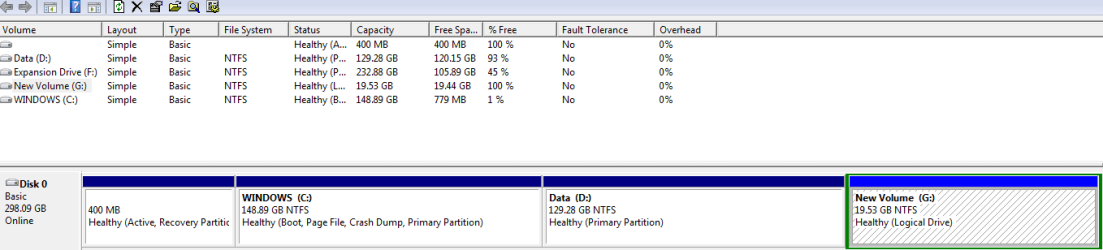
I just got a new Toshiba laptop (Windows 7, 64-bit Home Premium), and the hard disk is split into two sections Windows (C) which has 148GB of space, and Data (D) which has the same. Now, this is far from ideal, as I want to have all the hard drive space available on one partition.
On Data (D) there is HDDRecovery Files and a R14477EN.tag file. I'm aware they're important and I don't want to do anything that might kill my new laptop.
I was thinking of shrinking some of Data (D)'s volume to create a smaller partition that's big enough to hold these HDDRecovery files, as they only really need about 10GB. So I would move these files to the new partition, and then extend the volume of the main Windows (C) drive into the Data (D) drive so that they become one.
The reason I think I have to do it this way, is that you can only extend the volume into the partition on the right of it, which is the Data (D) drive.
So my question - will moving these HDDRecovery files into a new smaller partition cause any harm? And is the way I'm doing things right?
Thanks.
I just got a new Toshiba laptop (Windows 7, 64-bit Home Premium), and the hard disk is split into two sections Windows (C) which has 148GB of space, and Data (D) which has the same. Now, this is far from ideal, as I want to have all the hard drive space available on one partition.
On Data (D) there is HDDRecovery Files and a R14477EN.tag file. I'm aware they're important and I don't want to do anything that might kill my new laptop.
I was thinking of shrinking some of Data (D)'s volume to create a smaller partition that's big enough to hold these HDDRecovery files, as they only really need about 10GB. So I would move these files to the new partition, and then extend the volume of the main Windows (C) drive into the Data (D) drive so that they become one.
The reason I think I have to do it this way, is that you can only extend the volume into the partition on the right of it, which is the Data (D) drive.
So my question - will moving these HDDRecovery files into a new smaller partition cause any harm? And is the way I'm doing things right?
Thanks.
Last edited:
My Computer
At a glance
Windows 7, 64-Bit, Home Premium
- OS
- Windows 7, 64-Bit, Home Premium