Solved password problem

pawz7

New member
Member
VIP
Local time
9:36 PM
Messages
181
Location
UK
hello, a friend goes to help a lady of 90 years old with her computer. She uses it as a lifeline, for online shopping and e-mail as she lives out of town. Recently she found she could not enter her password to access an online store she uses for her groceries. She is not at all computer-savvy, which is where my friend comes in. He tried to put the password in for her (her fingers don't always do what she wants on the keyboard), and he had the same problem as she. He tried it on his own machine and it worked, so he thought it must be some sort of corruption on her machine ( Windows 7 of course), but didn't know what to do to fix it, so asked me. I suggested he goes into the browser ( Chrome), go to the settings and clear the temp folder from there, including passwords. He is going to try that when he goes - but will that do it do you think? She is somewhat distressed because she can't get her shopping ordered, so we want to be able to fix it as soon as we can. Thanks.
 

My Computer

Computer type
PC/Desktop
Computer Manufacturer/Model Number
Novatech / Homebuilt
OS
win seven 32, win seven 64
CPU
intel dual-core/i5
Motherboard
MSI/Gigabyte
Memory
4GB/8GB
Graphics Card(s)
both Nvidia
Sound Card
realtek/ummm
Monitor(s) Displays
dell widescreen
Screen Resolution
16-something x something
Hard Drives
lots!
I would just open another account and use a new password ! Or you can try to log in and then hit the forgot password button to reset password and then create a new one.
 

My Computer

Computer type
PC/Desktop
Computer Manufacturer/Model Number
A blend of brains, brawn and dumb luck.
OS
Windows 7 Ultimate 64
CPU
i7 3770k OC'd 4.6 @ 1.17v, also FX 8120 & i5 miniITX
Motherboard
MSI P67A-GD80 b3
Memory
32 gb G.Skill Sniper DDR3 10-12-12-31 @ 2133
Graphics Card(s)
XFX Radeon 7870 2GB DDR5
Sound Card
Sound Blaster Z Series Card
Monitor(s) Displays
(2) LG LED 23" 1920 x 1080 2ms Monitors via mini d-port
Screen Resolution
1680 X 1050 p
Hard Drives
Samsung 256 gb 830 SSD sata III
(1) 1 tb WD Black
(2) 1 tb Hitachi deskmates/sata II
(2) 1 tb WD green/sata II
(2) 3 tb Seagate Barracuda
(1) 120 gb OCZ Vertex SS
(1) Drobo 5N w/5 Seagate 3tb
PSU
EVGA modular 1000G2 80% gold rating & APC 1200 RS
Case
CoolerMaster Storm Styker
Cooling
7 case fans 140mm & 120mm, NZXT Kraken X60
Keyboard
(2) Logitech Illuminated Keyboards (1) usb (1) wireless
Mouse
Logitech G700 & T-BC21 - nano nx for the laptop
Internet Speed
Basic 120mbps down
Antivirus
Trend Micro Titanium Max Security & Malwarebytes Premium
Browser
Chrome and IE 10
Other Info
5 Noctua case fans + 3 Noctua in p/p on NZXT cooler
Integrated hot swap drive bays for 2.5" Drives
(2) Lite-on dvd/cd/Blu Ray optical 22X
Integrated fan controller and led on/off
HP Officejet Pro 8630 all-n-one
Hot-swappable 3.5" hard drive bay
Netgear Nighthawk router
Asus USB 3 & sata 6 PCIe card
Vantec IDE to sata adptr./Ultra sata adptr
Lenovo L420 i5 lappy with m sata
Drobo 5N advanced NAS
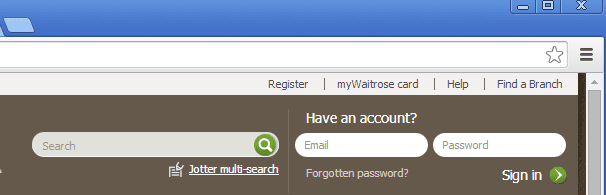
hello linne - think we have spoken before. As I understand it, she puts the right password in but it is not accepted. The little window where it should go has the word 'password' written in it, somewhat blurred and misaligned, sort of superimposed in the space. It should just be blank and white. She has been onto Waitrose, who cannot see the problem from their end. I thought of suggesting she created a fresh account, but I suspect the server will say that e-mail address is already in use. To be clear, as I understand it, the space won't accept the password. The same password is accepted on another machine.
 

My Computer

Computer type
PC/Desktop
Computer Manufacturer/Model Number
Novatech / Homebuilt
OS
win seven 32, win seven 64
CPU
intel dual-core/i5
Motherboard
MSI/Gigabyte
Memory
4GB/8GB
Graphics Card(s)
both Nvidia
Sound Card
realtek/ummm
Monitor(s) Displays
dell widescreen
Screen Resolution
16-something x something
Hard Drives
lots!
Could also be a browser issue, have her try logging in on another machine or using a different browser like Chrome, Firefox or IE. If that works then clearing the offending browser cache could help. But if other sites remember her name and passwords then that info will need to be entered again......could be a whole new problem....?
 

My Computer

Computer type
PC/Desktop
Computer Manufacturer/Model Number
A blend of brains, brawn and dumb luck.
OS
Windows 7 Ultimate 64
CPU
i7 3770k OC'd 4.6 @ 1.17v, also FX 8120 & i5 miniITX
Motherboard
MSI P67A-GD80 b3
Memory
32 gb G.Skill Sniper DDR3 10-12-12-31 @ 2133
Graphics Card(s)
XFX Radeon 7870 2GB DDR5
Sound Card
Sound Blaster Z Series Card
Monitor(s) Displays
(2) LG LED 23" 1920 x 1080 2ms Monitors via mini d-port
Screen Resolution
1680 X 1050 p
Hard Drives
Samsung 256 gb 830 SSD sata III
(1) 1 tb WD Black
(2) 1 tb Hitachi deskmates/sata II
(2) 1 tb WD green/sata II
(2) 3 tb Seagate Barracuda
(1) 120 gb OCZ Vertex SS
(1) Drobo 5N w/5 Seagate 3tb
PSU
EVGA modular 1000G2 80% gold rating & APC 1200 RS
Case
CoolerMaster Storm Styker
Cooling
7 case fans 140mm & 120mm, NZXT Kraken X60
Keyboard
(2) Logitech Illuminated Keyboards (1) usb (1) wireless
Mouse
Logitech G700 & T-BC21 - nano nx for the laptop
Internet Speed
Basic 120mbps down
Antivirus
Trend Micro Titanium Max Security & Malwarebytes Premium
Browser
Chrome and IE 10
Other Info
5 Noctua case fans + 3 Noctua in p/p on NZXT cooler
Integrated hot swap drive bays for 2.5" Drives
(2) Lite-on dvd/cd/Blu Ray optical 22X
Integrated fan controller and led on/off
HP Officejet Pro 8630 all-n-one
Hot-swappable 3.5" hard drive bay
Netgear Nighthawk router
Asus USB 3 & sata 6 PCIe card
Vantec IDE to sata adptr./Ultra sata adptr
Lenovo L420 i5 lappy with m sata
Drobo 5N advanced NAS
Could also be a browser issue, have her try logging in on another machine or using a different browser like Chrome, Firefox or IE. If that works then clearing the offending browser cache could help. But if other sites remember her name and passwords then that info will need to be entered again......could be a whole new problem....?

I think it is a browser issue. She is on Chrome already, and I have told Barry ( the friend) how to clear the temps, cookies and passwords from the browser, and I hope that will fix it. I don't think she does anything else on the machine apart from groceries and e-mail. I have also told him how to access IE and to download Firefox from the Mozilla site. My guess is that, being an old lady, she is going to want everything to stay the same, not have to use a different browser, so my hope is that clearing the browser settings for temp files, cookies and passwords will fix it. Is that what you meant by browser cache? Thanks Linne

ps, will post result when I get feedback.
 
Last edited:

My Computer

Computer type
PC/Desktop
Computer Manufacturer/Model Number
Novatech / Homebuilt
OS
win seven 32, win seven 64
CPU
intel dual-core/i5
Motherboard
MSI/Gigabyte
Memory
4GB/8GB
Graphics Card(s)
both Nvidia
Sound Card
realtek/ummm
Monitor(s) Displays
dell widescreen
Screen Resolution
16-something x something
Hard Drives
lots!

My Computer

Computer type
PC/Desktop
Computer Manufacturer/Model Number
A blend of brains, brawn and dumb luck.
OS
Windows 7 Ultimate 64
CPU
i7 3770k OC'd 4.6 @ 1.17v, also FX 8120 & i5 miniITX
Motherboard
MSI P67A-GD80 b3
Memory
32 gb G.Skill Sniper DDR3 10-12-12-31 @ 2133
Graphics Card(s)
XFX Radeon 7870 2GB DDR5
Sound Card
Sound Blaster Z Series Card
Monitor(s) Displays
(2) LG LED 23" 1920 x 1080 2ms Monitors via mini d-port
Screen Resolution
1680 X 1050 p
Hard Drives
Samsung 256 gb 830 SSD sata III
(1) 1 tb WD Black
(2) 1 tb Hitachi deskmates/sata II
(2) 1 tb WD green/sata II
(2) 3 tb Seagate Barracuda
(1) 120 gb OCZ Vertex SS
(1) Drobo 5N w/5 Seagate 3tb
PSU
EVGA modular 1000G2 80% gold rating & APC 1200 RS
Case
CoolerMaster Storm Styker
Cooling
7 case fans 140mm & 120mm, NZXT Kraken X60
Keyboard
(2) Logitech Illuminated Keyboards (1) usb (1) wireless
Mouse
Logitech G700 & T-BC21 - nano nx for the laptop
Internet Speed
Basic 120mbps down
Antivirus
Trend Micro Titanium Max Security & Malwarebytes Premium
Browser
Chrome and IE 10
Other Info
5 Noctua case fans + 3 Noctua in p/p on NZXT cooler
Integrated hot swap drive bays for 2.5" Drives
(2) Lite-on dvd/cd/Blu Ray optical 22X
Integrated fan controller and led on/off
HP Officejet Pro 8630 all-n-one
Hot-swappable 3.5" hard drive bay
Netgear Nighthawk router
Asus USB 3 & sata 6 PCIe card
Vantec IDE to sata adptr./Ultra sata adptr
Lenovo L420 i5 lappy with m sata
Drobo 5N advanced NAS
that is another possible line, but first we try the browser. I think he only visits her once a week, and no way would she know what to do on her own. 'Browser' she said when he passed my thoughts on to her, 'what's a browser? She loves her computer but she ain't ever going to do more than dabble the keys I think..
 

My Computer

Computer type
PC/Desktop
Computer Manufacturer/Model Number
Novatech / Homebuilt
OS
win seven 32, win seven 64
CPU
intel dual-core/i5
Motherboard
MSI/Gigabyte
Memory
4GB/8GB
Graphics Card(s)
both Nvidia
Sound Card
realtek/ummm
Monitor(s) Displays
dell widescreen
Screen Resolution
16-something x something
Hard Drives
lots!
All the more reason I would set it up with at least MS Security Essentials and Malwarebytes. Totally understand though as My 95 Y.O. Dad has a great rig I bought him and it's a Solitaire machine now.
 

My Computer

Computer type
PC/Desktop
Computer Manufacturer/Model Number
A blend of brains, brawn and dumb luck.
OS
Windows 7 Ultimate 64
CPU
i7 3770k OC'd 4.6 @ 1.17v, also FX 8120 & i5 miniITX
Motherboard
MSI P67A-GD80 b3
Memory
32 gb G.Skill Sniper DDR3 10-12-12-31 @ 2133
Graphics Card(s)
XFX Radeon 7870 2GB DDR5
Sound Card
Sound Blaster Z Series Card
Monitor(s) Displays
(2) LG LED 23" 1920 x 1080 2ms Monitors via mini d-port
Screen Resolution
1680 X 1050 p
Hard Drives
Samsung 256 gb 830 SSD sata III
(1) 1 tb WD Black
(2) 1 tb Hitachi deskmates/sata II
(2) 1 tb WD green/sata II
(2) 3 tb Seagate Barracuda
(1) 120 gb OCZ Vertex SS
(1) Drobo 5N w/5 Seagate 3tb
PSU
EVGA modular 1000G2 80% gold rating & APC 1200 RS
Case
CoolerMaster Storm Styker
Cooling
7 case fans 140mm & 120mm, NZXT Kraken X60
Keyboard
(2) Logitech Illuminated Keyboards (1) usb (1) wireless
Mouse
Logitech G700 & T-BC21 - nano nx for the laptop
Internet Speed
Basic 120mbps down
Antivirus
Trend Micro Titanium Max Security & Malwarebytes Premium
Browser
Chrome and IE 10
Other Info
5 Noctua case fans + 3 Noctua in p/p on NZXT cooler
Integrated hot swap drive bays for 2.5" Drives
(2) Lite-on dvd/cd/Blu Ray optical 22X
Integrated fan controller and led on/off
HP Officejet Pro 8630 all-n-one
Hot-swappable 3.5" hard drive bay
Netgear Nighthawk router
Asus USB 3 & sata 6 PCIe card
Vantec IDE to sata adptr./Ultra sata adptr
Lenovo L420 i5 lappy with m sata
Drobo 5N advanced NAS
she might already have these in place - I don't know. Whoever bought her the Win 7 laptop in the first place might have seen to it, or Barry. I will ask him next time I see him, Solitaire - yes, I expect this lady's is much the same ( play Spider Solitaire meself when listening to music)
 

My Computer

Computer type
PC/Desktop
Computer Manufacturer/Model Number
Novatech / Homebuilt
OS
win seven 32, win seven 64
CPU
intel dual-core/i5
Motherboard
MSI/Gigabyte
Memory
4GB/8GB
Graphics Card(s)
both Nvidia
Sound Card
realtek/ummm
Monitor(s) Displays
dell widescreen
Screen Resolution
16-something x something
Hard Drives
lots!
If it works in IE, have your friend create a shortcut to the shopping site in IE on her desktop. Name it Shopping. She can then just click that to shop. A Guy
 

My Computer

Computer type
PC/Desktop
OS
Windows 10 Home x64
CPU
INTEL Core i5-750 Quad-Core 3.37GHz
Motherboard
ASUS P7P55D
Memory
HyperX Fury Black Series 8GB (2 x 4GB) 1866Mhz
Graphics Card(s)
EVGA GeForce GTX 750 Superclocked 1GB 128-Bit GDDR5
Monitor(s) Displays
LG 32MA68HY 32" IPS
Screen Resolution
1920 x 1080
Hard Drives
Samsung 840 Evo 120GB, SEAGATE 500GB Barracuda® 7200.12, SATA 3 Gb/s, 7200 RPM, 16MB cache
PSU
ANTEC TruePower New TP-550, 80 PLUS, 550W
Case
ANTEC Three Hundred Illusion
Cooling
COOLER MASTER Hyper 212 Plus, 4 x 120mm 1 x 140mm Noctua's
Internet Speed
85 + Mbps
Antivirus
Avast
Browser
Vivaldi
Good idea A Guy, yes, will do that - she will still need to put her password in though, won't she?
 

My Computer

Computer type
PC/Desktop
Computer Manufacturer/Model Number
Novatech / Homebuilt
OS
win seven 32, win seven 64
CPU
intel dual-core/i5
Motherboard
MSI/Gigabyte
Memory
4GB/8GB
Graphics Card(s)
both Nvidia
Sound Card
realtek/ummm
Monitor(s) Displays
dell widescreen
Screen Resolution
16-something x something
Hard Drives
lots!
You might want to have Barry install TeamViewer so that you and Barry can help her without having to physically be there.

As far as working with a password, type it somewhere where you can see it (perhaps into notepad) and then copy/paste it into the password field.

I know what you mean about the word password already being in that field, but it should go away* when she clicks inside of it.

*hmmm, it does not go away in Chrome until you start typing.

This is what I see using IE10 and IE11:
http://www.waitrose.com/
waitrose.png

And pretty much the same thing using Chrome:
W-chrome.png

If clearing the temp stuff from Chrome does not work, then totally reset IE and try IE again.


edit: for what it is worth, the fields are blank when using IE8 and IE9:
W-IE9.png
And I was able to sign on to a waitrose account using IE8, IE9, IE10, IE11 and Chrome.
 
Last edited:

My Computer

Computer type
Laptop
Computer Manufacturer/Model Number
Employer provided Dell Latitude
OS
W7 Pro SP1 64bit
CPU
i7
Memory
8GB
Graphics Card(s)
Intel HD Graphics
Hard Drives
crappy SSD
Antivirus
Employer mandated Symantec Endpoint Protection
Browser
Pale Moon 64bit, IE11 64bit & Chrome 64bit
UNI, thank you for your post -most helpful. So 'password' in the box should be there in Chrome. I did not know that - never thought to check in Chrome. She did put her password in, but it was not received, and the 'password' did not disappear from the box as she typed, so I understand. I shall pass your suggestion on to Barry about copy and paste. That could be an answer. The TeamViewer idea I will leave for now as I doubt she could use it without him to help her, which would make it somewhat pointless, and anyway, he goes to give her companionship as much as computer help I believe. he is a good sorta guy. Thankyou for the trouble you have taken. I shall e-mail him now about the copy and paste.
 

My Computer

Computer type
PC/Desktop
Computer Manufacturer/Model Number
Novatech / Homebuilt
OS
win seven 32, win seven 64
CPU
intel dual-core/i5
Motherboard
MSI/Gigabyte
Memory
4GB/8GB
Graphics Card(s)
both Nvidia
Sound Card
realtek/ummm
Monitor(s) Displays
dell widescreen
Screen Resolution
16-something x something
Hard Drives
lots!
I totally get the companionship component to these computer help visits...
...but here is some info anyway.

Connecting to her computer via TeamViewer can be automatic. Barry can set it up when he is physically there. Then you and Barry can use it without any actions on her part*.

*If you use the free version, when you disconnect from a session, she will probably see a popup box asking her to buy TeamViewer. If you will immediately reconnect to her computer, dismiss the popup box and then quickly disconnect again --- there should not be second popup box.


No one needs to create an account with TeamViewer just to use the free version - but the account is free and you and Barry might want to create one just so you can save her connection info into TeamViewer's list of contacts. That said, if she is the only person that you will be connecting to, you can probably live without having a contact list.

Those at TeamViewer have done a good job protecting the computer from being accessed by hackers. If someone did happen to figure out the TeamViewer ID code, they should not be able to brute force the password because each wrong password tried makes TeamViewer wait longer before it will accept a new try. The wait time grows exponentially.

I have a number of elderly people that send me an e-mail describing their problem, then they leave their computer on overnight so that I can connect to it and work on it while they sleep. Just turn their computer's sound down if they have it cranked up. If you restart the computer, that sound might wake them up :-(

You can restart the remote computer and still reconnect. You can even restart the remote computer into the safe mode with networking and still reconnect. It is best to tell TeamViewer to tell the remote computer to restart (rather than you clicking on the normal Start > Restart buttons). If you let TeamViewer do the restart, then TeamViewer can notify you when the remote computer has completed the restart. TeamViewer will then let you reconnect using a single click on that notification.

I also keep a TeamViewer app on my cell phone. While it does let me remotely control the same set computers in my contact list, doing so is a bit impractical. The cell phone app is best to let you see what the other person is doing while you talk them thru "click here" instructions.

/end sales pitch :-)

TeamViewer is expensive (USD $700+). No need to buy it for this type of use.
 

My Computer

Computer type
Laptop
Computer Manufacturer/Model Number
Employer provided Dell Latitude
OS
W7 Pro SP1 64bit
CPU
i7
Memory
8GB
Graphics Card(s)
Intel HD Graphics
Hard Drives
crappy SSD
Antivirus
Employer mandated Symantec Endpoint Protection
Browser
Pale Moon 64bit, IE11 64bit & Chrome 64bit
UNI (our German Shepherd is called Uni(ty)), thank you for this info. I have used TeamViewer once to remotely help a chap, and have it on my computer in case it is needed. Other than that I have never explored it. Most computer problems that come my way require troubleshooting and hands-on healing. Anyway, very helpful - thank you. I shall copy and paste this to notepad and pass it to Barry if needed.
 

My Computer

Computer type
PC/Desktop
Computer Manufacturer/Model Number
Novatech / Homebuilt
OS
win seven 32, win seven 64
CPU
intel dual-core/i5
Motherboard
MSI/Gigabyte
Memory
4GB/8GB
Graphics Card(s)
both Nvidia
Sound Card
realtek/ummm
Monitor(s) Displays
dell widescreen
Screen Resolution
16-something x something
Hard Drives
lots!
an update folks. Clearing Chrome data and passwords did not resolve the problem, so next time he goes Barry is going to uninstall-reinstall a fresh clean copy of Chrome. Meanwhile he has got her to use IE for her Waitrose shopping ( but she wants to stay with Chrome if she can), and I have told him about putting a short-cut on the desktop, so hopefully the matter is resolved with a workaround for now. Thank you so much for all your help.
 

My Computer

Computer type
PC/Desktop
Computer Manufacturer/Model Number
Novatech / Homebuilt
OS
win seven 32, win seven 64
CPU
intel dual-core/i5
Motherboard
MSI/Gigabyte
Memory
4GB/8GB
Graphics Card(s)
both Nvidia
Sound Card
realtek/ummm
Monitor(s) Displays
dell widescreen
Screen Resolution
16-something x something
Hard Drives
lots!
Back
Top