Password Reset

How to Reset a Windows Password in Regedit at Boot

This is a fairly simple way to reset / change your Windows user account password if, for whatever reason you can't gain access to your account.

   Note
A big thank you to Everlong for helping me sort the last steps of this.

This tutorial can be used to reset the password in Windows 7 or Vista.​
   Information
If you don't have a proper Windows installation disk, have a look at the link below to create a repair disk that can be used to reset your user account password in Windows 7 and Vista.

(Windows 7) System Repair Disc - Create

(Vista) Create a Recovery Disc - Vista Forums

   Warning
Making changes to the Windows Registry has the potential to disable the PC, if you have any concerns over using the information set forth here please feel free to post a question in this same tutorial and we will be glad to help.

Be Advised: if you use this method to reset you're user account password ANY / All access to encrypted files stored in the account will be lost.

Let's get Started!

1) The Boot Priority in the BIOS needs to be set to boot first from the optical drive; insert your Windows disk and re-start the PC.
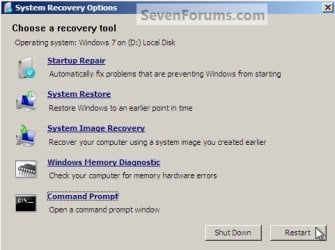
At the first screen select your language then Repair your computer then it'll do some searching, at System Recovery Options dot Use recovery tools then select the OS and click next; while there make note of the OS drive letter, it may not be C: like mine is D:.
Recovery Tools Next.jpg
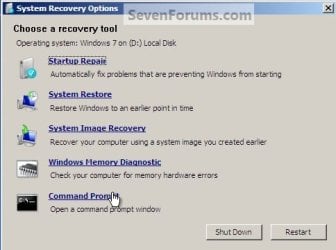
2) At the next screen select "Command Prompt" then in the Command window type "regedit" (without the quotes) and hit enter.
Command Prompt.jpg
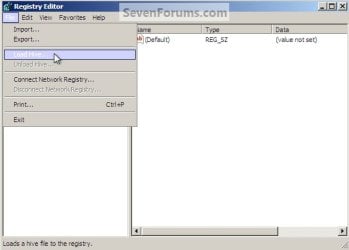
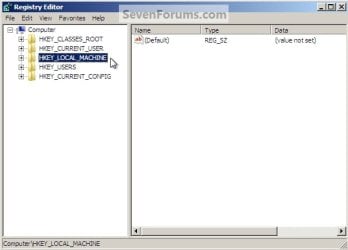
3) In the Registry Editor window that opens click to select "HKey_Local_Machine" then at the "File" menu select "Load Hive".
Choose HKLM.jpg
HKLM Load Hive.jpg
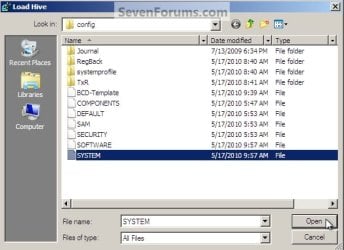
4) In the "Look In" in the "Load Hive" window that opens navigate to (in my case) LocalDiskD:\Windows\System32\config\SYSTEM and click "Open".
Choose OS Drive.jpg
System.jpg
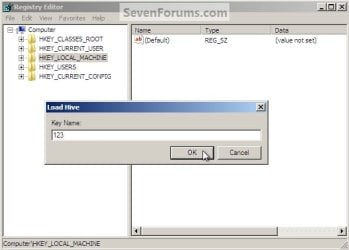
5) In the "Load Hive", "Key Name" box give the new key a name e.g. " 123 " (it can be whatever you like) and click OK.
Key Name 123.jpg
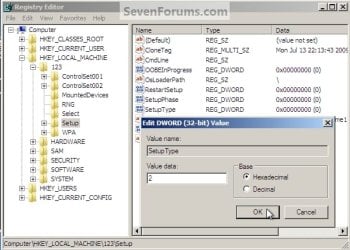
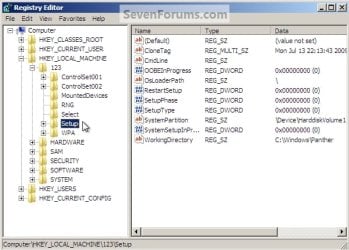
6) In the left pane of the registry Editor window click the " + " sign to expand the "HKey_Local_Machine" key then click the " + " sign to expand the "123" key then click to select the "Setup" key.
123 Setup.jpg
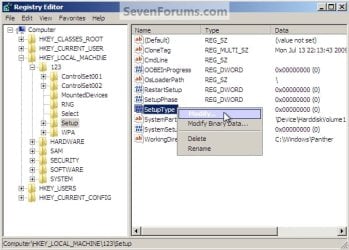
7) Now in the right pane right click "SetupType" and select "Modify", set the "Value data" to " 2 " and click OK.
SetupType Modify.jpg
SetupType Value.jpg
8) Again in the right pane right click "CmdLine" and select "Modify" and set the "Value data" to "cmd.exe" and click OK.
com.jpg
9) Now just as a precaution, close the Registry Editor at the "File" menu click "Exit"; then in the Command window that's still open type "regedit" and hit enter to open the Registry Editor again.

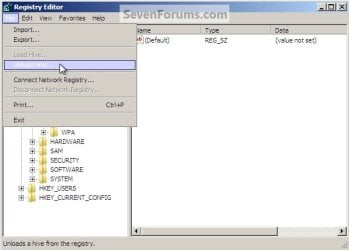
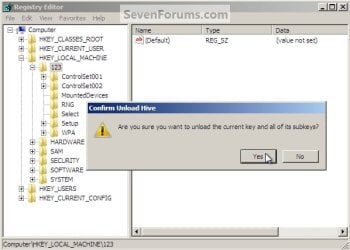
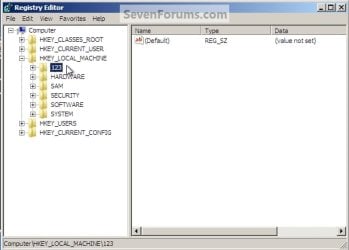
10) In the Registry Editor click the " + " sign to expand HKey_Local_Machine and click to select the new "123" key, at the "File" menu select "Unload Hive" and click "Yes" for the "Are you sure ..." question.
123 Key.jpg
123 Unload Hive.jpg
123 Unload Hive Yes.jpg
11) Now close the Registry Editor at the "File" menu click "Exit" then in the Command window type "exit" and hit enter to close the Command window, then remove the Windows disk and restart the PC.
Re-Start.jpg
12) When the PC restarts a Command window will open, in that window type "net user <username> <new password>" mine is (net user "Bare Foot Kid" Test6) be advised: if you have a username like mine, with spaces, you must use " " quotes around the user name; when you get the "Command Completed Successfully" type "exit" in the Command window and hit enter; at the logon screen use the new password you chose.
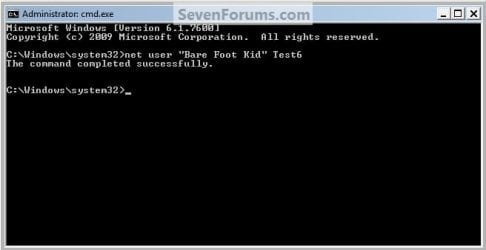
Test6.jpg
   Tip
If you like, you could type net user in the command prompt and press Enter to see a list of all names for each user account on the PC to help use with step 12.
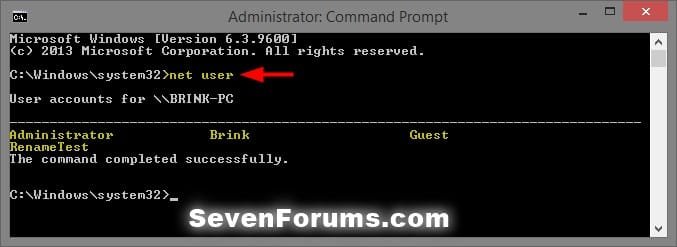
net-user.jpg


Enjoy! :)


Last edited by a moderator:
Hello Harry, I'm glad it was useful and thanks for the note. :)
 

My Computer

Computer Manufacturer/Model Number
* BFK Customs *
OS
W 7 64-bit Ultimate
CPU
Intel Q9550 Yorkfield
Motherboard
ASUS P5Q Pro
Memory
8GB Dominator 8500C5D
Graphics Card(s)
ATI : XFX 5870
Sound Card
Realtek HD Audio 7-1
Monitor(s) Displays
1x 47" LCD HDMI & 3x 26" LCD HDMI
Screen Resolution
1920x1080P & 1920x1200
Hard Drives
1x 80GB Intel X25-M G2 SSD : 1x 500GB & 1x 640GB WD Caviar Black(s)
PSU
Corsair 620HX
Case
Cooler Master RC-690
Cooling
Tuniq Tower 120, 2x 140mm and 3x 120mm case fans
Keyboard
Microsoft 500
Mouse
Razer Diamondback 3G
Internet Speed
14 Mb/s
Other Info
1x Koutech 3Gb/s SATA HDD Hot Swap Rack
Hello,

Thank you very much for these very clear instructions.

I followed them precisely, but when I entered my user name and new password as described in section #12, I received a message saying that my user name was not recognized.

Help please. :(

Sincerely,

Bill
 

My Computer

Computer Manufacturer/Model Number
HP Pavillion Elite
OS
Windows 7 Home 64bit
Hello Inukshuk, welcome to Seven Forums!


If your username is like mine, more than one word, you must use the quote marks around your username for it to complete successfully.

"Bare Foot Kid"

12) When the PC restarts a Command window will open, in that window type "net user <username> <new password>" mine is (net user "Bare Foot Kid" Test6) be advised: if you have a username like mine, with spaces, you must use " " quotes around the user name;
 

My Computer

Computer Manufacturer/Model Number
* BFK Customs *
OS
W 7 64-bit Ultimate
CPU
Intel Q9550 Yorkfield
Motherboard
ASUS P5Q Pro
Memory
8GB Dominator 8500C5D
Graphics Card(s)
ATI : XFX 5870
Sound Card
Realtek HD Audio 7-1
Monitor(s) Displays
1x 47" LCD HDMI & 3x 26" LCD HDMI
Screen Resolution
1920x1080P & 1920x1200
Hard Drives
1x 80GB Intel X25-M G2 SSD : 1x 500GB & 1x 640GB WD Caviar Black(s)
PSU
Corsair 620HX
Case
Cooler Master RC-690
Cooling
Tuniq Tower 120, 2x 140mm and 3x 120mm case fans
Keyboard
Microsoft 500
Mouse
Razer Diamondback 3G
Internet Speed
14 Mb/s
Other Info
1x Koutech 3Gb/s SATA HDD Hot Swap Rack
Hello,

Thank you for your prompt reply.

My user name is only one word, no spaces needed.

Thanks,

Bill
 

My Computer

Computer Manufacturer/Model Number
HP Pavillion Elite
OS
Windows 7 Home 64bit
Hello Bill.


See if using "quote" marks around the username will sort it for you.
 

My Computer

Computer Manufacturer/Model Number
* BFK Customs *
OS
W 7 64-bit Ultimate
CPU
Intel Q9550 Yorkfield
Motherboard
ASUS P5Q Pro
Memory
8GB Dominator 8500C5D
Graphics Card(s)
ATI : XFX 5870
Sound Card
Realtek HD Audio 7-1
Monitor(s) Displays
1x 47" LCD HDMI & 3x 26" LCD HDMI
Screen Resolution
1920x1080P & 1920x1200
Hard Drives
1x 80GB Intel X25-M G2 SSD : 1x 500GB & 1x 640GB WD Caviar Black(s)
PSU
Corsair 620HX
Case
Cooler Master RC-690
Cooling
Tuniq Tower 120, 2x 140mm and 3x 120mm case fans
Keyboard
Microsoft 500
Mouse
Razer Diamondback 3G
Internet Speed
14 Mb/s
Other Info
1x Koutech 3Gb/s SATA HDD Hot Swap Rack
Hi,

I went back and did all of the steps very carefully again.

When I got to step 12, I entered net user "Dad" 123 and hit enter.

I received the message, "The user name could not be found".

Suggestions please?

Thank you.

Bill
 

My Computer

Computer Manufacturer/Model Number
HP Pavillion Elite
OS
Windows 7 Home 64bit
Hello Bill.


Is "Dad" the default administrator account that was setup when Windows was installed or is it a secondary account created from the default admin account?
 

My Computer

Computer Manufacturer/Model Number
* BFK Customs *
OS
W 7 64-bit Ultimate
CPU
Intel Q9550 Yorkfield
Motherboard
ASUS P5Q Pro
Memory
8GB Dominator 8500C5D
Graphics Card(s)
ATI : XFX 5870
Sound Card
Realtek HD Audio 7-1
Monitor(s) Displays
1x 47" LCD HDMI & 3x 26" LCD HDMI
Screen Resolution
1920x1080P & 1920x1200
Hard Drives
1x 80GB Intel X25-M G2 SSD : 1x 500GB & 1x 640GB WD Caviar Black(s)
PSU
Corsair 620HX
Case
Cooler Master RC-690
Cooling
Tuniq Tower 120, 2x 140mm and 3x 120mm case fans
Keyboard
Microsoft 500
Mouse
Razer Diamondback 3G
Internet Speed
14 Mb/s
Other Info
1x Koutech 3Gb/s SATA HDD Hot Swap Rack
WINDOWS DISC

I NEEDED A START UP DISC, I WAS IN LIVE SUPPORT WITH MICROSOFT, THE TECH TOLD ME TO CALL E-MACHINES AND ASK FOR A INSTALL DISC. E-MACHINES TOLD ME THAT THERE WAS NO SUCH THING AS MY COMPUTER CANM FROM THE FACTORY ALL SET UP. FINALLY GOT MY PC FIXED BUT NO THANKS TO E-MACHINES.

NOW WHAT DISK ARE YOU REFERING TO. AND WHY IS SIMPLY CHANGING/RESETTING A PASSWORD SO COMPLICATED. I CAN CHANGE MY BANKING PASSWORD WITH LESS TROUBLE THAN THIS.

JACK SUTTON
 

My Computer

Computer Manufacturer/Model Number
ET1831
OS
don't know

My Computer

Computer Manufacturer/Model Number
Custom
OS
Windows 7 Professional x64
CPU
Intel i7 2600K OC'd @ 4620 MHz
Motherboard
Asus P8Z68-V Pro
Memory
16GB GSkill Sniper 2133 Mhz (4x4GB)
Graphics Card(s)
EVGA GeForce GTX 480 SuperClocked+
Sound Card
Realtek High Definition Audio
Monitor(s) Displays
2x Acer S273HLbmii 27"
Screen Resolution
2 x 1920x1080
Hard Drives
64GB Crucial M4 SSD

Storage: Hitachi 1TB 5400RPM, Samsung 1.5TB 5400RPM
PSU
Corsair HW Series 750w (modular)
Case
Cooler Master HAF 932 Advanced Blue Edition
Cooling
CM Hyper 212+ CPU cooler, 3x 230mm + 1x 140mm case fans
Keyboard
Logitech MK320 (wireless)
Mouse
Logitech MK320 (wireless)
Internet Speed
30 Mb/s : 2 Mb/s
Sorry about the caps, forgot they were on, will refrain from now on. thanks for the tip on changing pass word
 

My Computer

Computer Manufacturer/Model Number
ET1831
OS
don't know
Another way

There is another way(very similar) to do this that does NOT involve the registry. I read the comment about the balance so a 12 year old won't try this on his/her parents. Do I have permission to post the alternate way, which is the method I use? I know for a fact my method works on Server 2008, but I'm sure your method will as well.
 

My Computer

OS
Windows 7 Professional x64
There is another way(very similar) to do this that does NOT involve the registry. I read the comment about the balance so a 12 year old won't try this on his/her parents. Do I have permission to post the alternate way, which is the method I use? I know for a fact my method works on Server 2008, but I'm sure your method will as well.


Start a new thread here.
 

My Computer

Computer Manufacturer/Model Number
* BFK Customs *
OS
W 7 64-bit Ultimate
CPU
Intel Q9550 Yorkfield
Motherboard
ASUS P5Q Pro
Memory
8GB Dominator 8500C5D
Graphics Card(s)
ATI : XFX 5870
Sound Card
Realtek HD Audio 7-1
Monitor(s) Displays
1x 47" LCD HDMI & 3x 26" LCD HDMI
Screen Resolution
1920x1080P & 1920x1200
Hard Drives
1x 80GB Intel X25-M G2 SSD : 1x 500GB & 1x 640GB WD Caviar Black(s)
PSU
Corsair 620HX
Case
Cooler Master RC-690
Cooling
Tuniq Tower 120, 2x 140mm and 3x 120mm case fans
Keyboard
Microsoft 500
Mouse
Razer Diamondback 3G
Internet Speed
14 Mb/s
Other Info
1x Koutech 3Gb/s SATA HDD Hot Swap Rack
I registered in this forum just for saying thanks to this article
Thanks mat ;)
 
Last edited:

My Computer

OS
Windows 7 Ultimate x32
I registered in this forum just for saying thanks to this article
Thanks mat ;)


Hello hmr007, welcome to Seven Forums!


It's very nice to see that people are helped, thanks for the kind words my friend.
 

My Computer

Computer Manufacturer/Model Number
* BFK Customs *
OS
W 7 64-bit Ultimate
CPU
Intel Q9550 Yorkfield
Motherboard
ASUS P5Q Pro
Memory
8GB Dominator 8500C5D
Graphics Card(s)
ATI : XFX 5870
Sound Card
Realtek HD Audio 7-1
Monitor(s) Displays
1x 47" LCD HDMI & 3x 26" LCD HDMI
Screen Resolution
1920x1080P & 1920x1200
Hard Drives
1x 80GB Intel X25-M G2 SSD : 1x 500GB & 1x 640GB WD Caviar Black(s)
PSU
Corsair 620HX
Case
Cooler Master RC-690
Cooling
Tuniq Tower 120, 2x 140mm and 3x 120mm case fans
Keyboard
Microsoft 500
Mouse
Razer Diamondback 3G
Internet Speed
14 Mb/s
Other Info
1x Koutech 3Gb/s SATA HDD Hot Swap Rack
Please help

Hi, I have completed all the directions, but after the restart when the command prompt box comes up I cannot type anything. The cursor flashes in the box but nothing will type. Would the fact that I am on a laptop and changed the key layout to United Kingdom make any difference? Any help appreciated.
 

My Computer

OS
Windows 7 Home Premium 64bit
Hello Kezzer, welcome to Seven Forums!


I haven't heard of this issue before, it may be that the lappy K/B is not 'active' until a certain point that I have no idea about; perhaps someone will have some input for you so keep checking back.
 

My Computer

Computer Manufacturer/Model Number
* BFK Customs *
OS
W 7 64-bit Ultimate
CPU
Intel Q9550 Yorkfield
Motherboard
ASUS P5Q Pro
Memory
8GB Dominator 8500C5D
Graphics Card(s)
ATI : XFX 5870
Sound Card
Realtek HD Audio 7-1
Monitor(s) Displays
1x 47" LCD HDMI & 3x 26" LCD HDMI
Screen Resolution
1920x1080P & 1920x1200
Hard Drives
1x 80GB Intel X25-M G2 SSD : 1x 500GB & 1x 640GB WD Caviar Black(s)
PSU
Corsair 620HX
Case
Cooler Master RC-690
Cooling
Tuniq Tower 120, 2x 140mm and 3x 120mm case fans
Keyboard
Microsoft 500
Mouse
Razer Diamondback 3G
Internet Speed
14 Mb/s
Other Info
1x Koutech 3Gb/s SATA HDD Hot Swap Rack
Thanks for getting back

The command prompt box has just disappeared now. Took the battery out and it restarted to normal log in screen. I'm on an HP DV7 if that helps, feel gutted to have fallen at the last hurdle of changing the password.
 

My Computer

OS
Windows 7 Home Premium 64bit

My Computer

Computer Manufacturer/Model Number
* BFK Customs *
OS
W 7 64-bit Ultimate
CPU
Intel Q9550 Yorkfield
Motherboard
ASUS P5Q Pro
Memory
8GB Dominator 8500C5D
Graphics Card(s)
ATI : XFX 5870
Sound Card
Realtek HD Audio 7-1
Monitor(s) Displays
1x 47" LCD HDMI & 3x 26" LCD HDMI
Screen Resolution
1920x1080P & 1920x1200
Hard Drives
1x 80GB Intel X25-M G2 SSD : 1x 500GB & 1x 640GB WD Caviar Black(s)
PSU
Corsair 620HX
Case
Cooler Master RC-690
Cooling
Tuniq Tower 120, 2x 140mm and 3x 120mm case fans
Keyboard
Microsoft 500
Mouse
Razer Diamondback 3G
Internet Speed
14 Mb/s
Other Info
1x Koutech 3Gb/s SATA HDD Hot Swap Rack
It's my mum's brand new one, she had it on about 30mins, then logged out and couldn't get back on. She swears the password is right but Windows says it's wrong. Don't think there would have been a restore point created yet? We didn't make one manually.
 

My Computer

OS
Windows 7 Home Premium 64bit
It's my mum's brand new one, she had it on about 30mins, then logged out and couldn't get back on. She swears the password is right but Windows says it's wrong. Don't think there would have been a restore point created yet? We didn't make one manually.


What kind / who built it? Perhaps you can do a factory restore and start over from scratch.
 

My Computer

Computer Manufacturer/Model Number
* BFK Customs *
OS
W 7 64-bit Ultimate
CPU
Intel Q9550 Yorkfield
Motherboard
ASUS P5Q Pro
Memory
8GB Dominator 8500C5D
Graphics Card(s)
ATI : XFX 5870
Sound Card
Realtek HD Audio 7-1
Monitor(s) Displays
1x 47" LCD HDMI & 3x 26" LCD HDMI
Screen Resolution
1920x1080P & 1920x1200
Hard Drives
1x 80GB Intel X25-M G2 SSD : 1x 500GB & 1x 640GB WD Caviar Black(s)
PSU
Corsair 620HX
Case
Cooler Master RC-690
Cooling
Tuniq Tower 120, 2x 140mm and 3x 120mm case fans
Keyboard
Microsoft 500
Mouse
Razer Diamondback 3G
Internet Speed
14 Mb/s
Other Info
1x Koutech 3Gb/s SATA HDD Hot Swap Rack
Back
Top