Password Reset

How to Reset a Windows Password in Regedit at Boot

This is a fairly simple way to reset / change your Windows user account password if, for whatever reason you can't gain access to your account.

   Note
A big thank you to Everlong for helping me sort the last steps of this.

This tutorial can be used to reset the password in Windows 7 or Vista.​
   Information
If you don't have a proper Windows installation disk, have a look at the link below to create a repair disk that can be used to reset your user account password in Windows 7 and Vista.

(Windows 7) System Repair Disc - Create

(Vista) Create a Recovery Disc - Vista Forums

   Warning
Making changes to the Windows Registry has the potential to disable the PC, if you have any concerns over using the information set forth here please feel free to post a question in this same tutorial and we will be glad to help.

Be Advised: if you use this method to reset you're user account password ANY / All access to encrypted files stored in the account will be lost.

Let's get Started!

1) The Boot Priority in the BIOS needs to be set to boot first from the optical drive; insert your Windows disk and re-start the PC.
At the first screen select your language then Repair your computer then it'll do some searching, at System Recovery Options dot Use recovery tools then select the OS and click next; while there make note of the OS drive letter, it may not be C: like mine is D:.
Recovery Tools Next.jpg
2) At the next screen select "Command Prompt" then in the Command window type "regedit" (without the quotes) and hit enter.
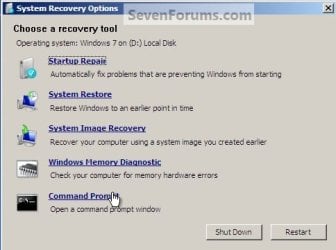
Command Prompt.jpg
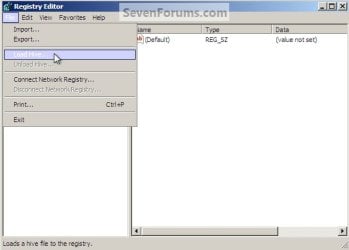
3) In the Registry Editor window that opens click to select "HKey_Local_Machine" then at the "File" menu select "Load Hive".
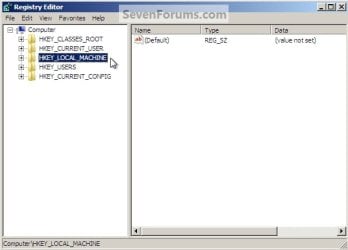
Choose HKLM.jpg
HKLM Load Hive.jpg
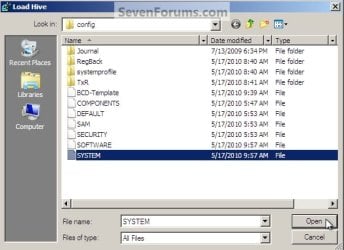
4) In the "Look In" in the "Load Hive" window that opens navigate to (in my case) LocalDiskD:\Windows\System32\config\SYSTEM and click "Open".
Choose OS Drive.jpg
System.jpg
5) In the "Load Hive", "Key Name" box give the new key a name e.g. " 123 " (it can be whatever you like) and click OK.
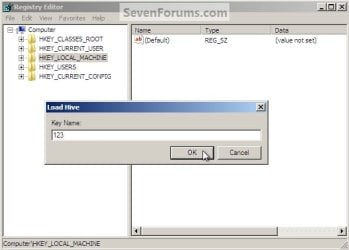
Key Name 123.jpg
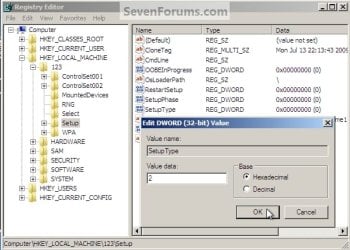
6) In the left pane of the registry Editor window click the " + " sign to expand the "HKey_Local_Machine" key then click the " + " sign to expand the "123" key then click to select the "Setup" key.
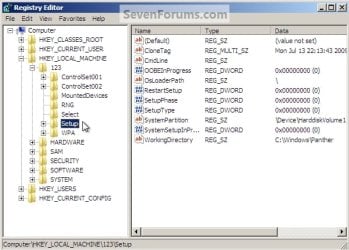
123 Setup.jpg
7) Now in the right pane right click "SetupType" and select "Modify", set the "Value data" to " 2 " and click OK.
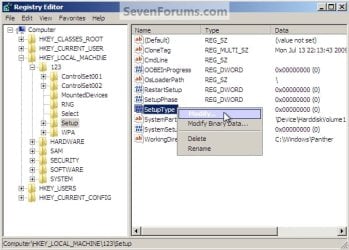
SetupType Modify.jpg
SetupType Value.jpg
8) Again in the right pane right click "CmdLine" and select "Modify" and set the "Value data" to "cmd.exe" and click OK.
com.jpg
9) Now just as a precaution, close the Registry Editor at the "File" menu click "Exit"; then in the Command window that's still open type "regedit" and hit enter to open the Registry Editor again.

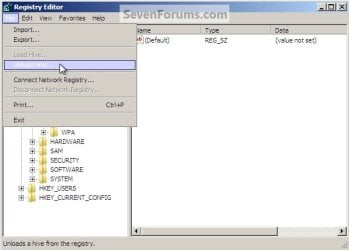
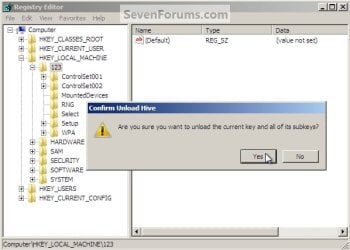
10) In the Registry Editor click the " + " sign to expand HKey_Local_Machine and click to select the new "123" key, at the "File" menu select "Unload Hive" and click "Yes" for the "Are you sure ..." question.
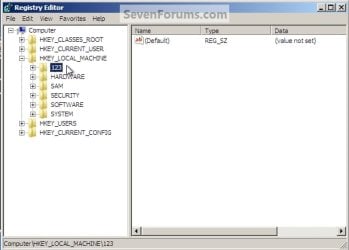
123 Key.jpg
123 Unload Hive.jpg
123 Unload Hive Yes.jpg
11) Now close the Registry Editor at the "File" menu click "Exit" then in the Command window type "exit" and hit enter to close the Command window, then remove the Windows disk and restart the PC.
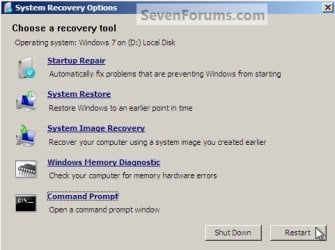
Re-Start.jpg
12) When the PC restarts a Command window will open, in that window type "net user <username> <new password>" mine is (net user "Bare Foot Kid" Test6) be advised: if you have a username like mine, with spaces, you must use " " quotes around the user name; when you get the "Command Completed Successfully" type "exit" in the Command window and hit enter; at the logon screen use the new password you chose.
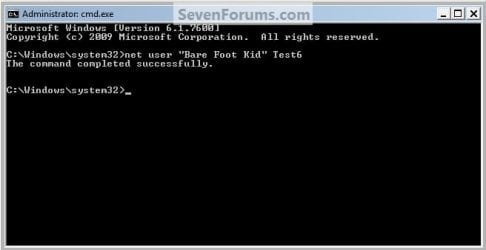
Test6.jpg
   Tip
If you like, you could type net user in the command prompt and press Enter to see a list of all names for each user account on the PC to help use with step 12.
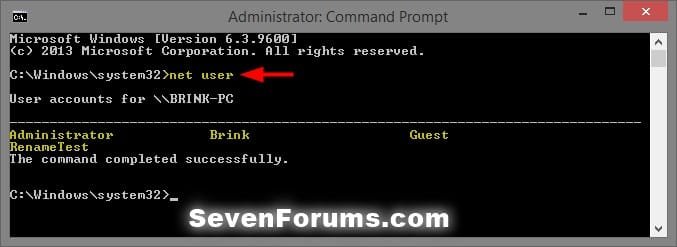
net-user.jpg


Enjoy! :)


Last edited by a moderator:
Went with the factory restore, all is well again, didn't have any personal files on it yet, thanks for your help.
 

My Computer

OS
Windows 7 Home Premium 64bit
Went with the factory restore, all is well again, didn't have any personal files on it yet, thanks for your help.


Hello again mate, good to see you got it going and thanks for the update.


To save further issues, have a look at Option One in this guide at the link below to create a Password Reset disk and store it away.


Password Reset Options in Windows 7
 

My Computer

Computer Manufacturer/Model Number
* BFK Customs *
OS
W 7 64-bit Ultimate
CPU
Intel Q9550 Yorkfield
Motherboard
ASUS P5Q Pro
Memory
8GB Dominator 8500C5D
Graphics Card(s)
ATI : XFX 5870
Sound Card
Realtek HD Audio 7-1
Monitor(s) Displays
1x 47" LCD HDMI & 3x 26" LCD HDMI
Screen Resolution
1920x1080P & 1920x1200
Hard Drives
1x 80GB Intel X25-M G2 SSD : 1x 500GB & 1x 640GB WD Caviar Black(s)
PSU
Corsair 620HX
Case
Cooler Master RC-690
Cooling
Tuniq Tower 120, 2x 140mm and 3x 120mm case fans
Keyboard
Microsoft 500
Mouse
Razer Diamondback 3G
Internet Speed
14 Mb/s
Other Info
1x Koutech 3Gb/s SATA HDD Hot Swap Rack
Help Needed

Hi, Somehow I can no longer login to my desktop/family computer as the Admin....

I don't know if one of my teens changed the password of what the deal is..

I tried the instructions above but can't get the system repair disc created as it keeps asking me for the admin password (which is what I don't have)

What can I do?? Can I create the system repair disk on my laptop?? then use it on the desktop??

Help Please.... :0
 

My Computer

OS
Windows 7
Hi, Somehow I can no longer login to my desktop/family computer as the Admin....

I don't know if one of my teens changed the password of what the deal is..

I tried the instructions above but can't get the system repair disc created as it keeps asking me for the admin password (which is what I don't have)

What can I do?? Can I create the system repair disk on my laptop?? then use it on the desktop??

Help Please.... :0


Hello tpettie, welcome to Seven Forums!


Yes you can create the Windows repair disk on the lappy and be sure to post back with any further questions you may have and to keep us informed.


How to Create a Windows 7 System Repair Disc
 

My Computer

Computer Manufacturer/Model Number
* BFK Customs *
OS
W 7 64-bit Ultimate
CPU
Intel Q9550 Yorkfield
Motherboard
ASUS P5Q Pro
Memory
8GB Dominator 8500C5D
Graphics Card(s)
ATI : XFX 5870
Sound Card
Realtek HD Audio 7-1
Monitor(s) Displays
1x 47" LCD HDMI & 3x 26" LCD HDMI
Screen Resolution
1920x1080P & 1920x1200
Hard Drives
1x 80GB Intel X25-M G2 SSD : 1x 500GB & 1x 640GB WD Caviar Black(s)
PSU
Corsair 620HX
Case
Cooler Master RC-690
Cooling
Tuniq Tower 120, 2x 140mm and 3x 120mm case fans
Keyboard
Microsoft 500
Mouse
Razer Diamondback 3G
Internet Speed
14 Mb/s
Other Info
1x Koutech 3Gb/s SATA HDD Hot Swap Rack
How to Create a Windows 7 System Repair Disc[/URL]

Ok stuck on the Bios part mine says

1st boot device CD-rom
2nd hard drive group
3 Floppy group
4 networkdboot group

floppy group boot prioity not installed
> cd-rom group boot priority [tsstcorp CDDVDW]
>HDD group Boot priority [ST3320418AS]
network group boot priority Not istalled


I did try the system repair disk in the CD-Rom on start up but it just took me to the users screen ???


I can't get to this step....
 
Last edited:

My Computer

OS
Windows 7
How to Create a Windows 7 System Repair Disc[/URL]

Ok stuck on the Bios part mine says

1st boot device CD-rom
2nd hard drive group
3 Floppy group
4 networkdboot group

floppy group boot prioity not installed
> cd-rom group boot priority [tsstcorp CDDVDW]
>HDD group Boot priority [ST3320418AS]
network group boot priority Not istalled


I did try the system repair disk in the CD-Rom on start up but it just took me to the users screen ???


I can't get to this step....

For some reason it seems the disk is not booting, have a look at this tutorial at the link below to see if you can get a USB stick to boot as the recovery disk, put the ISO file on the USB stick.

USB Windows 7 Installation Key Drive - Create
 

My Computer

Computer Manufacturer/Model Number
* BFK Customs *
OS
W 7 64-bit Ultimate
CPU
Intel Q9550 Yorkfield
Motherboard
ASUS P5Q Pro
Memory
8GB Dominator 8500C5D
Graphics Card(s)
ATI : XFX 5870
Sound Card
Realtek HD Audio 7-1
Monitor(s) Displays
1x 47" LCD HDMI & 3x 26" LCD HDMI
Screen Resolution
1920x1080P & 1920x1200
Hard Drives
1x 80GB Intel X25-M G2 SSD : 1x 500GB & 1x 640GB WD Caviar Black(s)
PSU
Corsair 620HX
Case
Cooler Master RC-690
Cooling
Tuniq Tower 120, 2x 140mm and 3x 120mm case fans
Keyboard
Microsoft 500
Mouse
Razer Diamondback 3G
Internet Speed
14 Mb/s
Other Info
1x Koutech 3Gb/s SATA HDD Hot Swap Rack
The registry edit to reset password worked like a charm. Awesome. Man so why even password protect the pc if it's that easy to circumvent? Just from a casual passerby?
 

My Computer

Computer type
PC/Desktop
Computer Manufacturer/Model Number
Custom Build
OS
Windows 7 Pro 64bit build 7601 SP1
CPU
Intel Core I5 3570K 3.4Ghz w/ Zalman CNPS9900NT RT
Motherboard
MSI Z77A-G45 Gaming
Memory
G.Skill F3-12800CL9D-8GbXL ; 4Gx2
Graphics Card(s)
EVGA Geforce GTX 770 Superclocked
Sound Card
Creative Sound Blaster Z
Monitor(s) Displays
Dual ViewSonic VX2770Smh-LED Black 27"IPS-Panel
Screen Resolution
1920x1080
Hard Drives
Kingston Hyper X 240GB SSD Win8 Pro 64bit 6GB/s Sata III
Intel 335 Series SSD 240GB Win8 Storage 6GB/s Sata III
Intel 320 Series SSD 600GB Storage 3GB/s Sata II
Western Digital Scorpio Black 1TB - Docked via Esata
PSU
Coolermaster GX 750W
Case
Corsair Vengence C70
Cooling
Coolermaster 120mm and Enermax 140mm
Keyboard
Corsair Vengence K70
Mouse
Logitech G500
Internet Speed
22mbps+
Browser
Firefox, Chrome, IE
Other Info
Swan M50W 2.1 speakers
APC UPS
Thermaltake BlacX HDD Dock
Samsung BD Optical Drive
Netgear WNDR4500
Last edited by a moderator:

My Computer

Computer Manufacturer/Model Number
* BFK Customs *
OS
W 7 64-bit Ultimate
CPU
Intel Q9550 Yorkfield
Motherboard
ASUS P5Q Pro
Memory
8GB Dominator 8500C5D
Graphics Card(s)
ATI : XFX 5870
Sound Card
Realtek HD Audio 7-1
Monitor(s) Displays
1x 47" LCD HDMI & 3x 26" LCD HDMI
Screen Resolution
1920x1080P & 1920x1200
Hard Drives
1x 80GB Intel X25-M G2 SSD : 1x 500GB & 1x 640GB WD Caviar Black(s)
PSU
Corsair 620HX
Case
Cooler Master RC-690
Cooling
Tuniq Tower 120, 2x 140mm and 3x 120mm case fans
Keyboard
Microsoft 500
Mouse
Razer Diamondback 3G
Internet Speed
14 Mb/s
Other Info
1x Koutech 3Gb/s SATA HDD Hot Swap Rack
That wouldn't have worked in this situation. My friend last night gave me his old laptop in trade for one of my old lcd monitors. Anyway, I totally forgot to ask him about the password when I got home as I live an hour away from him and it was about 10pm when I got home. I'm impatient sometimes and I wanted to get into right away so I can do some maintenance and such.
 

My Computer

Computer type
PC/Desktop
Computer Manufacturer/Model Number
Custom Build
OS
Windows 7 Pro 64bit build 7601 SP1
CPU
Intel Core I5 3570K 3.4Ghz w/ Zalman CNPS9900NT RT
Motherboard
MSI Z77A-G45 Gaming
Memory
G.Skill F3-12800CL9D-8GbXL ; 4Gx2
Graphics Card(s)
EVGA Geforce GTX 770 Superclocked
Sound Card
Creative Sound Blaster Z
Monitor(s) Displays
Dual ViewSonic VX2770Smh-LED Black 27"IPS-Panel
Screen Resolution
1920x1080
Hard Drives
Kingston Hyper X 240GB SSD Win8 Pro 64bit 6GB/s Sata III
Intel 335 Series SSD 240GB Win8 Storage 6GB/s Sata III
Intel 320 Series SSD 600GB Storage 3GB/s Sata II
Western Digital Scorpio Black 1TB - Docked via Esata
PSU
Coolermaster GX 750W
Case
Corsair Vengence C70
Cooling
Coolermaster 120mm and Enermax 140mm
Keyboard
Corsair Vengence K70
Mouse
Logitech G500
Internet Speed
22mbps+
Browser
Firefox, Chrome, IE
Other Info
Swan M50W 2.1 speakers
APC UPS
Thermaltake BlacX HDD Dock
Samsung BD Optical Drive
Netgear WNDR4500
That wouldn't have worked in this situation. My friend last night gave me his old laptop in trade for one of my old lcd monitors. Anyway, I totally forgot to ask him about the password when I got home as I live an hour away from him and it was about 10pm when I got home. I'm impatient sometimes and I wanted to get into right away so I can do some maintenance and such.


No mate, I meant for you to create it for future need.
 

My Computer

Computer Manufacturer/Model Number
* BFK Customs *
OS
W 7 64-bit Ultimate
CPU
Intel Q9550 Yorkfield
Motherboard
ASUS P5Q Pro
Memory
8GB Dominator 8500C5D
Graphics Card(s)
ATI : XFX 5870
Sound Card
Realtek HD Audio 7-1
Monitor(s) Displays
1x 47" LCD HDMI & 3x 26" LCD HDMI
Screen Resolution
1920x1080P & 1920x1200
Hard Drives
1x 80GB Intel X25-M G2 SSD : 1x 500GB & 1x 640GB WD Caviar Black(s)
PSU
Corsair 620HX
Case
Cooler Master RC-690
Cooling
Tuniq Tower 120, 2x 140mm and 3x 120mm case fans
Keyboard
Microsoft 500
Mouse
Razer Diamondback 3G
Internet Speed
14 Mb/s
Other Info
1x Koutech 3Gb/s SATA HDD Hot Swap Rack
Oh, yeah, ok, that's definitely a good idea.
 

My Computer

Computer type
PC/Desktop
Computer Manufacturer/Model Number
Custom Build
OS
Windows 7 Pro 64bit build 7601 SP1
CPU
Intel Core I5 3570K 3.4Ghz w/ Zalman CNPS9900NT RT
Motherboard
MSI Z77A-G45 Gaming
Memory
G.Skill F3-12800CL9D-8GbXL ; 4Gx2
Graphics Card(s)
EVGA Geforce GTX 770 Superclocked
Sound Card
Creative Sound Blaster Z
Monitor(s) Displays
Dual ViewSonic VX2770Smh-LED Black 27"IPS-Panel
Screen Resolution
1920x1080
Hard Drives
Kingston Hyper X 240GB SSD Win8 Pro 64bit 6GB/s Sata III
Intel 335 Series SSD 240GB Win8 Storage 6GB/s Sata III
Intel 320 Series SSD 600GB Storage 3GB/s Sata II
Western Digital Scorpio Black 1TB - Docked via Esata
PSU
Coolermaster GX 750W
Case
Corsair Vengence C70
Cooling
Coolermaster 120mm and Enermax 140mm
Keyboard
Corsair Vengence K70
Mouse
Logitech G500
Internet Speed
22mbps+
Browser
Firefox, Chrome, IE
Other Info
Swan M50W 2.1 speakers
APC UPS
Thermaltake BlacX HDD Dock
Samsung BD Optical Drive
Netgear WNDR4500
Create a repair disc?

Perhaps I'm reading this wrong, but how in the hell are you supposed to create a repair disk if you've lost or forgotten your password?
 

My Computer

OS
Windows 7 Ultimate 64
Nice tutorial you have here. However, I would never recommend that you edit the registry as doing it wrong is a one way ticket to corrupting your installation. You can reset your password by simply typing in the wrong password at login, then following the instructions there
 

My Computer

Computer Manufacturer/Model Number
Custom Built
OS
Windows 7 Professional 64-bit
CPU
Intel Core 2 Quad Q9505 2.83GHz
Memory
8GB
Graphics Card(s)
ATI Radeon HD 5700
Sound Card
Realtek HD Audio
Monitor(s) Displays
Generic PnP Monitor (23" TV)
Screen Resolution
1920x1080 (with 1024x768 extended display)
Hard Drives
1TB WDC WD10EARS-00Y5B1 ATA
PSU
550W (Can't confirm)
Keyboard
Microsoft Comfort Curve 2000 v1
Mouse
Microsoft Basic Optical Mouse
Internet Speed
6.5Mbps Download, 0.35Mbps Upload
Nice tutorial you have here. However, I would never recommend that you edit the registry as doing it wrong is a one way ticket to corrupting your installation. You can reset your password by simply typing in the wrong password at login, then following the instructions there

Hello Shukaku,

That would work as well, but only if you had created a password reset disc prior to use to reset the password with using that option.
 

My Computer

Computer type
PC/Desktop
Computer Manufacturer/Model Number
Self built custom
OS
64-bit Windows 11 Pro for Workstations
CPU
Intel i7-8700K OC'd to 5 GHz
Motherboard
ASUS ROG Maximus XI Formula Z390
Memory
64 GB (4x16GB) G.SKILL TridentZ RGB DDR4 3600 MHz
Graphics Card(s)
ASUS ROG-STRIX-GTX1080TI-O11G-GAMING
Sound Card
Integrated
Monitor(s) Displays
2 x Samsung Odyssey G7 27"
Screen Resolution
2560x1440
Hard Drives
1TB Samsung 990 PRO M.2,
4TB Samsung 990 PRO PRO M.2,
TerraMaster F8 SSD Plus NAS
PSU
Seasonic Prime Titanium 850W
Case
Thermaltake Core P3
Cooling
Corsair Hydro H115i
Keyboard
Logitech wireless K800
Mouse
Logitech MX Master 4
Internet Speed
2 Gb/s Download and 100 Mb/s Upload
Antivirus
Malwarebyte Anti-Malware Premium
Browser
Google Chrome
Other Info
Logitech Z625 speaker system,
Logitech BRIO 4K Pro webcam,
HP Color LaserJet Pro MFP M477fdn,
APC SMART-UPS RT 1000 XL - SURT1000XLI,
Galaxy S23 Plus phone
Hi,

I followed all the instructions but when I got to cmd prompt and typed in (net user catherine 123456) without brackets, it gave me a user name not found. I've read the previous posts and have attempted to try it with quotation marks but it does not work. I am pretty sure that it is not the admin account as it was the default that I made during the first start up of the computer. Any solutions?

Thanks
 

My Computer

Computer Manufacturer/Model Number
Dell Dimension C521
OS
Windows 7 Ultimate x86
Memory
3gb
Graphics Card(s)
Nvidia GeForce

My Computer

Computer type
PC/Desktop
Computer Manufacturer/Model Number
Self built custom
OS
64-bit Windows 11 Pro for Workstations
CPU
Intel i7-8700K OC'd to 5 GHz
Motherboard
ASUS ROG Maximus XI Formula Z390
Memory
64 GB (4x16GB) G.SKILL TridentZ RGB DDR4 3600 MHz
Graphics Card(s)
ASUS ROG-STRIX-GTX1080TI-O11G-GAMING
Sound Card
Integrated
Monitor(s) Displays
2 x Samsung Odyssey G7 27"
Screen Resolution
2560x1440
Hard Drives
1TB Samsung 990 PRO M.2,
4TB Samsung 990 PRO PRO M.2,
TerraMaster F8 SSD Plus NAS
PSU
Seasonic Prime Titanium 850W
Case
Thermaltake Core P3
Cooling
Corsair Hydro H115i
Keyboard
Logitech wireless K800
Mouse
Logitech MX Master 4
Internet Speed
2 Gb/s Download and 100 Mb/s Upload
Antivirus
Malwarebyte Anti-Malware Premium
Browser
Google Chrome
Other Info
Logitech Z625 speaker system,
Logitech BRIO 4K Pro webcam,
HP Color LaserJet Pro MFP M477fdn,
APC SMART-UPS RT 1000 XL - SURT1000XLI,
Galaxy S23 Plus phone
Do I have to do the Boot Priority step? I'm asking because when I go to the link of Boot Priority it shows the steps to do it but for the windows vista.

and I want to reset my password but for a windows 7

Step 12 doesn't happen to me. After doing step 11, when my computer restarts a Command Window doesn't appears it goes straight to window where I choose between guest or the Adm.
 
Last edited by a moderator:

My Computer

OS
Windows 7 Home Premium 64-Bit
Hello Reddose, and welcome to Seven Forums.

The boot priority example at that link is just an example using Vista, but it's the same for in Windows 7. You do need to do it to be able to boot from your Windows 7 installation disc to boot to a command prompt at boot.

Double check the steps to make sure that you didn't miss anything while trying it again.

Hope this helps,
Shawn
 

My Computer

Computer type
PC/Desktop
Computer Manufacturer/Model Number
Self built custom
OS
64-bit Windows 11 Pro for Workstations
CPU
Intel i7-8700K OC'd to 5 GHz
Motherboard
ASUS ROG Maximus XI Formula Z390
Memory
64 GB (4x16GB) G.SKILL TridentZ RGB DDR4 3600 MHz
Graphics Card(s)
ASUS ROG-STRIX-GTX1080TI-O11G-GAMING
Sound Card
Integrated
Monitor(s) Displays
2 x Samsung Odyssey G7 27"
Screen Resolution
2560x1440
Hard Drives
1TB Samsung 990 PRO M.2,
4TB Samsung 990 PRO PRO M.2,
TerraMaster F8 SSD Plus NAS
PSU
Seasonic Prime Titanium 850W
Case
Thermaltake Core P3
Cooling
Corsair Hydro H115i
Keyboard
Logitech wireless K800
Mouse
Logitech MX Master 4
Internet Speed
2 Gb/s Download and 100 Mb/s Upload
Antivirus
Malwarebyte Anti-Malware Premium
Browser
Google Chrome
Other Info
Logitech Z625 speaker system,
Logitech BRIO 4K Pro webcam,
HP Color LaserJet Pro MFP M477fdn,
APC SMART-UPS RT 1000 XL - SURT1000XLI,
Galaxy S23 Plus phone
I was under the impression that resetting a password in Windows makes you lose ownership of what ever that user had including objects that can not be re taken easily. Rite or wrong?
 

My Computer

Computer Manufacturer/Model Number
ASRock Mother
OS
Win XP Pro 32 and Win7 Untilmate 64
CPU
AMD Athlon II X3
Motherboard
ASRock
Memory
4 Gig
Hard Drives
WD 500
Hello bmaz, and welcome to Seven Forums.

That would be incorrect. Permissions are tied to the user profile itself, and not to the password. :)
 

My Computer

Computer type
PC/Desktop
Computer Manufacturer/Model Number
Self built custom
OS
64-bit Windows 11 Pro for Workstations
CPU
Intel i7-8700K OC'd to 5 GHz
Motherboard
ASUS ROG Maximus XI Formula Z390
Memory
64 GB (4x16GB) G.SKILL TridentZ RGB DDR4 3600 MHz
Graphics Card(s)
ASUS ROG-STRIX-GTX1080TI-O11G-GAMING
Sound Card
Integrated
Monitor(s) Displays
2 x Samsung Odyssey G7 27"
Screen Resolution
2560x1440
Hard Drives
1TB Samsung 990 PRO M.2,
4TB Samsung 990 PRO PRO M.2,
TerraMaster F8 SSD Plus NAS
PSU
Seasonic Prime Titanium 850W
Case
Thermaltake Core P3
Cooling
Corsair Hydro H115i
Keyboard
Logitech wireless K800
Mouse
Logitech MX Master 4
Internet Speed
2 Gb/s Download and 100 Mb/s Upload
Antivirus
Malwarebyte Anti-Malware Premium
Browser
Google Chrome
Other Info
Logitech Z625 speaker system,
Logitech BRIO 4K Pro webcam,
HP Color LaserJet Pro MFP M477fdn,
APC SMART-UPS RT 1000 XL - SURT1000XLI,
Galaxy S23 Plus phone
Back
Top