Password Reset

How to Reset a Windows Password in Regedit at Boot

This is a fairly simple way to reset / change your Windows user account password if, for whatever reason you can't gain access to your account.

   Note
A big thank you to Everlong for helping me sort the last steps of this.

This tutorial can be used to reset the password in Windows 7 or Vista.​
   Information
If you don't have a proper Windows installation disk, have a look at the link below to create a repair disk that can be used to reset your user account password in Windows 7 and Vista.

(Windows 7) System Repair Disc - Create

(Vista) Create a Recovery Disc - Vista Forums

   Warning
Making changes to the Windows Registry has the potential to disable the PC, if you have any concerns over using the information set forth here please feel free to post a question in this same tutorial and we will be glad to help.

Be Advised: if you use this method to reset you're user account password ANY / All access to encrypted files stored in the account will be lost.

Let's get Started!

1) The Boot Priority in the BIOS needs to be set to boot first from the optical drive; insert your Windows disk and re-start the PC.
At the first screen select your language then Repair your computer then it'll do some searching, at System Recovery Options dot Use recovery tools then select the OS and click next; while there make note of the OS drive letter, it may not be C: like mine is D:.
Recovery Tools Next.jpg
2) At the next screen select "Command Prompt" then in the Command window type "regedit" (without the quotes) and hit enter.
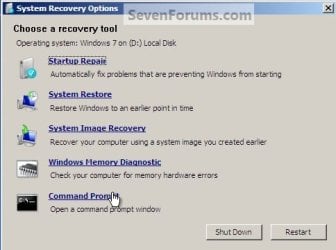
Command Prompt.jpg
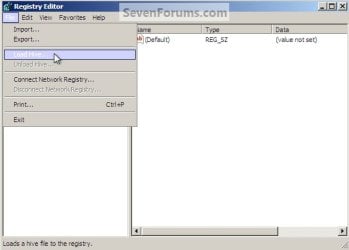
3) In the Registry Editor window that opens click to select "HKey_Local_Machine" then at the "File" menu select "Load Hive".
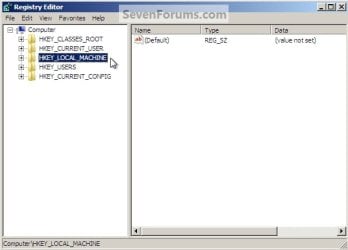
Choose HKLM.jpg
HKLM Load Hive.jpg
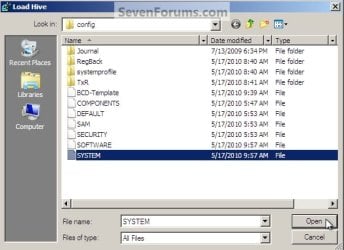
4) In the "Look In" in the "Load Hive" window that opens navigate to (in my case) LocalDiskD:\Windows\System32\config\SYSTEM and click "Open".
Choose OS Drive.jpg
System.jpg
5) In the "Load Hive", "Key Name" box give the new key a name e.g. " 123 " (it can be whatever you like) and click OK.
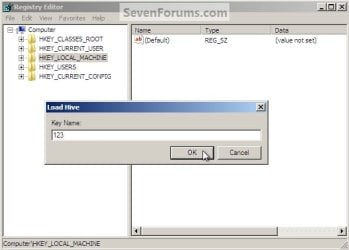
Key Name 123.jpg
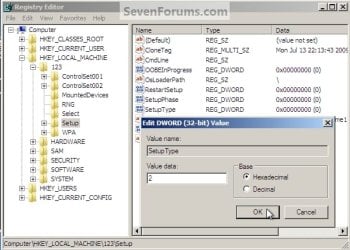
6) In the left pane of the registry Editor window click the " + " sign to expand the "HKey_Local_Machine" key then click the " + " sign to expand the "123" key then click to select the "Setup" key.
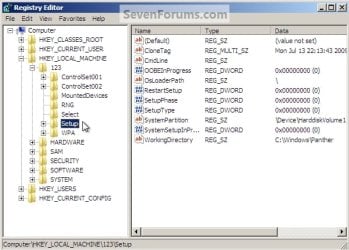
123 Setup.jpg
7) Now in the right pane right click "SetupType" and select "Modify", set the "Value data" to " 2 " and click OK.
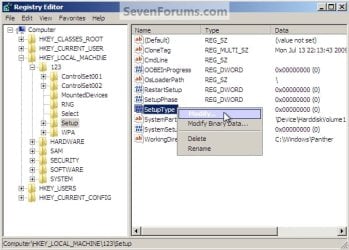
SetupType Modify.jpg
SetupType Value.jpg
8) Again in the right pane right click "CmdLine" and select "Modify" and set the "Value data" to "cmd.exe" and click OK.
com.jpg
9) Now just as a precaution, close the Registry Editor at the "File" menu click "Exit"; then in the Command window that's still open type "regedit" and hit enter to open the Registry Editor again.

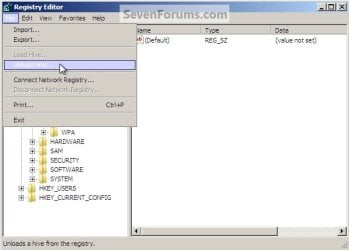
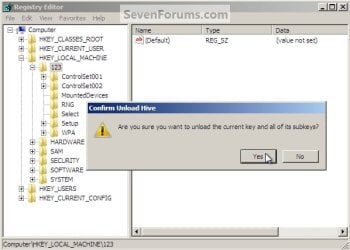
10) In the Registry Editor click the " + " sign to expand HKey_Local_Machine and click to select the new "123" key, at the "File" menu select "Unload Hive" and click "Yes" for the "Are you sure ..." question.
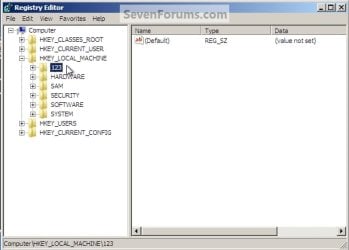
123 Key.jpg
123 Unload Hive.jpg
123 Unload Hive Yes.jpg
11) Now close the Registry Editor at the "File" menu click "Exit" then in the Command window type "exit" and hit enter to close the Command window, then remove the Windows disk and restart the PC.
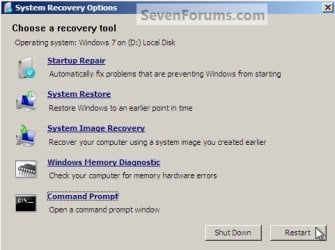
Re-Start.jpg
12) When the PC restarts a Command window will open, in that window type "net user <username> <new password>" mine is (net user "Bare Foot Kid" Test6) be advised: if you have a username like mine, with spaces, you must use " " quotes around the user name; when you get the "Command Completed Successfully" type "exit" in the Command window and hit enter; at the logon screen use the new password you chose.
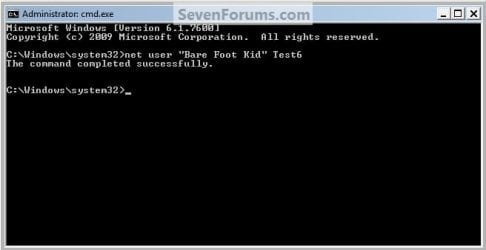
Test6.jpg
   Tip
If you like, you could type net user in the command prompt and press Enter to see a list of all names for each user account on the PC to help use with step 12.
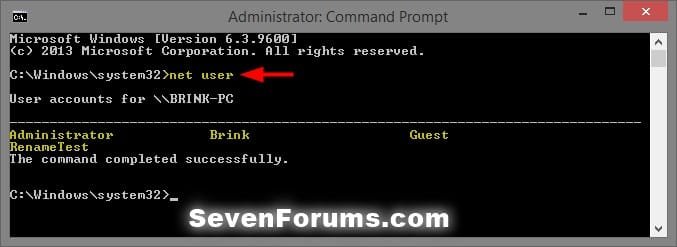
net-user.jpg


Enjoy! :)


Last edited by a moderator:
Thank you

A first timer to this site. Huge thanks to Bare Foot Kid for "Reset your Windows Password in Regedit at Boot". Suffice to say 8 hours spent following useless and irrelevant advice before finding this article which solved my problem.
 

My Computer

Computer type
PC/Desktop
Computer Manufacturer/Model Number
acer, hp, dell
OS
windows 7 home premium
Good stuff rosemoss....plenty of excellent advice here at SF. Welcome :thumbsup:
 

My Computer

Computer type
PC/Desktop
Computer Manufacturer/Model Number
Golden Mk. I.4
OS
Windows 10 Pro x64 ; Xubuntu x64
CPU
Intel i7 860 @ 2.80 GHz O/C'ed to 4.0GHz
Motherboard
Gigabyte P55A-UD3R Rev.1. Award BIOS F13
Memory
16GB Corsair Vengance DDR3 @ 661 MHz Dual Channel (9-9-9-24)
Graphics Card(s)
EVGA NVidia GTX 560 1024MB
Sound Card
Realtek Integrated
Monitor(s) Displays
Dual Samsung SyncMaster 2494HS
Screen Resolution
1920*1080 and 1920*1080
Hard Drives
1*Samsung 840 EVO 120GB SSD;
1*OCZ Vertex 2 60GB SSD;
2*Samsung F3 SpinPoint 1TB in RAID0;
1*Samsung F1 SpinPoint 1TB;
2*Western Digital 1TB External USB 3.0
1*Western Digital 500GB External USB 3.0
1*Seagate 500GB External USB 2.0
PSU
Thermaltake ToughPower QFan 750W
Case
Thermaltake Element S VK60001W2Z
Cooling
Corsair H60 Water Cooling, 2*230mm and 2*80mm case fans
Keyboard
Logitech G110
Mouse
Logitech MX518
Good to see it worked for you.
 

My Computer

Computer Manufacturer/Model Number
* BFK Customs *
OS
W 7 64-bit Ultimate
CPU
Intel Q9550 Yorkfield
Motherboard
ASUS P5Q Pro
Memory
8GB Dominator 8500C5D
Graphics Card(s)
ATI : XFX 5870
Sound Card
Realtek HD Audio 7-1
Monitor(s) Displays
1x 47" LCD HDMI & 3x 26" LCD HDMI
Screen Resolution
1920x1080P & 1920x1200
Hard Drives
1x 80GB Intel X25-M G2 SSD : 1x 500GB & 1x 640GB WD Caviar Black(s)
PSU
Corsair 620HX
Case
Cooler Master RC-690
Cooling
Tuniq Tower 120, 2x 140mm and 3x 120mm case fans
Keyboard
Microsoft 500
Mouse
Razer Diamondback 3G
Internet Speed
14 Mb/s
Other Info
1x Koutech 3Gb/s SATA HDD Hot Swap Rack
"" Select your user name and type in the password, and then click on OK. ""

What???? you are here because I lost my password and I want to reset it.. now you ask me about it???? huh?? are you serious?

or

this method works only if you know your password but Windows wont accept it on log on? so you have to reset it using this method?

is my last statement is correct?

Thanks!
 

My Computer

Computer type
PC/Desktop
OS
Windows 7
"" Select your user name and type in the password, and then click on OK. ""

What???? you are here because I lost my password and I want to reset it.. now you ask me about it???? huh?? are you serious?

or

this method works only if you know your password but Windows wont accept it on log on? so you have to reset it using this method?

is my last statement is correct?

Thanks!


If you boot directly from your retail Windows installation media to get to recovery options, then you will not need to enter your password. :)
 

My Computer

Computer type
PC/Desktop
Computer Manufacturer/Model Number
Self built custom
OS
64-bit Windows 11 Pro for Workstations
CPU
Intel i7-8700K OC'd to 5 GHz
Motherboard
ASUS ROG Maximus XI Formula Z390
Memory
64 GB (4x16GB) G.SKILL TridentZ RGB DDR4 3600 MHz
Graphics Card(s)
ASUS ROG-STRIX-GTX1080TI-O11G-GAMING
Sound Card
Integrated
Monitor(s) Displays
2 x Samsung Odyssey G7 27"
Screen Resolution
2560x1440
Hard Drives
1TB Samsung 990 PRO M.2,
4TB Samsung 990 PRO PRO M.2,
TerraMaster F8 SSD Plus NAS
PSU
Seasonic Prime Titanium 850W
Case
Thermaltake Core P3
Cooling
Corsair Hydro H115i
Keyboard
Logitech wireless K800
Mouse
Logitech MX Master 4
Internet Speed
2 Gb/s Download and 100 Mb/s Upload
Antivirus
Malwarebyte Anti-Malware Premium
Browser
Google Chrome
Other Info
Logitech Z625 speaker system,
Logitech BRIO 4K Pro webcam,
HP Color LaserJet Pro MFP M477fdn,
APC SMART-UPS RT 1000 XL - SURT1000XLI,
Galaxy S23 Plus phone
Did Not Work

Hi There,

I followed this tutorial to reset the password, but at the last step when you reboot the machine and try to login from the command screen, it does not work. I get the response "The user name could not be found".

I input the user name "Wes", so when I log in at the last step, am I supposed to type in net user "Wes" . . . but what password am I supposed to use here? Or do I just make up a password and input it here?

Your example was net user "bare foot kit" Test6. At what point did you designate Test6 as your password?

Please help.

Thanks
 

My Computer

Computer type
PC/Desktop
Computer Manufacturer/Model Number
HP Compaq
OS
Windows 7 Pro 64-bit
CPU
Intel Core I5 vPro
Not sure what you mean. You don't log in from the command screen. You only type the command to set a new password.

Test6 was just an example. If let's say you too use Test6 as your new password, then you would type: net user Wes Test6
 

My Computer

Computer type
Laptop
Computer Manufacturer/Model Number
HP Elitebook 8540p
OS
Windows 7 Pro 32
CPU
Intel(R) Core(TM) i5 CPU M 540 @ 2.53GHz
Motherboard
Hewlett-Packard 1521
Memory
4,00 GB (Usable 2,98)
Graphics Card(s)
NVIDIA NVS 5100M
Sound Card
NVIDIA High Definition Audio
Screen Resolution
1600x900
Hard Drives
INTEL SSDSA2CW120G3
Antivirus
F-Secure Internet Security
Browser
IE, Firefox, Opera
Other Info
Sandboxie,
SRP (Software Restriction Policy),
EMET (Enhanced Mitigation Experience Toolkit),
WFC (Windows Firewall Control by BiniSoft),
Malwarebytes Premium
Thanks for helping me.

when I reboot the PC and it showed the CMD screen as you said it would in the instructions, when I input the command net user Wes Taylor15, it does not complete successfully. It says cannot find user name.
 

My Computer

Computer type
PC/Desktop
Computer Manufacturer/Model Number
HP Compaq
OS
Windows 7 Pro 64-bit
CPU
Intel Core I5 vPro
Is Wes a local user on the computer? In your thread "Administrator password" you mentioned changing from domain to workgroup.
 

My Computer

Computer type
Laptop
Computer Manufacturer/Model Number
HP Elitebook 8540p
OS
Windows 7 Pro 32
CPU
Intel(R) Core(TM) i5 CPU M 540 @ 2.53GHz
Motherboard
Hewlett-Packard 1521
Memory
4,00 GB (Usable 2,98)
Graphics Card(s)
NVIDIA NVS 5100M
Sound Card
NVIDIA High Definition Audio
Screen Resolution
1600x900
Hard Drives
INTEL SSDSA2CW120G3
Antivirus
F-Secure Internet Security
Browser
IE, Firefox, Opera
Other Info
Sandboxie,
SRP (Software Restriction Policy),
EMET (Enhanced Mitigation Experience Toolkit),
WFC (Windows Firewall Control by BiniSoft),
Malwarebytes Premium
I was trying to get this PC off our network domain, and make it a stand alone PC for home use.

No, "Wes" is not a local user on the machine. All the profiles I believe were on the network server, I don't what local users are on the machine.

I am stuck on the CMD screen. Do I need to use a local user and password? Is there a way to find a list of local users on the machine? These PCs were set up on a domain, I don't believe that there was a local user set up. But I am not sure.

My old boss named Kyle used to use this workstation.
 

My Computer

Computer type
PC/Desktop
Computer Manufacturer/Model Number
HP Compaq
OS
Windows 7 Pro 64-bit
CPU
Intel Core I5 vPro
Not sure, but I think so. Domains are not my thing. You can use this command to list local administrators:

net localgroup administrators
 

My Computer

Computer type
Laptop
Computer Manufacturer/Model Number
HP Elitebook 8540p
OS
Windows 7 Pro 32
CPU
Intel(R) Core(TM) i5 CPU M 540 @ 2.53GHz
Motherboard
Hewlett-Packard 1521
Memory
4,00 GB (Usable 2,98)
Graphics Card(s)
NVIDIA NVS 5100M
Sound Card
NVIDIA High Definition Audio
Screen Resolution
1600x900
Hard Drives
INTEL SSDSA2CW120G3
Antivirus
F-Secure Internet Security
Browser
IE, Firefox, Opera
Other Info
Sandboxie,
SRP (Software Restriction Policy),
EMET (Enhanced Mitigation Experience Toolkit),
WFC (Windows Firewall Control by BiniSoft),
Malwarebytes Premium
Thanks Tookeri,

I used that new command you suggested to find list of local user names.

It returned result of administrator as the only local user.

I then input net user administrator Test6 and it completed successfully. I was then able to log on as "administrator" with the new Test6 password. Thanks again!
 

My Computer

Computer type
PC/Desktop
Computer Manufacturer/Model Number
HP Compaq
OS
Windows 7 Pro 64-bit
CPU
Intel Core I5 vPro
Good news, glad I could help! Now you should be able to create a new administrator account and name it whatever you want.
 

My Computer

Computer type
Laptop
Computer Manufacturer/Model Number
HP Elitebook 8540p
OS
Windows 7 Pro 32
CPU
Intel(R) Core(TM) i5 CPU M 540 @ 2.53GHz
Motherboard
Hewlett-Packard 1521
Memory
4,00 GB (Usable 2,98)
Graphics Card(s)
NVIDIA NVS 5100M
Sound Card
NVIDIA High Definition Audio
Screen Resolution
1600x900
Hard Drives
INTEL SSDSA2CW120G3
Antivirus
F-Secure Internet Security
Browser
IE, Firefox, Opera
Other Info
Sandboxie,
SRP (Software Restriction Policy),
EMET (Enhanced Mitigation Experience Toolkit),
WFC (Windows Firewall Control by BiniSoft),
Malwarebytes Premium
Great Guide for Password Reset

This is the best guide for resetting a lost password. It is well written and takes you step by step through the whole process. Windows 7, for some unknown reason, did not accept one "System Repair Disk", but it it did accept another one. I have just a small suggestion: add a "net user" command as you may not know which user's password you would like to reset. Many Thanks.
 
Last edited:

My Computer

Computer Manufacturer/Model Number
Generic PC
OS
Windows 7 Ultimate 64 bit
CPU
Intel Core I3 2120
Motherboard
ASUS P8-Z68 VPro/Gen3
Memory
8 GB
Graphics Card(s)
XFX R 7750
Sound Card
None
Monitor(s) Displays
2 Displays: 24'' LG Flatron E2340 and Polyview V293 CMC AD
Screen Resolution
1920X1080 and 1280 X 1024
Hard Drives
OCZ Agility 2 SATA II 120 GB 3.5' as C: drive
2 X Western Digital 500 GB 7400rpm mirrored as F: drive
PSU
600 W
Case
Corsair
Keyboard
Logitech LX710
Mouse
Logitech LX710
Good idea cjf. I added a tip box under step 12 for that. Thank you. :)
 

My Computer

Computer type
PC/Desktop
Computer Manufacturer/Model Number
Self built custom
OS
64-bit Windows 11 Pro for Workstations
CPU
Intel i7-8700K OC'd to 5 GHz
Motherboard
ASUS ROG Maximus XI Formula Z390
Memory
64 GB (4x16GB) G.SKILL TridentZ RGB DDR4 3600 MHz
Graphics Card(s)
ASUS ROG-STRIX-GTX1080TI-O11G-GAMING
Sound Card
Integrated
Monitor(s) Displays
2 x Samsung Odyssey G7 27"
Screen Resolution
2560x1440
Hard Drives
1TB Samsung 990 PRO M.2,
4TB Samsung 990 PRO PRO M.2,
TerraMaster F8 SSD Plus NAS
PSU
Seasonic Prime Titanium 850W
Case
Thermaltake Core P3
Cooling
Corsair Hydro H115i
Keyboard
Logitech wireless K800
Mouse
Logitech MX Master 4
Internet Speed
2 Gb/s Download and 100 Mb/s Upload
Antivirus
Malwarebyte Anti-Malware Premium
Browser
Google Chrome
Other Info
Logitech Z625 speaker system,
Logitech BRIO 4K Pro webcam,
HP Color LaserJet Pro MFP M477fdn,
APC SMART-UPS RT 1000 XL - SURT1000XLI,
Galaxy S23 Plus phone
You Are a God!

OMG thank you so much I've been searching and retyping this same command line a thousand times

net user My Admin <password>

but no one said you had to put user names with spaces in "" , you are a life saver I've been banging my head against the wall with this clients computer for hours!

Thanks again
Anthony
 

My Computer

OS
Windows 7 Pro 64Bit
Great Tutorial! I hope I don't miss a step...I need it now since I lost my main drive trying to restore to factory settings we had a second OS but we just used it as storage for years! and apparently cannot change any thing because password may be protecting it, maybe I will be able to start windows again.

Thanks!
 

My Computer

Computer type
PC/Desktop
Computer Manufacturer/Model Number
HP
OS
Windows 7 Home Premium 64 bit
No start but repair disk.

Thanks again for your tutorial I used this with repair disk, after I did it, I could not get to the last step, because windows would not start, when I restarted I press f8 right when I push start I got withing the system with out repair disk, first screen the one with US highlighted in blue, next It was asking for password, I click in the box and press enter and it let me in!!! umm.... it took me straight to the windows where you can repair comp and command prompt and stuff. So yes thanks again,

You may know this all ready, sorry I don't read much, I wanted to let you know worked great! :)
 

My Computer

Computer type
PC/Desktop
Computer Manufacturer/Model Number
HP
OS
Windows 7 Home Premium 64 bit
This is the best guide for resetting a lost password. It is well written and takes you step by step through the whole process. Windows 7, for some unknown reason, did not accept one "System Repair Disk", but it it did accept another one. I have just a small suggestion: add a "net user" command as you may not know which user's password you would like to reset. Many Thanks.

If you want to reset an administrative password you need to be logged into a secondary account with administrative rights, once logged in, open the command prompt as an administrator, type in ( without the quotes): " net user %username% * "
This will prompt you to enter a new password for the account.
NOTE: %username% is a variable which holds the current ( logged on ) user name. Please replace %username% with the account name you wish to reset the password for.
If you have no secondary accounts try running a live version of Windows/Linux from a disc or 3rd party tools.
 

My Computer

Computer type
PC/Desktop
OS
windows 10
Back
Top