Password Reset

How to Reset a Windows Password in Regedit at Boot

This is a fairly simple way to reset / change your Windows user account password if, for whatever reason you can't gain access to your account.

   Note
A big thank you to Everlong for helping me sort the last steps of this.

This tutorial can be used to reset the password in Windows 7 or Vista.​
   Information
If you don't have a proper Windows installation disk, have a look at the link below to create a repair disk that can be used to reset your user account password in Windows 7 and Vista.

(Windows 7) System Repair Disc - Create

(Vista) Create a Recovery Disc - Vista Forums

   Warning
Making changes to the Windows Registry has the potential to disable the PC, if you have any concerns over using the information set forth here please feel free to post a question in this same tutorial and we will be glad to help.

Be Advised: if you use this method to reset you're user account password ANY / All access to encrypted files stored in the account will be lost.

Let's get Started!

1) The Boot Priority in the BIOS needs to be set to boot first from the optical drive; insert your Windows disk and re-start the PC.
At the first screen select your language then Repair your computer then it'll do some searching, at System Recovery Options dot Use recovery tools then select the OS and click next; while there make note of the OS drive letter, it may not be C: like mine is D:.
Recovery Tools Next.jpg
2) At the next screen select "Command Prompt" then in the Command window type "regedit" (without the quotes) and hit enter.
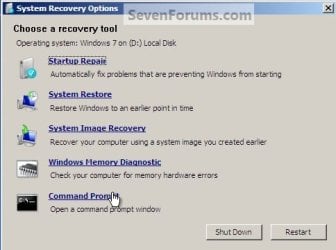
Command Prompt.jpg
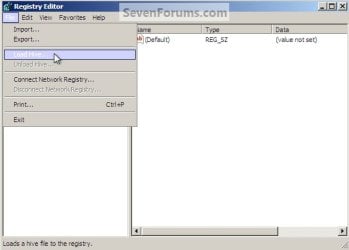
3) In the Registry Editor window that opens click to select "HKey_Local_Machine" then at the "File" menu select "Load Hive".
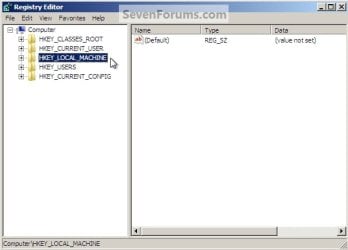
Choose HKLM.jpg
HKLM Load Hive.jpg
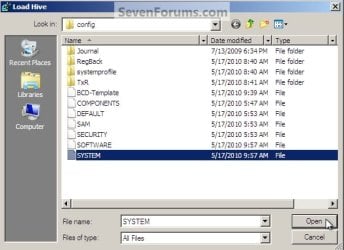
4) In the "Look In" in the "Load Hive" window that opens navigate to (in my case) LocalDiskD:\Windows\System32\config\SYSTEM and click "Open".
Choose OS Drive.jpg
System.jpg
5) In the "Load Hive", "Key Name" box give the new key a name e.g. " 123 " (it can be whatever you like) and click OK.
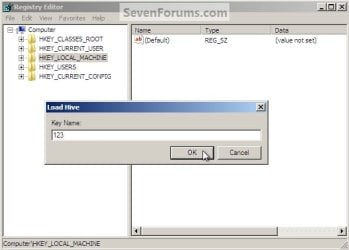
Key Name 123.jpg
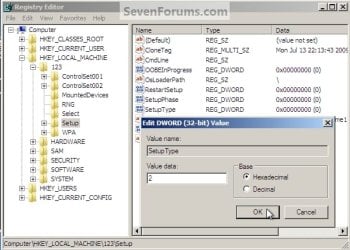
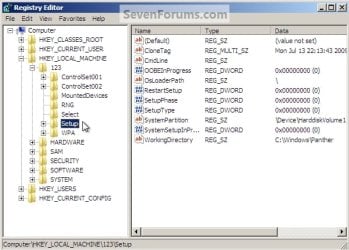
6) In the left pane of the registry Editor window click the " + " sign to expand the "HKey_Local_Machine" key then click the " + " sign to expand the "123" key then click to select the "Setup" key.
123 Setup.jpg
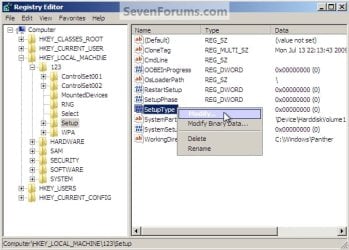
7) Now in the right pane right click "SetupType" and select "Modify", set the "Value data" to " 2 " and click OK.
SetupType Modify.jpg
SetupType Value.jpg
8) Again in the right pane right click "CmdLine" and select "Modify" and set the "Value data" to "cmd.exe" and click OK.
com.jpg
9) Now just as a precaution, close the Registry Editor at the "File" menu click "Exit"; then in the Command window that's still open type "regedit" and hit enter to open the Registry Editor again.

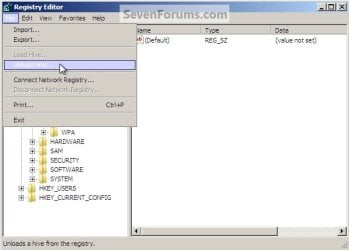
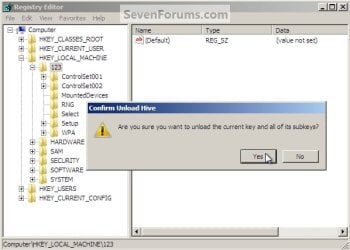
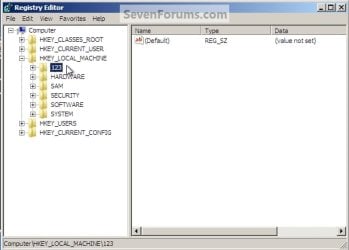
10) In the Registry Editor click the " + " sign to expand HKey_Local_Machine and click to select the new "123" key, at the "File" menu select "Unload Hive" and click "Yes" for the "Are you sure ..." question.
123 Key.jpg
123 Unload Hive.jpg
123 Unload Hive Yes.jpg
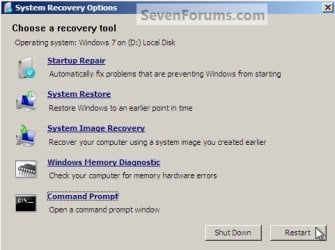
11) Now close the Registry Editor at the "File" menu click "Exit" then in the Command window type "exit" and hit enter to close the Command window, then remove the Windows disk and restart the PC.
Re-Start.jpg
12) When the PC restarts a Command window will open, in that window type "net user <username> <new password>" mine is (net user "Bare Foot Kid" Test6) be advised: if you have a username like mine, with spaces, you must use " " quotes around the user name; when you get the "Command Completed Successfully" type "exit" in the Command window and hit enter; at the logon screen use the new password you chose.
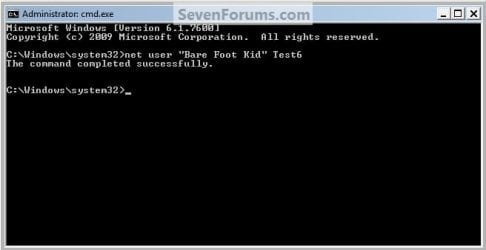
Test6.jpg
   Tip
If you like, you could type net user in the command prompt and press Enter to see a list of all names for each user account on the PC to help use with step 12.
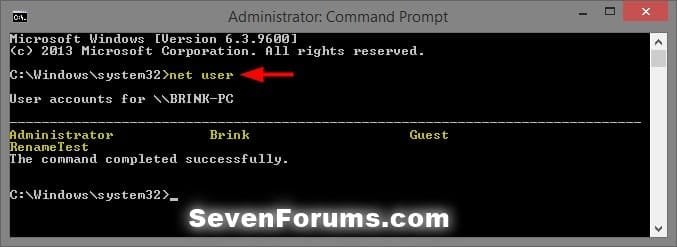
net-user.jpg


Enjoy! :)


Last edited by a moderator:
Does this method still work?

Hello, this is my first post and I thank you in advance for your help. I have an HP laptop running Windows 7 Home Premium that I have forgotten the password for. I have followed these instructions three times now with the same results. My failure comes at the last step, where the computer restarts and the command prompt should appear. Mine does not it goes straight to the Windows log in screen. What am I doing wrong?
 

My Computer

Computer type
Laptop
Computer Manufacturer/Model Number
HP
OS
Windows 7 Home Premium 64 bit
CPU
AMD Vision
Browser
Chrome

My Computer

Computer type
PC/Desktop
Computer Manufacturer/Model Number
Self built custom
OS
64-bit Windows 11 Pro for Workstations
CPU
Intel i7-8700K OC'd to 5 GHz
Motherboard
ASUS ROG Maximus XI Formula Z390
Memory
64 GB (4x16GB) G.SKILL TridentZ RGB DDR4 3600 MHz
Graphics Card(s)
ASUS ROG-STRIX-GTX1080TI-O11G-GAMING
Sound Card
Integrated
Monitor(s) Displays
2 x Samsung Odyssey G7 27"
Screen Resolution
2560x1440
Hard Drives
1TB Samsung 990 PRO M.2,
4TB Samsung 990 PRO PRO M.2,
TerraMaster F8 SSD Plus NAS
PSU
Seasonic Prime Titanium 850W
Case
Thermaltake Core P3
Cooling
Corsair Hydro H115i
Keyboard
Logitech wireless K800
Mouse
Logitech MX Master 4
Internet Speed
2 Gb/s Download and 100 Mb/s Upload
Antivirus
Malwarebyte Anti-Malware Premium
Browser
Google Chrome
Other Info
Logitech Z625 speaker system,
Logitech BRIO 4K Pro webcam,
HP Color LaserJet Pro MFP M477fdn,
APC SMART-UPS RT 1000 XL - SURT1000XLI,
Galaxy S23 Plus phone
:thumbsup:
 

My Computer

Computer type
PC/Desktop
Computer Manufacturer/Model Number
Self built custom
OS
64-bit Windows 11 Pro for Workstations
CPU
Intel i7-8700K OC'd to 5 GHz
Motherboard
ASUS ROG Maximus XI Formula Z390
Memory
64 GB (4x16GB) G.SKILL TridentZ RGB DDR4 3600 MHz
Graphics Card(s)
ASUS ROG-STRIX-GTX1080TI-O11G-GAMING
Sound Card
Integrated
Monitor(s) Displays
2 x Samsung Odyssey G7 27"
Screen Resolution
2560x1440
Hard Drives
1TB Samsung 990 PRO M.2,
4TB Samsung 990 PRO PRO M.2,
TerraMaster F8 SSD Plus NAS
PSU
Seasonic Prime Titanium 850W
Case
Thermaltake Core P3
Cooling
Corsair Hydro H115i
Keyboard
Logitech wireless K800
Mouse
Logitech MX Master 4
Internet Speed
2 Gb/s Download and 100 Mb/s Upload
Antivirus
Malwarebyte Anti-Malware Premium
Browser
Google Chrome
Other Info
Logitech Z625 speaker system,
Logitech BRIO 4K Pro webcam,
HP Color LaserJet Pro MFP M477fdn,
APC SMART-UPS RT 1000 XL - SURT1000XLI,
Galaxy S23 Plus phone
Thank you. I actually found a method that worked this morning. It was on the Microsoft community. Here is a link to it, maybe it will help someone else. It worked for me.

Forgot my windows 7 home premium login password - Microsoft Community

There are already too many suggestions like that one so we don't need another copy & paste link from M$crosoft community.

By the way, the tutorial of this thread on Sevenforums doesn't work on my Sony laptop because the BIOS won't let me change the boot drive.
It seems like a protection when the administrator is password locked so the system doesn't allow doing some stuff in the BIOS.
 

My Computer

Computer type
PC/Desktop
Computer Manufacturer/Model Number
Custom build
OS
Windows 7 Ultimate x64
CPU
Intel i5-6600K 3.50GHz
Motherboard
Asus Pro Z170 Gaming
Memory
Corsair DDR4 2x8GB
Graphics Card(s)
MSI GeForce GTX1070 Gaming X
Sound Card
On board Realtek
Monitor(s) Displays
Dell SP2309W
Screen Resolution
1920x1080
Hard Drives
OS Samsung 850 EVO 500GB SATA III SSD
2x Hitachi Deskstar 1GB SATA data drives
1x Western Digital Caviar Black 1TB SATA data drive
PSU
Corsair HX650W
Case
CoolerMaster CM 690 III
Cooling
Coolermaster Hyper 212 EVO 1x200mm 1x140mm 2x120mm case fan
Keyboard
Logitech usb keyboard
Mouse
Logitech G500 $27 bargain :)
Internet Speed
ADSL2
Antivirus
Microsoft Security Essential, MalwareBytes
Browser
SRWare Iron, Internet Explorer
Other Info
Very happy with this buid.
I struggled a lot to find all compatible parts since I wanted an Intel 1151 based motherboard so to be able to install Windows 7.
I chose this case because it has amazing air flow, it's sturdy and looks good.
The case included 1x 200mm front and 1x 120mm back fans, I added 1x 200mm on the top and 1x120 bottom fans and modded the panels with black stockings for women s
GREAT JOB- THANK YOU:-)
 

My Computer

Computer type
PC/Desktop
Computer Manufacturer/Model Number
Custom Build
OS
Microsoft Windows 7 Ultimate 64-bit 7601 Multiprocessor Free Service Pack 1
CPU
AMD Phenom(tm) II X3 720 Processor
Motherboard
Gigabyte Technology Co., Ltd. GA-MA785GPMT-UD2H
Memory
4.00 GB
Graphics Card(s)
ATI Radeon HD 4800 Series
Sound Card
(1) AMD High Definition Audio Device (2) Realtech H/D Audio
Screen Resolution
DELL 2405FPW (1920 x 1200 ) @ 75 Hz
Hard Drives
(1) Samsung SSD 840 Series ATA Device (2) WDC WD400BD-75MRA1 ATA Device
PSU
700w Kingwin Mach-1
Antivirus
Avast
Browser
Firefox
There are already too many suggestions like that one so we don't need another copy & paste link from M$crosoft community.

By the way, the tutorial of this thread on Sevenforums doesn't work on my Sony laptop because the BIOS won't let me change the boot drive.
It seems like a protection when the administrator is password locked so the system doesn't allow doing some stuff in the BIOS.

The BIOS won't let you change the boot drive, if so that , the laptop can not booted from bootable disk,it gets more complicated.
Reading them for help : 3 Ways to Bypass Windows 7/8/10 Login Password without Disk
7 Free Windows Password Recovery Tools (September 2018)
Please noter that some of them involve Bios Settings .
 
Last edited:

My Computer

Computer type
PC/Desktop
Computer Manufacturer/Model Number
Acer
OS
Windows 10 Ultimate x6
In that case you can just remove the HDD and attach it to another computer and load the hive that way.

Vantec makes a good SATA/PATA USB adapter. I own one.
 

My Computer

Computer type
PC/Desktop
OS
Windows 7 Ultimate x64
I am used to using password reset disk to do that, but you did make one ,and for Windows 7 computer ,it's clearly getting tricky , as a last resort ,reinstalling a clean OS .
 

My Computer

Computer type
PC/Desktop
Computer Manufacturer/Model Number
Acer
OS
Windows 10 64 bit and Windows 7 32 bit
CPU
Intel
Last edited:

My Computer

Computer type
PC/Desktop
Computer Manufacturer/Model Number
HP
OS
Windows 10 64bit
CPU
Intel
Motherboard
Interl
Memory
8G
Graphics Card(s)
Interl
Hard Drives
Intel
Browser
Chrome Google
It worked for me thankfully. Ancient W7 laptop that I knew the password for would not work. This took care of my problem in short order. I'm glad I'm not scared of navigating the registry, especially when a spectacular tutorial like this is on hand!


Many thanks Brink, how much do I owe you??


Cheers! :D
 

My Computer

Computer type
PC/Desktop
Computer Manufacturer/Model Number
Custom
OS
Microsoft Windows 7 Ultimate 32-bit 7601 Multiprocessor Free Service Pack 1
CPU
Pentium(R) Dual-Core CPU E6500 @ 2.93GHz
Motherboard
Gigabyte Technology Co., Ltd. EP45-UD3L
Memory
G.Skill 2.00 GB
Graphics Card(s)
NVIDIA GeForce 8400 GS
Sound Card
High Definition Audio Device
Screen Resolution
1680 x 1050 x 32 bits (4294967296 colors) @ 59 Hz
Hard Drives
(1) ST1500DL003-9VT16L ATA Device (2) WDC WD3200AAKS-00L9A0 ATA Device (3) WDC WD7501AALS-00J7B0 ATA Device
Antivirus
MSE, Avast 17.2
Browser
Firefox
It worked for me thankfully. Ancient W7 laptop that I knew the password for would not work. This took care of my problem in short order. I'm glad I'm not scared of navigating the registry, especially when a spectacular tutorial like this is on hand!


Many thanks Brink, how much do I owe you??


Cheers! :D


It being able to help and make you happy is payment in full. :-)
 

My Computer

Computer type
PC/Desktop
Computer Manufacturer/Model Number
Self built custom
OS
64-bit Windows 11 Pro for Workstations
CPU
Intel i7-8700K OC'd to 5 GHz
Motherboard
ASUS ROG Maximus XI Formula Z390
Memory
64 GB (4x16GB) G.SKILL TridentZ RGB DDR4 3600 MHz
Graphics Card(s)
ASUS ROG-STRIX-GTX1080TI-O11G-GAMING
Sound Card
Integrated
Monitor(s) Displays
2 x Samsung Odyssey G7 27"
Screen Resolution
2560x1440
Hard Drives
1TB Samsung 990 PRO M.2,
4TB Samsung 990 PRO PRO M.2,
TerraMaster F8 SSD Plus NAS
PSU
Seasonic Prime Titanium 850W
Case
Thermaltake Core P3
Cooling
Corsair Hydro H115i
Keyboard
Logitech wireless K800
Mouse
Logitech MX Master 4
Internet Speed
2 Gb/s Download and 100 Mb/s Upload
Antivirus
Malwarebyte Anti-Malware Premium
Browser
Google Chrome
Other Info
Logitech Z625 speaker system,
Logitech BRIO 4K Pro webcam,
HP Color LaserJet Pro MFP M477fdn,
APC SMART-UPS RT 1000 XL - SURT1000XLI,
Galaxy S23 Plus phone
Works Great without a System Repair Disc as well as follows:

This can be done without making a System Repair Disc by removing the problematic system drive from th problematic PC and attaching the problematic system drive to another, working, Windows PC via a USB adapter cable, and then Loading (and modifying) the SYSTEM hive on the USB-connected (problematic) system drive via regedit on the working Windows PC, and finally replacing the modified problematic system drive back into the problematic PC and rebooting the problematic Windows PC and using the resulting cmd.exe to execute the net command on the problematic PC ... works like a charm ...
 

My Computer

Computer Manufacturer/Model Number
Panasonic CF-53
OS
Windows 7 Professional
CPU
Intel I5
The BIOS won't let you change the boot drive, if so that , the laptop can not booted from bootable disk,it gets more complicated.
Reading them for help : 3 Ways to Bypass Windows 7/8/10 Login Password without Disk
7 Free Windows Password Recovery Tools (September 2018)
Please noter that some of them involve Bios Settings .
Thanks for trying to help, unfortunately these tricks were only good for earlier versions of Windows7 on laptops and some PCs, It's a pity that these misleading informations are available on internet by hawkers trying to lure some money.
I'm specifically talking about laptops, there are many issues like not being able to login in the admin account, there is no any guess account, there is no optical drive, you can't change the boot order, you can't make changes in the BIOS so all these tricks like cd disks utilities, command prompt instructions etc. etc. DO NOT WORK, don't waste your time!

In that case you can just remove the HDD and attach it to another computer and load the hive that way.
Easy to say but you need to show it done with instructions, you need to think that the new hive is set for a different computer installation so I don't know if this will work but if it does, you'll need to reinstall all software and who knows what else.

This can be done without making a System Repair Disc by removing the problematic system drive from th problematic PC and attaching the problematic system drive to another, working, Windows PC via a USB adapter cable, and then Loading (and modifying) the SYSTEM hive on the USB-connected (problematic) system drive via regedit on the working Windows PC, and finally replacing the modified problematic system drive back into the problematic PC and rebooting the problematic Windows PC and using the resulting cmd.exe to execute the net command on the problematic PC ... works like a charm ...

And what are these modifications? I see too many people on internet saying this is easy to do but they never give instructions.
 

My Computer

Computer type
PC/Desktop
Computer Manufacturer/Model Number
Custom build
OS
Windows 7 Ultimate x64
CPU
Intel i5-6600K 3.50GHz
Motherboard
Asus Pro Z170 Gaming
Memory
Corsair DDR4 2x8GB
Graphics Card(s)
MSI GeForce GTX1070 Gaming X
Sound Card
On board Realtek
Monitor(s) Displays
Dell SP2309W
Screen Resolution
1920x1080
Hard Drives
OS Samsung 850 EVO 500GB SATA III SSD
2x Hitachi Deskstar 1GB SATA data drives
1x Western Digital Caviar Black 1TB SATA data drive
PSU
Corsair HX650W
Case
CoolerMaster CM 690 III
Cooling
Coolermaster Hyper 212 EVO 1x200mm 1x140mm 2x120mm case fan
Keyboard
Logitech usb keyboard
Mouse
Logitech G500 $27 bargain :)
Internet Speed
ADSL2
Antivirus
Microsoft Security Essential, MalwareBytes
Browser
SRWare Iron, Internet Explorer
Other Info
Very happy with this buid.
I struggled a lot to find all compatible parts since I wanted an Intel 1151 based motherboard so to be able to install Windows 7.
I chose this case because it has amazing air flow, it's sturdy and looks good.
The case included 1x 200mm front and 1x 120mm back fans, I added 1x 200mm on the top and 1x120 bottom fans and modded the panels with black stockings for women s
you're wrong about everything you posted!

unfortunately these tricks were only good for earlier versions of Windows7 on laptops and some PCs, It's a pity that these misleading informations are available on internet by hawkers trying to lure some money.

i really don't know what you're talking about:

1. nobody on this thread has tried to sell anybody anything. In fact, the opposite is true: Bare Foot Kid gave everyone brilliant, easy to follow, bullet-proof instructions on how to do password reset without having to spend a penny.

2. you're totally wrong about: "only good for earlier versions of Windows 7. I just did this on W7 SP1 that was fully up to date and it worked perfectly.


I'm specifically talking about laptops, there are many issues like not being able to login in the admin account, there is no any guess account, there is no optical drive, you can't change the boot order, you can't make changes in the BIOS so all these tricks like cd disks utilities, command prompt instructions etc. etc. DO NOT WORK, don't waste your time!

again, pretty much all nonsense:

1. i've worked on 100's of laptops and have never seen one where the boot order couldn't be changed temporarily

2. it's true that many newer laptops don't come with CD drives, but there are instructions available on how to make bootable recovery media on a USB drive, and i did post basic instructions on how to utilize Bare Foot Kid's brilliant recovery method without recovery media via connecting the problematic system drive from one system to a different system via a simple USB adapter cable.


you need to think that the new hive is set for a different computer installation so I don't know if this will work but if it does, you'll need to reinstall all software and who knows what else.

again, you're 100% wrong about everything you said.

1. "you need to think that the new hive is set for a different computer installation". the part that is modified is the same for all systems.

2. "so I don't know if this will work". you're correct, you don't know

3. but if it does, you'll need to reinstall all software and who knows what else wrong". wrong again. it worked perfectly for me, and there's no reason at all that it shouldn't for everyone else.


Easy to say but you need to show it done with instructions

I don't NEED to do anything: if my instructions are insufficient for you to follow, then you clearly know almost nothing about Windows operating systems and hardware, though i suppose it's possible you could always lookup the parts you don't understand. Certainly you shouldn't be making ignorant posts where everything you posted is wrong!

And what are these modifications? I see too many people on internet saying this is easy to do but they never give instructions.

Apparently you're really terrible at searching the internet because it's chock full of amazing instructions for just about anything anyone could want.
 
Last edited:

My Computer

Computer Manufacturer/Model Number
Panasonic CF-53
OS
Windows 7 Professional
CPU
Intel I5
i really don't know what you're talking about
I've counted your words, 531 of non sense words and NOT EVEN ONE SINGLE INSTRUCTION!
You done this and that, other people done this and that, you can search on internet this and that, so why are you posting here if I can search everything on internet?
Are you 10 years old, most probably yes!
You successfully fixed a Windows SP1 but you don't even mention if it was PC or laptop and what laptop!
My Sony laptop didn't let me chance the boot order and you argue with that?
Dude you got serious problems!
Stop replaying if you can't give any useful information other that just arguing!
 

My Computer

Computer type
PC/Desktop
Computer Manufacturer/Model Number
Custom build
OS
Windows 7 Ultimate x64
CPU
Intel i5-6600K 3.50GHz
Motherboard
Asus Pro Z170 Gaming
Memory
Corsair DDR4 2x8GB
Graphics Card(s)
MSI GeForce GTX1070 Gaming X
Sound Card
On board Realtek
Monitor(s) Displays
Dell SP2309W
Screen Resolution
1920x1080
Hard Drives
OS Samsung 850 EVO 500GB SATA III SSD
2x Hitachi Deskstar 1GB SATA data drives
1x Western Digital Caviar Black 1TB SATA data drive
PSU
Corsair HX650W
Case
CoolerMaster CM 690 III
Cooling
Coolermaster Hyper 212 EVO 1x200mm 1x140mm 2x120mm case fan
Keyboard
Logitech usb keyboard
Mouse
Logitech G500 $27 bargain :)
Internet Speed
ADSL2
Antivirus
Microsoft Security Essential, MalwareBytes
Browser
SRWare Iron, Internet Explorer
Other Info
Very happy with this buid.
I struggled a lot to find all compatible parts since I wanted an Intel 1151 based motherboard so to be able to install Windows 7.
I chose this case because it has amazing air flow, it's sturdy and looks good.
The case included 1x 200mm front and 1x 120mm back fans, I added 1x 200mm on the top and 1x120 bottom fans and modded the panels with black stockings for women s
Back
Top