patch cleaner / installer folder

Deleted695

New member
Local time
1:30 AM
Messages
45
my windows folder is 61 Gbyte
my winsxs subfolder is 12 Gbyte
my installer subfolder is 31 Gbyte
I can free my installer subfolder with 21Gbyte space by using patchcleaner.
patchcleaner looks for orphaned files

But is it safe to use patchcleaner?Won't I have problems with my installations?
 
Hi,
Never heard of it,
Use disk cleanup and cleanup system files inside it,
You can also use ccleaner although I never have.
 

My Computer

Computer type
PC/Desktop
Computer Manufacturer/Model Number
Custom assembled by me :}
OS
Win-7-Pro64bit 7-H-Prem-64bit
CPU
i7-5930K 2nd i9-9940x both water blocked VRM's too
Motherboard
ASUS SABERTOOTH X99 2nd ASUS x299 Apex
Memory
Trident-z 3200C14 2nd Trident-z 3600C16
Graphics Card(s)
EVGA 1080ti ftw3 2nd Titan Xp both water blocked
Sound Card
Built-in Realtek
Monitor(s) Displays
1-AOC G2460PG 24"G-Sync 144Hz/ 2nd 1-ASUS VG248QE 24" 144Hz
Screen Resolution
1920 x 1080 144Hz
Hard Drives
2-Samsung M.2 Evo & Evo Plus
2-Samsung 850 EVO 500GB SSD's/ 3-2.5 W.D. Black 1tb-&3-1tb/3-3.5 WD Black 1tb hdd's
PSU
EVGA SuperNOVA 1000-P2 2nd 1200-P2
Case
2-Corsair Obsidian Series 450D Black ATX Mid Tower
Cooling
Custom water loops
Keyboard
Logitech G710+/ 2nd Logitech G910
Mouse
2-RedDragon M901 Perdition 16400 dpi Gaming mouse = wired
Internet Speed
Comcast Ping 19ms 89.31mbps download speed 6.12mbps upload
Antivirus
Malwarebytes Pro/ Superantispyware Pro
Browser
FireFox & Pale moon
Other Info
2nd ASUS X299 Apex/Intel i9-9940x with Custom water loop/7H-Prem-x64/Corsair 450D case/Ram Trident-z 3600C16 4x8gb / Samsung970Evo plus 500gb SSD/Dual ssd EZ swap evo/PSU EVGA SuperNova 1200w-P2 80+Platinum/GPU Titan Xp /8-ML-140 on push-pull on 2-280GTX rads
my winsxs subfolder is 12 Gbyte
my installer subfolder is 31 Gbyte
I can free my installer subfolder with 21Gbyte space by using patchcleaner.
C:\Windows\Installer?

Dont touch it, with whatever cleaner. Otherwise there will remain a big chance of a number of programs having a msi based installer not working properly.
 

My Computer

Computer type
PC/Desktop
Computer Manufacturer/Model Number
Self Assembled
OS
Microsoft Windows 10 Pro Insider Preview 64-bit
CPU
Intel(R) Core(TM) i3-4130 CPU @ 3.40GHz
Motherboard
Gigabyte Technology Co., Ltd. B85M-D3H
Memory
Corsair Vengence 4GB x2 (8.00GB Dual-Channel DDR3 @ 798MHz)
Graphics Card(s)
2047MB GeForce GTS 450 (ZOTAC International)
Sound Card
Onboard (Realtek High Definition Audio)
Monitor(s) Displays
LG Flatron E2040T
Screen Resolution
1600x900
Hard Drives
Western Digital 1 TB
Seagate 500 GB
PSU
Corsair VS550
Case
Cooler Master K380
Cooling
Cooler Master Seidon 120V Plus
Keyboard
Logitech MK260r
Mouse
Logitech MK260r
Internet Speed
PMPL Broadband
Antivirus
Windows Defender + MBAM
Browser
Firefox
Other Info
Dell Studio 15" Laptop

My Computer

Computer type
PC/Desktop
Computer Manufacturer/Model Number
Dell Studio XPS 8500
OS
OEM Windows 7 Ult (x64) SP1
CPU
Intel Core-i7 3770 @ 3.4 GHz
Motherboard
"Dell" branded
Memory
16 GB DDR3 SDRAM @ 1333 MHz
Graphics Card(s)
NVidia GeForce GT620 1 GB
Sound Card
THX TruStudio PC
Monitor(s) Displays
Dell U2410 Full HD
Hard Drives
2.0 TB SATA2 @ 7200 RPM
PSU
350W
Keyboard
MS 4000 Ergon - Wired
Mouse
Logitech Anywhere MX
Internet Speed
Cable HSI w/Turbo (router)
Antivirus
KIS-MBAM Premium-MBAE Premium
Browser
Fx (current version); IE
Other Info
And a Win7/64 Pro laptop; And a Win10/64 Pro desktop.
Personally I agree with ARC's advice. However I would point out that it's possible to reduce the size of the WINSXS folder using advanced disk cleanup if you have the update from microsoft installed that allows this. As it's designed by Microsoft to work properly it's the only thing I would use and even then only with a system image backup.

See: https://social.technet.microsoft.co...sxs-folder-of-windows-7-sp1?forum=w7itproperf

As for the installer folder it shouldn't be touched except with Microsoft's own tool (Windows Installer Cleanup - msizap.exe) and then only if you're trying to fully uninstall a program. If you get it wrong it will leave you with programs that can't be removed or repaired. You will not be able to uninstall or repair any application that used one of those .msi files.
 
Last edited:

My Computer

Computer type
Laptop
Computer Manufacturer/Model Number
ASUS
OS
Microsoft Windows 7 Home Premium 64-bit 7601 Multiprocessor Free Service Pack 1
CPU
AMD C-60 APU with Radeon(tm) HD Graphics
Motherboard
ASUSTeK COMPUTER INC. X501U
Memory
4.00 GB
Graphics Card(s)
AMD Radeon HD 6290 Graphics
Sound Card
(1) AMD High Definition Audio Device (2) Realtek High Defi
Screen Resolution
1366 x 768 x 32 bits (4294967296 colors) @ 60 Hz
Hard Drives
Hitachi HTS545050A7E380 SATA Disk Device
Antivirus
Comodo CIS & FW, SecureAplus App Whitelisting, Threatfire
Browser
Cyberfox 64bit, Opera 64bit, Airfox
Other Info
Spy-The-Spy, HitmanPro.Alert, Norton Connect Safe, MJRegWatcher, BitDefender TrafficLight, Voodoo Shield, Zemana AntiMalware

My Computer

Computer type
PC/Desktop
Computer Manufacturer/Model Number
Home made Desktop
OS
Windows 10 Pro. 64/ version 1709 Windows 7 Pro/64
CPU
Intel i7-6800K @ 4.3
Motherboard
ASUS X-99 Deluxe II
Memory
Corsair Platinum 16 gig @2400
Graphics Card(s)
EVGA GTX 1070 OC
Monitor(s) Displays
Asus 27" LED LCD/VE278Q
Screen Resolution
1920-1080 or 1280-720 HDMI
Hard Drives
INTEL SSD 730-240 Gb Sata 3.0/
PSU
EVGA Platium 1200W
Case
Phanteks Luxe Tempered Glass 8 fans/ one radiator
Cooling
XSPC/ Water Cooled CPU
Keyboard
Das 4 Professional
Mouse
Logitech M705/MX Anywhere 2-S
Internet Speed
100 mbits
Antivirus
Microsoft Security Essentials/ Malwarebytes Premium 3.0/ SAS
Browser
I.E. 11 default/Firefox/ ISP Time Warner Cable/Spectrum
Other Info
LG BluRay Burner/
Sound system-KLipsch-THX/
Icy Dock ssd Hot Swap bays.
my windows folder is 61 Gbyte

But is it safe to use patchcleaner?Won't I have problems with my installations?

Hi, I am the guy who wrote PatchCleaner. I first released back in June 2015 and after 12,000+ downloads I have not had a single person complain that it has broken their computer.

PatchCleaner comes with a move option, so to be safe you can plug in an External USB drive and use the move option to relocate the orphaned patches to your external drive. If you have problems you can just copy them back.

To date there is one known issue with PatchCleaner (which I encountered) which can cause problems with Adobe Reader's automatic update, please read more on the website. PatchCleaner.

To explain briefly how PatchCleaner works. Microsoft maintains a list of known required patches that you can obtain via a WMI call (Windows Management Instrumentation). I compare this list against what is actually in the installer folder. Anything in the folder that is not in the list is identified as an orphaned patch and can either be moved or deleted.

In saying all that, I do not warrant the product so use at your own risk.

I recommend the move action. 12,000 + users can't be wrong :)
 
Last edited:

My Computer

Computer type
Laptop
Computer Manufacturer/Model Number
Sony VIAO Pro 13
OS
Windows 10 64-bit
CPU
Core i7
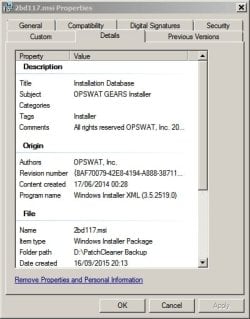
Okay so this intrigued me. Having a recent system image backup available I ran Patch Cleaner. Here are the results.

One orphaned msi installer detected and moved. Sure enough - after inspection it turns out that it can be deleted. It's the installer for Opswat Gears - a program that is no longer installed. It's the only detection and doesn't free up much space.

PatchCleaner Backup.jpg

PatchCleaner Backup 2.jpg
 

My Computer

Computer type
Laptop
Computer Manufacturer/Model Number
ASUS
OS
Microsoft Windows 7 Home Premium 64-bit 7601 Multiprocessor Free Service Pack 1
CPU
AMD C-60 APU with Radeon(tm) HD Graphics
Motherboard
ASUSTeK COMPUTER INC. X501U
Memory
4.00 GB
Graphics Card(s)
AMD Radeon HD 6290 Graphics
Sound Card
(1) AMD High Definition Audio Device (2) Realtek High Defi
Screen Resolution
1366 x 768 x 32 bits (4294967296 colors) @ 60 Hz
Hard Drives
Hitachi HTS545050A7E380 SATA Disk Device
Antivirus
Comodo CIS & FW, SecureAplus App Whitelisting, Threatfire
Browser
Cyberfox 64bit, Opera 64bit, Airfox
Other Info
Spy-The-Spy, HitmanPro.Alert, Norton Connect Safe, MJRegWatcher, BitDefender TrafficLight, Voodoo Shield, Zemana AntiMalware

My Computer

Computer type
Laptop
Computer Manufacturer/Model Number
Employer provided Dell Latitude
OS
W7 Pro SP1 64bit
CPU
i7
Memory
8GB
Graphics Card(s)
Intel HD Graphics
Hard Drives
crappy SSD
Antivirus
Employer mandated Symantec Endpoint Protection
Browser
Pale Moon 64bit, IE11 64bit & Chrome 64bit
Here I am again, Mr. Simple.

I use the Windows 7 built in disk cleaner or the extended.
Anything in WINSXS that it doesn't remove I leave alone.
Windows 7 knows what it does or does not want to save.

Any thing to do with WINSXS that is messed up could take days to repair.
 

My Computer

Computer type
PC/Desktop
Computer Manufacturer/Model Number
Home made Desktop
OS
Windows 10 Pro. 64/ version 1709 Windows 7 Pro/64
CPU
Intel i7-6800K @ 4.3
Motherboard
ASUS X-99 Deluxe II
Memory
Corsair Platinum 16 gig @2400
Graphics Card(s)
EVGA GTX 1070 OC
Monitor(s) Displays
Asus 27" LED LCD/VE278Q
Screen Resolution
1920-1080 or 1280-720 HDMI
Hard Drives
INTEL SSD 730-240 Gb Sata 3.0/
PSU
EVGA Platium 1200W
Case
Phanteks Luxe Tempered Glass 8 fans/ one radiator
Cooling
XSPC/ Water Cooled CPU
Keyboard
Das 4 Professional
Mouse
Logitech M705/MX Anywhere 2-S
Internet Speed
100 mbits
Antivirus
Microsoft Security Essentials/ Malwarebytes Premium 3.0/ SAS
Browser
I.E. 11 default/Firefox/ ISP Time Warner Cable/Spectrum
Other Info
LG BluRay Burner/
Sound system-KLipsch-THX/
Icy Dock ssd Hot Swap bays.
Microsoft's Disk Cleanup tool

It's the only detection and doesn't free up much space.
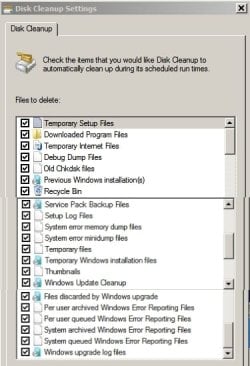
Have you used Microsoft's Disk Cleanup tool in the past?

Yes I've used it with these settings:

Disk Cleanup Settings.jpg

I'm pretty sure those settings clean up WINSXS as intended by Microsoft. Running with those settings does seem to miss that orphaned file.

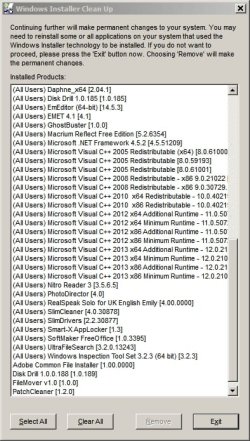
Also I use Microsoft's own Windows Installer Cleanup on rare occasions. Interestingly, Patch Cleaner makes it's way onto the list:

Windows Installer Clean Up.jpg
 

My Computer

Computer type
Laptop
Computer Manufacturer/Model Number
ASUS
OS
Microsoft Windows 7 Home Premium 64-bit 7601 Multiprocessor Free Service Pack 1
CPU
AMD C-60 APU with Radeon(tm) HD Graphics
Motherboard
ASUSTeK COMPUTER INC. X501U
Memory
4.00 GB
Graphics Card(s)
AMD Radeon HD 6290 Graphics
Sound Card
(1) AMD High Definition Audio Device (2) Realtek High Defi
Screen Resolution
1366 x 768 x 32 bits (4294967296 colors) @ 60 Hz
Hard Drives
Hitachi HTS545050A7E380 SATA Disk Device
Antivirus
Comodo CIS & FW, SecureAplus App Whitelisting, Threatfire
Browser
Cyberfox 64bit, Opera 64bit, Airfox
Other Info
Spy-The-Spy, HitmanPro.Alert, Norton Connect Safe, MJRegWatcher, BitDefender TrafficLight, Voodoo Shield, Zemana AntiMalware
PatchCleaner clean up results

It's the only detection and doesn't free up much space.

On a clean machine there is not much to clean up so yes, it doesn't clean up much space :p

On some of my development computers, the best results I got was 15GB.

After a recent set of Microsoft windows updates, again on a computer I use for software development, it found and cleaned up just over 1GB, (this was a computer that I had cleaned a few months earlier).

Right now on my Laptop with Windows 10 - 1.2GB

PatchCleaner_Windows10.png

Check out a few of the happy users who have used it and provided feedback on other sites, who are getting between 10 and 15 Gb reduction in the installer directory size.

https://www.raymond.cc/blog/safely-delete-unused-msi-and-mst-files-from-windows-installer-folder/

How can I to free up drive space from the Windows installer folder without killing Windows 8.1? - Super User

So I would say give it a run on a computer with a large c:\windows\Installer directory, you might get better results. Also try running it after one of those large blocks of windows updates.

Cheers
 

My Computer

Computer type
Laptop
Computer Manufacturer/Model Number
Sony VIAO Pro 13
OS
Windows 10 64-bit
CPU
Core i7
Check out a few of the happy users who have used it and provided feedback on other sites, who are getting between 10 and 15 Gb reduction in the installer directory size.

https://www.raymond.cc/blog/safely-delete-unused-msi-and-mst-files-from-windows-installer-folder/

How can I to free up drive space from the Windows installer folder without killing Windows 8.1? - Super User

So I would say give it a run on a computer with a large c:\windows\Installer directory, you might get better results. Also try running it after one of those large blocks of windows updates.

Cheers

I will do as you say and try running Patch Cleaner after next months batch of Windows Updates. All I was really saying in my earlier post was that it didn't find much to remove but obviously that may not be the case for other users. It certainly didn't do any harm! I think the concern shown by other members here is what would happen if it removed the installer (msi) for a currently installed program but there were no such issues when running it on my machine.
 

My Computer

Computer type
Laptop
Computer Manufacturer/Model Number
ASUS
OS
Microsoft Windows 7 Home Premium 64-bit 7601 Multiprocessor Free Service Pack 1
CPU
AMD C-60 APU with Radeon(tm) HD Graphics
Motherboard
ASUSTeK COMPUTER INC. X501U
Memory
4.00 GB
Graphics Card(s)
AMD Radeon HD 6290 Graphics
Sound Card
(1) AMD High Definition Audio Device (2) Realtek High Defi
Screen Resolution
1366 x 768 x 32 bits (4294967296 colors) @ 60 Hz
Hard Drives
Hitachi HTS545050A7E380 SATA Disk Device
Antivirus
Comodo CIS & FW, SecureAplus App Whitelisting, Threatfire
Browser
Cyberfox 64bit, Opera 64bit, Airfox
Other Info
Spy-The-Spy, HitmanPro.Alert, Norton Connect Safe, MJRegWatcher, BitDefender TrafficLight, Voodoo Shield, Zemana AntiMalware
I have used PatchCleaner with fantastic results. It is an excellent utility! Remember, as it is suggested when you use the application, deleting (as with anything done on a PC, is not always the best thing to do) is one option, but MOVE is the ideal choice of the two. Browse and relocate the "move" location to a specific backup hard drive or partition perhaps. That way, if anything should go wrong, you can always simply return the file in question to the original location and done! I have never had any program/application pop-up and ask for any of these lingering files in approximately 6 months.

Thanks jcrawfor74 for your fantastic utility!
 
Last edited:

My Computer

Computer type
PC/Desktop
Computer Manufacturer/Model Number
Custom
OS
Windows 8.1 Pro 64-bit
CPU
Intel Core i7 3770K @ 3.50GHz
Motherboard
ASUSTeK COMPUTER INC. P8Z77-V PRO (LGA1155)
Memory
16.0GB Dual-Channel DDR3 @ 799MHz (10-10-10-30)
Graphics Card(s)
EVGA NVIDIA GeForce GTX 780, 6144MB GDDR5
Sound Card
Sound Blaster Z
Monitor(s) Displays
ASUS VE278
Screen Resolution
1920x1080 @ 60Hz
Hard Drives
1) 250GB Samsung 850 EVO (SSD)
2) 2TB Seagate (SATA)
3) 2TB Seagate (SATA)
4) 4TB Seagate (EXTERNAL)
PSU
OCZ ZX 1000W
Case
Antec 1100
Cooling
Standard with Antec 1100
Keyboard
Microsoft Wireless Natural Multimedia
Mouse
Razer Death Adder Chroma
Internet Speed
60 Mbps
Antivirus
Windows Defender, Malwarebytes Anti-Malware, Anti-Exploit
Browser
Chrome
Hi, I am the guy who wrote PatchCleaner. I first released back in June 2015 and after 12,000+ downloads I have not had a single person complain that it has broken their computer.

.................


Hi jcrawfor74!

My Installer is 24G at present , so I desperately neeed to restore some of that space. I followed your link and downloaded the file, notwithstanding Eset's violent protests. What I'm left with is a "PatchCleaner_1.4.2.0[1]" file without an extension!:huh: Either possibly Eset is trying to be "helpfull", or it was designed this way and I'm supposed to add the extension myself, in which case I would like to know what extension to use.

I would be eternaly grateful for your help (or anyone else's for that matter) to get me some "breathing space" on my - way too small - HD.
 

My Computer

Computer type
PC/Desktop
Computer Manufacturer/Model Number
unknown
OS
Windows7Ultimate x64
Hi, I am the guy who wrote PatchCleaner. I first released back in June 2015 and after 12,000+ downloads I have not had a single person complain that it has broken their computer.

.................


Hi jcrawfor74!

My Installer is 24G at present , so I desperately neeed to restore some of that space. I followed your link and downloaded the file, notwithstanding Eset's violent protests. What I'm left with is a "PatchCleaner_1.4.2.0[1]" file without an extension!:huh: Either possibly Eset is trying to be "helpfull", or it was designed this way and I'm supposed to add the extension myself, in which case I would like to know what extension to use.

I would be eternaly grateful for your help (or anyone else's for that matter) to get me some "breathing space" on my - way too small - HD.

It is an .exe,

2016-07-11_20h58_16.png

You can also unpack it with 7-zip and run the .msi inside,

Support
Installation Issues
Some people have encountered some installaton challenges when attempting to install. If you hit problems then I suggest you try the following.

The installer that you download from the website is a self extracting 7z archive created as per my blog post (How to make a self extracting archive runs your setup.exe, 7zip -sfx).

So you can actually open the .exe file with 7Zip and extract the files (setup.exe and PatchCleaner.msi).

I would then try running the PatchCleaner.msi file directly.

PatchCleaner - safely clean your windows installer directory | homedev - software development out of the box
 

My Computer

Computer type
PC/Desktop
Computer Manufacturer/Model Number
Self Built
OS
Win 10 Pro x64
CPU
Intel I5-2500K @3.3GHz
Motherboard
Asrock P67 Extreme4
Memory
16GB G.Skill Ripjaws X (4x4GB)
Graphics Card(s)
EVGA GeForce 750 Ti SC 2GB
Sound Card
ASUS Xonar DG 5.1 Channels 24-bit 96KHz PCI Interface Sound
Monitor(s) Displays
auria eq2367
Screen Resolution
1920 x 1080
Hard Drives
250GB Samsung 850 EVO SSD
1TB WD Blue
1TB Hitachi
PSU
SeaSonic X 650W 80 Plus Gold
Case
Corsair Obsidian 750D
Cooling
Corsair H60, Three 140mm case fans
Keyboard
Logitech Wireless Keyboard K520
Mouse
Logitech Wireless Mouse M310
Internet Speed
Wave Broadband ~ 100 dn 5 up
Antivirus
Windows Defender, Malwarebytes Premium
Browser
Edge, IE11, Chrome
Other Info
Laptop specs: HP g7-1365dx /
CPU: AMD A6-3420M APU with Radeon(tm) HD Graphics /
RAM: Crucial 8Gb (2x4Gb) /
SSD: Crucial M4-CT128M4SSD2 ATA Device/ FW 000F /
GFX: AMD Radeon HD 6520G /
OS: Windows 10 Pro x64
It is an .exe,

View attachment 389378

You can also unpack it with 7-zip and run the .msi inside,

Support
Installation Issues
Some people have encountered some installaton challenges when attempting to install. If you hit problems then I suggest you try the following.

The installer that you download from the website is a self extracting 7z archive created as per my blog post (How to make a self extracting archive runs your setup.exe, 7zip -sfx).

So you can actually open the .exe file with 7Zip and extract the files (setup.exe and PatchCleaner.msi).

I would then try running the PatchCleaner.msi file directly.

PatchCleaner - safely clean your windows installer directory | homedev - software development out of the box

@ derekimo:
Thanks for your very quick reply! Also thanks for a look into your "kitchen", but I'm afraid that's waaay over my head... I'm a 68 year old grandma:geek: who's trying to keep up with the savy crowd LOL. So please take my hand here and show me the way.

I don't have 7zip, would rar do the trick? And am I to use it on the file without extension that I already downloaded, or should I download the one you posted above and unzip that?

Am I correct in assuming that to instal I don't use the .exe, but rather run the .msi instead?

I don't mean to sound dense, but I've never encountered this method before.

Thank you for your patience :)
 

My Computer

Computer type
PC/Desktop
Computer Manufacturer/Model Number
unknown
OS
Windows7Ultimate x64
You're welcome, I was just pointing out the options for you but I will unpack it for you so you can just use the .msi file.

View attachment PatchCleaner.zip

I'm sure you can also do it with WinRAR, I just don't have it installed but they are quite similar.

Regarding the install, yes, I would just unzip the file above and run the .msi file as mentioned in the part I quoted from the support.

There is also a setup.exe in the unpacked download, I would just go with the .msi file though.

Hope that doesn't confuse you and clears things up. :)
 

My Computer

Computer type
PC/Desktop
Computer Manufacturer/Model Number
Self Built
OS
Win 10 Pro x64
CPU
Intel I5-2500K @3.3GHz
Motherboard
Asrock P67 Extreme4
Memory
16GB G.Skill Ripjaws X (4x4GB)
Graphics Card(s)
EVGA GeForce 750 Ti SC 2GB
Sound Card
ASUS Xonar DG 5.1 Channels 24-bit 96KHz PCI Interface Sound
Monitor(s) Displays
auria eq2367
Screen Resolution
1920 x 1080
Hard Drives
250GB Samsung 850 EVO SSD
1TB WD Blue
1TB Hitachi
PSU
SeaSonic X 650W 80 Plus Gold
Case
Corsair Obsidian 750D
Cooling
Corsair H60, Three 140mm case fans
Keyboard
Logitech Wireless Keyboard K520
Mouse
Logitech Wireless Mouse M310
Internet Speed
Wave Broadband ~ 100 dn 5 up
Antivirus
Windows Defender, Malwarebytes Premium
Browser
Edge, IE11, Chrome
Other Info
Laptop specs: HP g7-1365dx /
CPU: AMD A6-3420M APU with Radeon(tm) HD Graphics /
RAM: Crucial 8Gb (2x4Gb) /
SSD: Crucial M4-CT128M4SSD2 ATA Device/ FW 000F /
GFX: AMD Radeon HD 6520G /
OS: Windows 10 Pro x64
You're welcome, I was just pointing out the options for you but I will unpack it for you so you can just use the .msi file.

View attachment 389435

I'm sure you can also do it with WinRAR, I just don't have it installed but they are quite similar.

Regarding the install, yes, I would just unzip the file above and run the .msi file as mentioned in the part I quoted from the support.

There is also a setup.exe in the unpacked download, I would just go with the .msi file though.

Hope that doesn't confuse you and clears things up. :)

Poor PatchCleaner nearly burst a vein collecting all my orphaned files, but I'm now down from 27Gb to 7Gb!! I'll have to let it recuperate some before I use it again LOL.

Many many thanks to jcrawford and yourself for all your help. If I ever encounter probs with W7 again, I'll know where to come for help. Great board and wonderful people!
 

My Computer

Computer type
PC/Desktop
Computer Manufacturer/Model Number
unknown
OS
Windows7Ultimate x64
Back
Top