PC crash with memory exeption error message

arjfca

New member
Member
VIP
Local time
3:03 PM
Messages
363
Hello

I had posted a similar question in the BSOD section, but it seem that it is more appropriate to put it in this section

Lately, I have a lot of problems with my PC. Sometime I got a blue screen, sometime, some software stop working, sometime Google Chrome web page do crash. I can't say if I got one or many problems

To this post, I added the dump report

Any help appreciated

Martin
 

Attachments

My Computer

Computer Manufacturer/Model Number
Home made
OS
windows 7 Pro x64
CPU
Intel I5 3450
Motherboard
Gefabye B75M-D3H
Memory
8 GB DDR3 dual chanel
Graphics Card(s)
Asus Radeon 4870 Nevedi Gforce GTX 500Ti
Sound Card
None
Monitor(s) Displays
4 L206W, Synckmaster, Acer X203W, X223W
Screen Resolution
1680 X 1050
Hard Drives
SSD 120G from Intel

640 GB
PSU
Cooler Master 600W
Case
Antec
Cooling
Regular fan
Keyboard
Microsoft Multimedia Bilingual
Mouse
Microsoft Optical 3000

arffcamate it doesn't help much when the event logs are in French (I think) and onething I do notice is you have two different graphics cards in the dxdiagreadout and in your system specs there is only the GeForce 550 Ti listed ??

So how many cards have you onboard? because it would appear to even me and I am not a graphics expert but surely the two would be at odds with each other. That is unless you are driving two monitors at the same time. Which also prompts me to ask why is the monitor resolution so low??
 

My Computer

Computer type
PC/Desktop
Computer Manufacturer/Model Number
Own build (new) Desk1 / Asus ROG Win 7 / Desk2 1st build
OS
Desk1 7 Home Prem / Desk2 10 Pro / Main lap Asus ROG 10 Pro 2 laptop Toshiba 7 Pro Asus P2520 7 & 10
CPU
Desk1 i5 3750K / Laptop i7 GTX 860M / Desk2 i5 2500
Motherboard
Desk1 Asus P877-V / Desk2 Gigabyte H67 UD3H / Laptop ?
Memory
Desk1 8GB (1866) / Desk2 16GB (1333) / Laptop 8Gb DDR3
Graphics Card(s)
Desk 1& 2NVidia GTX 650 & Laptops on board Intel
Sound Card
Desk 1 & 2 -XONAR DG Realtek High Def audio Laptop
Monitor(s) Displays
Desk 1 Benq HD 2450 / Desk2 Philips 24" / Laptop 17.5"
Screen Resolution
1920x1080 D1 & D2 & Laptop 1
Hard Drives
Desk1 Samsung 120GB 830 SSD
Asus ROG 256GB 850 Pro SSD
Desk2 Samsung 840 256 SSD
Toshiba 120GB EVO
PSU
Desk 1 Corsair HX 1050/ Laptop ? / Desk 2 Corsair HX 650
Case
Desk 1 Cooler HAF XM ? Toshiba laptop / Desk2 Coolermaster
Cooling
Fans on all Desk1 -2 Desk2 - all Coolermasters 5 Laptop ?
Keyboard
Desk 1 MS Sidewinder X6 Desk 2 MS Sidewinder X 4
Mouse
Desk 1&2 - Gigabyte MS 900 gamer - laptop - Logitec wireless
Internet Speed
ADSL2+
Other Info
One other Desktop (tester) and spare Toshba laptop both with SSD's
Running Kaspersky 2016 ISS on all machines config'd identically
Logitec audio stereo systems on each machine (x3)
Canon MG5250MFC
Router/modem TP-Link running WPA2SK

arffcamate it doesn't help much when the event logs are in French (I think) and onething I do notice is you have two different graphics cards in the dxdiagreadout and in your system specs there is only the GeForce 550 Ti listed ??

So how many cards have you onboard? because it would appear to even me and I am not a graphics expert but surely the two would be at odds with each other. That is unless you are driving two monitors at the same time. Which also prompts me to ask why is the monitor resolution so low??

Hello IctLol / Thanks for your input

My system use two graphics cards and drive four monitors ( 2 per cards). Resolution appear normal on my screen. Resolution set to 1680 X 1050 for each in the configuration. Last video card installed more than two years ago. System was ok back then. Problem did start about three or four months ago.

Will see if I can change the report to be in English

Martin
 

My Computer

Computer Manufacturer/Model Number
Home made
OS
windows 7 Pro x64
CPU
Intel I5 3450
Motherboard
Gefabye B75M-D3H
Memory
8 GB DDR3 dual chanel
Graphics Card(s)
Asus Radeon 4870 Nevedi Gforce GTX 500Ti
Sound Card
None
Monitor(s) Displays
4 L206W, Synckmaster, Acer X203W, X223W
Screen Resolution
1680 X 1050
Hard Drives
SSD 120G from Intel

640 GB
PSU
Cooler Master 600W
Case
Antec
Cooling
Regular fan
Keyboard
Microsoft Multimedia Bilingual
Mouse
Microsoft Optical 3000
Martin mate I would really like to know what the temps are on those cards as it seems that the problem has started recently.
I am also not sure how wise it is to run two different cards together as the memory bandwidth and the memory clocks are different speeds.

Also if you look one can support up to 4 monitors and the other one says multiple ones
GeForce GTX 550 Ti | Specifications | GeForce
Specifications | GeForce

open these links on adjoining tabs and you can flick from one to the other to see what I mean mind you it is still the same driver which by the way has only been released recently - 344.11. Having said that I stand to be corrected of course but I think it would depend on the cards are driving the same pair of monitors.
 

My Computer

Computer type
PC/Desktop
Computer Manufacturer/Model Number
Own build (new) Desk1 / Asus ROG Win 7 / Desk2 1st build
OS
Desk1 7 Home Prem / Desk2 10 Pro / Main lap Asus ROG 10 Pro 2 laptop Toshiba 7 Pro Asus P2520 7 & 10
CPU
Desk1 i5 3750K / Laptop i7 GTX 860M / Desk2 i5 2500
Motherboard
Desk1 Asus P877-V / Desk2 Gigabyte H67 UD3H / Laptop ?
Memory
Desk1 8GB (1866) / Desk2 16GB (1333) / Laptop 8Gb DDR3
Graphics Card(s)
Desk 1& 2NVidia GTX 650 & Laptops on board Intel
Sound Card
Desk 1 & 2 -XONAR DG Realtek High Def audio Laptop
Monitor(s) Displays
Desk 1 Benq HD 2450 / Desk2 Philips 24" / Laptop 17.5"
Screen Resolution
1920x1080 D1 & D2 & Laptop 1
Hard Drives
Desk1 Samsung 120GB 830 SSD
Asus ROG 256GB 850 Pro SSD
Desk2 Samsung 840 256 SSD
Toshiba 120GB EVO
PSU
Desk 1 Corsair HX 1050/ Laptop ? / Desk 2 Corsair HX 650
Case
Desk 1 Cooler HAF XM ? Toshiba laptop / Desk2 Coolermaster
Cooling
Fans on all Desk1 -2 Desk2 - all Coolermasters 5 Laptop ?
Keyboard
Desk 1 MS Sidewinder X6 Desk 2 MS Sidewinder X 4
Mouse
Desk 1&2 - Gigabyte MS 900 gamer - laptop - Logitec wireless
Internet Speed
ADSL2+
Other Info
One other Desktop (tester) and spare Toshba laptop both with SSD's
Running Kaspersky 2016 ISS on all machines config'd identically
Logitec audio stereo systems on each machine (x3)
Canon MG5250MFC
Router/modem TP-Link running WPA2SK
IciT2Lol

Did look in the provided link, but to be honest,,, I'm lost

Did download the updated driver for Geforce, but driver won't install for the moment
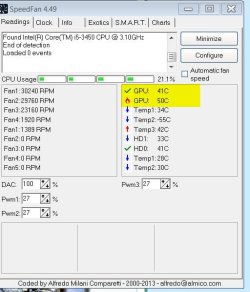
One of the gpu seem hotter that the other one


If I had to chose to keep one of the video card, witch one should I kept and look to buy a compatible one?

Will try to reboot to resolve the driver installation

Martin
 

Attachments

  • GPU Temp.jpg
    GPU Temp.jpg
    43.6 KB · Views: 8

My Computer

Computer Manufacturer/Model Number
Home made
OS
windows 7 Pro x64
CPU
Intel I5 3450
Motherboard
Gefabye B75M-D3H
Memory
8 GB DDR3 dual chanel
Graphics Card(s)
Asus Radeon 4870 Nevedi Gforce GTX 500Ti
Sound Card
None
Monitor(s) Displays
4 L206W, Synckmaster, Acer X203W, X223W
Screen Resolution
1680 X 1050
Hard Drives
SSD 120G from Intel

640 GB
PSU
Cooler Master 600W
Case
Antec
Cooling
Regular fan
Keyboard
Microsoft Multimedia Bilingual
Mouse
Microsoft Optical 3000
It does appear from your graphic that the second card listed is running a bit on the warm side; so you might want to check to see if that one has a fan on it that the fan is working. Also clean out any dust and dirt on it so it can "breathe". Also; i think Icit is right. Using too many cards may eat up your available gpu memory
 

My Computer

Computer type
PC/Desktop
Computer Manufacturer/Model Number
custom built
OS
Windows 7 ultimate 64-bit
CPU
Intel I7 2600K 3.4ghz
Motherboard
Asus Evo P8P67
Memory
Corsair 16gb ddr3 1600mhz
Graphics Card(s)
Nvidia Geforce gt 430
Sound Card
Sound Blaster Titanium x-fi pci express
Monitor(s) Displays
Dell E198WFP
Hard Drives
1 western digital 2TB drive.
PSU
Antec 1200 watt
Case
Inwin Dragon Rider
Cooling
6 case supplied cooling fans
Keyboard
logitech mk700
Mouse
logitech m705
Internet Speed
25-50mbps download; 10mbps upload(i think)
Antivirus
avg free 2014
Browser
mozilla firefox
Other Info
Also have a pretty bad speaker setup which is a klipsch promedia 5.1 surround speaker setup with huge subwoofer and lg blu ray player/writer. Also a hp officejet pro 8600 plus wireless all in one and a logitech s7500 webcam.
I have got to confer with Matts these devices are prone to a lot of crud collecting on them and being a high heat source component such crud / dust will simply heighten the heat build up.

Also going further on Matts comments just how old are these GPU's - could be the fan bearings are now wearing beyond adequate operation. I would certainly replace the thermal compound on each card. Not a hard job and as long as you clean it properly and DO NOT overtighten the fixings when replacing the heatsinks it should make some difference and makes for cleaning the fans easier too. .

Personally I would not use two different GPU's but that is just me. It sort of resembles using different brands of RAM that is another example of conflicting problems.

PS Use these if available they are the best and do not overdo the compound
http://www.arcticsilver.com/arcticlean.htm < you can use some form of alcohol but it does not come clos to this stuff
http://www.arcticsilver.com/as5.htm
 

My Computer

Computer type
PC/Desktop
Computer Manufacturer/Model Number
Own build (new) Desk1 / Asus ROG Win 7 / Desk2 1st build
OS
Desk1 7 Home Prem / Desk2 10 Pro / Main lap Asus ROG 10 Pro 2 laptop Toshiba 7 Pro Asus P2520 7 & 10
CPU
Desk1 i5 3750K / Laptop i7 GTX 860M / Desk2 i5 2500
Motherboard
Desk1 Asus P877-V / Desk2 Gigabyte H67 UD3H / Laptop ?
Memory
Desk1 8GB (1866) / Desk2 16GB (1333) / Laptop 8Gb DDR3
Graphics Card(s)
Desk 1& 2NVidia GTX 650 & Laptops on board Intel
Sound Card
Desk 1 & 2 -XONAR DG Realtek High Def audio Laptop
Monitor(s) Displays
Desk 1 Benq HD 2450 / Desk2 Philips 24" / Laptop 17.5"
Screen Resolution
1920x1080 D1 & D2 & Laptop 1
Hard Drives
Desk1 Samsung 120GB 830 SSD
Asus ROG 256GB 850 Pro SSD
Desk2 Samsung 840 256 SSD
Toshiba 120GB EVO
PSU
Desk 1 Corsair HX 1050/ Laptop ? / Desk 2 Corsair HX 650
Case
Desk 1 Cooler HAF XM ? Toshiba laptop / Desk2 Coolermaster
Cooling
Fans on all Desk1 -2 Desk2 - all Coolermasters 5 Laptop ?
Keyboard
Desk 1 MS Sidewinder X6 Desk 2 MS Sidewinder X 4
Mouse
Desk 1&2 - Gigabyte MS 900 gamer - laptop - Logitec wireless
Internet Speed
ADSL2+
Other Info
One other Desktop (tester) and spare Toshba laptop both with SSD's
Running Kaspersky 2016 ISS on all machines config'd identically
Logitec audio stereo systems on each machine (x3)
Canon MG5250MFC
Router/modem TP-Link running WPA2SK
Thanks IcitsLol

You sincerely merit your reputation

The PC is use to display charts. I did remark that when I increase resolution and ask to get a deeper historical data, GPU's are getting hotter. Problem do seem's to occurred more frequently when charts are over loaded with data and other fancy thing on them

These card are not to old. But I did not bought the last technology. I did spray air in them a month ago, but problem persist.

- I will look for opportunity to get two cards of the same type
- I will look to add an additional fan to remove heat from them
- The hotter card is below the colder one, I will swap them
- I will look to add compound to GPU

But a question remain, Is a faulty GPU could cause a PC crash , Blue screen or memory error reported by Windows?

Martin
 

My Computer

Computer Manufacturer/Model Number
Home made
OS
windows 7 Pro x64
CPU
Intel I5 3450
Motherboard
Gefabye B75M-D3H
Memory
8 GB DDR3 dual chanel
Graphics Card(s)
Asus Radeon 4870 Nevedi Gforce GTX 500Ti
Sound Card
None
Monitor(s) Displays
4 L206W, Synckmaster, Acer X203W, X223W
Screen Resolution
1680 X 1050
Hard Drives
SSD 120G from Intel

640 GB
PSU
Cooler Master 600W
Case
Antec
Cooling
Regular fan
Keyboard
Microsoft Multimedia Bilingual
Mouse
Microsoft Optical 3000
Martin now mate what you might have done when you sprayed the fans particularly with air you may have damaged the bearings in them as the are not designed to spin at speeds higher than their normal speed limits. I have remarked on many occasions throughout the forum that this is a very risky thing to do with compressed air. Usually I tell this to folks who are cleaning out a laptop cooling system. you would appreciate that having wrecked the bearing by overheating it or throwing it out of alignment. Plus if the assembly is not removed before you do that the crud can be blown further into the device's cooling system.

Anyway I think what you propose is probably the best idea and please let us know how things go.

by the way thanks you for your very kind words but it is something that we all do in this forum as a matter of choice:) There are far cleverer members than I in here and I only do his because I do have a real enthusiasm for electronics.
 

My Computer

Computer type
PC/Desktop
Computer Manufacturer/Model Number
Own build (new) Desk1 / Asus ROG Win 7 / Desk2 1st build
OS
Desk1 7 Home Prem / Desk2 10 Pro / Main lap Asus ROG 10 Pro 2 laptop Toshiba 7 Pro Asus P2520 7 & 10
CPU
Desk1 i5 3750K / Laptop i7 GTX 860M / Desk2 i5 2500
Motherboard
Desk1 Asus P877-V / Desk2 Gigabyte H67 UD3H / Laptop ?
Memory
Desk1 8GB (1866) / Desk2 16GB (1333) / Laptop 8Gb DDR3
Graphics Card(s)
Desk 1& 2NVidia GTX 650 & Laptops on board Intel
Sound Card
Desk 1 & 2 -XONAR DG Realtek High Def audio Laptop
Monitor(s) Displays
Desk 1 Benq HD 2450 / Desk2 Philips 24" / Laptop 17.5"
Screen Resolution
1920x1080 D1 & D2 & Laptop 1
Hard Drives
Desk1 Samsung 120GB 830 SSD
Asus ROG 256GB 850 Pro SSD
Desk2 Samsung 840 256 SSD
Toshiba 120GB EVO
PSU
Desk 1 Corsair HX 1050/ Laptop ? / Desk 2 Corsair HX 650
Case
Desk 1 Cooler HAF XM ? Toshiba laptop / Desk2 Coolermaster
Cooling
Fans on all Desk1 -2 Desk2 - all Coolermasters 5 Laptop ?
Keyboard
Desk 1 MS Sidewinder X6 Desk 2 MS Sidewinder X 4
Mouse
Desk 1&2 - Gigabyte MS 900 gamer - laptop - Logitec wireless
Internet Speed
ADSL2+
Other Info
One other Desktop (tester) and spare Toshba laptop both with SSD's
Running Kaspersky 2016 ISS on all machines config'd identically
Logitec audio stereo systems on each machine (x3)
Canon MG5250MFC
Router/modem TP-Link running WPA2SK
Back
Top