PC freezes and produces buzzing sounds

santori

New member
Local time
11:27 AM
Messages
32
Hello,

Over the last several months, I've been experiencing my PC hard locking and producing a buzzing sound through my headphones. The only 'solution' at the moment is to manually reset my tower to get back to the desktop. It's been very difficult to isolate how this begins; I've had this occur when I have 1-2 monitors, whilst doing work/PC on idle, watching a video on youtube/streaming, etc.

I took the advice in a previous thread (http://www.sevenforums.com/tutorials/174459-dump-files-configure-windows-create-bsod-6.html) by going through msconfig and doing a clean start-up on Windows but I still experience the lock-ups. However, the only program I did not disable upon start-up was my anti-virus program (Avira Internet Security) and the problem reared its head last night. I've never had a problem with this on my previous machine so I doubt that this program would be a problem..?

My system specs are as follows:

Windows 7 Professional 64-bit
Intel i5 3750K
ASUS Z778LK-V mobo
1 TB WD Caviar Black
8 GB Ram (I believe this is Corsair Hyper X, is there anyway I can check this without pulling out the sticks?)
ASUS GTX660 2GB (331.65 older drivers, was experiencing intermittent black outs on my screen)
Corsair HX650W PSU

I was wondering if there if anyone had any suggestions on whether this could be software vs. hardware based, since I haven't really changed the programs I've used since the same majority of programs with my previous rig. Would there be any benchmarks that could be recommended to test my computer? I've tried swapping out my GPU but am willing to 'stress test' it if needed.

Any help would be greatly appreciated.

Thanks
 

My Computer My Computer

At a glance

Windows 7 64 bitIntel(R) Core(TM) i5-3570K CPU @ 3.40GHzTotal memory: 8.00 GB, Usable: 7.94 GBASUS Nvidia GeForce GTX 660 (I believe 2GB)
Computer type
PC/Desktop
Computer Manufacturer/Model Number
Self-built/custom
OS
Windows 7 64 bit
CPU
Intel(R) Core(TM) i5-3570K CPU @ 3.40GHz
Motherboard
ASUSTeK COMPUTER INC. P8Z77-V LK
Memory
Total memory: 8.00 GB, Usable: 7.94 GB
Graphics Card(s)
ASUS Nvidia GeForce GTX 660 (I believe 2GB)
Sound Card
High Definition Audio Device, Realtek High Definition Audio
Monitor(s) Displays
LG L245WP
Screen Resolution
1900x1200
Hard Drives
Western Digital Black Caviar 1TB
PSU
Corsair HX650
Case
Fractal Design Define R4
Cooling
Factory cooling for CPU, no others
Keyboard
Coolmaster CM Storm Brown
Mouse
Steelseries Rival
Internet Speed
75 mbps download & 10 mbps upload (500ms ping)
Antivirus
Avira Internet Security
Browser
Firefox & Chrome
Other Info
BIOS Date: 02/01/13 11:41:08 Ver: 10.01
The stress test would probably be a good way to test the cpu. I would give that a shot. Also; since you said you have lock ups; I would test the ram using Memtest86+ using the following link to see if there is any issues with your ram possibly:

Memtest86+ - Advanced Memory Diagnostic Tool
 

My Computer My Computer

At a glance

Windows 7 ultimate 64-bitIntel I7 2600K 3.4ghzCorsair 16gb ddr3 1600mhzNvidia Geforce gt 430
Computer type
PC/Desktop
Computer Manufacturer/Model Number
custom built
OS
Windows 7 ultimate 64-bit
CPU
Intel I7 2600K 3.4ghz
Motherboard
Asus Evo P8P67
Memory
Corsair 16gb ddr3 1600mhz
Graphics Card(s)
Nvidia Geforce gt 430
Sound Card
Sound Blaster Titanium x-fi pci express
Monitor(s) Displays
Dell E198WFP
Hard Drives
1 western digital 2TB drive.
PSU
Antec 1200 watt
Case
Inwin Dragon Rider
Cooling
6 case supplied cooling fans
Keyboard
logitech mk700
Mouse
logitech m705
Internet Speed
25-50mbps download; 10mbps upload(i think)
Antivirus
avg free 2014
Browser
mozilla firefox
Other Info
Also have a pretty bad speaker setup which is a klipsch promedia 5.1 surround speaker setup with huge subwoofer and lg blu ray player/writer. Also a hp officejet pro 8600 plus wireless all in one and a logitech s7500 webcam.
Hi matts6887,

Thanks for responding. Which stress test are you referring to? Searching brings up several results, any recommendations?

First time doing any of these tests, but for Mem86+, do you have any suggestions for how many passes I should do for the RAM test? I have 8 GB of ram.

Thanks
 

My Computer My Computer

At a glance

Windows 7 64 bitIntel(R) Core(TM) i5-3570K CPU @ 3.40GHzTotal memory: 8.00 GB, Usable: 7.94 GBASUS Nvidia GeForce GTX 660 (I believe 2GB)
Computer type
PC/Desktop
Computer Manufacturer/Model Number
Self-built/custom
OS
Windows 7 64 bit
CPU
Intel(R) Core(TM) i5-3570K CPU @ 3.40GHz
Motherboard
ASUSTeK COMPUTER INC. P8Z77-V LK
Memory
Total memory: 8.00 GB, Usable: 7.94 GB
Graphics Card(s)
ASUS Nvidia GeForce GTX 660 (I believe 2GB)
Sound Card
High Definition Audio Device, Realtek High Definition Audio
Monitor(s) Displays
LG L245WP
Screen Resolution
1900x1200
Hard Drives
Western Digital Black Caviar 1TB
PSU
Corsair HX650
Case
Fractal Design Define R4
Cooling
Factory cooling for CPU, no others
Keyboard
Coolmaster CM Storm Brown
Mouse
Steelseries Rival
Internet Speed
75 mbps download & 10 mbps upload (500ms ping)
Antivirus
Avira Internet Security
Browser
Firefox & Chrome
Other Info
BIOS Date: 02/01/13 11:41:08 Ver: 10.01
matts6887 is off line at the present time.

A proper test should be a least 8 passes. It will take quite a while so don't get in a hurry.
If by chance the test finds bad memory before the 8 passes, stop the test and post back and let matts6887 know.
 

My Computer My Computer

At a glance

Windows 10 Pro. 64/ version 1709 Windows 7 Pr...Intel i7-6800K @ 4.3Corsair Platinum 16 gig @2400EVGA GTX 1070 OC
Computer type
PC/Desktop
Computer Manufacturer/Model Number
Home made Desktop
OS
Windows 10 Pro. 64/ version 1709 Windows 7 Pro/64
CPU
Intel i7-6800K @ 4.3
Motherboard
ASUS X-99 Deluxe II
Memory
Corsair Platinum 16 gig @2400
Graphics Card(s)
EVGA GTX 1070 OC
Monitor(s) Displays
Asus 27" LED LCD/VE278Q
Screen Resolution
1920-1080 or 1280-720 HDMI
Hard Drives
INTEL SSD 730-240 Gb Sata 3.0/
PSU
EVGA Platium 1200W
Case
Phanteks Luxe Tempered Glass 8 fans/ one radiator
Cooling
XSPC/ Water Cooled CPU
Keyboard
Das 4 Professional
Mouse
Logitech M705/MX Anywhere 2-S
Internet Speed
100 mbits
Antivirus
Microsoft Security Essentials/ Malwarebytes Premium 3.0/ SAS
Browser
I.E. 11 default/Firefox/ ISP Time Warner Cable/Spectrum
Other Info
LG BluRay Burner/
Sound system-KLipsch-THX/
Icy Dock ssd Hot Swap bays.
Managed to do a memtest86+ test overnight and completed 10 passes. I had no errors while keeping both sticks of memory connected (ddr3 x2, 8 GB) so I figured it'd be a waste of time to try the sticks individually.

What would be the next thing to test? Any help would be appreciated thanks.
 

My Computer My Computer

At a glance

Windows 7 64 bitIntel(R) Core(TM) i5-3570K CPU @ 3.40GHzTotal memory: 8.00 GB, Usable: 7.94 GBASUS Nvidia GeForce GTX 660 (I believe 2GB)
Computer type
PC/Desktop
Computer Manufacturer/Model Number
Self-built/custom
OS
Windows 7 64 bit
CPU
Intel(R) Core(TM) i5-3570K CPU @ 3.40GHz
Motherboard
ASUSTeK COMPUTER INC. P8Z77-V LK
Memory
Total memory: 8.00 GB, Usable: 7.94 GB
Graphics Card(s)
ASUS Nvidia GeForce GTX 660 (I believe 2GB)
Sound Card
High Definition Audio Device, Realtek High Definition Audio
Monitor(s) Displays
LG L245WP
Screen Resolution
1900x1200
Hard Drives
Western Digital Black Caviar 1TB
PSU
Corsair HX650
Case
Fractal Design Define R4
Cooling
Factory cooling for CPU, no others
Keyboard
Coolmaster CM Storm Brown
Mouse
Steelseries Rival
Internet Speed
75 mbps download & 10 mbps upload (500ms ping)
Antivirus
Avira Internet Security
Browser
Firefox & Chrome
Other Info
BIOS Date: 02/01/13 11:41:08 Ver: 10.01
Looking at the other thread lets make sure things are correct.

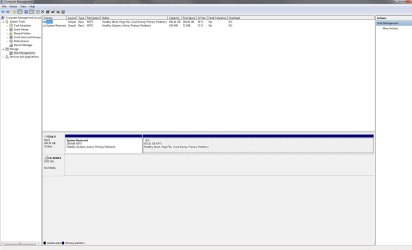
1. You must have 10% free space on the (C) drive and its better to have at least 20%. Windows 7 needs elbow room to work.

2. You need a check mark in that box as this picture indicates and it needs to stay there.
You are not going to out smart Windows 7 when it comes to how to use memory.

343628d1419094538-dump-files-configure-windows-create-bsod-capture.pnsystem-managed.png


--------------------------------------------------------------------------------------
The next things we need to know more about your system and we need this information so we can see it with your ever post.

These two tutorials will help you do that. Don't forget your security programs and power supply.

By Brink:
http://www.sevenforums.com/tutorials/180324-system-info-see-your-system-specs.html

By Kari:
http://www.sevenforums.com/tutorials/311593-speccy-publish-snapshot-your-system-specs.html

Next could you (exactly) complete this tutorial by Golden.

http://www.sevenforums.com/tutorials/274797-disk-management-post-screen-capture-image.html
Get back to us when this is completed.
 

My Computer My Computer

At a glance

Windows 10 Pro. 64/ version 1709 Windows 7 Pr...Intel i7-6800K @ 4.3Corsair Platinum 16 gig @2400EVGA GTX 1070 OC
Computer type
PC/Desktop
Computer Manufacturer/Model Number
Home made Desktop
OS
Windows 10 Pro. 64/ version 1709 Windows 7 Pro/64
CPU
Intel i7-6800K @ 4.3
Motherboard
ASUS X-99 Deluxe II
Memory
Corsair Platinum 16 gig @2400
Graphics Card(s)
EVGA GTX 1070 OC
Monitor(s) Displays
Asus 27" LED LCD/VE278Q
Screen Resolution
1920-1080 or 1280-720 HDMI
Hard Drives
INTEL SSD 730-240 Gb Sata 3.0/
PSU
EVGA Platium 1200W
Case
Phanteks Luxe Tempered Glass 8 fans/ one radiator
Cooling
XSPC/ Water Cooled CPU
Keyboard
Das 4 Professional
Mouse
Logitech M705/MX Anywhere 2-S
Internet Speed
100 mbits
Antivirus
Microsoft Security Essentials/ Malwarebytes Premium 3.0/ SAS
Browser
I.E. 11 default/Firefox/ ISP Time Warner Cable/Spectrum
Other Info
LG BluRay Burner/
Sound system-KLipsch-THX/
Icy Dock ssd Hot Swap bays.
Hello again,

I've set my computer specs on my profile so that should be available. Here's the speccy snapshot of system specs:

http://speccy.piriform.com/results/laUmATDyxnU7IjglclcU0XX

I've also included two screenshots, the first being of my virtual memory settings and the second being from my disk management.
 

Attachments

  • Virtual memory.jpg
    Virtual memory.jpg
    39.9 KB · Views: 5
  • ComputerMgmtscreen.jpg
    ComputerMgmtscreen.jpg
    98.7 KB · Views: 8

My Computer My Computer

At a glance

Windows 7 64 bitIntel(R) Core(TM) i5-3570K CPU @ 3.40GHzTotal memory: 8.00 GB, Usable: 7.94 GBASUS Nvidia GeForce GTX 660 (I believe 2GB)
Computer type
PC/Desktop
Computer Manufacturer/Model Number
Self-built/custom
OS
Windows 7 64 bit
CPU
Intel(R) Core(TM) i5-3570K CPU @ 3.40GHz
Motherboard
ASUSTeK COMPUTER INC. P8Z77-V LK
Memory
Total memory: 8.00 GB, Usable: 7.94 GB
Graphics Card(s)
ASUS Nvidia GeForce GTX 660 (I believe 2GB)
Sound Card
High Definition Audio Device, Realtek High Definition Audio
Monitor(s) Displays
LG L245WP
Screen Resolution
1900x1200
Hard Drives
Western Digital Black Caviar 1TB
PSU
Corsair HX650
Case
Fractal Design Define R4
Cooling
Factory cooling for CPU, no others
Keyboard
Coolmaster CM Storm Brown
Mouse
Steelseries Rival
Internet Speed
75 mbps download & 10 mbps upload (500ms ping)
Antivirus
Avira Internet Security
Browser
Firefox & Chrome
Other Info
BIOS Date: 02/01/13 11:41:08 Ver: 10.01

Things I noticed.

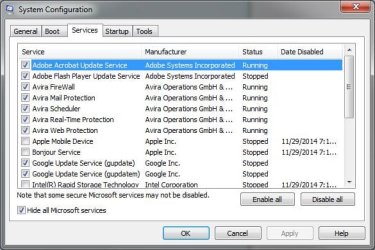
1. You have Avira security but yet you might have the Windows firewall and Avira firewall both active.
If Avira came with a firewall check and make sure you have the Windows 7 firewall (off). One firewall at a time. One anti virus program at a time.

2. You also have AVG Guard also running. I would not use that program.

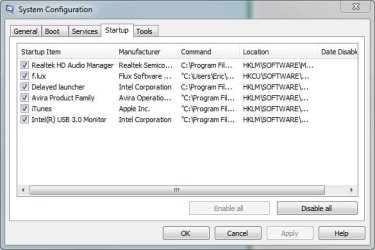
3. What is this Flux program? I see it running.

4. You have some auto updates is Scheduling. That is normally not a good thing.

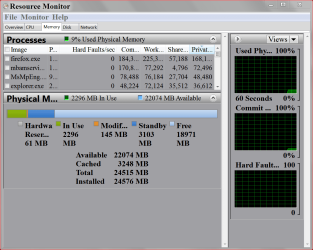
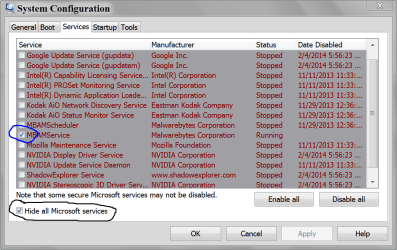
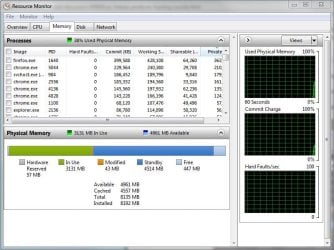
Please post these pictures from your system.

Resource Monitor Ram.PNG

MSCONFIG SERVICES.PNG

MSCONFIG STARTUP.PNG
 

My Computer My Computer

At a glance

Windows 10 Pro. 64/ version 1709 Windows 7 Pr...Intel i7-6800K @ 4.3Corsair Platinum 16 gig @2400EVGA GTX 1070 OC
Computer type
PC/Desktop
Computer Manufacturer/Model Number
Home made Desktop
OS
Windows 10 Pro. 64/ version 1709 Windows 7 Pro/64
CPU
Intel i7-6800K @ 4.3
Motherboard
ASUS X-99 Deluxe II
Memory
Corsair Platinum 16 gig @2400
Graphics Card(s)
EVGA GTX 1070 OC
Monitor(s) Displays
Asus 27" LED LCD/VE278Q
Screen Resolution
1920-1080 or 1280-720 HDMI
Hard Drives
INTEL SSD 730-240 Gb Sata 3.0/
PSU
EVGA Platium 1200W
Case
Phanteks Luxe Tempered Glass 8 fans/ one radiator
Cooling
XSPC/ Water Cooled CPU
Keyboard
Das 4 Professional
Mouse
Logitech M705/MX Anywhere 2-S
Internet Speed
100 mbits
Antivirus
Microsoft Security Essentials/ Malwarebytes Premium 3.0/ SAS
Browser
I.E. 11 default/Firefox/ ISP Time Warner Cable/Spectrum
Other Info
LG BluRay Burner/
Sound system-KLipsch-THX/
Icy Dock ssd Hot Swap bays.
Hello,

1. I've checked and my Windows Firewall is turned off.

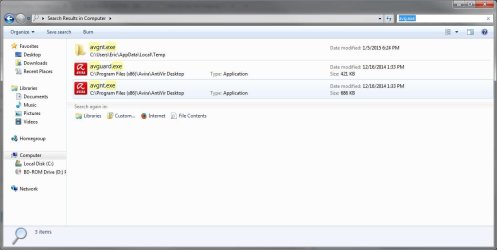
2. I've searched 'AVG Guard' via windows explorer on my 'Computer' and nothing shows up. The only way that I can currently see anything in relation to AVG Guard is searching for avg.exe. I've included a screenshot of what comes up in the search results and it seems to be related on Avira (anti-virus)?

3. Flux is a program that adjusts the brightness on your computer over the course of a day. It'll adjust the brightness as the day changes whcih depends on your location/sun's position.

4. Are you referring to windows update scheduling? If so/not, where do I find and change the ability to do auto-updates? I've never had a problem in the past with leaving them on (if we're talking about windows updates automatically), is there any specific reason why I should turn it off?

Also, I've included screenshots for the three following items you mentioned previously.

Thanks for the continued help.
 

Attachments

  • System Config (Startup).JPG
    System Config (Startup).JPG
    41 KB · Views: 61
  • System Config (Services).JPG
    System Config (Services).JPG
    54.5 KB · Views: 63
  • Resource Monitor.JPG
    Resource Monitor.JPG
    80.6 KB · Views: 1
  • avgexe.JPG
    avgexe.JPG
    61.1 KB · Views: 2

My Computer My Computer

At a glance

Windows 7 64 bitIntel(R) Core(TM) i5-3570K CPU @ 3.40GHzTotal memory: 8.00 GB, Usable: 7.94 GBASUS Nvidia GeForce GTX 660 (I believe 2GB)
Computer type
PC/Desktop
Computer Manufacturer/Model Number
Self-built/custom
OS
Windows 7 64 bit
CPU
Intel(R) Core(TM) i5-3570K CPU @ 3.40GHz
Motherboard
ASUSTeK COMPUTER INC. P8Z77-V LK
Memory
Total memory: 8.00 GB, Usable: 7.94 GB
Graphics Card(s)
ASUS Nvidia GeForce GTX 660 (I believe 2GB)
Sound Card
High Definition Audio Device, Realtek High Definition Audio
Monitor(s) Displays
LG L245WP
Screen Resolution
1900x1200
Hard Drives
Western Digital Black Caviar 1TB
PSU
Corsair HX650
Case
Fractal Design Define R4
Cooling
Factory cooling for CPU, no others
Keyboard
Coolmaster CM Storm Brown
Mouse
Steelseries Rival
Internet Speed
75 mbps download & 10 mbps upload (500ms ping)
Antivirus
Avira Internet Security
Browser
Firefox & Chrome
Other Info
BIOS Date: 02/01/13 11:41:08 Ver: 10.01
Hi,

Just a quick update but I've had a stint where this problem hasn't arised. However, in the last 3 days I've received one at least daily. I haven't been able to replicate it as well, so looking for any further help, thanks.
 

My Computer My Computer

At a glance

Windows 7 64 bitIntel(R) Core(TM) i5-3570K CPU @ 3.40GHzTotal memory: 8.00 GB, Usable: 7.94 GBASUS Nvidia GeForce GTX 660 (I believe 2GB)
Computer type
PC/Desktop
Computer Manufacturer/Model Number
Self-built/custom
OS
Windows 7 64 bit
CPU
Intel(R) Core(TM) i5-3570K CPU @ 3.40GHz
Motherboard
ASUSTeK COMPUTER INC. P8Z77-V LK
Memory
Total memory: 8.00 GB, Usable: 7.94 GB
Graphics Card(s)
ASUS Nvidia GeForce GTX 660 (I believe 2GB)
Sound Card
High Definition Audio Device, Realtek High Definition Audio
Monitor(s) Displays
LG L245WP
Screen Resolution
1900x1200
Hard Drives
Western Digital Black Caviar 1TB
PSU
Corsair HX650
Case
Fractal Design Define R4
Cooling
Factory cooling for CPU, no others
Keyboard
Coolmaster CM Storm Brown
Mouse
Steelseries Rival
Internet Speed
75 mbps download & 10 mbps upload (500ms ping)
Antivirus
Avira Internet Security
Browser
Firefox & Chrome
Other Info
BIOS Date: 02/01/13 11:41:08 Ver: 10.01
Hello again..

New symptoms have been popping up in the last couple of days since I last posted which have been popping up a lot more frequently (going back a couple months now as well).

The first problem which is brand new, is that the freezes now are NOT creating the high pitched buzzing noise. I'll still have to hard reset to 'correct' the problem. This has started over the last 3-4 days.

The second problem, which I'm not sure is related but could potentially be, is that my mouse will 'die' and I won't be able to move the cursor without unplugging/plugging it back into an USB plug. Sometimes this won't work while other times just waiting will correct the problem. This has also started with my keyboard in the last couple of days too..

This problem has now developed in my keyboard not working where it feels like the keys have 'shifted' one key to the right where none of my letter keys will work at all or prompt other keys registering (if I press 't' it'll function as a 'y' - not the reality, but hopefully this gets the point across...). This is ALSO happening to my mouse tonight, where if I left-click on a thumbnail it'll prompt a save on the .htm file (which I'm assuming is the picture on a news story for example).

So with my limited knowledge, would this be a motherboard problem? Or are the diagnostic results that I posted a couple weeks ago telling of another problem?

Any help would be appreciated since I have no idea what's going on anymore...
 

My Computer My Computer

At a glance

Windows 7 64 bitIntel(R) Core(TM) i5-3570K CPU @ 3.40GHzTotal memory: 8.00 GB, Usable: 7.94 GBASUS Nvidia GeForce GTX 660 (I believe 2GB)
Computer type
PC/Desktop
Computer Manufacturer/Model Number
Self-built/custom
OS
Windows 7 64 bit
CPU
Intel(R) Core(TM) i5-3570K CPU @ 3.40GHz
Motherboard
ASUSTeK COMPUTER INC. P8Z77-V LK
Memory
Total memory: 8.00 GB, Usable: 7.94 GB
Graphics Card(s)
ASUS Nvidia GeForce GTX 660 (I believe 2GB)
Sound Card
High Definition Audio Device, Realtek High Definition Audio
Monitor(s) Displays
LG L245WP
Screen Resolution
1900x1200
Hard Drives
Western Digital Black Caviar 1TB
PSU
Corsair HX650
Case
Fractal Design Define R4
Cooling
Factory cooling for CPU, no others
Keyboard
Coolmaster CM Storm Brown
Mouse
Steelseries Rival
Internet Speed
75 mbps download & 10 mbps upload (500ms ping)
Antivirus
Avira Internet Security
Browser
Firefox & Chrome
Other Info
BIOS Date: 02/01/13 11:41:08 Ver: 10.01
Would there be any additional tests anyone can recommend me do?
 

My Computer My Computer

At a glance

Windows 7 64 bitIntel(R) Core(TM) i5-3570K CPU @ 3.40GHzTotal memory: 8.00 GB, Usable: 7.94 GBASUS Nvidia GeForce GTX 660 (I believe 2GB)
Computer type
PC/Desktop
Computer Manufacturer/Model Number
Self-built/custom
OS
Windows 7 64 bit
CPU
Intel(R) Core(TM) i5-3570K CPU @ 3.40GHz
Motherboard
ASUSTeK COMPUTER INC. P8Z77-V LK
Memory
Total memory: 8.00 GB, Usable: 7.94 GB
Graphics Card(s)
ASUS Nvidia GeForce GTX 660 (I believe 2GB)
Sound Card
High Definition Audio Device, Realtek High Definition Audio
Monitor(s) Displays
LG L245WP
Screen Resolution
1900x1200
Hard Drives
Western Digital Black Caviar 1TB
PSU
Corsair HX650
Case
Fractal Design Define R4
Cooling
Factory cooling for CPU, no others
Keyboard
Coolmaster CM Storm Brown
Mouse
Steelseries Rival
Internet Speed
75 mbps download & 10 mbps upload (500ms ping)
Antivirus
Avira Internet Security
Browser
Firefox & Chrome
Other Info
BIOS Date: 02/01/13 11:41:08 Ver: 10.01
This may or may not help but it can't hurt. Eset free on line scanner. I will take some time.
Let us know if it finds something.

Free Virus Scan | Online Virus Scanner from ESET :: Help

-----------------------------------
Did you ever correct msconfig Services and Startup?
You will only need your security programs checked.

Did you remove AVG.exe you found from your system?

What is included in Avira Product Family? I have never used Avera so I know little about it.
Example:
Web browsing package.
Cloud anything.
Auto Backup
Tune up utilities of any kind.

Some of todays Security packages keep adding enough junk until they quite work properly.
 

My Computer My Computer

At a glance

Windows 10 Pro. 64/ version 1709 Windows 7 Pr...Intel i7-6800K @ 4.3Corsair Platinum 16 gig @2400EVGA GTX 1070 OC
Computer type
PC/Desktop
Computer Manufacturer/Model Number
Home made Desktop
OS
Windows 10 Pro. 64/ version 1709 Windows 7 Pro/64
CPU
Intel i7-6800K @ 4.3
Motherboard
ASUS X-99 Deluxe II
Memory
Corsair Platinum 16 gig @2400
Graphics Card(s)
EVGA GTX 1070 OC
Monitor(s) Displays
Asus 27" LED LCD/VE278Q
Screen Resolution
1920-1080 or 1280-720 HDMI
Hard Drives
INTEL SSD 730-240 Gb Sata 3.0/
PSU
EVGA Platium 1200W
Case
Phanteks Luxe Tempered Glass 8 fans/ one radiator
Cooling
XSPC/ Water Cooled CPU
Keyboard
Das 4 Professional
Mouse
Logitech M705/MX Anywhere 2-S
Internet Speed
100 mbits
Antivirus
Microsoft Security Essentials/ Malwarebytes Premium 3.0/ SAS
Browser
I.E. 11 default/Firefox/ ISP Time Warner Cable/Spectrum
Other Info
LG BluRay Burner/
Sound system-KLipsch-THX/
Icy Dock ssd Hot Swap bays.
Hi,

I tried the ESET scanner and there were four objects that were considered potentially unsafe. There's a .txt file that's include with the appropriate files.

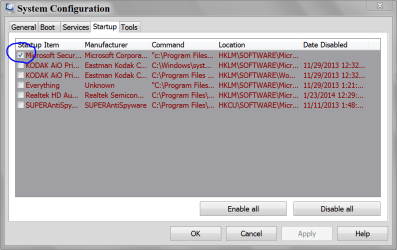
I'm not sure what you mean by 'correcting' the msconfig Services and Startup. If you meant turning off programs on startup then, like I had mentioned in my initial post, I turned off everything -but- my Avira Internet Security and was still experiencing lock-ups. I'm not sure if this would be useful but the 'Web Protection' has created stifled internet speeds and turning it off resolves the problem. Again, not sure if this would have any baring on the topic but just thought I'd mention it (pic included in attachments).

With that being said, I have not removed AVG.exe as it's part of my anti-virus program (please refer to post#9, 2nd attachment). Based on the attachment and uninstall programs list located in the control panel, I see no other avira-based programs seen.

In the interm, I'll do another ESET scan while turning off my Avira while idling. If you think that this would be a problem with the anti-virus program, would you happen to have any recommendations on a better service?

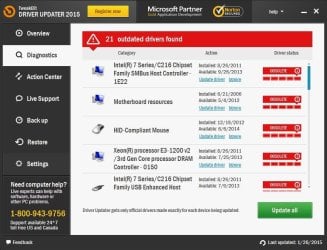
Lastly, while reading through similar problems in the forum, I tried using the TweakBit driver updater service (pic included in attachments). Are these services relatively trusted? Or is it primarily a waste of time?

Thanks for your help.
 

Attachments

My Computer My Computer

At a glance

Windows 7 64 bitIntel(R) Core(TM) i5-3570K CPU @ 3.40GHzTotal memory: 8.00 GB, Usable: 7.94 GBASUS Nvidia GeForce GTX 660 (I believe 2GB)
Computer type
PC/Desktop
Computer Manufacturer/Model Number
Self-built/custom
OS
Windows 7 64 bit
CPU
Intel(R) Core(TM) i5-3570K CPU @ 3.40GHz
Motherboard
ASUSTeK COMPUTER INC. P8Z77-V LK
Memory
Total memory: 8.00 GB, Usable: 7.94 GB
Graphics Card(s)
ASUS Nvidia GeForce GTX 660 (I believe 2GB)
Sound Card
High Definition Audio Device, Realtek High Definition Audio
Monitor(s) Displays
LG L245WP
Screen Resolution
1900x1200
Hard Drives
Western Digital Black Caviar 1TB
PSU
Corsair HX650
Case
Fractal Design Define R4
Cooling
Factory cooling for CPU, no others
Keyboard
Coolmaster CM Storm Brown
Mouse
Steelseries Rival
Internet Speed
75 mbps download & 10 mbps upload (500ms ping)
Antivirus
Avira Internet Security
Browser
Firefox & Chrome
Other Info
BIOS Date: 02/01/13 11:41:08 Ver: 10.01
In addition to my previous post, I've been scouring other threads to see if anything would help in my predicament and there were two things that stuck out to me:

-Could voltage to the RAM, CPU, or other parts be a problem? 7-8 months ago I put this computer together, and while I did not tinker with the motherboard or update the bios, I have seen a few threads mention that the voltage on the RAM could be a problem? In the same vein, could out of date mobo drivers or bios be a problem? Tweakbit said my drivers are out of date, but I chose the most recent driver on the ASUS website...

-Are crash reports only inherent to BSODs? Or do they also apply to system freezes/hard locks? If the later is correct, I have no crash reports to show for all the trouble I've been having.

Help and suggestions would be appreciated.
 

My Computer My Computer

At a glance

Windows 7 64 bitIntel(R) Core(TM) i5-3570K CPU @ 3.40GHzTotal memory: 8.00 GB, Usable: 7.94 GBASUS Nvidia GeForce GTX 660 (I believe 2GB)
Computer type
PC/Desktop
Computer Manufacturer/Model Number
Self-built/custom
OS
Windows 7 64 bit
CPU
Intel(R) Core(TM) i5-3570K CPU @ 3.40GHz
Motherboard
ASUSTeK COMPUTER INC. P8Z77-V LK
Memory
Total memory: 8.00 GB, Usable: 7.94 GB
Graphics Card(s)
ASUS Nvidia GeForce GTX 660 (I believe 2GB)
Sound Card
High Definition Audio Device, Realtek High Definition Audio
Monitor(s) Displays
LG L245WP
Screen Resolution
1900x1200
Hard Drives
Western Digital Black Caviar 1TB
PSU
Corsair HX650
Case
Fractal Design Define R4
Cooling
Factory cooling for CPU, no others
Keyboard
Coolmaster CM Storm Brown
Mouse
Steelseries Rival
Internet Speed
75 mbps download & 10 mbps upload (500ms ping)
Antivirus
Avira Internet Security
Browser
Firefox & Chrome
Other Info
BIOS Date: 02/01/13 11:41:08 Ver: 10.01
I would not use any program like Tweakbi! I recommend removing Tweakbit. That might be a problem because it will have it's fingers in everything.
When you install a program like Tweakbit after all those security scans you have defeated the purpose of the scans. Now you should start all over again with those scans to remove all the add ons and what ever came along with Tweakbit.

If you keep download program like Tweakbit or any other miracle fix everything programs we will never be able to get you fixed.
What ever problem you have we have members on this forum that can get you fixed but only with your help. You could have more than one problem but until we get fixed the obvious their is no sense going to the next steps.
You state that your ram has passed with 10 passes. Which indicates that you are not having a ram problem.

I would suggest not updating the bios at this time.
No over clocking of any kind should be done while you are having problems.

I will state one more time. You do not want AVG and Avira on your system at the same time.
***Lets make it easy for test purposes. Remove Avira and AVG completely using their online removal tools.
Then install MSE and update.

Microsoft Security Essentials - Microsoft Windows


Do I under stand that you do NOT get BSOD?

When you get another freeze do this and see if one of our BSOD experts can find something. It may or may not give needed information.

http://www.sevenforums.com/bsod-help-support/96879-blue-screen-death-bsod-posting-instructions.html

In my experience I have found that when you get a loud buzzing noise and a freeze the computer does get a BSOD but it's not chiseled in stone.

You are going in circles because you are not following instruction and wondering off doing other things. Lets do this step at a time following this forums members guidance.

When we get the basics done and I run out of ideas I will seek help from other members.
I will not seek help until the basic are completed correctly.
If you continue to do things you see on other forums at the same time we are trying to help your odds of getting fixed are slim.
 

My Computer My Computer

At a glance

Windows 10 Pro. 64/ version 1709 Windows 7 Pr...Intel i7-6800K @ 4.3Corsair Platinum 16 gig @2400EVGA GTX 1070 OC
Computer type
PC/Desktop
Computer Manufacturer/Model Number
Home made Desktop
OS
Windows 10 Pro. 64/ version 1709 Windows 7 Pro/64
CPU
Intel i7-6800K @ 4.3
Motherboard
ASUS X-99 Deluxe II
Memory
Corsair Platinum 16 gig @2400
Graphics Card(s)
EVGA GTX 1070 OC
Monitor(s) Displays
Asus 27" LED LCD/VE278Q
Screen Resolution
1920-1080 or 1280-720 HDMI
Hard Drives
INTEL SSD 730-240 Gb Sata 3.0/
PSU
EVGA Platium 1200W
Case
Phanteks Luxe Tempered Glass 8 fans/ one radiator
Cooling
XSPC/ Water Cooled CPU
Keyboard
Das 4 Professional
Mouse
Logitech M705/MX Anywhere 2-S
Internet Speed
100 mbits
Antivirus
Microsoft Security Essentials/ Malwarebytes Premium 3.0/ SAS
Browser
I.E. 11 default/Firefox/ ISP Time Warner Cable/Spectrum
Other Info
LG BluRay Burner/
Sound system-KLipsch-THX/
Icy Dock ssd Hot Swap bays.
It wasn't my intention to 'not follow instructions' as I had indicated that AVGuard.exe was a part of the Avira Anti-virus program. Mentioned previously already, this was indicated in post #9, so I didn't want to remove it as it was a part of the program itself. With that being said, it was not intention to avoid help. To re-iterate, AVG(uard) is a part of Avira, and is not a secondary anti-virus program.

I've already conducted a full scan of my system with Avira with no detections post-uninstall of the Tweakbit. I am currently running a scan via ESET Online Scanner. I was only trying to find similar threads based on my problems since this thread had been quite inactive the last month. After this next pass with ESET, I'll uninstall Avira and do a pass or two via MSE. I've never used MSE before, is it a sufficient program for active blocking of malware on websites, etc? I avoid any scrupulous websites, but I've visited popular websites and had stuff pop up before.

Correct. I do not see any BSOD screen upon the computer freezing/hard locking. When the freeze happens, I'll still see my desktop, video, word doc, etc while my peripherals do not respond which is followed by a buzzing noise via my headphones. I'm assuming, as a result, that since I do not see a BSOD screen, I'm unable to receive any crash dumps/reports? I've followed the instructions via your second link by using DMLog Collector and SF Diagnostic Tool and they cannot find any dump files. If you think it'd be advantageous, I can revisit this upon your request.

Upon further instruction, I'll uninstall Avira, install and update MSE, scan once/twice, and will report if I get another freeze.

Again, apologizes if I was making this more difficult it, it wasn't my intention. Just gets stressful when your in 3 hours deep of work and you're always worried about losing it all/having to save every couple minutes.

Thank you for your time and patience.
 

My Computer My Computer

At a glance

Windows 7 64 bitIntel(R) Core(TM) i5-3570K CPU @ 3.40GHzTotal memory: 8.00 GB, Usable: 7.94 GBASUS Nvidia GeForce GTX 660 (I believe 2GB)
Computer type
PC/Desktop
Computer Manufacturer/Model Number
Self-built/custom
OS
Windows 7 64 bit
CPU
Intel(R) Core(TM) i5-3570K CPU @ 3.40GHz
Motherboard
ASUSTeK COMPUTER INC. P8Z77-V LK
Memory
Total memory: 8.00 GB, Usable: 7.94 GB
Graphics Card(s)
ASUS Nvidia GeForce GTX 660 (I believe 2GB)
Sound Card
High Definition Audio Device, Realtek High Definition Audio
Monitor(s) Displays
LG L245WP
Screen Resolution
1900x1200
Hard Drives
Western Digital Black Caviar 1TB
PSU
Corsair HX650
Case
Fractal Design Define R4
Cooling
Factory cooling for CPU, no others
Keyboard
Coolmaster CM Storm Brown
Mouse
Steelseries Rival
Internet Speed
75 mbps download & 10 mbps upload (500ms ping)
Antivirus
Avira Internet Security
Browser
Firefox & Chrome
Other Info
BIOS Date: 02/01/13 11:41:08 Ver: 10.01
Sorry for my misunderstanding about AVG and Avguard.

I use MSE along with Malwarebytes and I have no problems.
Make sure the built in Windows 7 firewall is turned on after installing MSE and updating.

Unplug every thing that is not necessary (peripherals)

***I would also recommend removing Flux program.


Could you correct your specs many thing are
Graphics Card Intel(R) Core(TM) i5-3570K CPU @ 3.40GHz
Sound Card Intel(R) Core(TM) i5-3570K CPU @ 3.40GHz
Monitor(s) Displays LG L245WP
Computer type PC/Desktop
System Manufacturer/Model Number Self-built/custom
OS Windows 7 64 bit
CPU Intel(R) Core(TM) i5-3570K CPU @ 3.40GHz
Motherboard ASUSTeK COMPUTER INC. P8Z77-V LK
Memory Total memory: 8.00 GB, Usabel: 7.94 GB
Graphics Card Intel(R) Core(TM) i5-3570K CPU @ 3.40GHz
Sound Card Intel(R) Core(TM) i5-3570K CPU @ 3.40GHz
Monitor(s) Displays LG L245WP
Screen Resolution 1900x1200

Keyboard Coolmaster CM Storm Brown
Mouse Steelseries Rival
PSU Corsair HX650
Case Fractal Design Define R4
Cooling Factory cooling for CPU, no others
Hard Drives Intel(R) Core(TM) i5-3570K CPU @ 3.40GHz
Internet Speed 75 mbps download & 10 mbps upload (500ms ping)
Antivirus Avira Internet Security
Browser Firefox & Chrome
Other Info BIOS Date: 02/01/13 11:41:08 Ver: 10.01
Have you been monitoring your cpu temps? If so what are they when you are using your system with a load. (Gaming)
You already have Speccy use it to monitor your temps and fill in your specs correctly.

When done doing all this could you post another Speccy report like you did in your post #7.?

Without mini dumps or error codes it's a process of elimination.
**Could you use your system without ear phones.

--------------------------------------
I know I have given you a long list of things.
Take your time and give it your best shot.
Then sit back and read through the whole thread again and see if everything is taken care of.

Your specs show and this could be a concern.

Factory cooling for CPU, no others
Let us know of any problems or questions.

When all this is done we are going to put a stress test on your drivers and see if we can make one or more of them make a BSOD.
If we get a BSOD I will ask for help from one of our BSOD experts.
 
Last edited:

My Computer My Computer

At a glance

Windows 10 Pro. 64/ version 1709 Windows 7 Pr...Intel i7-6800K @ 4.3Corsair Platinum 16 gig @2400EVGA GTX 1070 OC
Computer type
PC/Desktop
Computer Manufacturer/Model Number
Home made Desktop
OS
Windows 10 Pro. 64/ version 1709 Windows 7 Pro/64
CPU
Intel i7-6800K @ 4.3
Motherboard
ASUS X-99 Deluxe II
Memory
Corsair Platinum 16 gig @2400
Graphics Card(s)
EVGA GTX 1070 OC
Monitor(s) Displays
Asus 27" LED LCD/VE278Q
Screen Resolution
1920-1080 or 1280-720 HDMI
Hard Drives
INTEL SSD 730-240 Gb Sata 3.0/
PSU
EVGA Platium 1200W
Case
Phanteks Luxe Tempered Glass 8 fans/ one radiator
Cooling
XSPC/ Water Cooled CPU
Keyboard
Das 4 Professional
Mouse
Logitech M705/MX Anywhere 2-S
Internet Speed
100 mbits
Antivirus
Microsoft Security Essentials/ Malwarebytes Premium 3.0/ SAS
Browser
I.E. 11 default/Firefox/ ISP Time Warner Cable/Spectrum
Other Info
LG BluRay Burner/
Sound system-KLipsch-THX/
Icy Dock ssd Hot Swap bays.
Please run the http://www.sevenforums.com/bsod-help-support/96879-blue-screen-death-bsod-posting-instructions.html

Also please open an elevated command prompt ( click start, type cmd in the search box, right click on the cmd entry and select run as administrator) in the black box that opens, copy/paste sfc /scannow. If you decide to type it, notice the space between the sfc and the /. It is a system file checker which will scan your system files and attempt to correct any missing or corrupt files. What we want are the results to say windows found no integrity violations. If it says files were found but could not be repaired, close the box, reboot and run it again, after opening the administrative command prompt. You may have to reboot and run it three times for it to repair all system files. If it can't repair them after 3 reboots, let us know.
 

My Computers My Computers

  • At a glance

    Windows 11 ProRyzen 9 5900X32GB G Skill DDR4-3600EVGA RTX 3080 FTW 3 Ultra
    Computer type
    PC/Desktop
    Computer Manufacturer/Model Number
    ALWAYS UNDER CONSTRUCTION
    OS
    Windows 11 Pro
    CPU
    Ryzen 9 5900X
    Motherboard
    Asus X570 Crosshair Viii Hero
    Memory
    32GB G Skill DDR4-3600
    Graphics Card(s)
    EVGA RTX 3080 FTW 3 Ultra
    Sound Card
    On Board/Sennheiser PC37X Headset
    Monitor(s) Displays
    3 X Asus 27"
    Screen Resolution
    2560x1440
    Hard Drives
    2 X 1 TB NVME drives
    PSU
    EVGA 850
    Case
    Phanteks Eclipse P400A
    Cooling
    EVGA 280 AIO
    Keyboard
    Logitech G510s/ Logitech G13
    Mouse
    Logitech G502
    Internet Speed
    24/1
    Antivirus
    ESET/MBAM Pro/SAS Pro
    Browser
    Chrome/ Firefox/ Edge
  • At a glance

    Windows 11 ProIntel Ultra 9 288V32 GB LPDDR5X 8533
    Computer type
    Laptop
    System Manufacturer/Model Number
    Dell 16 Plus
    OS
    Windows 11 Pro
    CPU
    Intel Ultra 9 288V
    Memory
    32 GB LPDDR5X 8533
    Monitor(s) Displays
    16" Mini-LED HDR600 Touch 90 Hz
    Screen Resolution
    2560X1600
    Hard Drives
    1 TB NVME
Thank you Steve for dropping by and lending a hand.
 

My Computer My Computer

At a glance

Windows 10 Pro. 64/ version 1709 Windows 7 Pr...Intel i7-6800K @ 4.3Corsair Platinum 16 gig @2400EVGA GTX 1070 OC
Computer type
PC/Desktop
Computer Manufacturer/Model Number
Home made Desktop
OS
Windows 10 Pro. 64/ version 1709 Windows 7 Pro/64
CPU
Intel i7-6800K @ 4.3
Motherboard
ASUS X-99 Deluxe II
Memory
Corsair Platinum 16 gig @2400
Graphics Card(s)
EVGA GTX 1070 OC
Monitor(s) Displays
Asus 27" LED LCD/VE278Q
Screen Resolution
1920-1080 or 1280-720 HDMI
Hard Drives
INTEL SSD 730-240 Gb Sata 3.0/
PSU
EVGA Platium 1200W
Case
Phanteks Luxe Tempered Glass 8 fans/ one radiator
Cooling
XSPC/ Water Cooled CPU
Keyboard
Das 4 Professional
Mouse
Logitech M705/MX Anywhere 2-S
Internet Speed
100 mbits
Antivirus
Microsoft Security Essentials/ Malwarebytes Premium 3.0/ SAS
Browser
I.E. 11 default/Firefox/ ISP Time Warner Cable/Spectrum
Other Info
LG BluRay Burner/
Sound system-KLipsch-THX/
Icy Dock ssd Hot Swap bays.
Back
Top