PC freezes and produces buzzing sounds

Yeah, I uninstalled from the Control Panel, so I'll just delete the files then. Thanks.

Haven't had the chance in the last couple of days, so I'll uninstall Avira and install MSE upon waiting for further instructions.

It sucks waiting for these lock ups to occur, haha.
 

My Computer My Computer

At a glance

Windows 7 64 bitIntel(R) Core(TM) i5-3570K CPU @ 3.40GHzTotal memory: 8.00 GB, Usable: 7.94 GBASUS Nvidia GeForce GTX 660 (I believe 2GB)
Computer type
PC/Desktop
Computer Manufacturer/Model Number
Self-built/custom
OS
Windows 7 64 bit
CPU
Intel(R) Core(TM) i5-3570K CPU @ 3.40GHz
Motherboard
ASUSTeK COMPUTER INC. P8Z77-V LK
Memory
Total memory: 8.00 GB, Usable: 7.94 GB
Graphics Card(s)
ASUS Nvidia GeForce GTX 660 (I believe 2GB)
Sound Card
High Definition Audio Device, Realtek High Definition Audio
Monitor(s) Displays
LG L245WP
Screen Resolution
1900x1200
Hard Drives
Western Digital Black Caviar 1TB
PSU
Corsair HX650
Case
Fractal Design Define R4
Cooling
Factory cooling for CPU, no others
Keyboard
Coolmaster CM Storm Brown
Mouse
Steelseries Rival
Internet Speed
75 mbps download & 10 mbps upload (500ms ping)
Antivirus
Avira Internet Security
Browser
Firefox & Chrome
Other Info
BIOS Date: 02/01/13 11:41:08 Ver: 10.01
Small update.

For the first week there was no lockups. However in the last couple days I've gotten consecutive lockups for two/three days in a row. I've included a DM Log collector file after restarting my computer from one of these events. Also, the high-pitched noise that the lock up provides is higher in frequency, whereas previously it's been a 'whine' and now has escalated to a 'screech.'

Another thing that I've noticed that from time-to-time, my keyboard and mouse will periodically not work (i.e. mouse cursor won't move/keystrokes won't input) although the power is on for both. Could this be related? And do you think this could be a motherboard problem due to the usb ports?
 

Attachments

My Computer My Computer

At a glance

Windows 7 64 bitIntel(R) Core(TM) i5-3570K CPU @ 3.40GHzTotal memory: 8.00 GB, Usable: 7.94 GBASUS Nvidia GeForce GTX 660 (I believe 2GB)
Computer type
PC/Desktop
Computer Manufacturer/Model Number
Self-built/custom
OS
Windows 7 64 bit
CPU
Intel(R) Core(TM) i5-3570K CPU @ 3.40GHz
Motherboard
ASUSTeK COMPUTER INC. P8Z77-V LK
Memory
Total memory: 8.00 GB, Usable: 7.94 GB
Graphics Card(s)
ASUS Nvidia GeForce GTX 660 (I believe 2GB)
Sound Card
High Definition Audio Device, Realtek High Definition Audio
Monitor(s) Displays
LG L245WP
Screen Resolution
1900x1200
Hard Drives
Western Digital Black Caviar 1TB
PSU
Corsair HX650
Case
Fractal Design Define R4
Cooling
Factory cooling for CPU, no others
Keyboard
Coolmaster CM Storm Brown
Mouse
Steelseries Rival
Internet Speed
75 mbps download & 10 mbps upload (500ms ping)
Antivirus
Avira Internet Security
Browser
Firefox & Chrome
Other Info
BIOS Date: 02/01/13 11:41:08 Ver: 10.01
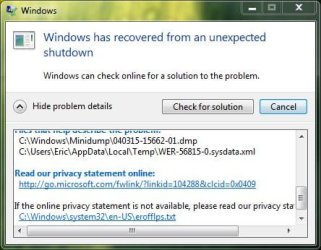
You have no dump files in your last upload. Reading your Windows error reporting There was an error on 2/19 and the error was
NVCPLUI.exe which is the Nvidia control panel. Please reinstall your Nvidia drivers using this method. Install the Display driver and PhysX only. http://www.sevenforums.com/tutorials/327414-nvidia-drivers-avoid-problems.html

To answer your question, yes it is possible that the motherboard is at fault. But, in my mind, everything is suspect until we find the culprit causing your problems.
 

My Computers My Computers

  • At a glance

    Windows 11 ProRyzen 9 5900X32GB G Skill DDR4-3600EVGA RTX 3080 FTW 3 Ultra
    Computer type
    PC/Desktop
    Computer Manufacturer/Model Number
    ALWAYS UNDER CONSTRUCTION
    OS
    Windows 11 Pro
    CPU
    Ryzen 9 5900X
    Motherboard
    Asus X570 Crosshair Viii Hero
    Memory
    32GB G Skill DDR4-3600
    Graphics Card(s)
    EVGA RTX 3080 FTW 3 Ultra
    Sound Card
    On Board/Sennheiser PC37X Headset
    Monitor(s) Displays
    3 X Asus 27"
    Screen Resolution
    2560x1440
    Hard Drives
    2 X 1 TB NVME drives
    PSU
    EVGA 850
    Case
    Phanteks Eclipse P400A
    Cooling
    EVGA 280 AIO
    Keyboard
    Logitech G510s/ Logitech G13
    Mouse
    Logitech G502
    Internet Speed
    24/1
    Antivirus
    ESET/MBAM Pro/SAS Pro
    Browser
    Chrome/ Firefox/ Edge
  • At a glance

    Windows 11 ProIntel Ultra 9 288V32 GB LPDDR5X 8533
    Computer type
    Laptop
    System Manufacturer/Model Number
    Dell 16 Plus
    OS
    Windows 11 Pro
    CPU
    Intel Ultra 9 288V
    Memory
    32 GB LPDDR5X 8533
    Monitor(s) Displays
    16" Mini-LED HDR600 Touch 90 Hz
    Screen Resolution
    2560X1600
    Hard Drives
    1 TB NVME
Thanks for directing me to that thread essenbe. I actually had a previous thread dedicated to this a while back (http://www.sevenforums.com/graphic-cards/352172-periodic-display-crashes.html) where my Aero would crash. I ended up downloading an older version of the drivers and have not had the Aero crash issue since. I have also checked the windows update setting and it set to the 'Notify me of updates but let me choose what to install.'

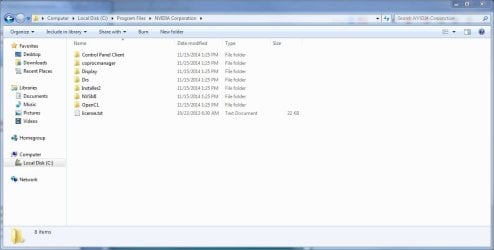
However, as I'm revisiting 'NVIDIA Drivers - Avoid Problems' thread, I can't find the Display Driver folder (whether it's in 32 or 64 bit version of the Program Files in C: ). I'm thinking that this was because I went through the process before? But with that being said, there should at least be a version folder of the drivers in one of the folders.

I'm considering doing a format and clean install of the system if this would be helpful. If you think that would be beneficial, do you have any suggestions in terms of how to get everything up to date (i.e. mobo, cpu drivers, etc)? I've only done formatting once before, and some of the drivers on the manufacturer's website seem quite old.
 

My Computer My Computer

At a glance

Windows 7 64 bitIntel(R) Core(TM) i5-3570K CPU @ 3.40GHzTotal memory: 8.00 GB, Usable: 7.94 GBASUS Nvidia GeForce GTX 660 (I believe 2GB)
Computer type
PC/Desktop
Computer Manufacturer/Model Number
Self-built/custom
OS
Windows 7 64 bit
CPU
Intel(R) Core(TM) i5-3570K CPU @ 3.40GHz
Motherboard
ASUSTeK COMPUTER INC. P8Z77-V LK
Memory
Total memory: 8.00 GB, Usable: 7.94 GB
Graphics Card(s)
ASUS Nvidia GeForce GTX 660 (I believe 2GB)
Sound Card
High Definition Audio Device, Realtek High Definition Audio
Monitor(s) Displays
LG L245WP
Screen Resolution
1900x1200
Hard Drives
Western Digital Black Caviar 1TB
PSU
Corsair HX650
Case
Fractal Design Define R4
Cooling
Factory cooling for CPU, no others
Keyboard
Coolmaster CM Storm Brown
Mouse
Steelseries Rival
Internet Speed
75 mbps download & 10 mbps upload (500ms ping)
Antivirus
Avira Internet Security
Browser
Firefox & Chrome
Other Info
BIOS Date: 02/01/13 11:41:08 Ver: 10.01
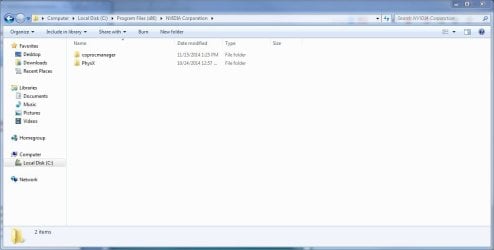
The Nvidia drivers should, by default, install to C:/Nvidia/Display Drivers unless you changed the install location. When you deleted the drivers program, you should not have deleted the Display Drivers folder, just the numbered folders with the driver number on it. Do you have a C:/Nvidia folder?
 

My Computers My Computers

  • At a glance

    Windows 11 ProRyzen 9 5900X32GB G Skill DDR4-3600EVGA RTX 3080 FTW 3 Ultra
    Computer type
    PC/Desktop
    Computer Manufacturer/Model Number
    ALWAYS UNDER CONSTRUCTION
    OS
    Windows 11 Pro
    CPU
    Ryzen 9 5900X
    Motherboard
    Asus X570 Crosshair Viii Hero
    Memory
    32GB G Skill DDR4-3600
    Graphics Card(s)
    EVGA RTX 3080 FTW 3 Ultra
    Sound Card
    On Board/Sennheiser PC37X Headset
    Monitor(s) Displays
    3 X Asus 27"
    Screen Resolution
    2560x1440
    Hard Drives
    2 X 1 TB NVME drives
    PSU
    EVGA 850
    Case
    Phanteks Eclipse P400A
    Cooling
    EVGA 280 AIO
    Keyboard
    Logitech G510s/ Logitech G13
    Mouse
    Logitech G502
    Internet Speed
    24/1
    Antivirus
    ESET/MBAM Pro/SAS Pro
    Browser
    Chrome/ Firefox/ Edge
  • At a glance

    Windows 11 ProIntel Ultra 9 288V32 GB LPDDR5X 8533
    Computer type
    Laptop
    System Manufacturer/Model Number
    Dell 16 Plus
    OS
    Windows 11 Pro
    CPU
    Intel Ultra 9 288V
    Memory
    32 GB LPDDR5X 8533
    Monitor(s) Displays
    16" Mini-LED HDR600 Touch 90 Hz
    Screen Resolution
    2560X1600
    Hard Drives
    1 TB NVME
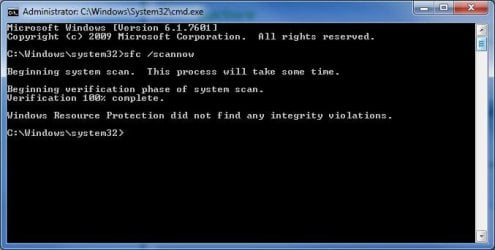
Please open an elevated command prompt ( click start, type cmd in the search box, right click on the cmd entry and select run as administrator) in the black box that opens, copy/paste sfc /scannow. If you decide to type it, notice the space between the sfc and the /. It is a system file checker which will scan your system files and attempt to correct any missing or corrupt files. What we want are the results to say windows found no integrity violations. If it says files were found but could not be repaired, close the box, reboot and run it again, after opening the administrative command prompt. You may have to reboot and run it three times for it to repair all system files. If it can't repair them after 3 reboots, let us know.
 

My Computers My Computers

  • At a glance

    Windows 11 ProRyzen 9 5900X32GB G Skill DDR4-3600EVGA RTX 3080 FTW 3 Ultra
    Computer type
    PC/Desktop
    Computer Manufacturer/Model Number
    ALWAYS UNDER CONSTRUCTION
    OS
    Windows 11 Pro
    CPU
    Ryzen 9 5900X
    Motherboard
    Asus X570 Crosshair Viii Hero
    Memory
    32GB G Skill DDR4-3600
    Graphics Card(s)
    EVGA RTX 3080 FTW 3 Ultra
    Sound Card
    On Board/Sennheiser PC37X Headset
    Monitor(s) Displays
    3 X Asus 27"
    Screen Resolution
    2560x1440
    Hard Drives
    2 X 1 TB NVME drives
    PSU
    EVGA 850
    Case
    Phanteks Eclipse P400A
    Cooling
    EVGA 280 AIO
    Keyboard
    Logitech G510s/ Logitech G13
    Mouse
    Logitech G502
    Internet Speed
    24/1
    Antivirus
    ESET/MBAM Pro/SAS Pro
    Browser
    Chrome/ Firefox/ Edge
  • At a glance

    Windows 11 ProIntel Ultra 9 288V32 GB LPDDR5X 8533
    Computer type
    Laptop
    System Manufacturer/Model Number
    Dell 16 Plus
    OS
    Windows 11 Pro
    CPU
    Intel Ultra 9 288V
    Memory
    32 GB LPDDR5X 8533
    Monitor(s) Displays
    16" Mini-LED HDR600 Touch 90 Hz
    Screen Resolution
    2560X1600
    Hard Drives
    1 TB NVME
Never to my knowledge have I decided not to install the NVIDIA drivers anywhere but the default location. But based on your comments, perhaps I had deleted the display drivers folder since I cannot find any numbered folders with their respective driver numbers. I do not have a C:/Nvidia folder, just C:/Nvidia Corporation (located both in regular Program Files & Program Files (x86), see attachments.

Also I have performed the elevated command prompt and sfc /scannow and have no integrity violations. Attachment below as well.

I think the first step would to be to sort out the NVIDIA stuff first by performing a clean install of the drivers? Would you suggest the most up-to-date drivers provided that they're WHQL? I had a problem with the most recent ones previously (based on the thread I linked earlier) but my GPU is a bit on the older side (GTX 660).
 

Attachments

  • nvidia folder.JPG
    nvidia folder.JPG
    57.2 KB · Views: 2
  • nvidia folder x86.JPG
    nvidia folder x86.JPG
    47.1 KB · Views: 2
  • elevatedcmdprompt.JPG
    elevatedcmdprompt.JPG
    32.3 KB · Views: 16

My Computer My Computer

At a glance

Windows 7 64 bitIntel(R) Core(TM) i5-3570K CPU @ 3.40GHzTotal memory: 8.00 GB, Usable: 7.94 GBASUS Nvidia GeForce GTX 660 (I believe 2GB)
Computer type
PC/Desktop
Computer Manufacturer/Model Number
Self-built/custom
OS
Windows 7 64 bit
CPU
Intel(R) Core(TM) i5-3570K CPU @ 3.40GHz
Motherboard
ASUSTeK COMPUTER INC. P8Z77-V LK
Memory
Total memory: 8.00 GB, Usable: 7.94 GB
Graphics Card(s)
ASUS Nvidia GeForce GTX 660 (I believe 2GB)
Sound Card
High Definition Audio Device, Realtek High Definition Audio
Monitor(s) Displays
LG L245WP
Screen Resolution
1900x1200
Hard Drives
Western Digital Black Caviar 1TB
PSU
Corsair HX650
Case
Fractal Design Define R4
Cooling
Factory cooling for CPU, no others
Keyboard
Coolmaster CM Storm Brown
Mouse
Steelseries Rival
Internet Speed
75 mbps download & 10 mbps upload (500ms ping)
Antivirus
Avira Internet Security
Browser
Firefox & Chrome
Other Info
BIOS Date: 02/01/13 11:41:08 Ver: 10.01
I would suggest you create a folder in C named Nvidia, and during the install process make sure the install goes to C:/Nvidia/display Drivers, it will create the display driver folder. Make sure the 'clean install' box is checked. I would try the latest WHQL driver, but you can choose whichever one you want/works best.
 

My Computers My Computers

  • At a glance

    Windows 11 ProRyzen 9 5900X32GB G Skill DDR4-3600EVGA RTX 3080 FTW 3 Ultra
    Computer type
    PC/Desktop
    Computer Manufacturer/Model Number
    ALWAYS UNDER CONSTRUCTION
    OS
    Windows 11 Pro
    CPU
    Ryzen 9 5900X
    Motherboard
    Asus X570 Crosshair Viii Hero
    Memory
    32GB G Skill DDR4-3600
    Graphics Card(s)
    EVGA RTX 3080 FTW 3 Ultra
    Sound Card
    On Board/Sennheiser PC37X Headset
    Monitor(s) Displays
    3 X Asus 27"
    Screen Resolution
    2560x1440
    Hard Drives
    2 X 1 TB NVME drives
    PSU
    EVGA 850
    Case
    Phanteks Eclipse P400A
    Cooling
    EVGA 280 AIO
    Keyboard
    Logitech G510s/ Logitech G13
    Mouse
    Logitech G502
    Internet Speed
    24/1
    Antivirus
    ESET/MBAM Pro/SAS Pro
    Browser
    Chrome/ Firefox/ Edge
  • At a glance

    Windows 11 ProIntel Ultra 9 288V32 GB LPDDR5X 8533
    Computer type
    Laptop
    System Manufacturer/Model Number
    Dell 16 Plus
    OS
    Windows 11 Pro
    CPU
    Intel Ultra 9 288V
    Memory
    32 GB LPDDR5X 8533
    Monitor(s) Displays
    16" Mini-LED HDR600 Touch 90 Hz
    Screen Resolution
    2560X1600
    Hard Drives
    1 TB NVME
Would you suggest manually deleting the two 'Nvidia Corporation' folders (locations found in pictures in previous attachment/post) before installing? I had an issue with the drivers not being updated after uninstalling via Control Panel > restart > update via Windows (as if you were plugging in an USB cable and not through windows update itself - settings are set according to your thread).

Also, reporting another instance where my keyboard and mouse have acted really weird (taken from post#11):

"This problem has now developed in my keyboard not working where it feels like the keys have 'shifted' one key to the right where none of my letter keys will work at all or prompt other keys registering (if I press 't' it'll function as a 'y' - not the reality, but hopefully this gets the point across...). This is ALSO happening to my mouse tonight, where if I left-click on a thumbnail it'll prompt a save on the .htm file (which I'm assuming is the picture on a news story for example)."
 

My Computer My Computer

At a glance

Windows 7 64 bitIntel(R) Core(TM) i5-3570K CPU @ 3.40GHzTotal memory: 8.00 GB, Usable: 7.94 GBASUS Nvidia GeForce GTX 660 (I believe 2GB)
Computer type
PC/Desktop
Computer Manufacturer/Model Number
Self-built/custom
OS
Windows 7 64 bit
CPU
Intel(R) Core(TM) i5-3570K CPU @ 3.40GHz
Motherboard
ASUSTeK COMPUTER INC. P8Z77-V LK
Memory
Total memory: 8.00 GB, Usable: 7.94 GB
Graphics Card(s)
ASUS Nvidia GeForce GTX 660 (I believe 2GB)
Sound Card
High Definition Audio Device, Realtek High Definition Audio
Monitor(s) Displays
LG L245WP
Screen Resolution
1900x1200
Hard Drives
Western Digital Black Caviar 1TB
PSU
Corsair HX650
Case
Fractal Design Define R4
Cooling
Factory cooling for CPU, no others
Keyboard
Coolmaster CM Storm Brown
Mouse
Steelseries Rival
Internet Speed
75 mbps download & 10 mbps upload (500ms ping)
Antivirus
Avira Internet Security
Browser
Firefox & Chrome
Other Info
BIOS Date: 02/01/13 11:41:08 Ver: 10.01
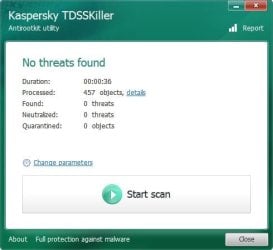
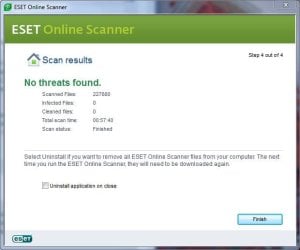
What you describe about your Mouse and Keyboard, I have never seen before. Just to be safe, I would run these virus scans.

Scan with Kaspersky TDSSKiller:
Anti-rootkit utility TDSSKiller
ESET online scanner:
Free Virus Scan | Online Virus Scanner from ESET
Free Online Virus Scanner | ESET

As far as the Nvidia files, I would create a folder name Nvidia in C: and make sure the installer lists C:/Nvidia/Display Folder. It will create the display folder. If you follow the instructions in
http://www.sevenforums.com/tutorials/327414-nvidia-drivers-avoid-problems.html you should be OK.

Things seem to be not be getting any better. If this does not work, I think we should try a clean install.
 

My Computers My Computers

  • At a glance

    Windows 11 ProRyzen 9 5900X32GB G Skill DDR4-3600EVGA RTX 3080 FTW 3 Ultra
    Computer type
    PC/Desktop
    Computer Manufacturer/Model Number
    ALWAYS UNDER CONSTRUCTION
    OS
    Windows 11 Pro
    CPU
    Ryzen 9 5900X
    Motherboard
    Asus X570 Crosshair Viii Hero
    Memory
    32GB G Skill DDR4-3600
    Graphics Card(s)
    EVGA RTX 3080 FTW 3 Ultra
    Sound Card
    On Board/Sennheiser PC37X Headset
    Monitor(s) Displays
    3 X Asus 27"
    Screen Resolution
    2560x1440
    Hard Drives
    2 X 1 TB NVME drives
    PSU
    EVGA 850
    Case
    Phanteks Eclipse P400A
    Cooling
    EVGA 280 AIO
    Keyboard
    Logitech G510s/ Logitech G13
    Mouse
    Logitech G502
    Internet Speed
    24/1
    Antivirus
    ESET/MBAM Pro/SAS Pro
    Browser
    Chrome/ Firefox/ Edge
  • At a glance

    Windows 11 ProIntel Ultra 9 288V32 GB LPDDR5X 8533
    Computer type
    Laptop
    System Manufacturer/Model Number
    Dell 16 Plus
    OS
    Windows 11 Pro
    CPU
    Intel Ultra 9 288V
    Memory
    32 GB LPDDR5X 8533
    Monitor(s) Displays
    16" Mini-LED HDR600 Touch 90 Hz
    Screen Resolution
    2560X1600
    Hard Drives
    1 TB NVME
Sorry for the late response, haven't been able to get the time to scan and give an update. Since my last post, I've maybe had one-to-two locks. I haven't had the chance to re-(clean)-install the Nvidia drivers again so if the dm-log collector files say it's the same problem I'll get on that asap.

Nothing showed up on the ESET online scanner as well as the Kaspersky TDSSKiller, which will be shown below. Just a note regarding the TDSS report, every paramater was checked aside from the 'Loaded modules' scanning option.

And yeah, I tend to agree that if I still have the same problems, a fresh install would be appropriate. While I don't mind giving it another shot, I've formatted maybe 2-3 times in the time that I've built this computer and still have had the same issues over the course of a couple years.

Thanks for your time.
 

Attachments

My Computer My Computer

At a glance

Windows 7 64 bitIntel(R) Core(TM) i5-3570K CPU @ 3.40GHzTotal memory: 8.00 GB, Usable: 7.94 GBASUS Nvidia GeForce GTX 660 (I believe 2GB)
Computer type
PC/Desktop
Computer Manufacturer/Model Number
Self-built/custom
OS
Windows 7 64 bit
CPU
Intel(R) Core(TM) i5-3570K CPU @ 3.40GHz
Motherboard
ASUSTeK COMPUTER INC. P8Z77-V LK
Memory
Total memory: 8.00 GB, Usable: 7.94 GB
Graphics Card(s)
ASUS Nvidia GeForce GTX 660 (I believe 2GB)
Sound Card
High Definition Audio Device, Realtek High Definition Audio
Monitor(s) Displays
LG L245WP
Screen Resolution
1900x1200
Hard Drives
Western Digital Black Caviar 1TB
PSU
Corsair HX650
Case
Fractal Design Define R4
Cooling
Factory cooling for CPU, no others
Keyboard
Coolmaster CM Storm Brown
Mouse
Steelseries Rival
Internet Speed
75 mbps download & 10 mbps upload (500ms ping)
Antivirus
Avira Internet Security
Browser
Firefox & Chrome
Other Info
BIOS Date: 02/01/13 11:41:08 Ver: 10.01
I thought you move to the moon or something. It's been a while.

Steve will have to read the Zip files.

I noticed in the post #51 this.

I've formatted maybe 2-3 times in the time that I've built this computer and still have had the same issues over the course of a couple years.
That is not a good sign.

Have you kept all the things un-plugged from your computer except your mouse and keyboard??

Have you changed anything about your computer from 2 weeks ago when we last heard from you??
Hardware, software ect. Anything.

Have you tried any other things to repair your system sense the last time you posted here about this problem.

If so what?
 

My Computer My Computer

At a glance

Windows 10 Pro. 64/ version 1709 Windows 7 Pr...Intel i7-6800K @ 4.3Corsair Platinum 16 gig @2400EVGA GTX 1070 OC
Computer type
PC/Desktop
Computer Manufacturer/Model Number
Home made Desktop
OS
Windows 10 Pro. 64/ version 1709 Windows 7 Pro/64
CPU
Intel i7-6800K @ 4.3
Motherboard
ASUS X-99 Deluxe II
Memory
Corsair Platinum 16 gig @2400
Graphics Card(s)
EVGA GTX 1070 OC
Monitor(s) Displays
Asus 27" LED LCD/VE278Q
Screen Resolution
1920-1080 or 1280-720 HDMI
Hard Drives
INTEL SSD 730-240 Gb Sata 3.0/
PSU
EVGA Platium 1200W
Case
Phanteks Luxe Tempered Glass 8 fans/ one radiator
Cooling
XSPC/ Water Cooled CPU
Keyboard
Das 4 Professional
Mouse
Logitech M705/MX Anywhere 2-S
Internet Speed
100 mbits
Antivirus
Microsoft Security Essentials/ Malwarebytes Premium 3.0/ SAS
Browser
I.E. 11 default/Firefox/ ISP Time Warner Cable/Spectrum
Other Info
LG BluRay Burner/
Sound system-KLipsch-THX/
Icy Dock ssd Hot Swap bays.
You still don't have any dump files to look at. I did see windows error reports for POL.EXE (Play online) and ffiv.exe (final fantasy). We may try something else first, when you have time to work with it.
 

My Computers My Computers

  • At a glance

    Windows 11 ProRyzen 9 5900X32GB G Skill DDR4-3600EVGA RTX 3080 FTW 3 Ultra
    Computer type
    PC/Desktop
    Computer Manufacturer/Model Number
    ALWAYS UNDER CONSTRUCTION
    OS
    Windows 11 Pro
    CPU
    Ryzen 9 5900X
    Motherboard
    Asus X570 Crosshair Viii Hero
    Memory
    32GB G Skill DDR4-3600
    Graphics Card(s)
    EVGA RTX 3080 FTW 3 Ultra
    Sound Card
    On Board/Sennheiser PC37X Headset
    Monitor(s) Displays
    3 X Asus 27"
    Screen Resolution
    2560x1440
    Hard Drives
    2 X 1 TB NVME drives
    PSU
    EVGA 850
    Case
    Phanteks Eclipse P400A
    Cooling
    EVGA 280 AIO
    Keyboard
    Logitech G510s/ Logitech G13
    Mouse
    Logitech G502
    Internet Speed
    24/1
    Antivirus
    ESET/MBAM Pro/SAS Pro
    Browser
    Chrome/ Firefox/ Edge
  • At a glance

    Windows 11 ProIntel Ultra 9 288V32 GB LPDDR5X 8533
    Computer type
    Laptop
    System Manufacturer/Model Number
    Dell 16 Plus
    OS
    Windows 11 Pro
    CPU
    Intel Ultra 9 288V
    Memory
    32 GB LPDDR5X 8533
    Monitor(s) Displays
    16" Mini-LED HDR600 Touch 90 Hz
    Screen Resolution
    2560X1600
    Hard Drives
    1 TB NVME
To start with Layback's questions..

Yes, I've unplugged multiple usb cords from my computer side from my keyboard and mouse. I'll only plug them back in again once I need them (i.e. need to print something) and then remove them afterwards.

Nothing has been changed in the last two weeks from when I last gave an update. The last thing that I changed was the Nvidia drivers upon essenbe's request. Maybe a couple updates in terms of programs that are already uninstalled but nothing new, no.

And no, I haven't tried anything new to help assist in the problem. Just haven't had the time.

With essenbe's questions..

I thought including the log files would be better than nothing. I guess it's good at least that there isn't a real BSOD problem? I don't know my way around navigating the report so just for transparency's sake...But that's odd, I had definitely uninstalled POL and FFXI if those are the two error reports showing. I guess a clean install is sounding more appealing as time goes on?

Overall, my issue of the computer locking up has not arising at all maybe in the last 2.5-3 weeks however like I had mentioned several times previously, sometimes these events don't show up for those periods and then all of a sudden start happening again, usually in flurries.

Thanks for your time and will be sure to check in more periodically.
 

My Computer My Computer

At a glance

Windows 7 64 bitIntel(R) Core(TM) i5-3570K CPU @ 3.40GHzTotal memory: 8.00 GB, Usable: 7.94 GBASUS Nvidia GeForce GTX 660 (I believe 2GB)
Computer type
PC/Desktop
Computer Manufacturer/Model Number
Self-built/custom
OS
Windows 7 64 bit
CPU
Intel(R) Core(TM) i5-3570K CPU @ 3.40GHz
Motherboard
ASUSTeK COMPUTER INC. P8Z77-V LK
Memory
Total memory: 8.00 GB, Usable: 7.94 GB
Graphics Card(s)
ASUS Nvidia GeForce GTX 660 (I believe 2GB)
Sound Card
High Definition Audio Device, Realtek High Definition Audio
Monitor(s) Displays
LG L245WP
Screen Resolution
1900x1200
Hard Drives
Western Digital Black Caviar 1TB
PSU
Corsair HX650
Case
Fractal Design Define R4
Cooling
Factory cooling for CPU, no others
Keyboard
Coolmaster CM Storm Brown
Mouse
Steelseries Rival
Internet Speed
75 mbps download & 10 mbps upload (500ms ping)
Antivirus
Avira Internet Security
Browser
Firefox & Chrome
Other Info
BIOS Date: 02/01/13 11:41:08 Ver: 10.01
Play close attention what you are doing on your system when/if you get a BSOD.
That information along with the logs might help.
 

My Computer My Computer

At a glance

Windows 10 Pro. 64/ version 1709 Windows 7 Pr...Intel i7-6800K @ 4.3Corsair Platinum 16 gig @2400EVGA GTX 1070 OC
Computer type
PC/Desktop
Computer Manufacturer/Model Number
Home made Desktop
OS
Windows 10 Pro. 64/ version 1709 Windows 7 Pro/64
CPU
Intel i7-6800K @ 4.3
Motherboard
ASUS X-99 Deluxe II
Memory
Corsair Platinum 16 gig @2400
Graphics Card(s)
EVGA GTX 1070 OC
Monitor(s) Displays
Asus 27" LED LCD/VE278Q
Screen Resolution
1920-1080 or 1280-720 HDMI
Hard Drives
INTEL SSD 730-240 Gb Sata 3.0/
PSU
EVGA Platium 1200W
Case
Phanteks Luxe Tempered Glass 8 fans/ one radiator
Cooling
XSPC/ Water Cooled CPU
Keyboard
Das 4 Professional
Mouse
Logitech M705/MX Anywhere 2-S
Internet Speed
100 mbits
Antivirus
Microsoft Security Essentials/ Malwarebytes Premium 3.0/ SAS
Browser
I.E. 11 default/Firefox/ ISP Time Warner Cable/Spectrum
Other Info
LG BluRay Burner/
Sound system-KLipsch-THX/
Icy Dock ssd Hot Swap bays.
That's great news, so far. I hope things continue going well for you.
 

My Computers My Computers

  • At a glance

    Windows 11 ProRyzen 9 5900X32GB G Skill DDR4-3600EVGA RTX 3080 FTW 3 Ultra
    Computer type
    PC/Desktop
    Computer Manufacturer/Model Number
    ALWAYS UNDER CONSTRUCTION
    OS
    Windows 11 Pro
    CPU
    Ryzen 9 5900X
    Motherboard
    Asus X570 Crosshair Viii Hero
    Memory
    32GB G Skill DDR4-3600
    Graphics Card(s)
    EVGA RTX 3080 FTW 3 Ultra
    Sound Card
    On Board/Sennheiser PC37X Headset
    Monitor(s) Displays
    3 X Asus 27"
    Screen Resolution
    2560x1440
    Hard Drives
    2 X 1 TB NVME drives
    PSU
    EVGA 850
    Case
    Phanteks Eclipse P400A
    Cooling
    EVGA 280 AIO
    Keyboard
    Logitech G510s/ Logitech G13
    Mouse
    Logitech G502
    Internet Speed
    24/1
    Antivirus
    ESET/MBAM Pro/SAS Pro
    Browser
    Chrome/ Firefox/ Edge
  • At a glance

    Windows 11 ProIntel Ultra 9 288V32 GB LPDDR5X 8533
    Computer type
    Laptop
    System Manufacturer/Model Number
    Dell 16 Plus
    OS
    Windows 11 Pro
    CPU
    Intel Ultra 9 288V
    Memory
    32 GB LPDDR5X 8533
    Monitor(s) Displays
    16" Mini-LED HDR600 Touch 90 Hz
    Screen Resolution
    2560X1600
    Hard Drives
    1 TB NVME
I can't say for sure if this is exactly the same issue but maybe 5 minutes after booting my computer up this morning I got an actual BSOD. The text flashed by too fast to make any note of what the problem was but I've included the dm-log files which also has the dump files we've been missing out on in the past. I've also included the report upon restart.

Hopefully the information helps.
 

Attachments

My Computer My Computer

At a glance

Windows 7 64 bitIntel(R) Core(TM) i5-3570K CPU @ 3.40GHzTotal memory: 8.00 GB, Usable: 7.94 GBASUS Nvidia GeForce GTX 660 (I believe 2GB)
Computer type
PC/Desktop
Computer Manufacturer/Model Number
Self-built/custom
OS
Windows 7 64 bit
CPU
Intel(R) Core(TM) i5-3570K CPU @ 3.40GHz
Motherboard
ASUSTeK COMPUTER INC. P8Z77-V LK
Memory
Total memory: 8.00 GB, Usable: 7.94 GB
Graphics Card(s)
ASUS Nvidia GeForce GTX 660 (I believe 2GB)
Sound Card
High Definition Audio Device, Realtek High Definition Audio
Monitor(s) Displays
LG L245WP
Screen Resolution
1900x1200
Hard Drives
Western Digital Black Caviar 1TB
PSU
Corsair HX650
Case
Fractal Design Define R4
Cooling
Factory cooling for CPU, no others
Keyboard
Coolmaster CM Storm Brown
Mouse
Steelseries Rival
Internet Speed
75 mbps download & 10 mbps upload (500ms ping)
Antivirus
Avira Internet Security
Browser
Firefox & Chrome
Other Info
BIOS Date: 02/01/13 11:41:08 Ver: 10.01
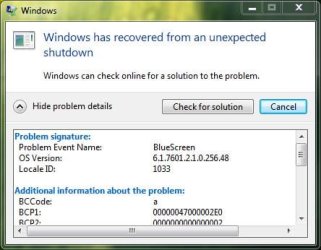
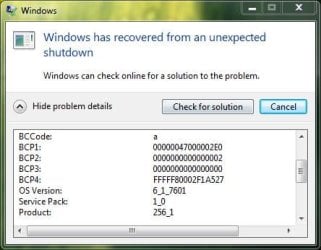
santori, here is what your dump file says is the cause,

Code:
BugCheck A, {47000002e0, 2, 0, fffff80002f1a527}
*** WARNING: Unable to verify timestamp for avgntflt.sys
***[COLOR=red] ERROR: Module load completed but symbols could not be loaded for avgntflt.sys[/COLOR]
Probably caused by : avgntflt.sys ( avgntflt+3da1 )

That is your Avira Anti Virus. Lets uninstall avira then use the removal tool Avira AntiVir Removal Tool - Download to completely get rid of it as much as possible and replace it with Microsoft Security Essentials (Microsoft Security Essentials - Microsoft Windows) and see if that improves the situation.
 

My Computers My Computers

  • At a glance

    Windows 11 ProRyzen 9 5900X32GB G Skill DDR4-3600EVGA RTX 3080 FTW 3 Ultra
    Computer type
    PC/Desktop
    Computer Manufacturer/Model Number
    ALWAYS UNDER CONSTRUCTION
    OS
    Windows 11 Pro
    CPU
    Ryzen 9 5900X
    Motherboard
    Asus X570 Crosshair Viii Hero
    Memory
    32GB G Skill DDR4-3600
    Graphics Card(s)
    EVGA RTX 3080 FTW 3 Ultra
    Sound Card
    On Board/Sennheiser PC37X Headset
    Monitor(s) Displays
    3 X Asus 27"
    Screen Resolution
    2560x1440
    Hard Drives
    2 X 1 TB NVME drives
    PSU
    EVGA 850
    Case
    Phanteks Eclipse P400A
    Cooling
    EVGA 280 AIO
    Keyboard
    Logitech G510s/ Logitech G13
    Mouse
    Logitech G502
    Internet Speed
    24/1
    Antivirus
    ESET/MBAM Pro/SAS Pro
    Browser
    Chrome/ Firefox/ Edge
  • At a glance

    Windows 11 ProIntel Ultra 9 288V32 GB LPDDR5X 8533
    Computer type
    Laptop
    System Manufacturer/Model Number
    Dell 16 Plus
    OS
    Windows 11 Pro
    CPU
    Intel Ultra 9 288V
    Memory
    32 GB LPDDR5X 8533
    Monitor(s) Displays
    16" Mini-LED HDR600 Touch 90 Hz
    Screen Resolution
    2560X1600
    Hard Drives
    1 TB NVME
Back
Top