PC Keeps Connecting To Proxy Server IN LAN

BanjoDrummer

New member
Member
Local time
2:49 PM
Messages
61
I just built my pc and when I go to the LAN settings in Internet options, the box to use a proxy server keeps getting checked. I believe that connecting to a proxy server causes some of my games to crash or to not work properly but I am not sure if this is the reason.

I have tried many different ways such as unchecking the box, resetting settings to default, checking the automatic detection box, and redownloading the network driver. However, it just keeps conencting to it! It can connect back minutes after I unchecked the box. I uncheck and click ok and check on it 3 minutes later and the proxy server is checked again!!

Is this a malware? ALso, is it possible that connecting to a proxy server could cause some games to not work properly? How do I set it to permanently not connect to a proxy server?

Thanks!
 

My Computer

Computer type
PC/Desktop
Computer Manufacturer/Model Number
Self Built
OS
Windows 7 professional x64
CPU
AMD fx 6300 3.5 ghz
Motherboard
Asus m5a97 R2.0
Memory
Crucial ballistix sport 8gb
Graphics Card(s)
Msi radeon r9 270 gaming 2gb
Hard Drives
Western Digital Caviar Blue 1tb
PSU
Corsair CX 600w
Case
Cooler Master HAF 912
Antivirus
Microsoft security essentials
Anyone?
 

My Computer

Computer type
PC/Desktop
Computer Manufacturer/Model Number
Self Built
OS
Windows 7 professional x64
CPU
AMD fx 6300 3.5 ghz
Motherboard
Asus m5a97 R2.0
Memory
Crucial ballistix sport 8gb
Graphics Card(s)
Msi radeon r9 270 gaming 2gb
Hard Drives
Western Digital Caviar Blue 1tb
PSU
Corsair CX 600w
Case
Cooler Master HAF 912
Antivirus
Microsoft security essentials

My Computer

Computer type
PC/Desktop
Computer Manufacturer/Model Number
Custom Built
OS
Windows 7 Professional x64 SP1 ; Windows Server 2012 R2 Standard
CPU
Intel Core i5 2400 @ 3.10GHz
Motherboard
Foxconn H67MP-S/-V/H67MP
Memory
8.0GB DDR3 @ 665MHz (2GBx4)
Graphics Card(s)
AMD Radeon HD 6870
Sound Card
Realtek High Definition Audio
Monitor(s) Displays
AOC 2243W & SMB1930NW
Screen Resolution
1440x900 & 1920x1080
Hard Drives
977GB Seagate ST31000524AS ATA Drive (SATA)
250GB WD iSCSI attached Drive
PSU
750W Gaming PSU
Case
Novatech Night
Cooling
Fan
Keyboard
Dell Standard PS/2 Keyboard
Mouse
R.A.T 07 Gaming Mouse
Internet Speed
Download: 10 Mbps Ping: 30ms Upload: 0.81 Mbps
Browser
Google Chrome
Other Info
Optiarc DVD RW AD-5260S ATA Device

Attachments

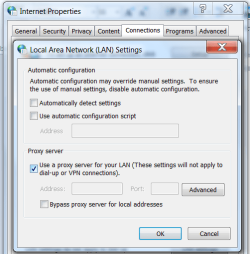
  • Proxy server check box.png
    Proxy server check box.png
    26.3 KB · Views: 55

My Computer

Computer type
PC/Desktop
Computer Manufacturer/Model Number
Self Built
OS
Windows 7 professional x64
CPU
AMD fx 6300 3.5 ghz
Motherboard
Asus m5a97 R2.0
Memory
Crucial ballistix sport 8gb
Graphics Card(s)
Msi radeon r9 270 gaming 2gb
Hard Drives
Western Digital Caviar Blue 1tb
PSU
Corsair CX 600w
Case
Cooler Master HAF 912
Antivirus
Microsoft security essentials
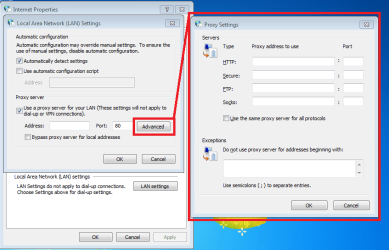
It will probably be blank, but please show the Advanced screen too:

proxy.png
 

My Computer

Computer type
Laptop
Computer Manufacturer/Model Number
Employer provided Dell Latitude
OS
W7 Pro SP1 64bit
CPU
i7
Memory
8GB
Graphics Card(s)
Intel HD Graphics
Hard Drives
crappy SSD
Antivirus
Employer mandated Symantec Endpoint Protection
Browser
Pale Moon 64bit, IE11 64bit & Chrome 64bit

Attachments

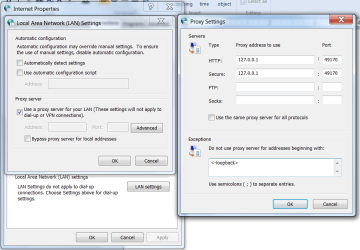
  • proxy server advanced settings.png
    proxy server advanced settings.png
    42.6 KB · Views: 3

My Computer

Computer type
PC/Desktop
Computer Manufacturer/Model Number
Self Built
OS
Windows 7 professional x64
CPU
AMD fx 6300 3.5 ghz
Motherboard
Asus m5a97 R2.0
Memory
Crucial ballistix sport 8gb
Graphics Card(s)
Msi radeon r9 270 gaming 2gb
Hard Drives
Western Digital Caviar Blue 1tb
PSU
Corsair CX 600w
Case
Cooler Master HAF 912
Antivirus
Microsoft security essentials
It will probably be blank, but please show the Advanced screen too:

View attachment 315472

Actually, my proxy advanced screen isn't blank. Is this causing the issue?
It probably should be blank. I saw (and subscribed to) your post when you first made it. I'm just not sure how to tell what app is causing the issue... so I did not post.

You might try these steps:
http://www.sevenforums.com/tutorial...ation-conflicts-performing-clean-startup.html
 

My Computer

Computer type
Laptop
Computer Manufacturer/Model Number
Employer provided Dell Latitude
OS
W7 Pro SP1 64bit
CPU
i7
Memory
8GB
Graphics Card(s)
Intel HD Graphics
Hard Drives
crappy SSD
Antivirus
Employer mandated Symantec Endpoint Protection
Browser
Pale Moon 64bit, IE11 64bit & Chrome 64bit
Just an observation:
If there is a check-mark by the option named "Use a proxy server for....", then the Address: and Port: fields should be white/enabled (ready to be typed in). Your screenshot shows them as greyed out. I'm not sure how that is possible. Maybe some group policy settings.
 

My Computer

Computer type
Laptop
Computer Manufacturer/Model Number
Employer provided Dell Latitude
OS
W7 Pro SP1 64bit
CPU
i7
Memory
8GB
Graphics Card(s)
Intel HD Graphics
Hard Drives
crappy SSD
Antivirus
Employer mandated Symantec Endpoint Protection
Browser
Pale Moon 64bit, IE11 64bit & Chrome 64bit
(Just to clarify what I am looking for) When I perform a clean startup, am I looking to see if the proxy server box automatically switches back to connecting to a proxy server? (if a clean startup solves my original problem)
 

My Computer

Computer type
PC/Desktop
Computer Manufacturer/Model Number
Self Built
OS
Windows 7 professional x64
CPU
AMD fx 6300 3.5 ghz
Motherboard
Asus m5a97 R2.0
Memory
Crucial ballistix sport 8gb
Graphics Card(s)
Msi radeon r9 270 gaming 2gb
Hard Drives
Western Digital Caviar Blue 1tb
PSU
Corsair CX 600w
Case
Cooler Master HAF 912
Antivirus
Microsoft security essentials
(Just to clarify what I am looking for) When I perform a clean startup, am I looking to see if the proxy server box automatically switches back to connecting to a proxy server? (if a clean startup solves my original problem)
Yes.
Uncheck that option to use a proxy.
Uncheck the startup stuff detailed in that tutorial.
Restart (wait a minute or two for MSE to get going)...
...then check to see if there is a check by the option to use a proxy.

Hopefully, there will be no check.

Then you enable half of the stuff that you disabled...
...restart again.
...then check again to see if there is a check by the option to use a proxy.
 

My Computer

Computer type
Laptop
Computer Manufacturer/Model Number
Employer provided Dell Latitude
OS
W7 Pro SP1 64bit
CPU
i7
Memory
8GB
Graphics Card(s)
Intel HD Graphics
Hard Drives
crappy SSD
Antivirus
Employer mandated Symantec Endpoint Protection
Browser
Pale Moon 64bit, IE11 64bit & Chrome 64bit
(Just to clarify what I am looking for) When I perform a clean startup, am I looking to see if the proxy server box automatically switches back to connecting to a proxy server? (if a clean startup solves my original problem)
Yes.
Uncheck that option to use a proxy.
Uncheck the startup stuff detailed in that tutorial.
Restart (wait a minute or two for MSE to get going)...
...then check to see if there is a check by the option to use a proxy.

Hopefully, there will be no check.

Then you enable half of the stuff that you disabled...
...restart again.
...then check again to see if there is a check by the option to use a proxy.

I tried this method and it seemed to work but whenever I played a game, the check to use a proxy would always appear. However, I think I have narrowed it down to the steam client service and another program. On the other hand, no matter what I disable, I always connect to a proxy server after gaming. I don't know why this is happening!
 

My Computer

Computer type
PC/Desktop
Computer Manufacturer/Model Number
Self Built
OS
Windows 7 professional x64
CPU
AMD fx 6300 3.5 ghz
Motherboard
Asus m5a97 R2.0
Memory
Crucial ballistix sport 8gb
Graphics Card(s)
Msi radeon r9 270 gaming 2gb
Hard Drives
Western Digital Caviar Blue 1tb
PSU
Corsair CX 600w
Case
Cooler Master HAF 912
Antivirus
Microsoft security essentials
(Just to clarify what I am looking for) When I perform a clean startup, am I looking to see if the proxy server box automatically switches back to connecting to a proxy server? (if a clean startup solves my original problem)
Yes.
Uncheck that option to use a proxy.
Uncheck the startup stuff detailed in that tutorial.
Restart (wait a minute or two for MSE to get going)...
...then check to see if there is a check by the option to use a proxy.

Hopefully, there will be no check.

Then you enable half of the stuff that you disabled...
...restart again.
...then check again to see if there is a check by the option to use a proxy.

I tried this method and it seemed to work but whenever I played a game, the check to use a proxy would always appear. However, I think I have narrowed it down to the steam client service and another program. On the other hand, no matter what I disable, I always connect to a proxy server after gaming. I don't know why this is happening!

Does the game go through steam? If it goes through steam then it will most likely be the steam client completing the change again.

Just a thought,
Josh :)
 

My Computer

Computer type
PC/Desktop
Computer Manufacturer/Model Number
Custom Built
OS
Windows 7 Professional x64 SP1 ; Windows Server 2012 R2 Standard
CPU
Intel Core i5 2400 @ 3.10GHz
Motherboard
Foxconn H67MP-S/-V/H67MP
Memory
8.0GB DDR3 @ 665MHz (2GBx4)
Graphics Card(s)
AMD Radeon HD 6870
Sound Card
Realtek High Definition Audio
Monitor(s) Displays
AOC 2243W & SMB1930NW
Screen Resolution
1440x900 & 1920x1080
Hard Drives
977GB Seagate ST31000524AS ATA Drive (SATA)
250GB WD iSCSI attached Drive
PSU
750W Gaming PSU
Case
Novatech Night
Cooling
Fan
Keyboard
Dell Standard PS/2 Keyboard
Mouse
R.A.T 07 Gaming Mouse
Internet Speed
Download: 10 Mbps Ping: 30ms Upload: 0.81 Mbps
Browser
Google Chrome
Other Info
Optiarc DVD RW AD-5260S ATA Device
I just built my pc and when I go to the LAN settings in Internet options, the box to use a proxy server keeps getting checked. I believe that connecting to a proxy server causes some of my games to crash or to not work properly but I am not sure if this is the reason.

I have tried many different ways such as unchecking the box, resetting settings to default, checking the automatic detection box, and redownloading the network driver. However, it just keeps conencting to it! It can connect back minutes after I unchecked the box. I uncheck and click ok and check on it 3 minutes later and the proxy server is checked again!!

Is this a malware? ALso, is it possible that connecting to a proxy server could cause some games to not work properly? How do I set it to permanently not connect to a proxy server?

Thanks!
I guess we should answer your questions :-(
1) Of course it could be malware, but it probably is not.
2) Yes, having a proxy set like yours is could mess up all or parts of games.
3) We don't know how to fix your issue permanently - yet. We need to find out what app(s) is making the change.

I really should learn to read more closely... or maybe I'm getting my forum threads mixed up. I'm involved in three threads with this same proxy issue (one thread is in another forum). If I had noticed the info I've quoted/highlighted in red, I would not have suggested that you try a clean boot*. You can put all of the MSCONFIG stuff back the way that it was (if you have not already done so.

*the clean boot method might find it, but there might be an easier way.

Before I mention our options for finding the offending app, let me say once again that I've never seen a screenshot like yours - nor can I replicate it:
315468d1398560213-pc-keeps-connecting-proxy-server-lan-proxy-server-check-box.png

If there is a check-mark by the option named "Use a proxy server for....", then the Address: and Port: fields should be white/enabled (ready to be typed in). Your screenshot shows them as greyed out. I'm not sure how that is possible.

Just for my own info/curiosity...
...please uncheck the option named "Use a proxy server for...."
...then "OK" your way out of all of those windows
...then go right back in to the screen shown in that screenshot
...and place a check by the option named "Use a proxy server for...."
Once you have done that, can you type in the Address: and Port: fields?


There are two ways that I can think of to find the app that is changing this setting:
1) Process Monitor might show you the change...
...but Process Monitor can be a bit overwhelming.
So, read the second option before you decide.

Look at this post (and the videos). The first video shows how to use Process Monitor to see some of the things that Explorer does to files when you change a certain Folder Option. In your case, you would not want to filter on the app named Explorer since you don't know which app we need to gather info on. And (in your case) you don't care about watching for file changes, you need to watch for changes to the registry.

1.1) You would start Process Monitor (& handle the EULA)
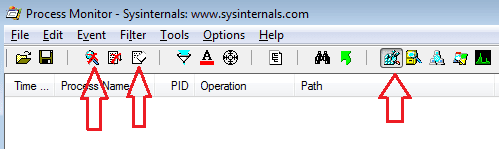
1.2) stop it from gathering data (left most arrow shown below)
1.3) clear the data it has gathered (center arrow)
1.4) filter out everything except registry changes (right most arrow)
PM.png
The right most arrow is pointing to the only button that you want pressed in. Click on each of the other buttons in that area so that they are not depressed/activated. This should let you only see changes made to the registry.

1.5) Manually uncheck the option named "Use a proxy server for...."
1.6) "OK" your way out of all of those windows
1.7) start gathering data via Process Monitor (left most arrow shown above)

Let Process Monitor gather data while you start Steam or any other app that you think might be changing the proxy setting. Then manually check to see if the prozy setting has indeed been changed.

1.8) Once you see that the proxy setting has been changed...
...stop Process Monitor from gathering data (left most arrow shown above).

1.9) Search the Process Monitor app/info for ProxyEnable
(Use ctrl-f to search the info/data gathered.)


2) A script might be easier...
...but it might not tell us everything that we need to know.

Look at this rather long post. Feel free to skip down to the videos. I might be able to change that script so that it tells you when the proxy setting gets changed. Then you might be able to find the offending app. Let me know if you would rather try a script instead of Process Monitor.

 
Last edited:

My Computer

Computer type
Laptop
Computer Manufacturer/Model Number
Employer provided Dell Latitude
OS
W7 Pro SP1 64bit
CPU
i7
Memory
8GB
Graphics Card(s)
Intel HD Graphics
Hard Drives
crappy SSD
Antivirus
Employer mandated Symantec Endpoint Protection
Browser
Pale Moon 64bit, IE11 64bit & Chrome 64bit
I just built my pc and when I go to the LAN settings in Internet options, the box to use a proxy server keeps getting checked. I believe that connecting to a proxy server causes some of my games to crash or to not work properly but I am not sure if this is the reason.

I have tried many different ways such as unchecking the box, resetting settings to default, checking the automatic detection box, and redownloading the network driver. However, it just keeps conencting to it! It can connect back minutes after I unchecked the box. I uncheck and click ok and check on it 3 minutes later and the proxy server is checked again!!

Is this a malware? ALso, is it possible that connecting to a proxy server could cause some games to not work properly? How do I set it to permanently not connect to a proxy server?

Thanks!
I guess we should answer your questions :-(
1) Of course it could be malware, but it probably is not.
2) Yes, having a proxy set like yours is could mess up all or parts of games.
3) We don't know how to fix your issue permanently - yet. We need to find out what app(s) is making the change.

I really should learn to read more closely... or maybe I'm getting my forum threads mixed up. I'm involved in three threads with this same proxy issue (one thread is in another forum). If I had noticed the info I've quoted/highlighted in red, I would not have suggested that you try a clean boot*. You can put all of the MSCONFIG stuff back the way that it was (if you have not already done so.

*the clean boot method might find it, but there might be an easier way.

Before I mention our options for finding the offending app, let me say once again that I've never seen a screenshot like yours - nor can I replicate it:
315468d1398560213-pc-keeps-connecting-proxy-server-lan-proxy-server-check-box.png

If there is a check-mark by the option named "Use a proxy server for....", then the Address: and Port: fields should be white/enabled (ready to be typed in). Your screenshot shows them as greyed out. I'm not sure how that is possible.

Just for my own info/curiosity...
...please uncheck the option named "Use a proxy server for...."
...then "OK" your way out of all of those windows
...then go right back in to the screen shown in that screenshot
...and place a check by the option named "Use a proxy server for...."
Once you have done that, can you type in the Address: and Port: fields?


There are two ways that I can think of to find the app that is changing this setting:
1) Process Monitor might show you the change...
...but Process Monitor can be a bit overwhelming.
So, read the second option before you decide.

Look at this post (and the videos). The first video shows how to use Process Monitor to see some of the things that Explorer does to files when you change a certain Folder Option. In your case, you would not want to filter on the app named Explorer since you don't know which app we need to gather info on. And (in your case) you don't care about watching for file changes, you need to watch for changes to the registry.

1.1) You would start Process Monitor (& handle the EULA)
1.2) stop it from gathering data (left most arrow shown below)
1.3) clear the data it has gathered (center arrow)
1.4) filter out everything except registry changes (right most arrow)
View attachment 316075
The right most arrow is pointing to the only button that you want pressed in. Click on each of the other buttons in that area so that they are not depressed/activated. This should let you only see changes made to the registry.

1.5) Manually uncheck the option named "Use a proxy server for...."
1.6) "OK" your way out of all of those windows
1.7) start gathering data via Process Monitor (left most arrow shown above)

Let Process Monitor gather data while you start Steam or any other app that you think might be changing the proxy setting. Then manually check to see if the prozy setting has indeed been changed.

1.8) Once you see that the proxy setting has been changed...
...stop Process Monitor from gathering data (left most arrow shown above).

1.9) Search the Process Monitor app/info for ProxyEnable
(Use ctrl-f to search the info/data gathered.)


2) A script might be easier...
...but it might not tell us everything that we need to know.

Look at the this rather long post. Feel free to skip down to the videos. I might be able to change that script so that it tells you when the proxy setting gets changed. Then you might be able to find the offending app. Let me know if you would rather try a script instead of Process Monitor.

I just checked the proxy settings and the address and port fields aren't greyed out. Also, in the advanced settings, it is now blank. I think one of the programs in the services section of msconfig was causing this .
 

My Computer

Computer type
PC/Desktop
Computer Manufacturer/Model Number
Self Built
OS
Windows 7 professional x64
CPU
AMD fx 6300 3.5 ghz
Motherboard
Asus m5a97 R2.0
Memory
Crucial ballistix sport 8gb
Graphics Card(s)
Msi radeon r9 270 gaming 2gb
Hard Drives
Western Digital Caviar Blue 1tb
PSU
Corsair CX 600w
Case
Cooler Master HAF 912
Antivirus
Microsoft security essentials
Do you need more help to figure out which app is causing this proxy issue?
Or is the tutorial enough?
 

My Computer

Computer type
Laptop
Computer Manufacturer/Model Number
Employer provided Dell Latitude
OS
W7 Pro SP1 64bit
CPU
i7
Memory
8GB
Graphics Card(s)
Intel HD Graphics
Hard Drives
crappy SSD
Antivirus
Employer mandated Symantec Endpoint Protection
Browser
Pale Moon 64bit, IE11 64bit & Chrome 64bit
Do you need more help to figure out which app is causing this proxy issue?
Or is the tutorial enough?

Hey I really appreciate all the help you have given me but I have been thinking about installing a clean version of windows and wiping the hard drive. So far I have gotten like 6 different blue screens that randomly occur and all of my browsers (internet explorer, chrome, firefox) have been crashing and have been getting different errors. New problems keep occurring one after the other and I was thinking that if I started fresh, and tried to install things one at a time, I would see if I can find out if it is something I may have installed.

Do you think that reinstalling windows would be a good idea and could help solve all my problems?

I don't have anything important on my pc so I won't lose anything
 

My Computer

Computer type
PC/Desktop
Computer Manufacturer/Model Number
Self Built
OS
Windows 7 professional x64
CPU
AMD fx 6300 3.5 ghz
Motherboard
Asus m5a97 R2.0
Memory
Crucial ballistix sport 8gb
Graphics Card(s)
Msi radeon r9 270 gaming 2gb
Hard Drives
Western Digital Caviar Blue 1tb
PSU
Corsair CX 600w
Case
Cooler Master HAF 912
Antivirus
Microsoft security essentials
You are welcome.

Re-installing the operating system is a good idea, but I cannot guarantee that doing so will cure all of your issues. Sometimes, hidden nasties survive the format/re-install process. Opinions vary on how best to wipe the hard drive first.

You might want to start a thread in the security forum and ask about that. Maybe they will ask you to run some scans so that you will know how much time/labor to put into wiping the drive.
 

My Computer

Computer type
Laptop
Computer Manufacturer/Model Number
Employer provided Dell Latitude
OS
W7 Pro SP1 64bit
CPU
i7
Memory
8GB
Graphics Card(s)
Intel HD Graphics
Hard Drives
crappy SSD
Antivirus
Employer mandated Symantec Endpoint Protection
Browser
Pale Moon 64bit, IE11 64bit & Chrome 64bit
I found that a program called RocketTab snuck on my system when I was trying to obtain some other software. It was resetting the proxy flag in an attempt to make itself as the proxy server, but must have been unable complete the proxy setup. It was not detected as malware since apparently it looked like I wanted that program.

Reinstalling your OS will fix the problem because it will get rid of this program or any program like it that wants to be the proxy server on your machine.
 

My Computer

Computer type
PC/Desktop
Computer Manufacturer/Model Number
DELL
OS
Wondows 7 Enterprise
CPU
Core i7
Motherboard
unknown
Memory
8GB
Graphics Card(s)
unknown
Hard Drives
yes, 2
Antivirus
Windows
Browser
ie, chronM, ff
RocketTab

I found this forum after experiencing the same problem - I wasn't able to access the web when I rebooted because my pc was trying to access an invalid proxy server. As soon as I deleted the proxy server and saved changes I would go back in and the details had re-populated.

I saw to comment above about RocketTab program

I went to Add/Remove programs, found this on my computer (which is only a few days old) and deleted it. This has fixed the issue successfully :)

Cheers
 

My Computer

Computer type
PC/Desktop
Computer Manufacturer/Model Number
Asus
OS
windows 8.1
CPU
i5-4460s
Back
Top