
PC Slow to shut off when shutting down (RAID 1)

thephatp

New member
Local time
4:33 PM
Messages
15
I have no idea why this is happening, and I've dealt with it for too long now.

Whenever I shutdown my pc (Windows 7 x64), the actual shutdown screen goes away in a reasonable amount of time, but my PC takes about another 8-10 minutes to shut off. Yes, that is 8-10 minutes to shut off. What is it doing during this time? The video signal to the monitor is shut off after the windows screen goes away, but my computers continues to do something for a long time before it will finally turn off.

I've never had this happen before on any of my pc builds (yes, this is completely custom), and it's been happening for over a year now, but it ONLY started once I set up a RAID 1 configuration. My boot drive is NOT on that RAID system. I have my boot drive on a separate disk (C drive) and two other 750GB disks are configured in RAID 1 (mirroring) for my storage drive. It uses the Intel Matrix Storage.

I should also note that this does not happen when rebooting, only when shutting down.

My setup is:

Mobo - Gigabyte P35-DS3R
RAM - 8GB 1033 RAM
Windows 7 Ultimate x64 SP1
Primary Drive (Boot) - 640 GB Western Digital
Secondary Drives in RAID 1 - 750 GB Western Digital
RAID - Intel Storage Matrix Manager


One thing I will say is that my DVD-Rom drive slowly flashes it's light over and over while the hard disks are doing something, but after Windows has (seemly) shut down (no video feed to monitor). I don't think this has anything to do with it, because again, it only started once I put in a RAID configuration.

I didn't know if this should go in the Windows forum or somewhere else, because I really don't know the source of the problem. Please move it if needed.

Any ideas/help would be greatly appreciated.
 

My Computer My Computer

At a glance

Windows 7 Ultimate x64 SP1Core 2 Quad Q95508GB (4x2GB) Corsair CM2X2048-6400C5ATI Radeon HD 4670
OS
Windows 7 Ultimate x64 SP1
CPU
Core 2 Quad Q9550
Motherboard
Gigabyte GA-P35-DS3R Rev 1.0
Memory
8GB (4x2GB) Corsair CM2X2048-6400C5
Graphics Card(s)
ATI Radeon HD 4670
Sound Card
Creative SB X-Fi
Monitor(s) Displays
Gateway FPD2485W
Screen Resolution
1920x1200
Hard Drives
OS - Western Digital 640GB WD6400AACS-00G8B1
RAID 1 - 2x 750GB Seagate ST3750640AS
Hi and welcome to SevenForums,

From the disk activity you describe, it sounds like the RAID1 array is checking that the two disks are synchronised or mirrored prior to shutdown - a sort of safety check if you like.

Is there some additional RAID management software installed on your system that controls this? Perhaps a setting in your BIOS? I'm thinking there may be some switch to turn this synchronisation check off at shutdown?

Regards,
Golden
 

My Computer My Computer

At a glance

Windows 10 Pro x64 ; Xubuntu x64Intel i7 860 @ 2.80 GHz O/C'ed to 4.0GHz16GB Corsair Vengance DDR3 @ 661 MHz Dual Cha...EVGA NVidia GTX 560 1024MB
Computer type
PC/Desktop
Computer Manufacturer/Model Number
Golden Mk. I.4
OS
Windows 10 Pro x64 ; Xubuntu x64
CPU
Intel i7 860 @ 2.80 GHz O/C'ed to 4.0GHz
Motherboard
Gigabyte P55A-UD3R Rev.1. Award BIOS F13
Memory
16GB Corsair Vengance DDR3 @ 661 MHz Dual Channel (9-9-9-24)
Graphics Card(s)
EVGA NVidia GTX 560 1024MB
Sound Card
Realtek Integrated
Monitor(s) Displays
Dual Samsung SyncMaster 2494HS
Screen Resolution
1920*1080 and 1920*1080
Hard Drives
1*Samsung 840 EVO 120GB SSD;
1*OCZ Vertex 2 60GB SSD;
2*Samsung F3 SpinPoint 1TB in RAID0;
1*Samsung F1 SpinPoint 1TB;
2*Western Digital 1TB External USB 3.0
1*Western Digital 500GB External USB 3.0
1*Seagate 500GB External USB 2.0
PSU
Thermaltake ToughPower QFan 750W
Case
Thermaltake Element S VK60001W2Z
Cooling
Corsair H60 Water Cooling, 2*230mm and 2*80mm case fans
Keyboard
Logitech G110
Mouse
Logitech MX518
Hi Golden, thanks for the reply.

What you explained about synchronizing before shutting down is exactly what I'm suspecting as well. That's why I force myself to wait instead of just killing it, but man it's terribly frustrating, especially when messing with hardware inside the PC.

I have Intel Matrix Storage Console, but the options are terribly limited. It's always a waste of an app. The only option I saw there was this:

Enable/Disable Hard Drive Data Cache:
The Hard Drive Data Cache is a performance-enhancing feature supported by some hard drives. Enabling the data cache improves performance by temporarily storing data before it is written to the hard drive. The disadvantage of enabling the data cache is that the cached data may be lost if the system loses power. To enable or disable the Data Cache, right-click on the RAID array and select 'Enable Hard Drive Data Cache' or 'Disable Hard Drive Data Cache'. Restart the computer to apply the changes.

I disabled it, and it really didn't seem to help at all. Maybe it was a minute or so faster, but I didn't time it. It was still on the order of several minutes before it finally turned off. Additionally, I didn't do much of anything before trying.

I'm not sure what settings to really look for in the BIOS, but from browsing through all of the options, I didn't see anything like this.

There is a configuration utility of some sort (I've used it before but a LONG time ago) that I could get when booting, except that it's not launching. I'm guessing it's my wireless keyboard not responding fast enough, so I'm going to try to dig up an old keyboard and see if I can get into that utility. Perhaps there is something there.

Thanks for the input, and if you have any other ideas, let me know. But again, I think you're right about what is happening...I just need to figure out how to disable it.

Oh, and one other note about energy settings--I set the hard drives to sleep after an hour, but the computer itself never sleeps (even sleeping takes a while, but not as long). However, when I'm waking up the hard drives, it always takes the RAID drives about 20-30 seconds once I've tried to access a file on the drive to actually respond (in Windows Explorer).... FWIW.
 

My Computer My Computer

At a glance

Windows 7 Ultimate x64 SP1Core 2 Quad Q95508GB (4x2GB) Corsair CM2X2048-6400C5ATI Radeon HD 4670
OS
Windows 7 Ultimate x64 SP1
CPU
Core 2 Quad Q9550
Motherboard
Gigabyte GA-P35-DS3R Rev 1.0
Memory
8GB (4x2GB) Corsair CM2X2048-6400C5
Graphics Card(s)
ATI Radeon HD 4670
Sound Card
Creative SB X-Fi
Monitor(s) Displays
Gateway FPD2485W
Screen Resolution
1920x1200
Hard Drives
OS - Western Digital 640GB WD6400AACS-00G8B1
RAID 1 - 2x 750GB Seagate ST3750640AS
Ok, found an old keyboard and got to the start-up utility I mentioned in the previous post (which hasn't shown up yet, so hopefully it does soon), and it only had create/delete RAID, so no luck.

I have no idea how or if it's even possible to alter the synchronization. :(
 

My Computer My Computer

At a glance

Windows 7 Ultimate x64 SP1Core 2 Quad Q95508GB (4x2GB) Corsair CM2X2048-6400C5ATI Radeon HD 4670
OS
Windows 7 Ultimate x64 SP1
CPU
Core 2 Quad Q9550
Motherboard
Gigabyte GA-P35-DS3R Rev 1.0
Memory
8GB (4x2GB) Corsair CM2X2048-6400C5
Graphics Card(s)
ATI Radeon HD 4670
Sound Card
Creative SB X-Fi
Monitor(s) Displays
Gateway FPD2485W
Screen Resolution
1920x1200
Hard Drives
OS - Western Digital 640GB WD6400AACS-00G8B1
RAID 1 - 2x 750GB Seagate ST3750640AS
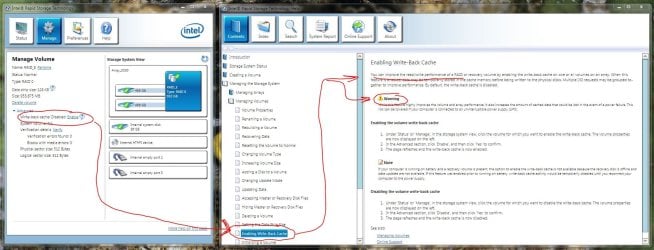
Hi,

I'm unsure if this is the same as what you already tried, but if not, then suggestions are that disabling the Write-back cache can improve performance.

Regards,
Golden
 

Attachments

  • Capture.JPG
    Capture.JPG
    181.3 KB · Views: 110

My Computer My Computer

At a glance

Windows 10 Pro x64 ; Xubuntu x64Intel i7 860 @ 2.80 GHz O/C'ed to 4.0GHz16GB Corsair Vengance DDR3 @ 661 MHz Dual Cha...EVGA NVidia GTX 560 1024MB
Computer type
PC/Desktop
Computer Manufacturer/Model Number
Golden Mk. I.4
OS
Windows 10 Pro x64 ; Xubuntu x64
CPU
Intel i7 860 @ 2.80 GHz O/C'ed to 4.0GHz
Motherboard
Gigabyte P55A-UD3R Rev.1. Award BIOS F13
Memory
16GB Corsair Vengance DDR3 @ 661 MHz Dual Channel (9-9-9-24)
Graphics Card(s)
EVGA NVidia GTX 560 1024MB
Sound Card
Realtek Integrated
Monitor(s) Displays
Dual Samsung SyncMaster 2494HS
Screen Resolution
1920*1080 and 1920*1080
Hard Drives
1*Samsung 840 EVO 120GB SSD;
1*OCZ Vertex 2 60GB SSD;
2*Samsung F3 SpinPoint 1TB in RAID0;
1*Samsung F1 SpinPoint 1TB;
2*Western Digital 1TB External USB 3.0
1*Western Digital 500GB External USB 3.0
1*Seagate 500GB External USB 2.0
PSU
Thermaltake ToughPower QFan 750W
Case
Thermaltake Element S VK60001W2Z
Cooling
Corsair H60 Water Cooling, 2*230mm and 2*80mm case fans
Keyboard
Logitech G110
Mouse
Logitech MX518
I hate to bump an old thread, but I wanted to report back what I (finally) think I figured out. First of all, I think some of it had to do with RAID and a crappy controller. However, I also found an update for my sound card driver (Creative SB046A: SB X-fi Fatal1ty Platinum Champion edition), which listed the following fixes:

Fixes:
Resolves the following issues:

  • System taking more than two minutes to shut down.
  • PowerDVD® DX 8.3 (Dell® version) not working properly.
  • Passthrough of Dolby®/DTS® audio to an external decoder not working with Windows Media Player 12.

See here (it's a search, not a download)

Just in case anyone else has a similar problem, be sure to check out drivers for ALL of your components, especially after updating.
 

My Computer My Computer

At a glance

Windows 7 Ultimate x64 SP1Core 2 Quad Q95508GB (4x2GB) Corsair CM2X2048-6400C5ATI Radeon HD 4670
OS
Windows 7 Ultimate x64 SP1
CPU
Core 2 Quad Q9550
Motherboard
Gigabyte GA-P35-DS3R Rev 1.0
Memory
8GB (4x2GB) Corsair CM2X2048-6400C5
Graphics Card(s)
ATI Radeon HD 4670
Sound Card
Creative SB X-Fi
Monitor(s) Displays
Gateway FPD2485W
Screen Resolution
1920x1200
Hard Drives
OS - Western Digital 640GB WD6400AACS-00G8B1
RAID 1 - 2x 750GB Seagate ST3750640AS
BTW, thank you Golden for your suggestions. I did try them, but they didn't fix the problem. Worth a shot though. ;)
 

My Computer My Computer

At a glance

Windows 7 Ultimate x64 SP1Core 2 Quad Q95508GB (4x2GB) Corsair CM2X2048-6400C5ATI Radeon HD 4670
OS
Windows 7 Ultimate x64 SP1
CPU
Core 2 Quad Q9550
Motherboard
Gigabyte GA-P35-DS3R Rev 1.0
Memory
8GB (4x2GB) Corsair CM2X2048-6400C5
Graphics Card(s)
ATI Radeon HD 4670
Sound Card
Creative SB X-Fi
Monitor(s) Displays
Gateway FPD2485W
Screen Resolution
1920x1200
Hard Drives
OS - Western Digital 640GB WD6400AACS-00G8B1
RAID 1 - 2x 750GB Seagate ST3750640AS
No worries - glad to hear its sorted.
 

My Computer My Computer

At a glance

Windows 10 Pro x64 ; Xubuntu x64Intel i7 860 @ 2.80 GHz O/C'ed to 4.0GHz16GB Corsair Vengance DDR3 @ 661 MHz Dual Cha...EVGA NVidia GTX 560 1024MB
Computer type
PC/Desktop
Computer Manufacturer/Model Number
Golden Mk. I.4
OS
Windows 10 Pro x64 ; Xubuntu x64
CPU
Intel i7 860 @ 2.80 GHz O/C'ed to 4.0GHz
Motherboard
Gigabyte P55A-UD3R Rev.1. Award BIOS F13
Memory
16GB Corsair Vengance DDR3 @ 661 MHz Dual Channel (9-9-9-24)
Graphics Card(s)
EVGA NVidia GTX 560 1024MB
Sound Card
Realtek Integrated
Monitor(s) Displays
Dual Samsung SyncMaster 2494HS
Screen Resolution
1920*1080 and 1920*1080
Hard Drives
1*Samsung 840 EVO 120GB SSD;
1*OCZ Vertex 2 60GB SSD;
2*Samsung F3 SpinPoint 1TB in RAID0;
1*Samsung F1 SpinPoint 1TB;
2*Western Digital 1TB External USB 3.0
1*Western Digital 500GB External USB 3.0
1*Seagate 500GB External USB 2.0
PSU
Thermaltake ToughPower QFan 750W
Case
Thermaltake Element S VK60001W2Z
Cooling
Corsair H60 Water Cooling, 2*230mm and 2*80mm case fans
Keyboard
Logitech G110
Mouse
Logitech MX518
Back
Top