Solved PC Stuck in System Recovery

Gamer1996

New member
Local time
10:28 AM
Messages
23
My dad just gave me his gaming PC that he made and he said the SSD crashed so I might have to get a new one (no idea if this relates to the problem) my pc is running windows 7 64. When I turn it on it starts the start up repair and finds nothing to repair. So I tried to system recovery and do a system restore but it comes up with errors. This is where I am stuck, I was using the pc to game all day yesterday the. I woke up and it was on the startup repair. HELP Please!!
 

My Computer My Computer

Computer type
PC/Desktop
OS
Windows 7 64
Hi Gamer1996,

Have you tried the following:

1. Spamming the Tab-key between your BIOS-post screen and your Windows Bootloader?

2. Entering "bootrec /rebuildbcd" on the command prompt (in the Windows Recovery Options window)

3. Reïnstalling your Windows

Please let me know if this have solved your problem, and which step was the best.
 

My Computer My Computer

Computer type
Laptop
Computer Manufacturer/Model Number
Dell Inspiron (15) 3520
OS
Windows 7 Professional x64, Windows 8.1 Pro x64, Windows 10 Home x64
CPU
Intel(R) Pentium(R) CPU B960 @ 2.20GHz, 2200 MHz,
Motherboard
Dell Inc. (or else Unknown)
Memory
4GB Installed (3.87 available)
Graphics Card(s)
Intel(R) HD Graphics ver. 9.17.10.4229
Sound Card
Cirrus LogicHigh Definition Audio
Monitor(s) Displays
General PnP Display
Screen Resolution
1366x768
Hard Drives
WDC WD5000LPVT-75G33T0 (Internal 500GB)
WD My Passport 0741 USB Device (External 1TB)
PSU
Dell LA64NS2-01
Cooling
Dell Inspiron 3520 CPU Cooling Fan Heatsink 60.4TZ01.011 0T0
Keyboard
Standard PS/2 Keyboard
Mouse
Dell Touchpad + Ewent EW3218
Internet Speed
60 MB/s
Antivirus
Windows Defender + Eset System Rescue CD (Linux A-V)
Browser
Google Chrome (Mozilla FireFox on Windows 10)
I did step one and it gave me an option to boot with windows 7 and a second option to use windows tool diagnostic.
I did step 2 and it said it was successful then I didn't know what to do from there ? I believe the D drive is corrupt, if that helps at all
 

My Computer My Computer

Computer type
PC/Desktop
OS
Windows 7 64
For step 3, I do not know how to reinstall it without being able to access it
 

My Computer My Computer

Computer type
PC/Desktop
OS
Windows 7 64
The D Drive, is that your Internal or your external drive?

PS. For step 3, you will need a Windows Installation disk from a store, or you can download it.
 

My Computer My Computer

Computer type
Laptop
Computer Manufacturer/Model Number
Dell Inspiron (15) 3520
OS
Windows 7 Professional x64, Windows 8.1 Pro x64, Windows 10 Home x64
CPU
Intel(R) Pentium(R) CPU B960 @ 2.20GHz, 2200 MHz,
Motherboard
Dell Inc. (or else Unknown)
Memory
4GB Installed (3.87 available)
Graphics Card(s)
Intel(R) HD Graphics ver. 9.17.10.4229
Sound Card
Cirrus LogicHigh Definition Audio
Monitor(s) Displays
General PnP Display
Screen Resolution
1366x768
Hard Drives
WDC WD5000LPVT-75G33T0 (Internal 500GB)
WD My Passport 0741 USB Device (External 1TB)
PSU
Dell LA64NS2-01
Cooling
Dell Inspiron 3520 CPU Cooling Fan Heatsink 60.4TZ01.011 0T0
Keyboard
Standard PS/2 Keyboard
Mouse
Dell Touchpad + Ewent EW3218
Internet Speed
60 MB/s
Antivirus
Windows Defender + Eset System Rescue CD (Linux A-V)
Browser
Google Chrome (Mozilla FireFox on Windows 10)
Internal . I have windows 7 on the disc I just don't know how to get past all this to reinstall it
 

My Computer My Computer

Computer type
PC/Desktop
OS
Windows 7 64
Okay, let's see...
How are you connected to sevenforums.com?
Is there any possibility to connect to the internet and run .exe files or something?
 

My Computer My Computer

Computer type
Laptop
Computer Manufacturer/Model Number
Dell Inspiron (15) 3520
OS
Windows 7 Professional x64, Windows 8.1 Pro x64, Windows 10 Home x64
CPU
Intel(R) Pentium(R) CPU B960 @ 2.20GHz, 2200 MHz,
Motherboard
Dell Inc. (or else Unknown)
Memory
4GB Installed (3.87 available)
Graphics Card(s)
Intel(R) HD Graphics ver. 9.17.10.4229
Sound Card
Cirrus LogicHigh Definition Audio
Monitor(s) Displays
General PnP Display
Screen Resolution
1366x768
Hard Drives
WDC WD5000LPVT-75G33T0 (Internal 500GB)
WD My Passport 0741 USB Device (External 1TB)
PSU
Dell LA64NS2-01
Cooling
Dell Inspiron 3520 CPU Cooling Fan Heatsink 60.4TZ01.011 0T0
Keyboard
Standard PS/2 Keyboard
Mouse
Dell Touchpad + Ewent EW3218
Internet Speed
60 MB/s
Antivirus
Windows Defender + Eset System Rescue CD (Linux A-V)
Browser
Google Chrome (Mozilla FireFox on Windows 10)
I am on my phone, I have no way to connect on my PC. I can't even get into safe mode at this point
 

My Computer My Computer

Computer type
PC/Desktop
OS
Windows 7 64
Okay, here are a few more steps:

1. What can you see when you enter 'bcdedit' into the command prompt in the Recovery Console?
2. Can you access system32 by entering 'cd %windir%\system32' amd 'cd C:\Windows\system32\'?
3. What pops up when you enter 'sfc /scannow', if you can even access it (it will take a while)?
 

My Computer My Computer

Computer type
Laptop
Computer Manufacturer/Model Number
Dell Inspiron (15) 3520
OS
Windows 7 Professional x64, Windows 8.1 Pro x64, Windows 10 Home x64
CPU
Intel(R) Pentium(R) CPU B960 @ 2.20GHz, 2200 MHz,
Motherboard
Dell Inc. (or else Unknown)
Memory
4GB Installed (3.87 available)
Graphics Card(s)
Intel(R) HD Graphics ver. 9.17.10.4229
Sound Card
Cirrus LogicHigh Definition Audio
Monitor(s) Displays
General PnP Display
Screen Resolution
1366x768
Hard Drives
WDC WD5000LPVT-75G33T0 (Internal 500GB)
WD My Passport 0741 USB Device (External 1TB)
PSU
Dell LA64NS2-01
Cooling
Dell Inspiron 3520 CPU Cooling Fan Heatsink 60.4TZ01.011 0T0
Keyboard
Standard PS/2 Keyboard
Mouse
Dell Touchpad + Ewent EW3218
Internet Speed
60 MB/s
Antivirus
Windows Defender + Eset System Rescue CD (Linux A-V)
Browser
Google Chrome (Mozilla FireFox on Windows 10)
1) comes up with windows boot loader and data under it and windows boot manager with data under it
2)I cannot come up with anything, may be typing. Incorrectly
3)It comes up with options like /scannow is the integrity of all protected.... And /verifyonly is .....and so on. It took about 5 seconds
 

My Computer My Computer

Computer type
PC/Desktop
OS
Windows 7 64
1) comes up with windows boot loader and data under it and windows boot manager with data under it
Can you tell if one of the path leads to 'C:\Windows\System32\winload.exe' or 'C:\Windows\system32\winload.efi' (.exe is for Legacy boot and .efi is for UEFI boot)

2)I cannot come up with anything, may be typing. Incorrectly
Oh sorry, I've forgot that you'll need to enter 'C:' after the command

3)It comes up with options like /scannow is the integrity of all protected.... And /verifyonly is .....and so on. It took about 5 seconds
Maybe you've spelled '/scannow' wrong or you've just gave too many parameters. Try the command again.
 

My Computer My Computer

Computer type
Laptop
Computer Manufacturer/Model Number
Dell Inspiron (15) 3520
OS
Windows 7 Professional x64, Windows 8.1 Pro x64, Windows 10 Home x64
CPU
Intel(R) Pentium(R) CPU B960 @ 2.20GHz, 2200 MHz,
Motherboard
Dell Inc. (or else Unknown)
Memory
4GB Installed (3.87 available)
Graphics Card(s)
Intel(R) HD Graphics ver. 9.17.10.4229
Sound Card
Cirrus LogicHigh Definition Audio
Monitor(s) Displays
General PnP Display
Screen Resolution
1366x768
Hard Drives
WDC WD5000LPVT-75G33T0 (Internal 500GB)
WD My Passport 0741 USB Device (External 1TB)
PSU
Dell LA64NS2-01
Cooling
Dell Inspiron 3520 CPU Cooling Fan Heatsink 60.4TZ01.011 0T0
Keyboard
Standard PS/2 Keyboard
Mouse
Dell Touchpad + Ewent EW3218
Internet Speed
60 MB/s
Antivirus
Windows Defender + Eset System Rescue CD (Linux A-V)
Browser
Google Chrome (Mozilla FireFox on Windows 10)
Under windows boot loader it says path and across from path it says \Windows\system32\winload.exe
 

My Computer My Computer

Computer type
PC/Desktop
OS
Windows 7 64
What does it say near to device?
It must be at least C:\ or boot
 

My Computer My Computer

Computer type
Laptop
Computer Manufacturer/Model Number
Dell Inspiron (15) 3520
OS
Windows 7 Professional x64, Windows 8.1 Pro x64, Windows 10 Home x64
CPU
Intel(R) Pentium(R) CPU B960 @ 2.20GHz, 2200 MHz,
Motherboard
Dell Inc. (or else Unknown)
Memory
4GB Installed (3.87 available)
Graphics Card(s)
Intel(R) HD Graphics ver. 9.17.10.4229
Sound Card
Cirrus LogicHigh Definition Audio
Monitor(s) Displays
General PnP Display
Screen Resolution
1366x768
Hard Drives
WDC WD5000LPVT-75G33T0 (Internal 500GB)
WD My Passport 0741 USB Device (External 1TB)
PSU
Dell LA64NS2-01
Cooling
Dell Inspiron 3520 CPU Cooling Fan Heatsink 60.4TZ01.011 0T0
Keyboard
Standard PS/2 Keyboard
Mouse
Dell Touchpad + Ewent EW3218
Internet Speed
60 MB/s
Antivirus
Windows Defender + Eset System Rescue CD (Linux A-V)
Browser
Google Chrome (Mozilla FireFox on Windows 10)
It says partition=D:
 

My Computer My Computer

Computer type
PC/Desktop
OS
Windows 7 64
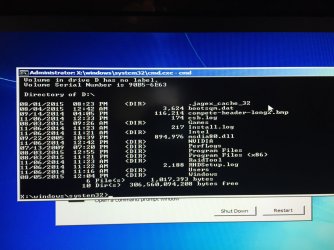
ok, let's enter 'dir D:' and can you post a picture of it (if there are no errors)?
 

My Computer My Computer

Computer type
Laptop
Computer Manufacturer/Model Number
Dell Inspiron (15) 3520
OS
Windows 7 Professional x64, Windows 8.1 Pro x64, Windows 10 Home x64
CPU
Intel(R) Pentium(R) CPU B960 @ 2.20GHz, 2200 MHz,
Motherboard
Dell Inc. (or else Unknown)
Memory
4GB Installed (3.87 available)
Graphics Card(s)
Intel(R) HD Graphics ver. 9.17.10.4229
Sound Card
Cirrus LogicHigh Definition Audio
Monitor(s) Displays
General PnP Display
Screen Resolution
1366x768
Hard Drives
WDC WD5000LPVT-75G33T0 (Internal 500GB)
WD My Passport 0741 USB Device (External 1TB)
PSU
Dell LA64NS2-01
Cooling
Dell Inspiron 3520 CPU Cooling Fan Heatsink 60.4TZ01.011 0T0
Keyboard
Standard PS/2 Keyboard
Mouse
Dell Touchpad + Ewent EW3218
Internet Speed
60 MB/s
Antivirus
Windows Defender + Eset System Rescue CD (Linux A-V)
Browser
Google Chrome (Mozilla FireFox on Windows 10)
Next to device under windows boot manager it says partition=C: and under windows boot loader it says partition=D:
 

My Computer My Computer

Computer type
PC/Desktop
OS
Windows 7 64
Oh I mean without the bcdedit, just 'dir D:'
 

My Computer My Computer

Computer type
Laptop
Computer Manufacturer/Model Number
Dell Inspiron (15) 3520
OS
Windows 7 Professional x64, Windows 8.1 Pro x64, Windows 10 Home x64
CPU
Intel(R) Pentium(R) CPU B960 @ 2.20GHz, 2200 MHz,
Motherboard
Dell Inc. (or else Unknown)
Memory
4GB Installed (3.87 available)
Graphics Card(s)
Intel(R) HD Graphics ver. 9.17.10.4229
Sound Card
Cirrus LogicHigh Definition Audio
Monitor(s) Displays
General PnP Display
Screen Resolution
1366x768
Hard Drives
WDC WD5000LPVT-75G33T0 (Internal 500GB)
WD My Passport 0741 USB Device (External 1TB)
PSU
Dell LA64NS2-01
Cooling
Dell Inspiron 3520 CPU Cooling Fan Heatsink 60.4TZ01.011 0T0
Keyboard
Standard PS/2 Keyboard
Mouse
Dell Touchpad + Ewent EW3218
Internet Speed
60 MB/s
Antivirus
Windows Defender + Eset System Rescue CD (Linux A-V)
Browser
Google Chrome (Mozilla FireFox on Windows 10)
I type dir D and here's what I get

Volume in drive X is Boot
Volume Serial Number is D60A-0DC2

Director of X:\windows\system32

File not found
 

My Computer My Computer

Computer type
PC/Desktop
OS
Windows 7 64
Now it will list the files in X:, because you forgot to place ':' after 'D'
copy this:

dir D:
 

My Computer My Computer

Computer type
Laptop
Computer Manufacturer/Model Number
Dell Inspiron (15) 3520
OS
Windows 7 Professional x64, Windows 8.1 Pro x64, Windows 10 Home x64
CPU
Intel(R) Pentium(R) CPU B960 @ 2.20GHz, 2200 MHz,
Motherboard
Dell Inc. (or else Unknown)
Memory
4GB Installed (3.87 available)
Graphics Card(s)
Intel(R) HD Graphics ver. 9.17.10.4229
Sound Card
Cirrus LogicHigh Definition Audio
Monitor(s) Displays
General PnP Display
Screen Resolution
1366x768
Hard Drives
WDC WD5000LPVT-75G33T0 (Internal 500GB)
WD My Passport 0741 USB Device (External 1TB)
PSU
Dell LA64NS2-01
Cooling
Dell Inspiron 3520 CPU Cooling Fan Heatsink 60.4TZ01.011 0T0
Keyboard
Standard PS/2 Keyboard
Mouse
Dell Touchpad + Ewent EW3218
Internet Speed
60 MB/s
Antivirus
Windows Defender + Eset System Rescue CD (Linux A-V)
Browser
Google Chrome (Mozilla FireFox on Windows 10)
It's not letting me post pictures from my phone can I possibly email them or somehow get them to you
 

Attachments

  • image.jpg
    image.jpg
    809.5 KB · Views: 1

My Computer My Computer

Computer type
PC/Desktop
OS
Windows 7 64
Back
Top