
You are using an out of date browser. It may not display this or other websites correctly.
You should upgrade or use an alternative browser.
You should upgrade or use an alternative browser.
Solved PC Stuck in System Recovery
- Thread starter Gamer1996
- Start date
Raystone
New member
Do you have an Android device, so I can send you a Windows Installation Disk?
You will need DriveDroid (Play Store) only with the the charger cable to your computer.
You will need DriveDroid (Play Store) only with the the charger cable to your computer.
My Computer
At a glance
Windows 7 Professional x64, Windows 8.1 Pro x...Intel(R) Pentium(R) CPU B960 @ 2.20GHz, 2200 ...4GB Installed (3.87 available)Intel(R) HD Graphics ver. 9.17.10.4229
- Computer type
- Laptop
- Computer Manufacturer/Model Number
- Dell Inspiron (15) 3520
- OS
- Windows 7 Professional x64, Windows 8.1 Pro x64, Windows 10 Home x64
- CPU
- Intel(R) Pentium(R) CPU B960 @ 2.20GHz, 2200 MHz,
- Motherboard
- Dell Inc. (or else Unknown)
- Memory
- 4GB Installed (3.87 available)
- Graphics Card(s)
- Intel(R) HD Graphics ver. 9.17.10.4229
- Sound Card
- Cirrus LogicHigh Definition Audio
- Monitor(s) Displays
- General PnP Display
- Screen Resolution
- 1366x768
- Hard Drives
- WDC WD5000LPVT-75G33T0 (Internal 500GB)
WD My Passport 0741 USB Device (External 1TB)
- PSU
- Dell LA64NS2-01
- Cooling
- Dell Inspiron 3520 CPU Cooling Fan Heatsink 60.4TZ01.011 0T0
- Keyboard
- Standard PS/2 Keyboard
- Mouse
- Dell Touchpad + Ewent EW3218
- Internet Speed
- 60 MB/s
- Antivirus
- Windows Defender + Eset System Rescue CD (Linux A-V)
- Browser
- Google Chrome (Mozilla FireFox on Windows 10)
Raystone
New member
Can you put the Windows Installation in your computer, and reboot it?
It may tell you 'Press any key to boot from the Cd...' or something. Do that.
If you are in the installation part, there are 2 paths (if you have clicked further): 'Upgrade' and 'Custom', choose Custom
Choose the letter D, by pressing Shift+F10 at the same time. Then the Command prompt shows up again.
enter 'diskpart' following by Enter. then enter 'list volume' and look on the other window which volume has the same amount of memory left on the D Drive. Now just upload a picture again with the 2 windows opened (maybe 2 pictures as the windows may be too big to let see them both).
It may tell you 'Press any key to boot from the Cd...' or something. Do that.
If you are in the installation part, there are 2 paths (if you have clicked further): 'Upgrade' and 'Custom', choose Custom
Choose the letter D, by pressing Shift+F10 at the same time. Then the Command prompt shows up again.
enter 'diskpart' following by Enter. then enter 'list volume' and look on the other window which volume has the same amount of memory left on the D Drive. Now just upload a picture again with the 2 windows opened (maybe 2 pictures as the windows may be too big to let see them both).
My Computer
At a glance
Windows 7 Professional x64, Windows 8.1 Pro x...Intel(R) Pentium(R) CPU B960 @ 2.20GHz, 2200 ...4GB Installed (3.87 available)Intel(R) HD Graphics ver. 9.17.10.4229
- Computer type
- Laptop
- Computer Manufacturer/Model Number
- Dell Inspiron (15) 3520
- OS
- Windows 7 Professional x64, Windows 8.1 Pro x64, Windows 10 Home x64
- CPU
- Intel(R) Pentium(R) CPU B960 @ 2.20GHz, 2200 MHz,
- Motherboard
- Dell Inc. (or else Unknown)
- Memory
- 4GB Installed (3.87 available)
- Graphics Card(s)
- Intel(R) HD Graphics ver. 9.17.10.4229
- Sound Card
- Cirrus LogicHigh Definition Audio
- Monitor(s) Displays
- General PnP Display
- Screen Resolution
- 1366x768
- Hard Drives
- WDC WD5000LPVT-75G33T0 (Internal 500GB)
WD My Passport 0741 USB Device (External 1TB)
- PSU
- Dell LA64NS2-01
- Cooling
- Dell Inspiron 3520 CPU Cooling Fan Heatsink 60.4TZ01.011 0T0
- Keyboard
- Standard PS/2 Keyboard
- Mouse
- Dell Touchpad + Ewent EW3218
- Internet Speed
- 60 MB/s
- Antivirus
- Windows Defender + Eset System Rescue CD (Linux A-V)
- Browser
- Google Chrome (Mozilla FireFox on Windows 10)
Raystone
New member
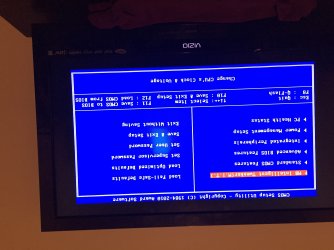
Let's try switch the boot order by entring the BIOS, set the CD/DVD Drive on position 1
My Computer
At a glance
Windows 7 Professional x64, Windows 8.1 Pro x...Intel(R) Pentium(R) CPU B960 @ 2.20GHz, 2200 ...4GB Installed (3.87 available)Intel(R) HD Graphics ver. 9.17.10.4229
- Computer type
- Laptop
- Computer Manufacturer/Model Number
- Dell Inspiron (15) 3520
- OS
- Windows 7 Professional x64, Windows 8.1 Pro x64, Windows 10 Home x64
- CPU
- Intel(R) Pentium(R) CPU B960 @ 2.20GHz, 2200 MHz,
- Motherboard
- Dell Inc. (or else Unknown)
- Memory
- 4GB Installed (3.87 available)
- Graphics Card(s)
- Intel(R) HD Graphics ver. 9.17.10.4229
- Sound Card
- Cirrus LogicHigh Definition Audio
- Monitor(s) Displays
- General PnP Display
- Screen Resolution
- 1366x768
- Hard Drives
- WDC WD5000LPVT-75G33T0 (Internal 500GB)
WD My Passport 0741 USB Device (External 1TB)
- PSU
- Dell LA64NS2-01
- Cooling
- Dell Inspiron 3520 CPU Cooling Fan Heatsink 60.4TZ01.011 0T0
- Keyboard
- Standard PS/2 Keyboard
- Mouse
- Dell Touchpad + Ewent EW3218
- Internet Speed
- 60 MB/s
- Antivirus
- Windows Defender + Eset System Rescue CD (Linux A-V)
- Browser
- Google Chrome (Mozilla FireFox on Windows 10)
Raystone
New member
Go to Advanced BIOS Features -> Boot Sequence -> Change your 1st Boot Device to CD/DVD and your 2nd Boot Device to your Hard Drive,
My Computer
At a glance
Windows 7 Professional x64, Windows 8.1 Pro x...Intel(R) Pentium(R) CPU B960 @ 2.20GHz, 2200 ...4GB Installed (3.87 available)Intel(R) HD Graphics ver. 9.17.10.4229
- Computer type
- Laptop
- Computer Manufacturer/Model Number
- Dell Inspiron (15) 3520
- OS
- Windows 7 Professional x64, Windows 8.1 Pro x64, Windows 10 Home x64
- CPU
- Intel(R) Pentium(R) CPU B960 @ 2.20GHz, 2200 MHz,
- Motherboard
- Dell Inc. (or else Unknown)
- Memory
- 4GB Installed (3.87 available)
- Graphics Card(s)
- Intel(R) HD Graphics ver. 9.17.10.4229
- Sound Card
- Cirrus LogicHigh Definition Audio
- Monitor(s) Displays
- General PnP Display
- Screen Resolution
- 1366x768
- Hard Drives
- WDC WD5000LPVT-75G33T0 (Internal 500GB)
WD My Passport 0741 USB Device (External 1TB)
- PSU
- Dell LA64NS2-01
- Cooling
- Dell Inspiron 3520 CPU Cooling Fan Heatsink 60.4TZ01.011 0T0
- Keyboard
- Standard PS/2 Keyboard
- Mouse
- Dell Touchpad + Ewent EW3218
- Internet Speed
- 60 MB/s
- Antivirus
- Windows Defender + Eset System Rescue CD (Linux A-V)
- Browser
- Google Chrome (Mozilla FireFox on Windows 10)
Raystone
New member
I will stay here until you're back, until it's too late for me to stay.
My Computer
At a glance
Windows 7 Professional x64, Windows 8.1 Pro x...Intel(R) Pentium(R) CPU B960 @ 2.20GHz, 2200 ...4GB Installed (3.87 available)Intel(R) HD Graphics ver. 9.17.10.4229
- Computer type
- Laptop
- Computer Manufacturer/Model Number
- Dell Inspiron (15) 3520
- OS
- Windows 7 Professional x64, Windows 8.1 Pro x64, Windows 10 Home x64
- CPU
- Intel(R) Pentium(R) CPU B960 @ 2.20GHz, 2200 MHz,
- Motherboard
- Dell Inc. (or else Unknown)
- Memory
- 4GB Installed (3.87 available)
- Graphics Card(s)
- Intel(R) HD Graphics ver. 9.17.10.4229
- Sound Card
- Cirrus LogicHigh Definition Audio
- Monitor(s) Displays
- General PnP Display
- Screen Resolution
- 1366x768
- Hard Drives
- WDC WD5000LPVT-75G33T0 (Internal 500GB)
WD My Passport 0741 USB Device (External 1TB)
- PSU
- Dell LA64NS2-01
- Cooling
- Dell Inspiron 3520 CPU Cooling Fan Heatsink 60.4TZ01.011 0T0
- Keyboard
- Standard PS/2 Keyboard
- Mouse
- Dell Touchpad + Ewent EW3218
- Internet Speed
- 60 MB/s
- Antivirus
- Windows Defender + Eset System Rescue CD (Linux A-V)
- Browser
- Google Chrome (Mozilla FireFox on Windows 10)
Raystone
New member
Is your drive rapidly spinning at boot?
My Computer
At a glance
Windows 7 Professional x64, Windows 8.1 Pro x...Intel(R) Pentium(R) CPU B960 @ 2.20GHz, 2200 ...4GB Installed (3.87 available)Intel(R) HD Graphics ver. 9.17.10.4229
- Computer type
- Laptop
- Computer Manufacturer/Model Number
- Dell Inspiron (15) 3520
- OS
- Windows 7 Professional x64, Windows 8.1 Pro x64, Windows 10 Home x64
- CPU
- Intel(R) Pentium(R) CPU B960 @ 2.20GHz, 2200 MHz,
- Motherboard
- Dell Inc. (or else Unknown)
- Memory
- 4GB Installed (3.87 available)
- Graphics Card(s)
- Intel(R) HD Graphics ver. 9.17.10.4229
- Sound Card
- Cirrus LogicHigh Definition Audio
- Monitor(s) Displays
- General PnP Display
- Screen Resolution
- 1366x768
- Hard Drives
- WDC WD5000LPVT-75G33T0 (Internal 500GB)
WD My Passport 0741 USB Device (External 1TB)
- PSU
- Dell LA64NS2-01
- Cooling
- Dell Inspiron 3520 CPU Cooling Fan Heatsink 60.4TZ01.011 0T0
- Keyboard
- Standard PS/2 Keyboard
- Mouse
- Dell Touchpad + Ewent EW3218
- Internet Speed
- 60 MB/s
- Antivirus
- Windows Defender + Eset System Rescue CD (Linux A-V)
- Browser
- Google Chrome (Mozilla FireFox on Windows 10)
Raystone
New member
Nice. After that, follow the steps on page 3
My Computer
At a glance
Windows 7 Professional x64, Windows 8.1 Pro x...Intel(R) Pentium(R) CPU B960 @ 2.20GHz, 2200 ...4GB Installed (3.87 available)Intel(R) HD Graphics ver. 9.17.10.4229
- Computer type
- Laptop
- Computer Manufacturer/Model Number
- Dell Inspiron (15) 3520
- OS
- Windows 7 Professional x64, Windows 8.1 Pro x64, Windows 10 Home x64
- CPU
- Intel(R) Pentium(R) CPU B960 @ 2.20GHz, 2200 MHz,
- Motherboard
- Dell Inc. (or else Unknown)
- Memory
- 4GB Installed (3.87 available)
- Graphics Card(s)
- Intel(R) HD Graphics ver. 9.17.10.4229
- Sound Card
- Cirrus LogicHigh Definition Audio
- Monitor(s) Displays
- General PnP Display
- Screen Resolution
- 1366x768
- Hard Drives
- WDC WD5000LPVT-75G33T0 (Internal 500GB)
WD My Passport 0741 USB Device (External 1TB)
- PSU
- Dell LA64NS2-01
- Cooling
- Dell Inspiron 3520 CPU Cooling Fan Heatsink 60.4TZ01.011 0T0
- Keyboard
- Standard PS/2 Keyboard
- Mouse
- Dell Touchpad + Ewent EW3218
- Internet Speed
- 60 MB/s
- Antivirus
- Windows Defender + Eset System Rescue CD (Linux A-V)
- Browser
- Google Chrome (Mozilla FireFox on Windows 10)

Raystone
New member
go to Imgur, upload the photo's from there, and send me the link after you're done.
My Computer
At a glance
Windows 7 Professional x64, Windows 8.1 Pro x...Intel(R) Pentium(R) CPU B960 @ 2.20GHz, 2200 ...4GB Installed (3.87 available)Intel(R) HD Graphics ver. 9.17.10.4229
- Computer type
- Laptop
- Computer Manufacturer/Model Number
- Dell Inspiron (15) 3520
- OS
- Windows 7 Professional x64, Windows 8.1 Pro x64, Windows 10 Home x64
- CPU
- Intel(R) Pentium(R) CPU B960 @ 2.20GHz, 2200 MHz,
- Motherboard
- Dell Inc. (or else Unknown)
- Memory
- 4GB Installed (3.87 available)
- Graphics Card(s)
- Intel(R) HD Graphics ver. 9.17.10.4229
- Sound Card
- Cirrus LogicHigh Definition Audio
- Monitor(s) Displays
- General PnP Display
- Screen Resolution
- 1366x768
- Hard Drives
- WDC WD5000LPVT-75G33T0 (Internal 500GB)
WD My Passport 0741 USB Device (External 1TB)
- PSU
- Dell LA64NS2-01
- Cooling
- Dell Inspiron 3520 CPU Cooling Fan Heatsink 60.4TZ01.011 0T0
- Keyboard
- Standard PS/2 Keyboard
- Mouse
- Dell Touchpad + Ewent EW3218
- Internet Speed
- 60 MB/s
- Antivirus
- Windows Defender + Eset System Rescue CD (Linux A-V)
- Browser
- Google Chrome (Mozilla FireFox on Windows 10)

Raystone
New member
You need to select Disk 0 Partition 2 and then Next. If there is a prompt about 'windows.old' then press 'OK' to keep the folder
My Computer
At a glance
Windows 7 Professional x64, Windows 8.1 Pro x...Intel(R) Pentium(R) CPU B960 @ 2.20GHz, 2200 ...4GB Installed (3.87 available)Intel(R) HD Graphics ver. 9.17.10.4229
- Computer type
- Laptop
- Computer Manufacturer/Model Number
- Dell Inspiron (15) 3520
- OS
- Windows 7 Professional x64, Windows 8.1 Pro x64, Windows 10 Home x64
- CPU
- Intel(R) Pentium(R) CPU B960 @ 2.20GHz, 2200 MHz,
- Motherboard
- Dell Inc. (or else Unknown)
- Memory
- 4GB Installed (3.87 available)
- Graphics Card(s)
- Intel(R) HD Graphics ver. 9.17.10.4229
- Sound Card
- Cirrus LogicHigh Definition Audio
- Monitor(s) Displays
- General PnP Display
- Screen Resolution
- 1366x768
- Hard Drives
- WDC WD5000LPVT-75G33T0 (Internal 500GB)
WD My Passport 0741 USB Device (External 1TB)
- PSU
- Dell LA64NS2-01
- Cooling
- Dell Inspiron 3520 CPU Cooling Fan Heatsink 60.4TZ01.011 0T0
- Keyboard
- Standard PS/2 Keyboard
- Mouse
- Dell Touchpad + Ewent EW3218
- Internet Speed
- 60 MB/s
- Antivirus
- Windows Defender + Eset System Rescue CD (Linux A-V)
- Browser
- Google Chrome (Mozilla FireFox on Windows 10)
Similar threads
- Replies
- 19
- Views
- 5K
- Replies
- 2
- Views
- 914

- Replies
- 18
- Views
- 15K
- Replies
- 1
- Views
- 11K
