PC Turns Off Instead of Sleeping

Neophile

New member
Power User
Local time
1:40 PM
Messages
171
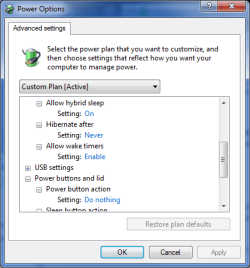
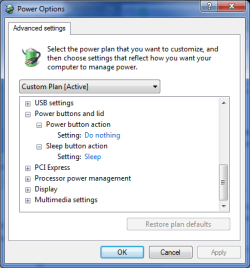
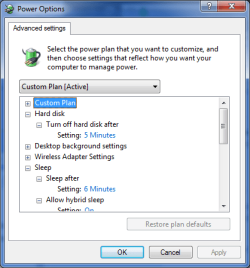
In a new installation, with the original Power Saver profile of Power Options, I noticed that after having been away for some time, the PC was off when I came back. This happened every time it should go to sleep. I made a Custom profile with shorter times to try it. It happens always the same, it goes through the cycle (screen saver, display off, hard disks off and sleep), but when it gets to the point of sleeping it just turns off. I attach the settings pictures with values that I have tested on other installations and proved to work in a normal way. Where is the problem causing this issue, please?
 

Attachments
  • PowerOp-0.png
    PowerOp-0.png
    14.3 KB · Views: 27
  • PowerOp-1.png
    PowerOp-1.png
    13.7 KB · Views: 27
  • PowerOp-2.png
    PowerOp-2.png
    13.6 KB · Views: 26
Last edited:

My Computer My Computer

At a glance

Windows 7 Ultimate 64-bit SP1AMD Athlon 64 II X3 440Kingston kit 4GB DDR3 1333MHz (KVR1333D3N9K2/4)
Computer type
PC/Desktop
Computer Manufacturer/Model Number
Home assembled
OS
Windows 7 Ultimate 64-bit SP1
CPU
AMD Athlon 64 II X3 440
Motherboard
M4A785TD-V EVO
Memory
Kingston kit 4GB DDR3 1333MHz (KVR1333D3N9K2/4)
Monitor(s) Displays
ASUS AS VH198S
Screen Resolution
1440x900
Hard Drives
Crucial MX300 2.5" SSD SATA,
Western Digital Caviar Black WD1002FAEX SATA-III,
Samsung HD161HJ SATA-II,
Seagate Barracuda ST3120022A ATA,
Western Digital WD800BB ATA.
Case
Standard
Cooling
Standard
Keyboard
Safeway SW-20
Mouse
Logitech Anywhere, Logitech MX Anywhere 2S, Technet M006
Internet Speed
130 Mbs fiber
Antivirus
Avast Premier
Browser
Firefox, Ice Dragon and Opera
Other Info
PCI ATA-133 Adapter,
Parallel Port Card PCI - PU005V2.
Hi Neophile,

Question, does your machine behave the same (turn off) with Power Options > preferred plans, Balanced or Performance set to turn off monitor at specific time and sleep at specific time? my desktop PC is set on both Balanced and Performance to turn off monitor at specific time and sleep at specific time without any shutdowns occurring.
 

My Computer My Computer

At a glance

Win 10 x64, Linux Lite, Win 7 x64, BlackArch,...
Computer type
PC/Desktop
Computer Manufacturer/Model Number
HP Desktop & Compaq Laptop
OS
Win 10 x64, Linux Lite, Win 7 x64, BlackArch, & Kali
Hard Drives
Samsung 850 Pro 256Gb,
Hitachi HDD 1Tb,
Crucial MX SSD 250Gb
Segate 3Tb USB 3.0 Ext. Backup HDD
Internet Speed
150Mbps dn, 20Mbps up
Antivirus
Avast Free, Malwarebytes Anti-Exploit & Anti-Ransomware
Browser
Firefox, Chrome, Opera, & VPN
Thank you for the reply. No, I have not tried that other two power plans, but the other one also OS original, and than the custom one. I will try your suggestion and be back in a few hours. I also have had my PC set to specific times since these settings appeared, and never had a similar problem as today's. So it must be something interfering that I ignore. What could that be?
 

My Computer My Computer

At a glance

Windows 7 Ultimate 64-bit SP1AMD Athlon 64 II X3 440Kingston kit 4GB DDR3 1333MHz (KVR1333D3N9K2/4)
Computer type
PC/Desktop
Computer Manufacturer/Model Number
Home assembled
OS
Windows 7 Ultimate 64-bit SP1
CPU
AMD Athlon 64 II X3 440
Motherboard
M4A785TD-V EVO
Memory
Kingston kit 4GB DDR3 1333MHz (KVR1333D3N9K2/4)
Monitor(s) Displays
ASUS AS VH198S
Screen Resolution
1440x900
Hard Drives
Crucial MX300 2.5" SSD SATA,
Western Digital Caviar Black WD1002FAEX SATA-III,
Samsung HD161HJ SATA-II,
Seagate Barracuda ST3120022A ATA,
Western Digital WD800BB ATA.
Case
Standard
Cooling
Standard
Keyboard
Safeway SW-20
Mouse
Logitech Anywhere, Logitech MX Anywhere 2S, Technet M006
Internet Speed
130 Mbs fiber
Antivirus
Avast Premier
Browser
Firefox, Ice Dragon and Opera
Other Info
PCI ATA-133 Adapter,
Parallel Port Card PCI - PU005V2.
I don't, as a rule, set custom plans when there are "regular" plans available that you can modify to perform the same function. Less possibility for operator entry error!
 

My Computer My Computer

At a glance

Win 10 x64, Linux Lite, Win 7 x64, BlackArch,...
Computer type
PC/Desktop
Computer Manufacturer/Model Number
HP Desktop & Compaq Laptop
OS
Win 10 x64, Linux Lite, Win 7 x64, BlackArch, & Kali
Hard Drives
Samsung 850 Pro 256Gb,
Hitachi HDD 1Tb,
Crucial MX SSD 250Gb
Segate 3Tb USB 3.0 Ext. Backup HDD
Internet Speed
150Mbps dn, 20Mbps up
Antivirus
Avast Free, Malwarebytes Anti-Exploit & Anti-Ransomware
Browser
Firefox, Chrome, Opera, & VPN
I tried what you wrote on your post before last, the original power plans as they come with the installation, and as suspected with the same unfortunate results. There is very little error induction on making a custom profile based on an original one, once you just reduce the times. In fact, it is exactly the same as if you take the original and change its values. The original times are all exaggerated for my needs, so I have always done that way since the function appeared.

As it is a fresh install not even yet updated, I thought the Windows updates might resolve the issue. It installed them all. There were many reboots along the process, but after all updates installed, the last reboot stopped at boot with the known sentence: "winload.exe is missing or corrupt".

Now, I think I will wipe the disk and fresh install the OS again. It will be less work that trying to repair. Well, thank you, anyway.
 

My Computer My Computer

At a glance

Windows 7 Ultimate 64-bit SP1AMD Athlon 64 II X3 440Kingston kit 4GB DDR3 1333MHz (KVR1333D3N9K2/4)
Computer type
PC/Desktop
Computer Manufacturer/Model Number
Home assembled
OS
Windows 7 Ultimate 64-bit SP1
CPU
AMD Athlon 64 II X3 440
Motherboard
M4A785TD-V EVO
Memory
Kingston kit 4GB DDR3 1333MHz (KVR1333D3N9K2/4)
Monitor(s) Displays
ASUS AS VH198S
Screen Resolution
1440x900
Hard Drives
Crucial MX300 2.5" SSD SATA,
Western Digital Caviar Black WD1002FAEX SATA-III,
Samsung HD161HJ SATA-II,
Seagate Barracuda ST3120022A ATA,
Western Digital WD800BB ATA.
Case
Standard
Cooling
Standard
Keyboard
Safeway SW-20
Mouse
Logitech Anywhere, Logitech MX Anywhere 2S, Technet M006
Internet Speed
130 Mbs fiber
Antivirus
Avast Premier
Browser
Firefox, Ice Dragon and Opera
Other Info
PCI ATA-133 Adapter,
Parallel Port Card PCI - PU005V2.
Back
Top