PC won't let me install Windows 7 :(

Adamworthy

New member
Local time
6:50 PM
Messages
16
Hi guys, my uncle has bought a copy of Windows 7 to put on his pc which is currently running ubuntu.

I put the Windows 7 disc in and boot from cd but it seems to just hang on a black screen for a while then boot into linux.

If i disable the hdd in boot menu it'll load up the set up then report an error of some file missing, txtsetup.sif I think.

It also does this with the XP disc. I know it has the grub boot loader on it.

It's stuck with Linux :( any help guys??? :cry:
 

My Computer My Computer

OS
Windows 7 x64
This could be caused by a number of things, including hardware issues and cd issues. I'm guessing it's not the disk(s) because you have two. So we're stuck with a hardware problem. According to threads around the internet, it is most likely caused by a ram issue.

Download the Ultimate Boot CD and run the memory diagnostics

Ultimate Boot CD - Overview

If those come back clean, run the diagnostics for other hardware.

Also, please fill in your system specs via UserCP.
 

My Computer My Computer

Computer Manufacturer/Model Number
Apple Macbook Pro (April 2009)
OS
W7 Ult. x64 | OS X
CPU
Intel Mobile Core 2 Duo 2.93Ghz [T9800 Penryn]
Motherboard
NVIDIA nForce 730i Rev. B1 [Mac-F2268EC8 (U2E1)]
Memory
4096MB Samsung DDR3 Dual Channel [PC3-8500F 1066Mhz]
Graphics Card(s)
NVIDIA GeForce 9600M GT 512MB [G96M Rev. C1]
Sound Card
SB X-Fi Surround 5.1 USB | Onboard Realtek (Disabled)
Monitor(s) Displays
Acer x223wbd 22" | Apple Anti-Glare 17" (Disabled)
Screen Resolution
{Current} 1440x900 {Acer} 1680x1050 {Apple} 1920x1200
Hard Drives
{Internal}
Seagate Momentus 320GB 2.5" 7200RPM [ST9320421AS]

{Externals}
LaCie 320GB USB 2.0 HDD [301284UR]
LaCie 750GB USB 2.0 FW400 eSATA HDD [301314U]
LaCie 1TB USB 2.0 HDD [301304UR]
PSU
Magsafe
Case
Aluminum/Unibody (MBP52)
Cooling
2 x 6000 RPM Fans
Keyboard
Logitech G-15v2 [PN 920-000379]
Mouse
Logitech G-9 [PN 910-000338]
Internet Speed
12Mbps/2.5Mbps w/ 24Mbps Speed Boost [Comcast]
Other Info
Logitech X-540 Speakers [PN 970223-0122]
Sennheiser PC-151 Headset
I'll give it a go for the other hardware, it's definitely not the RAM as i've tried the RAM from my pc in it.
 

My Computer My Computer

OS
Windows 7 x64
You need to deep clean the HD to remove GRUB. Then after Win7 install reinstall Ubuntu and GRUB if you want it to manage the boot. http://lifehacker.com/5403100/dual+boot-windows-7-and-ubuntu-in-perfect-harmony

You can use free Partition Wizard bootable CD to Wipe Disk. I would use DOD standard (3 passes of zeroes) to get it cleanest.

Or boot Win7 DVD Repair console, click through to Recov Tools to open a Command Line, type:

DIskpart
list disk
select disk # (use # for target HD)
clean all (run this 3 times for DOD standard)
exit

Now boot back into DVD to Custom install with Drive Tools to Create New partition(s) and format before installing.
 
Last edited:
I'm downloading those things now, another thing though. It also failed with the ubuntu installation CD so i'm guessing it is a hardware problem.

I've tried different RAM and a differnet Hard Drive so it's not those.

The only disc so far that I've managed to boot successfully was GParted.
 

My Computer My Computer

OS
Windows 7 x64
Do you want a Dual Boot with Win 7 & Linux?
 

My Computer My Computer

OS
ME/XP/Vista/Win7
Do you want a Dual Boot with Win 7 & Linux?
Nope, I want linux gone completely and just Windows 7 on.

One of his friends decided to install ubuntu and its been nothing but trouble.
 

My Computer My Computer

OS
Windows 7 x64
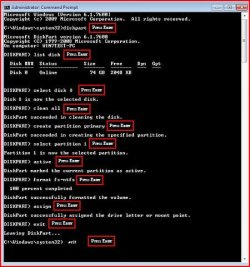
All Linux code must be deleted.

Try a full clean & full format.

1) Boot DVD.
2) Press Shift+F10 (for command prompt)

Type in command line
DISKPART
LIST DISK
SELECT DISK # (win 7 HD)
CLEAN ALL
CREATE PARTITION PRIMARY
SELECT PARTITION 1
ACTIVE
FORMAT=NTFS
ASSIGN
EXIT
EXIT
 

Attachments

  • Capture5.JPG
    Capture5.JPG
    45.3 KB · Views: 47

My Computer My Computer

OS
ME/XP/Vista/Win7
I wonder if this is a bad DVD drive. Do you have any other drives you can try out?
 

My Computer My Computer

Computer Manufacturer/Model Number
Custom
OS
Windows 7 Professional x64
CPU
Intel i7 2600K OC'd @ 4620 MHz
Motherboard
Asus P8Z68-V Pro
Memory
16GB GSkill Sniper 2133 Mhz (4x4GB)
Graphics Card(s)
EVGA GeForce GTX 480 SuperClocked+
Sound Card
Realtek High Definition Audio
Monitor(s) Displays
2x Acer S273HLbmii 27"
Screen Resolution
2 x 1920x1080
Hard Drives
64GB Crucial M4 SSD

Storage: Hitachi 1TB 5400RPM, Samsung 1.5TB 5400RPM
PSU
Corsair HW Series 750w (modular)
Case
Cooler Master HAF 932 Advanced Blue Edition
Cooling
CM Hyper 212+ CPU cooler, 3x 230mm + 1x 140mm case fans
Keyboard
Logitech MK320 (wireless)
Mouse
Logitech MK320 (wireless)
Internet Speed
30 Mb/s : 2 Mb/s
All Linux code must be deleted.

Try a full clean & full format.

1) Boot DVD.
2) Press Shift+F10 (for command prompt)

Type in command line
DISKPART
LIST DISK
SELECT DISK # (win 7 HD)
CLEAN ALL
CREATE PARTITION PRIMARY
SELECT PARTITION 1
ACTIVE
FORMAT=NTFS
ASSIGN
EXIT
EXIT

Which dvd do I boot? It won't boot OS installation dvd's at all.
 

My Computer My Computer

OS
Windows 7 x64
I wonder if this is a bad DVD drive. Do you have any other drives you can try out?

Yeah, I have one from an old laptop I could try.

I'll give it a go when this memory test has completed.
 

My Computer My Computer

OS
Windows 7 x64
OMD Windows is installing after changing the disc drive over, this is weird as his friend installed linux using the same disc drive just last week :S
 

My Computer My Computer

OS
Windows 7 x64

My Computer My Computer

Computer Manufacturer/Model Number
Custom
OS
Windows 7 Professional x64
CPU
Intel i7 2600K OC'd @ 4620 MHz
Motherboard
Asus P8Z68-V Pro
Memory
16GB GSkill Sniper 2133 Mhz (4x4GB)
Graphics Card(s)
EVGA GeForce GTX 480 SuperClocked+
Sound Card
Realtek High Definition Audio
Monitor(s) Displays
2x Acer S273HLbmii 27"
Screen Resolution
2 x 1920x1080
Hard Drives
64GB Crucial M4 SSD

Storage: Hitachi 1TB 5400RPM, Samsung 1.5TB 5400RPM
PSU
Corsair HW Series 750w (modular)
Case
Cooler Master HAF 932 Advanced Blue Edition
Cooling
CM Hyper 212+ CPU cooler, 3x 230mm + 1x 140mm case fans
Keyboard
Logitech MK320 (wireless)
Mouse
Logitech MK320 (wireless)
Internet Speed
30 Mb/s : 2 Mb/s

My Computer My Computer

OS
Windows 7 x64
Another thing, my laptops disc drive keeps disappearing. Could this be a faulty drive too?
 

My Computer My Computer

OS
Windows 7 x64
Where does it disappear from? How do you get it back?
 

My Computer My Computer

Computer Manufacturer/Model Number
Custom
OS
Windows 7 Professional x64
CPU
Intel i7 2600K OC'd @ 4620 MHz
Motherboard
Asus P8Z68-V Pro
Memory
16GB GSkill Sniper 2133 Mhz (4x4GB)
Graphics Card(s)
EVGA GeForce GTX 480 SuperClocked+
Sound Card
Realtek High Definition Audio
Monitor(s) Displays
2x Acer S273HLbmii 27"
Screen Resolution
2 x 1920x1080
Hard Drives
64GB Crucial M4 SSD

Storage: Hitachi 1TB 5400RPM, Samsung 1.5TB 5400RPM
PSU
Corsair HW Series 750w (modular)
Case
Cooler Master HAF 932 Advanced Blue Edition
Cooling
CM Hyper 212+ CPU cooler, 3x 230mm + 1x 140mm case fans
Keyboard
Logitech MK320 (wireless)
Mouse
Logitech MK320 (wireless)
Internet Speed
30 Mb/s : 2 Mb/s
Is the drive visible in Device Manager or Disk Management during that time?
 

My Computer My Computer

Computer Manufacturer/Model Number
Custom
OS
Windows 7 Professional x64
CPU
Intel i7 2600K OC'd @ 4620 MHz
Motherboard
Asus P8Z68-V Pro
Memory
16GB GSkill Sniper 2133 Mhz (4x4GB)
Graphics Card(s)
EVGA GeForce GTX 480 SuperClocked+
Sound Card
Realtek High Definition Audio
Monitor(s) Displays
2x Acer S273HLbmii 27"
Screen Resolution
2 x 1920x1080
Hard Drives
64GB Crucial M4 SSD

Storage: Hitachi 1TB 5400RPM, Samsung 1.5TB 5400RPM
PSU
Corsair HW Series 750w (modular)
Case
Cooler Master HAF 932 Advanced Blue Edition
Cooling
CM Hyper 212+ CPU cooler, 3x 230mm + 1x 140mm case fans
Keyboard
Logitech MK320 (wireless)
Mouse
Logitech MK320 (wireless)
Internet Speed
30 Mb/s : 2 Mb/s
Back
Top