Solved pdf icons

theterrier

New member
Local time
1:08 AM
Messages
25
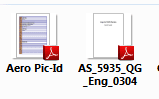
I use adobe reader to open pdf files and the icons for these files are of a preview of the first page as opposed to the adobe icon, can I change them
 

My Computer

OS
windows 7 32 bit
CPU
amd 4200
Motherboard
asus m2n-e sli
Graphics Card(s)
nvidia geforece GT 240
Hi Theterrier

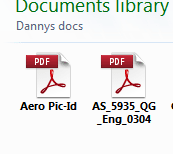
I also use adobe reader for pdf files and these are the icons I get no first page preview just the icon.
Capture.PNG


Can you post a screenshot of what yours are like
Danny
 

My Computer

Computer Manufacturer/Model Number
acer aspire 5935g
OS
Windows 7 Home Premium x64 SP1
CPU
intel(R)core(TM)2 duo CPU T6600 @ 2.20GHz
Motherboard
intel gm45/gm47 revision 07
Memory
3 gb ddr3
Graphics Card(s)
ati radeon hd4570/512mb
Monitor(s) Displays
lop156wh2-tle1 15.3 flat
Screen Resolution
1366x768
Hard Drives
OCZ-Agility3 60gig ssd
320gig external hdd
500gig external hdd
Mouse
Optical
Internet Speed
30Mbps Down/30Mbps Up
Ive just played around with the folder view sizes and I think ive got what you may have.It seems the icon depends on the folder size although mine reset again at reboot, or possibly if you open adobe reader they change as thats what mine did


Capture.PNG

Danny
 

My Computer

Computer Manufacturer/Model Number
acer aspire 5935g
OS
Windows 7 Home Premium x64 SP1
CPU
intel(R)core(TM)2 duo CPU T6600 @ 2.20GHz
Motherboard
intel gm45/gm47 revision 07
Memory
3 gb ddr3
Graphics Card(s)
ati radeon hd4570/512mb
Monitor(s) Displays
lop156wh2-tle1 15.3 flat
Screen Resolution
1366x768
Hard Drives
OCZ-Agility3 60gig ssd
320gig external hdd
500gig external hdd
Mouse
Optical
Internet Speed
30Mbps Down/30Mbps Up
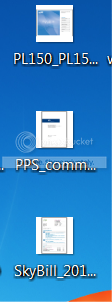
Yes they are similar to what I get but they are on my desktop and are at the smallest size (I dont know how to post a preview)
 

My Computer

OS
windows 7 32 bit
CPU
amd 4200
Motherboard
asus m2n-e sli
Graphics Card(s)
nvidia geforece GT 240

My Computer

Computer type
PC/Desktop
Computer Manufacturer/Model Number
Custom Built
OS
Windows 10 Pro x64, Windows 8.1 Pro x64, Windows 7 Ultimate x64 SP1,
CPU
INTEL i9-7920X LGA 2066
Motherboard
Gigabyte X299-WU8 F3
Memory
64 GB (4 X 16 GB) G-Skill V Series DDR4 3200 Quad Channel
Graphics Card(s)
EVGA GTX 1060 SC 3 GB
Sound Card
Realtek Onboard ALC1220
Monitor(s) Displays
2 x Samsung S27E310
Screen Resolution
1920x1080
Hard Drives
Samsung 2 x 970 EVO Plus 500 GB NVMe
1 x 6TB WD 6003FZBX SATA
1 x 6TB WD 60EFRX SATA
12 x 3TB WD 30EFRX SATA
PSU
Seasonic X-1050
Case
Thermaltake Armor+
Cooling
Corsair H80i V2 Liquid AOI Cooler
Keyboard
Logitech G510s
Mouse
Logitech MX Master 2S
Internet Speed
200 Mb/s
Antivirus
ESET NOD32 13.1
Browser
EDGE (Dev, Canary, Beta), Chrome
Other Info
ASUS RT-AC68U router
Malwarebytes 4.0.4
Heres how for future refeence or for smaller shots just use the "snipping tool"

http://www.sevenforums.com/tutorials/9717-screenshot-paint.html

Do the icons change if you use different sizes.

I can get them to change to either icon by opening adobe reader and re saving each one in a new location but thats not a fix.Im unsure of why they change or whether they will stay like that mine have up to now

Danny
 

My Computer

Computer Manufacturer/Model Number
acer aspire 5935g
OS
Windows 7 Home Premium x64 SP1
CPU
intel(R)core(TM)2 duo CPU T6600 @ 2.20GHz
Motherboard
intel gm45/gm47 revision 07
Memory
3 gb ddr3
Graphics Card(s)
ati radeon hd4570/512mb
Monitor(s) Displays
lop156wh2-tle1 15.3 flat
Screen Resolution
1366x768
Hard Drives
OCZ-Agility3 60gig ssd
320gig external hdd
500gig external hdd
Mouse
Optical
Internet Speed
30Mbps Down/30Mbps Up
Here you go and no they don't change on the desktop when I alter the size

desktopicons.png
 

My Computer

OS
windows 7 32 bit
CPU
amd 4200
Motherboard
asus m2n-e sli
Graphics Card(s)
nvidia geforece GT 240
Use the link above pbcopter posted and delete that registry key (BACK UP FIRST) just tested it and all adobe icons change to having the full pdf icon

Danny
 

My Computer

Computer Manufacturer/Model Number
acer aspire 5935g
OS
Windows 7 Home Premium x64 SP1
CPU
intel(R)core(TM)2 duo CPU T6600 @ 2.20GHz
Motherboard
intel gm45/gm47 revision 07
Memory
3 gb ddr3
Graphics Card(s)
ati radeon hd4570/512mb
Monitor(s) Displays
lop156wh2-tle1 15.3 flat
Screen Resolution
1366x768
Hard Drives
OCZ-Agility3 60gig ssd
320gig external hdd
500gig external hdd
Mouse
Optical
Internet Speed
30Mbps Down/30Mbps Up
very strange it worked for one user but when I tried it on the other desktop they remained the same
 

My Computer

OS
windows 7 32 bit
CPU
amd 4200
Motherboard
asus m2n-e sli
Graphics Card(s)
nvidia geforece GT 240
very strange it worked for one user but when I tried it on the other desktop they remained the same

Did you log off and on again or reboot.The reg edit requires it

Danny
 

My Computer

Computer Manufacturer/Model Number
acer aspire 5935g
OS
Windows 7 Home Premium x64 SP1
CPU
intel(R)core(TM)2 duo CPU T6600 @ 2.20GHz
Motherboard
intel gm45/gm47 revision 07
Memory
3 gb ddr3
Graphics Card(s)
ati radeon hd4570/512mb
Monitor(s) Displays
lop156wh2-tle1 15.3 flat
Screen Resolution
1366x768
Hard Drives
OCZ-Agility3 60gig ssd
320gig external hdd
500gig external hdd
Mouse
Optical
Internet Speed
30Mbps Down/30Mbps Up
yes I think it was something to do with ccleaner because I have managed to get it to work
 

My Computer

OS
windows 7 32 bit
CPU
amd 4200
Motherboard
asus m2n-e sli
Graphics Card(s)
nvidia geforece GT 240
Back
Top