peer networking grouping error 1079

iTzTeEZzY

New member
Local time
10:06 AM
Messages
12
I really need help. I can't get peer networking grouping to start. when i go into services ant try to manually start it it gives me error 1079: the account specified for this service is different from the account specified for other services running the same process. someone please help :D
 

My Computer My Computer

Computer Manufacturer/Model Number
Alienware M17x
OS
7
CPU
Q9000 2.0 QuarCore
Memory
4GB 1333GHZ
Graphics Card(s)
Dual Nvida 260M
Hard Drives
1TB 7200rpm

My Computer My Computer

Computer type
PC/Desktop
Computer Manufacturer/Model Number
Home built
OS
Windows 7 Ult, Windows 8.1 Pro,
CPU
Q9650-4.275GHz, E8600 4.5GHz, E6750-3.8GHz
Motherboard
Evga 780i FTW
Memory
G.Skill PC2 9600 1200Mhz 5 5 5 15 2T
Graphics Card(s)
GTX480
Sound Card
Asus Xonar D2
Monitor(s) Displays
HannsG
Screen Resolution
1680X1050
Hard Drives
GSkill Phoenix Pro 120GB SSD
PSU
ThermalTake Toughpower 1000Watt modular
Case
ThermalTake XaserV
Cooling
Xigmatek S1283
Keyboard
Logitech G15
Mouse
Logitech G9
Internet Speed
T1
Last edited:

My Computer My Computer

Computer Manufacturer/Model Number
Alienware M17x
OS
7
CPU
Q9000 2.0 QuarCore
Memory
4GB 1333GHZ
Graphics Card(s)
Dual Nvida 260M
Hard Drives
1TB 7200rpm
Try this for the peer networking problem. The described symtoms aren't the same but this file has been known to cause problems with peer networking so it may be worth a try. I really havn't seen anyone with your exact problem yet.

The fix for this problem seems to be Deleting the file idstore.sst under C:\windows\serviceProfiles\LocalService\AppData\Roaming\PeerNetworking

Once everything at Peer Networking Grouping is running you may also need to do this...

Start the Task Manager
Click on the service Tab
Find the "HomeGroupProvider"
and then stop the service.
You will need to restart after doing this.
 

My Computer My Computer

Computer type
PC/Desktop
Computer Manufacturer/Model Number
Home built
OS
Windows 7 Ult, Windows 8.1 Pro,
CPU
Q9650-4.275GHz, E8600 4.5GHz, E6750-3.8GHz
Motherboard
Evga 780i FTW
Memory
G.Skill PC2 9600 1200Mhz 5 5 5 15 2T
Graphics Card(s)
GTX480
Sound Card
Asus Xonar D2
Monitor(s) Displays
HannsG
Screen Resolution
1680X1050
Hard Drives
GSkill Phoenix Pro 120GB SSD
PSU
ThermalTake Toughpower 1000Watt modular
Case
ThermalTake XaserV
Cooling
Xigmatek S1283
Keyboard
Logitech G15
Mouse
Logitech G9
Internet Speed
T1
Try this for the peer networking problem. The described symtoms aren't the same but this file has been known to cause problems with peer networking so it may be worth a try. I really havn't seen anyone with your exact problem yet.

The fix for this problem seems to be Deleting the file idstore.sst under C:\windows\serviceProfiles\LocalService\AppData\Roaming\PeerNetworking

Once everything at Peer Networking Grouping is running you may also need to do this...

Start the Task Manager
Click on the service Tab
Find the "HomeGroupProvider"
and then stop the service.
You will need to restart after doing this.

I tried it still doesnt work. thanks for trying.
 

My Computer My Computer

Computer Manufacturer/Model Number
Alienware M17x
OS
7
CPU
Q9000 2.0 QuarCore
Memory
4GB 1333GHZ
Graphics Card(s)
Dual Nvida 260M
Hard Drives
1TB 7200rpm
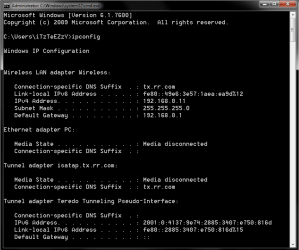
Can you post a screen shot or your ipconfig details by typing ipconfig into the command prompt and hitting enter.

Use the snipping tool to get the picture with. I need to see if IPv6 is working correctly on your machine.

Looks like picture below.
 

Attachments

  • ipconfig both connections.PNG
    ipconfig both connections.PNG
    15.9 KB · Views: 426

My Computer My Computer

Computer type
PC/Desktop
Computer Manufacturer/Model Number
Home built
OS
Windows 7 Ult, Windows 8.1 Pro,
CPU
Q9650-4.275GHz, E8600 4.5GHz, E6750-3.8GHz
Motherboard
Evga 780i FTW
Memory
G.Skill PC2 9600 1200Mhz 5 5 5 15 2T
Graphics Card(s)
GTX480
Sound Card
Asus Xonar D2
Monitor(s) Displays
HannsG
Screen Resolution
1680X1050
Hard Drives
GSkill Phoenix Pro 120GB SSD
PSU
ThermalTake Toughpower 1000Watt modular
Case
ThermalTake XaserV
Cooling
Xigmatek S1283
Keyboard
Logitech G15
Mouse
Logitech G9
Internet Speed
T1
Here it is
 

Attachments

  • Capture.PNG
    Capture.PNG
    16.2 KB · Views: 214

My Computer My Computer

Computer Manufacturer/Model Number
Alienware M17x
OS
7
CPU
Q9000 2.0 QuarCore
Memory
4GB 1333GHZ
Graphics Card(s)
Dual Nvida 260M
Hard Drives
1TB 7200rpm
Can you post a screen shot or your ipconfig details by typing ipconfig into the command prompt and hitting enter.

Use the snipping tool to get the picture with. I need to see if IPv6 is working correctly on your machine.

Looks like picture below.

Is my IPv6 working correctly?
 

My Computer My Computer

Computer Manufacturer/Model Number
Alienware M17x
OS
7
CPU
Q9000 2.0 QuarCore
Memory
4GB 1333GHZ
Graphics Card(s)
Dual Nvida 260M
Hard Drives
1TB 7200rpm
please help. i don't know what to do.
 

My Computer My Computer

Computer Manufacturer/Model Number
Alienware M17x
OS
7
CPU
Q9000 2.0 QuarCore
Memory
4GB 1333GHZ
Graphics Card(s)
Dual Nvida 260M
Hard Drives
1TB 7200rpm
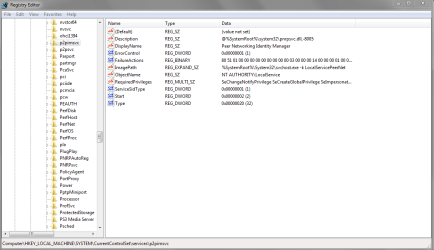
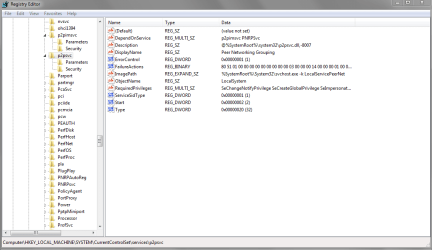
Lets compare the reg keys for this service. I have no issue with starting it.

Can you screenshot these kets

HKEY_LOCAL_MACHINE\SYSTEM\CurrentControlSet\services\p2pimsvc

HKEY_LOCAL_MACHINE\SYSTEM\CurrentControlSet\services\p2psvc
 

My Computer My Computer

Computer Manufacturer/Model Number
Lenovo ThinkPad T60
OS
Windows 7 Ultimate 64Bit
CPU
GenuineIntel Intel(R) Core(TM) DuoCore T2400 @ 1.83GHz
Motherboard
Intel(R) 82801G (ICH7 Family)
Memory
2.00 GB
Graphics Card(s)
Mobile Intel(R) 945 Express Chipset
Sound Card
SoundMAX Integrated Digital HD Audio
Monitor(s) Displays
ThinkPad Display
Screen Resolution
1400x1050
Hard Drives
100Gb SATA
Keyboard
Standard Keyboard
Mouse
HID-compliant Mouse
Internet Speed
Cable Broadband - 54Mbps
Other Info
Intel(R) PRO/1000 PL Network Connection
11a/b/g Wireless LAN Mini PCI Express Adapter
Lets compare the reg keys for this service. I have no issue with starting it.

Can you screenshot these kets

HKEY_LOCAL_MACHINE\SYSTEM\CurrentControlSet\services\p2pimsvc

HKEY_LOCAL_MACHINE\SYSTEM\CurrentControlSet\services\p2psvc

Ok here it is.
 

Attachments

  • Capture.PNG
    Capture.PNG
    27.1 KB · Views: 258
  • 1Capture.PNG
    1Capture.PNG
    26.6 KB · Views: 171

My Computer My Computer

Computer Manufacturer/Model Number
Alienware M17x
OS
7
CPU
Q9000 2.0 QuarCore
Memory
4GB 1333GHZ
Graphics Card(s)
Dual Nvida 260M
Hard Drives
1TB 7200rpm
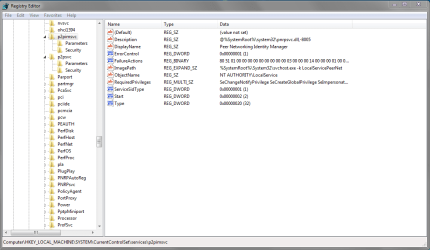
These look to be a little different.

You can try and merge or add my reg keys. First do an export for each of your keys just in case you need to revert it back.

I take no blame for your actions :D
 

Attachments

My Computer My Computer

Computer Manufacturer/Model Number
Lenovo ThinkPad T60
OS
Windows 7 Ultimate 64Bit
CPU
GenuineIntel Intel(R) Core(TM) DuoCore T2400 @ 1.83GHz
Motherboard
Intel(R) 82801G (ICH7 Family)
Memory
2.00 GB
Graphics Card(s)
Mobile Intel(R) 945 Express Chipset
Sound Card
SoundMAX Integrated Digital HD Audio
Monitor(s) Displays
ThinkPad Display
Screen Resolution
1400x1050
Hard Drives
100Gb SATA
Keyboard
Standard Keyboard
Mouse
HID-compliant Mouse
Internet Speed
Cable Broadband - 54Mbps
Other Info
Intel(R) PRO/1000 PL Network Connection
11a/b/g Wireless LAN Mini PCI Express Adapter
These look to be a little different.

You can try and merge or add my reg keys. First do an export for each of your keys just in case you need to revert it back.

I take no blame for your actions :D

Here it is.
 

Attachments

  • Captuasadare.PNG
    Captuasadare.PNG
    26.2 KB · Views: 121
  • Casdpture.PNG
    Casdpture.PNG
    27.6 KB · Views: 83

My Computer My Computer

Computer Manufacturer/Model Number
Alienware M17x
OS
7
CPU
Q9000 2.0 QuarCore
Memory
4GB 1333GHZ
Graphics Card(s)
Dual Nvida 260M
Hard Drives
1TB 7200rpm
They don't look like mine. After you do your export as a backup, delete those key and use mine.
 

My Computer My Computer

Computer Manufacturer/Model Number
Lenovo ThinkPad T60
OS
Windows 7 Ultimate 64Bit
CPU
GenuineIntel Intel(R) Core(TM) DuoCore T2400 @ 1.83GHz
Motherboard
Intel(R) 82801G (ICH7 Family)
Memory
2.00 GB
Graphics Card(s)
Mobile Intel(R) 945 Express Chipset
Sound Card
SoundMAX Integrated Digital HD Audio
Monitor(s) Displays
ThinkPad Display
Screen Resolution
1400x1050
Hard Drives
100Gb SATA
Keyboard
Standard Keyboard
Mouse
HID-compliant Mouse
Internet Speed
Cable Broadband - 54Mbps
Other Info
Intel(R) PRO/1000 PL Network Connection
11a/b/g Wireless LAN Mini PCI Express Adapter
They don't look like mine. After you do your export as a backup, delete those key and use mine.

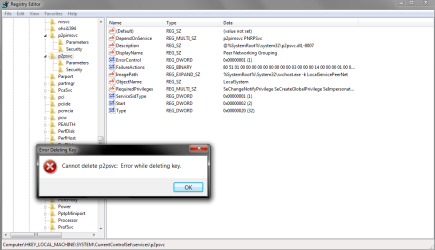
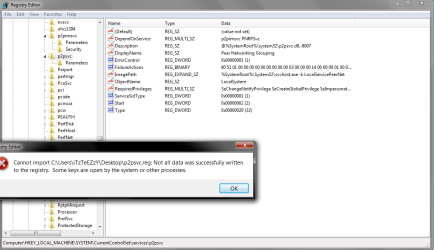
this is what happens when i delete one 1st pic. this is whats left after 1st pic 2nd pic. what happens after import 3rd pic.
 

Attachments

  • 1Capture.PNG
    1Capture.PNG
    32.3 KB · Views: 137
  • 2.PNG
    2.PNG
    26.4 KB · Views: 59
  • 3.PNG
    3.PNG
    34.1 KB · Views: 100

My Computer My Computer

Computer Manufacturer/Model Number
Alienware M17x
OS
7
CPU
Q9000 2.0 QuarCore
Memory
4GB 1333GHZ
Graphics Card(s)
Dual Nvida 260M
Hard Drives
1TB 7200rpm
Do you want to try and do entry by entry?
 

My Computer My Computer

Computer Manufacturer/Model Number
Lenovo ThinkPad T60
OS
Windows 7 Ultimate 64Bit
CPU
GenuineIntel Intel(R) Core(TM) DuoCore T2400 @ 1.83GHz
Motherboard
Intel(R) 82801G (ICH7 Family)
Memory
2.00 GB
Graphics Card(s)
Mobile Intel(R) 945 Express Chipset
Sound Card
SoundMAX Integrated Digital HD Audio
Monitor(s) Displays
ThinkPad Display
Screen Resolution
1400x1050
Hard Drives
100Gb SATA
Keyboard
Standard Keyboard
Mouse
HID-compliant Mouse
Internet Speed
Cable Broadband - 54Mbps
Other Info
Intel(R) PRO/1000 PL Network Connection
11a/b/g Wireless LAN Mini PCI Express Adapter

My Computer My Computer

Computer Manufacturer/Model Number
Alienware M17x
OS
7
CPU
Q9000 2.0 QuarCore
Memory
4GB 1333GHZ
Graphics Card(s)
Dual Nvida 260M
Hard Drives
1TB 7200rpm
Oh wait you got the images the other way round. It now looking the same :(

Hmm i don't what to do now. Mine just starts and stops without issues.
 

My Computer My Computer

Computer Manufacturer/Model Number
Lenovo ThinkPad T60
OS
Windows 7 Ultimate 64Bit
CPU
GenuineIntel Intel(R) Core(TM) DuoCore T2400 @ 1.83GHz
Motherboard
Intel(R) 82801G (ICH7 Family)
Memory
2.00 GB
Graphics Card(s)
Mobile Intel(R) 945 Express Chipset
Sound Card
SoundMAX Integrated Digital HD Audio
Monitor(s) Displays
ThinkPad Display
Screen Resolution
1400x1050
Hard Drives
100Gb SATA
Keyboard
Standard Keyboard
Mouse
HID-compliant Mouse
Internet Speed
Cable Broadband - 54Mbps
Other Info
Intel(R) PRO/1000 PL Network Connection
11a/b/g Wireless LAN Mini PCI Express Adapter
well thanks for trying.
 

My Computer My Computer

Computer Manufacturer/Model Number
Alienware M17x
OS
7
CPU
Q9000 2.0 QuarCore
Memory
4GB 1333GHZ
Graphics Card(s)
Dual Nvida 260M
Hard Drives
1TB 7200rpm
Oh wait you got the images the other way round. It now looking the same :(

Hmm i don't what to do now. Mine just starts and stops without issues.

thanks so much after i imported your keys and turned of my firewall it works +rep
 

My Computer My Computer

Computer Manufacturer/Model Number
Alienware M17x
OS
7
CPU
Q9000 2.0 QuarCore
Memory
4GB 1333GHZ
Graphics Card(s)
Dual Nvida 260M
Hard Drives
1TB 7200rpm
Back
Top