Pentium D 950 Windows 7 Install Help

ianhaney

New member
Local time
9:45 PM
Messages
34
Hi

I am having a bit of a nightmare trying to install Windows 7 on a Pentium D 950 computer, it's a NEC Powermate ML450. From what I have seen on Google etc. it can take Windows 7 Home Premium SP1 as it's got 3GB RAM, a 500GB HDD. It don't seem to boot from the disc on startup when I press F8 and select to boot from the disc, it just keeps looping. I currently have XP on it as that's all I can install on it so far. I have tried a USB stick to install Windows 7 but does the same thing and just loops on startup when press F8 and select USB.

I am currently trying to install Windows 7 from Windows itself and at the mo it is copying the Windows files but when it reboots it just keeps rebooting/looping

I installed Windows 7 upgrade tool and says Windows 7 can be installed so don't get it.

Has anyone had the same issue or can help please?

Thank you in advance
 

My Computer

OS
Windows 10 Pro 64bit
How did you get the Win 7 installation disk? Is it a original M$ disk or you burned a iso file on a DVD?
 

My Computers

System One System Two

  • Computer type
    PC/Desktop
    Computer Manufacturer/Model Number
    custom build
    OS
    Windows 7 HP 64
    CPU
    i5 6600K - 800MHz to 4200MHz
    Motherboard
    GA-Z170-HD3P
    Memory
    4+4G GSkill DDR4 3000
    Graphics Card(s)
    IG - Intel 530
    Monitor(s) Displays
    Samsung 226BW
    Screen Resolution
    1680x1050
    Hard Drives
    (1) -1 SM951 – 128GB M.2 AHCI PCIe SSD drive for Windows 7 and Lubuntu
    (2) -1 WD SATA 3 - 1T for Data
    (3) -1 WD SATA 3 - 1T for backup
    PSU
    Thermaltake 450W TR2 gold
    Keyboard
    Old and good Chicony mechanical keyboard
    Mouse
    Logitech mX performance - 9 buttons (had to disable some)
    Internet Speed
    500Mb/s
    Browser
    Firefox 64
    Other Info
    TinyWall firewall
  • Computer type
    Laptop
    System Manufacturer/Model Number
    Asus Q550LF
    OS
    Windows 7 Pro
    CPU
    i7-4500U 800MHz to 3.0GHz
    Motherboard
    Asus Q550LF
    Memory
    (4+4)G DDR3 1600
    Graphics Card(s)
    IG intel 4400 + NVIDIA GeForce GT 745M
    Sound Card
    Realtek
    Monitor(s) Displays
    LG Display LP156WF4-SPH1
    Screen Resolution
    1920 x 1080
    Hard Drives
    BX500 120G SSD for Windows and programs +
    1T HDD for data
    Internet Speed
    500 Mb/s
    Browser
    Firefox
    Other Info
    TinyWall firewall
It's a ISO file burned onto a DVD, I have used it loads of times in other PC's and it works
 

My Computer

OS
Windows 10 Pro 64bit
On BIOS, set the main boot disk to the ODD.
Detach all other disks but the target disk (very important).
Boot from the Win 7 installation disk and do a clean install Clean Install Windows 7 - Windows 7 Help Forums
Make sure you delete ALL partitions on the target disk than create new partition.
Install on the big NTFS created.
 

My Computers

System One System Two

  • Computer type
    PC/Desktop
    Computer Manufacturer/Model Number
    custom build
    OS
    Windows 7 HP 64
    CPU
    i5 6600K - 800MHz to 4200MHz
    Motherboard
    GA-Z170-HD3P
    Memory
    4+4G GSkill DDR4 3000
    Graphics Card(s)
    IG - Intel 530
    Monitor(s) Displays
    Samsung 226BW
    Screen Resolution
    1680x1050
    Hard Drives
    (1) -1 SM951 – 128GB M.2 AHCI PCIe SSD drive for Windows 7 and Lubuntu
    (2) -1 WD SATA 3 - 1T for Data
    (3) -1 WD SATA 3 - 1T for backup
    PSU
    Thermaltake 450W TR2 gold
    Keyboard
    Old and good Chicony mechanical keyboard
    Mouse
    Logitech mX performance - 9 buttons (had to disable some)
    Internet Speed
    500Mb/s
    Browser
    Firefox 64
    Other Info
    TinyWall firewall
  • Computer type
    Laptop
    System Manufacturer/Model Number
    Asus Q550LF
    OS
    Windows 7 Pro
    CPU
    i7-4500U 800MHz to 3.0GHz
    Motherboard
    Asus Q550LF
    Memory
    (4+4)G DDR3 1600
    Graphics Card(s)
    IG intel 4400 + NVIDIA GeForce GT 745M
    Sound Card
    Realtek
    Monitor(s) Displays
    LG Display LP156WF4-SPH1
    Screen Resolution
    1920 x 1080
    Hard Drives
    BX500 120G SSD for Windows and programs +
    1T HDD for data
    Internet Speed
    500 Mb/s
    Browser
    Firefox
    Other Info
    TinyWall firewall
Done that and still no joy, it just loops after I press enter to boot from the cd or dvd when the messages appears on startup
 

My Computer

OS
Windows 10 Pro 64bit
May be your Win 7 installation disk is damaged.
Burn another DVD.
 

My Computers

System One System Two

  • Computer type
    PC/Desktop
    Computer Manufacturer/Model Number
    custom build
    OS
    Windows 7 HP 64
    CPU
    i5 6600K - 800MHz to 4200MHz
    Motherboard
    GA-Z170-HD3P
    Memory
    4+4G GSkill DDR4 3000
    Graphics Card(s)
    IG - Intel 530
    Monitor(s) Displays
    Samsung 226BW
    Screen Resolution
    1680x1050
    Hard Drives
    (1) -1 SM951 – 128GB M.2 AHCI PCIe SSD drive for Windows 7 and Lubuntu
    (2) -1 WD SATA 3 - 1T for Data
    (3) -1 WD SATA 3 - 1T for backup
    PSU
    Thermaltake 450W TR2 gold
    Keyboard
    Old and good Chicony mechanical keyboard
    Mouse
    Logitech mX performance - 9 buttons (had to disable some)
    Internet Speed
    500Mb/s
    Browser
    Firefox 64
    Other Info
    TinyWall firewall
  • Computer type
    Laptop
    System Manufacturer/Model Number
    Asus Q550LF
    OS
    Windows 7 Pro
    CPU
    i7-4500U 800MHz to 3.0GHz
    Motherboard
    Asus Q550LF
    Memory
    (4+4)G DDR3 1600
    Graphics Card(s)
    IG intel 4400 + NVIDIA GeForce GT 745M
    Sound Card
    Realtek
    Monitor(s) Displays
    LG Display LP156WF4-SPH1
    Screen Resolution
    1920 x 1080
    Hard Drives
    BX500 120G SSD for Windows and programs +
    1T HDD for data
    Internet Speed
    500 Mb/s
    Browser
    Firefox
    Other Info
    TinyWall firewall
I have tried others and still no joy, I have noticed the XP discs that it does boot up and install are CD's but the optical drive does support DVD's as it has the DVD and RW logo's on the front but seems odd that it can boot and install XP and nothing else, surely the PC can support Windows 7
 

My Computer

OS
Windows 10 Pro 64bit
I have given up on it as am out of ideas, I tried to even install a second hard drive and install Windows 7 on the second one and keep XP on the first one and started installing from the setup.exe file I clicked on within Windows XP and got to 30% on expanding files and it reboots but the issue happens where it just loops on startup and does not get no further than the splash screen where to press F2 for BIOS and just keeps looping that screen so gave up with it, for some reason it don't like to install anything properly apart from XP
 

My Computer

OS
Windows 10 Pro 64bit
As a test, try to install something like Linux Mint 32-bit on the computer. This will cause any hardware issues to show up. If successful, then there isn't likely any hardware issue with the computer.
 

My Computer

Computer type
PC/Desktop
Computer Manufacturer/Model Number
Dell
OS
Linux Mint 18.2 xfce 64-bit (VMWare host) / Windows 8.1 Pro 32-bit (VMWare guest)
CPU
Haswell
Memory
4 GB
Monitor(s) Displays
Acer 23"
Screen Resolution
1920 x 1080
Hard Drives
Two hard drives, 1TB each: One for Linux, one for my data.
Keyboard
IBM Model M
Antivirus
Sophos (Linux), Trend Micro (Windows)
Browser
Firefox, Opera
Other Info
I use Samba to share my data drive with the other computers at my house and with my guest session in VMWare Workstation Player.
I have downloaded Linux Mint Cinnamon 18.3 and put it on dvd disc and is booting at the moment as selected cd/dvd as the first boot option and pressed F8 to boot from the dvd disc
 

My Computer

OS
Windows 10 Pro 64bit
Run it from the DVD for a bit, as a test. Then, after running it a bit, click on the install icon to install it to your hard drive. Be sure to choose the option to erase the drive and put only Mint Cinnamon on the drive. I have also found that it is better to tell it you want to log in with a password than without.
 

My Computer

Computer type
PC/Desktop
Computer Manufacturer/Model Number
Dell
OS
Linux Mint 18.2 xfce 64-bit (VMWare host) / Windows 8.1 Pro 32-bit (VMWare guest)
CPU
Haswell
Memory
4 GB
Monitor(s) Displays
Acer 23"
Screen Resolution
1920 x 1080
Hard Drives
Two hard drives, 1TB each: One for Linux, one for my data.
Keyboard
IBM Model M
Antivirus
Sophos (Linux), Trend Micro (Windows)
Browser
Firefox, Opera
Other Info
I use Samba to share my data drive with the other computers at my house and with my guest session in VMWare Workstation Player.
Sorry just got a email saying "xfce 32-bit will be the most lightweight, so I suggest you go with that one."

I will download that one now and not use cinnamon version
 

My Computer

OS
Windows 10 Pro 64bit
How do I run it from the disc for abit, do you mean when it boots from the disc and it gets to the desktop where it has the 3 icons and the one is install Linux Mint, shall I leave it running in desktop for a bit with the disc and then install?

I am downloading the xfce edition iso file, should be done in a hour or less, will post a update once done and running from the disc for abit then installing and doing what you said about the logging with a password then without
 

My Computer

OS
Windows 10 Pro 64bit
When you boot with the DVD, it will put you into a working copy of Linux Mint. At that point you are running Linux from the DVD.

You will find that there is an "Install Linux Mint" icon. If you click on it, Linux Mint will be installed on your hard drive.
 

My Computer

Computer type
PC/Desktop
Computer Manufacturer/Model Number
Dell
OS
Linux Mint 18.2 xfce 64-bit (VMWare host) / Windows 8.1 Pro 32-bit (VMWare guest)
CPU
Haswell
Memory
4 GB
Monitor(s) Displays
Acer 23"
Screen Resolution
1920 x 1080
Hard Drives
Two hard drives, 1TB each: One for Linux, one for my data.
Keyboard
IBM Model M
Antivirus
Sophos (Linux), Trend Micro (Windows)
Browser
Firefox, Opera
Other Info
I use Samba to share my data drive with the other computers at my house and with my guest session in VMWare Workstation Player.
ok no probs, I'll run it off the disc for 5 mins then click on install Linux Mint icon, once done, I will post a update
 

My Computer

OS
Windows 10 Pro 64bit
I am not having much luck with Linux Mint, first I could not install Linux Mint xfce, it froze on starting up so installing cinnamon and it first said about a file not matched during the install slideshow bit so clicked retry and was going up on the progress bar and now it has came up with the installer encountered an error copying files to the hard disk

[errno 5] input/output

this is often due to a faulty cd/dvd disc drive or a faulty hard disk

It goes onto to say clean the disc or burn at a lower speed

I feel like giving up with it
 

My Computer

OS
Windows 10 Pro 64bit
Always burn dvd`s at the slowest possible speed given by the program

Try this.

Free ISO Burner

I would just go out and buy a couple 4 or 8GB flash drives, instead of wasting time with dvd`s, cd`s etc.
 

My Computer

Computer type
PC/Desktop
Computer Manufacturer/Model Number
Skylake Special #666
OS
Windows 10 Pro x64
CPU
Intel Core i7 6700K
Motherboard
Asus Sabertooth Z170 Mark 1
Memory
GSkill TridentZ RGB 16GB 3600 16-16-16-36
Graphics Card(s)
EVGA GTX 980 Ti SC x2
Sound Card
Realtek High Definition
Monitor(s) Displays
AOC G2460PG
Screen Resolution
1920 x 1080 144Hz
Hard Drives
Samsung 860 Pro 256GB, Seagate Barracuda 4TB x2
PSU
EVGA 1000 P2, EVGA White Custom Braided Cables
Case
Corsair Vengeance C70 Gunmetal Black
Cooling
Corsair H100i v2, Corsair ML120 x2, Thermal Grizzly Kryonaut
Keyboard
Logitech G910 Orion Spectrum
Mouse
Logitech G700s
Internet Speed
Verizon Fios Quantum Gateway 75/75
Antivirus
Windows Defender, Malwarebytes Free 3.8.3
Browser
Chrome
Other Info
Corsair SP120 x4, LG Blu-ray Drive, Durabrand HT-395 100 Watt Dolby Digital Amp, Corsair H2100 Wireless 7.1 Headset
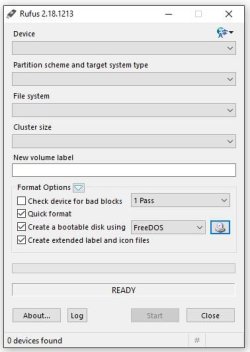
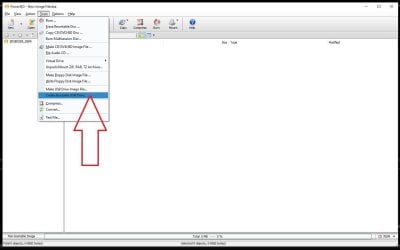
I got a 16GB USB stick that I don't use, I can use that and burn the iso onto it. i use poweriso, that's ok to use isn't it and burn it at the lowest speed given by it
 

My Computer

OS
Windows 10 Pro 64bit

Attachments

  • Capture.JPG
    Capture.JPG
    30.3 KB · Views: 6
  • Capture1.JPG
    Capture1.JPG
    64.1 KB · Views: 1

My Computer

Computer type
PC/Desktop
Computer Manufacturer/Model Number
Skylake Special #666
OS
Windows 10 Pro x64
CPU
Intel Core i7 6700K
Motherboard
Asus Sabertooth Z170 Mark 1
Memory
GSkill TridentZ RGB 16GB 3600 16-16-16-36
Graphics Card(s)
EVGA GTX 980 Ti SC x2
Sound Card
Realtek High Definition
Monitor(s) Displays
AOC G2460PG
Screen Resolution
1920 x 1080 144Hz
Hard Drives
Samsung 860 Pro 256GB, Seagate Barracuda 4TB x2
PSU
EVGA 1000 P2, EVGA White Custom Braided Cables
Case
Corsair Vengeance C70 Gunmetal Black
Cooling
Corsair H100i v2, Corsair ML120 x2, Thermal Grizzly Kryonaut
Keyboard
Logitech G910 Orion Spectrum
Mouse
Logitech G700s
Internet Speed
Verizon Fios Quantum Gateway 75/75
Antivirus
Windows Defender, Malwarebytes Free 3.8.3
Browser
Chrome
Other Info
Corsair SP120 x4, LG Blu-ray Drive, Durabrand HT-395 100 Watt Dolby Digital Amp, Corsair H2100 Wireless 7.1 Headset
Back
Top