Perform system restore on an external HD?

dwj88

New member
Local time
4:26 AM
Messages
3
Hello all,

This is going to sound like a display problem, but it ends up being related to system-restore: I promise!

I recently replaced the screen on my HP Dv6t 6c00 laptop. The new screen lit up, but no image appeared, so I tried to change some settings in Windows using an external monitor to see if I could force Windows to display on the new laptop screen.

I ended up (foolishly) disabling the integrated video adapter, and now I can't see the external monitor, either! (oops). The only thing I can think of now is disconnecting the HDD, connecting it to another computer, and trying to do a system restore--unless someone knows a way to re-enable the graphics while blind...

I've already tried resetting the CMOS memory, using a magnet to fool the laptop into thinking its closed, and hitting Fn+F4/Windows+P to switch to the external. I haven't been able to find a way to view the BIOS screen on the external,, either; it doesn't seem to be possible on an HP laptop. If there's a setting to change in the BIOS to allow this, I can't get to it because I can't see anything.

To summarize, my questions are: given the above information, how can I either re-enable the graphics card or do a system restore on my HDD while it is connected to another computer? I would prefer to connect the HDD by USB (I have a SATA-USB adapter). The most convenient machine for me to use would be my girlfriend's macbook pro, although I could probably borrow a friend's laptop if necessary.

Any ideas? Thanks for reading!
 

My Computer My Computer

Computer type
PC/Desktop
Computer Manufacturer/Model Number
HP
OS
Windows 7 Home Ultimate 64-bit
CPU
i7
Motherboard
?
Welcome to Seven Forums dwj88.

I doubt if a Restore would help since the graphics adapter would be disabled in the BIOS, not the OS. If you do connect the HDD to another (Windows only) machine, windows Update would likely start loading drivers for that machine and maybe make the install invalid.

Have you re-checked you work on the new screen?
 

My Computer My Computer

Computer type
PC/Desktop
Computer Manufacturer/Model Number
Home Built Desktop By DataTech
OS
Windows 7 Ultimate X64 SP1
CPU
Intel i5-2550K, Differing ~4.4-4.8GHz No built in GPU
Motherboard
ASUS P8Z68-V PRO/GEN3
Memory
16GB G.Skill Sniper 1866MHz @ 2133MHz 2x8GB
Graphics Card(s)
ASUS GTX650TIB-DC2OC-2GD5, (650TI Boost)
Sound Card
Onboard Realtek 5-1
Monitor(s) Displays
Samsung P2570HD
Screen Resolution
1920x1080
Hard Drives
Samsung 840 Pro 256GB SSD for OS, 500GB Seagate Constellation (Enterprise drive) for Data
PSU
Corsair HX650W
Case
Inwin Dragon Rider
Cooling
Hyper 212 EVO w/two Noctua fans, push-pull, @1300 RPM
Keyboard
E-Z Eyes, bright yellow keys with large characters
Mouse
steelseries SENSEI Laser Pro Gaming
Internet Speed
48-51Mbs Mbs down, 11 Mbs up Xfinity Cable
Antivirus
Norton Internet Security 2013
Browser
IE 10, Opera, Pale Moon if needed
Other Info
4 case fans, LG BluRay-RE, ASUS DVD-RW, Mr. Fusion power supply, 1.21 gigawatts.
I replaced the cable on the new screen, too--checked it over a couple times. If there's a problem with my installation of the screen or cable, I'm not skilled enough to see it. You can tell it's hooked up, because the light comes on and the screen flashes at the appropriate moments--it just doesn't display any images. It goes from black to dark grey.

If it helps, I disabled the graphics adapter in the device manager--not sure if this makes a difference on whether or not the card is disabled in BIOS (I'm really still a learner).

What if I link the HDD to another device with internet connectivity turned off? Or if I just boot from that device, and use the HDD as a USB drive--is there a way to reverse the device manager change through that method? (possibly in the registry? A wild guess).
 

My Computer My Computer

Computer type
PC/Desktop
Computer Manufacturer/Model Number
HP
OS
Windows 7 Home Ultimate 64-bit
CPU
i7
Motherboard
?
Since you can't see an image on an external monitor, which should work by plugging it in, you may have done something wrong in replacing the screen. The external video feed would, I think, have to go through the same feed as the built-in one.

You can't boot Windows via a USB attached HDD. If you attach it to another motherboard I think any changes you could make would be to that computer. It may not even boot since hardware would probably be very dissimilar. I doubt any changes you would make in another PC would not carry back to the laptop.

I'll ask for some others to have a look in.:)
 

My Computer My Computer

Computer type
PC/Desktop
Computer Manufacturer/Model Number
Home Built Desktop By DataTech
OS
Windows 7 Ultimate X64 SP1
CPU
Intel i5-2550K, Differing ~4.4-4.8GHz No built in GPU
Motherboard
ASUS P8Z68-V PRO/GEN3
Memory
16GB G.Skill Sniper 1866MHz @ 2133MHz 2x8GB
Graphics Card(s)
ASUS GTX650TIB-DC2OC-2GD5, (650TI Boost)
Sound Card
Onboard Realtek 5-1
Monitor(s) Displays
Samsung P2570HD
Screen Resolution
1920x1080
Hard Drives
Samsung 840 Pro 256GB SSD for OS, 500GB Seagate Constellation (Enterprise drive) for Data
PSU
Corsair HX650W
Case
Inwin Dragon Rider
Cooling
Hyper 212 EVO w/two Noctua fans, push-pull, @1300 RPM
Keyboard
E-Z Eyes, bright yellow keys with large characters
Mouse
steelseries SENSEI Laser Pro Gaming
Internet Speed
48-51Mbs Mbs down, 11 Mbs up Xfinity Cable
Antivirus
Norton Internet Security 2013
Browser
IE 10, Opera, Pale Moon if needed
Other Info
4 case fans, LG BluRay-RE, ASUS DVD-RW, Mr. Fusion power supply, 1.21 gigawatts.
Welcome DWJ to SF.

I'm not sure if you tried this, but reset the CMOS. This should help...
How to Clear Your Computer?s CMOS to Reset BIOS Settings
This will fix any issues with the BIOS being set to the wrong value.

If that doesn't fix it, do you have a Windows Installation DVD, stick it into the drive and reboot.
Can you see anything from the DVD? If you do, use the Repair function.
It can't hurt.

If you are still scratching your head, try booting into the Safe mode.
This should bypass the standard drivers.
If none of these help, then I'll start scratching my head.

Good luck

PS - Hi Britton
 

My Computer My Computer

Computer type
PC/Desktop
Computer Manufacturer/Model Number
Custome Built
OS
Microsoft Windows 7 Ultimate 64-bit 7601 Multiprocessor Free Service Pack 1
CPU
Intel(R) Core(TM) i7 CPU 950 @ 3.07GHz
Motherboard
ASUSTeK Computer INC. SABERTOOTH X58 (LGA1366)
Memory
16.0GB Dual-Channel DDR3 @ 534MHz (8-8-8-20)
Graphics Card(s)
1023MB NVIDIA GeForce GTX 650 (EVGA)
Sound Card
(1) NVIDIA High Definition Audio (2) High Definition Audio
Monitor(s) Displays
HP W2072a LED Backlit
Screen Resolution
1920x1080@60Hz
Hard Drives
(1) SAMSUNG MMCRE28G5MXP-0VB SCSI Disk Device
(2) ST1000DM 003-1CH162 SCSI Disk Device
(3) WDC WD10EURX-73FH1Y0 SCSI Disk Device
PSU
XION XON-1000P14F
Cooling
Fans
Antivirus
Windows Security Essentials
Browser
Mozilla Firefox
Other Info
BIOS Version/Date
American Megatrends Inc. 1402, 8/9/2012
SMBIOS Version 2.5
Thanks for your replies, everyone!

The first thing I think I should clarify is that the external monitor stopped working because I disabled the integrated graphics in the device manager, not realizing this would be so hard to reverse. Before that, I had an external that started working after windows booted, but I was unable to access the BIOS because the main screen didn't display. Now neither screen displays.

As for the other suggestions, I've tried resetting the CMOS memory, but it didn't seem to help--I think because I disabled the integrated graphics in the Windows device manager, not in the BIOS menu. I've never been able to see BIOS in the external monitor--it would only start displaying after Windows booted. That's why I was looking into a system restore via another computer--but it doesn't look like that's viable.

The Window's installation DVD is a good idea--provided it will display on the external monitor so that I can select "repair." I don't have one right now, but the drive has a restore-partition and from what I understand these disks aren't so hard to make--right?

As for Safe Mode, I've been having a hard time entering it because I can't see anything on startup. If anyone knows how I can do so blind from this BIOS, I'd be willing to give it a shot: HP Notebook System BIOS Update | HP® Support

Thanks again for your replies!
 

My Computer My Computer

Computer type
PC/Desktop
Computer Manufacturer/Model Number
HP
OS
Windows 7 Home Ultimate 64-bit
CPU
i7
Motherboard
?
As for the Safe mode, boot up with the Delete Key depressed and sustain the depressed key until something shows on the screen.
This has nothing to do with Windows drivers.

If you can't see the BIOS, then it sounds like a hardware issue. Since you live in the USA, recommend you take the laptop in to Staples. They have fixed issues with my laptop, and they should at least be able to give your laptop a clean bill of health.
 

My Computer My Computer

Computer type
PC/Desktop
Computer Manufacturer/Model Number
Custome Built
OS
Microsoft Windows 7 Ultimate 64-bit 7601 Multiprocessor Free Service Pack 1
CPU
Intel(R) Core(TM) i7 CPU 950 @ 3.07GHz
Motherboard
ASUSTeK Computer INC. SABERTOOTH X58 (LGA1366)
Memory
16.0GB Dual-Channel DDR3 @ 534MHz (8-8-8-20)
Graphics Card(s)
1023MB NVIDIA GeForce GTX 650 (EVGA)
Sound Card
(1) NVIDIA High Definition Audio (2) High Definition Audio
Monitor(s) Displays
HP W2072a LED Backlit
Screen Resolution
1920x1080@60Hz
Hard Drives
(1) SAMSUNG MMCRE28G5MXP-0VB SCSI Disk Device
(2) ST1000DM 003-1CH162 SCSI Disk Device
(3) WDC WD10EURX-73FH1Y0 SCSI Disk Device
PSU
XION XON-1000P14F
Cooling
Fans
Antivirus
Windows Security Essentials
Browser
Mozilla Firefox
Other Info
BIOS Version/Date
American Megatrends Inc. 1402, 8/9/2012
SMBIOS Version 2.5
The Window's installation DVD is a good idea--provided it will display on the external monitor so that I can select "repair." I don't have one right now, but the drive has a restore-partition and from what I understand these disks aren't so hard to make--right?

Thanks again for your replies!

For the Windows ISO file, you can go to this site Windows 7 Direct Download Links, Official Disk Images from Digital River You will need to go about half way down the page to get to the English versions. Be sure to get the correct version for your PC (Home Premium, Pro, Etc) and also the correct 32-bit or 64-bit. Burn the ISO to a DVD and you will have your Windows 7 disk.
 

My Computer My Computer

Computer type
PC/Desktop
Computer Manufacturer/Model Number
Custom Build
OS
Windows 7 Home Premium 32-Bit - Build 7600 SP1
CPU
Intel Core i3-2120 3.30Ghz
Motherboard
Asus P8Z68-V LX Intel Z68 Socket H2 ATX
Memory
Kingston 4 GB DDR3 1333 mhz
Graphics Card(s)
AMD Radeon HD6670
Sound Card
Sound Blaster Audigy SE 24-Bit
Monitor(s) Displays
Asus VE228
Screen Resolution
1440 X 900
Hard Drives
OCZ Vertex 3 120 GB Sata 3 SSD ==
Kingston SH103/S3 120 G Hyper X 120 GB SSD ==
Western Digital 500 GB Caviar Green 7200 RPM ==
PSU
Corsair CX600M == 600 Watt
Case
NZXT Apollo - Silver with Clear Side Panel
Cooling
Three 120 mm Fans
Keyboard
Microsoft Natural 4000
Mouse
Microsoft Custom Optical 3000
Internet Speed
AT&T Fiber Optic Wireless Network
Antivirus
Microsoft Security Essentials
Browser
Chrome
Other Info
120 mm Blue LED Fan -- Three Blue LED Lazer Light Sticks
I will ask you to double check the ribbon connection from motherboard to display - on both ends. These are notoriously tricky to insert properly all the way in. You feel like you are going to break something and you have to apply equal force all across the connector. There will be a "snap" of sorts when it finally seats, but this is not an obvious or loud snap - more like a thud.

You do not say whether the display is CCFL or LED backlit, but in either case you can get power to the backlight without data from the graphics chip. So just because it lights up does not mean it is connected properly.

Disabling the graphics chip in Windows only affects Windows. Your BIOS screens are completely independent of anything you do in Windows. So you should get the BIOS screen on an external monitor.

I am not familiar with your method of resetting the BIOS or attempting a ClearCMOS. I suggest you try this on a laptop:
Power off, remove the power supply/charger, remove the battery.
Press and hold the power button down for at least 30 seconds
Put everything back together and start up.

If that does not work you may need to do all the steps above but then remove the 3v motherboard battery also.

Let's see if any of that helps.
 

My Computer My Computer

Computer type
PC/Desktop
Computer Manufacturer/Model Number
Home Built - Jan 2013
OS
Windows 7 64 Bit Home Premium SP1
CPU
i7-3820
Motherboard
Asus P9X79-PRO - Bios 4608
Memory
GSkill F3-14900CL9Q - 16GB
Graphics Card(s)
EVGA GeForce GTX660 - Driver 352.86
Sound Card
On board Realtek ALC898
Monitor(s) Displays
Acer S271HL
Screen Resolution
1920 x 1080
Hard Drives
#1- Samsung 840 Pro Series
#2- Western Digital WD1002FAEX Sata3 Black
#3- Western Digital WD1002FAEX Sata3 Black
PSU
Corsair CMPSU-850TX-V2 - 850 watt (by Seasonic)
Case
Corsair Obsidian 550D
Cooling
Standard 3 120mm case fans, Cooler Master Hyper 212 EVO
Keyboard
MS KC-0405
Mouse
Intellimouse 5-button
Internet Speed
56 Mbits/Sec (on a good day)
Antivirus
Avast & Malwarebytes
Browser
Firefox
Other Info
Asus DVD - DRW-24B1ST 24X
bigmck - as a side note, your Sig image is not fair. Now I've got to go get a burger. Your looks just to good.
 

My Computer My Computer

Computer type
PC/Desktop
Computer Manufacturer/Model Number
Custome Built
OS
Microsoft Windows 7 Ultimate 64-bit 7601 Multiprocessor Free Service Pack 1
CPU
Intel(R) Core(TM) i7 CPU 950 @ 3.07GHz
Motherboard
ASUSTeK Computer INC. SABERTOOTH X58 (LGA1366)
Memory
16.0GB Dual-Channel DDR3 @ 534MHz (8-8-8-20)
Graphics Card(s)
1023MB NVIDIA GeForce GTX 650 (EVGA)
Sound Card
(1) NVIDIA High Definition Audio (2) High Definition Audio
Monitor(s) Displays
HP W2072a LED Backlit
Screen Resolution
1920x1080@60Hz
Hard Drives
(1) SAMSUNG MMCRE28G5MXP-0VB SCSI Disk Device
(2) ST1000DM 003-1CH162 SCSI Disk Device
(3) WDC WD10EURX-73FH1Y0 SCSI Disk Device
PSU
XION XON-1000P14F
Cooling
Fans
Antivirus
Windows Security Essentials
Browser
Mozilla Firefox
Other Info
BIOS Version/Date
American Megatrends Inc. 1402, 8/9/2012
SMBIOS Version 2.5

My Computer My Computer

Computer type
PC/Desktop
Computer Manufacturer/Model Number
Custom Build
OS
Windows 7 Home Premium 32-Bit - Build 7600 SP1
CPU
Intel Core i3-2120 3.30Ghz
Motherboard
Asus P8Z68-V LX Intel Z68 Socket H2 ATX
Memory
Kingston 4 GB DDR3 1333 mhz
Graphics Card(s)
AMD Radeon HD6670
Sound Card
Sound Blaster Audigy SE 24-Bit
Monitor(s) Displays
Asus VE228
Screen Resolution
1440 X 900
Hard Drives
OCZ Vertex 3 120 GB Sata 3 SSD ==
Kingston SH103/S3 120 G Hyper X 120 GB SSD ==
Western Digital 500 GB Caviar Green 7200 RPM ==
PSU
Corsair CX600M == 600 Watt
Case
NZXT Apollo - Silver with Clear Side Panel
Cooling
Three 120 mm Fans
Keyboard
Microsoft Natural 4000
Mouse
Microsoft Custom Optical 3000
Internet Speed
AT&T Fiber Optic Wireless Network
Antivirus
Microsoft Security Essentials
Browser
Chrome
Other Info
120 mm Blue LED Fan -- Three Blue LED Lazer Light Sticks
I was thinking even with the integrate GPU disabled w7 should kick in with its own included graphics driver. Example, when I do a clean install, I have a display before I install any drivers, it is just very limited as to what resolutions that can be displayed.

I still suspect either you don't have the new screen properly connected or maybe the new one is no good.

ps: Hi Wizard
 

My Computer My Computer

Computer type
PC/Desktop
Computer Manufacturer/Model Number
Home Built Desktop By DataTech
OS
Windows 7 Ultimate X64 SP1
CPU
Intel i5-2550K, Differing ~4.4-4.8GHz No built in GPU
Motherboard
ASUS P8Z68-V PRO/GEN3
Memory
16GB G.Skill Sniper 1866MHz @ 2133MHz 2x8GB
Graphics Card(s)
ASUS GTX650TIB-DC2OC-2GD5, (650TI Boost)
Sound Card
Onboard Realtek 5-1
Monitor(s) Displays
Samsung P2570HD
Screen Resolution
1920x1080
Hard Drives
Samsung 840 Pro 256GB SSD for OS, 500GB Seagate Constellation (Enterprise drive) for Data
PSU
Corsair HX650W
Case
Inwin Dragon Rider
Cooling
Hyper 212 EVO w/two Noctua fans, push-pull, @1300 RPM
Keyboard
E-Z Eyes, bright yellow keys with large characters
Mouse
steelseries SENSEI Laser Pro Gaming
Internet Speed
48-51Mbs Mbs down, 11 Mbs up Xfinity Cable
Antivirus
Norton Internet Security 2013
Browser
IE 10, Opera, Pale Moon if needed
Other Info
4 case fans, LG BluRay-RE, ASUS DVD-RW, Mr. Fusion power supply, 1.21 gigawatts.
If you are looking for a driver these are the ones now you will have to find out whether it is AMD or an Intel graphics chip
Software & driver downloads HP Pavilion dv6t-6c00 CTO Select Edition Entertainment Notebook PC | HP® Support

I always download from the maker as I find the Windows feature mot that good.

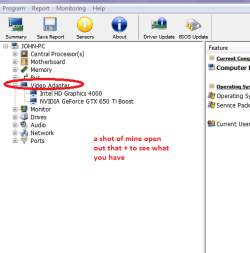
To find the chip brand try running HW Info HWiNFO, HWiNFO32/64 - Download < you will need the 64bit version and when running it ignore the update reminder it doesn't do anything out here at least But see my pic as to what to look for.
 

Attachments

  • HWINFO HP.PNG
    HWINFO HP.PNG
    15 KB · Views: 13

My Computer My Computer

Computer type
PC/Desktop
Computer Manufacturer/Model Number
Own build (new) Desk1 / Asus ROG Win 7 / Desk2 1st build
OS
Desk1 7 Home Prem / Desk2 10 Pro / Main lap Asus ROG 10 Pro 2 laptop Toshiba 7 Pro Asus P2520 7 & 10
CPU
Desk1 i5 3750K / Laptop i7 GTX 860M / Desk2 i5 2500
Motherboard
Desk1 Asus P877-V / Desk2 Gigabyte H67 UD3H / Laptop ?
Memory
Desk1 8GB (1866) / Desk2 16GB (1333) / Laptop 8Gb DDR3
Graphics Card(s)
Desk 1& 2NVidia GTX 650 & Laptops on board Intel
Sound Card
Desk 1 & 2 -XONAR DG Realtek High Def audio Laptop
Monitor(s) Displays
Desk 1 Benq HD 2450 / Desk2 Philips 24" / Laptop 17.5"
Screen Resolution
1920x1080 D1 & D2 & Laptop 1
Hard Drives
Desk1 Samsung 120GB 830 SSD
Asus ROG 256GB 850 Pro SSD
Desk2 Samsung 840 256 SSD
Toshiba 120GB EVO
PSU
Desk 1 Corsair HX 1050/ Laptop ? / Desk 2 Corsair HX 650
Case
Desk 1 Cooler HAF XM ? Toshiba laptop / Desk2 Coolermaster
Cooling
Fans on all Desk1 -2 Desk2 - all Coolermasters 5 Laptop ?
Keyboard
Desk 1 MS Sidewinder X6 Desk 2 MS Sidewinder X 4
Mouse
Desk 1&2 - Gigabyte MS 900 gamer - laptop - Logitec wireless
Internet Speed
ADSL2+
Other Info
One other Desktop (tester) and spare Toshba laptop both with SSD's
Running Kaspersky 2016 ISS on all machines config'd identically
Logitec audio stereo systems on each machine (x3)
Canon MG5250MFC
Router/modem TP-Link running WPA2SK
John, thanks for the good help, but the OP can't get a display to work. :(
 

My Computer My Computer

Computer type
PC/Desktop
Computer Manufacturer/Model Number
Home Built Desktop By DataTech
OS
Windows 7 Ultimate X64 SP1
CPU
Intel i5-2550K, Differing ~4.4-4.8GHz No built in GPU
Motherboard
ASUS P8Z68-V PRO/GEN3
Memory
16GB G.Skill Sniper 1866MHz @ 2133MHz 2x8GB
Graphics Card(s)
ASUS GTX650TIB-DC2OC-2GD5, (650TI Boost)
Sound Card
Onboard Realtek 5-1
Monitor(s) Displays
Samsung P2570HD
Screen Resolution
1920x1080
Hard Drives
Samsung 840 Pro 256GB SSD for OS, 500GB Seagate Constellation (Enterprise drive) for Data
PSU
Corsair HX650W
Case
Inwin Dragon Rider
Cooling
Hyper 212 EVO w/two Noctua fans, push-pull, @1300 RPM
Keyboard
E-Z Eyes, bright yellow keys with large characters
Mouse
steelseries SENSEI Laser Pro Gaming
Internet Speed
48-51Mbs Mbs down, 11 Mbs up Xfinity Cable
Antivirus
Norton Internet Security 2013
Browser
IE 10, Opera, Pale Moon if needed
Other Info
4 case fans, LG BluRay-RE, ASUS DVD-RW, Mr. Fusion power supply, 1.21 gigawatts.
John, thanks for the good help, but the OP can't get a display to work. :(
No worries mate just a thought and I reckon it must be down to either an installation problem ie a ribbon cable gone bad somewhere, the connections in the swivel hinge are bad or maybe the new screen itself is crook.
 

My Computer My Computer

Computer type
PC/Desktop
Computer Manufacturer/Model Number
Own build (new) Desk1 / Asus ROG Win 7 / Desk2 1st build
OS
Desk1 7 Home Prem / Desk2 10 Pro / Main lap Asus ROG 10 Pro 2 laptop Toshiba 7 Pro Asus P2520 7 & 10
CPU
Desk1 i5 3750K / Laptop i7 GTX 860M / Desk2 i5 2500
Motherboard
Desk1 Asus P877-V / Desk2 Gigabyte H67 UD3H / Laptop ?
Memory
Desk1 8GB (1866) / Desk2 16GB (1333) / Laptop 8Gb DDR3
Graphics Card(s)
Desk 1& 2NVidia GTX 650 & Laptops on board Intel
Sound Card
Desk 1 & 2 -XONAR DG Realtek High Def audio Laptop
Monitor(s) Displays
Desk 1 Benq HD 2450 / Desk2 Philips 24" / Laptop 17.5"
Screen Resolution
1920x1080 D1 & D2 & Laptop 1
Hard Drives
Desk1 Samsung 120GB 830 SSD
Asus ROG 256GB 850 Pro SSD
Desk2 Samsung 840 256 SSD
Toshiba 120GB EVO
PSU
Desk 1 Corsair HX 1050/ Laptop ? / Desk 2 Corsair HX 650
Case
Desk 1 Cooler HAF XM ? Toshiba laptop / Desk2 Coolermaster
Cooling
Fans on all Desk1 -2 Desk2 - all Coolermasters 5 Laptop ?
Keyboard
Desk 1 MS Sidewinder X6 Desk 2 MS Sidewinder X 4
Mouse
Desk 1&2 - Gigabyte MS 900 gamer - laptop - Logitec wireless
Internet Speed
ADSL2+
Other Info
One other Desktop (tester) and spare Toshba laptop both with SSD's
Running Kaspersky 2016 ISS on all machines config'd identically
Logitec audio stereo systems on each machine (x3)
Canon MG5250MFC
Router/modem TP-Link running WPA2SK
Back
Top