Performance Effectiveness/Memory Usage

Berkey

Lost In Space
Power User
VIP
Local time
6:49 PM
Messages
328
Location
Cybertron
Hello,

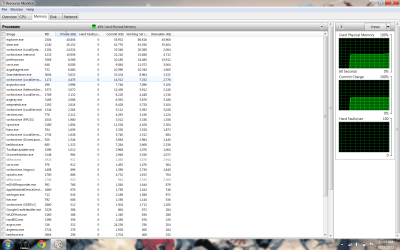
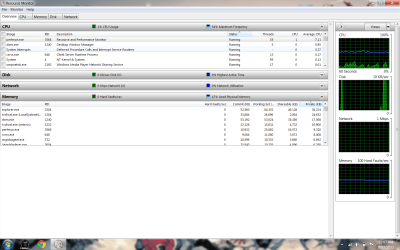
New to the forums and have been looking at some old posts about performance and thought I would inquire about a similar problem, but wanted to know exactly what I can do (screen shots to provide) to best help others help solve said problems. I will post an over view shot and one of the memory tab (in descending order) as I have seen on some of the other threads. If there are other screen shots or other information I can produce to help this solution please let me know.

Usually I might have 50 processes running when idle so I'm not sure if there are others that do not need to be running or some that may be totally unnecessary to even have. I'll be honest I'm not the most computer savvy guy so I can't tell you what exactly this laptop has in it (Ram total, OS etc.) as it was just given to me, so I apologize for not putting those specs up front. I suppose I'm really just looking to see if this computer is running as efficiently as possible and how to monitor it's effectiveness in the future.

Thank you for any help
 

Attachments
  • Overview.png
    Overview.png
    84.8 KB · Views: 17
  • Memory.png
    Memory.png
    101.5 KB · Views: 16

My Computer

Computer type
PC/Desktop
OS
Microsoft Windows 7 Professional 64-bit SP1
CPU
Intel(R) Core(TM) i5 CPU M 520 @ 2.40GHz
Motherboard
Dell Inc. 0K42JR
Memory
8.00 GB
Graphics Card(s)
NVIDIA NVS 3100M
Sound Card
(1) NVIDIA High Definition Audio (2) IDT High Definition A
Monitor(s) Displays
1
Screen Resolution
1440 x 900 x 32 bits (4294967296 colors) @ 59 Hz
Hard Drives
Samsung SSD 840 PRO Series ATA Device
Welcome to Seven Forums bberkey.

To view your basic computer information, open the Start menu, right-click Computer, then click Properties. You should now be able to see what OS is installed, if SP1 is also installed, your total memory, etc. There are several free programs you can install that will provide much greater details about your computer. Things like the name of the manufacturer of the memory chips, the hard drive, the motherboard, computer temperatures, etc. A lot of folks here recommend Speccy.

Speccy - System Information - Free Download

Windows 7 is pretty good at sorting things out and making best use of memory. One of the tutorials here explains what else can be done to optimize Windows 7. Not everything will apply to your computer and the old saying "if it ain't broke, don't fix it" certainly applies. Unless you're having a specific problem sometimes it's best to leave things alone. If you have other questions folks will always be here to help. ;)

http://www.sevenforums.com/tutorials/11728-optimize-windows-7-a.html
 

My Computer

Computer type
Laptop
Computer Manufacturer/Model Number
Sony Vaio VPCEB47GM Laptop
OS
Win 7 Pro 64-bit
CPU
Intel i5 2.4 Ghz
Memory
8GB DDR3
Graphics Card(s)
Intel HD 3000
Sound Card
IDT High Definition
Monitor(s) Displays
15.6 WGXA Anti-Glare LED
Screen Resolution
1280x800
Hard Drives
640Gb 7200rpm
Antivirus
MSE
Browser
Opera (primary) with IE9 backup
50 processes is pretty good. I've got 47 running right now with nothing loaded except this one Firefox browser window and my standard background stuff.

I'd say the average user probably has 60 or 70 processes and we often see cases of more than 100 processes on this forum.

Anything less than 2 GB of RAM used is pretty much normal and no problem, assuming you have at least 4 GB installed.
 

My Computer

Computer type
PC/Desktop
Computer Manufacturer/Model Number
Ignatz Special; 4 speed manual gearbox; factory air conditioning; one of one
OS
Windows 7 Home Premium SP1, 64-bit
CPU
Intel Skylake i5-6600K, not overclocked
Motherboard
AsRock Z170M Extreme 4, micro ATX
Memory
8 GB HyperX DDR4-2666 (2 x 4 GB)
Graphics Card(s)
none; graphics are integrated on CPU
Sound Card
onboard: Realtek ALC1150; external: USB Behringer UF0-202
Monitor(s) Displays
Dell S2340M 23 inch IPS
Screen Resolution
1600 x 900
Hard Drives
System: Crucial MX100 series SSD, 128 GB;
Data: Samsung Spinpoint 103SJ, 1 TB;
Backup: WD Caviar Green WD30EZRX-00D8PB0, 3 TB
PSU
Rosewill SilentNight 500 watt fanless, semi-modular
Case
Antec Solo II
Cooling
Noctua NH-U12S; Noctua F12 intake, Noctua S12A exhaust
Keyboard
Microsoft 200 6JH-00001 USB
Mouse
Dell or Microsoft optical wired; USB
Antivirus
Microsoft Security Essentials and Malwarebytes Premium
Browser
Pale Moon
Other Info
All fans PWM; speeds at idle: CPU circa 500 rpm; intake circa 600 rpm; exhaust circa 600 rpm; CPU temps 27 idle and 47 C load in a warm room (27 C/81 F) when running Intel Extreme Tuning Utility stress test.
i have 4 gb ddr2 @ 667 in dual channel but when i copy more than one thing at a time i see some decline in performance and my best guess is that my feeble psu is to blame coz im using 2 hdds and when both are active it takes few secs to start copy paste if this is wrong place to post plz delete it
 

My Computer

Computer Manufacturer/Model Number
custom made
OS
windows 7 ultimate x64 and windows vista ultimate x86
CPU
intel pentium dual core e 5200 @ 3.3 ghz oced (BSEL)
Motherboard
intel dg31 pr
Memory
2 x 2 gb 667 mhz ddr2 (kingston and corsair)
Graphics Card(s)
ati radeon hd 4670 2d1g d3
Sound Card
onboard
Monitor(s) Displays
crt 15 inch
Hard Drives
1 x 500 gb sata 7200 rpm 16 mb cache
1 x 250 gb sata 7200 rpm 8 mb cache
PSU
350 watt lg psu 16a on 12 v rail
Case
custom made
Cooling
air cooling
Keyboard
a4tech
Mouse
a4 tech
Internet Speed
1 mb per sec
Back
Top