Performance Issues on WIN7 Computer

NoActualName

New member
Local time
7:13 AM
Messages
5
Hello, I came here in the hopes that someone may help me determine a potential fix for the problem which I am currently having from my desktop computer; or some diagnostic program I can use in order to determine the underlying issue which I am experiencing.

To briefly explain, I am experience stuttering which has random intervals. This occurs during video streaming, gaming, as well as when there's nothing going on; whenever I'm on the desktop. As you can imagine, this is extremely irritating.

I have scanned the system for any potential of viruses, malware, spyware and have come up with nothing. I have fragmented my hard drive, and it should be noted that the hard drive is new and freshly installed with windows 7. I have ran the disk checking utility program, and it came up with no issues. I have updated my graphics card as well.

I had my computer sent off to the repair shop to install Windows 7 after having a new hard drive installed; and once I had it returned to me, it came with this stuttering problem. Is there anything I can do other than send it back to the repair shop?
 

My Computer

Computer type
PC/Desktop
Computer Manufacturer/Model Number
Asus
OS
Windows 7 Home Premium 64 Bit
CPU
Intel(R) Core(TM) i7-3770 CPU @ 3.40GHz 3.40 GHz
Motherboard
ASUSTeK COMPUTER INC. CM6870
Memory
16 GB
Graphics Card(s)
Nvidia Geforce GT630
Antivirus
None
Browser
Chrome
Hi and welcome to SevenForums,
Please make sure your system spec's page is correct,
Your not showing a antivirus program :/
Does that mean you've been streaming videos and playing games without one :shock:

Sending it back should be done if a warrantee was given did they install the video card ?
Again warrantee ;)
 

My Computer

Computer type
PC/Desktop
Computer Manufacturer/Model Number
Custom assembled by me :}
OS
Win-7-Pro64bit 7-H-Prem-64bit
CPU
i7-5930K 2nd i9-9940x both water blocked VRM's too
Motherboard
ASUS SABERTOOTH X99 2nd ASUS x299 Apex
Memory
Trident-z 3200C14 2nd Trident-z 3600C16
Graphics Card(s)
EVGA 1080ti ftw3 2nd Titan Xp both water blocked
Sound Card
Built-in Realtek
Monitor(s) Displays
1-AOC G2460PG 24"G-Sync 144Hz/ 2nd 1-ASUS VG248QE 24" 144Hz
Screen Resolution
1920 x 1080 144Hz
Hard Drives
2-Samsung M.2 Evo & Evo Plus
2-Samsung 850 EVO 500GB SSD's/ 3-2.5 W.D. Black 1tb-&3-1tb/3-3.5 WD Black 1tb hdd's
PSU
EVGA SuperNOVA 1000-P2 2nd 1200-P2
Case
2-Corsair Obsidian Series 450D Black ATX Mid Tower
Cooling
Custom water loops
Keyboard
Logitech G710+/ 2nd Logitech G910
Mouse
2-RedDragon M901 Perdition 16400 dpi Gaming mouse = wired
Internet Speed
Comcast Ping 19ms 89.31mbps download speed 6.12mbps upload
Antivirus
Malwarebytes Pro/ Superantispyware Pro
Browser
FireFox & Pale moon
Other Info
2nd ASUS X299 Apex/Intel i9-9940x with Custom water loop/7H-Prem-x64/Corsair 450D case/Ram Trident-z 3600C16 4x8gb / Samsung970Evo plus 500gb SSD/Dual ssd EZ swap evo/PSU EVGA SuperNova 1200w-P2 80+Platinum/GPU Titan Xp /8-ML-140 on push-pull on 2-280GTX rads
I've been using AntiMalwareBytes.

And I think you misunderstood, this isn't a recently bought PC; it's one I had for about four years, I've just received it back from the repair shop which installed Windows 7 on my newly installed hard drive.
 

My Computer

Computer type
PC/Desktop
Computer Manufacturer/Model Number
Asus
OS
Windows 7 Home Premium 64 Bit
CPU
Intel(R) Core(TM) i7-3770 CPU @ 3.40GHz 3.40 GHz
Motherboard
ASUSTeK COMPUTER INC. CM6870
Memory
16 GB
Graphics Card(s)
Nvidia Geforce GT630
Antivirus
None
Browser
Chrome
Thanks please still use the link above my signature to fill in your system spec's for the machine,
If you have onboard graphic's remove the card and test the stuttering,
Also while you have the panel off check the connection to the hdd and power and motherboard to see if they are loose,
Cheers.
 

My Computer

Computer type
PC/Desktop
Computer Manufacturer/Model Number
Custom assembled by me :}
OS
Win-7-Pro64bit 7-H-Prem-64bit
CPU
i7-5930K 2nd i9-9940x both water blocked VRM's too
Motherboard
ASUS SABERTOOTH X99 2nd ASUS x299 Apex
Memory
Trident-z 3200C14 2nd Trident-z 3600C16
Graphics Card(s)
EVGA 1080ti ftw3 2nd Titan Xp both water blocked
Sound Card
Built-in Realtek
Monitor(s) Displays
1-AOC G2460PG 24"G-Sync 144Hz/ 2nd 1-ASUS VG248QE 24" 144Hz
Screen Resolution
1920 x 1080 144Hz
Hard Drives
2-Samsung M.2 Evo & Evo Plus
2-Samsung 850 EVO 500GB SSD's/ 3-2.5 W.D. Black 1tb-&3-1tb/3-3.5 WD Black 1tb hdd's
PSU
EVGA SuperNOVA 1000-P2 2nd 1200-P2
Case
2-Corsair Obsidian Series 450D Black ATX Mid Tower
Cooling
Custom water loops
Keyboard
Logitech G710+/ 2nd Logitech G910
Mouse
2-RedDragon M901 Perdition 16400 dpi Gaming mouse = wired
Internet Speed
Comcast Ping 19ms 89.31mbps download speed 6.12mbps upload
Antivirus
Malwarebytes Pro/ Superantispyware Pro
Browser
FireFox & Pale moon
Other Info
2nd ASUS X299 Apex/Intel i9-9940x with Custom water loop/7H-Prem-x64/Corsair 450D case/Ram Trident-z 3600C16 4x8gb / Samsung970Evo plus 500gb SSD/Dual ssd EZ swap evo/PSU EVGA SuperNova 1200w-P2 80+Platinum/GPU Titan Xp /8-ML-140 on push-pull on 2-280GTX rads
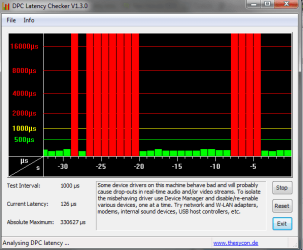
Run this program and see whether there are any red bars. If yes, take a snip of the picture and post it here. That should be run when the problem occurs.

DPC Latency Checker
 

My Computer

Computer Manufacturer/Model Number
HP, Dell, Gateway, Toshiba - 4 laptops and 2 desktops
OS
Vista, Windows7, Mint Mate, Zorin, Windows 8
CPU
from 1.6GHz Duo to i7
Monitor(s) Displays
2x HP w2207
Hard Drives
5x HDD, 7x SSD, 12x Externals
Keyboard
with trackball - no mices
Mouse
Trackball mice
Internet Speed
DSL 6000
Here you go; it seems to occur randomly. Red bars seem to appear even though I am not actively doing anything.

Edit; as suggested by the program, I individually checked each device via disabling and enabling 'em whilst monitoring for any spikes. And I have come to the conclusion that it is my network adapter that is causing these spikes and have noticed that there was no audio or video stutter when it is disabled for, as far as I observed, five minutes.

Now the underlying problem is that I do not know what to do from here, as when disabled, this cuts of my internet and thus cannot proceed to my daily activities of watching videos and otherwise surfing the web. What can I do to remedy this, if it helps, the network adapter is called "802.11n Wireless LAN Card".
 

Attachments

  • Untitled.png
    Untitled.png
    12.8 KB · Views: 38
Last edited:

My Computer

Computer type
PC/Desktop
Computer Manufacturer/Model Number
Asus
OS
Windows 7 Home Premium 64 Bit
CPU
Intel(R) Core(TM) i7-3770 CPU @ 3.40GHz 3.40 GHz
Motherboard
ASUSTeK COMPUTER INC. CM6870
Memory
16 GB
Graphics Card(s)
Nvidia Geforce GT630
Antivirus
None
Browser
Chrome
You probably have a generic Lan driver. Look on your manufacturers website whether they have a driver for the Lan card of your model PC. Then install that. But at least we narrowed it down.
 

My Computer

Computer Manufacturer/Model Number
HP, Dell, Gateway, Toshiba - 4 laptops and 2 desktops
OS
Vista, Windows7, Mint Mate, Zorin, Windows 8
CPU
from 1.6GHz Duo to i7
Monitor(s) Displays
2x HP w2207
Hard Drives
5x HDD, 7x SSD, 12x Externals
Keyboard
with trackball - no mices
Mouse
Trackball mice
Internet Speed
DSL 6000
I've went ahead to ASUS main site and searched for drivers for my model number and found drivers for LAN, and so as per your suggestion I went ahead and installed that. Rebooted, and went to device managers and it isn't there. I then went to install the wireless one, and same result, reboot, and it's not there. I don't know whether it's something I'm doing wrong, but yea, I can't seem to install another network adapter.
 

My Computer

Computer type
PC/Desktop
Computer Manufacturer/Model Number
Asus
OS
Windows 7 Home Premium 64 Bit
CPU
Intel(R) Core(TM) i7-3770 CPU @ 3.40GHz 3.40 GHz
Motherboard
ASUSTeK COMPUTER INC. CM6870
Memory
16 GB
Graphics Card(s)
Nvidia Geforce GT630
Antivirus
None
Browser
Chrome
See picture.
 

Attachments

  • 2014-12-06_2319.png
    2014-12-06_2319.png
    26.6 KB · Views: 35

My Computer

Computer Manufacturer/Model Number
HP, Dell, Gateway, Toshiba - 4 laptops and 2 desktops
OS
Vista, Windows7, Mint Mate, Zorin, Windows 8
CPU
from 1.6GHz Duo to i7
Monitor(s) Displays
2x HP w2207
Hard Drives
5x HDD, 7x SSD, 12x Externals
Keyboard
with trackball - no mices
Mouse
Trackball mice
Internet Speed
DSL 6000
I've been using AntiMalwareBytes.

And I think you misunderstood, this isn't a recently bought PC; it's one I had for about four years, I've just received it back from the repair shop which installed Windows 7 on my newly installed hard drive.

Just a point, Malwarebytes is not an antivirus program. You should install one.
 

My Computer

Computer type
PC/Desktop
Computer Manufacturer/Model Number
Custom Built
OS
Windows 10 Pro x64, Windows 8.1 Pro x64, Windows 7 Ultimate x64 SP1,
CPU
INTEL i9-7920X LGA 2066
Motherboard
Gigabyte X299-WU8 F3
Memory
64 GB (4 X 16 GB) G-Skill V Series DDR4 3200 Quad Channel
Graphics Card(s)
EVGA GTX 1060 SC 3 GB
Sound Card
Realtek Onboard ALC1220
Monitor(s) Displays
2 x Samsung S27E310
Screen Resolution
1920x1080
Hard Drives
Samsung 2 x 970 EVO Plus 500 GB NVMe
1 x 6TB WD 6003FZBX SATA
1 x 6TB WD 60EFRX SATA
12 x 3TB WD 30EFRX SATA
PSU
Seasonic X-1050
Case
Thermaltake Armor+
Cooling
Corsair H80i V2 Liquid AOI Cooler
Keyboard
Logitech G510s
Mouse
Logitech MX Master 2S
Internet Speed
200 Mb/s
Antivirus
ESET NOD32 13.1
Browser
EDGE (Dev, Canary, Beta), Chrome
Other Info
ASUS RT-AC68U router
Malwarebytes 4.0.4
I have attempted to do as you had suggested, although it did not work. I right clicked on the 802.11n, went to properties and then to driver, I then browsed my computer for what I had downloaded and it just said that "The best driver software for your device is already installed."

I've also attempted to update it via the "Let me pick from a list of device drivers on my computer" option, and I've managed to bluescreened after various options taken from the Asus category.
 

My Computer

Computer type
PC/Desktop
Computer Manufacturer/Model Number
Asus
OS
Windows 7 Home Premium 64 Bit
CPU
Intel(R) Core(TM) i7-3770 CPU @ 3.40GHz 3.40 GHz
Motherboard
ASUSTeK COMPUTER INC. CM6870
Memory
16 GB
Graphics Card(s)
Nvidia Geforce GT630
Antivirus
None
Browser
Chrome
That is strange. I wonder whether something is wrong with the hardware.

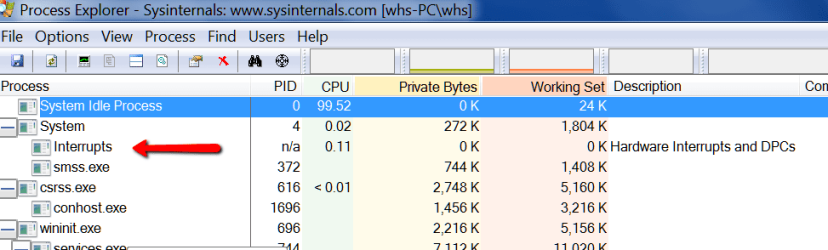
1. Download and run the Process Explorer: Process Explorer

2. See whether there are any interrupts - especially DPCs (deferred procedure calls). You see more details when you right click on the process and go to Properties.
 

Attachments

  • 2014-12-07_1304.png
    2014-12-07_1304.png
    19.8 KB · Views: 1

My Computer

Computer Manufacturer/Model Number
HP, Dell, Gateway, Toshiba - 4 laptops and 2 desktops
OS
Vista, Windows7, Mint Mate, Zorin, Windows 8
CPU
from 1.6GHz Duo to i7
Monitor(s) Displays
2x HP w2207
Hard Drives
5x HDD, 7x SSD, 12x Externals
Keyboard
with trackball - no mices
Mouse
Trackball mice
Internet Speed
DSL 6000
Back
Top