Solved Performing a Clean Install Gets Rid of the System Reserved Partition

Moby

New member
Local time
8:44 AM
Messages
5
I performed a clean install (windows 7 SP1, 64 bit) in order to move my system recovery 100mb partition to my SSD, because I had my HDD connected when I carried out my first install. I did this with the HDD unplugged, but now my computer boots up correctly with no system reserved partition on C.

Any help appreciated!
 

My Computer My Computer

At a glance

Windows 7 SP1 64-biti7-5820k16GB Ballistix2 x MSI Twin Frozr Geforce GTX 970
Computer type
PC/Desktop
Computer Manufacturer/Model Number
Custom Build
OS
Windows 7 SP1 64-bit
CPU
i7-5820k
Motherboard
Gigabyte X99-UD4
Memory
16GB Ballistix
Graphics Card(s)
2 x MSI Twin Frozr Geforce GTX 970
Hard Drives
3TB WD HDD
250GB Samsung SSD
That`s because you must have had a pre defined partition for windows.

You do not need a system reserved partition. (It`s not called a system recovery partition)
 

My Computer My Computer

At a glance

Windows 10 Pro x64Intel Core i7 6700KGSkill TridentZ RGB 16GB 3600 16-16-16-36EVGA GTX 980 Ti SC x2
Computer type
PC/Desktop
Computer Manufacturer/Model Number
Skylake Special #666
OS
Windows 10 Pro x64
CPU
Intel Core i7 6700K
Motherboard
Asus Sabertooth Z170 Mark 1
Memory
GSkill TridentZ RGB 16GB 3600 16-16-16-36
Graphics Card(s)
EVGA GTX 980 Ti SC x2
Sound Card
Realtek High Definition
Monitor(s) Displays
AOC G2460PG
Screen Resolution
1920 x 1080 144Hz
Hard Drives
Samsung 860 Pro 256GB, Seagate Barracuda 4TB x2
PSU
EVGA 1000 P2, EVGA White Custom Braided Cables
Case
Corsair Vengeance C70 Gunmetal Black
Cooling
Corsair H100i v2, Corsair ML120 x2, Thermal Grizzly Kryonaut
Keyboard
Logitech G910 Orion Spectrum
Mouse
Logitech G700s
Internet Speed
Verizon Fios Quantum Gateway 75/75
Antivirus
Windows Defender, Malwarebytes Free 3.8.3
Browser
Chrome
Other Info
Corsair SP120 x4, LG Blu-ray Drive, Durabrand HT-395 100 Watt Dolby Digital Amp, Corsair H2100 Wireless 7.1 Headset
Thanks for your response. I was just worried because I read somewhere that it's necessary to boot windows (but this isn't the case for me)

Can I now safely Remove it from my HDD ? (Could I have removed it without doing a clean install?)
 

My Computer My Computer

At a glance

Windows 7 SP1 64-biti7-5820k16GB Ballistix2 x MSI Twin Frozr Geforce GTX 970
Computer type
PC/Desktop
Computer Manufacturer/Model Number
Custom Build
OS
Windows 7 SP1 64-bit
CPU
i7-5820k
Motherboard
Gigabyte X99-UD4
Memory
16GB Ballistix
Graphics Card(s)
2 x MSI Twin Frozr Geforce GTX 970
Hard Drives
3TB WD HDD
250GB Samsung SSD
Yes, as long as the ssd boots on it`s own.

And yes, we could have helped you get the ssd booting on it`s own without re installing.

But, it`s water under the bridge :)
 

My Computer My Computer

At a glance

Windows 10 Pro x64Intel Core i7 6700KGSkill TridentZ RGB 16GB 3600 16-16-16-36EVGA GTX 980 Ti SC x2
Computer type
PC/Desktop
Computer Manufacturer/Model Number
Skylake Special #666
OS
Windows 10 Pro x64
CPU
Intel Core i7 6700K
Motherboard
Asus Sabertooth Z170 Mark 1
Memory
GSkill TridentZ RGB 16GB 3600 16-16-16-36
Graphics Card(s)
EVGA GTX 980 Ti SC x2
Sound Card
Realtek High Definition
Monitor(s) Displays
AOC G2460PG
Screen Resolution
1920 x 1080 144Hz
Hard Drives
Samsung 860 Pro 256GB, Seagate Barracuda 4TB x2
PSU
EVGA 1000 P2, EVGA White Custom Braided Cables
Case
Corsair Vengeance C70 Gunmetal Black
Cooling
Corsair H100i v2, Corsair ML120 x2, Thermal Grizzly Kryonaut
Keyboard
Logitech G910 Orion Spectrum
Mouse
Logitech G700s
Internet Speed
Verizon Fios Quantum Gateway 75/75
Antivirus
Windows Defender, Malwarebytes Free 3.8.3
Browser
Chrome
Other Info
Corsair SP120 x4, LG Blu-ray Drive, Durabrand HT-395 100 Watt Dolby Digital Amp, Corsair H2100 Wireless 7.1 Headset
If the SSD boots without System Reserved then there was no reason to reinstall it. It doesn't matter whether you have one or not as long as Win7 boots.

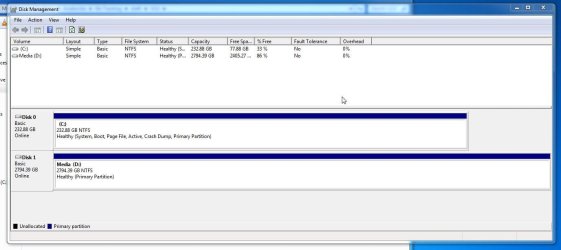
If Win7 won't boot when the hard drive is disconnected, then plug it back in and provide a screenshot of Disk Management - Post a Screen Capture Image
 
Thanks everyone, I really appreciate the advice. Unfortunately I've already done a clean install, and right now I'm transferring all my old files back :/ oh well, at least I've learnt an important lesson
 

My Computer My Computer

At a glance

Windows 7 SP1 64-biti7-5820k16GB Ballistix2 x MSI Twin Frozr Geforce GTX 970
Computer type
PC/Desktop
Computer Manufacturer/Model Number
Custom Build
OS
Windows 7 SP1 64-bit
CPU
i7-5820k
Motherboard
Gigabyte X99-UD4
Memory
16GB Ballistix
Graphics Card(s)
2 x MSI Twin Frozr Geforce GTX 970
Hard Drives
3TB WD HDD
250GB Samsung SSD
What could still be wrong?
 

My Computer My Computer

At a glance

Windows 7 SP1 64-biti7-5820k16GB Ballistix2 x MSI Twin Frozr Geforce GTX 970
Computer type
PC/Desktop
Computer Manufacturer/Model Number
Custom Build
OS
Windows 7 SP1 64-bit
CPU
i7-5820k
Motherboard
Gigabyte X99-UD4
Memory
16GB Ballistix
Graphics Card(s)
2 x MSI Twin Frozr Geforce GTX 970
Hard Drives
3TB WD HDD
250GB Samsung SSD
The configuration. We read Disk Mgmt like a doctor reads X-rays. Do you want to know if it's correct now?
 
Haha ok. Here it is (screenshot attached)

I'm just dreading having to do another install
 

Attachments

  • 2015-07-11 22_54_59-Program Manager.jpg
    2015-07-11 22_54_59-Program Manager.jpg
    66.6 KB · Views: 4

My Computer My Computer

At a glance

Windows 7 SP1 64-biti7-5820k16GB Ballistix2 x MSI Twin Frozr Geforce GTX 970
Computer type
PC/Desktop
Computer Manufacturer/Model Number
Custom Build
OS
Windows 7 SP1 64-bit
CPU
i7-5820k
Motherboard
Gigabyte X99-UD4
Memory
16GB Ballistix
Graphics Card(s)
2 x MSI Twin Frozr Geforce GTX 970
Hard Drives
3TB WD HDD
250GB Samsung SSD
Back
Top