Solved Peridoic SSD Maintenance Using TRIM Functionality

plsrepli

New member
Local time
5:16 AM
Messages
14
Hello all,

I just did a clean install of Win 7 to a newly installed Patriot Pyro 60GB SSD. I verified that TRIM was active (via the "fsutil behavior query DisableDeleteNotify" and the result was "0"); however, my new SSD shows up as a standard hard drive in the "Defrag and Optimize" view and if I hit the defrag button, it looks like it is doing a normal defrag (eg, Pass 0 completed, etc) so I have disabled scheduled defrags. Now, is this normal bahavior for Win 7 and is TRIM just working in background?

The reason I ask is because I have the same SSD installed on a Win 8 machine and the "Defrag and Optimize" view correctly identifies it as a "solid state device" and if I try to defrag it manually, Win 8 invokes the TRIM function (the progression now shows TRIM started/completed information).

Thanks for your help,

plsrepli
 

My Computer My Computer

Computer type
Laptop
Computer Manufacturer/Model Number
Lenovo B575
OS
Win 7 x64
CPU
AMD E-350
Memory
8GB
Hard Drives
Patriot 60GB SSD
Antivirus
Avast 8
Browser
Firefox
What does your HDD look like in Windows Experience Index (WEI)?

Control Panel > Performance Information and Tools (on that page, right-hand column under "Primary Hard Disk").
 

My Computer My Computer

Computer type
PC/Desktop
Computer Manufacturer/Model Number
Custom
OS
Windows 7
CPU
AMD Phenom II X2 (dual-core)
Motherboard
GA-MA785GM-US2H
Memory
4G
Graphics Card(s)
integrated ATI HD 4200
Sound Card
integrated
Monitor(s) Displays
Samsung 24"
Screen Resolution
1920x1080
Hard Drives
1 SSD - Samsung 840 - 500 GB - OS and DATA partitions
1 SSD - Intel 320 - 120 GB (used for backups) - Misc/BACKUP
1 SATA HD - WD, 500 GB - BACKUP
PSU
Ultra X4 500W
Case
Ultra X-blaster
Keyboard
Microsoft Digital Media Pro
Mouse
Logitech WIRED!
Internet Speed
15 Mbps FIOS
Hi Jim,

Thanks for responding. Images follow:

image1.jpg


imagea.jpg


image2.jpg


image3.jpg


image4.jpg


So, does anybody have an SSD working on Windows 7 and does it look and act like mine or is there something wrong on my end that can be fixed. Thanks Jim and thanks to anybody else that wants to chime in and help on this issue.

plsrepli
 

My Computer My Computer

Computer type
Laptop
Computer Manufacturer/Model Number
Lenovo B575
OS
Win 7 x64
CPU
AMD E-350
Memory
8GB
Hard Drives
Patriot 60GB SSD
Antivirus
Avast 8
Browser
Firefox
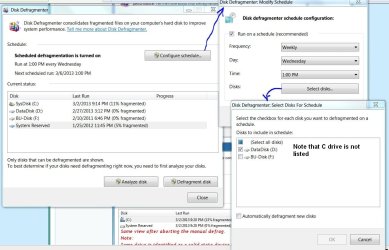
My Windows 7 is the same. Windows should know that the drive is a SSD and won't place it in the scheduled defrag. However, you can force a defrag (not advisable) by selecting the drive and clicking defrag. Mine shows last run of today because I clicked on Analyze. Check the Selected drives to see if your C drive is listed. If it not, Windows knows it's a SSD.
 

Attachments

  • Defrag.JPG
    Defrag.JPG
    115 KB · Views: 17

My Computer My Computer

Computer type
PC/Desktop
Computer Manufacturer/Model Number
Built 2/11/2011
OS
Windows 7 Pro-x64
CPU
i7-2600 3.4GHz - 3.8GHz Turbo
Motherboard
Intel DH67BL-B3
Memory
8Gb - 2x4GB, Muskin 991770 PC3-1333
Graphics Card(s)
Integrated Intel HD 2000
Sound Card
Integrated Intel 10.1 HD, RealTek ALC892
Monitor(s) Displays
Asus LCD VH222H, Haier HL24XSL2a
Screen Resolution
1920x1080, 1920x1080
Hard Drives
Crucial SSD C300-128Gb,
Western Digital WD5002AALX - 500Gb,
Western Digital WD7501AALS - 750Gb
PSU
Seasonic 650W 80+ Gold Modular
Case
Rosewill Defender
Cooling
Stock CPU, Four 120mm case fans, PCH fan added
Keyboard
Logitech EX100 Y-RBH94 Wireless
Mouse
Logitech EX100 M-RCE95 Wireless
Internet Speed
3.0/1.5 Mbs
Antivirus
Microsoft Security Essentials
Browser
Microsoft Internet Explorer 11
Other Info
Antec Veris Premier-Multimedia IR Station,
Cyber Accoustics-3602 Speakers,
AFT XM-5U Card Reader,
Hauppauge TV-HVR-2250,
Sony LX300 USB Turntable
A big hello carwiz!

You are just what the doctor ordered! Thanks to you I fianlly feel comfortable with my settings!

img6.jpg


Thanks again,

plsrepli
 

My Computer My Computer

Computer type
Laptop
Computer Manufacturer/Model Number
Lenovo B575
OS
Win 7 x64
CPU
AMD E-350
Memory
8GB
Hard Drives
Patriot 60GB SSD
Antivirus
Avast 8
Browser
Firefox
No problem. Glad to help. Speedy buggers ain't they. :)
 

My Computer My Computer

Computer type
PC/Desktop
Computer Manufacturer/Model Number
Built 2/11/2011
OS
Windows 7 Pro-x64
CPU
i7-2600 3.4GHz - 3.8GHz Turbo
Motherboard
Intel DH67BL-B3
Memory
8Gb - 2x4GB, Muskin 991770 PC3-1333
Graphics Card(s)
Integrated Intel HD 2000
Sound Card
Integrated Intel 10.1 HD, RealTek ALC892
Monitor(s) Displays
Asus LCD VH222H, Haier HL24XSL2a
Screen Resolution
1920x1080, 1920x1080
Hard Drives
Crucial SSD C300-128Gb,
Western Digital WD5002AALX - 500Gb,
Western Digital WD7501AALS - 750Gb
PSU
Seasonic 650W 80+ Gold Modular
Case
Rosewill Defender
Cooling
Stock CPU, Four 120mm case fans, PCH fan added
Keyboard
Logitech EX100 Y-RBH94 Wireless
Mouse
Logitech EX100 M-RCE95 Wireless
Internet Speed
3.0/1.5 Mbs
Antivirus
Microsoft Security Essentials
Browser
Microsoft Internet Explorer 11
Other Info
Antec Veris Premier-Multimedia IR Station,
Cyber Accoustics-3602 Speakers,
AFT XM-5U Card Reader,
Hauppauge TV-HVR-2250,
Sony LX300 USB Turntable
No problem. Glad to help. Speedy buggers ain't they. :)

Yes they are fairly fast... even on a SATA II controller! Thanks again for your help!

plsrepli
 

My Computer My Computer

Computer type
Laptop
Computer Manufacturer/Model Number
Lenovo B575
OS
Win 7 x64
CPU
AMD E-350
Memory
8GB
Hard Drives
Patriot 60GB SSD
Antivirus
Avast 8
Browser
Firefox
Back
Top