Periodic freezes in my system

I knew it would be too good to be truth, the dropped frame still happened even tough i completly deinstalled acronis true image and rebooted. I have checked the trace and now the driver delays looks a bit different...

MEGAUPLOAD - The leading online storage and file delivery service

Please analyze this one, see if there is still any acronis driver in there... this is amazing, i am starting to be afraid this won't be ever solved :)
 

My Computer My Computer

At a glance

Windows 7 Ultimate 64bit SP1AMD Phenom(tm) II X4 955 Processor 3200 BE8GB DD3 PC3-10700 (4X2GB modules)ATI Radeon HD 5770
OS
Windows 7 Ultimate 64bit SP1
CPU
AMD Phenom(tm) II X4 955 Processor 3200 BE
Motherboard
Asus M4A785TD-V EVO
Memory
8GB DD3 PC3-10700 (4X2GB modules)
Graphics Card(s)
ATI Radeon HD 5770
Sound Card
Onboard
Screen Resolution
1024x768
Hard Drives
320GB SAMSUNG SATA2
500GB SEAGATE SATA2
2000GB SAMSUNG SATA2
250GB HITACHI SATA2
I knew it would be too good to be truth, the dropped frame still happened even tough i completly deinstalled acronis true image and rebooted. I have checked the trace and now the driver delays looks a bit different...

MEGAUPLOAD - The leading online storage and file delivery service

Please analyze this one, see if there is still any acronis driver in there... this is amazing, i am starting to be afraid this won't be ever solved :)

Too bad. That driver delay block just after 33.5sec - is that where you reckon you lost frames?
 

My Computer My Computer

At a glance

Win7x64
Computer Manufacturer/Model Number
Multiple machines in various stages of decomposition.
OS
Win7x64
yes i think so, because i started the trace about 30 seconds before uptime reached another hour, and usually the dropped frame happens 1-2 segunds after the uptime reaches another hour.

update : well if you can't find anything else in the driver delays section... maybe it's possible to find in the other sections i hope... because i think that the LAST thing we should check is the tv capture card drivers themselfs being the cause of the dropped frames, i can't even think about that possibility... No but wait a minute... that gaved me an idea, i will check if that drop in the cpu activity also happens when there is no dropped frames and also if it also happens if there is no tv capture. If it DOES happen, that's good because i will be able to make the test WITHOUT the capture card installed, this way i can see if the problem is the tv capture card's drivers/card or not.
 
Last edited:

My Computer My Computer

At a glance

Windows 7 Ultimate 64bit SP1AMD Phenom(tm) II X4 955 Processor 3200 BE8GB DD3 PC3-10700 (4X2GB modules)ATI Radeon HD 5770
OS
Windows 7 Ultimate 64bit SP1
CPU
AMD Phenom(tm) II X4 955 Processor 3200 BE
Motherboard
Asus M4A785TD-V EVO
Memory
8GB DD3 PC3-10700 (4X2GB modules)
Graphics Card(s)
ATI Radeon HD 5770
Sound Card
Onboard
Screen Resolution
1024x768
Hard Drives
320GB SAMSUNG SATA2
500GB SEAGATE SATA2
2000GB SAMSUNG SATA2
250GB HITACHI SATA2
update : well if you can't find anything else in the driver delays section... maybe it's possible to find in the other sections i hope...

Sorry, been a bit busy. The wife is interfering with my quality internet time.

It does seem very likely that the video utility's drop in processor usage is linked to those "delayed" IRPs (see attachment). The pattern is becoming easier to recognise, if not to understand. With the Acronis drivers gone, these two now "own" the IRP(s) at the point where they fail to be processed for over 100ms:

ClassPnP: plug-n-play enumerator for the storage drivers (disk.sys).
PartMgr: partition manager, notifies PnP of the existence of partitions.

Based on that, to me it looks like the activity is related to some sort of periodic attempt to enumerate disk partitions. The trouble is that even Xperf can't log everything that happens on the system, so we don't know why the IRPs are slow to be processed.

Further troubleshooting along these lines would require either DDK/driver verifier components (fiddly), or even a direct-attach kernel debugger (extremely complex), and both options are simply impractical over a web forum. Therefore, we shall have to think instead...


  • What type of disk are we talking about here?
  • Does it matter which disk the video files are stored on?
  • What if you use a USB stick or a USB drive as the storage medium for the videos?
It all looks rather disk-oriented right now, though in a software sense.
 

Attachments

My Computer My Computer

At a glance

Win7x64
Computer Manufacturer/Model Number
Multiple machines in various stages of decomposition.
OS
Win7x64
Oh my god i can't believe it FINALLY for the first time ever i got 3 tests in a row without a dropped frame in the hourly change! All i had to do... was to capture in a usb HDD ! BUT we have to solve this because this usb hdd is NOT mine, i just have it borrowed so i really hope it's possible to fix this, since i only have usb sticks of my own and of course they aren't fast enought to keep up with tv captures.

[*]What type of disk are we talking about here?

Well when i used windows xp i noticed that everytime that i captured on sata hdd drives there was always 1 dropped frame sometimes, but at the time i didn't know about this thing of the uptime so i never noticed which was the pattern. So i started using only IDE drives to capture and the problem was gone. That is, until i moved to windows vista or windows seven, here capturing in ide or sata don't make a difference, now that i know about this problem i think this was very probably the same problem i had in windows xp when capturing in sata drives, only that in windows vista and seven, it also happens on ide drives too. So most of the tests i did on windows seven was in the IDE drive but there was one time i told you i tested without anything more connected to the computer (remember, when i said i disconected the cdrom, all other hdd drives, etc) and in that case i did the tv capture in the secondary sata2 drive but the problem still happened.

[*]Does it matter which disk the video files are stored on?
I already replyed this one above.

[*]What if you use a USB stick or a USB drive as the storage medium for the videos?
YEAH that really worked, i now used a borrowed usb HDD and for the third time i do a test it doesn't drop that framer anymore, i never tough this would actually work since i once tried the tv capture in a ramdrive (but that was several days ago, not recently) and the dropped frame still happened BUT maybe it's because i am not using kaspersky and acronis true image at the moment... Anyway i still need to make a few more tests in this drive to be absolutly sure that the dropped frames stopped, because sometimes it's normal that there isn't any dropped, but 3 times in one day without dropped frames at that time actually never happened before :) Heres the trace of the latest one i did (the third one) see if you notice something different here.

MEGAUPLOAD - The leading online storage and file delivery service

edit : another test, now i did on the 250gb sata2 hdd, and of course there was dropped frames in that time, this time 3 dropped frames. It's like i say this seems to only happen in internal hdd's...

final edit for today : this time i tested again in the usb HDD and AGAIN no dropped frame! Now it's for sure, the problem is clearly in a internal hdd capture, either if it's sata or ide.

next day : before i went to sleep i did a 3 hour capture, and again there wasn't any dropped frame at the next hourly cycle BUT there was 6 dropped frames at 01:23:33, exactly like before! This is amazing, real amazing... But that's not my main concern, the most important one is the dropped frames hourly that now don't happen anymore but only in the usb hdd.
 
Last edited:

My Computer My Computer

At a glance

Windows 7 Ultimate 64bit SP1AMD Phenom(tm) II X4 955 Processor 3200 BE8GB DD3 PC3-10700 (4X2GB modules)ATI Radeon HD 5770
OS
Windows 7 Ultimate 64bit SP1
CPU
AMD Phenom(tm) II X4 955 Processor 3200 BE
Motherboard
Asus M4A785TD-V EVO
Memory
8GB DD3 PC3-10700 (4X2GB modules)
Graphics Card(s)
ATI Radeon HD 5770
Sound Card
Onboard
Screen Resolution
1024x768
Hard Drives
320GB SAMSUNG SATA2
500GB SEAGATE SATA2
2000GB SAMSUNG SATA2
250GB HITACHI SATA2
Oh my god i can't believe it FINALLY for the first time ever i got 3 tests in a row without a dropped frame in the hourly change! All i had to do... was to capture in a usb HDD !

Great! Glad to hear it :)

BUT we have to solve this because this usb hdd is NOT mine, i just have it borrowed so i really hope it's possible to fix this, since i only have usb sticks of my own and of course they aren't fast enought to keep up with tv captures.

I should probably do some "expectation adjustment" as they call it in marketing. "Solving" this may not be practical. Even Xperf doesn't contain sufficient info to explain why those disk-bound IRPs are sometimes slow to process. To understand that, I'd need your machine on the desk beside me, with another PC running a kernel debugger and thus "controlling" the operation of your OS so that it could be examined in minute detail. Not only am I not in Portugal, though I'd love to visit(:)), but this part of the OS is not my forte. It can sometimes take days to understand something like this on a code level, and if it turns out to be a hardware glitch or a software bug - there's nothing we can do about it anyway.

Having now hopefully lowered your sights, I'd like to point out that you've got a very decent workaround. Do without Kaspersky to remain freeze-free at midnight, and buy yourself a USB enclosure for your SATA scratch drive. Not the most elegant solution perhaps, but one which should cost all of $20 if you shop around.

Comments?
 

My Computer My Computer

At a glance

Win7x64
Computer Manufacturer/Model Number
Multiple machines in various stages of decomposition.
OS
Win7x64
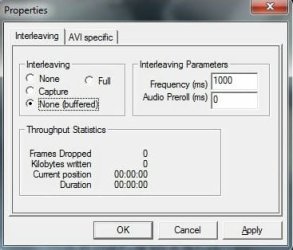
no no i won't need to do any of that anymore, i FINALLY found the solution, finally ! Well, i haven't found exactly a fix of the problem but rather a hidden option in the tv capture drivers that is able to "absorve" the delay that happens hourly and EVEN the one that happens in 01:23:33 of capture... Check the attached screenshot, probably only those that understand about tv captures knows what this is, but this is one of the default microsoft dialogs for tv captures, and amazingly the option "none(buffered)" in the "interleaving" section worked for this, it seems this creates a kind of buffer so that when there is a delay it will prevent dropped frames. During all these months i only used "none" all the time since it's the default setting that the tv capture drivers has, anyways i had to test these options for myself because i found no documentation of any of these options ANYWHERE at all not even in google.

I remember i tested some of these settings in windows xp before but since i haven't had much problems with dropped frames in windows xp they had almost no effect. But now to my big surprise this actually worked EVEN in the sata2 drive ! (at least the 250gb hitach one). I tested in both the IDE hdd and the sata2 250gb hitachi hdd sata. I tested this about 4-5 times and got no dropped frames ever :) BUT to my surprise i got some dropped frames when i captured in the windows partition, probably this is related to those operations that happen in the hourly delay, since those drivers are on that partition, but that's ok i don't need to capture in the windows hdd anyway.

Anyways still all the trouble we had in the topic was worth it, now i know how to diagnose dropped frames next time they happen :) And also i hope this helps other people too :)
 

Attachments

  • Scr20091009_2004_#12_Properties.jpg
    Scr20091009_2004_#12_Properties.jpg
    17.8 KB · Views: 8

My Computer My Computer

At a glance

Windows 7 Ultimate 64bit SP1AMD Phenom(tm) II X4 955 Processor 3200 BE8GB DD3 PC3-10700 (4X2GB modules)ATI Radeon HD 5770
OS
Windows 7 Ultimate 64bit SP1
CPU
AMD Phenom(tm) II X4 955 Processor 3200 BE
Motherboard
Asus M4A785TD-V EVO
Memory
8GB DD3 PC3-10700 (4X2GB modules)
Graphics Card(s)
ATI Radeon HD 5770
Sound Card
Onboard
Screen Resolution
1024x768
Hard Drives
320GB SAMSUNG SATA2
500GB SEAGATE SATA2
2000GB SAMSUNG SATA2
250GB HITACHI SATA2
Anyways still all the trouble we had in the topic was worth it, now i know how to diagnose dropped frames next time they happen :) And also i hope this helps other people too :)

Great! Glad to hear you've found a way to get the capture utility to be more tolerant of the hourly slow-downs.

I can't help wondering whether your hardware is perhaps just a little underpowered for the sort of work you're doing, to the point where the increased footprint of Vista/W7 (over XP) was the straw that broke the camel's back. The machine I'm sitting on doesn't exhibit those ~150ms classpnp/partmgr IRP delays, so my inclination is to think that your specific hardware is somehow linked.

Thanks for hosting a fun problem to troubleshoot ;)
 

My Computer My Computer

At a glance

Win7x64
Computer Manufacturer/Model Number
Multiple machines in various stages of decomposition.
OS
Win7x64
Anyways still all the trouble we had in the topic was worth it, now i know how to diagnose dropped frames next time they happen :) And also i hope this helps other people too :)

Great! Glad to hear you've found a way to get the capture utility to be more tolerant of the hourly slow-downs.

I can't help wondering whether your hardware is perhaps just a little underpowered for the sort of work you're doing, to the point where the increased footprint of Vista/W7 (over XP) was the straw that broke the camel's back. The machine I'm sitting on doesn't exhibit those ~150ms classpnp/partmgr IRP delays, so my inclination is to think that your specific hardware is somehow linked.

Thanks for hosting a fun problem to troubleshoot ;)

Yes indeed i find it strange too, but what you recommend me to do? I think nothing else can be done about these delays right? Perhaps it's better let it like they are, i already lost a lot of time (and patience) on this :)
 

My Computer My Computer

At a glance

Windows 7 Ultimate 64bit SP1AMD Phenom(tm) II X4 955 Processor 3200 BE8GB DD3 PC3-10700 (4X2GB modules)ATI Radeon HD 5770
OS
Windows 7 Ultimate 64bit SP1
CPU
AMD Phenom(tm) II X4 955 Processor 3200 BE
Motherboard
Asus M4A785TD-V EVO
Memory
8GB DD3 PC3-10700 (4X2GB modules)
Graphics Card(s)
ATI Radeon HD 5770
Sound Card
Onboard
Screen Resolution
1024x768
Hard Drives
320GB SAMSUNG SATA2
500GB SEAGATE SATA2
2000GB SAMSUNG SATA2
250GB HITACHI SATA2
Yes indeed i find it strange too, but what you recommend me to do? I think nothing else can be done about these delays right? Perhaps it's better let it like they are, i already lost a lot of time (and patience) on this :)

Oh, without doubt, the best thing to do is to use that "buffering" option in the capture app. You don't seem to experience any other issues, so the fact that once per hour a couple of IRPs take a few hundred milliseconds longer to process than strictly normal is entirely unimportant - once the buffering workaround is implemented.

Enjoy your video capturing without dropped frames.
 

My Computer My Computer

At a glance

Win7x64
Computer Manufacturer/Model Number
Multiple machines in various stages of decomposition.
OS
Win7x64
Lool thanks unfortunately thanks to my rotten cable tv provider i cannot fully enjoy tv captures, but that's offtopic here so nevermind :) But at least the dropped frames issue is solved for now.
 

My Computer My Computer

At a glance

Windows 7 Ultimate 64bit SP1AMD Phenom(tm) II X4 955 Processor 3200 BE8GB DD3 PC3-10700 (4X2GB modules)ATI Radeon HD 5770
OS
Windows 7 Ultimate 64bit SP1
CPU
AMD Phenom(tm) II X4 955 Processor 3200 BE
Motherboard
Asus M4A785TD-V EVO
Memory
8GB DD3 PC3-10700 (4X2GB modules)
Graphics Card(s)
ATI Radeon HD 5770
Sound Card
Onboard
Screen Resolution
1024x768
Hard Drives
320GB SAMSUNG SATA2
500GB SEAGATE SATA2
2000GB SAMSUNG SATA2
250GB HITACHI SATA2
This has been a great thread! Great detective work!

Just to add my 2¢... you are not alone in your Kaspersky issues. I was getting 3, 4, 5 BSODs per day back in June, and dumping Kaspersky solved about half of them. The new av/as from MS (Microsoft Security Essentials) works good with Win 7... give it a try. You won't even notice its there... the best thing you can say about an av/as utility.
 

My Computer My Computer

At a glance

windows 7 x64 Home Premiumintel q6600g.skill 8gb ddr2 1066 (pc2 8500)evga geforce 9800 gtx 512 mb
Computer Manufacturer/Model Number
me / #1
OS
windows 7 x64 Home Premium
CPU
intel q6600
Motherboard
gigbyte ga ep45 ud3l
Memory
g.skill 8gb ddr2 1066 (pc2 8500)
Graphics Card(s)
evga geforce 9800 gtx 512 mb
Screen Resolution
1680 x 1050
Hard Drives
wd caviar black 500 gb
wd caviar black 1tb
wd elements 1tb external hd x2
PSU
raidmax 500w
Case
smilodon (yes, t'was the pretty blue lites that got me!)
ok thanks i will try it later.
 

My Computer My Computer

At a glance

Windows 7 Ultimate 64bit SP1AMD Phenom(tm) II X4 955 Processor 3200 BE8GB DD3 PC3-10700 (4X2GB modules)ATI Radeon HD 5770
OS
Windows 7 Ultimate 64bit SP1
CPU
AMD Phenom(tm) II X4 955 Processor 3200 BE
Motherboard
Asus M4A785TD-V EVO
Memory
8GB DD3 PC3-10700 (4X2GB modules)
Graphics Card(s)
ATI Radeon HD 5770
Sound Card
Onboard
Screen Resolution
1024x768
Hard Drives
320GB SAMSUNG SATA2
500GB SEAGATE SATA2
2000GB SAMSUNG SATA2
250GB HITACHI SATA2
Jeez both the "none (buffered)" and "full" methods are VERY good indeed... last nigh i did a NINE hour capture (yes you all read correctly!!) with ZERO dropped frames! And i also tested while doing several things on the pc and EVEN opening and closing the dvd tray which ALWAYS used to trigger dropped frames, but now none got dropped and no, there wasn't any problem in the capture file at all! Yeah i am sure happy with this now it's even better than in windows xp, finally.
 

My Computer My Computer

At a glance

Windows 7 Ultimate 64bit SP1AMD Phenom(tm) II X4 955 Processor 3200 BE8GB DD3 PC3-10700 (4X2GB modules)ATI Radeon HD 5770
OS
Windows 7 Ultimate 64bit SP1
CPU
AMD Phenom(tm) II X4 955 Processor 3200 BE
Motherboard
Asus M4A785TD-V EVO
Memory
8GB DD3 PC3-10700 (4X2GB modules)
Graphics Card(s)
ATI Radeon HD 5770
Sound Card
Onboard
Screen Resolution
1024x768
Hard Drives
320GB SAMSUNG SATA2
500GB SEAGATE SATA2
2000GB SAMSUNG SATA2
250GB HITACHI SATA2
Good news: the nature of the "midnight" freeze is easy to see in the logs.
Bad news: Insufficient info (in Xperf) to tell which driver is responsible :(

Suggestion: do the "midnight" capture once more please, but this time crash the box on purpose afterwards so that a BSOD minidump is generated (once you've saved your data). Here's how...

1) Add the "CrashOnCtrlScroll" registry value as per this MSDN article: Forcing a System Crash from the Keyboard
2) Reboot at least once. Test that your machine then bugchecks (BSODs) whenever you press ctrl+ScrLk+ScrLk, and that it produces a minidump in \Windows\Minidump. (The minidump is the important part.)
3) For the next "midnight run", use: xperf -on PROC_THREAD+LOADER+INTERRUPT+DPC+PROFILE+DISPATCHER+DRIVERS+CSWITCH -stackwalk profile
4) A few minutes after you finish and save the Xperf logging, use ctrl+ScrLk+ScrLk to crash the machine and produce a minidump.

It's *vital* that the Xperf log and minidump be from the same boot. In other words, the crash has to occur after you run Xperf, but before you reboot. The combination of Xperf log and minidump may reveal more.

=================
Longer version: you can see in the attached graph, which is a composite of several overlaid quantities, that everything else seems to cease during that phallic-looking "DPC" spike (in red). Think of a DPC as a very primitive and high-priority task that temporarily suspends everything else on the system. They normally occur somewhere between 200 and 500 times per second on your machine, but during the 1sec interval around that spike there are in excess of 98 thousand DPCs. Their combined effect is the temporary lockup that you experience - the system is so busy servicing DPCs that all other activity is basically suspended.

The table I attached shows the address of the function responsible as 0x8e4536c0. That's outside of the kernel range, and very probably a driver. The problem is that I can't tell which driver because of a randomisation feature that moves those addresses around on each boot (partially for security reasons). That's why the combination of Xperf log plus minidump may reveal which driver is involved - the minidump can be used to correlate the address to a particular driver name.

I have no idea whether this will lead to a practical solution, but hell, it's fun (at least for me ;)), and it may even pinpoint the hardware/driver combo that's doing weird stuff at midnight.

Very interesting investigation!
However, sorting the DPC CPU usage summary table (from the Xperf trace) by modules rather than by functions would have shown directly that kl1.sys was the culprit without having to create a minidump and load it in windbg to find this same module from the function's address..:geek:
 
Last edited:

My Computer My Computer

At a glance

Win7 & XP
OS
Win7 & XP
Excuse me from reviving this old thread, but I've been having the same "midnight freeze" issue for a year now, since I have Vista Business 64 bit (currently at SP2). I've decided to Google it once more after getting a freeze while playing at 00:00 today and found your discussion.

I have KAV11 (11.0.1.400), not KIS. I see it has been found Kaspersky, more specifically kl1.sys, is the culprit, nice work! Why is it doing this all the time at midnight though? Is there somewhere in Kaspersky's options we could perhaps change to stop this from happening? Some automatic, predetermined task we could disable?

Thanks
 

My Computer My Computer

At a glance

Windows 7 Professional 64bitIntel i7 9203x2GB GSKillEVGA GTX 295
OS
Windows 7 Professional 64bit
CPU
Intel i7 920
Motherboard
EVGA X58 SLI
Memory
3x2GB GSKill
Graphics Card(s)
EVGA GTX 295
Sound Card
Auzentech X-Fi Forte
Monitor(s) Displays
Samsung T220
Screen Resolution
1680x1050
Hard Drives
2x640GB internal WD Caviar
1 TB WD My Book external
PSU
Corsair HX1000
Case
Antec 1200
Well unfortunately i don't know how to help you because quite honestly i STILL have the same problem even now in windows 7 32bits and having a quad core amd 955 be cpu and KIS 2010, and i learned to "live with that freeze" mostly because i don't do anymore cpu based tv capturing and it's all using a hardware encoder tv capture card so i haven't worried about this problem anymore, and i am glad about that because i haven't found a way to fix this at all.

By the way the only reason i don't use KIS 2011 at all is because many times i get 100% cpu (in fact 25% of it since i have now a quad core) usage and i don't have that problem in kis 2010, but the freezes at midnight still happen unfortunately.
 

My Computer My Computer

At a glance

Windows 7 Ultimate 64bit SP1AMD Phenom(tm) II X4 955 Processor 3200 BE8GB DD3 PC3-10700 (4X2GB modules)ATI Radeon HD 5770
OS
Windows 7 Ultimate 64bit SP1
CPU
AMD Phenom(tm) II X4 955 Processor 3200 BE
Motherboard
Asus M4A785TD-V EVO
Memory
8GB DD3 PC3-10700 (4X2GB modules)
Graphics Card(s)
ATI Radeon HD 5770
Sound Card
Onboard
Screen Resolution
1024x768
Hard Drives
320GB SAMSUNG SATA2
500GB SEAGATE SATA2
2000GB SAMSUNG SATA2
250GB HITACHI SATA2
Back
Top