Permanently Delete - Add to Context Menu

How to Add 'Permanently Delete' to Send To Context Menu in Windows


   Information
This tutorial will show you how to add or remove Permanently Delete from the Send To context menu in XP, Vista, Windows 7, and Windows 8.

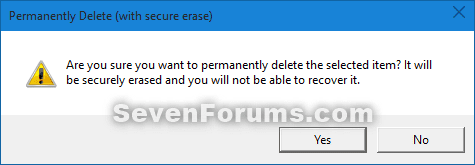
When you use the added Permanently Delete, it will give you a confirmation prompt to secure erase the selected file(s), and will not be placed in the Recycle Bin.

This could also be handy if you did not want to set the Recycle Bin to permanently delete files so that you can Delete some files to the Recycle Bin, and others Permanently Delete with this context menu item.

While you must be logged in as an administrator to be able to add or remove this context menu, all users will be able to use the context menu.

   Note
How to use Permanently Delete when added:

1) Select one or more files.

2) Right click or press and hold on selected files.

3) Click/tap on Send to and Permanently Delete.js.
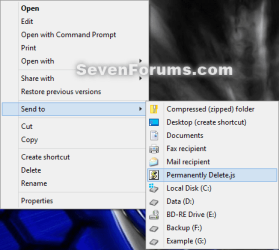
Usage-1.png
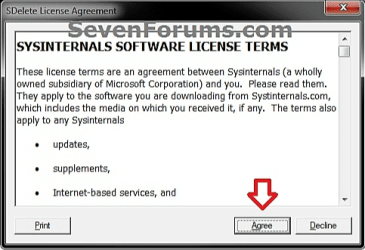
4) If this is the first time you used Permanently Delete, then click on Agree for the SDelete license agreement. You will not see this anymore afterwards.
Usage-3.png
5) Click/tap on Yes to confirm.
Usage-2.png
6) Click/tap on OK in the confirmation dialog.
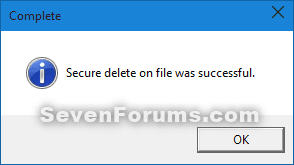
Usage-4.png


CONTENTS:
  • Option One: To Add Permanently Delete to Send To Context Menu
  • Option Two: To Remove Permanently Delete from Send To Context Menu


OPTION ONE

To Add Permanently Delete to Send To Context Menu


1. Click/tap on the Download button below to go the Windows Sysinternals website, and then download SDelete to your desktop.

Download


2. Unblock the downloaded SDelete.zip file.

3. Open the SDelete.zip file, and extract (drag and drop) the SDelete.exe file to your desktop.

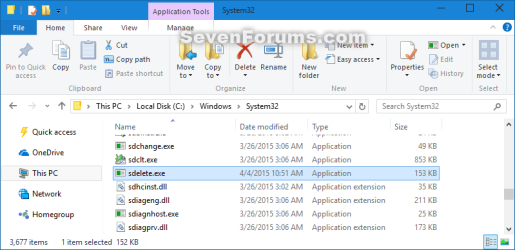
4. Move the SDelete.exe file into the C:\Windows\System32 folder. (see screenshot below)
System32.png
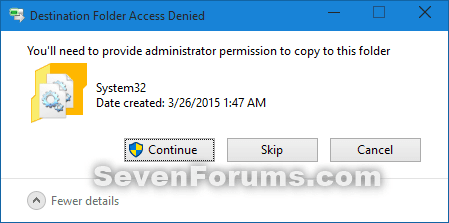
5. Click/tap on Continue to confirm. (see screenshot below)
System32_confirm.png
6. Click/tap on the Download button below to download the Permanently_Delete.zip file to your desktop.

Download


7. Unblock the downloaded Permanently_Delete.zip file.

8. Open the Permanently_Delete.zip file, and extract (drag and drop) the Permanently Delete.js file to your desktop.

   Note
Special thanks to our valued member Pyprohly for writing this javascript file for us.


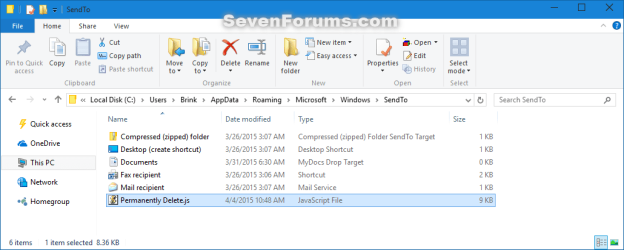
9. Move the Permanently Delete.js file into the shell:sendto (type in address bar of explorer and press Enter) folder. (see screenshot below)

   Note
If you like, you can create a shortcut of the Permanently Delete.js file, change the shortcut's icon to what you like, and place the shortcut into the shell:sendto folder instead.

SendTo.png


OPTION TWO

To Remove Permanently Delete from Send To Context Menu


1. Open the C:\Windows\System32 folder, and delete the SDelete.exe file. (see screenshot below)
System32.png
2. Open the shell:sendto (type in address bar of explorer and press Enter) folder, and delete the Permanently Delete.js file. (see screenshot below)
SendTo.png


That's it,
Shawn


Attachments

Last edited:
Hello Ices,

I'm not having any issues with 1.61 working for me. :confused:

I've updated OPTION ONE to solve the issue of having to delete a folder twice when it had content.

Please try the updated OPTION ONE to see if that may help.

it say error deleting ...the Directory is not empty ....
but now the files & folder is deleted

with new script v 1.61 short video
View attachment new script.zip

but with SDelete 1.51 is no error message
& with new script & v 1.51 is not working... no message

http://forum.sysinternals.com/sdelete-16-folder-bug_topic26573.html
 

My Computer

Computer type
PC/Desktop
OS
Windows 7 Ultimate x64
CPU
Intel Core 2 Duo E7200 @ 2.53GHz
Motherboard
BIOSTAR Group G31-M7 TE
Memory
4,00GB Dual-Channel DDR2 @ 398MHz (5-5-5-18)
Graphics Card(s)
512MB NVIDIA GeForce 8500 GT (Gigabyte)
Sound Card
Realtek High Definition Audio 5.1
Screen Resolution
1280x1024 pixels
Hard Drives
WDC WD1002FAEX-00Z3A0 ATA Device 931 GB
Browser
Comodo Dragon
Other Info
Optical Drives: HL-DT-ST DVDRAM GSA-4167B ATA Device;
Speccy: http://speccy.piriform.com/results/mpAug3INnJkpJFsddkm8sms
Ah, ok. That's just a false error when the directory is not empty. It will still delete the folder and it's contents though.

I've added a quite switch to prevent the false error from showing so it will not cause any false alarms about it. Please try the updated OPTION ONE with the new 1.61 SDelete again to see how that works now for you. :)
 

My Computer

Computer type
PC/Desktop
Computer Manufacturer/Model Number
Self built custom
OS
64-bit Windows 11 Pro for Workstations
CPU
Intel i7-8700K OC'd to 5 GHz
Motherboard
ASUS ROG Maximus XI Formula Z390
Memory
64 GB (4x16GB) G.SKILL TridentZ RGB DDR4 3600 MHz
Graphics Card(s)
ASUS ROG-STRIX-GTX1080TI-O11G-GAMING
Sound Card
Integrated
Monitor(s) Displays
2 x Samsung Odyssey G7 27"
Screen Resolution
2560x1440
Hard Drives
1TB Samsung 990 PRO M.2,
4TB Samsung 990 PRO PRO M.2,
TerraMaster F8 SSD Plus NAS
PSU
Seasonic Prime Titanium 850W
Case
Thermaltake Core P3
Cooling
Corsair Hydro H115i
Keyboard
Logitech wireless K800
Mouse
Logitech MX Master 4
Internet Speed
2 Gb/s Download and 100 Mb/s Upload
Antivirus
Malwarebyte Anti-Malware Premium
Browser
Google Chrome
Other Info
Logitech Z625 speaker system,
Logitech BRIO 4K Pro webcam,
HP Color LaserJet Pro MFP M477fdn,
APC SMART-UPS RT 1000 XL - SURT1000XLI,
Galaxy S23 Plus phone
Now everything work great.
 
Last edited by a moderator:

My Computer

Computer type
PC/Desktop
OS
Windows 7 Ultimate x64
CPU
Intel Core 2 Duo E7200 @ 2.53GHz
Motherboard
BIOSTAR Group G31-M7 TE
Memory
4,00GB Dual-Channel DDR2 @ 398MHz (5-5-5-18)
Graphics Card(s)
512MB NVIDIA GeForce 8500 GT (Gigabyte)
Sound Card
Realtek High Definition Audio 5.1
Screen Resolution
1280x1024 pixels
Hard Drives
WDC WD1002FAEX-00Z3A0 ATA Device 931 GB
Browser
Comodo Dragon
Other Info
Optical Drives: HL-DT-ST DVDRAM GSA-4167B ATA Device;
Speccy: http://speccy.piriform.com/results/mpAug3INnJkpJFsddkm8sms
:thumbsup:
 

My Computer

Computer type
PC/Desktop
Computer Manufacturer/Model Number
Self built custom
OS
64-bit Windows 11 Pro for Workstations
CPU
Intel i7-8700K OC'd to 5 GHz
Motherboard
ASUS ROG Maximus XI Formula Z390
Memory
64 GB (4x16GB) G.SKILL TridentZ RGB DDR4 3600 MHz
Graphics Card(s)
ASUS ROG-STRIX-GTX1080TI-O11G-GAMING
Sound Card
Integrated
Monitor(s) Displays
2 x Samsung Odyssey G7 27"
Screen Resolution
2560x1440
Hard Drives
1TB Samsung 990 PRO M.2,
4TB Samsung 990 PRO PRO M.2,
TerraMaster F8 SSD Plus NAS
PSU
Seasonic Prime Titanium 850W
Case
Thermaltake Core P3
Cooling
Corsair Hydro H115i
Keyboard
Logitech wireless K800
Mouse
Logitech MX Master 4
Internet Speed
2 Gb/s Download and 100 Mb/s Upload
Antivirus
Malwarebyte Anti-Malware Premium
Browser
Google Chrome
Other Info
Logitech Z625 speaker system,
Logitech BRIO 4K Pro webcam,
HP Color LaserJet Pro MFP M477fdn,
APC SMART-UPS RT 1000 XL - SURT1000XLI,
Galaxy S23 Plus phone
   Note

The first time that you click on Permanently Delete you will need to click on the EULA Agree button for SDelete. You will only need to do this once.

Attachment 161623

When used this will immediately permanently secure delete the file or folder that you right clicked on bypassing the Recycle Bin, and does 1 or 7 overwrite passes to help make sure the current version of the deleted file or folder is unrecoverable.


Does this process overwrite the files with zeroes or 7 random number sequences?
 

My Computer

Computer type
PC/Desktop
Computer Manufacturer/Model Number
Home Built Desktop By DataTech
OS
Windows 7 Ultimate X64 SP1
CPU
Intel i5-2550K, Differing ~4.4-4.8GHz No built in GPU
Motherboard
ASUS P8Z68-V PRO/GEN3
Memory
16GB G.Skill Sniper 1866MHz @ 2133MHz 2x8GB
Graphics Card(s)
ASUS GTX650TIB-DC2OC-2GD5, (650TI Boost)
Sound Card
Onboard Realtek 5-1
Monitor(s) Displays
Samsung P2570HD
Screen Resolution
1920x1080
Hard Drives
Samsung 840 Pro 256GB SSD for OS, 500GB Seagate Constellation (Enterprise drive) for Data
PSU
Corsair HX650W
Case
Inwin Dragon Rider
Cooling
Hyper 212 EVO w/two Noctua fans, push-pull, @1300 RPM
Keyboard
E-Z Eyes, bright yellow keys with large characters
Mouse
steelseries SENSEI Laser Pro Gaming
Internet Speed
48-51Mbs Mbs down, 11 Mbs up Xfinity Cable
Antivirus
Norton Internet Security 2013
Browser
IE 10, Opera, Pale Moon if needed
Other Info
4 case fans, LG BluRay-RE, ASUS DVD-RW, Mr. Fusion power supply, 1.21 gigawatts.
Hello Gary,

It performs a secure delete by overwriting the data on the hard drive with zeros, and repeats seven times. :)
 

My Computer

Computer type
PC/Desktop
Computer Manufacturer/Model Number
Self built custom
OS
64-bit Windows 11 Pro for Workstations
CPU
Intel i7-8700K OC'd to 5 GHz
Motherboard
ASUS ROG Maximus XI Formula Z390
Memory
64 GB (4x16GB) G.SKILL TridentZ RGB DDR4 3600 MHz
Graphics Card(s)
ASUS ROG-STRIX-GTX1080TI-O11G-GAMING
Sound Card
Integrated
Monitor(s) Displays
2 x Samsung Odyssey G7 27"
Screen Resolution
2560x1440
Hard Drives
1TB Samsung 990 PRO M.2,
4TB Samsung 990 PRO PRO M.2,
TerraMaster F8 SSD Plus NAS
PSU
Seasonic Prime Titanium 850W
Case
Thermaltake Core P3
Cooling
Corsair Hydro H115i
Keyboard
Logitech wireless K800
Mouse
Logitech MX Master 4
Internet Speed
2 Gb/s Download and 100 Mb/s Upload
Antivirus
Malwarebyte Anti-Malware Premium
Browser
Google Chrome
Other Info
Logitech Z625 speaker system,
Logitech BRIO 4K Pro webcam,
HP Color LaserJet Pro MFP M477fdn,
APC SMART-UPS RT 1000 XL - SURT1000XLI,
Galaxy S23 Plus phone
Okey dokey, thanks. :D
 

My Computer

Computer type
PC/Desktop
Computer Manufacturer/Model Number
Home Built Desktop By DataTech
OS
Windows 7 Ultimate X64 SP1
CPU
Intel i5-2550K, Differing ~4.4-4.8GHz No built in GPU
Motherboard
ASUS P8Z68-V PRO/GEN3
Memory
16GB G.Skill Sniper 1866MHz @ 2133MHz 2x8GB
Graphics Card(s)
ASUS GTX650TIB-DC2OC-2GD5, (650TI Boost)
Sound Card
Onboard Realtek 5-1
Monitor(s) Displays
Samsung P2570HD
Screen Resolution
1920x1080
Hard Drives
Samsung 840 Pro 256GB SSD for OS, 500GB Seagate Constellation (Enterprise drive) for Data
PSU
Corsair HX650W
Case
Inwin Dragon Rider
Cooling
Hyper 212 EVO w/two Noctua fans, push-pull, @1300 RPM
Keyboard
E-Z Eyes, bright yellow keys with large characters
Mouse
steelseries SENSEI Laser Pro Gaming
Internet Speed
48-51Mbs Mbs down, 11 Mbs up Xfinity Cable
Antivirus
Norton Internet Security 2013
Browser
IE 10, Opera, Pale Moon if needed
Other Info
4 case fans, LG BluRay-RE, ASUS DVD-RW, Mr. Fusion power supply, 1.21 gigawatts.
Anytime. :)
 

My Computer

Computer type
PC/Desktop
Computer Manufacturer/Model Number
Self built custom
OS
64-bit Windows 11 Pro for Workstations
CPU
Intel i7-8700K OC'd to 5 GHz
Motherboard
ASUS ROG Maximus XI Formula Z390
Memory
64 GB (4x16GB) G.SKILL TridentZ RGB DDR4 3600 MHz
Graphics Card(s)
ASUS ROG-STRIX-GTX1080TI-O11G-GAMING
Sound Card
Integrated
Monitor(s) Displays
2 x Samsung Odyssey G7 27"
Screen Resolution
2560x1440
Hard Drives
1TB Samsung 990 PRO M.2,
4TB Samsung 990 PRO PRO M.2,
TerraMaster F8 SSD Plus NAS
PSU
Seasonic Prime Titanium 850W
Case
Thermaltake Core P3
Cooling
Corsair Hydro H115i
Keyboard
Logitech wireless K800
Mouse
Logitech MX Master 4
Internet Speed
2 Gb/s Download and 100 Mb/s Upload
Antivirus
Malwarebyte Anti-Malware Premium
Browser
Google Chrome
Other Info
Logitech Z625 speaker system,
Logitech BRIO 4K Pro webcam,
HP Color LaserJet Pro MFP M477fdn,
APC SMART-UPS RT 1000 XL - SURT1000XLI,
Galaxy S23 Plus phone
Sorry if I brought back a dead thread, but is there a way to get this context menu reg to have the things in the 7 passes registry but also execute the -c and -z to clean the space and zero fill?
 

My Computer

Computer type
PC/Desktop
OS
Windows 7 64x
Hello NopeAvi, and welcome to Seven Forums.

The -C and -Z switchers require to specify a drive letter to use it on. That would not be easy to make universal. :(
 

My Computer

Computer type
PC/Desktop
Computer Manufacturer/Model Number
Self built custom
OS
64-bit Windows 11 Pro for Workstations
CPU
Intel i7-8700K OC'd to 5 GHz
Motherboard
ASUS ROG Maximus XI Formula Z390
Memory
64 GB (4x16GB) G.SKILL TridentZ RGB DDR4 3600 MHz
Graphics Card(s)
ASUS ROG-STRIX-GTX1080TI-O11G-GAMING
Sound Card
Integrated
Monitor(s) Displays
2 x Samsung Odyssey G7 27"
Screen Resolution
2560x1440
Hard Drives
1TB Samsung 990 PRO M.2,
4TB Samsung 990 PRO PRO M.2,
TerraMaster F8 SSD Plus NAS
PSU
Seasonic Prime Titanium 850W
Case
Thermaltake Core P3
Cooling
Corsair Hydro H115i
Keyboard
Logitech wireless K800
Mouse
Logitech MX Master 4
Internet Speed
2 Gb/s Download and 100 Mb/s Upload
Antivirus
Malwarebyte Anti-Malware Premium
Browser
Google Chrome
Other Info
Logitech Z625 speaker system,
Logitech BRIO 4K Pro webcam,
HP Color LaserJet Pro MFP M477fdn,
APC SMART-UPS RT 1000 XL - SURT1000XLI,
Galaxy S23 Plus phone
A few questions:

1. Is there some reason why the vbs script is called Permantly-Delete.vbs and not Permanently-Delete.vbs? If one later is searching for this by searching for "permanently" it might not be found.

2. Is there some reason why the vbs script is placed in the system32 dir? Seems to me like a bad idea to pollute that directory with user scripts. Can't the registry entry just point to anywhere you actually put it?

3. Since shift-del performs the same function, wouldn't it be better to have a command that simply submits that to explorer?

4. Since people often discover keyboard shortcuts by seeing them in a context menu, how about adding that (shift-del) to the context menu also?

Thanks.
 

My Computer

Computer type
Laptop
Computer Manufacturer/Model Number
Lenovo T61p
OS
win 7 pro x64
CPU
T7700 Intel
Memory
4GB
Hello apb, :)

Q1) No reason other than a typo that has just now been realized. They still worked since it was looking for the typo name, but I have updated the files to have the correct spelling now. Thank you for pointing this out so that I could correct it.

Q2) You could place the .vbs file anywhere you like, but you would just need to edit the .reg file for the new location instead.

Q3) That would be an idea, but I would have to look into it.

Q4) If it works out ok by doing so via a command, but I would have to look into it and test as well.
 

My Computer

Computer type
PC/Desktop
Computer Manufacturer/Model Number
Self built custom
OS
64-bit Windows 11 Pro for Workstations
CPU
Intel i7-8700K OC'd to 5 GHz
Motherboard
ASUS ROG Maximus XI Formula Z390
Memory
64 GB (4x16GB) G.SKILL TridentZ RGB DDR4 3600 MHz
Graphics Card(s)
ASUS ROG-STRIX-GTX1080TI-O11G-GAMING
Sound Card
Integrated
Monitor(s) Displays
2 x Samsung Odyssey G7 27"
Screen Resolution
2560x1440
Hard Drives
1TB Samsung 990 PRO M.2,
4TB Samsung 990 PRO PRO M.2,
TerraMaster F8 SSD Plus NAS
PSU
Seasonic Prime Titanium 850W
Case
Thermaltake Core P3
Cooling
Corsair Hydro H115i
Keyboard
Logitech wireless K800
Mouse
Logitech MX Master 4
Internet Speed
2 Gb/s Download and 100 Mb/s Upload
Antivirus
Malwarebyte Anti-Malware Premium
Browser
Google Chrome
Other Info
Logitech Z625 speaker system,
Logitech BRIO 4K Pro webcam,
HP Color LaserJet Pro MFP M477fdn,
APC SMART-UPS RT 1000 XL - SURT1000XLI,
Galaxy S23 Plus phone
Hey there! Great tutorial again. I just have 1 concern. It clearly says in the beginning of the tutorial:

When you right click on a shortcut and click on "Permanently Delete", it's the target (source file) of the shortcut that gets deleted, and not the shortcut itself. Deleting the shortcut a second time will also delete the shortcut itself.

Can't we do something about that? I know myself and if I get used to using the 'Permanently Delete Context Menu option' all throughout then I am surely going to one day use it on a shortcut meaning only to delete the shortcut and NOT the target file. So isn't it possible to still have that nice perm. del. context menu option, but be able to use it on shortcuts and have it delete only them [the shortcuts] and not the target file. I apologize in advance if I have misunderstood something.
 

My Computer

Computer type
Laptop
Computer Manufacturer/Model Number
HP
OS
Win 7 x64
Hello soewhaty,

I'm afraid that I don't know of any other workaround for that. :(
 

My Computer

Computer type
PC/Desktop
Computer Manufacturer/Model Number
Self built custom
OS
64-bit Windows 11 Pro for Workstations
CPU
Intel i7-8700K OC'd to 5 GHz
Motherboard
ASUS ROG Maximus XI Formula Z390
Memory
64 GB (4x16GB) G.SKILL TridentZ RGB DDR4 3600 MHz
Graphics Card(s)
ASUS ROG-STRIX-GTX1080TI-O11G-GAMING
Sound Card
Integrated
Monitor(s) Displays
2 x Samsung Odyssey G7 27"
Screen Resolution
2560x1440
Hard Drives
1TB Samsung 990 PRO M.2,
4TB Samsung 990 PRO PRO M.2,
TerraMaster F8 SSD Plus NAS
PSU
Seasonic Prime Titanium 850W
Case
Thermaltake Core P3
Cooling
Corsair Hydro H115i
Keyboard
Logitech wireless K800
Mouse
Logitech MX Master 4
Internet Speed
2 Gb/s Download and 100 Mb/s Upload
Antivirus
Malwarebyte Anti-Malware Premium
Browser
Google Chrome
Other Info
Logitech Z625 speaker system,
Logitech BRIO 4K Pro webcam,
HP Color LaserJet Pro MFP M477fdn,
APC SMART-UPS RT 1000 XL - SURT1000XLI,
Galaxy S23 Plus phone
Still... thank you for the reply and input. For now I'll stay away from this method of deleting, cos I know I will surely delete a shortcut and thereby a file I didn't mean to. I guess I'm not the only one who'll run into that issue. I use lots of shortcuts on my local hdd and ssd so ... great tutorial nonetheless and great objective it has!
 

My Computer

Computer type
Laptop
Computer Manufacturer/Model Number
HP
OS
Win 7 x64
originally posted this in the wrong page, my apoligies

please help with adding a confirmation dialog when using permanently delete?
 

My Computer

Computer type
PC/Desktop
Computer Manufacturer/Model Number
Dell - Alienware Aurora R3
OS
Windows 7 Ultimate x64 SP1
CPU
Intel Core i5-2.5K (4x) CPU @3.3GHz, Sandy Bridge, 1155 LGA
Motherboard
Alienware 046MHW A00
Memory
Corsair XMS3 4GB DDR3 @798.1MHz, 1:6, 9-10-10-25 clocks, 2T
Graphics Card(s)
XFX Radeon HD 6870 Black Edition V2 1GB
Sound Card
AMD HD (6870 GPU) or Sound Blaster X-Fi Xtream Audio (7.1)
Monitor(s) Displays
Bad-Ass Acer AL1717 VGA (3x)
Screen Resolution
3840 x 1024 (1280*3 x 1024)
Hard Drives
Western Digital 1TB/64MB HDD @7200 RPM, SATA-II
Seagate Barracuda LP 2TB/32MB HDD @5900 RPM, SATA-II
PSU
IDK it's a Spaceship bro..
Case
Color-Changing Alienware Spaceship w/ Active Mood Display™
Cooling
Liquid Cooling
Keyboard
No flipping idea.. Has PS/2 mouse input like a boss
Mouse
MS-WMM 4K or Dell PS/2 w/ grime-collecting hamster ball insd
Internet Speed
1.80 MB/s DL & 0.50 MB/s UL
Antivirus
Bitdefender Free
Browser
VM or Sandboxie Opera Chrome Firefox w/EFF HTTPS Everywhere
Other Info
Flashing lights and laser beams... Oh and the color-changing Alienware mood display package
Hello Hairy, and welcome to Seven Forums.

Step 2 in OPTION TWO of this tutorial has an option with a confirmation. :)
 

My Computer

Computer type
PC/Desktop
Computer Manufacturer/Model Number
Self built custom
OS
64-bit Windows 11 Pro for Workstations
CPU
Intel i7-8700K OC'd to 5 GHz
Motherboard
ASUS ROG Maximus XI Formula Z390
Memory
64 GB (4x16GB) G.SKILL TridentZ RGB DDR4 3600 MHz
Graphics Card(s)
ASUS ROG-STRIX-GTX1080TI-O11G-GAMING
Sound Card
Integrated
Monitor(s) Displays
2 x Samsung Odyssey G7 27"
Screen Resolution
2560x1440
Hard Drives
1TB Samsung 990 PRO M.2,
4TB Samsung 990 PRO PRO M.2,
TerraMaster F8 SSD Plus NAS
PSU
Seasonic Prime Titanium 850W
Case
Thermaltake Core P3
Cooling
Corsair Hydro H115i
Keyboard
Logitech wireless K800
Mouse
Logitech MX Master 4
Internet Speed
2 Gb/s Download and 100 Mb/s Upload
Antivirus
Malwarebyte Anti-Malware Premium
Browser
Google Chrome
Other Info
Logitech Z625 speaker system,
Logitech BRIO 4K Pro webcam,
HP Color LaserJet Pro MFP M477fdn,
APC SMART-UPS RT 1000 XL - SURT1000XLI,
Galaxy S23 Plus phone
And this will give me the option for 7 pass scrub?
 

My Computer

Computer type
PC/Desktop
Computer Manufacturer/Model Number
Dell - Alienware Aurora R3
OS
Windows 7 Ultimate x64 SP1
CPU
Intel Core i5-2.5K (4x) CPU @3.3GHz, Sandy Bridge, 1155 LGA
Motherboard
Alienware 046MHW A00
Memory
Corsair XMS3 4GB DDR3 @798.1MHz, 1:6, 9-10-10-25 clocks, 2T
Graphics Card(s)
XFX Radeon HD 6870 Black Edition V2 1GB
Sound Card
AMD HD (6870 GPU) or Sound Blaster X-Fi Xtream Audio (7.1)
Monitor(s) Displays
Bad-Ass Acer AL1717 VGA (3x)
Screen Resolution
3840 x 1024 (1280*3 x 1024)
Hard Drives
Western Digital 1TB/64MB HDD @7200 RPM, SATA-II
Seagate Barracuda LP 2TB/32MB HDD @5900 RPM, SATA-II
PSU
IDK it's a Spaceship bro..
Case
Color-Changing Alienware Spaceship w/ Active Mood Display™
Cooling
Liquid Cooling
Keyboard
No flipping idea.. Has PS/2 mouse input like a boss
Mouse
MS-WMM 4K or Dell PS/2 w/ grime-collecting hamster ball insd
Internet Speed
1.80 MB/s DL & 0.50 MB/s UL
Antivirus
Bitdefender Free
Browser
VM or Sandboxie Opera Chrome Firefox w/EFF HTTPS Everywhere
Other Info
Flashing lights and laser beams... Oh and the color-changing Alienware mood display package
No.

SDelete from Option One doesn't appear to have a confirmation option.
 

My Computer

Computer type
PC/Desktop
Computer Manufacturer/Model Number
Self built custom
OS
64-bit Windows 11 Pro for Workstations
CPU
Intel i7-8700K OC'd to 5 GHz
Motherboard
ASUS ROG Maximus XI Formula Z390
Memory
64 GB (4x16GB) G.SKILL TridentZ RGB DDR4 3600 MHz
Graphics Card(s)
ASUS ROG-STRIX-GTX1080TI-O11G-GAMING
Sound Card
Integrated
Monitor(s) Displays
2 x Samsung Odyssey G7 27"
Screen Resolution
2560x1440
Hard Drives
1TB Samsung 990 PRO M.2,
4TB Samsung 990 PRO PRO M.2,
TerraMaster F8 SSD Plus NAS
PSU
Seasonic Prime Titanium 850W
Case
Thermaltake Core P3
Cooling
Corsair Hydro H115i
Keyboard
Logitech wireless K800
Mouse
Logitech MX Master 4
Internet Speed
2 Gb/s Download and 100 Mb/s Upload
Antivirus
Malwarebyte Anti-Malware Premium
Browser
Google Chrome
Other Info
Logitech Z625 speaker system,
Logitech BRIO 4K Pro webcam,
HP Color LaserJet Pro MFP M477fdn,
APC SMART-UPS RT 1000 XL - SURT1000XLI,
Galaxy S23 Plus phone
Can we please make it somehow so that deleting a shortcut with 'Permanent delete' deletes only the shortcut itself and NOT the actual file?
 

My Computer

Computer type
Laptop
Computer Manufacturer/Model Number
HP
OS
Win 7 x64
Back
Top