Permanently Delete - Add to Context Menu

How to Add 'Permanently Delete' to Send To Context Menu in Windows


   Information
This tutorial will show you how to add or remove Permanently Delete from the Send To context menu in XP, Vista, Windows 7, and Windows 8.

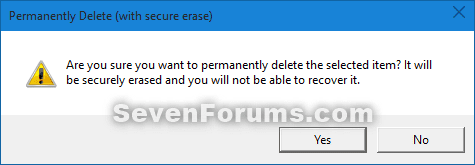
When you use the added Permanently Delete, it will give you a confirmation prompt to secure erase the selected file(s), and will not be placed in the Recycle Bin.

This could also be handy if you did not want to set the Recycle Bin to permanently delete files so that you can Delete some files to the Recycle Bin, and others Permanently Delete with this context menu item.

While you must be logged in as an administrator to be able to add or remove this context menu, all users will be able to use the context menu.

   Note
How to use Permanently Delete when added:

1) Select one or more files.

2) Right click or press and hold on selected files.

3) Click/tap on Send to and Permanently Delete.js.
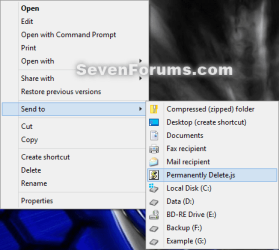
Usage-1.png
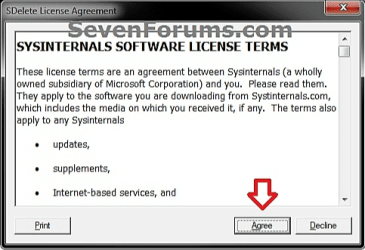
4) If this is the first time you used Permanently Delete, then click on Agree for the SDelete license agreement. You will not see this anymore afterwards.
Usage-3.png
5) Click/tap on Yes to confirm.
Usage-2.png
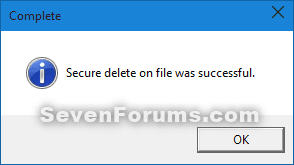
6) Click/tap on OK in the confirmation dialog.
Usage-4.png


CONTENTS:
  • Option One: To Add Permanently Delete to Send To Context Menu
  • Option Two: To Remove Permanently Delete from Send To Context Menu


OPTION ONE

To Add Permanently Delete to Send To Context Menu


1. Click/tap on the Download button below to go the Windows Sysinternals website, and then download SDelete to your desktop.

Download


2. Unblock the downloaded SDelete.zip file.

3. Open the SDelete.zip file, and extract (drag and drop) the SDelete.exe file to your desktop.

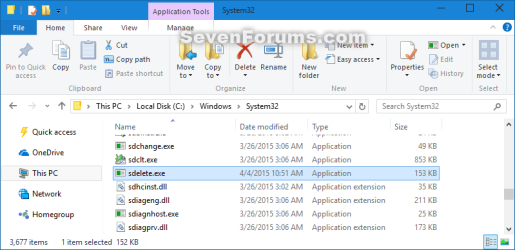
4. Move the SDelete.exe file into the C:\Windows\System32 folder. (see screenshot below)
System32.png
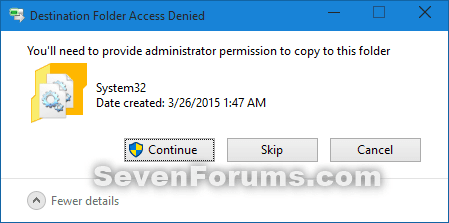
5. Click/tap on Continue to confirm. (see screenshot below)
System32_confirm.png
6. Click/tap on the Download button below to download the Permanently_Delete.zip file to your desktop.

Download


7. Unblock the downloaded Permanently_Delete.zip file.

8. Open the Permanently_Delete.zip file, and extract (drag and drop) the Permanently Delete.js file to your desktop.

   Note
Special thanks to our valued member Pyprohly for writing this javascript file for us.


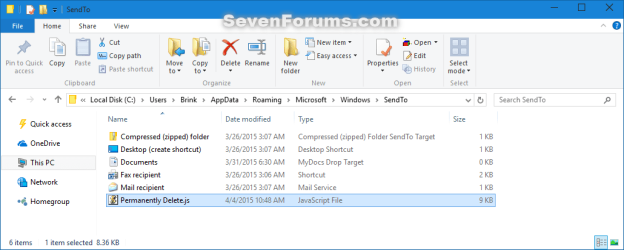
9. Move the Permanently Delete.js file into the shell:sendto (type in address bar of explorer and press Enter) folder. (see screenshot below)

   Note
If you like, you can create a shortcut of the Permanently Delete.js file, change the shortcut's icon to what you like, and place the shortcut into the shell:sendto folder instead.

SendTo.png


OPTION TWO

To Remove Permanently Delete from Send To Context Menu


1. Open the C:\Windows\System32 folder, and delete the SDelete.exe file. (see screenshot below)
System32.png
2. Open the shell:sendto (type in address bar of explorer and press Enter) folder, and delete the Permanently Delete.js file. (see screenshot below)
SendTo.png


That's it,
Shawn


Attachments

Last edited:
Yes I know about more when 15 items selected, no I just trying with 2-3 files.

%1 not working even with single file or folder. %2 works with single, but no success with multiple.
 

My Computer

OS
Windows 7 Ultimate x64
I'm afraid that I'm not sure why it's not working for you with multiple items selected with it being used in Classic Shell instead. :(
 

My Computer

Computer type
PC/Desktop
Computer Manufacturer/Model Number
Self built custom
OS
64-bit Windows 11 Pro for Workstations
CPU
Intel i7-8700K OC'd to 5 GHz
Motherboard
ASUS ROG Maximus XI Formula Z390
Memory
64 GB (4x16GB) G.SKILL TridentZ RGB DDR4 3600 MHz
Graphics Card(s)
ASUS ROG-STRIX-GTX1080TI-O11G-GAMING
Sound Card
Integrated
Monitor(s) Displays
2 x Samsung Odyssey G7 27"
Screen Resolution
2560x1440
Hard Drives
1TB Samsung 990 PRO M.2,
4TB Samsung 990 PRO PRO M.2,
TerraMaster F8 SSD Plus NAS
PSU
Seasonic Prime Titanium 850W
Case
Thermaltake Core P3
Cooling
Corsair Hydro H115i
Keyboard
Logitech wireless K800
Mouse
Logitech MX Master 4
Internet Speed
2 Gb/s Download and 100 Mb/s Upload
Antivirus
Malwarebyte Anti-Malware Premium
Browser
Google Chrome
Other Info
Logitech Z625 speaker system,
Logitech BRIO 4K Pro webcam,
HP Color LaserJet Pro MFP M477fdn,
APC SMART-UPS RT 1000 XL - SURT1000XLI,
Galaxy S23 Plus phone
I tested %2 using the method in the tutorial, and it wouldn't work at all. Only %1 worked using that method.

I'm not sure what would work with Classic Shell though.
 

My Computer

Computer type
PC/Desktop
Computer Manufacturer/Model Number
Self built custom
OS
64-bit Windows 11 Pro for Workstations
CPU
Intel i7-8700K OC'd to 5 GHz
Motherboard
ASUS ROG Maximus XI Formula Z390
Memory
64 GB (4x16GB) G.SKILL TridentZ RGB DDR4 3600 MHz
Graphics Card(s)
ASUS ROG-STRIX-GTX1080TI-O11G-GAMING
Sound Card
Integrated
Monitor(s) Displays
2 x Samsung Odyssey G7 27"
Screen Resolution
2560x1440
Hard Drives
1TB Samsung 990 PRO M.2,
4TB Samsung 990 PRO PRO M.2,
TerraMaster F8 SSD Plus NAS
PSU
Seasonic Prime Titanium 850W
Case
Thermaltake Core P3
Cooling
Corsair Hydro H115i
Keyboard
Logitech wireless K800
Mouse
Logitech MX Master 4
Internet Speed
2 Gb/s Download and 100 Mb/s Upload
Antivirus
Malwarebyte Anti-Malware Premium
Browser
Google Chrome
Other Info
Logitech Z625 speaker system,
Logitech BRIO 4K Pro webcam,
HP Color LaserJet Pro MFP M477fdn,
APC SMART-UPS RT 1000 XL - SURT1000XLI,
Galaxy S23 Plus phone
%1 yes it works from context menu. %1 with Classic Shell as I mentioned before not working, only %2, but only with single file :(
 

My Computer

OS
Windows 7 Ultimate x64
So if I have it right Shawn I can delete permanently everything I pick down to just having the OS left on the drive? and I can use The Bare Foot Kid's tut to delete the whole drive?

I have a few old drives that I want to scrub up and this looks like what I want - but I just to make sure.
 

My Computer

Computer type
PC/Desktop
Computer Manufacturer/Model Number
Own build (new) Desk1 / Asus ROG Win 7 / Desk2 1st build
OS
Desk1 7 Home Prem / Desk2 10 Pro / Main lap Asus ROG 10 Pro 2 laptop Toshiba 7 Pro Asus P2520 7 & 10
CPU
Desk1 i5 3750K / Laptop i7 GTX 860M / Desk2 i5 2500
Motherboard
Desk1 Asus P877-V / Desk2 Gigabyte H67 UD3H / Laptop ?
Memory
Desk1 8GB (1866) / Desk2 16GB (1333) / Laptop 8Gb DDR3
Graphics Card(s)
Desk 1& 2NVidia GTX 650 & Laptops on board Intel
Sound Card
Desk 1 & 2 -XONAR DG Realtek High Def audio Laptop
Monitor(s) Displays
Desk 1 Benq HD 2450 / Desk2 Philips 24" / Laptop 17.5"
Screen Resolution
1920x1080 D1 & D2 & Laptop 1
Hard Drives
Desk1 Samsung 120GB 830 SSD
Asus ROG 256GB 850 Pro SSD
Desk2 Samsung 840 256 SSD
Toshiba 120GB EVO
PSU
Desk 1 Corsair HX 1050/ Laptop ? / Desk 2 Corsair HX 650
Case
Desk 1 Cooler HAF XM ? Toshiba laptop / Desk2 Coolermaster
Cooling
Fans on all Desk1 -2 Desk2 - all Coolermasters 5 Laptop ?
Keyboard
Desk 1 MS Sidewinder X6 Desk 2 MS Sidewinder X 4
Mouse
Desk 1&2 - Gigabyte MS 900 gamer - laptop - Logitec wireless
Internet Speed
ADSL2+
Other Info
One other Desktop (tester) and spare Toshba laptop both with SSD's
Running Kaspersky 2016 ISS on all machines config'd identically
Logitec audio stereo systems on each machine (x3)
Canon MG5250MFC
Router/modem TP-Link running WPA2SK

My Computer

Computer type
PC/Desktop
Computer Manufacturer/Model Number
Self built custom
OS
64-bit Windows 11 Pro for Workstations
CPU
Intel i7-8700K OC'd to 5 GHz
Motherboard
ASUS ROG Maximus XI Formula Z390
Memory
64 GB (4x16GB) G.SKILL TridentZ RGB DDR4 3600 MHz
Graphics Card(s)
ASUS ROG-STRIX-GTX1080TI-O11G-GAMING
Sound Card
Integrated
Monitor(s) Displays
2 x Samsung Odyssey G7 27"
Screen Resolution
2560x1440
Hard Drives
1TB Samsung 990 PRO M.2,
4TB Samsung 990 PRO PRO M.2,
TerraMaster F8 SSD Plus NAS
PSU
Seasonic Prime Titanium 850W
Case
Thermaltake Core P3
Cooling
Corsair Hydro H115i
Keyboard
Logitech wireless K800
Mouse
Logitech MX Master 4
Internet Speed
2 Gb/s Download and 100 Mb/s Upload
Antivirus
Malwarebyte Anti-Malware Premium
Browser
Google Chrome
Other Info
Logitech Z625 speaker system,
Logitech BRIO 4K Pro webcam,
HP Color LaserJet Pro MFP M477fdn,
APC SMART-UPS RT 1000 XL - SURT1000XLI,
Galaxy S23 Plus phone
Thanks Shawn up with the goods again :D
 

My Computer

Computer type
PC/Desktop
Computer Manufacturer/Model Number
Own build (new) Desk1 / Asus ROG Win 7 / Desk2 1st build
OS
Desk1 7 Home Prem / Desk2 10 Pro / Main lap Asus ROG 10 Pro 2 laptop Toshiba 7 Pro Asus P2520 7 & 10
CPU
Desk1 i5 3750K / Laptop i7 GTX 860M / Desk2 i5 2500
Motherboard
Desk1 Asus P877-V / Desk2 Gigabyte H67 UD3H / Laptop ?
Memory
Desk1 8GB (1866) / Desk2 16GB (1333) / Laptop 8Gb DDR3
Graphics Card(s)
Desk 1& 2NVidia GTX 650 & Laptops on board Intel
Sound Card
Desk 1 & 2 -XONAR DG Realtek High Def audio Laptop
Monitor(s) Displays
Desk 1 Benq HD 2450 / Desk2 Philips 24" / Laptop 17.5"
Screen Resolution
1920x1080 D1 & D2 & Laptop 1
Hard Drives
Desk1 Samsung 120GB 830 SSD
Asus ROG 256GB 850 Pro SSD
Desk2 Samsung 840 256 SSD
Toshiba 120GB EVO
PSU
Desk 1 Corsair HX 1050/ Laptop ? / Desk 2 Corsair HX 650
Case
Desk 1 Cooler HAF XM ? Toshiba laptop / Desk2 Coolermaster
Cooling
Fans on all Desk1 -2 Desk2 - all Coolermasters 5 Laptop ?
Keyboard
Desk 1 MS Sidewinder X6 Desk 2 MS Sidewinder X 4
Mouse
Desk 1&2 - Gigabyte MS 900 gamer - laptop - Logitec wireless
Internet Speed
ADSL2+
Other Info
One other Desktop (tester) and spare Toshba laptop both with SSD's
Running Kaspersky 2016 ISS on all machines config'd identically
Logitec audio stereo systems on each machine (x3)
Canon MG5250MFC
Router/modem TP-Link running WPA2SK
You're most welcome. :)
 

My Computer

Computer type
PC/Desktop
Computer Manufacturer/Model Number
Self built custom
OS
64-bit Windows 11 Pro for Workstations
CPU
Intel i7-8700K OC'd to 5 GHz
Motherboard
ASUS ROG Maximus XI Formula Z390
Memory
64 GB (4x16GB) G.SKILL TridentZ RGB DDR4 3600 MHz
Graphics Card(s)
ASUS ROG-STRIX-GTX1080TI-O11G-GAMING
Sound Card
Integrated
Monitor(s) Displays
2 x Samsung Odyssey G7 27"
Screen Resolution
2560x1440
Hard Drives
1TB Samsung 990 PRO M.2,
4TB Samsung 990 PRO PRO M.2,
TerraMaster F8 SSD Plus NAS
PSU
Seasonic Prime Titanium 850W
Case
Thermaltake Core P3
Cooling
Corsair Hydro H115i
Keyboard
Logitech wireless K800
Mouse
Logitech MX Master 4
Internet Speed
2 Gb/s Download and 100 Mb/s Upload
Antivirus
Malwarebyte Anti-Malware Premium
Browser
Google Chrome
Other Info
Logitech Z625 speaker system,
Logitech BRIO 4K Pro webcam,
HP Color LaserJet Pro MFP M477fdn,
APC SMART-UPS RT 1000 XL - SURT1000XLI,
Galaxy S23 Plus phone
This is pretty excellent. I was still pretty new to batch files, before reading this, I'm kind of stoked that I have a way to put my own commands into the context menu now. Did not know u could do that with registry =)

Is there any way to have it prompt user for something like "Are you sure you want to delete?"

Would it be possible to put an in-line prompt on the command in the registry? Like, I know this is not real syntax, 'Prompt "Are you sure?" | if yes do "sdelete.exe /p 3 /s %1"' ?? Did that make any sense? Can you do a prompt and a command all in the same line?

Or what if i put that sdelete.exe command into a batch script with the prompt, and the registry command could just run the batch file? How would that look?
 

My Computer

OS
Windows 7 Ultimate x64
Hello fuqueue,

Sorry it took me a bit to answer.

I added a second option to step 1 OPTION TWO for a confirmation prompt before permanently deleting the selected file(s) to help with this for you.

If you like, you can edit the VBS file in the downloaded ZIP file to see how the script looks. :)
 

My Computer

Computer type
PC/Desktop
Computer Manufacturer/Model Number
Self built custom
OS
64-bit Windows 11 Pro for Workstations
CPU
Intel i7-8700K OC'd to 5 GHz
Motherboard
ASUS ROG Maximus XI Formula Z390
Memory
64 GB (4x16GB) G.SKILL TridentZ RGB DDR4 3600 MHz
Graphics Card(s)
ASUS ROG-STRIX-GTX1080TI-O11G-GAMING
Sound Card
Integrated
Monitor(s) Displays
2 x Samsung Odyssey G7 27"
Screen Resolution
2560x1440
Hard Drives
1TB Samsung 990 PRO M.2,
4TB Samsung 990 PRO PRO M.2,
TerraMaster F8 SSD Plus NAS
PSU
Seasonic Prime Titanium 850W
Case
Thermaltake Core P3
Cooling
Corsair Hydro H115i
Keyboard
Logitech wireless K800
Mouse
Logitech MX Master 4
Internet Speed
2 Gb/s Download and 100 Mb/s Upload
Antivirus
Malwarebyte Anti-Malware Premium
Browser
Google Chrome
Other Info
Logitech Z625 speaker system,
Logitech BRIO 4K Pro webcam,
HP Color LaserJet Pro MFP M477fdn,
APC SMART-UPS RT 1000 XL - SURT1000XLI,
Galaxy S23 Plus phone
Here's a simpler solution. Press Shift+Delete.
 

My Computer

OS
Win7 Ultimate x64 SP1 / WCP x64 / Ubuntu 11 x64
Hello Ken,

Agreed for OPTION TWO. Thank you. :)

This tutorial was mostly for OPTION ONE for a secure erase that you cannot get with Shift+Delete. OPTION TWO was just another added option for those that wanted it via context menu.
 

My Computer

Computer type
PC/Desktop
Computer Manufacturer/Model Number
Self built custom
OS
64-bit Windows 11 Pro for Workstations
CPU
Intel i7-8700K OC'd to 5 GHz
Motherboard
ASUS ROG Maximus XI Formula Z390
Memory
64 GB (4x16GB) G.SKILL TridentZ RGB DDR4 3600 MHz
Graphics Card(s)
ASUS ROG-STRIX-GTX1080TI-O11G-GAMING
Sound Card
Integrated
Monitor(s) Displays
2 x Samsung Odyssey G7 27"
Screen Resolution
2560x1440
Hard Drives
1TB Samsung 990 PRO M.2,
4TB Samsung 990 PRO PRO M.2,
TerraMaster F8 SSD Plus NAS
PSU
Seasonic Prime Titanium 850W
Case
Thermaltake Core P3
Cooling
Corsair Hydro H115i
Keyboard
Logitech wireless K800
Mouse
Logitech MX Master 4
Internet Speed
2 Gb/s Download and 100 Mb/s Upload
Antivirus
Malwarebyte Anti-Malware Premium
Browser
Google Chrome
Other Info
Logitech Z625 speaker system,
Logitech BRIO 4K Pro webcam,
HP Color LaserJet Pro MFP M477fdn,
APC SMART-UPS RT 1000 XL - SURT1000XLI,
Galaxy S23 Plus phone
What do you mean by "Secure Delete"? :confused:
Also, holding shift and clicking delete would work too.
 

My Computer

OS
Win7 Ultimate x64 SP1 / WCP x64 / Ubuntu 11 x64
Deleting a file only marks it as deleted but doesn't overwrite the file on the HDD. It's only overwritten if something new is saved to the same spot on the HDD afterwards. Without it being overwritten, there's a good chance that the file could be recovered from the HDD.

Secure erase (goes by many other names) will delete the file, and overwrite the file with zero X specified amount of passes to help make sure that the file is erased from the HDD and most likely not recoverable. The more passes used, the less chance of the file being able to be recovered. To many passes would just be a waste of time though. If you like, the link below can help give you a better idea about this.
Data remanence - Wikipedia, the free encyclopedia


While Shift+Delete will delete the file without it being placed in the Recycle Bin, it doesn't secure erase the file.
 

My Computer

Computer type
PC/Desktop
Computer Manufacturer/Model Number
Self built custom
OS
64-bit Windows 11 Pro for Workstations
CPU
Intel i7-8700K OC'd to 5 GHz
Motherboard
ASUS ROG Maximus XI Formula Z390
Memory
64 GB (4x16GB) G.SKILL TridentZ RGB DDR4 3600 MHz
Graphics Card(s)
ASUS ROG-STRIX-GTX1080TI-O11G-GAMING
Sound Card
Integrated
Monitor(s) Displays
2 x Samsung Odyssey G7 27"
Screen Resolution
2560x1440
Hard Drives
1TB Samsung 990 PRO M.2,
4TB Samsung 990 PRO PRO M.2,
TerraMaster F8 SSD Plus NAS
PSU
Seasonic Prime Titanium 850W
Case
Thermaltake Core P3
Cooling
Corsair Hydro H115i
Keyboard
Logitech wireless K800
Mouse
Logitech MX Master 4
Internet Speed
2 Gb/s Download and 100 Mb/s Upload
Antivirus
Malwarebyte Anti-Malware Premium
Browser
Google Chrome
Other Info
Logitech Z625 speaker system,
Logitech BRIO 4K Pro webcam,
HP Color LaserJet Pro MFP M477fdn,
APC SMART-UPS RT 1000 XL - SURT1000XLI,
Galaxy S23 Plus phone
Deleting a file only marks it as deleted but doesn't overwrite the file on the HDD. It's only overwritten if something new is saved to the same spot on the HDD afterwards. Without it being overwritten, there's a good chance that the file could be recovered from the HDD.

Secure erase (goes by many other names) will delete the file, and overwrite the file with zero X specified amount of passes to help make sure that the file is erased from the HDD and most likely not recoverable. The more passes used, the less chance of the file being able to be recovered. To many passes would just be a waste of time though. If you like, the link below can help give you a better idea about this.Data remanence - Wikipedia, the free encyclopedia
While Shift+Delete will delete the file without it being placed in the Recycle Bin, it doesn't secure erase the file.

:thumbsup:
 

My Computer

OS
Win7 Ultimate x64 SP1 / WCP x64 / Ubuntu 11 x64
Thanks Brink, this sure does come in handy! ;)
 

My Computer

Computer Manufacturer/Model Number
* BFK Customs *
OS
W 7 64-bit Ultimate
CPU
Intel Q9550 Yorkfield
Motherboard
ASUS P5Q Pro
Memory
8GB Dominator 8500C5D
Graphics Card(s)
ATI : XFX 5870
Sound Card
Realtek HD Audio 7-1
Monitor(s) Displays
1x 47" LCD HDMI & 3x 26" LCD HDMI
Screen Resolution
1920x1080P & 1920x1200
Hard Drives
1x 80GB Intel X25-M G2 SSD : 1x 500GB & 1x 640GB WD Caviar Black(s)
PSU
Corsair 620HX
Case
Cooler Master RC-690
Cooling
Tuniq Tower 120, 2x 140mm and 3x 120mm case fans
Keyboard
Microsoft 500
Mouse
Razer Diamondback 3G
Internet Speed
14 Mb/s
Other Info
1x Koutech 3Gb/s SATA HDD Hot Swap Rack
You're welcome Ted. Thank you. :)
 

My Computer

Computer type
PC/Desktop
Computer Manufacturer/Model Number
Self built custom
OS
64-bit Windows 11 Pro for Workstations
CPU
Intel i7-8700K OC'd to 5 GHz
Motherboard
ASUS ROG Maximus XI Formula Z390
Memory
64 GB (4x16GB) G.SKILL TridentZ RGB DDR4 3600 MHz
Graphics Card(s)
ASUS ROG-STRIX-GTX1080TI-O11G-GAMING
Sound Card
Integrated
Monitor(s) Displays
2 x Samsung Odyssey G7 27"
Screen Resolution
2560x1440
Hard Drives
1TB Samsung 990 PRO M.2,
4TB Samsung 990 PRO PRO M.2,
TerraMaster F8 SSD Plus NAS
PSU
Seasonic Prime Titanium 850W
Case
Thermaltake Core P3
Cooling
Corsair Hydro H115i
Keyboard
Logitech wireless K800
Mouse
Logitech MX Master 4
Internet Speed
2 Gb/s Download and 100 Mb/s Upload
Antivirus
Malwarebyte Anti-Malware Premium
Browser
Google Chrome
Other Info
Logitech Z625 speaker system,
Logitech BRIO 4K Pro webcam,
HP Color LaserJet Pro MFP M477fdn,
APC SMART-UPS RT 1000 XL - SURT1000XLI,
Galaxy S23 Plus phone

My Computer

Computer type
PC/Desktop
OS
Windows 7 Ultimate x64
CPU
Intel Core 2 Duo E7200 @ 2.53GHz
Motherboard
BIOSTAR Group G31-M7 TE
Memory
4,00GB Dual-Channel DDR2 @ 398MHz (5-5-5-18)
Graphics Card(s)
512MB NVIDIA GeForce 8500 GT (Gigabyte)
Sound Card
Realtek High Definition Audio 5.1
Screen Resolution
1280x1024 pixels
Hard Drives
WDC WD1002FAEX-00Z3A0 ATA Device 931 GB
Browser
Comodo Dragon
Other Info
Optical Drives: HL-DT-ST DVDRAM GSA-4167B ATA Device;
Speccy: http://speccy.piriform.com/results/mpAug3INnJkpJFsddkm8sms
Hello Ices,

I'm not having any issues with 1.61 working for me. :confused:

I've updated OPTION ONE to solve the issue of having to delete a folder twice when it had content.

Please try the updated OPTION ONE to see if that may help.
 

My Computer

Computer type
PC/Desktop
Computer Manufacturer/Model Number
Self built custom
OS
64-bit Windows 11 Pro for Workstations
CPU
Intel i7-8700K OC'd to 5 GHz
Motherboard
ASUS ROG Maximus XI Formula Z390
Memory
64 GB (4x16GB) G.SKILL TridentZ RGB DDR4 3600 MHz
Graphics Card(s)
ASUS ROG-STRIX-GTX1080TI-O11G-GAMING
Sound Card
Integrated
Monitor(s) Displays
2 x Samsung Odyssey G7 27"
Screen Resolution
2560x1440
Hard Drives
1TB Samsung 990 PRO M.2,
4TB Samsung 990 PRO PRO M.2,
TerraMaster F8 SSD Plus NAS
PSU
Seasonic Prime Titanium 850W
Case
Thermaltake Core P3
Cooling
Corsair Hydro H115i
Keyboard
Logitech wireless K800
Mouse
Logitech MX Master 4
Internet Speed
2 Gb/s Download and 100 Mb/s Upload
Antivirus
Malwarebyte Anti-Malware Premium
Browser
Google Chrome
Other Info
Logitech Z625 speaker system,
Logitech BRIO 4K Pro webcam,
HP Color LaserJet Pro MFP M477fdn,
APC SMART-UPS RT 1000 XL - SURT1000XLI,
Galaxy S23 Plus phone
Back
Top