Permanently Delete - Add to Context Menu

How to Add 'Permanently Delete' to Send To Context Menu in Windows


   Information
This tutorial will show you how to add or remove Permanently Delete from the Send To context menu in XP, Vista, Windows 7, and Windows 8.

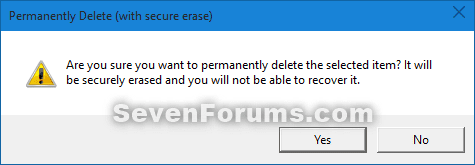
When you use the added Permanently Delete, it will give you a confirmation prompt to secure erase the selected file(s), and will not be placed in the Recycle Bin.

This could also be handy if you did not want to set the Recycle Bin to permanently delete files so that you can Delete some files to the Recycle Bin, and others Permanently Delete with this context menu item.

While you must be logged in as an administrator to be able to add or remove this context menu, all users will be able to use the context menu.

   Note
How to use Permanently Delete when added:

1) Select one or more files.

2) Right click or press and hold on selected files.

3) Click/tap on Send to and Permanently Delete.js.
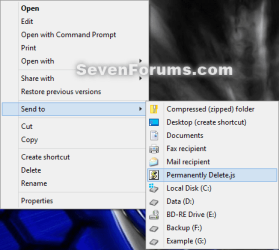
Usage-1.png
4) If this is the first time you used Permanently Delete, then click on Agree for the SDelete license agreement. You will not see this anymore afterwards.
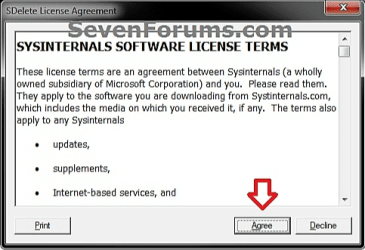
Usage-3.png
5) Click/tap on Yes to confirm.
Usage-2.png
6) Click/tap on OK in the confirmation dialog.
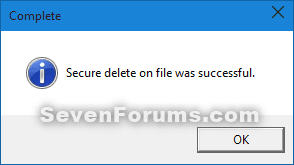
Usage-4.png


CONTENTS:
  • Option One: To Add Permanently Delete to Send To Context Menu
  • Option Two: To Remove Permanently Delete from Send To Context Menu


OPTION ONE

To Add Permanently Delete to Send To Context Menu


1. Click/tap on the Download button below to go the Windows Sysinternals website, and then download SDelete to your desktop.

Download


2. Unblock the downloaded SDelete.zip file.

3. Open the SDelete.zip file, and extract (drag and drop) the SDelete.exe file to your desktop.

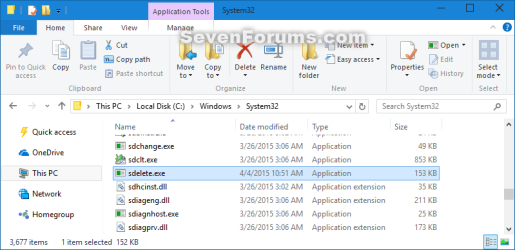
4. Move the SDelete.exe file into the C:\Windows\System32 folder. (see screenshot below)
System32.png
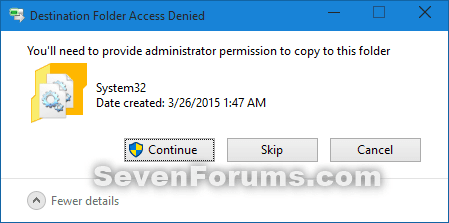
5. Click/tap on Continue to confirm. (see screenshot below)
System32_confirm.png
6. Click/tap on the Download button below to download the Permanently_Delete.zip file to your desktop.

Download


7. Unblock the downloaded Permanently_Delete.zip file.

8. Open the Permanently_Delete.zip file, and extract (drag and drop) the Permanently Delete.js file to your desktop.

   Note
Special thanks to our valued member Pyprohly for writing this javascript file for us.


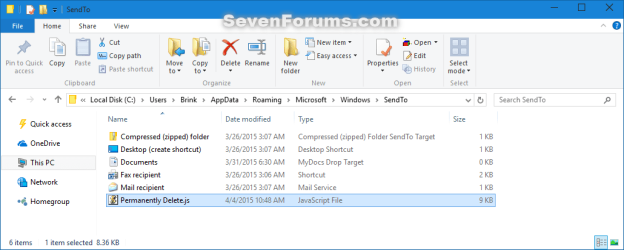
9. Move the Permanently Delete.js file into the shell:sendto (type in address bar of explorer and press Enter) folder. (see screenshot below)

   Note
If you like, you can create a shortcut of the Permanently Delete.js file, change the shortcut's icon to what you like, and place the shortcut into the shell:sendto folder instead.

SendTo.png


OPTION TWO

To Remove Permanently Delete from Send To Context Menu


1. Open the C:\Windows\System32 folder, and delete the SDelete.exe file. (see screenshot below)
System32.png
2. Open the shell:sendto (type in address bar of explorer and press Enter) folder, and delete the Permanently Delete.js file. (see screenshot below)
SendTo.png


That's it,
Shawn


Attachments

Last edited:

My Computer My Computer

At a glance

64-bit Windows 11 Pro for WorkstationsIntel i7-8700K OC'd to 5 GHz64 GB (4x16GB) G.SKILL TridentZ RGB DDR4 3600...ASUS ROG-STRIX-GTX1080TI-O11G-GAMING
Computer type
PC/Desktop
Computer Manufacturer/Model Number
Self built custom
OS
64-bit Windows 11 Pro for Workstations
CPU
Intel i7-8700K OC'd to 5 GHz
Motherboard
ASUS ROG Maximus XI Formula Z390
Memory
64 GB (4x16GB) G.SKILL TridentZ RGB DDR4 3600 MHz
Graphics Card(s)
ASUS ROG-STRIX-GTX1080TI-O11G-GAMING
Sound Card
Integrated
Monitor(s) Displays
2 x Samsung Odyssey G7 27"
Screen Resolution
2560x1440
Hard Drives
1TB Samsung 990 PRO M.2,
4TB Samsung 990 PRO PRO M.2,
TerraMaster F8 SSD Plus NAS
PSU
Seasonic Prime Titanium 850W
Case
Thermaltake Core P3
Cooling
Corsair Hydro H115i
Keyboard
Logitech wireless K800
Mouse
Logitech MX Master 4
Internet Speed
2 Gb/s Download and 100 Mb/s Upload
Antivirus
Malwarebyte Anti-Malware Premium
Browser
Google Chrome
Other Info
Logitech Z625 speaker system,
Logitech BRIO 4K Pro webcam,
HP Color LaserJet Pro MFP M477fdn,
APC SMART-UPS RT 1000 XL - SURT1000XLI,
Galaxy S23 Plus phone
Wait a minute. I got even more confused now. I know full well that deleting a file with Shift+delete deletes the file without placing it in the recycle bin. But I thought that Shift+delete only deletes a file in a way that the file is only marked as ... let's call it 'hidden' (deleted) for the Operating System so that the Operating System itself does not display the file any longer, but the file is still there .. on the drive ... hiding, until the moment another file overwrites it [takes its place] and at that point the initial file is gone for good. I've deleted tons of files by mistake with shift+del and immediately after the mistake [without moving, copying or deleting and further data on the drive] have used 3rd party tools so as to undeleted/restore the initially shift+deleted file. It has always worked. And so .. i thought the whole point of this thread was that adding this context menu to the right-click deletes the file directly and FOREVER, without giving you the possibility to restore the file with any 3rd party tool. IS THAT CORRECT OR NOT? I though it was. That was my knowledge and understanding until I read this and got confused:

Hello soewhaty,

I'm afraid for that, you'll need to use the Recycle Bin instead.

http://www.sevenforums.com/tutorials/12205-recycle-bin-permanently-delete-items-automatically.html


Brink, when I read your comment and the link to the other forum I got confused. Is all I wrote in the first paragraph of this comment of mine correct and especially the part on what adding the right-click context menu does?
 

My Computer My Computer

At a glance

Win 7 x64
Computer type
Laptop
Computer Manufacturer/Model Number
HP
OS
Win 7 x64
This tutorial doesn't use the same method that Windows uses to bypass the Recycle Bin to permanently delete files.

Instead, Option One uses a 3rd party program to permanently delete with an option to secure erase. Secure erase is what will prevent recovery. Option Two uses a script to permanently delete a file.

The only drawback is the issue of these options is when you permanently delete a shortcut, it will delete it's target (source) file. That's why I suggested to use the Recycle Bin option I posted above for when you want to only permanently delete a shortcut and not it's target.
 

My Computer My Computer

At a glance

64-bit Windows 11 Pro for WorkstationsIntel i7-8700K OC'd to 5 GHz64 GB (4x16GB) G.SKILL TridentZ RGB DDR4 3600...ASUS ROG-STRIX-GTX1080TI-O11G-GAMING
Computer type
PC/Desktop
Computer Manufacturer/Model Number
Self built custom
OS
64-bit Windows 11 Pro for Workstations
CPU
Intel i7-8700K OC'd to 5 GHz
Motherboard
ASUS ROG Maximus XI Formula Z390
Memory
64 GB (4x16GB) G.SKILL TridentZ RGB DDR4 3600 MHz
Graphics Card(s)
ASUS ROG-STRIX-GTX1080TI-O11G-GAMING
Sound Card
Integrated
Monitor(s) Displays
2 x Samsung Odyssey G7 27"
Screen Resolution
2560x1440
Hard Drives
1TB Samsung 990 PRO M.2,
4TB Samsung 990 PRO PRO M.2,
TerraMaster F8 SSD Plus NAS
PSU
Seasonic Prime Titanium 850W
Case
Thermaltake Core P3
Cooling
Corsair Hydro H115i
Keyboard
Logitech wireless K800
Mouse
Logitech MX Master 4
Internet Speed
2 Gb/s Download and 100 Mb/s Upload
Antivirus
Malwarebyte Anti-Malware Premium
Browser
Google Chrome
Other Info
Logitech Z625 speaker system,
Logitech BRIO 4K Pro webcam,
HP Color LaserJet Pro MFP M477fdn,
APC SMART-UPS RT 1000 XL - SURT1000XLI,
Galaxy S23 Plus phone
Alright, well ... how about this strategy then - I am planning on using option 1 which includes Secure Erase, and when it comes to shortcuts I will not delete them with the right-click context menu add-on [from this forum] but instead will Shift+delete them, which as far as I see deletes ONLY the shortcut and not the source file [obviously shift-deleting a shortcut does NOT perform a secure erase of the shortcut itself, but I can live with that]. With this strategy I can Secure Erase all desired data by using the right-click menu, and in the same time make sure I only delete shortcuts and not their targets by shift-deleting them. Do you approve of that?

Could you please tell me quickly what the benefits are of deleting unneeded files with Secure Erase? Clearly, as we said, Secure Eelete deletes a file beyond recovery. But is it better performance-wise to do a secure erase of unneeded files so as to eliminate clutter on my SSD or does it not matter whether a file is deleted with Secure Erase or simply with Shift+Del?
 

My Computer My Computer

At a glance

Win 7 x64
Computer type
Laptop
Computer Manufacturer/Model Number
HP
OS
Win 7 x64
That strategy should work well for what you wanted.

There's no other benefit for using secure erase other than to make it less than likely to be able recover the file.

Deleting with Shift+Del will only mark the file as deleted, does not secure erase it, and doesn't put it in the Recycle Bin. If something should write over the space the marked deleted file is using (ex: new file saved there), then it will not be able to be recovered.

As far as it mattering, it just depends on if you needed the file to be secured erase or not.
 

My Computer My Computer

At a glance

64-bit Windows 11 Pro for WorkstationsIntel i7-8700K OC'd to 5 GHz64 GB (4x16GB) G.SKILL TridentZ RGB DDR4 3600...ASUS ROG-STRIX-GTX1080TI-O11G-GAMING
Computer type
PC/Desktop
Computer Manufacturer/Model Number
Self built custom
OS
64-bit Windows 11 Pro for Workstations
CPU
Intel i7-8700K OC'd to 5 GHz
Motherboard
ASUS ROG Maximus XI Formula Z390
Memory
64 GB (4x16GB) G.SKILL TridentZ RGB DDR4 3600 MHz
Graphics Card(s)
ASUS ROG-STRIX-GTX1080TI-O11G-GAMING
Sound Card
Integrated
Monitor(s) Displays
2 x Samsung Odyssey G7 27"
Screen Resolution
2560x1440
Hard Drives
1TB Samsung 990 PRO M.2,
4TB Samsung 990 PRO PRO M.2,
TerraMaster F8 SSD Plus NAS
PSU
Seasonic Prime Titanium 850W
Case
Thermaltake Core P3
Cooling
Corsair Hydro H115i
Keyboard
Logitech wireless K800
Mouse
Logitech MX Master 4
Internet Speed
2 Gb/s Download and 100 Mb/s Upload
Antivirus
Malwarebyte Anti-Malware Premium
Browser
Google Chrome
Other Info
Logitech Z625 speaker system,
Logitech BRIO 4K Pro webcam,
HP Color LaserJet Pro MFP M477fdn,
APC SMART-UPS RT 1000 XL - SURT1000XLI,
Galaxy S23 Plus phone
So ... no other benefits of doing a secure erase then. One would only Secure Erase a file so as to make sure that for example an intruder for example would never be able to recover a file and thereby disclose its content ... so it's a safety measure in a way.

I thought it was actually healthy for an hdd or ssd to do a secure erase of files instead of just shift+deleting them. Тhought Secure Erase eliminates some clutter and/or makes the drive read/write faster, but if I understand you correct that is not the case.
 

My Computer My Computer

At a glance

Win 7 x64
Computer type
Laptop
Computer Manufacturer/Model Number
HP
OS
Win 7 x64
Nope, that's not the case.

Windows version of permanently delete is to just not have the file go into the Recycle Bin. Otherwise, it's the same only mark the file as deleted on the drive so that it's space can be used to write data to again.

Secure erase will mark the file as deleted, but it also overwrites the data on the drive. Each time it overwrites the data is called a pass. The more passes the less likely the data can be recovered. This is the main reason why secure erase takes much longer than a simple delete. For example, a quick format versus a full format.

Defragging a HDD as needed will help keep it healthy though.
 

My Computer My Computer

At a glance

64-bit Windows 11 Pro for WorkstationsIntel i7-8700K OC'd to 5 GHz64 GB (4x16GB) G.SKILL TridentZ RGB DDR4 3600...ASUS ROG-STRIX-GTX1080TI-O11G-GAMING
Computer type
PC/Desktop
Computer Manufacturer/Model Number
Self built custom
OS
64-bit Windows 11 Pro for Workstations
CPU
Intel i7-8700K OC'd to 5 GHz
Motherboard
ASUS ROG Maximus XI Formula Z390
Memory
64 GB (4x16GB) G.SKILL TridentZ RGB DDR4 3600 MHz
Graphics Card(s)
ASUS ROG-STRIX-GTX1080TI-O11G-GAMING
Sound Card
Integrated
Monitor(s) Displays
2 x Samsung Odyssey G7 27"
Screen Resolution
2560x1440
Hard Drives
1TB Samsung 990 PRO M.2,
4TB Samsung 990 PRO PRO M.2,
TerraMaster F8 SSD Plus NAS
PSU
Seasonic Prime Titanium 850W
Case
Thermaltake Core P3
Cooling
Corsair Hydro H115i
Keyboard
Logitech wireless K800
Mouse
Logitech MX Master 4
Internet Speed
2 Gb/s Download and 100 Mb/s Upload
Antivirus
Malwarebyte Anti-Malware Premium
Browser
Google Chrome
Other Info
Logitech Z625 speaker system,
Logitech BRIO 4K Pro webcam,
HP Color LaserJet Pro MFP M477fdn,
APC SMART-UPS RT 1000 XL - SURT1000XLI,
Galaxy S23 Plus phone
Tutorial had been updated with a better working option. This is thanks to our valued member Pyprohly for writing the .js file. :)
 

My Computer My Computer

At a glance

64-bit Windows 11 Pro for WorkstationsIntel i7-8700K OC'd to 5 GHz64 GB (4x16GB) G.SKILL TridentZ RGB DDR4 3600...ASUS ROG-STRIX-GTX1080TI-O11G-GAMING
Computer type
PC/Desktop
Computer Manufacturer/Model Number
Self built custom
OS
64-bit Windows 11 Pro for Workstations
CPU
Intel i7-8700K OC'd to 5 GHz
Motherboard
ASUS ROG Maximus XI Formula Z390
Memory
64 GB (4x16GB) G.SKILL TridentZ RGB DDR4 3600 MHz
Graphics Card(s)
ASUS ROG-STRIX-GTX1080TI-O11G-GAMING
Sound Card
Integrated
Monitor(s) Displays
2 x Samsung Odyssey G7 27"
Screen Resolution
2560x1440
Hard Drives
1TB Samsung 990 PRO M.2,
4TB Samsung 990 PRO PRO M.2,
TerraMaster F8 SSD Plus NAS
PSU
Seasonic Prime Titanium 850W
Case
Thermaltake Core P3
Cooling
Corsair Hydro H115i
Keyboard
Logitech wireless K800
Mouse
Logitech MX Master 4
Internet Speed
2 Gb/s Download and 100 Mb/s Upload
Antivirus
Malwarebyte Anti-Malware Premium
Browser
Google Chrome
Other Info
Logitech Z625 speaker system,
Logitech BRIO 4K Pro webcam,
HP Color LaserJet Pro MFP M477fdn,
APC SMART-UPS RT 1000 XL - SURT1000XLI,
Galaxy S23 Plus phone
Please tell us what the behavior of that method is when it comes to deleting shortcuts? Or, for that matter, junctions and file symlinks?
 

My Computer My Computer

At a glance

win 7 pro x64T7700 Intel4GB
Computer type
Laptop
Computer Manufacturer/Model Number
Lenovo T61p
OS
win 7 pro x64
CPU
T7700 Intel
Memory
4GB
Hello apb,

It will only permanently delete the actual selected file(s). If you select to delete a shortcut, it will only delete the shortcut and not the target. Same with junction points and symbolic links. :)
 

My Computer My Computer

At a glance

64-bit Windows 11 Pro for WorkstationsIntel i7-8700K OC'd to 5 GHz64 GB (4x16GB) G.SKILL TridentZ RGB DDR4 3600...ASUS ROG-STRIX-GTX1080TI-O11G-GAMING
Computer type
PC/Desktop
Computer Manufacturer/Model Number
Self built custom
OS
64-bit Windows 11 Pro for Workstations
CPU
Intel i7-8700K OC'd to 5 GHz
Motherboard
ASUS ROG Maximus XI Formula Z390
Memory
64 GB (4x16GB) G.SKILL TridentZ RGB DDR4 3600 MHz
Graphics Card(s)
ASUS ROG-STRIX-GTX1080TI-O11G-GAMING
Sound Card
Integrated
Monitor(s) Displays
2 x Samsung Odyssey G7 27"
Screen Resolution
2560x1440
Hard Drives
1TB Samsung 990 PRO M.2,
4TB Samsung 990 PRO PRO M.2,
TerraMaster F8 SSD Plus NAS
PSU
Seasonic Prime Titanium 850W
Case
Thermaltake Core P3
Cooling
Corsair Hydro H115i
Keyboard
Logitech wireless K800
Mouse
Logitech MX Master 4
Internet Speed
2 Gb/s Download and 100 Mb/s Upload
Antivirus
Malwarebyte Anti-Malware Premium
Browser
Google Chrome
Other Info
Logitech Z625 speaker system,
Logitech BRIO 4K Pro webcam,
HP Color LaserJet Pro MFP M477fdn,
APC SMART-UPS RT 1000 XL - SURT1000XLI,
Galaxy S23 Plus phone
What happened to the original option for this command?

I do not want it in the "Send To" menu. I want it in the base right click menu. I downloaded this for work years ago and want the same functionality that I have with that version.

I remember that there was a reg file that added it directly to the right click menu and not the "send to" sub menu.

Is there a way to get that version? I'm not skilled in creating .bat files. Thank you!
 

My Computer My Computer

At a glance

Win 7 64 bit
OS
Win 7 64 bit
Hello Wolfgrrl,

The old option had a bug in it where if you deleted a shortcut, it would delete the target and not the shortcut.

The option in the tutorial now works flawlessly.
 

My Computer My Computer

At a glance

64-bit Windows 11 Pro for WorkstationsIntel i7-8700K OC'd to 5 GHz64 GB (4x16GB) G.SKILL TridentZ RGB DDR4 3600...ASUS ROG-STRIX-GTX1080TI-O11G-GAMING
Computer type
PC/Desktop
Computer Manufacturer/Model Number
Self built custom
OS
64-bit Windows 11 Pro for Workstations
CPU
Intel i7-8700K OC'd to 5 GHz
Motherboard
ASUS ROG Maximus XI Formula Z390
Memory
64 GB (4x16GB) G.SKILL TridentZ RGB DDR4 3600 MHz
Graphics Card(s)
ASUS ROG-STRIX-GTX1080TI-O11G-GAMING
Sound Card
Integrated
Monitor(s) Displays
2 x Samsung Odyssey G7 27"
Screen Resolution
2560x1440
Hard Drives
1TB Samsung 990 PRO M.2,
4TB Samsung 990 PRO PRO M.2,
TerraMaster F8 SSD Plus NAS
PSU
Seasonic Prime Titanium 850W
Case
Thermaltake Core P3
Cooling
Corsair Hydro H115i
Keyboard
Logitech wireless K800
Mouse
Logitech MX Master 4
Internet Speed
2 Gb/s Download and 100 Mb/s Upload
Antivirus
Malwarebyte Anti-Malware Premium
Browser
Google Chrome
Other Info
Logitech Z625 speaker system,
Logitech BRIO 4K Pro webcam,
HP Color LaserJet Pro MFP M477fdn,
APC SMART-UPS RT 1000 XL - SURT1000XLI,
Galaxy S23 Plus phone
How do I get this to appear in the base right click menu instead of the "Send To" menu?
 

My Computer My Computer

At a glance

Win 7 64 bit
OS
Win 7 64 bit
That option is no longer supported or safe to use because of the bug I mentioned above.
 

My Computer My Computer

At a glance

64-bit Windows 11 Pro for WorkstationsIntel i7-8700K OC'd to 5 GHz64 GB (4x16GB) G.SKILL TridentZ RGB DDR4 3600...ASUS ROG-STRIX-GTX1080TI-O11G-GAMING
Computer type
PC/Desktop
Computer Manufacturer/Model Number
Self built custom
OS
64-bit Windows 11 Pro for Workstations
CPU
Intel i7-8700K OC'd to 5 GHz
Motherboard
ASUS ROG Maximus XI Formula Z390
Memory
64 GB (4x16GB) G.SKILL TridentZ RGB DDR4 3600 MHz
Graphics Card(s)
ASUS ROG-STRIX-GTX1080TI-O11G-GAMING
Sound Card
Integrated
Monitor(s) Displays
2 x Samsung Odyssey G7 27"
Screen Resolution
2560x1440
Hard Drives
1TB Samsung 990 PRO M.2,
4TB Samsung 990 PRO PRO M.2,
TerraMaster F8 SSD Plus NAS
PSU
Seasonic Prime Titanium 850W
Case
Thermaltake Core P3
Cooling
Corsair Hydro H115i
Keyboard
Logitech wireless K800
Mouse
Logitech MX Master 4
Internet Speed
2 Gb/s Download and 100 Mb/s Upload
Antivirus
Malwarebyte Anti-Malware Premium
Browser
Google Chrome
Other Info
Logitech Z625 speaker system,
Logitech BRIO 4K Pro webcam,
HP Color LaserJet Pro MFP M477fdn,
APC SMART-UPS RT 1000 XL - SURT1000XLI,
Galaxy S23 Plus phone
Hmmm.........was that a bug on all systems? I never had that issue happen to me.
 

My Computer My Computer

At a glance

Win 7 64 bit
OS
Win 7 64 bit
Yes, it was a bug on all systems when deleting a shortcut.
 

My Computer My Computer

At a glance

64-bit Windows 11 Pro for WorkstationsIntel i7-8700K OC'd to 5 GHz64 GB (4x16GB) G.SKILL TridentZ RGB DDR4 3600...ASUS ROG-STRIX-GTX1080TI-O11G-GAMING
Computer type
PC/Desktop
Computer Manufacturer/Model Number
Self built custom
OS
64-bit Windows 11 Pro for Workstations
CPU
Intel i7-8700K OC'd to 5 GHz
Motherboard
ASUS ROG Maximus XI Formula Z390
Memory
64 GB (4x16GB) G.SKILL TridentZ RGB DDR4 3600 MHz
Graphics Card(s)
ASUS ROG-STRIX-GTX1080TI-O11G-GAMING
Sound Card
Integrated
Monitor(s) Displays
2 x Samsung Odyssey G7 27"
Screen Resolution
2560x1440
Hard Drives
1TB Samsung 990 PRO M.2,
4TB Samsung 990 PRO PRO M.2,
TerraMaster F8 SSD Plus NAS
PSU
Seasonic Prime Titanium 850W
Case
Thermaltake Core P3
Cooling
Corsair Hydro H115i
Keyboard
Logitech wireless K800
Mouse
Logitech MX Master 4
Internet Speed
2 Gb/s Download and 100 Mb/s Upload
Antivirus
Malwarebyte Anti-Malware Premium
Browser
Google Chrome
Other Info
Logitech Z625 speaker system,
Logitech BRIO 4K Pro webcam,
HP Color LaserJet Pro MFP M477fdn,
APC SMART-UPS RT 1000 XL - SURT1000XLI,
Galaxy S23 Plus phone
Hi Wolfgrrl,

I'm not skilled in creating .bat files.
No batch files are used in this tutorial, and you arn't required to create any sort of script yourself. Simply drag and drop the script the tutorial provides for you, to the relevant location.

The old option had a bug in it where if you deleted a shortcut, it would delete the target and not the shortcut.
This isn't quite the main reason for the change (but that bug on SDelete's part sure needs fixing). The old Option did not have a confirmation dialogue upon deletion, which put off some people. And made others go crazy.

I do not want it in the "Send To" menu. I want it in the base right click menu
I don't like how the Permanently Delete button is positioned in the Send to context menu either. But there's a certain limitation that dissuads me from creating it any other way, namely, well it's a bit hard to describe, but the Permanently Delete button placed anywhere else in the centext menu would prevent multiple items being passed to the JScript file.

Basically, thanks to the 'Send to' menu, deleting multiple items at once is possible.

What happened to the original option for this command? [...] Is there a way to get that version?
If you'd really like Wolfgrrl, and if Brink agrees to re-share his knowledge of the registry hacks he used in the old Option, I'd be happy to create a varient of the script that works directly from the context menu, for you. However, do know, you will have the drawback of not being able to delete multiple items at a time.
 

My Computer My Computer

At a glance

Windows 10, Windows 8.1 Pro, Windows 7 Profes...
Computer type
PC/Desktop
OS
Windows 10, Windows 8.1 Pro, Windows 7 Professional, OS X El Capitan
I appreciate the explanation, Pyprohly.

Reckon it's best to use as it is now.
 

My Computer My Computer

At a glance

Win 7 64 bit
OS
Win 7 64 bit
Glad you concur.

Only an extra click trades in for a slightly better user experience.

You are going to like the new Option. ;)
 

My Computer My Computer

At a glance

Windows 10, Windows 8.1 Pro, Windows 7 Profes...
Computer type
PC/Desktop
OS
Windows 10, Windows 8.1 Pro, Windows 7 Professional, OS X El Capitan
Back
Top