
Personalize - Add or Remove from Desktop Context Menu

How to Add or Remove "Personalize" from Desktop Context Menu in Windows 7 and Windows 8


   Information
This tutorial will show you how to add or remove Personalize from the desktop context menu for all users in Windows 8 and Windows 7 Home Premium, Professional, Ultimate, and Enterprise.

You must be logged in as an administrator to be able to do the steps in this tutorial.

   Warning
This tutorial will not work in the Windows 7 Starter and Windows 7 Home Basic editions since they do not have the personalization features included in them.

For the Windows 7 Starter and Windows 7 Home Basic editions, see OPTION TWO in the tutorial link below to add Personalize instead.

http://www.sevenforums.com/tutorials/47294-desktop-background-change-windows-7-starter.html


EXAMPLE: "Personalize" in Desktop Context Menu
NOTE: This is when you right click or press and hold on a empty area of the desktop.
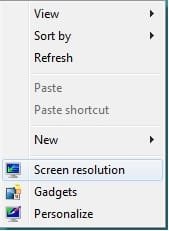
example.jpg


OPTION ONE

To Remove "Personalize" from Desktop Context Menu


1. Press the Windows+R keys to open the Run dialog, type regedit and click/tap on OK.

   Note
If you have already previously done steps 1-4, then you can just skip them and only have to do step 5 below instead.


2. If prompted by UAC, then click on Yes.

3. In regedit, go to the registry key location below, take ownership of set permissions to Allow your user account Full control of the Personalize registry key. (see screenshot below)
NOTE: For Windows 8, see also: Take Ownership of a File, Folder, Drive, or Registry Key in Windows 8
HKEY_CLASSES_ROOT\DesktopBackground\Shell\Personalize

Personalize.jpg
4. In regedit, go to the registry key location below, take ownership of set permissions to Allow your user account Full control of the command registry key. (see screenshot below)
NOTE: For Windows 8, see also: Take Ownership of a File, Folder, Drive, or Registry Key in Windows 8
HKEY_CLASSES_ROOT\DesktopBackground\Shell\Display\command
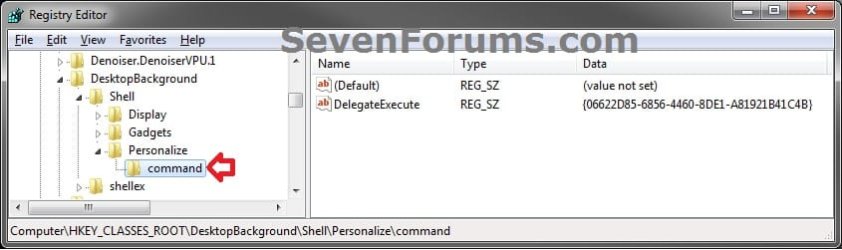
command.jpg
5. Click/tap on the Download button below to download the .reg file below.
NOTE: This will delete the Personalize and command registry keys above for you automatically instead of you having to manually doing it.
Remove_Personalize_from_Desktop_Context_Menu.reg

Download


A) Save the .reg file to your desktop.

B) Double click/tap on the downloaded .reg file to merge it.

C) If prompted, click/tap on Run, Yes (UAC), Yes, and OK.

D) When finished, you can delete the downloaded .reg file if you like.


OPTION TWO

To Add/Restore "Personalize" to Desktop Context Menu


1. Click on the Download button below to download the .reg file below.
NOTE: This will restore the default Personalize and command registry keys and their entries that were deleted from above.
Add_Personalize_to_Desktop_Context_Menu.reg

Download


2. Save the .reg file to your desktop.

3. Double click/tap on the downloaded .reg file to merge it.

4. If prompted, click/tap on Run, Yes (UAC), Yes, and OK.

5. When finished, you can delete the downloaded .reg file if you like.
That's it,
Shawn


Attachments

Last edited:
I have this problem while i followed " ADD/Restore "Personalize" to Desktop Context Menu " steps..

Please help me to find out this.:cry::cry:


When i normally click on Personalize of Desktop Context Menu this is appearing.
 
Last edited by a moderator:

My Computer

Computer type
PC/Desktop
Computer Manufacturer/Model Number
Custom Build
OS
Windows 7 Ultimate x64
CPU
core-i 3
Motherboard
Gigabyte
Memory
4GB DDR3
Graphics Card(s)
6450 AMD Radeon
Hard Drives
500GB Hitachi ATA
Antivirus
Microsoft Security Essentials
Browser
Google Crome

My Computer

Computer type
PC/Desktop
Computer Manufacturer/Model Number
Self built custom
OS
64-bit Windows 11 Pro for Workstations
CPU
Intel i7-8700K OC'd to 5 GHz
Motherboard
ASUS ROG Maximus XI Formula Z390
Memory
64 GB (4x16GB) G.SKILL TridentZ RGB DDR4 3600 MHz
Graphics Card(s)
ASUS ROG-STRIX-GTX1080TI-O11G-GAMING
Sound Card
Integrated
Monitor(s) Displays
2 x Samsung Odyssey G7 27"
Screen Resolution
2560x1440
Hard Drives
1TB Samsung 990 PRO M.2,
4TB Samsung 990 PRO PRO M.2,
TerraMaster F8 SSD Plus NAS
PSU
Seasonic Prime Titanium 850W
Case
Thermaltake Core P3
Cooling
Corsair Hydro H115i
Keyboard
Logitech wireless K800
Mouse
Logitech MX Master 4
Internet Speed
2 Gb/s Download and 100 Mb/s Upload
Antivirus
Malwarebyte Anti-Malware Premium
Browser
Google Chrome
Other Info
Logitech Z625 speaker system,
Logitech BRIO 4K Pro webcam,
HP Color LaserJet Pro MFP M477fdn,
APC SMART-UPS RT 1000 XL - SURT1000XLI,
Galaxy S23 Plus phone
Yes I have checked step 3 & 4 carefully. They are same as in Step 3 & 4.
 

My Computer

Computer type
PC/Desktop
Computer Manufacturer/Model Number
Custom Build
OS
Windows 7 Ultimate x64
CPU
core-i 3
Motherboard
Gigabyte
Memory
4GB DDR3
Graphics Card(s)
6450 AMD Radeon
Hard Drives
500GB Hitachi ATA
Antivirus
Microsoft Security Essentials
Browser
Google Crome
Then you may have some other issue. See if doing a system restore using a restore point dated before this started may be able to undo and fix this for you.
 

My Computer

Computer type
PC/Desktop
Computer Manufacturer/Model Number
Self built custom
OS
64-bit Windows 11 Pro for Workstations
CPU
Intel i7-8700K OC'd to 5 GHz
Motherboard
ASUS ROG Maximus XI Formula Z390
Memory
64 GB (4x16GB) G.SKILL TridentZ RGB DDR4 3600 MHz
Graphics Card(s)
ASUS ROG-STRIX-GTX1080TI-O11G-GAMING
Sound Card
Integrated
Monitor(s) Displays
2 x Samsung Odyssey G7 27"
Screen Resolution
2560x1440
Hard Drives
1TB Samsung 990 PRO M.2,
4TB Samsung 990 PRO PRO M.2,
TerraMaster F8 SSD Plus NAS
PSU
Seasonic Prime Titanium 850W
Case
Thermaltake Core P3
Cooling
Corsair Hydro H115i
Keyboard
Logitech wireless K800
Mouse
Logitech MX Master 4
Internet Speed
2 Gb/s Download and 100 Mb/s Upload
Antivirus
Malwarebyte Anti-Malware Premium
Browser
Google Chrome
Other Info
Logitech Z625 speaker system,
Logitech BRIO 4K Pro webcam,
HP Color LaserJet Pro MFP M477fdn,
APC SMART-UPS RT 1000 XL - SURT1000XLI,
Galaxy S23 Plus phone
But i don't have a previously restore point...!!! What can i do??
 

My Computer

Computer type
PC/Desktop
Computer Manufacturer/Model Number
Custom Build
OS
Windows 7 Ultimate x64
CPU
core-i 3
Motherboard
Gigabyte
Memory
4GB DDR3
Graphics Card(s)
6450 AMD Radeon
Hard Drives
500GB Hitachi ATA
Antivirus
Microsoft Security Essentials
Browser
Google Crome
Double check to take ownership first, then set permissions for the keys in step 3 and 4. You'll get the first error you posted if you didn't.

Please go ahead and post screenshots showing your registry settings for this to see if anything may stand out.
 

My Computer

Computer type
PC/Desktop
Computer Manufacturer/Model Number
Self built custom
OS
64-bit Windows 11 Pro for Workstations
CPU
Intel i7-8700K OC'd to 5 GHz
Motherboard
ASUS ROG Maximus XI Formula Z390
Memory
64 GB (4x16GB) G.SKILL TridentZ RGB DDR4 3600 MHz
Graphics Card(s)
ASUS ROG-STRIX-GTX1080TI-O11G-GAMING
Sound Card
Integrated
Monitor(s) Displays
2 x Samsung Odyssey G7 27"
Screen Resolution
2560x1440
Hard Drives
1TB Samsung 990 PRO M.2,
4TB Samsung 990 PRO PRO M.2,
TerraMaster F8 SSD Plus NAS
PSU
Seasonic Prime Titanium 850W
Case
Thermaltake Core P3
Cooling
Corsair Hydro H115i
Keyboard
Logitech wireless K800
Mouse
Logitech MX Master 4
Internet Speed
2 Gb/s Download and 100 Mb/s Upload
Antivirus
Malwarebyte Anti-Malware Premium
Browser
Google Chrome
Other Info
Logitech Z625 speaker system,
Logitech BRIO 4K Pro webcam,
HP Color LaserJet Pro MFP M477fdn,
APC SMART-UPS RT 1000 XL - SURT1000XLI,
Galaxy S23 Plus phone
I executed regedit as TrustedInstaller, then removed the key manually. All works, thanks. Even do not need restart Explorer.
 

My Computer

Computer type
PC/Desktop
OS
Windows 7
:thumbsup:
 

My Computer

Computer type
PC/Desktop
Computer Manufacturer/Model Number
Self built custom
OS
64-bit Windows 11 Pro for Workstations
CPU
Intel i7-8700K OC'd to 5 GHz
Motherboard
ASUS ROG Maximus XI Formula Z390
Memory
64 GB (4x16GB) G.SKILL TridentZ RGB DDR4 3600 MHz
Graphics Card(s)
ASUS ROG-STRIX-GTX1080TI-O11G-GAMING
Sound Card
Integrated
Monitor(s) Displays
2 x Samsung Odyssey G7 27"
Screen Resolution
2560x1440
Hard Drives
1TB Samsung 990 PRO M.2,
4TB Samsung 990 PRO PRO M.2,
TerraMaster F8 SSD Plus NAS
PSU
Seasonic Prime Titanium 850W
Case
Thermaltake Core P3
Cooling
Corsair Hydro H115i
Keyboard
Logitech wireless K800
Mouse
Logitech MX Master 4
Internet Speed
2 Gb/s Download and 100 Mb/s Upload
Antivirus
Malwarebyte Anti-Malware Premium
Browser
Google Chrome
Other Info
Logitech Z625 speaker system,
Logitech BRIO 4K Pro webcam,
HP Color LaserJet Pro MFP M477fdn,
APC SMART-UPS RT 1000 XL - SURT1000XLI,
Galaxy S23 Plus phone
Back
Top