Solved Personalized Image-Backup Strategy Advice please?

Miranova23

3D Artist in Training
Pro User
Local time
2:15 AM
Messages
352
Location
Philadelphia
Over the past couple days and even some over the past couple weeks, I still haven't found any posts here specific enough to my needs, and questions.

My drive setup right now:
1. For my rig, I have the OS installed on a 118GB SSD.
2. I followed Kari's tutorial here and have successfully had my User Profile running off of my 2nd drive, a 2TB HDD. For the time being, this usually contains between 350-400GB of data files. (I deal with a lot of video.)
3. I also own a 1TB external, partitioned into 3 parts. This is portable & updated manually since I may be changing these files while at school, then bringing it back home & updating my rig's same files with the new changes.
1 NTFS for work files (school, commissions)
1 NTFS for personal pleasures (music, movies)
& 1 smaller 100GB FAT32 portion to bypass large file transfer limits when dealing with a Mac at school.
4. 500GB Maxtor One Touch. I grew frustrated with the program associated with it, reformatted it to completely empty, and now just keep it as a clean solid backup of everything. I'm considering reinstating it...

I'm looking into using just Windows or Maxtor, Acronis, Macrium-- but I'm not sure which will really give me what I'm concerned about. I'm all good with backing up the data files.

My problem: Windows image backup says that it must include any partition that has the OS installed on it, and that includes D:\ with my User Profile on it. However, the OS + 350GB of data is a lot to compress into an image. I understand it needs the User Profile to access the OS at all, but I don't need those data files included in the image. Not to mention, the larger it is the more something is likely to go wrong, or get corrupted, and then the whole thing is shot. How can I make a system image that excludes my data? I wouldn't mind moving them back over via firewire/esata. Also, just to make sure I understand, could I save that image on my Maxtor via firewire?

Any advice greatly appreciated, thanks!

[What's doubly annoying is that I used Acronis Disk Director to try to cut out of the 2TB a 50GB partition- not big enough. 100GB- still not big enough. 1TB- still not big enough, though I suspect Windows was trying to keep within a 30% of the partition rule. Finally, 1.5TB- ended up wiping itself out and I couldn't logon as there was now NOTHING on the entire HDD. --.-- I don't even know how it did that. :sarc: Reinstalled, whatever.]
 

My Computer My Computer

Computer type
PC/Desktop
OS
Windows 7 Pro x64 SP1
CPU
AMD Phenom II x6 1090T Black Edition 3.2GHz
Motherboard
ASUS M4A88TD-V EVO/USB3
Memory
Patriot G ‘Sector 5’ Edition 8GB (2 x 4GB) 1600MHz
Sound Card
(onboard) Realtek® ALC 892 8-Channel High Definition Audio
Monitor(s) Displays
ViewSonic VX2253 22"
Screen Resolution
1920x1080
Hard Drives
Transcend SSD720 2.5" SATAIII 64GB SSD; Western Digital Caviar Green WD20EARS 2TB 64MB 3.5" HDD
LG WH10LS30 10X Blu-ray Burner with LightScribe
PSU
CORSAIR TX Series 950W ATX12V 80 Plus Bronze
Case
Cooler Master HAF X NVidia Edition; 5 Green LED Fans!
Cooling
CORSAIR A70 120mm Dual-Fan
Keyboard
Verbatim 97472 Mini Wireless Slim
Mouse
bundled Verbatim 97472 Wireless
Antivirus
Avast
Browser
Chrome
Other Info
Ultraportable/Desktop Replacement Laptop:
circa Oct 2006,
Dell XPS M1210,
Windows 7 Professional 32-bit,
Intel Core 2 Duo T7200 2.0GHz,
3.25 (4) GB of RAM,
NVidia GeForce Go 7400,
500GB Seagate Momentus 7200RPM HDD
Maybe just changing the Default Location of Windows 7 User Folders would simplify things. Use your current data (non image) backup strategy for these folders.
I don't know how Windows imaging treats this situation but I would guess Macrium would be fine.
 

My Computer My Computer

Computer type
PC/Desktop
Computer Manufacturer/Model Number
Own build
OS
Windows 7x64 Home Premium SP1
CPU
Intel i7 2600k
Motherboard
ASUS P8Z68 Deluxe
Memory
G.Skill Ripjaws (DDR3-1600) 2x4GB
Graphics Card(s)
Nvidia GeForce GTS 450; Intel HD Graphics 3000(GT2+)
Monitor(s) Displays
Dell Ultrasharp IPS panel U2311H, Samsung SyncMaster P2350
Screen Resolution
1920x1080
Hard Drives
Samsung 850 Pro SSD 256GB, Samsung SSD 840 120GB, Seagates 1TB Barracuda ST31000528AS x2
PSU
Seasonic M12II 520W
Case
Lian Li Lancool PC-K60
Cooling
Case: 1x120mm, 3x140mm CPU: Hyper 212+
Keyboard
Logitech MK520 (wireless)
Mouse
Logitech MK520
Internet Speed
6-7 Mbps
Antivirus
Norton Security Premium, Malwarebytes on 2 (MSE on 3rd PC)
Browser
FireFox
Other Info
Audio: Logitech Z523 2.1
I don't use any of the "precustomized" User Folders, though. I don't know how I'd do that in the first place. I tried that a couple months ago but got so fed up that it only worked for some of my folders, that happened to have the same name and thus it assimilated them, and even then it didn't always redirect to the correct spot. I kept losing track of files cuz sometimesthey'd end up really being saved to C:\, when I thought they were on D:\, but then found that they actually weren't. Also WMP told me there was no music files anywhere in my computer. (I don't know how it missed 38GB.) Also wreaked havoc on my Downloads folder. :cry: I was so glad when I found how to just move the entire User Profile, and it's been so smooth. I guess, maybe for every folder & any hereafter I'd have to make it actually just a shortcut? (Like how My Documents is relocated in XP...) And wouldn't it still want to follow those links and include them-- maybe? I don't know... :(
 

My Computer My Computer

Computer type
PC/Desktop
OS
Windows 7 Pro x64 SP1
CPU
AMD Phenom II x6 1090T Black Edition 3.2GHz
Motherboard
ASUS M4A88TD-V EVO/USB3
Memory
Patriot G ‘Sector 5’ Edition 8GB (2 x 4GB) 1600MHz
Sound Card
(onboard) Realtek® ALC 892 8-Channel High Definition Audio
Monitor(s) Displays
ViewSonic VX2253 22"
Screen Resolution
1920x1080
Hard Drives
Transcend SSD720 2.5" SATAIII 64GB SSD; Western Digital Caviar Green WD20EARS 2TB 64MB 3.5" HDD
LG WH10LS30 10X Blu-ray Burner with LightScribe
PSU
CORSAIR TX Series 950W ATX12V 80 Plus Bronze
Case
Cooler Master HAF X NVidia Edition; 5 Green LED Fans!
Cooling
CORSAIR A70 120mm Dual-Fan
Keyboard
Verbatim 97472 Mini Wireless Slim
Mouse
bundled Verbatim 97472 Wireless
Antivirus
Avast
Browser
Chrome
Other Info
Ultraportable/Desktop Replacement Laptop:
circa Oct 2006,
Dell XPS M1210,
Windows 7 Professional 32-bit,
Intel Core 2 Duo T7200 2.0GHz,
3.25 (4) GB of RAM,
NVidia GeForce Go 7400,
500GB Seagate Momentus 7200RPM HDD
I'm a bit confused but hopefully someone will give further suggestions.
 

My Computer My Computer

Computer type
PC/Desktop
Computer Manufacturer/Model Number
Own build
OS
Windows 7x64 Home Premium SP1
CPU
Intel i7 2600k
Motherboard
ASUS P8Z68 Deluxe
Memory
G.Skill Ripjaws (DDR3-1600) 2x4GB
Graphics Card(s)
Nvidia GeForce GTS 450; Intel HD Graphics 3000(GT2+)
Monitor(s) Displays
Dell Ultrasharp IPS panel U2311H, Samsung SyncMaster P2350
Screen Resolution
1920x1080
Hard Drives
Samsung 850 Pro SSD 256GB, Samsung SSD 840 120GB, Seagates 1TB Barracuda ST31000528AS x2
PSU
Seasonic M12II 520W
Case
Lian Li Lancool PC-K60
Cooling
Case: 1x120mm, 3x140mm CPU: Hyper 212+
Keyboard
Logitech MK520 (wireless)
Mouse
Logitech MK520
Internet Speed
6-7 Mbps
Antivirus
Norton Security Premium, Malwarebytes on 2 (MSE on 3rd PC)
Browser
FireFox
Other Info
Audio: Logitech Z523 2.1
miranova,

Please post a copy of the output of disk manager using following procedure:


HOW TO POST A SNAPSHOT OF DISK MANAGEMENT DISPLAY

Run disk management:
WIN | type DISKMGMT.MSC | ENTER
WIN is the key with the wavy flag.

Maximize the output of Disk Management:
ALT-Spacebar key combo (this pops up a menu) |
X key (selects Maximize) |
Drag the field separators (such as between Status and Capacity) to show entire field. This is very important, otherwise, needed info is not visible.

Make a snapshot:
WIN | type SNIPPING | ENTER
Click the New button.
Drag the cursor around the area you want to snip.
File | Save as | select save location and name | Save button

Post the snapshot:
· Click on the paperclip icon in that row of icons at the top of the message box.
· Click on a BROWSE button. There are 5 of them.
· Navigate to the folder containing the snapshot.
· Click on the snapshot.
· Click on the OPEN button.
· Click on the UPLOAD button adjacent to the 5th BROWSE button.
· Close the MANAGE ATTACHMENTS window.
· Position the cursor at the spot in the message where you want the
snapshot to appear.
· Click on the PaperClip again.
· Click on the file which you want to insert
· Attach code will be inserted into your message.
 

My Computer My Computer

Computer Manufacturer/Model Number
Toshiba Satellite S875D-S7239 laptop
OS
MS Windows 7 Ultimate SP1 64-bit
CPU
AMD A10-4600M
Motherboard
AMD Pumori (Socket FT1)
Memory
6.00 GB Dual-Channel DDR3 @ 798MHz (11-11-12-28)
Graphics Card(s)
AMD Radeon HD 7660G
Sound Card
High Definition Audio Device
Monitor(s) Displays
Generic PnP Monitor (1600x900@60Hz)
Screen Resolution
1600x900@60Hz
Hard Drives
SSD 119GB Corsair CSSD-V128GB2 ATA Device
Keyboard
Standard PS/2 Keyboard
Mouse
HP Wireless Optical Mobile Mouse Model FHA-3410
Internet Speed
What the local pub, local coffee shop offers.
Other Info
Optical Drive:MATSHITA BD-CMB UJ160B ATA Device


Also have an Asus ha1002xp netbook with Win 7 Ultimate installed.
I would suggest leaving your profile on the C drive, and then simply creating a VIDEO folder on the D drive and storing your video there.
 

My Computer My Computer

Computer Manufacturer/Model Number
Self-Built in July 2009
OS
Windows 7 Ultimate x64
CPU
Intel Q9550 2.83Ghz OC'd to 3.40Ghz
Motherboard
Gigabyte GA-EP45-UD3R rev. 1.1, F12 BIOS
Memory
8GB G.Skill PI DDR2-800, 4-4-4-12 timings
Graphics Card(s)
EVGA 1280MB Nvidia GeForce GTX570
Sound Card
Realtek ALC899A 8 channel onboard audio
Monitor(s) Displays
23" Acer x233H
Screen Resolution
1920x1080
Hard Drives
Intel X25-M 80GB Gen 2 SSD
Western Digital 1TB Caviar Black, 32MB cache. WD1001FALS
PSU
Corsair 620HX modular
Case
Antec P182
Cooling
stock
Keyboard
ABS M1 Mechanical
Mouse
Logitech G9 Laser Mouse
Internet Speed
15/2 cable modem
Other Info
Windows and Linux enthusiast. Logitech G35 Headset.
The way I set mine up (for better or worse) is like this:

SSD #1 = Windows 7, and all applications
HD #1 = Steam & all other Games
HD #2 = Partition 1 = Documents/Downloads
Partition 2=Media (Music/Videos/Pictures)
SSD#2 = High Disk use Games

HD#3 BackUp

I just moved the location of the actual User folders.
You could also, as pparks suggested, just make your own folders elsewhere, and simply add that location to your librarys list.


I use Acronis, and have it setup on a schedule.
The My Documents Folder is backed up daily, as a differential Backup.
My OS Drive gets Backed up every 2 days
Media I just BackUp manually since mine does not change that often.

This setup works quite well for me.
Documents I have backed up often, simply due to save Games and other items that change frequently.
I also choose differential just in case I want to recover or rollback a specific file from a specific day.

Also, having Documents, Music, Videos, Pictures, and Games away from the OS ..
A complete disc system restore on the OS drive only takes about 6minutes.


Acronis has a lot of options & extra features and excellent Scheduling in whatever increments you want etc.
It of course is not free, and may not be the best choice for everyone ... but IMHO, its well worth it.

Acronis does not care about the other partions connected to the OS.

And by that I mean, with this setup I found Windows Imaging tool wanted to back up my games drive as well, resulting in quite large Images.
I found this annoying, as most of my games have been backed up to disc, and therefore not needed.


Im fairly certain Macrium will treat the system Image or partiion Image in the same way Acronis does.
So it too would be a good alternative to the built in tool, and its free.
 

My Computer My Computer

Computer Manufacturer/Model Number
Custom (Self Build)
OS
Windows 7 Home Premium 64bit
CPU
Intel Core i7 2700k
Motherboard
eVGA P67 SLI
Memory
8GB Mushkin Redline Ridgebacks @1866
Graphics Card(s)
EVGA GTX570 SC
Sound Card
XiFi Titanium HD
Monitor(s) Displays
LG W2453V
Screen Resolution
1920x1080
Hard Drives
Intel 320 80GB -- Intel X25-V 40GB --WD Black 1TB x2 -- WD Blue 640GB
PSU
Seasonic x750
Case
Corsair 600T SE White
Cooling
eVGA Superclocked CPU Cooler
Keyboard
Saitek Cyborg
Antivirus
Kaspersky
Browser
IE
Other Info
LG BD/DVD
I don't use any of the "precustomized" User Folders, though.
Miranova23,
Maybe I should have elaborated that it was this statement that stumped me and still does. It seems to defeat the advice some of the other members have offered.
 

My Computer My Computer

Computer type
PC/Desktop
Computer Manufacturer/Model Number
Own build
OS
Windows 7x64 Home Premium SP1
CPU
Intel i7 2600k
Motherboard
ASUS P8Z68 Deluxe
Memory
G.Skill Ripjaws (DDR3-1600) 2x4GB
Graphics Card(s)
Nvidia GeForce GTS 450; Intel HD Graphics 3000(GT2+)
Monitor(s) Displays
Dell Ultrasharp IPS panel U2311H, Samsung SyncMaster P2350
Screen Resolution
1920x1080
Hard Drives
Samsung 850 Pro SSD 256GB, Samsung SSD 840 120GB, Seagates 1TB Barracuda ST31000528AS x2
PSU
Seasonic M12II 520W
Case
Lian Li Lancool PC-K60
Cooling
Case: 1x120mm, 3x140mm CPU: Hyper 212+
Keyboard
Logitech MK520 (wireless)
Mouse
Logitech MK520
Internet Speed
6-7 Mbps
Antivirus
Norton Security Premium, Malwarebytes on 2 (MSE on 3rd PC)
Browser
FireFox
Other Info
Audio: Logitech Z523 2.1
When I first tried just moving the User Folders, the original folders (set up back in XP) of "My Music, My Pictures, My Videos, & Downloads" became the User Folders. The icons changed and there were no duplicates. However, they were showing many discrepancies and just making life horribly confusing. My other folders are organized for my actual everyday use: AIPH (school), Notes, Commissions (contains Docs, Vids, & Pics), My Audio, My Books, Apps (installers)... WMP imported all of My Music, but couldn't play a single file. Despite my best efforts, I lost any control over Downloads. There may be remedies to those issues, but the 2 top things making me pull my hair out was that depending on where I looked, the 2 folders changing the most, Downloads & My Video, were different. The worst is, isn't this still more clicks to get to the folders? I did this to avoid such hassles...

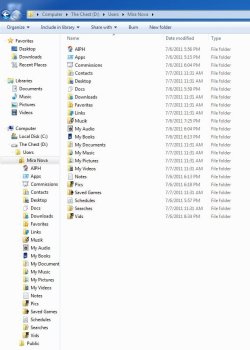
I found that moving the entire User Profile (at installation), and changing the names to Muzik, Pix, Vids, and DownLow, left me with duplicates initially, but was ultimately easier. I redirected WMP to Muzik, and everything imported and played perfectly fine. I even got it to recognize my old playlists. Nothing unseen has gotten into my DownLow folder. I know that the folders I put things into are the "real" folders. I don't have a before pic, but here's what I have now:

folder setup.JPG
(This is before running the reg files to take ownership to permanently delete the duplicates, or any navigation pane edits. I know at one point I'd found something to create a User Profile link, much like how My Documents was always listed above Computer.)

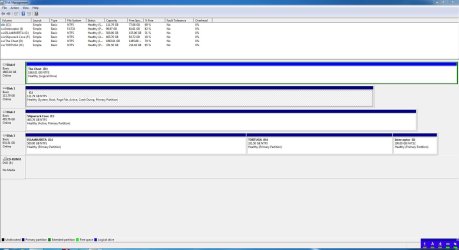
Disk Management:
Guess I should've included this right off the bat, sorry. ^.^>
Disk Management.JPG

I just don't know what to do... =/
 

My Computer My Computer

Computer type
PC/Desktop
OS
Windows 7 Pro x64 SP1
CPU
AMD Phenom II x6 1090T Black Edition 3.2GHz
Motherboard
ASUS M4A88TD-V EVO/USB3
Memory
Patriot G ‘Sector 5’ Edition 8GB (2 x 4GB) 1600MHz
Sound Card
(onboard) Realtek® ALC 892 8-Channel High Definition Audio
Monitor(s) Displays
ViewSonic VX2253 22"
Screen Resolution
1920x1080
Hard Drives
Transcend SSD720 2.5" SATAIII 64GB SSD; Western Digital Caviar Green WD20EARS 2TB 64MB 3.5" HDD
LG WH10LS30 10X Blu-ray Burner with LightScribe
PSU
CORSAIR TX Series 950W ATX12V 80 Plus Bronze
Case
Cooler Master HAF X NVidia Edition; 5 Green LED Fans!
Cooling
CORSAIR A70 120mm Dual-Fan
Keyboard
Verbatim 97472 Mini Wireless Slim
Mouse
bundled Verbatim 97472 Wireless
Antivirus
Avast
Browser
Chrome
Other Info
Ultraportable/Desktop Replacement Laptop:
circa Oct 2006,
Dell XPS M1210,
Windows 7 Professional 32-bit,
Intel Core 2 Duo T7200 2.0GHz,
3.25 (4) GB of RAM,
NVidia GeForce Go 7400,
500GB Seagate Momentus 7200RPM HDD
Miranova,

Refresh me here. Just exactly what do you want?

And thanks for the snapshot even if you didn't drag the dividers so that we could see all of the textual description in the top pane.

Right now you are possibly your own worst enemy. Using the registry to "take possession" can have deleterious side effects.

Let us know what you want to do. Forget all of the history. We will be able to help you and you will receive many different approaches to solving your problem.
 

My Computer My Computer

Computer Manufacturer/Model Number
Toshiba Satellite S875D-S7239 laptop
OS
MS Windows 7 Ultimate SP1 64-bit
CPU
AMD A10-4600M
Motherboard
AMD Pumori (Socket FT1)
Memory
6.00 GB Dual-Channel DDR3 @ 798MHz (11-11-12-28)
Graphics Card(s)
AMD Radeon HD 7660G
Sound Card
High Definition Audio Device
Monitor(s) Displays
Generic PnP Monitor (1600x900@60Hz)
Screen Resolution
1600x900@60Hz
Hard Drives
SSD 119GB Corsair CSSD-V128GB2 ATA Device
Keyboard
Standard PS/2 Keyboard
Mouse
HP Wireless Optical Mobile Mouse Model FHA-3410
Internet Speed
What the local pub, local coffee shop offers.
Other Info
Optical Drive:MATSHITA BD-CMB UJ160B ATA Device


Also have an Asus ha1002xp netbook with Win 7 Ultimate installed.
This may not even possible, but I wanted to know if it was...
I'd like to be able to keep my current setup, and create an image backup that excludes most of my data folders. It's 350 extra GB that I wouldn't trust in a single massive image. What's making it tricky is that the User Profile is essential to log on to Windows, and rightly so, Windows won't let me exclude D:\ from an image backup.

I'm interested if Acronis or Macrium would let me choose which folders to include in an image.
 

My Computer My Computer

Computer type
PC/Desktop
OS
Windows 7 Pro x64 SP1
CPU
AMD Phenom II x6 1090T Black Edition 3.2GHz
Motherboard
ASUS M4A88TD-V EVO/USB3
Memory
Patriot G ‘Sector 5’ Edition 8GB (2 x 4GB) 1600MHz
Sound Card
(onboard) Realtek® ALC 892 8-Channel High Definition Audio
Monitor(s) Displays
ViewSonic VX2253 22"
Screen Resolution
1920x1080
Hard Drives
Transcend SSD720 2.5" SATAIII 64GB SSD; Western Digital Caviar Green WD20EARS 2TB 64MB 3.5" HDD
LG WH10LS30 10X Blu-ray Burner with LightScribe
PSU
CORSAIR TX Series 950W ATX12V 80 Plus Bronze
Case
Cooler Master HAF X NVidia Edition; 5 Green LED Fans!
Cooling
CORSAIR A70 120mm Dual-Fan
Keyboard
Verbatim 97472 Mini Wireless Slim
Mouse
bundled Verbatim 97472 Wireless
Antivirus
Avast
Browser
Chrome
Other Info
Ultraportable/Desktop Replacement Laptop:
circa Oct 2006,
Dell XPS M1210,
Windows 7 Professional 32-bit,
Intel Core 2 Duo T7200 2.0GHz,
3.25 (4) GB of RAM,
NVidia GeForce Go 7400,
500GB Seagate Momentus 7200RPM HDD
You cannot run an image based application and image the system without getting all drives that contain operating system files. This is the reason I suggested moving the profile back to C:\ and putting your data standalone on your D drive.

I don't think it's wise to have OS components running on more than 1 hard drive. Because you are now dependent on 2 hard drives not failing.
 

My Computer My Computer

Computer Manufacturer/Model Number
Self-Built in July 2009
OS
Windows 7 Ultimate x64
CPU
Intel Q9550 2.83Ghz OC'd to 3.40Ghz
Motherboard
Gigabyte GA-EP45-UD3R rev. 1.1, F12 BIOS
Memory
8GB G.Skill PI DDR2-800, 4-4-4-12 timings
Graphics Card(s)
EVGA 1280MB Nvidia GeForce GTX570
Sound Card
Realtek ALC899A 8 channel onboard audio
Monitor(s) Displays
23" Acer x233H
Screen Resolution
1920x1080
Hard Drives
Intel X25-M 80GB Gen 2 SSD
Western Digital 1TB Caviar Black, 32MB cache. WD1001FALS
PSU
Corsair 620HX modular
Case
Antec P182
Cooling
stock
Keyboard
ABS M1 Mechanical
Mouse
Logitech G9 Laser Mouse
Internet Speed
15/2 cable modem
Other Info
Windows and Linux enthusiast. Logitech G35 Headset.
Keep your system and all of your system on one drive (partition). Keep your data on one or more separate drives (partitions). This principle has been true since the pre-DOS days.

I have my OS and my applications on 50 GB and am only using half of that. Imaging my "system" is quick and easy. I have more space for my data. I use a different backup strategy for my data, although I could also image that.

Nowadays, imaging and backup software is no longer on a sector by sector 100% copy thereof. Consequently, your image and/or your backup takes up considerable less space than the system/data itself.
 

My Computer My Computer

Computer Manufacturer/Model Number
Toshiba Satellite S875D-S7239 laptop
OS
MS Windows 7 Ultimate SP1 64-bit
CPU
AMD A10-4600M
Motherboard
AMD Pumori (Socket FT1)
Memory
6.00 GB Dual-Channel DDR3 @ 798MHz (11-11-12-28)
Graphics Card(s)
AMD Radeon HD 7660G
Sound Card
High Definition Audio Device
Monitor(s) Displays
Generic PnP Monitor (1600x900@60Hz)
Screen Resolution
1600x900@60Hz
Hard Drives
SSD 119GB Corsair CSSD-V128GB2 ATA Device
Keyboard
Standard PS/2 Keyboard
Mouse
HP Wireless Optical Mobile Mouse Model FHA-3410
Internet Speed
What the local pub, local coffee shop offers.
Other Info
Optical Drive:MATSHITA BD-CMB UJ160B ATA Device


Also have an Asus ha1002xp netbook with Win 7 Ultimate installed.
I don't think it's wise to have OS components running on more than 1 hard drive. Because you are now dependent on 2 hard drives not failing.

You make an excellent point here...
Since I got 7 a couple months ago, I have been fine with reformatting C, & D being fine. However, when D got wiped by accident, I had no way to log onto C, true.

I have an idea, but rather than confuse everyone further, let me pose the simple question: If I have a User Profile on C, and a User Profile on D, will I still be required to include D?

I am installing Acronis Backup & Restore 11 free trial right now to take a look at how it works.
 

My Computer My Computer

Computer type
PC/Desktop
OS
Windows 7 Pro x64 SP1
CPU
AMD Phenom II x6 1090T Black Edition 3.2GHz
Motherboard
ASUS M4A88TD-V EVO/USB3
Memory
Patriot G ‘Sector 5’ Edition 8GB (2 x 4GB) 1600MHz
Sound Card
(onboard) Realtek® ALC 892 8-Channel High Definition Audio
Monitor(s) Displays
ViewSonic VX2253 22"
Screen Resolution
1920x1080
Hard Drives
Transcend SSD720 2.5" SATAIII 64GB SSD; Western Digital Caviar Green WD20EARS 2TB 64MB 3.5" HDD
LG WH10LS30 10X Blu-ray Burner with LightScribe
PSU
CORSAIR TX Series 950W ATX12V 80 Plus Bronze
Case
Cooler Master HAF X NVidia Edition; 5 Green LED Fans!
Cooling
CORSAIR A70 120mm Dual-Fan
Keyboard
Verbatim 97472 Mini Wireless Slim
Mouse
bundled Verbatim 97472 Wireless
Antivirus
Avast
Browser
Chrome
Other Info
Ultraportable/Desktop Replacement Laptop:
circa Oct 2006,
Dell XPS M1210,
Windows 7 Professional 32-bit,
Intel Core 2 Duo T7200 2.0GHz,
3.25 (4) GB of RAM,
NVidia GeForce Go 7400,
500GB Seagate Momentus 7200RPM HDD
I believe if any user profiles are on the D drive, you would have to include D: in the image.
 

My Computer My Computer

Computer Manufacturer/Model Number
Self-Built in July 2009
OS
Windows 7 Ultimate x64
CPU
Intel Q9550 2.83Ghz OC'd to 3.40Ghz
Motherboard
Gigabyte GA-EP45-UD3R rev. 1.1, F12 BIOS
Memory
8GB G.Skill PI DDR2-800, 4-4-4-12 timings
Graphics Card(s)
EVGA 1280MB Nvidia GeForce GTX570
Sound Card
Realtek ALC899A 8 channel onboard audio
Monitor(s) Displays
23" Acer x233H
Screen Resolution
1920x1080
Hard Drives
Intel X25-M 80GB Gen 2 SSD
Western Digital 1TB Caviar Black, 32MB cache. WD1001FALS
PSU
Corsair 620HX modular
Case
Antec P182
Cooling
stock
Keyboard
ABS M1 Mechanical
Mouse
Logitech G9 Laser Mouse
Internet Speed
15/2 cable modem
Other Info
Windows and Linux enthusiast. Logitech G35 Headset.
Acronis Backup & Recovery 11 created this ".TIB" file:
file.jpg

I was able to exclude any folder I wanted, or use wildcards to exclude just certain kinds of documents even. I've never actually completely done an image. I was expecting an .iso. Is this still an "image?" Or is it something else...
If it is, I'm golden. =)
 

My Computer My Computer

Computer type
PC/Desktop
OS
Windows 7 Pro x64 SP1
CPU
AMD Phenom II x6 1090T Black Edition 3.2GHz
Motherboard
ASUS M4A88TD-V EVO/USB3
Memory
Patriot G ‘Sector 5’ Edition 8GB (2 x 4GB) 1600MHz
Sound Card
(onboard) Realtek® ALC 892 8-Channel High Definition Audio
Monitor(s) Displays
ViewSonic VX2253 22"
Screen Resolution
1920x1080
Hard Drives
Transcend SSD720 2.5" SATAIII 64GB SSD; Western Digital Caviar Green WD20EARS 2TB 64MB 3.5" HDD
LG WH10LS30 10X Blu-ray Burner with LightScribe
PSU
CORSAIR TX Series 950W ATX12V 80 Plus Bronze
Case
Cooler Master HAF X NVidia Edition; 5 Green LED Fans!
Cooling
CORSAIR A70 120mm Dual-Fan
Keyboard
Verbatim 97472 Mini Wireless Slim
Mouse
bundled Verbatim 97472 Wireless
Antivirus
Avast
Browser
Chrome
Other Info
Ultraportable/Desktop Replacement Laptop:
circa Oct 2006,
Dell XPS M1210,
Windows 7 Professional 32-bit,
Intel Core 2 Duo T7200 2.0GHz,
3.25 (4) GB of RAM,
NVidia GeForce Go 7400,
500GB Seagate Momentus 7200RPM HDD
Paid Macrium (not expensive) has folder imaging flexibility.
But you still should be able to sort things out with a user profile on C: alone. It may involve reorganizing your data.
I use Macrium free which gives flexibility at the partition level.

You really want to be able to make a standalone image of C: so that you can quickly image and reimage that partition/HDD alone. You do not want to rely on a second disk for imaging or booting.
 

My Computer My Computer

Computer type
PC/Desktop
Computer Manufacturer/Model Number
Own build
OS
Windows 7x64 Home Premium SP1
CPU
Intel i7 2600k
Motherboard
ASUS P8Z68 Deluxe
Memory
G.Skill Ripjaws (DDR3-1600) 2x4GB
Graphics Card(s)
Nvidia GeForce GTS 450; Intel HD Graphics 3000(GT2+)
Monitor(s) Displays
Dell Ultrasharp IPS panel U2311H, Samsung SyncMaster P2350
Screen Resolution
1920x1080
Hard Drives
Samsung 850 Pro SSD 256GB, Samsung SSD 840 120GB, Seagates 1TB Barracuda ST31000528AS x2
PSU
Seasonic M12II 520W
Case
Lian Li Lancool PC-K60
Cooling
Case: 1x120mm, 3x140mm CPU: Hyper 212+
Keyboard
Logitech MK520 (wireless)
Mouse
Logitech MK520
Internet Speed
6-7 Mbps
Antivirus
Norton Security Premium, Malwarebytes on 2 (MSE on 3rd PC)
Browser
FireFox
Other Info
Audio: Logitech Z523 2.1
mirinova,
Listen to those who with decades of experience.

You put your system on one partition.
Everything else on other partitions.


ISO is a format. What is on that iso depends upon the program that put it there. SOMETIMES an iso file with contain an image file, for example, the Win 7 DVD contains a wim which in tern contains several versions of Win 7 in it.


If you correctly put your system on one and only partition, then any of the backup and restore softwares will have no problem "imaging" your system and restoring your system without interferring with any of the other partitions. You can use the backup features of any of several backup programs to backup your data partitions.

Go to the WIKI encyclopedia site for more info on the ISO format.
 

My Computer My Computer

Computer Manufacturer/Model Number
Toshiba Satellite S875D-S7239 laptop
OS
MS Windows 7 Ultimate SP1 64-bit
CPU
AMD A10-4600M
Motherboard
AMD Pumori (Socket FT1)
Memory
6.00 GB Dual-Channel DDR3 @ 798MHz (11-11-12-28)
Graphics Card(s)
AMD Radeon HD 7660G
Sound Card
High Definition Audio Device
Monitor(s) Displays
Generic PnP Monitor (1600x900@60Hz)
Screen Resolution
1600x900@60Hz
Hard Drives
SSD 119GB Corsair CSSD-V128GB2 ATA Device
Keyboard
Standard PS/2 Keyboard
Mouse
HP Wireless Optical Mobile Mouse Model FHA-3410
Internet Speed
What the local pub, local coffee shop offers.
Other Info
Optical Drive:MATSHITA BD-CMB UJ160B ATA Device


Also have an Asus ha1002xp netbook with Win 7 Ultimate installed.
I understand ISOs, but I've never seen a TIB before. So, you're saying that this .tib is not an image backup?

I'm not trying to discredit your experience by any means, hence I'm here asking. I just want something that is going to work for me, and still be reliable.

So, I suppose... Is there any other way I could have a User Profile (on C) direct to my folders (on D)? The only catch there is, can it be done without using only the precustomized User Folders? I have no use for most of them.
 

My Computer My Computer

Computer type
PC/Desktop
OS
Windows 7 Pro x64 SP1
CPU
AMD Phenom II x6 1090T Black Edition 3.2GHz
Motherboard
ASUS M4A88TD-V EVO/USB3
Memory
Patriot G ‘Sector 5’ Edition 8GB (2 x 4GB) 1600MHz
Sound Card
(onboard) Realtek® ALC 892 8-Channel High Definition Audio
Monitor(s) Displays
ViewSonic VX2253 22"
Screen Resolution
1920x1080
Hard Drives
Transcend SSD720 2.5" SATAIII 64GB SSD; Western Digital Caviar Green WD20EARS 2TB 64MB 3.5" HDD
LG WH10LS30 10X Blu-ray Burner with LightScribe
PSU
CORSAIR TX Series 950W ATX12V 80 Plus Bronze
Case
Cooler Master HAF X NVidia Edition; 5 Green LED Fans!
Cooling
CORSAIR A70 120mm Dual-Fan
Keyboard
Verbatim 97472 Mini Wireless Slim
Mouse
bundled Verbatim 97472 Wireless
Antivirus
Avast
Browser
Chrome
Other Info
Ultraportable/Desktop Replacement Laptop:
circa Oct 2006,
Dell XPS M1210,
Windows 7 Professional 32-bit,
Intel Core 2 Duo T7200 2.0GHz,
3.25 (4) GB of RAM,
NVidia GeForce Go 7400,
500GB Seagate Momentus 7200RPM HDD
Baby steps.

First, put all of your system and all of your applications on the C.

Let us know when that is complete.

Then we can advise as to the next step.
 

My Computer My Computer

Computer Manufacturer/Model Number
Toshiba Satellite S875D-S7239 laptop
OS
MS Windows 7 Ultimate SP1 64-bit
CPU
AMD A10-4600M
Motherboard
AMD Pumori (Socket FT1)
Memory
6.00 GB Dual-Channel DDR3 @ 798MHz (11-11-12-28)
Graphics Card(s)
AMD Radeon HD 7660G
Sound Card
High Definition Audio Device
Monitor(s) Displays
Generic PnP Monitor (1600x900@60Hz)
Screen Resolution
1600x900@60Hz
Hard Drives
SSD 119GB Corsair CSSD-V128GB2 ATA Device
Keyboard
Standard PS/2 Keyboard
Mouse
HP Wireless Optical Mobile Mouse Model FHA-3410
Internet Speed
What the local pub, local coffee shop offers.
Other Info
Optical Drive:MATSHITA BD-CMB UJ160B ATA Device


Also have an Asus ha1002xp netbook with Win 7 Ultimate installed.
Back
Top