Photos turn all black in windows explorer and windows photo gallery

benwlson

New member
Local time
6:29 PM
Messages
1
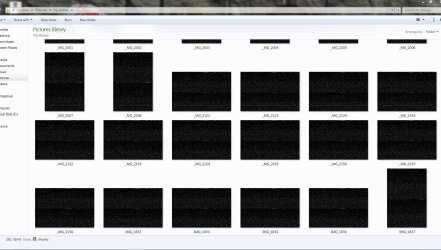
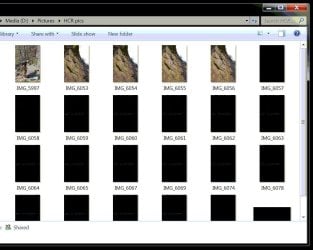
I just imported all of my personal photos to my new windows 7 computer and most of the pictures in the various folders turn all black and are no longer viewable in both the thumbnails of windows explorer and within the windows photo gallery. If I use a different program such as Picasa, I can still see the photos, and if I copy them and view them on my old Vista machine, they work fine. When I open the folder containing them in the Windows 7 machine, all of the thumbnails initially show the proper preview, but then they all (or most) turn all black within a few seconds. If I click on a file to open it, it shows the correct image the first time, but if I close the viewer and try again, the image is all black within the viewer from then on.
 

Attachments
  • screenshot.jpg
    screenshot.jpg
    90.1 KB · Views: 1

My Computer My Computer

At a glance

Windows 7 Ultimate x64AMD A8-76002 x 4GB DDR3 2133Integrated
Computer type
PC/Desktop
Computer Manufacturer/Model Number
custom build
OS
Windows 7 Ultimate x64
CPU
AMD A8-7600
Motherboard
Gigabyte F2A88XM-HD3
Memory
2 x 4GB DDR3 2133
Graphics Card(s)
Integrated
Hard Drives
128GB SSD
500GB HDD
Antivirus
MSE
Browser
Chrome
Hi Benwlson,

Did you have any luck so far? I have had the exact same problem for a while now. Strangely, I recognize your screenshot, displaying only the top row of pictures fine.
 

My Computer My Computer

At a glance

Window 7 Professional x64
Computer type
PC/Desktop
OS
Window 7 Professional x64
Hi Benwlson and Jann,

I too have this problem after transferring files to a new system. Did you guys find a solution yet?
What kind of system are you guys using?
 

My Computer My Computer

At a glance

Windows 7 Ultimate x64AMD A8-7600G.SKill F3-17000CL11-4GBXL x 2(Built in graphics)
Computer type
PC/Desktop
Computer Manufacturer/Model Number
Custom Build
OS
Windows 7 Ultimate x64
CPU
AMD A8-7600
Motherboard
MSI A88XM-E35
Memory
G.SKill F3-17000CL11-4GBXL x 2
Graphics Card(s)
(Built in graphics)
Hard Drives
Crucial MX100 256GB
I have this same exact problem. It is on my wife's photo editing pc. (amateur photgrapher)...so you can imagine the complaints I get. I seemed to have now gotten it to the point where they don't all turn black..but if you open one in Windows Photo viewer and hit the next arrow it loads a black screen for each photo... Rather annoying. In the mean time I'm looking for alternatives to windows photo viewer...and contemplating doing a complete OS re-install :( :(

system specs: (maybe there is some commonality here)

CPU: AMD A10-7850k
RAM: 16gb DDR3
OS Drive SSD
Windows 7 64 bit.
 

My Computer My Computer

At a glance

Windows 7 64 Bit.
Computer type
PC/Desktop
OS
Windows 7 64 Bit.
Hi Jack5577,

Yes, there is some commonality, the system I built was an A8 7600 on an MSI motherboard. I managed to fix the problem by removing the display driver completely (not just uninstall, google for removal tool) and then reinstall the one from the msi (or your motherboards manufacturer's) website, not the AMD website. Let me know if this helps. Good luck!
 

My Computer My Computer

At a glance

Windows 7 Ultimate x64AMD A8-7600G.SKill F3-17000CL11-4GBXL x 2(Built in graphics)
Computer type
PC/Desktop
Computer Manufacturer/Model Number
Custom Build
OS
Windows 7 Ultimate x64
CPU
AMD A8-7600
Motherboard
MSI A88XM-E35
Memory
G.SKill F3-17000CL11-4GBXL x 2
Graphics Card(s)
(Built in graphics)
Hard Drives
Crucial MX100 256GB
Interesting.. I have a gigabyte MB with the A88x chipset. I'll remove the driver using a removal tool and then reinstall the mb manufacturers drivers and see if that does the trick. Thanks for the heads up. I'll repost if I solve the issue.
 

My Computer My Computer

At a glance

Windows 7 64 Bit.
Computer type
PC/Desktop
OS
Windows 7 64 Bit.
That did the trick! Thanks!

Jack
 

My Computer My Computer

At a glance

Windows 7 64 Bit.
Computer type
PC/Desktop
OS
Windows 7 64 Bit.
Glad I could help! :)
 

My Computer My Computer

At a glance

Windows 7 Ultimate x64AMD A8-7600G.SKill F3-17000CL11-4GBXL x 2(Built in graphics)
Computer type
PC/Desktop
Computer Manufacturer/Model Number
Custom Build
OS
Windows 7 Ultimate x64
CPU
AMD A8-7600
Motherboard
MSI A88XM-E35
Memory
G.SKill F3-17000CL11-4GBXL x 2
Graphics Card(s)
(Built in graphics)
Hard Drives
Crucial MX100 256GB
other work around

hey,

thanks for figuring out this was display driver-related. i didnt like your solution tho so i found sage thumbs. now wife is happy again and it works like it should with amd driver.

https://code.google.com/p/sagethumbs/

Nipplebeards
 

My Computer My Computer

At a glance

windows7 home premiuma10-77008gbno
Computer type
PC/Desktop
Computer Manufacturer/Model Number
custom
OS
windows7 home premium
CPU
a10-7700
Motherboard
asrock a78
Memory
8gb
Graphics Card(s)
no
if this fixes me I'll be forever in your debt! This momma thought I lost all my pictures.
 

Attachments

  • 10397107_10153681229945760_1643448573327336882_o.jpg
    10397107_10153681229945760_1643448573327336882_o.jpg
    244.7 KB · Views: 0

My Computer My Computer

At a glance

Windows 7
Computer type
PC/Desktop
Computer Manufacturer/Model Number
HP
OS
Windows 7
Hi there, Good day to you.

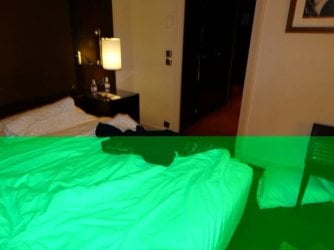
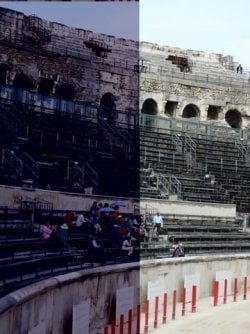
I have joined forum because after several months, I came across this thread to which I am responding. I attach some interesting photos. When I view photos in Explorer as "Large Icons", or "Extra Large Icons". the thumb nails change colour right in front of me. It is dramatic. If I click on a photo to see in full screen, the enlarged size is also corrupted. There is more. If I go back to the original folder, the corruption is permanent in the folder. Not all photos get corrupted. Not all photos get "attacked" by the same colour.

Photos on the SD Card in the Camera are perfect.

I have used Kaspersky paid version, Avast free version, Windows scanner (Microsoft Safety Scanner - Free Virus Scan with the Microsoft Safety Scanner), Norton, Bidefender on line virus checkers. There is no virus.

If I load the photos form the SD Card again, different photos get corrupted.

I have updated drivers. Made no difference.

This started happening in the last 6 months. Nothing changed. I am unable to create travel videos.

I have changed disk and installed earlier version of Acronis image.

I have transferred some photos to DVDs. The images are safe on the DVD. Photos do not get "attacked" on the DVD.

I have not found anything remotely similar (yet) in the camera forums. I am hoping there is some experience in the Forum community.
HP Compaq dc7900 Model Small Form Factor PC, Model KP721Av
Windows 7, 64 bit
Intel (R) Core (TM) 2 Duo CPU 8400 @ 3.00 GHZ
8 Gb GB of Ram
Intel (R) Q45/Q43 Express chipset (Microsoft Corporation-WDDM 1.1)
Motherboard Product Hewlett-Packard Motherboard 3031h
HP LE2201w LCD Monitor
Western Digital Black 1 TB hard Disk


mal1938
 

Attachments

  • DSC05626.JPG
    DSC05626.JPG
    95.2 KB · Views: 16
  • DSC05757.JPG
    DSC05757.JPG
    84.2 KB · Views: 16
  • DSC06642.JPG
    DSC06642.JPG
    71.4 KB · Views: 16
  • DSC06035.JPG
    DSC06035.JPG
    82.3 KB · Views: 17
  • DSC06241.JPG
    DSC06241.JPG
    86 KB · Views: 17

My Computer My Computer

At a glance

Windows 7 64 bitIntel (R) Core (TM) 2 Duo CPU [email protected] GHZ8 GBIntel (R) Q45/Q43 Express chipset (Microsoft ...
Computer type
PC/Desktop
Computer Manufacturer/Model Number
HP Compaq dc7900 Small Form Factor PC
OS
Windows 7 64 bit
CPU
Intel (R) Core (TM) 2 Duo CPU [email protected] GHZ
Motherboard
Motherboard Product Hewlett-Packard Motherboard 3031h
Memory
8 GB
Graphics Card(s)
Intel (R) Q45/Q43 Express chipset (Microsoft Corporation-WDD
Hard Drives
WD 1 TB, and 2 Tb Data Disk (External)
Antivirus
Kaspersky
Browser
Firefox and Chrome
Back
Top