Picture Quality

pic quality

it is definitely in fine
 

My Computer

Computer Manufacturer/Model Number
HP Pavillion g6 Notebook PC
OS
windows 7 Home Premium 32 bit
Memory
4 GB
pic quality

new last xmas. been same all the time. i just keep editing a lot. am using windows live photo gallery. a mate loaned me photo elements other day, same thing.
 

My Computer

Computer Manufacturer/Model Number
HP Pavillion g6 Notebook PC
OS
windows 7 Home Premium 32 bit
Memory
4 GB
So its' still under guarantee? Good!
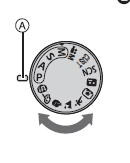
What is the mode dial set to:
It is best for you to be on auto see screenshot:
Capture7.PNG

What is the file size of the last photo you took? And can you give as much file detail as possible. If you right click on the photo in the folder where you saved it and click properties that will give the file size then click the Details tab and there you will see the image size in pixels. Is it possible for you to upload one of your photos anto a server like photobucket Here:
Register for free at Photobucket.com
 

My Computer

Computer type
PC/Desktop
OS
Microsoft Windows 7 Home Premium 64-bit 7601 Multiprocessor Free Service Pack 1
CPU
Intel(R) Core(TM) i7-3770 CPU @ 3.40GHz
Motherboard
ASUSTeK COMPUTER INC. P8H77-M
Memory
8.00 GB
Graphics Card(s)
Intel(R) HD Graphics 4000
Sound Card
On Board
Monitor(s) Displays
Dell 24"
Screen Resolution
1920 x 1080
Hard Drives
(1) INTEL SSDSC2CT180A3 ATA Device (2) ST500DM002-1BD142 ATA Device (3) WDC WD3200AAKS-75L9A0 ATA Device (4) Generic- Compact Flash USB Device (5) Generic- MS/MS-Pro USB Device (6) Generic- SD/MMC USB Device (7) Generic- SM/xD-Picture USB
PSU
500w Corsair
Case
Cooler Master
Cooling
3 Fans
Keyboard
Logitech MK300
Mouse
Logitech WOM
Internet Speed
75Mb
Antivirus
Norton 360
Browser
Firefox, Opera, IE
pic quality

all gettin to technical for me now. thanks for all your help but will leave it now. Tom
 

My Computer

Computer Manufacturer/Model Number
HP Pavillion g6 Notebook PC
OS
windows 7 Home Premium 32 bit
Memory
4 GB
"I have camera panasonic lumix dmc fz45. pictures look good on camera lcd screen. when transferred to windows live photo gallery they are dull and need serious editing."

Camera LCDs typically increase the contrast so the small image is easier to see.

- Check a histogram of your images, in the camera and on the computer; they should cover the full range in bright outdoor pictures.

- Reset your camera to defaults.

- Try a non-MS image viewer. (e.g. irfanview).

- Post a pic here (or cropped portion).
 

My Computer

Computer Manufacturer/Model Number
eMachines ET1831-7
OS
Windows 7 Ultimate
CPU
Pentium Dual-Core CPU E5400 @ 2.70GHz
Motherboard
EMCP73VT-PM
Memory
4096M
Graphics Card(s)
nVidia 8400GS
Sound Card
built-in Realtek
Monitor(s) Displays
Acer 20"
Screen Resolution
1680x1050
Hard Drives
Seagate ST3750528AS ATA 500G
Other Info
Dual-boot with Linux.
all gettin to technical for me now. thanks for all your help but will leave it now. Tom
Hi Tom
What a ashame to stop now when I feel we are getting close to a solution but I can fully undestand if you find it is getting too techie for you. I run a small club locally specifically desigend for real beginners. Just please give this a try. There is a link at the end of this message, click on it and then click Contact Us in the menu. No need to register just fill in the contact us form and that will come straight to me. I will then reply and exlpain what I have in mind. Just give it a try. No need to procedd if you decide not too but I guarantee that if you try it you won't regret it.
John
Here's the link:
Welcome
 

My Computer

Computer type
PC/Desktop
OS
Microsoft Windows 7 Home Premium 64-bit 7601 Multiprocessor Free Service Pack 1
CPU
Intel(R) Core(TM) i7-3770 CPU @ 3.40GHz
Motherboard
ASUSTeK COMPUTER INC. P8H77-M
Memory
8.00 GB
Graphics Card(s)
Intel(R) HD Graphics 4000
Sound Card
On Board
Monitor(s) Displays
Dell 24"
Screen Resolution
1920 x 1080
Hard Drives
(1) INTEL SSDSC2CT180A3 ATA Device (2) ST500DM002-1BD142 ATA Device (3) WDC WD3200AAKS-75L9A0 ATA Device (4) Generic- Compact Flash USB Device (5) Generic- MS/MS-Pro USB Device (6) Generic- SD/MMC USB Device (7) Generic- SM/xD-Picture USB
PSU
500w Corsair
Case
Cooler Master
Cooling
3 Fans
Keyboard
Logitech MK300
Mouse
Logitech WOM
Internet Speed
75Mb
Antivirus
Norton 360
Browser
Firefox, Opera, IE
pic quality

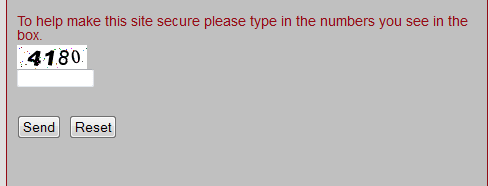
not my day. tried that contact page, asking me to fill in numbers in the box. i could not see any numbers.
 

My Computer

Computer Manufacturer/Model Number
HP Pavillion g6 Notebook PC
OS
windows 7 Home Premium 32 bit
Memory
4 GB
not my day. tried that contact page, asking me to fill in numbers in the box. i could not see any numbers.
This is what you will see although the actual numbers will be different every time you go onto the page. In this case you would type "4180" in the box immediately below the numbers. Different numbers get generated every time someone opens this page. It is called CAPTCHA.
Capture8.PNG
 

My Computer

Computer type
PC/Desktop
OS
Microsoft Windows 7 Home Premium 64-bit 7601 Multiprocessor Free Service Pack 1
CPU
Intel(R) Core(TM) i7-3770 CPU @ 3.40GHz
Motherboard
ASUSTeK COMPUTER INC. P8H77-M
Memory
8.00 GB
Graphics Card(s)
Intel(R) HD Graphics 4000
Sound Card
On Board
Monitor(s) Displays
Dell 24"
Screen Resolution
1920 x 1080
Hard Drives
(1) INTEL SSDSC2CT180A3 ATA Device (2) ST500DM002-1BD142 ATA Device (3) WDC WD3200AAKS-75L9A0 ATA Device (4) Generic- Compact Flash USB Device (5) Generic- MS/MS-Pro USB Device (6) Generic- SD/MMC USB Device (7) Generic- SM/xD-Picture USB
PSU
500w Corsair
Case
Cooler Master
Cooling
3 Fans
Keyboard
Logitech MK300
Mouse
Logitech WOM
Internet Speed
75Mb
Antivirus
Norton 360
Browser
Firefox, Opera, IE
numbers

yes, my daughter found the numbers.
 

My Computer

Computer Manufacturer/Model Number
HP Pavillion g6 Notebook PC
OS
windows 7 Home Premium 32 bit
Memory
4 GB
pic quality

took my camera to currys. guy put my card into a large mac and pics were great. says it is a laptop problem
 

My Computer

Computer Manufacturer/Model Number
HP Pavillion g6 Notebook PC
OS
windows 7 Home Premium 32 bit
Memory
4 GB
took my camera to currys. guy put my card into a large mac and pics were great. says it is a laptop problem
This seems a bit odd to me but lets try a different photo viewer. I suggest you try the free viewer "Irfanview" this you can download from here:
Download IrfanView Free
Try your images in that.
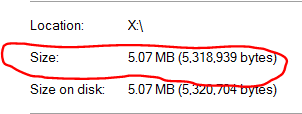
The reason I am a bit sceptical is that you say the sample photos on your PC show fine, it's just the ones from your camera that are poor. Can you have another try at lookng at the file size of one of the images. As I said before this is straightforward just right click on the image in the folder where you saved it. click "Properties" right at the bottom of the list and look for the size. it will look like this:
Capture9.PNG
 

My Computer

Computer type
PC/Desktop
OS
Microsoft Windows 7 Home Premium 64-bit 7601 Multiprocessor Free Service Pack 1
CPU
Intel(R) Core(TM) i7-3770 CPU @ 3.40GHz
Motherboard
ASUSTeK COMPUTER INC. P8H77-M
Memory
8.00 GB
Graphics Card(s)
Intel(R) HD Graphics 4000
Sound Card
On Board
Monitor(s) Displays
Dell 24"
Screen Resolution
1920 x 1080
Hard Drives
(1) INTEL SSDSC2CT180A3 ATA Device (2) ST500DM002-1BD142 ATA Device (3) WDC WD3200AAKS-75L9A0 ATA Device (4) Generic- Compact Flash USB Device (5) Generic- MS/MS-Pro USB Device (6) Generic- SD/MMC USB Device (7) Generic- SM/xD-Picture USB
PSU
500w Corsair
Case
Cooler Master
Cooling
3 Fans
Keyboard
Logitech MK300
Mouse
Logitech WOM
Internet Speed
75Mb
Antivirus
Norton 360
Browser
Firefox, Opera, IE
Upload an Image? Maybe?
 

My Computer

Computer type
PC/Desktop
Computer Manufacturer/Model Number
Self Build
OS
MS Windows 7 Professional 64-bit SP1
CPU
AMD FX(tm)-6100 Six-Core Processor Socket AM3+ (942)
Motherboard
ASUSTeK COMPUTER INC. SABERTOOTH 990FX (AM3r2)
Memory
8.00 GB Dual-Channel DDR3 @ 802MHz (11-11-11-36) 1.5Volts
Graphics Card(s)
NVIDIA GeForce GTX 560 Ti
Sound Card
Onboard Realtek HD
Monitor(s) Displays
shimian (1920x1080@60Hz)
Screen Resolution
1920*1080
Hard Drives
OCZ-AGIL ITY3 SATA Disk Device 120GB
PSU
Corsair TX 750
Case
Corsair
Cooling
WaterCooled
Keyboard
Microsoft Wired
Mouse
Logitech USB Optical TiltWheel Mouse
Internet Speed
Realtek PCIe GBE Family Controller 20MB*1MB
Antivirus
Avast
Browser
Firefox
Other Info
150GB Internal Hard Drive for Backing Up Important Files -
Hauppauge Nova-DT Dual DVB-T Tuner Device (+IR) -
USB PC Camera with Mic (SN9C105)
pic quality

put a load of pics on today all around 9.5 to 13 MB. have edited them all now as they were awful.
 

My Computer

Computer Manufacturer/Model Number
HP Pavillion g6 Notebook PC
OS
windows 7 Home Premium 32 bit
Memory
4 GB
will download that irfanview and see what happens
 

My Computer

Computer Manufacturer/Model Number
HP Pavillion g6 Notebook PC
OS
windows 7 Home Premium 32 bit
Memory
4 GB
pic quality

downloaded that irfanview. cannot get pics on to it. they went straight to windows photo gallery
 

My Computer

Computer Manufacturer/Model Number
HP Pavillion g6 Notebook PC
OS
windows 7 Home Premium 32 bit
Memory
4 GB
You need to tell the image to open in Irfanview. Right click on one of the images, Click "Open with" then if Irfanview is not in the list click "Choose default Program" Again if Irfanview is not in the list then click "Browse" and then go to where Irfanview is installed on your C drive and click on its .exe file.
 

My Computer

Computer type
PC/Desktop
OS
Microsoft Windows 7 Home Premium 64-bit 7601 Multiprocessor Free Service Pack 1
CPU
Intel(R) Core(TM) i7-3770 CPU @ 3.40GHz
Motherboard
ASUSTeK COMPUTER INC. P8H77-M
Memory
8.00 GB
Graphics Card(s)
Intel(R) HD Graphics 4000
Sound Card
On Board
Monitor(s) Displays
Dell 24"
Screen Resolution
1920 x 1080
Hard Drives
(1) INTEL SSDSC2CT180A3 ATA Device (2) ST500DM002-1BD142 ATA Device (3) WDC WD3200AAKS-75L9A0 ATA Device (4) Generic- Compact Flash USB Device (5) Generic- MS/MS-Pro USB Device (6) Generic- SD/MMC USB Device (7) Generic- SM/xD-Picture USB
PSU
500w Corsair
Case
Cooler Master
Cooling
3 Fans
Keyboard
Logitech MK300
Mouse
Logitech WOM
Internet Speed
75Mb
Antivirus
Norton 360
Browser
Firefox, Opera, IE
pic quality

have uninstalled it now. i lost my homepage it seem to take over everything. have got a 10" jessops digital photo frame. put card straight into it and pics ok
 

My Computer

Computer Manufacturer/Model Number
HP Pavillion g6 Notebook PC
OS
windows 7 Home Premium 32 bit
Memory
4 GB
Have you tried altering the brightness contrast on your Laptop? Most laptops are set to low, for power saving. Should be a function key to press and hold, then press one of the f keys, should be a logo on the function keys F1 through to F12 For brightness / Contrast.
 

My Computer

Computer type
PC/Desktop
Computer Manufacturer/Model Number
Self Build
OS
MS Windows 7 Professional 64-bit SP1
CPU
AMD FX(tm)-6100 Six-Core Processor Socket AM3+ (942)
Motherboard
ASUSTeK COMPUTER INC. SABERTOOTH 990FX (AM3r2)
Memory
8.00 GB Dual-Channel DDR3 @ 802MHz (11-11-11-36) 1.5Volts
Graphics Card(s)
NVIDIA GeForce GTX 560 Ti
Sound Card
Onboard Realtek HD
Monitor(s) Displays
shimian (1920x1080@60Hz)
Screen Resolution
1920*1080
Hard Drives
OCZ-AGIL ITY3 SATA Disk Device 120GB
PSU
Corsair TX 750
Case
Corsair
Cooling
WaterCooled
Keyboard
Microsoft Wired
Mouse
Logitech USB Optical TiltWheel Mouse
Internet Speed
Realtek PCIe GBE Family Controller 20MB*1MB
Antivirus
Avast
Browser
Firefox
Other Info
150GB Internal Hard Drive for Backing Up Important Files -
Hauppauge Nova-DT Dual DVB-T Tuner Device (+IR) -
USB PC Camera with Mic (SN9C105)
Hi Tom
Irfanview does not take over everything, during the installation you had the choice to install other items as well like an extra toolbar and a change of homepage. You MUST have agreed to install these, ther is a checkbox alongside each item for you to chosse or not! You may have missed them but it does illustrate the wisdom in reading the notes that are there for you. You also had the choice of making Irfanview the default program for various file extentions, JPEG among them. Again you must have unchecked the boxes otherwise all your graphic image files would open in Irfanview. As you chose not to have Irfanview open any files it obviously can't as your Windows Photo Viewer is still the default viewer.
Buying the digital photo frame has really only proven that the images on your card are OK but we knew that already when you went to Curry's. It wont help sove the problem with the laptop.
I would strongly recommend that you install Irfanview again and this time take note of the choices! It really is the only way to get anywhere I feel!
BTW has your laptop got a card reader?
 

My Computer

Computer type
PC/Desktop
OS
Microsoft Windows 7 Home Premium 64-bit 7601 Multiprocessor Free Service Pack 1
CPU
Intel(R) Core(TM) i7-3770 CPU @ 3.40GHz
Motherboard
ASUSTeK COMPUTER INC. P8H77-M
Memory
8.00 GB
Graphics Card(s)
Intel(R) HD Graphics 4000
Sound Card
On Board
Monitor(s) Displays
Dell 24"
Screen Resolution
1920 x 1080
Hard Drives
(1) INTEL SSDSC2CT180A3 ATA Device (2) ST500DM002-1BD142 ATA Device (3) WDC WD3200AAKS-75L9A0 ATA Device (4) Generic- Compact Flash USB Device (5) Generic- MS/MS-Pro USB Device (6) Generic- SD/MMC USB Device (7) Generic- SM/xD-Picture USB
PSU
500w Corsair
Case
Cooler Master
Cooling
3 Fans
Keyboard
Logitech MK300
Mouse
Logitech WOM
Internet Speed
75Mb
Antivirus
Norton 360
Browser
Firefox, Opera, IE
Have you tried altering the brightness contrast on your Laptop? Most laptops are set to low, for power saving. Should be a function key to press and hold, then press one of the f keys, should be a logo on the function keys F1 through to F12 For brightness / Contrast.
If we can get Tom to upload a file to Photobucket we can see if this is indeed the problem. If it is then I can't see why the Win 7 sample images show OK (See earlier post)
 

My Computer

Computer type
PC/Desktop
OS
Microsoft Windows 7 Home Premium 64-bit 7601 Multiprocessor Free Service Pack 1
CPU
Intel(R) Core(TM) i7-3770 CPU @ 3.40GHz
Motherboard
ASUSTeK COMPUTER INC. P8H77-M
Memory
8.00 GB
Graphics Card(s)
Intel(R) HD Graphics 4000
Sound Card
On Board
Monitor(s) Displays
Dell 24"
Screen Resolution
1920 x 1080
Hard Drives
(1) INTEL SSDSC2CT180A3 ATA Device (2) ST500DM002-1BD142 ATA Device (3) WDC WD3200AAKS-75L9A0 ATA Device (4) Generic- Compact Flash USB Device (5) Generic- MS/MS-Pro USB Device (6) Generic- SD/MMC USB Device (7) Generic- SM/xD-Picture USB
PSU
500w Corsair
Case
Cooler Master
Cooling
3 Fans
Keyboard
Logitech MK300
Mouse
Logitech WOM
Internet Speed
75Mb
Antivirus
Norton 360
Browser
Firefox, Opera, IE
Back
Top