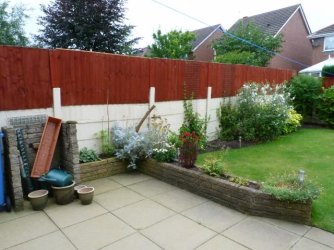
pic quality
card reader ? will try the irnaview again
card reader ? will try the irnaview again
My Computer
- Computer Manufacturer/Model Number
- HP Pavillion g6 Notebook PC
- OS
- windows 7 Home Premium 32 bit
- Memory
- 4 GB

Have you tried altering the brightness contrast on your Laptop? Most laptops are set to low, for power saving. Should be a function key to press and hold, then press one of the f keys, should be a logo on the function keys F1 through to F12 For brightness / Contrast.

A slot in the side of your laptop where you put the card from your camera. If none how do you get the photos from the card into the computer? Do you use the same usb cable as when you download the photos from the camera's internal memory. I hope so because if you do then we are near to the answer i think!card reader ?

Have you tried altering the brightness contrast on your Laptop? Most laptops are set to low, for power saving. Should be a function key to press and hold, then press one of the f keys, should be a logo on the function keys F1 through to F12 For brightness / Contrast.

tried uploading photo. keeps failingHave you tried altering the brightness contrast on your Laptop? Most laptops are set to low, for power saving. Should be a function key to press and hold, then press one of the f keys, should be a logo on the function keys F1 through to F12 For brightness / Contrast.
it may also be a combination of Fn and the left/right or up/down arrow keys .
have you been able to try putting the pics onto a different computer to see if they remain the same .
also anthonys idea of uploading a pic here for us to check is a very good one.
to upload, click the paperclip in the reply box and browse to an image from the window that opens, click upload and make your post,
we can download it and see how it looks in our photo gallery and other viewers for you.
make sure its a photo that is less than 10MB in size. You cannot upload a larger file. 10MB Max.tried uploading photo. keeps failingHave you tried altering the brightness contrast on your Laptop? Most laptops are set to low, for power saving. Should be a function key to press and hold, then press one of the f keys, should be a logo on the function keys F1 through to F12 For brightness / Contrast.
it may also be a combination of Fn and the left/right or up/down arrow keys .
have you been able to try putting the pics onto a different computer to see if they remain the same .
also anthonys idea of uploading a pic here for us to check is a very good one.
to upload, click the paperclip in the reply box and browse to an image from the window that opens, click upload and make your post,
we can download it and see how it looks in our photo gallery and other viewers for you.
Set the color for an LCD monitor
- To get the best color displayed on your LCD monitor, make sure to set it to 32-bit color. This measurement refers to color depth, which is the number of color values that can be assigned to a single pixel in an image. Color depth can range from 1 bit (black-and-white) to 32 bits (over 16.7 million colors). For more information, see Change color management settings.
- right click an empty area of the desktop and select open Screen Resolution.
- Click Advanced settings, and then click the Monitor tab.
- Under Colors, select True Color (32 bit), and then click OK.
Yes this looks fine but you must have done some editing as this is not straight from the camera (or card) Your camera records a file that is between 9 and 13 meg and this one is minute by comparison. Less than a third of a MB! You must have at least resized it which sort of destroys the whole idea. This is why I wanted you to put an original file up on Photobucket!!!! What does the photo you uploaded look like on your PC when viewed in WPG?
same i'm afraidHere's one more thing to try.
Tom,
Please:
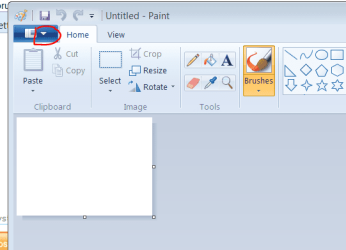
Click the Start Button. Click "All Programs" Find "Accessories" Click it then search down the list for Paint and double click it. This will open The Paint Program. At the top right click the arrow head ringed on the attached screenshot here:
View attachment 226876
Then click "Open" and go to where you store your photos . Select one and click "Open" your pictire will appear in Paint. How does that look?
would love to sort but feeling like am gettin on folks nerves now.So are you saying that we should stop here? You are happy to have a good camera that you can't view the results properly on your PC?