Solved Pin a document to the taskbar

Jellycat

New member
Local time
10:46 AM
Messages
23
I hope I'm in the right section ? I would like to pin a Microsoft works document to the taskbar so I can open that specific document with just one click. I have tried pinning it to the taskbar but all that does is open Microsoft works and not the actual document. Can someone help me ?
 

My Computer

Computer Manufacturer/Model Number
Dell
OS
windows 7 home premium 64bit
CPU
Intel Celeron
Memory
4GB
Cooling
Notebook Cooler ZM-NC2000
Internet Speed
>10Mb
Yes, it can be done. See for yourself if that's what you're looking for (if not, you're stuck with the items in a jump list)

1) Create a new folder wherever it's convenient for you (Desktop, My Documents etc.). Anything you put into this folder will show in the toolbar.

2) Unlock the task bar, if you haven't yet...Right-click on the taskbar -> Toolbars -> New toolbar… (and browse to the folder you just created)

3) Drag/drop your documents (or shortcuts to them) into that folder.

4)To improve an unify the looks, right click the resize handle of the toolbar . Uncheck "show text" and "show title" and right-click "view" "Large icons"

5) (If you so desire) Lock the taskbar again..(.it removes the resize handles;)

I just pinned 2 RTFs for demonstrations sake. One Click on them opens them in my standard application for RTF.
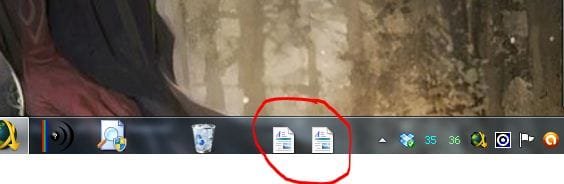
Capture.JPG

-DG
Edit: To remove what you just created simply right click the task bar go to tool bars and uncheck the folder name created in #1

 

My Computer

Computer Manufacturer/Model Number
HP m8000n
OS
Windows 7 Ultimate x86
CPU
DualCore AMD Athlon 64 X2, 2600 MHz 5200+
Motherboard
Asus M2N68-LA (Narra)
Memory
Samsung 2GB DDR2
Graphics Card(s)
Onboard NVIDIA GeForce 6150SE nForce 430
Sound Card
Onboard nVIDIA nForce 6100-430 (MCP61P)
Monitor(s) Displays
Westinghouse 19" LED
Screen Resolution
1280x1024
Hard Drives
SATA II Seagate Barracuda 500GB
USB II WD Elements 500GB
USB II WD My Book 1TB
USB II WD My Book 2TB
PSU
Stock (HP)
Case
Stock (HP)
Cooling
Stock
Keyboard
Logitech Classic KB 200
Mouse
Standard HP opticle USB mouse
Try this
Put the document on desktop.

Make suer that the bar is unlocked, then drag to the bar
Hope it works.
 

My Computer

Computer type
PC/Desktop
Computer Manufacturer/Model Number
Dell XPS 420
OS
Windows 10, Home Clean Install
CPU
Intel Core2 processsor Q8200(2.33Ghz 1333FSB) Quad Core Tech
Motherboard
Dell
Memory
6 gb
Graphics Card(s)
ATI Radeon 256MB HD3650
Sound Card
Intergrated 7.1 Channel Audio
Monitor(s) Displays
Dell SP2009W 20"
Hard Drives
640 GB Serial ATA Hard drive
Cooling
Fan
Keyboard
Dell USB Keyboard
Mouse
Dell Premium Optical USB
Internet Speed
DSL 2.85
That works too, Richard no matter if the task bar is locked or not.
The difference is: with your method, the application (in my case Wordpad) gets pinned and the document is in its jump list. (And of course you'll need 2 clicks to open the doc.)
Advantage in your version: the task bar won't be cluttered with documents in case you have more than just 1 or 2 :D

-DG
 

My Computer

Computer Manufacturer/Model Number
HP m8000n
OS
Windows 7 Ultimate x86
CPU
DualCore AMD Athlon 64 X2, 2600 MHz 5200+
Motherboard
Asus M2N68-LA (Narra)
Memory
Samsung 2GB DDR2
Graphics Card(s)
Onboard NVIDIA GeForce 6150SE nForce 430
Sound Card
Onboard nVIDIA nForce 6100-430 (MCP61P)
Monitor(s) Displays
Westinghouse 19" LED
Screen Resolution
1280x1024
Hard Drives
SATA II Seagate Barracuda 500GB
USB II WD Elements 500GB
USB II WD My Book 1TB
USB II WD My Book 2TB
PSU
Stock (HP)
Case
Stock (HP)
Cooling
Stock
Keyboard
Logitech Classic KB 200
Mouse
Standard HP opticle USB mouse
Dave to be honest, I was not trying to give a better method. We actually posted at the same time. Iwas surprised to see your answer when done. So the OP knows, Sledges answer is excellent.
 

My Computer

Computer type
PC/Desktop
Computer Manufacturer/Model Number
Dell XPS 420
OS
Windows 10, Home Clean Install
CPU
Intel Core2 processsor Q8200(2.33Ghz 1333FSB) Quad Core Tech
Motherboard
Dell
Memory
6 gb
Graphics Card(s)
ATI Radeon 256MB HD3650
Sound Card
Intergrated 7.1 Channel Audio
Monitor(s) Displays
Dell SP2009W 20"
Hard Drives
640 GB Serial ATA Hard drive
Cooling
Fan
Keyboard
Dell USB Keyboard
Mouse
Dell Premium Optical USB
Internet Speed
DSL 2.85
Nah, no worries, Richard...we're good :D
Now the TS has two different methods to pick from.

Like I said before...options are good! I like options!!:thumbsup:
 

My Computer

Computer Manufacturer/Model Number
HP m8000n
OS
Windows 7 Ultimate x86
CPU
DualCore AMD Athlon 64 X2, 2600 MHz 5200+
Motherboard
Asus M2N68-LA (Narra)
Memory
Samsung 2GB DDR2
Graphics Card(s)
Onboard NVIDIA GeForce 6150SE nForce 430
Sound Card
Onboard nVIDIA nForce 6100-430 (MCP61P)
Monitor(s) Displays
Westinghouse 19" LED
Screen Resolution
1280x1024
Hard Drives
SATA II Seagate Barracuda 500GB
USB II WD Elements 500GB
USB II WD My Book 1TB
USB II WD My Book 2TB
PSU
Stock (HP)
Case
Stock (HP)
Cooling
Stock
Keyboard
Logitech Classic KB 200
Mouse
Standard HP opticle USB mouse
Thanks so much SledgeDG and richc46 :). I like both methods but prefer SledgeDG's - sorry richc46 :). Excellent help here as always.
 
Last edited:

My Computer

Computer Manufacturer/Model Number
Dell
OS
windows 7 home premium 64bit
CPU
Intel Celeron
Memory
4GB
Cooling
Notebook Cooler ZM-NC2000
Internet Speed
>10Mb
No reason to be sorry. We were not compteing. Just want you to find an answer to your question.
 

My Computer

Computer type
PC/Desktop
Computer Manufacturer/Model Number
Dell XPS 420
OS
Windows 10, Home Clean Install
CPU
Intel Core2 processsor Q8200(2.33Ghz 1333FSB) Quad Core Tech
Motherboard
Dell
Memory
6 gb
Graphics Card(s)
ATI Radeon 256MB HD3650
Sound Card
Intergrated 7.1 Channel Audio
Monitor(s) Displays
Dell SP2009W 20"
Hard Drives
640 GB Serial ATA Hard drive
Cooling
Fan
Keyboard
Dell USB Keyboard
Mouse
Dell Premium Optical USB
Internet Speed
DSL 2.85
Thanks richc46 :).
 

My Computer

Computer Manufacturer/Model Number
Dell
OS
windows 7 home premium 64bit
CPU
Intel Celeron
Memory
4GB
Cooling
Notebook Cooler ZM-NC2000
Internet Speed
>10Mb
Back
Top