pin folder to start menu

Caddish

New member
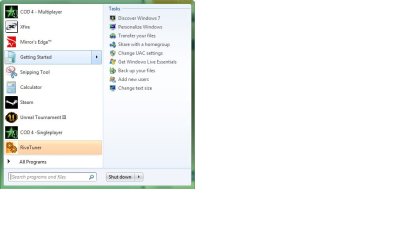
Hi I was wondering if it is possible to have a folder pinned in the start menu behaving like the Getting Started icon, that is when I hover on the folder I want for example my game to show on the right
 

My Computer

Computer Manufacturer/Model Number
Clevo m860tu
OS
Windows 7 x64 RC1
CPU
P8400 @ 2.24ghz
Memory
2go ddr3
Graphics Card(s)
9800m gt
Monitor(s) Displays
15.4" and 22"
Screen Resolution
Both wsxga+
Hard Drives
320go@5400rpm
Keyboard
Apple Aluminium keyboard
Mouse
Logitech VX Revolution
Internet Speed
8mbit/s

My Computer

Computer type
PC/Desktop
Computer Manufacturer/Model Number
Self built custom
OS
64-bit Windows 11 Pro for Workstations
CPU
Intel i7-8700K OC'd to 5 GHz
Motherboard
ASUS ROG Maximus XI Formula Z390
Memory
64 GB (4x16GB) G.SKILL TridentZ RGB DDR4 3600 MHz
Graphics Card(s)
ASUS ROG-STRIX-GTX1080TI-O11G-GAMING
Sound Card
Integrated
Monitor(s) Displays
2 x Samsung Odyssey G7 27"
Screen Resolution
2560x1440
Hard Drives
1TB Samsung 990 PRO M.2,
4TB Samsung 990 PRO PRO M.2,
TerraMaster F8 SSD Plus NAS
PSU
Seasonic Prime Titanium 850W
Case
Thermaltake Core P3
Cooling
Corsair Hydro H115i
Keyboard
Logitech wireless K800
Mouse
Logitech MX Master 4
Internet Speed
2 Gb/s Download and 100 Mb/s Upload
Antivirus
Malwarebyte Anti-Malware Premium
Browser
Google Chrome
Other Info
Logitech Z625 speaker system,
Logitech BRIO 4K Pro webcam,
HP Color LaserJet Pro MFP M477fdn,
APC SMART-UPS RT 1000 XL - SURT1000XLI,
Galaxy S23 Plus phone
Thanks but this way the folder is only a link what I wish is that when I hover on the folder the content of the folder display on the left like in the attached thumbnail
 

Attachments

  • Untitled.jpg
    Untitled.jpg
    70.9 KB · Views: 111

My Computer

Computer Manufacturer/Model Number
Clevo m860tu
OS
Windows 7 x64 RC1
CPU
P8400 @ 2.24ghz
Memory
2go ddr3
Graphics Card(s)
9800m gt
Monitor(s) Displays
15.4" and 22"
Screen Resolution
Both wsxga+
Hard Drives
320go@5400rpm
Keyboard
Apple Aluminium keyboard
Mouse
Logitech VX Revolution
Internet Speed
8mbit/s
I don't think there is a way. It's one of my pet peeves with Windows 7. I have 4 "flyout" menus above programs and I miss them when I boot into Windows 7. :(
 

My Computer

Computer Manufacturer/Model Number
Haha! You peeked. Why so nosey?
OS
XP / Windows 7 Pro RTM
Thanks but this way the folder is only a link what I wish is that when I hover on the folder the content of the folder display on the left like in the attached thumbnail

Hello Caddish.

This feature monitors applications and...particular, compatible applications, for tasks and internal programs they can open.It is a new ,handy feature but it can only be used for apps, not folders.

The only thing you can do is have Windows Explorer pinned to taskbar which shows you the latest opened folders on the right pane.
 

My Computer

Computer Manufacturer/Model Number
ENIAC
OS
Windows 7 RC 7100 32bit/64bit
CPU
Intel Core2Duo E4500 2.20 GHz
Motherboard
ASUS P5LD2-X/1333
Memory
2x1GB Kinsgston DDR2 800MHz
Graphics Card(s)
Nvidia 8500GT
Sound Card
Onboard High Definition Audio Device
Monitor(s) Displays
Sony Bravia 42"
Case
LINKW 2222
Cooling
Standard Intel
Keyboard
Some cheap one
Mouse
Microsoft Intellimouse something
Internet Speed
24MBps ADSL
Folders in Start menu to act like a menu

I agree! Why would Windows NOT allow you to place a folder on the start menu and also allow it to act like a menu (i.e. when you hover over it, the contents of that folder are displayed). In XP & Vista, I used this feature constantly to quickly drill down to files I needed to access. The altermative is to open up a Windows Explorer window. On the right side of the start menu (the black area) are folders that do this, what decides which folders appear there? Ugh! I used and relied on this feature so much that had I known, I probably would have just stayed with Vista. Please, can't one of you make a tweak? Where is Superman when we need him?!!!
 

My Computer

Computer Manufacturer/Model Number
HP Pavilion
OS
Windows 7
Monitor(s) Displays
Hanns-G
Hello William, and welcome to Seven Forums.

You can use the free program Vista Start Menu to have fully customizable Start Menu in Windows 7 instead.

Hope this helps,
Shawn
 

My Computer

Computer type
PC/Desktop
Computer Manufacturer/Model Number
Self built custom
OS
64-bit Windows 11 Pro for Workstations
CPU
Intel i7-8700K OC'd to 5 GHz
Motherboard
ASUS ROG Maximus XI Formula Z390
Memory
64 GB (4x16GB) G.SKILL TridentZ RGB DDR4 3600 MHz
Graphics Card(s)
ASUS ROG-STRIX-GTX1080TI-O11G-GAMING
Sound Card
Integrated
Monitor(s) Displays
2 x Samsung Odyssey G7 27"
Screen Resolution
2560x1440
Hard Drives
1TB Samsung 990 PRO M.2,
4TB Samsung 990 PRO PRO M.2,
TerraMaster F8 SSD Plus NAS
PSU
Seasonic Prime Titanium 850W
Case
Thermaltake Core P3
Cooling
Corsair Hydro H115i
Keyboard
Logitech wireless K800
Mouse
Logitech MX Master 4
Internet Speed
2 Gb/s Download and 100 Mb/s Upload
Antivirus
Malwarebyte Anti-Malware Premium
Browser
Google Chrome
Other Info
Logitech Z625 speaker system,
Logitech BRIO 4K Pro webcam,
HP Color LaserJet Pro MFP M477fdn,
APC SMART-UPS RT 1000 XL - SURT1000XLI,
Galaxy S23 Plus phone
isn't it wonderful how microsoft made something so beautiful and kept it for themselves? and how others need to make the programs to do things that everyone would want? i've never been able to use the start menu for much of anything - would be nice, it's right there...

the all programs folder - just look at it, it's a mess...

the vista start menu program is way too much....
i'm thinking of going back to a menu program i used for '98 or something similar - it was tiny and small,
you could do anything you want with it...

five years later, people are still asking the same question...
 

My Computer

Computer type
Laptop
Computer Manufacturer/Model Number
hp
OS
windows 8.1 64
Yes you can add a folder to the Start Menu (without additional utilities). Simply pin a program to your Start Menu as you normally would. Once you verified the program is there, right click the program and click Properties. Change the properties to match the requirements for your folder: [General] Add the description of your folder, [Shortcut] Change the Target, Comment, and Icon for the folder then click OK to complete. TaDah! You got what you asked for.
 

My Computer

Computer type
PC/Desktop
OS
Windows 7 Professional 64 bit
Hello and welcome, @tcwhite:

Yes you can add a folder to the Start Menu (without additional utilities). Simply pin a program to your Start Menu as you normally would. Once you verified the program is there, right click the program and click Properties. Change the properties to match the requirements for your folder: [General] Add the description of your folder, [Shortcut] Change the Target, Comment, and Icon for the folder then click OK to complete. TaDah! You got what you asked for.

This thread is more than 7 years old.
So it's a good bet the OP may no longer be following it.;)

But, thanks for your helpful advice.
And enjoy your stay.:)

Cheers,
MM
 

My Computer

Computer type
PC/Desktop
Computer Manufacturer/Model Number
Dell Studio XPS 8500
OS
OEM Windows 7 Ult (x64) SP1
CPU
Intel Core-i7 3770 @ 3.4 GHz
Motherboard
"Dell" branded
Memory
16 GB DDR3 SDRAM @ 1333 MHz
Graphics Card(s)
NVidia GeForce GT620 1 GB
Sound Card
THX TruStudio PC
Monitor(s) Displays
Dell U2410 Full HD
Hard Drives
2.0 TB SATA2 @ 7200 RPM
PSU
350W
Keyboard
MS 4000 Ergon - Wired
Mouse
Logitech Anywhere MX
Internet Speed
Cable HSI w/Turbo (router)
Antivirus
KIS-MBAM Premium-MBAE Premium
Browser
Fx (current version); IE
Other Info
And a Win7/64 Pro laptop; And a Win10/64 Pro desktop.
Back
Top