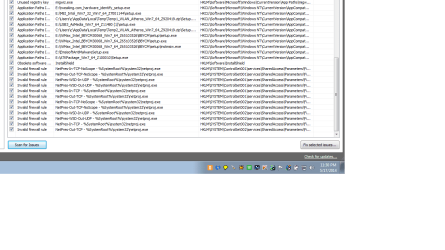
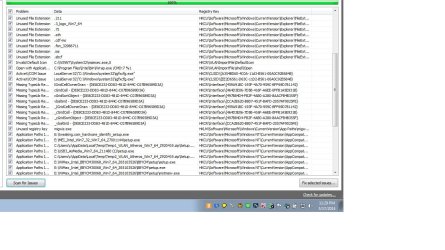
Please advise on leftovers from a re install (screenshot)

jonnyhillow

Banned
Local time
2:40 PM
Messages
637
Location
NJ native & NC
Hi everyone, forgive me if this is the wrong forum but the ccleaner forum was not helping me understand this unfortunately.

This is what i am faced with after a reinstall , where do i start and what do i do with all this , save it to a compressed folder ?

Thank you, the computer is running fine but i don't know if i need to correct all these.

Thanks for any help
 

Attachments
  • Untitled.jpg
    Untitled.jpg
    161.4 KB · Views: 7
  • Untitled.png
    Untitled.png
    20.7 KB · Views: 5

My Computer My Computer

At a glance

Microsoft Windows 7 Home Premium 64-bit 7601 ...Intel(R) Core(TM) i5-2430M CPU @ 2.40GHz6.00 GBIntel(R) HD Graphics 3000
Computer type
Laptop
Computer Manufacturer/Model Number
Asus laptop U56E
OS
Microsoft Windows 7 Home Premium 64-bit 7601 Multiprocessor Free Service Pack 1
CPU
Intel(R) Core(TM) i5-2430M CPU @ 2.40GHz
Motherboard
ASUSTeK Computer Inc. U56E
Memory
6.00 GB
Graphics Card(s)
Intel(R) HD Graphics 3000
Sound Card
(1) High Definition Audio Device (2) High Definition Audio
Screen Resolution
1366 x 768 x 32 bits (4294967296 colors) @ 60 Hz
Hard Drives
WDC WD6400BPVT-80HXZT3
The best thing you can do is ignore it.

If you "corrected" all of it, the chances of you noticing any difference is very small.

There is some risk to correcting. Possibly small, but it's there.

Why take any risk when the chances of noticeable benefit are very small?

If you had a 1 in 10 chance of having a noticeable benefit and a 1 in 10,000 chance of doing harm, maybe you'd take the chance. But I don't think those are the odds you face.

Additionally: if you correct all of that stuff and nothing bad happens, you'll be encouraged to continue to correct more stuff in the future---increasing the chance that you'll sooner or later do something you wish you hadn't done. All for little or no benefit. I realize that can be hard to do if you are at all obsessive/compulsive----I have those tendencies myself.

Concentrate on the other tools in CCleaner, particularly the regular "cleaner" section.

On the other hand---if you ever get Macrium figured out, you may feel more willing to take these types of chances since you think you could restore. But on yet another hand, Macrium or any other imaging/recovery program can fail too.
 

My Computer My Computer

At a glance

Windows 7 Home Premium SP1, 64-bitIntel Skylake i5-6600K, not overclocked8 GB HyperX DDR4-2666 (2 x 4 GB)none; graphics are integrated on CPU
Computer type
PC/Desktop
Computer Manufacturer/Model Number
Ignatz Special; 4 speed manual gearbox; factory air conditioning; one of one
OS
Windows 7 Home Premium SP1, 64-bit
CPU
Intel Skylake i5-6600K, not overclocked
Motherboard
AsRock Z170M Extreme 4, micro ATX
Memory
8 GB HyperX DDR4-2666 (2 x 4 GB)
Graphics Card(s)
none; graphics are integrated on CPU
Sound Card
onboard: Realtek ALC1150; external: USB Behringer UF0-202
Monitor(s) Displays
Dell S2340M 23 inch IPS
Screen Resolution
1600 x 900
Hard Drives
System: Crucial MX100 series SSD, 128 GB;
Data: Samsung Spinpoint 103SJ, 1 TB;
Backup: WD Caviar Green WD30EZRX-00D8PB0, 3 TB
PSU
Rosewill SilentNight 500 watt fanless, semi-modular
Case
Antec Solo II
Cooling
Noctua NH-U12S; Noctua F12 intake, Noctua S12A exhaust
Keyboard
Microsoft 200 6JH-00001 USB
Mouse
Dell or Microsoft optical wired; USB
Antivirus
Microsoft Security Essentials and Malwarebytes Premium
Browser
Pale Moon
Other Info
All fans PWM; speeds at idle: CPU circa 500 rpm; intake circa 600 rpm; exhaust circa 600 rpm; CPU temps 27 idle and 47 C load in a warm room (27 C/81 F) when running Intel Extreme Tuning Utility stress test.
Click on fix selected issues.

It will not hurt anything, you don`t want a bunch of duplicates or strays in the registry.

And keep fixing it until there are no issues left. ;)
 

My Computer My Computer

At a glance

Windows 10 Pro x64Intel Core i7 6700KGSkill TridentZ RGB 16GB 3600 16-16-16-36EVGA GTX 980 Ti SC x2
Computer type
PC/Desktop
Computer Manufacturer/Model Number
Skylake Special #666
OS
Windows 10 Pro x64
CPU
Intel Core i7 6700K
Motherboard
Asus Sabertooth Z170 Mark 1
Memory
GSkill TridentZ RGB 16GB 3600 16-16-16-36
Graphics Card(s)
EVGA GTX 980 Ti SC x2
Sound Card
Realtek High Definition
Monitor(s) Displays
AOC G2460PG
Screen Resolution
1920 x 1080 144Hz
Hard Drives
Samsung 860 Pro 256GB, Seagate Barracuda 4TB x2
PSU
EVGA 1000 P2, EVGA White Custom Braided Cables
Case
Corsair Vengeance C70 Gunmetal Black
Cooling
Corsair H100i v2, Corsair ML120 x2, Thermal Grizzly Kryonaut
Keyboard
Logitech G910 Orion Spectrum
Mouse
Logitech G700s
Internet Speed
Verizon Fios Quantum Gateway 75/75
Antivirus
Windows Defender, Malwarebytes Free 3.8.3
Browser
Chrome
Other Info
Corsair SP120 x4, LG Blu-ray Drive, Durabrand HT-395 100 Watt Dolby Digital Amp, Corsair H2100 Wireless 7.1 Headset
If it was my computer I would select Fix It.
Then it offers you the chance to save. Select save.
After a week and every thing is still working properly remove the saved Ccleaner file from your computer.
It has always worked for me using Ccleaner.

Their are other options. I use all of them along with Ccleaner.

http://www.sevenforums.com/tutorials/818-disk-cleanup-open-use.html


http://www.sevenforums.com/tutorials/76383-disk-cleanup-extended.html


http://www.sevenforums.com/tutorials/307546-windows-updates-remove-outdated-updates-windows-7-a.html

After doing all the this I do a defrag if it's not a SSD after a fresh install of Windows using Windows 7 built in defrag tool.
 

My Computer My Computer

At a glance

Windows 10 Pro. 64/ version 1709 Windows 7 Pr...Intel i7-6800K @ 4.3Corsair Platinum 16 gig @2400EVGA GTX 1070 OC
Computer type
PC/Desktop
Computer Manufacturer/Model Number
Home made Desktop
OS
Windows 10 Pro. 64/ version 1709 Windows 7 Pro/64
CPU
Intel i7-6800K @ 4.3
Motherboard
ASUS X-99 Deluxe II
Memory
Corsair Platinum 16 gig @2400
Graphics Card(s)
EVGA GTX 1070 OC
Monitor(s) Displays
Asus 27" LED LCD/VE278Q
Screen Resolution
1920-1080 or 1280-720 HDMI
Hard Drives
INTEL SSD 730-240 Gb Sata 3.0/
PSU
EVGA Platium 1200W
Case
Phanteks Luxe Tempered Glass 8 fans/ one radiator
Cooling
XSPC/ Water Cooled CPU
Keyboard
Das 4 Professional
Mouse
Logitech M705/MX Anywhere 2-S
Internet Speed
100 mbits
Antivirus
Microsoft Security Essentials/ Malwarebytes Premium 3.0/ SAS
Browser
I.E. 11 default/Firefox/ ISP Time Warner Cable/Spectrum
Other Info
LG BluRay Burner/
Sound system-KLipsch-THX/
Icy Dock ssd Hot Swap bays.
Thanks everybody, one more question, is this type of thing common after a re install?

Thanks again
 

My Computer My Computer

At a glance

Microsoft Windows 7 Home Premium 64-bit 7601 ...Intel(R) Core(TM) i5-2430M CPU @ 2.40GHz6.00 GBIntel(R) HD Graphics 3000
Computer type
Laptop
Computer Manufacturer/Model Number
Asus laptop U56E
OS
Microsoft Windows 7 Home Premium 64-bit 7601 Multiprocessor Free Service Pack 1
CPU
Intel(R) Core(TM) i5-2430M CPU @ 2.40GHz
Motherboard
ASUSTeK Computer Inc. U56E
Memory
6.00 GB
Graphics Card(s)
Intel(R) HD Graphics 3000
Sound Card
(1) High Definition Audio Device (2) High Definition Audio
Screen Resolution
1366 x 768 x 32 bits (4294967296 colors) @ 60 Hz
Hard Drives
WDC WD6400BPVT-80HXZT3
CCleaner is utterly trustworthy, perhaps the most highly regarded little tool in tech.

We've never had a verified case here that I've seen of CCleaner causing any problems. It's not something that needs to be run obsessively, but perhaps monthly or quarterly depending upon how much it finds to clean up when run.

I often have a gig of schmutz to clean up after a fresh install, mainly staging files from Windows Update. So its also a good timet o run it. I follow CCleaner with Puran Defrag Free Edition Boot Time Defrag with Full Disk Check, enabling Intelligent Optimizer on the Additional Operations tab which moves most-used files to the outer edge of the hard drive for faster reads. A Boot Time defrag includes Systems Files which is real bang for your buck. I've seen it speed up boot times by a full minute.
 
Thank you i will give it a try .
 

My Computer My Computer

At a glance

Microsoft Windows 7 Home Premium 64-bit 7601 ...Intel(R) Core(TM) i5-2430M CPU @ 2.40GHz6.00 GBIntel(R) HD Graphics 3000
Computer type
Laptop
Computer Manufacturer/Model Number
Asus laptop U56E
OS
Microsoft Windows 7 Home Premium 64-bit 7601 Multiprocessor Free Service Pack 1
CPU
Intel(R) Core(TM) i5-2430M CPU @ 2.40GHz
Motherboard
ASUSTeK Computer Inc. U56E
Memory
6.00 GB
Graphics Card(s)
Intel(R) HD Graphics 3000
Sound Card
(1) High Definition Audio Device (2) High Definition Audio
Screen Resolution
1366 x 768 x 32 bits (4294967296 colors) @ 60 Hz
Hard Drives
WDC WD6400BPVT-80HXZT3
Back
Top