please don't laugh...

I hope she didn't give up. Without sound patronizing, I wanted to compliment her one last time. My computer experience goes back to the 70's when I took programming classes in COBOL, BAL, RPG, etc. I moved on to another profession, but was always involved heavily with computers in a professional and personal capacity.

That said, I never got involved much in formatting drives. And I'm slightly embarrassed to admit, I now think I know less about it than I did a week ago.

It may be because I've moved on in age a bit, but that stuff was starting to look like Latin.

But hang in there if you are so inclined.
 

My Computer

OS
Windows 7 Home Premium 64 bit
Memory
4GB DDR3
Hope to hear if she got it working or even if she didn't.
 

My Computer

Computer type
PC/Desktop
Computer Manufacturer/Model Number
76~2.0
OS
Windows 7 Ult x64 - SP1/ Windows 8 Pro x64
CPU
Intel Core i5-3570K 4.6GHz
Motherboard
Gigabyte GA-Z77X UD3H, f18
Memory
8GB (2X4GB) DDR3 1600 Corsair Vengeance CL8 1.5v
Graphics Card(s)
Sapphire HD 7770 Vapor-X OC 1GB DDR5
Sound Card
Onboard VIA VT2021
Monitor(s) Displays
22" LCD Dell
Screen Resolution
1680x1050
Hard Drives
Samsung 840Pro 128GB SSD,
Seagate Barracuda 500GB SATA2 7200rpm 32MB cache, Seagate Barracuda 1TB SATA2 7200rpm 32MB cache,
PSU
Corsair HX650W
Case
Cooler Master Storm Scout
Cooling
Corsair H80 2x12cm Noctua NF P12 , 2x14cm case fans
Keyboard
Logitech Wave
Mouse
CM Sentinel
Internet Speed
Dismal
Antivirus
Avast
Browser
Opera Next
Other Info
Haswell laptop: HP Envy 17t-j, i7-4700MQ, GeForce 740M 2GB DDR3, 17.3" Full HD 1920x1080, 16GB RAM, Samsung 840 Pro 128GB, 1TB Hitachi 7200 HDD,
Desktop: eSATA ports,
External eSATA Seagate 500GB SATA2 7200rpm,
External WD USB 500GB
Sorry, it's been a while since I checked in. I've just been following some steps greg suggested about imaging and it's taking more time and a few more tries than expected. I'm nothing if not subborn. I WILL figure this out if its the last thing I do.
I'm still going at it, but I'll update if this works.

Thanks for all the help :)
 

My Computer

Computer Manufacturer/Model Number
Acer Aspire 4810tz
OS
Windows Home Premium 32bit
Welcome back, we were beginning to wonder if you had given up.
Good to see that you are determined to fix this computer, as long as you continue to post we will be here to help.
 

My Computer

Computer type
PC/Desktop
Computer Manufacturer/Model Number
Self Built Custom Computer.
OS
Windows 10 Pro x64
CPU
i7-4770K
Motherboard
Asus Z87 Sabertooth
Memory
16Gig DDR3-2400
Graphics Card(s)
Gigabyte GT740
Sound Card
Onboard
Monitor(s) Displays
Benq 27" - Dell 23' - Benq 22"
Screen Resolution
1680x1050
Hard Drives
Samsung 840 Pro 128g SSD
1xWestern Digital Caviar Green 1tb
2xWestern Digital Caviar Green 2 tb
PSU
Seasonic 760 watt Platinum
Case
Coolermaster Haf - X
Cooling
Noctua NH-C12P CPU Cooler
Keyboard
Logitech illuminated keyboard
Mouse
Logitech Perfomance MX
Internet Speed
Cable = speeds to 20Mbps downsteam and 512kbps upsteam
Antivirus
Avast Internet Security
Browser
Firefox
After one 2003 falling apart at the seams XP Dell, Windows image backup, Paragon Backup & Recovery, external HD, and a frozen bag of peas later, this where I'm at: Windows Home Premium is in my pc (somewhere) but I haven't booted just yet.

I've been running "repair startup" a few dozen times but I still get the "A disk read error occurred," "No bootable device," or "BOOTMGR is missing" error. :confused:

Following some knowledgable advice, I created a partition on my old XP Dell and installed Windows 7. Annoyingly enough, it installed and booted perfectly on that machine. The laptop's condition leaves much to be desired and has a tendency to overheat and shutdown -and that's where my frozen bag of peas came in. It successfully backed up the laptop image on my external HD.

I then copied it to my Acer via Windows image backup and Paragon Backup & Recovery. I have triple checked that the partition with Windows 7 is "active" and every few "repair startup" tries I do have the CD repairing and restarting.
I have attempted all steps through IDE and AHCI (because I wasn't sure which was the one to use). Right now, Windows 7 is installed in AHCI and repairing away.


I have also previously tried this in command prompt:
  • bcdedit /export C:\BCD_Backup
  • c:
  • cd boot
  • attrib bcd -s -h -r
  • ren c:\boot\bcd bcd.old
  • bootrec /RebuildBcd
But no juice. Gah, not sure what I'm doing wrong...
 

My Computer

Computer Manufacturer/Model Number
Acer Aspire 4810tz
OS
Windows Home Premium 32bit
Oh my god... You are officially "Skilled" !!! By the way, in my book... If you did the install normally on another computer and the installed OS boots up normally, you should now look at the "devil" laptop that gives you all this grieve a hard long devastating look, the "you are dead to me" look (quoted from "How I met your mother").

zzz2496

Edit: I forgot one thing... I have suspicion on your HDD/storage controller for a while, your newest post you said about the laptop has a tendency to overheat and shutdown. This incident(s) can lead to catastrophic hardware failure, and I hope now isn't the case... but it does lead me to believe that it's a hardware failure (at least I suspect your HDD/storage controller is failing).
 

My Computer

Computer Manufacturer/Model Number
Self Built
OS
Windows7 Ultimate 64bit
CPU
Intel Core 2 Quad Q6600
Motherboard
Abit IN9-32X-MMAX
Memory
DDR2 Adata 4GB
Graphics Card(s)
Nvidia GeForce GTX 285 1024 and Nvidia GeForce 8800GT 512
Sound Card
Asus Xonar HDAV 1.3
Monitor(s) Displays
Dell 2407WFP and BenQ 2400v and Philips 150v3
Screen Resolution
3840x1200 and 1024x768
Hard Drives
2 WDC 1TB
1 WDC 1.5TB
1 WDC 640GB
1 WDC 320GB
1 Seagate 200GB
PSU
Corsair TX 850W
Case
Cooler Master HAF932
Cooling
Arctic Cooling Freezer Extreme and plenty of fans...
Keyboard
MicrosoftNaturalKeyboard 4000/Apple Alu keyboard/Dinovo mini
Mouse
Logitech G5/MarbleMouseTrackball/PerformanceMX/SpacePilotPRO
Internet Speed
1.5Mbps down/384Kbps up
Other Info
APC SURT 1000XL
Logitech Z-560
Wiimote
Mikrotik Router
Linksys (now Cisco) SD2008 8 port Gigabit switch
Linksys WRT54G (acting as AP)
Apple wireless Aluminium keyboard
Apple Magic Mouse
Xbox360 wired controller
  • Like
Reactions: JMH
At this point, it might be worth it to go see if you can pick up a new HDD. Make sure to ask if you can return it if it doesn't fix it.
I am guessing either bad cable, bad HDD, or bad mobo.

It might be worth it to just take it to a tech shop and ask whats wrong too.

Nice job keeping up, following advice, and posting back! Lets get this damn thing fixed already.

~Lordbob
 

My Computer

Computer Manufacturer/Model Number
Hera
OS
Windows 7 Ultimate x64, Mint 9
CPU
Intel i5-2500k
Motherboard
ASUS P8P67 Pro
Memory
2x 4Gb Corsair VENGEANCE DDR3-1600
Graphics Card(s)
NVidia GeForce N260GTX Twin Frozr
Sound Card
Realtek HD OnBoard Audio
Monitor(s) Displays
ASUS 24" Monitor
Screen Resolution
1920x1080
Hard Drives
G.SKILL Phoenix Series 60GB SATA II MLC Internal Solid State Drive (SSD)
SAMSUNG Spinpoint F3R 1TB 7200 RPM 32MB Cache SATA II
PSU
Cooler Master Real Power Pro 750W
Case
Cooler Master Haf 932
Cooling
Fans
Keyboard
Razer Tarantula
Mouse
Razer Lachesis
Internet Speed
not fast enough
I created a partition on my old XP Dell and installed Windows 7. The laptop's condition leaves much to be desired and has a tendency to overheat and shutdown -and that's where my frozen bag of peas came in.

I had a smiler problem with my (2 years old) laptop. Dust had built up in the computer and more impotently in the fan, so the laptop was getting no ventilation. This caused my laptop to regularly get hot and often shutdown after only an hour in use. So I went to my local office supplies shop and got a can of compressed air (for under $10) and used it to clean all the dust out of my laptop.

After I did that, my laptop ran perfectly cool and never overheated. So I would suggest opening the back off your laptop and see if there is a lot of dust inside, if there is, go and get a can of compressed air and spray it all out. Once completing that, the laptop should work fine.
 
Last edited:

My Computer

Computer Manufacturer/Model Number
Self-built on 31/1/11
OS
Windows 7 Ultimate 64 bit
CPU
Intel i5 2400 @ 3.80 GHz
Motherboard
Ashrock P67 Extreme 4
Memory
Mushkin Silverline 996768 4GB
Graphics Card(s)
MSI GTX 460 760MB Cyclone Overclocked
Sound Card
Integrated
Monitor(s) Displays
Asus VH202T 20" Widescreen
Screen Resolution
1600x900
Hard Drives
SSD: OCZ Vertex 2 60GB
HDD: Hitachi Deskstar 7K1000.C 500GB
PSU
Silverstone Strider 500W
Case
Zalman Z9 Plus
Cooling
Cooler Master Hyper 212 Plus
Keyboard
Logitech Wireless Keyboard MK520
Mouse
Logitech M310
Internet Speed
3 Mbps
Other Info
UEFI: Ashrock P67/
Network Card :TP-Link WN350GD/
WEI: 7.4/
ODD: Lite-On IHAS324
Let's try manually to write the MBR to Win7 partition.

boot the 7 dvd, press Shft F10 at first screen to open command prompt, type:

Diskpart
lis vol
(get the Win7 drive letter - it might be different from PW or WinRE)
exit

Then type

bootsect /nt60 C: (replace C with whatever the 7 drive letter is)

press enter

If Win7 doesn't start now, or attempt to start but stalls at Starting Windows color orbs screen, boot back into DVD Command line to type:

bootrec.exe /fixboot
bootrec.exe /fixmbr

If Win7 doesn't start now, try running Startup Repair up to 3 separate times with reboots again.

If Win7 attempts to Start but stalls at Starting Windows color orbs, it needs to be adjusted to the new Hardware using Paragon Adpative Restore CD to Adjust Hardware.
 
Last edited:
If the MBR repair doesn't get your laptop booting into Win7.

Can you give us some more information on your old Dell laptop?
Details on the HDD so we can see if it's possible to install the Dell laptop's HDD in your Acer laptop to determine if this may be a HDD issue.
 

My Computer

Computer type
PC/Desktop
Computer Manufacturer/Model Number
76~2.0
OS
Windows 7 Ult x64 - SP1/ Windows 8 Pro x64
CPU
Intel Core i5-3570K 4.6GHz
Motherboard
Gigabyte GA-Z77X UD3H, f18
Memory
8GB (2X4GB) DDR3 1600 Corsair Vengeance CL8 1.5v
Graphics Card(s)
Sapphire HD 7770 Vapor-X OC 1GB DDR5
Sound Card
Onboard VIA VT2021
Monitor(s) Displays
22" LCD Dell
Screen Resolution
1680x1050
Hard Drives
Samsung 840Pro 128GB SSD,
Seagate Barracuda 500GB SATA2 7200rpm 32MB cache, Seagate Barracuda 1TB SATA2 7200rpm 32MB cache,
PSU
Corsair HX650W
Case
Cooler Master Storm Scout
Cooling
Corsair H80 2x12cm Noctua NF P12 , 2x14cm case fans
Keyboard
Logitech Wave
Mouse
CM Sentinel
Internet Speed
Dismal
Antivirus
Avast
Browser
Opera Next
Other Info
Haswell laptop: HP Envy 17t-j, i7-4700MQ, GeForce 740M 2GB DDR3, 17.3" Full HD 1920x1080, 16GB RAM, Samsung 840 Pro 128GB, 1TB Hitachi 7200 HDD,
Desktop: eSATA ports,
External eSATA Seagate 500GB SATA2 7200rpm,
External WD USB 500GB
I tried all options greg mentioned above ^ and some I googled but I continue to get the error:
A disk read error occrred
Press Ctrl+Alt+Del to restart

or

No bootable device --insert boot disk and press any key
(this shows up when the Windows DVD isn't in)

As to the overheat, that's my old Dell not my Acer. Thanks for the advice though :)

Dave,
(answering a question from a few pages ago) I checked my warranty with Western Digital and they told me I have no limited warranty, and that I would have to contact Acer

As to my old Dell, it's an Inspiron 5100.
 

My Computer

Computer Manufacturer/Model Number
Acer Aspire 4810tz
OS
Windows Home Premium 32bit
Too bad about the warranty, I would think WD would stand behind there product even if an OEM computer.

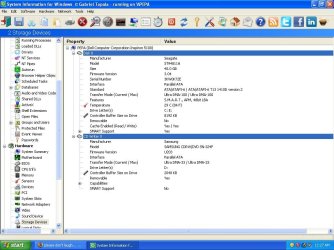
Can you download SIW-System Information for Windows, and go to 'Hardware - Storage Devices' and post a snip of the HDD info?

This info should tell us if you can put the Dell laptop HDD in the Acer and see if it will boot from the different HDD.
This will confirm if it is a HDD issue.

Since you got the Acer have you updated any drivers or the BIOS?


The dust cleaning advice mentioned previously will probably solve the Dell Inspiron 5100 overheating issue.

For future reference, if the HDD is compatible, your Dell Inspiron 5100 owner's Manual.
Page 106, at the bottom, tells you how to remove the HDD.
 

My Computer

Computer type
PC/Desktop
Computer Manufacturer/Model Number
76~2.0
OS
Windows 7 Ult x64 - SP1/ Windows 8 Pro x64
CPU
Intel Core i5-3570K 4.6GHz
Motherboard
Gigabyte GA-Z77X UD3H, f18
Memory
8GB (2X4GB) DDR3 1600 Corsair Vengeance CL8 1.5v
Graphics Card(s)
Sapphire HD 7770 Vapor-X OC 1GB DDR5
Sound Card
Onboard VIA VT2021
Monitor(s) Displays
22" LCD Dell
Screen Resolution
1680x1050
Hard Drives
Samsung 840Pro 128GB SSD,
Seagate Barracuda 500GB SATA2 7200rpm 32MB cache, Seagate Barracuda 1TB SATA2 7200rpm 32MB cache,
PSU
Corsair HX650W
Case
Cooler Master Storm Scout
Cooling
Corsair H80 2x12cm Noctua NF P12 , 2x14cm case fans
Keyboard
Logitech Wave
Mouse
CM Sentinel
Internet Speed
Dismal
Antivirus
Avast
Browser
Opera Next
Other Info
Haswell laptop: HP Envy 17t-j, i7-4700MQ, GeForce 740M 2GB DDR3, 17.3" Full HD 1920x1080, 16GB RAM, Samsung 840 Pro 128GB, 1TB Hitachi 7200 HDD,
Desktop: eSATA ports,
External eSATA Seagate 500GB SATA2 7200rpm,
External WD USB 500GB
Here's the snip Dave
 

Attachments

  • dell.JPG
    dell.JPG
    100.2 KB · Views: 42

My Computer

Computer Manufacturer/Model Number
Acer Aspire 4810tz
OS
Windows Home Premium 32bit
O_O OMG.
I don't know if I undid everything or did something right, but I switched from AHCI to IDE and my start up hung at "starting windows" and the flame animation didn't start. Then it went to "Windows is loading files..."
To clarify: the DVD is not in.

Is this false hope?
 

My Computer

Computer Manufacturer/Model Number
Acer Aspire 4810tz
OS
Windows Home Premium 32bit
AHCI/IDE is the method of accessing your HDD. DO NOT CHANGE IT once you installed your Windows, it WILL HUNG. Simply change it back to IDE will solve the start up problem.

zzz2496
 

My Computer

Computer Manufacturer/Model Number
Self Built
OS
Windows7 Ultimate 64bit
CPU
Intel Core 2 Quad Q6600
Motherboard
Abit IN9-32X-MMAX
Memory
DDR2 Adata 4GB
Graphics Card(s)
Nvidia GeForce GTX 285 1024 and Nvidia GeForce 8800GT 512
Sound Card
Asus Xonar HDAV 1.3
Monitor(s) Displays
Dell 2407WFP and BenQ 2400v and Philips 150v3
Screen Resolution
3840x1200 and 1024x768
Hard Drives
2 WDC 1TB
1 WDC 1.5TB
1 WDC 640GB
1 WDC 320GB
1 Seagate 200GB
PSU
Corsair TX 850W
Case
Cooler Master HAF932
Cooling
Arctic Cooling Freezer Extreme and plenty of fans...
Keyboard
MicrosoftNaturalKeyboard 4000/Apple Alu keyboard/Dinovo mini
Mouse
Logitech G5/MarbleMouseTrackball/PerformanceMX/SpacePilotPRO
Internet Speed
1.5Mbps down/384Kbps up
Other Info
APC SURT 1000XL
Logitech Z-560
Wiimote
Mikrotik Router
Linksys (now Cisco) SD2008 8 port Gigabit switch
Linksys WRT54G (acting as AP)
Apple wireless Aluminium keyboard
Apple Magic Mouse
Xbox360 wired controller
Your Dell HDD is PATA, your Acer HDD should be SATA.
The PATA HDD will not connect to your SATA Acer.


When your BIOS is set to AHCI the installation will load drivers for AHCI, which are different than the drivers for IDE.
There are ways to change this with the OS installed, usually requires a registry change.

But, this is interesting that it is loading files...

By all means, let it continue.

Let us know the result.
 
Last edited:

My Computer

Computer type
PC/Desktop
Computer Manufacturer/Model Number
76~2.0
OS
Windows 7 Ult x64 - SP1/ Windows 8 Pro x64
CPU
Intel Core i5-3570K 4.6GHz
Motherboard
Gigabyte GA-Z77X UD3H, f18
Memory
8GB (2X4GB) DDR3 1600 Corsair Vengeance CL8 1.5v
Graphics Card(s)
Sapphire HD 7770 Vapor-X OC 1GB DDR5
Sound Card
Onboard VIA VT2021
Monitor(s) Displays
22" LCD Dell
Screen Resolution
1680x1050
Hard Drives
Samsung 840Pro 128GB SSD,
Seagate Barracuda 500GB SATA2 7200rpm 32MB cache, Seagate Barracuda 1TB SATA2 7200rpm 32MB cache,
PSU
Corsair HX650W
Case
Cooler Master Storm Scout
Cooling
Corsair H80 2x12cm Noctua NF P12 , 2x14cm case fans
Keyboard
Logitech Wave
Mouse
CM Sentinel
Internet Speed
Dismal
Antivirus
Avast
Browser
Opera Next
Other Info
Haswell laptop: HP Envy 17t-j, i7-4700MQ, GeForce 740M 2GB DDR3, 17.3" Full HD 1920x1080, 16GB RAM, Samsung 840 Pro 128GB, 1TB Hitachi 7200 HDD,
Desktop: eSATA ports,
External eSATA Seagate 500GB SATA2 7200rpm,
External WD USB 500GB
SHEESH...28 pages of trouble shooting and errors.

"Windows is loading files..." Did anything happen?

Is there a CIS Lab or Computer Lab Tech at the College? When I went back to school taking the CIS course (Computer Information Systems) everyone there had to tear down a PC (everything out of the case) and put it back together and install Windows on it. We even offered upgrade/repair services to other students at school.

If there is such a class/lab at your school ... take it there. They should have knowledgeable students there to help fix your situation, and quite possibly have spare 2.5" SATA HDDs to swap with yours.
 

My Computer

Computer Manufacturer/Model Number
Asus V2-M3M8200 Barebones
OS
Windows 7 Professional x64
CPU
AMD Phenom II X4 925
Motherboard
V2-M3M8200 (basically a M3N78-VM)
Memory
4x1024mb Kingston HyperX DDR2-1066 KHX8500D2/1G
Graphics Card(s)
Asus GTS 450 OC
Sound Card
Creative Sound Blaster X-Fi Titanium PCIe
Monitor(s) Displays
Asus 24" LCD VH242H
Screen Resolution
1920x1080
Hard Drives
WDC WD5000AAKS
WDC WD5002ABYS
Seagate ST325062 USB-to-IDE
Fujitsu 160GB Pocket USB HDD
PSU
Antec Earthwatts EA-430D
Case
Asus V2-M3M8200
Cooling
120mm side fan & 80mm front & 92mm rear fan
Keyboard
Dell USB mini Multimedia
Mouse
Logitech MX518
Internet Speed
Comcast Xfinity
Other Info
Logitech Webcam Pro 9000
Accurian 40-1462 Speakers
little dot MKII Headphone Amp
O_O OMG.
I don't know if I undid everything or did something right, but I switched from AHCI to IDE and my start up hung at "starting windows" and the flame animation didn't start. Then it went to "Windows is loading files..."
To clarify: the DVD is not in.

Is this false hope?

What did it do next?

If it hangs on the Starting Windows color flames animation then you need to run Paragon Adaptive Restore CD since you changed hardware when you imaged Win7 from your Dell to your Acer. Win7 will not always start up right away on new hardware, but needs to have its drivers removed and some other adjustments which PAR CD does.

Try the Mark Active + Startup Repair x3 with SATA set to IDE now. The SATA controller should match the setting on the Dell. If it continues hanging at Starting Windows animation then let me know and I'll loan you my PAR CD.
 

My Computer

Computer Manufacturer/Model Number
Asus V2-M3M8200 Barebones
OS
Windows 7 Professional x64
CPU
AMD Phenom II X4 925
Motherboard
V2-M3M8200 (basically a M3N78-VM)
Memory
4x1024mb Kingston HyperX DDR2-1066 KHX8500D2/1G
Graphics Card(s)
Asus GTS 450 OC
Sound Card
Creative Sound Blaster X-Fi Titanium PCIe
Monitor(s) Displays
Asus 24" LCD VH242H
Screen Resolution
1920x1080
Hard Drives
WDC WD5000AAKS
WDC WD5002ABYS
Seagate ST325062 USB-to-IDE
Fujitsu 160GB Pocket USB HDD
PSU
Antec Earthwatts EA-430D
Case
Asus V2-M3M8200
Cooling
120mm side fan & 80mm front & 92mm rear fan
Keyboard
Dell USB mini Multimedia
Mouse
Logitech MX518
Internet Speed
Comcast Xfinity
Other Info
Logitech Webcam Pro 9000
Accurian 40-1462 Speakers
little dot MKII Headphone Amp
same problem - 0x80FE0000

Hi guys, i want to bump this thread because i have the same problem.
"It was going pretty well -it got passed 3 check marks. Then it suddenly stopped I received the error code:
Windows could not set the offline locale information. Error Code: 0x80FE0000"

Excatly this. I bought my new PC yesterday, but i cant install Windows 7 Home Premium SP1 or Xp SP3 because of this error. I did read the whole topic, too bad "mypcbroke" stoped to response. So, my PC:
Motherboard: Asus M5A97
CPU: AMD Phenom II X4 965
Patriot Patriot 4GB 1333Mhz (single RAM)
PSU: Hipro HPE-450W
Video card: Ati Radeon HD6870
HDD: Seagate Barracuda ST320DM000 (320GB)
I updated my Bios (uefi or whatever) to the newest version, tried to switch from AHCI mod to IDE.
Sometimes i got BSOD (with different erros) and once i installed the Win7 successfully. (seriously, wtf). But after PC restart the boot stoped before the Win7 loading screen. This time i tried XP, but failed too.
What to do? Maybe HDD is bad?
//sorry for english mistakes
 

My Computer

OS
Windows 7
Back
Top