please don't laugh...

There is nothing overt that indicates memory - just going through the motions to test all of the hardware if we don't get anywhere with the install attempts.

Now that you have the USB flash stick, trying install with it will tell us a lot.

(As the download page says, use memtest 3.5 for less than 4gb RAM.)

We still have some more tricks up our sleeve: Do you have or know anyone with Acronis 10+ which can make an image on another machine and then remove all the drivers to reimage to your HD? I happen to have it. You'll need a second machine with a HD to install upon, or with Win7 already installed.
 
Last edited:
Memtest will take too much time right now, the fastest try would be the 4gb Flash install
 

My Computer

Computer type
PC/Desktop
Computer Manufacturer/Model Number
Built them myself, Science Experiments !
OS
Win7 Enterprise, Win7 x86 (Ult 7600), Win7 x64 Ult 7600, TechNet RTM on AMD x64 (2.8Ghz)
CPU
AMD fx8350 4ghz, AMD-32 2400mhz, AMD-64 3200mhz, AMDx64 2.8G
Motherboard
SIS 755, ECS-K8M890M-M (Ult 7600), GigaByte & others
Memory
2gb, 4gb on the Ult 7600, 4gb on Technet RTM, 32gb on FX8350
Graphics Card(s)
Draw my own Graphics, several nVidia cards
Sound Card
on motherboard
Monitor(s) Displays
19" flat scr, 28" I-Inc widescr,22" Emprex Widescr, 23" Acer
Screen Resolution
1280 x 1024, 1440 x 900, 1920 x 1080
Hard Drives
6 pata Ide HD's & 2 Sata HD's
added 80gb external on Ult 7600 computer,
numerous extra 1tb, 2TB, 3Tb SATA HD's
A collection of ext HD Docks w/ HDs
PSU
430w, 550w, 600w, 700, 800, etc
Case
All Generic Full Towers
Cooling
Open Air & a few fans, some w/ colored LEDs
Keyboard
Compaq & Dell recycled from GoodWill
Mouse
Made in China Optical Wired Mouse
Internet Speed
Fast Cable InterNet
Antivirus
AVG Free on 24 different Desktops, NO Problems!
Browser
IE 8 is preferred, but use FireFox sometimes
Other Info
Linksys Routers, switches, & Hubs
Too Many USB Flash Drives to count, Biggest is 64GB !
Eight computers in my home network.
Sixteen computers at my business network.
Linked via TeamViewer !
Lots of old used spare computer parts everywhere!
Do I have to do anything before installing? Do I have to format the partition? And I'm assuming I'm picking ther larger of the two...
 

My Computer

Computer Manufacturer/Model Number
Acer Aspire 4810tz
OS
Windows Home Premium 32bit
It needs to be tested using the pre-partitioning you have - format both partitions, install to larger one,

AND then if install fails next delete both partitions to let the installer create and format the partitions.
 
EDIT:

If you still have installation issues, you can do it later.
/EDIT


Follow Greg's recommendation and run memtest86+ if there is still problems with the installation.

A problem with RAM might cause this issue.

Use version 3.5 if you have less than 4GB RAM, if you have 4GB RAM or more use 3.4.

If you get errors, note them, and stop the test.
Let us know the errors and the number of passes.
 

My Computer

Computer type
PC/Desktop
Computer Manufacturer/Model Number
76~2.0
OS
Windows 7 Ult x64 - SP1/ Windows 8 Pro x64
CPU
Intel Core i5-3570K 4.6GHz
Motherboard
Gigabyte GA-Z77X UD3H, f18
Memory
8GB (2X4GB) DDR3 1600 Corsair Vengeance CL8 1.5v
Graphics Card(s)
Sapphire HD 7770 Vapor-X OC 1GB DDR5
Sound Card
Onboard VIA VT2021
Monitor(s) Displays
22" LCD Dell
Screen Resolution
1680x1050
Hard Drives
Samsung 840Pro 128GB SSD,
Seagate Barracuda 500GB SATA2 7200rpm 32MB cache, Seagate Barracuda 1TB SATA2 7200rpm 32MB cache,
PSU
Corsair HX650W
Case
Cooler Master Storm Scout
Cooling
Corsair H80 2x12cm Noctua NF P12 , 2x14cm case fans
Keyboard
Logitech Wave
Mouse
CM Sentinel
Internet Speed
Dismal
Antivirus
Avast
Browser
Opera Next
Other Info
Haswell laptop: HP Envy 17t-j, i7-4700MQ, GeForce 740M 2GB DDR3, 17.3" Full HD 1920x1080, 16GB RAM, Samsung 840 Pro 128GB, 1TB Hitachi 7200 HDD,
Desktop: eSATA ports,
External eSATA Seagate 500GB SATA2 7200rpm,
External WD USB 500GB
You say that you have a fresh DVD where did it come from is it a borrowed one or a reburn of the old one that may be faulty.
You really need to try an install disc borrowed begged or stolen from a friend that has successfully installed windows from it.
If that doesn't work, as mentioned it may be the DVD drive. Do you have a laser cleaning disc to clean the DVD player?
 

My Computer

Computer type
PC/Desktop
Computer Manufacturer/Model Number
Self Built Custom Computer.
OS
Windows 10 Pro x64
CPU
i7-4770K
Motherboard
Asus Z87 Sabertooth
Memory
16Gig DDR3-2400
Graphics Card(s)
Gigabyte GT740
Sound Card
Onboard
Monitor(s) Displays
Benq 27" - Dell 23' - Benq 22"
Screen Resolution
1680x1050
Hard Drives
Samsung 840 Pro 128g SSD
1xWestern Digital Caviar Green 1tb
2xWestern Digital Caviar Green 2 tb
PSU
Seasonic 760 watt Platinum
Case
Coolermaster Haf - X
Cooling
Noctua NH-C12P CPU Cooler
Keyboard
Logitech illuminated keyboard
Mouse
Logitech Perfomance MX
Internet Speed
Cable = speeds to 20Mbps downsteam and 512kbps upsteam
Antivirus
Avast Internet Security
Browser
Firefox
DVD is fresh one. I'm not currently using the Acer upgrade one

Currently running Memtest-86
 

My Computer

Computer Manufacturer/Model Number
Acer Aspire 4810tz
OS
Windows Home Premium 32bit
Guys, I think we are providing TOO much information... Overloading her a little bit...

~Lordbob
 

My Computer

Computer Manufacturer/Model Number
Hera
OS
Windows 7 Ultimate x64, Mint 9
CPU
Intel i5-2500k
Motherboard
ASUS P8P67 Pro
Memory
2x 4Gb Corsair VENGEANCE DDR3-1600
Graphics Card(s)
NVidia GeForce N260GTX Twin Frozr
Sound Card
Realtek HD OnBoard Audio
Monitor(s) Displays
ASUS 24" Monitor
Screen Resolution
1920x1080
Hard Drives
G.SKILL Phoenix Series 60GB SATA II MLC Internal Solid State Drive (SSD)
SAMSUNG Spinpoint F3R 1TB 7200 RPM 32MB Cache SATA II
PSU
Cooler Master Real Power Pro 750W
Case
Cooler Master Haf 932
Cooling
Fans
Keyboard
Razer Tarantula
Mouse
Razer Lachesis
Internet Speed
not fast enough
Memtest ended. Says: Pass complete, no errors. Press Esc to exit


Booted via USB. Formatted both partition and crossing fingers as installing (yet again). If that doesn't work I'll do what greg suggested earlier of deleting and letting installer format the partitions.
:sleepy: Getting super sleepy over here on the east coast so I'll try this and hit the sack. Thanks guys!

 

My Computer

Computer Manufacturer/Model Number
Acer Aspire 4810tz
OS
Windows Home Premium 32bit
Memtest86+ will run many different tests and loop (going on for many hours), if there are any flagrant errors they will usually show up within the first hour.
This should be good enough for now, if any others agree you might try it again later.
Most people let it run overnight, while they sleep.

Glad to hear the memtest86+ passed the initial test, good to have that out of the way.

Greg has the best suggestion on how to proceed.
 

My Computer

Computer type
PC/Desktop
Computer Manufacturer/Model Number
76~2.0
OS
Windows 7 Ult x64 - SP1/ Windows 8 Pro x64
CPU
Intel Core i5-3570K 4.6GHz
Motherboard
Gigabyte GA-Z77X UD3H, f18
Memory
8GB (2X4GB) DDR3 1600 Corsair Vengeance CL8 1.5v
Graphics Card(s)
Sapphire HD 7770 Vapor-X OC 1GB DDR5
Sound Card
Onboard VIA VT2021
Monitor(s) Displays
22" LCD Dell
Screen Resolution
1680x1050
Hard Drives
Samsung 840Pro 128GB SSD,
Seagate Barracuda 500GB SATA2 7200rpm 32MB cache, Seagate Barracuda 1TB SATA2 7200rpm 32MB cache,
PSU
Corsair HX650W
Case
Cooler Master Storm Scout
Cooling
Corsair H80 2x12cm Noctua NF P12 , 2x14cm case fans
Keyboard
Logitech Wave
Mouse
CM Sentinel
Internet Speed
Dismal
Antivirus
Avast
Browser
Opera Next
Other Info
Haswell laptop: HP Envy 17t-j, i7-4700MQ, GeForce 740M 2GB DDR3, 17.3" Full HD 1920x1080, 16GB RAM, Samsung 840 Pro 128GB, 1TB Hitachi 7200 HDD,
Desktop: eSATA ports,
External eSATA Seagate 500GB SATA2 7200rpm,
External WD USB 500GB
Now lets see if you can earn your Skilled Badge by doing the USB Flash Win7 Install ;)


skilled.png
 

My Computer

Computer type
PC/Desktop
Computer Manufacturer/Model Number
Built them myself, Science Experiments !
OS
Win7 Enterprise, Win7 x86 (Ult 7600), Win7 x64 Ult 7600, TechNet RTM on AMD x64 (2.8Ghz)
CPU
AMD fx8350 4ghz, AMD-32 2400mhz, AMD-64 3200mhz, AMDx64 2.8G
Motherboard
SIS 755, ECS-K8M890M-M (Ult 7600), GigaByte & others
Memory
2gb, 4gb on the Ult 7600, 4gb on Technet RTM, 32gb on FX8350
Graphics Card(s)
Draw my own Graphics, several nVidia cards
Sound Card
on motherboard
Monitor(s) Displays
19" flat scr, 28" I-Inc widescr,22" Emprex Widescr, 23" Acer
Screen Resolution
1280 x 1024, 1440 x 900, 1920 x 1080
Hard Drives
6 pata Ide HD's & 2 Sata HD's
added 80gb external on Ult 7600 computer,
numerous extra 1tb, 2TB, 3Tb SATA HD's
A collection of ext HD Docks w/ HDs
PSU
430w, 550w, 600w, 700, 800, etc
Case
All Generic Full Towers
Cooling
Open Air & a few fans, some w/ colored LEDs
Keyboard
Compaq & Dell recycled from GoodWill
Mouse
Made in China Optical Wired Mouse
Internet Speed
Fast Cable InterNet
Antivirus
AVG Free on 24 different Desktops, NO Problems!
Browser
IE 8 is preferred, but use FireFox sometimes
Other Info
Linksys Routers, switches, & Hubs
Too Many USB Flash Drives to count, Biggest is 64GB !
Eight computers in my home network.
Sixteen computers at my business network.
Linked via TeamViewer !
Lots of old used spare computer parts everywhere!
Well, I'm going to sleep :sleepy: I'll be back about 6am Arizona Time.

PM if you need anything special ;)
 

My Computer

Computer type
PC/Desktop
Computer Manufacturer/Model Number
Built them myself, Science Experiments !
OS
Win7 Enterprise, Win7 x86 (Ult 7600), Win7 x64 Ult 7600, TechNet RTM on AMD x64 (2.8Ghz)
CPU
AMD fx8350 4ghz, AMD-32 2400mhz, AMD-64 3200mhz, AMDx64 2.8G
Motherboard
SIS 755, ECS-K8M890M-M (Ult 7600), GigaByte & others
Memory
2gb, 4gb on the Ult 7600, 4gb on Technet RTM, 32gb on FX8350
Graphics Card(s)
Draw my own Graphics, several nVidia cards
Sound Card
on motherboard
Monitor(s) Displays
19" flat scr, 28" I-Inc widescr,22" Emprex Widescr, 23" Acer
Screen Resolution
1280 x 1024, 1440 x 900, 1920 x 1080
Hard Drives
6 pata Ide HD's & 2 Sata HD's
added 80gb external on Ult 7600 computer,
numerous extra 1tb, 2TB, 3Tb SATA HD's
A collection of ext HD Docks w/ HDs
PSU
430w, 550w, 600w, 700, 800, etc
Case
All Generic Full Towers
Cooling
Open Air & a few fans, some w/ colored LEDs
Keyboard
Compaq & Dell recycled from GoodWill
Mouse
Made in China Optical Wired Mouse
Internet Speed
Fast Cable InterNet
Antivirus
AVG Free on 24 different Desktops, NO Problems!
Browser
IE 8 is preferred, but use FireFox sometimes
Other Info
Linksys Routers, switches, & Hubs
Too Many USB Flash Drives to count, Biggest is 64GB !
Eight computers in my home network.
Sixteen computers at my business network.
Linked via TeamViewer !
Lots of old used spare computer parts everywhere!
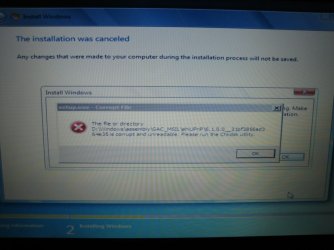
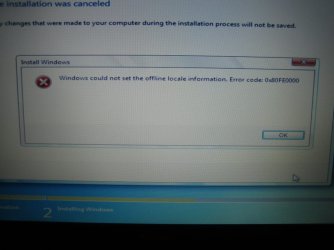
Received the first to errors with the partition I already had.

Then received the third pic after deleting and formating.

I am currently booting from USB.

Figured might as well post it before going to sleep.
 

Attachments

  • IMG_5968.JPG
    IMG_5968.JPG
    69.3 KB · Views: 32
  • IMG_5969.JPG
    IMG_5969.JPG
    62.2 KB · Views: 25
  • IMG_5970.JPG
    IMG_5970.JPG
    62.1 KB · Views: 26

My Computer

Computer Manufacturer/Model Number
Acer Aspire 4810tz
OS
Windows Home Premium 32bit
Please confirm did you get these errors booting from the Usb or DVD?
 

My Computer

Computer type
PC/Desktop
Computer Manufacturer/Model Number
Self Built Custom Computer.
OS
Windows 10 Pro x64
CPU
i7-4770K
Motherboard
Asus Z87 Sabertooth
Memory
16Gig DDR3-2400
Graphics Card(s)
Gigabyte GT740
Sound Card
Onboard
Monitor(s) Displays
Benq 27" - Dell 23' - Benq 22"
Screen Resolution
1680x1050
Hard Drives
Samsung 840 Pro 128g SSD
1xWestern Digital Caviar Green 1tb
2xWestern Digital Caviar Green 2 tb
PSU
Seasonic 760 watt Platinum
Case
Coolermaster Haf - X
Cooling
Noctua NH-C12P CPU Cooler
Keyboard
Logitech illuminated keyboard
Mouse
Logitech Perfomance MX
Internet Speed
Cable = speeds to 20Mbps downsteam and 512kbps upsteam
Antivirus
Avast Internet Security
Browser
Firefox
Did you ever clear CMOS as mentioned earlier?

The last erors indicate faulty HDD and/or bad installation media for the first two, old partitions.

Ths third error can be caused by BIOS (need update), clearing CMOS may help this, bad install media, bad hardware with HDD or RAM being likely cause.
You have tried two different sets of Win7 files, origional upgrade DVD and different Win7 files burned to DVD, then the ISO from USB drive. I think we can rule out bad install media and bad ODD.

You ran HDD diagnostics, Check Disk, WD lifeguard and GW lifeguard. All came back good. This is still a concern for me, though a bit of a stretch.

You wrote zeros to the HDD, it should be cleaned.

The RAM has been tested with memtest86+ and passed.
The longer test will have to be done from an OS, as will Prime95 blend test.

You may need to get a different HDD to test in your laptop.
Borrowing one would be the most painless.
What type of external HDD do you have?
USB or eSATA connection?
Sealed case or notebook HDD in an enclosure?

Is it still under warranty?
Did you get it from a shop or chain store nearby?
 

My Computer

Computer type
PC/Desktop
Computer Manufacturer/Model Number
76~2.0
OS
Windows 7 Ult x64 - SP1/ Windows 8 Pro x64
CPU
Intel Core i5-3570K 4.6GHz
Motherboard
Gigabyte GA-Z77X UD3H, f18
Memory
8GB (2X4GB) DDR3 1600 Corsair Vengeance CL8 1.5v
Graphics Card(s)
Sapphire HD 7770 Vapor-X OC 1GB DDR5
Sound Card
Onboard VIA VT2021
Monitor(s) Displays
22" LCD Dell
Screen Resolution
1680x1050
Hard Drives
Samsung 840Pro 128GB SSD,
Seagate Barracuda 500GB SATA2 7200rpm 32MB cache, Seagate Barracuda 1TB SATA2 7200rpm 32MB cache,
PSU
Corsair HX650W
Case
Cooler Master Storm Scout
Cooling
Corsair H80 2x12cm Noctua NF P12 , 2x14cm case fans
Keyboard
Logitech Wave
Mouse
CM Sentinel
Internet Speed
Dismal
Antivirus
Avast
Browser
Opera Next
Other Info
Haswell laptop: HP Envy 17t-j, i7-4700MQ, GeForce 740M 2GB DDR3, 17.3" Full HD 1920x1080, 16GB RAM, Samsung 840 Pro 128GB, 1TB Hitachi 7200 HDD,
Desktop: eSATA ports,
External eSATA Seagate 500GB SATA2 7200rpm,
External WD USB 500GB
I'd also check the HASH of the ISO just to rule that out. Install HashTab... is the coolest thing ever!, rightclick on ISO to get the checksum, then cut and paste the correct checksum from the offcial list here to compare: Windows 7 RTM SHA-1 hash / checksums

Then reset the CMOS to try install again: Clear CMOS - 3 Ways to Clear the CMOS - Reset BIOS

Let memtest86 run repeatedly for at least 5-6 passes or overnight the next time you leave the laptop.

The reason Dave asked about your external HD is because many external's are just laptop HD's in a case with a USB cable. You might be able to extract it from case and replace your HD with it by removing the access panel for your HD, sliding the old HD out and sliding the replacement in to try it. I will try to find you a diagram for your laptop's HD location.

Can you also boot into BIOS setup to see what your current BIOS version is, so we can see if you may need a BIOS update which could in itself be the problem? The latest BIOS I'm finding is 1.35, although there is a 2.35 for "Special Edition 2009" models of 4810TZ.
 
My BIOS model is: InsydeH2O Setup Utility Rev. 2.5
or is it:
System BIOS Version: v1.0
VGA BIOS Version: 1736

Yes, I have reset the CMOS previously (a couple times)

As to the question if the HD is external or internal... I have no idea...
 

My Computer

Computer Manufacturer/Model Number
Acer Aspire 4810tz
OS
Windows Home Premium 32bit
What is the external HDD brand and model number, we can find the info for you.

If your external HDD and laptop have eSATA connection you can install the OS on the external for a test.
I did this with the first beta version of Win7.

Looks like your BIOS is the System BIOS Version: v1.0. Might be a good idea to upgrade it, as Greg mentioned.
 

My Computer

Computer type
PC/Desktop
Computer Manufacturer/Model Number
76~2.0
OS
Windows 7 Ult x64 - SP1/ Windows 8 Pro x64
CPU
Intel Core i5-3570K 4.6GHz
Motherboard
Gigabyte GA-Z77X UD3H, f18
Memory
8GB (2X4GB) DDR3 1600 Corsair Vengeance CL8 1.5v
Graphics Card(s)
Sapphire HD 7770 Vapor-X OC 1GB DDR5
Sound Card
Onboard VIA VT2021
Monitor(s) Displays
22" LCD Dell
Screen Resolution
1680x1050
Hard Drives
Samsung 840Pro 128GB SSD,
Seagate Barracuda 500GB SATA2 7200rpm 32MB cache, Seagate Barracuda 1TB SATA2 7200rpm 32MB cache,
PSU
Corsair HX650W
Case
Cooler Master Storm Scout
Cooling
Corsair H80 2x12cm Noctua NF P12 , 2x14cm case fans
Keyboard
Logitech Wave
Mouse
CM Sentinel
Internet Speed
Dismal
Antivirus
Avast
Browser
Opera Next
Other Info
Haswell laptop: HP Envy 17t-j, i7-4700MQ, GeForce 740M 2GB DDR3, 17.3" Full HD 1920x1080, 16GB RAM, Samsung 840 Pro 128GB, 1TB Hitachi 7200 HDD,
Desktop: eSATA ports,
External eSATA Seagate 500GB SATA2 7200rpm,
External WD USB 500GB
I am researching the BIOS now. Several posts in forums refer to updating to v 1.31 from 2009 but Acer appears to have pulled BIOS updates off the Downloads webpage for that model. Can only find 1.20 on other sites so far.

What is the extension to your model Aspire 4810tz-xxxx listed on sticker on bottom?

BIOS updates are risky when flashed from CD and best done from an OS, so we should probably try imaging Win7 on to your HD first, after a few more install attempts.

Can you enter BIOS setup and look thoroughly for your SATA controller which should be near where the drives are shown, make sure its set to IDE mode.
 
Wait, my external hard drive with where my computer from a few months ago is saved? It's a Hitachi Simpledrive.... something or another

How would I update my BIOS?
 

My Computer

Computer Manufacturer/Model Number
Acer Aspire 4810tz
OS
Windows Home Premium 32bit
Back
Top