please don't laugh...

From Windows is the only safe way. But if we could find your BIOS updates (Acer took them down) then its possible you could flash from CD. It would be better to try installing or imaging WIn7 onto your HD first so you can do it more safely.

Is there any chance you are still within the first year of purchase to get Acer Tech support, who apparently need to supervise their BIOS updates on this model?

Did you check your SATA controller setting? I know you have an IDE drive but it still needs to be checked in BIOS setup where the HD's register (not boot order).

Dave will help you possibly swap the external into your laptop.
 

My Computer

Computer type
PC/Desktop
Computer Manufacturer/Model Number
76~2.0
OS
Windows 7 Ult x64 - SP1/ Windows 8 Pro x64
CPU
Intel Core i5-3570K 4.6GHz
Motherboard
Gigabyte GA-Z77X UD3H, f18
Memory
8GB (2X4GB) DDR3 1600 Corsair Vengeance CL8 1.5v
Graphics Card(s)
Sapphire HD 7770 Vapor-X OC 1GB DDR5
Sound Card
Onboard VIA VT2021
Monitor(s) Displays
22" LCD Dell
Screen Resolution
1680x1050
Hard Drives
Samsung 840Pro 128GB SSD,
Seagate Barracuda 500GB SATA2 7200rpm 32MB cache, Seagate Barracuda 1TB SATA2 7200rpm 32MB cache,
PSU
Corsair HX650W
Case
Cooler Master Storm Scout
Cooling
Corsair H80 2x12cm Noctua NF P12 , 2x14cm case fans
Keyboard
Logitech Wave
Mouse
CM Sentinel
Internet Speed
Dismal
Antivirus
Avast
Browser
Opera Next
Other Info
Haswell laptop: HP Envy 17t-j, i7-4700MQ, GeForce 740M 2GB DDR3, 17.3" Full HD 1920x1080, 16GB RAM, Samsung 840 Pro 128GB, 1TB Hitachi 7200 HDD,
Desktop: eSATA ports,
External eSATA Seagate 500GB SATA2 7200rpm,
External WD USB 500GB
Work with Dave on getting your HD swapped as that is the most promising route now.

But there is one thing to deal with when you get around to it. I just re-read thread and see this:

The factory default has Network Boot enabled and F12 Boot Menu disabled. And SATA mode has been in AHCI

I think your SATA controller should be in IDE mode. Change it to IDE to try install.

And make sure network boot is disabled.
 
Last edited:

My Computer

Computer Manufacturer/Model Number
Acer Aspire 4810tz
OS
Windows Home Premium 32bit
I worked on a Science Experiment Today :geek:

I built a mini desktop computer.

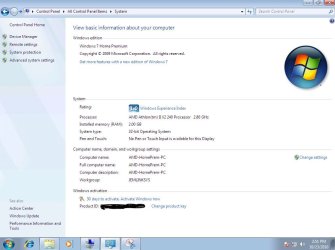
AMD x64 240 CPU
Gigabyte GA-M68M-S2 Motherboard
2 x 1gb G.Skill DDR2 800 memory
1.5 Seagate HD (Brand new, not formatted)

Installed Windows 7 Home Premium 32 bit from TechNet subscription download
.iso burned with ImgBurn at 4x speed to DVD

Install took about 25 minutes, No Errors at all.
Connected to internet with Cat5 cable the whole time, it picked up updates.

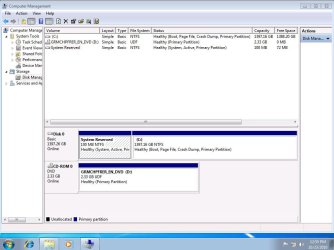
Looks like Home Prem took 9.10gb of HD space, & the 100mb reserved partition. :)

AMD_Home_Prem_Disk_Mgmt.JPG

So now I am perplexed at "mypcbroke's" install problem :confused:

AMD_II_240_HomePremium_snip.JPG
 
Last edited:

My Computer

Computer type
PC/Desktop
Computer Manufacturer/Model Number
Built them myself, Science Experiments !
OS
Win7 Enterprise, Win7 x86 (Ult 7600), Win7 x64 Ult 7600, TechNet RTM on AMD x64 (2.8Ghz)
CPU
AMD fx8350 4ghz, AMD-32 2400mhz, AMD-64 3200mhz, AMDx64 2.8G
Motherboard
SIS 755, ECS-K8M890M-M (Ult 7600), GigaByte & others
Memory
2gb, 4gb on the Ult 7600, 4gb on Technet RTM, 32gb on FX8350
Graphics Card(s)
Draw my own Graphics, several nVidia cards
Sound Card
on motherboard
Monitor(s) Displays
19" flat scr, 28" I-Inc widescr,22" Emprex Widescr, 23" Acer
Screen Resolution
1280 x 1024, 1440 x 900, 1920 x 1080
Hard Drives
6 pata Ide HD's & 2 Sata HD's
added 80gb external on Ult 7600 computer,
numerous extra 1tb, 2TB, 3Tb SATA HD's
A collection of ext HD Docks w/ HDs
PSU
430w, 550w, 600w, 700, 800, etc
Case
All Generic Full Towers
Cooling
Open Air & a few fans, some w/ colored LEDs
Keyboard
Compaq & Dell recycled from GoodWill
Mouse
Made in China Optical Wired Mouse
Internet Speed
Fast Cable InterNet
Antivirus
AVG Free on 24 different Desktops, NO Problems!
Browser
IE 8 is preferred, but use FireFox sometimes
Other Info
Linksys Routers, switches, & Hubs
Too Many USB Flash Drives to count, Biggest is 64GB !
Eight computers in my home network.
Sixteen computers at my business network.
Linked via TeamViewer !
Lots of old used spare computer parts everywhere!
I worked on a Science Experiment Today :geek:

I built a mini desktop computer.

AMD x64 240 CPU
Gigabyte GA-M68M-S2 Motherboard
2 x 1gb G.Skill DDR2 800 memory
1.5 Seagate HD (Brand new, not formatted)

Installed Windows 7 Home Premium 32 bit from TechNet subscription download
.iso burned with ImgBurn at 4x speed to DVD

Install took about 25 minutes, No Errors at all.
Connected to internet with Cat5 cable the whole time, it picked up updates.

Looks like Home Prem took 9.10gb of HD space, & the 100mb reserved partition. :)

View attachment 107112

So now I am perplexed at "mypcbroke's" install problem :confused:

You're tellin me, I'm perplexed by what you just said....
 

My Computer

Computer Manufacturer/Model Number
Acer Aspire 4810tz
OS
Windows Home Premium 32bit
I'm thinking we need to go back to the WD DataLife Tools Boot CD.

We need to write Zeros to the HD TWICE in a row to clear a re-occuring corrupted boot sector from being written to correctly.

Then we should have almost a bare virgin HD to try without any formatting for an install.

:orb:

  1. You can now boot the computer to the diagnostics CD. Make sure your boot order in your BIOS is set to boot to the CD-ROM drive first.
  1. You will see the following options:
  2. SELECT DRIVE - Always choose this option first, as it determines which drive you will be working on.
  • QUICK TEST - This option tests your drive quickly for any major physical problems. (Please note: Although this option is safe and does not alter the data on your hard drive, Western Digital recommends that you have a current backup of your data).
  • EXTENDED TEST - This option checks your drive thoroughly and it can repair any correctable errors. (Please note: Although this option is safe and does not alter the data on your hard drive, some data loss may occur, depending on the errors found and the errors corrected. Western Digital recommends that you have a current backup of your data).
  • WRITE ZEROS TO DRIVE - The Write Zeros option, wipes any and all data off your drive. This option used when your data is no longer usable or recoverable. If you no longer need any data from your drive and would like to start over, run this option to set your drive to an as new condition. NOTE: Please make sure that you have selected the correct drive to perform this function on as once ran, no data will be recoverable.
  • VIEW TEST RESULTS - You can see the results of the test you just performed
 

My Computer

Computer type
PC/Desktop
Computer Manufacturer/Model Number
Built them myself, Science Experiments !
OS
Win7 Enterprise, Win7 x86 (Ult 7600), Win7 x64 Ult 7600, TechNet RTM on AMD x64 (2.8Ghz)
CPU
AMD fx8350 4ghz, AMD-32 2400mhz, AMD-64 3200mhz, AMDx64 2.8G
Motherboard
SIS 755, ECS-K8M890M-M (Ult 7600), GigaByte & others
Memory
2gb, 4gb on the Ult 7600, 4gb on Technet RTM, 32gb on FX8350
Graphics Card(s)
Draw my own Graphics, several nVidia cards
Sound Card
on motherboard
Monitor(s) Displays
19" flat scr, 28" I-Inc widescr,22" Emprex Widescr, 23" Acer
Screen Resolution
1280 x 1024, 1440 x 900, 1920 x 1080
Hard Drives
6 pata Ide HD's & 2 Sata HD's
added 80gb external on Ult 7600 computer,
numerous extra 1tb, 2TB, 3Tb SATA HD's
A collection of ext HD Docks w/ HDs
PSU
430w, 550w, 600w, 700, 800, etc
Case
All Generic Full Towers
Cooling
Open Air & a few fans, some w/ colored LEDs
Keyboard
Compaq & Dell recycled from GoodWill
Mouse
Made in China Optical Wired Mouse
Internet Speed
Fast Cable InterNet
Antivirus
AVG Free on 24 different Desktops, NO Problems!
Browser
IE 8 is preferred, but use FireFox sometimes
Other Info
Linksys Routers, switches, & Hubs
Too Many USB Flash Drives to count, Biggest is 64GB !
Eight computers in my home network.
Sixteen computers at my business network.
Linked via TeamViewer !
Lots of old used spare computer parts everywhere!
WRITE ZEROS TO DRIVE - The Write Zeros option, wipes any and all data off your drive. This option used when your data is no longer usable or recoverable. If you no longer need any data from your drive and would like to start over, run this option to set your drive to an as new condition. NOTE: Please make sure that you have selected the correct drive to perform this function on as once ran, no data will be recoverable.


I received an ICRC error when I tried to write zeros....
 

My Computer

Computer Manufacturer/Model Number
Acer Aspire 4810tz
OS
Windows Home Premium 32bit
Should we try the extended test :confused:

EXTENDED TEST - This option checks your drive thoroughly and it can repair any correctable errors. (Please note: Although this option is safe and does not alter the data on your hard drive, some data loss may occur, depending on the errors found and the errors corrected. Western Digital recommends that you have a current backup of your data).
 

My Computer

Computer type
PC/Desktop
Computer Manufacturer/Model Number
Built them myself, Science Experiments !
OS
Win7 Enterprise, Win7 x86 (Ult 7600), Win7 x64 Ult 7600, TechNet RTM on AMD x64 (2.8Ghz)
CPU
AMD fx8350 4ghz, AMD-32 2400mhz, AMD-64 3200mhz, AMDx64 2.8G
Motherboard
SIS 755, ECS-K8M890M-M (Ult 7600), GigaByte & others
Memory
2gb, 4gb on the Ult 7600, 4gb on Technet RTM, 32gb on FX8350
Graphics Card(s)
Draw my own Graphics, several nVidia cards
Sound Card
on motherboard
Monitor(s) Displays
19" flat scr, 28" I-Inc widescr,22" Emprex Widescr, 23" Acer
Screen Resolution
1280 x 1024, 1440 x 900, 1920 x 1080
Hard Drives
6 pata Ide HD's & 2 Sata HD's
added 80gb external on Ult 7600 computer,
numerous extra 1tb, 2TB, 3Tb SATA HD's
A collection of ext HD Docks w/ HDs
PSU
430w, 550w, 600w, 700, 800, etc
Case
All Generic Full Towers
Cooling
Open Air & a few fans, some w/ colored LEDs
Keyboard
Compaq & Dell recycled from GoodWill
Mouse
Made in China Optical Wired Mouse
Internet Speed
Fast Cable InterNet
Antivirus
AVG Free on 24 different Desktops, NO Problems!
Browser
IE 8 is preferred, but use FireFox sometimes
Other Info
Linksys Routers, switches, & Hubs
Too Many USB Flash Drives to count, Biggest is 64GB !
Eight computers in my home network.
Sixteen computers at my business network.
Linked via TeamViewer !
Lots of old used spare computer parts everywhere!
Using the Diskpart Clean All procedure from tutorial does the same thing if GWScan CD won't zero. I'm wondering if it even completed the first time around - it takes about an hour or more on 320gb HD. Sometimes Users get tired of waiting and cancel it which would leave the HD in an already-corrupted state if that's the case.

But running the Extended Test is a good idea anyway since I dont' think any of us are confident in that HD. So many of the google results I've read for each of the many errors she's gotten point to bad HD.

I like your thinking, Doc. These errors all seem to have in common possible boot sector corruption which may require more than one set of zeroes to overwrite.
 
But running the Extended Test is a good idea, anyway, since I dont' think any of us are confident in the HD. So many of the google results I've read for all of her errors point to bad HD.

I like your thinking, Doc. These errors all seem to have in common possible boot sector corruption which may require more than one set of zeroes to overwrite.

[/QUOTE]


No Greg, that is why I built a new Home Prem desktop from scratch today to see the size of the Home Prem 32 bit install. It was 9.10gb.
 
Last edited:

My Computer

Computer type
PC/Desktop
Computer Manufacturer/Model Number
Built them myself, Science Experiments !
OS
Win7 Enterprise, Win7 x86 (Ult 7600), Win7 x64 Ult 7600, TechNet RTM on AMD x64 (2.8Ghz)
CPU
AMD fx8350 4ghz, AMD-32 2400mhz, AMD-64 3200mhz, AMDx64 2.8G
Motherboard
SIS 755, ECS-K8M890M-M (Ult 7600), GigaByte & others
Memory
2gb, 4gb on the Ult 7600, 4gb on Technet RTM, 32gb on FX8350
Graphics Card(s)
Draw my own Graphics, several nVidia cards
Sound Card
on motherboard
Monitor(s) Displays
19" flat scr, 28" I-Inc widescr,22" Emprex Widescr, 23" Acer
Screen Resolution
1280 x 1024, 1440 x 900, 1920 x 1080
Hard Drives
6 pata Ide HD's & 2 Sata HD's
added 80gb external on Ult 7600 computer,
numerous extra 1tb, 2TB, 3Tb SATA HD's
A collection of ext HD Docks w/ HDs
PSU
430w, 550w, 600w, 700, 800, etc
Case
All Generic Full Towers
Cooling
Open Air & a few fans, some w/ colored LEDs
Keyboard
Compaq & Dell recycled from GoodWill
Mouse
Made in China Optical Wired Mouse
Internet Speed
Fast Cable InterNet
Antivirus
AVG Free on 24 different Desktops, NO Problems!
Browser
IE 8 is preferred, but use FireFox sometimes
Other Info
Linksys Routers, switches, & Hubs
Too Many USB Flash Drives to count, Biggest is 64GB !
Eight computers in my home network.
Sixteen computers at my business network.
Linked via TeamViewer !
Lots of old used spare computer parts everywhere!
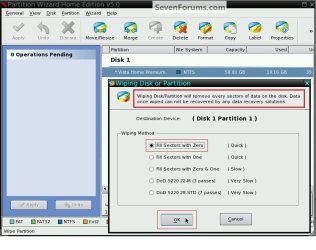
Partition Wizard has many different wipe options.


click to enlarge
Wipe_Type.jpg
 

My Computer

Computer Manufacturer/Model Number
* BFK Customs *
OS
W 7 64-bit Ultimate
CPU
Intel Q9550 Yorkfield
Motherboard
ASUS P5Q Pro
Memory
8GB Dominator 8500C5D
Graphics Card(s)
ATI : XFX 5870
Sound Card
Realtek HD Audio 7-1
Monitor(s) Displays
1x 47" LCD HDMI & 3x 26" LCD HDMI
Screen Resolution
1920x1080P & 1920x1200
Hard Drives
1x 80GB Intel X25-M G2 SSD : 1x 500GB & 1x 640GB WD Caviar Black(s)
PSU
Corsair 620HX
Case
Cooler Master RC-690
Cooling
Tuniq Tower 120, 2x 140mm and 3x 120mm case fans
Keyboard
Microsoft 500
Mouse
Razer Diamondback 3G
Internet Speed
14 Mb/s
Other Info
1x Koutech 3Gb/s SATA HDD Hot Swap Rack
The Dept of Defense (DOD) standard for a HD being wiped good enough to avoid data recovery is 3 sets of zeroes, which is listed above on the PW options Ted posted.

I'd set aside 3-4 hours to do that and then you'll know if boot sector corruption is the cause which is highly likely. In fact the Startup Repair result you got "Missing OS loader" points directly to it, which is why I had you run the commands to rebuild BCD last night.
 
Ok good, because I haven't checked back since my last post (went out to grab food) and I had left PW writing zeros. It looks like its not going to be done for a while, but it's moving along
 

My Computer

Computer Manufacturer/Model Number
Acer Aspire 4810tz
OS
Windows Home Premium 32bit
I'm glad you have been patient with us. I once made an image of a 80gb HD that took 12 hours, it was on a slow CPU computer. But when I restored the image to a new HD it worked!
 

My Computer

Computer type
PC/Desktop
Computer Manufacturer/Model Number
Built them myself, Science Experiments !
OS
Win7 Enterprise, Win7 x86 (Ult 7600), Win7 x64 Ult 7600, TechNet RTM on AMD x64 (2.8Ghz)
CPU
AMD fx8350 4ghz, AMD-32 2400mhz, AMD-64 3200mhz, AMDx64 2.8G
Motherboard
SIS 755, ECS-K8M890M-M (Ult 7600), GigaByte & others
Memory
2gb, 4gb on the Ult 7600, 4gb on Technet RTM, 32gb on FX8350
Graphics Card(s)
Draw my own Graphics, several nVidia cards
Sound Card
on motherboard
Monitor(s) Displays
19" flat scr, 28" I-Inc widescr,22" Emprex Widescr, 23" Acer
Screen Resolution
1280 x 1024, 1440 x 900, 1920 x 1080
Hard Drives
6 pata Ide HD's & 2 Sata HD's
added 80gb external on Ult 7600 computer,
numerous extra 1tb, 2TB, 3Tb SATA HD's
A collection of ext HD Docks w/ HDs
PSU
430w, 550w, 600w, 700, 800, etc
Case
All Generic Full Towers
Cooling
Open Air & a few fans, some w/ colored LEDs
Keyboard
Compaq & Dell recycled from GoodWill
Mouse
Made in China Optical Wired Mouse
Internet Speed
Fast Cable InterNet
Antivirus
AVG Free on 24 different Desktops, NO Problems!
Browser
IE 8 is preferred, but use FireFox sometimes
Other Info
Linksys Routers, switches, & Hubs
Too Many USB Flash Drives to count, Biggest is 64GB !
Eight computers in my home network.
Sixteen computers at my business network.
Linked via TeamViewer !
Lots of old used spare computer parts everywhere!
While that's running: do you have another computer with Win7 or which you could install Win7 temporarily onto a partition on the HD?

There is a way to get Win7 onto your problem HD (if it's tested out to be good) without having to install it. I do this sometimes on problem installs which are taking too much time.
 
doc,
I like the new avatar. One of these days I'll have to learn how to do those fancy things. Recognize that mine is from the Arizona Haunted House?


Karl,
How's this for starters....
Animation1dw.gif

Want something else? Let me know!
 

My Computer

Computer Manufacturer/Model Number
HP M9077c
OS
Windows 7 Home Premium 64bit
CPU
Intel(R)Core(TM)2 quad [email protected] 2.39GHz
Motherboard
ASUSeK
Memory
6GB DDR2 6400
Graphics Card(s)
GeForce 8500/512MB
Sound Card
Realtek High Def Audio
Monitor(s) Displays
HP w2408 LCD 24" widescreen
Screen Resolution
1920x1200
Cooling
6 pack of Bud
Keyboard
MS wireless Inteli
Mouse
MS wireless Inteli
While that's running: do you have another computer with Win7 or which you could install Win7 temporarily onto a partition on the HD?

There is a way to get Win7 onto your problem HD (if it's tested out to be good) without having to install it. I do this sometimes on problem installs which are taking too much time.

What would I do with another Windows 7 pc? Because there is someone I could bribe... the pc i've been using the past few days is an xp...
 

My Computer

Computer Manufacturer/Model Number
Acer Aspire 4810tz
OS
Windows Home Premium 32bit
By installing WIn7 to a partition on the other computer, creating a backup image of it saved to external, you can restore image to laptop HD.

Before booting up, use Paragon Adaptive Restore CD to remove all of the drivers so new ones are installed fresh for the new hardware.
 
Last edited:
O_O

?????????

PW is at 62% DoD 3 passes... I'll take it one step at a time from there
 

My Computer

Computer Manufacturer/Model Number
Acer Aspire 4810tz
OS
Windows Home Premium 32bit
Back
Top