PLease help witha botched Linux install

Arun77

New member
Local time
8:13 AM
Messages
1
Hi
I have a new Dell Laptop with Windows 7 installed . I wanted to try the Suse and somehow the CD had some problems so the installation aborted. After that I am in a mess.Now I cannot install anything.
1) I have tried installing Win XP .But the dreadeded BSOD -7B error came
2) Tried the Win & cd , But the screen hangs right after "the windows is loading fles"

3) Tried fdsik and only can see 30gb( I have 640 GB)


Only thing I can do is install the UBUNTU or SUSE ( It shows original 640 GB or so )

SLAX / SUSE live CD not working and hanging
Please help.
I am praying that there is no hardware problem.Please help me.

Arun
 

My Computer

OS
windows 7
Hello Arun77, welcome to Seven Forums!


The 'info' below is the Dell factory recovery instructions, if that doesn't work, I'm sure my mate theog will link you the place to purchase the pre-made disk set from Dell.

Have a look through the information in these tutorials linked below for some additional ideas and be sure to post back with any further questions you may have and to keep us informed.

   Information

New Dell
Turn on the computer.

2 As the computer starts, press <F8> on the keyboard until the Advanced Boot Options menu appears on the screen.

Note:
You must press <F8> before the Windows logo appears on the screen. If you press <F8> after the Windows logo appears on the screen, the Advanced Boot Options menu will not appear on the screen. If you do not see the Advanced Boot Options menu, restart the computer, and then repeat this step until you see the menu on the screen.

3 Press the <Down Arrow> on the keyboard to select Repair Your Computer on the Advanced Boot Options menu, and then press <Enter>.

4 Specify the language settings that you want, and then click Next.

5 Log in as a user who has administrative credentials, and then click OK.

6 Click Dell Factory Image Restore.

7 In the Dell Factory Image Restore window, click Next.

8 Click to select the Yes, reformat hard drive and restore system software to factory condition check box.

9 Click Next.
The computer is restored to the default factory configuration.

10 When the restore operation is completed, click Finish to restart the computer.
The software is now installed as it was when the computer was first received.
 

My Computer

Computer Manufacturer/Model Number
* BFK Customs *
OS
W 7 64-bit Ultimate
CPU
Intel Q9550 Yorkfield
Motherboard
ASUS P5Q Pro
Memory
8GB Dominator 8500C5D
Graphics Card(s)
ATI : XFX 5870
Sound Card
Realtek HD Audio 7-1
Monitor(s) Displays
1x 47" LCD HDMI & 3x 26" LCD HDMI
Screen Resolution
1920x1080P & 1920x1200
Hard Drives
1x 80GB Intel X25-M G2 SSD : 1x 500GB & 1x 640GB WD Caviar Black(s)
PSU
Corsair 620HX
Case
Cooler Master RC-690
Cooling
Tuniq Tower 120, 2x 140mm and 3x 120mm case fans
Keyboard
Microsoft 500
Mouse
Razer Diamondback 3G
Internet Speed
14 Mb/s
Other Info
1x Koutech 3Gb/s SATA HDD Hot Swap Rack
   Information
Boot up using the Startup disk CD or Windows 7 DVD. (not the OEM manufacturer's Recovery Disk) If you have a Netbook, you will need a CD/DVD drive.​


Make sure no USB drives are plugged in.


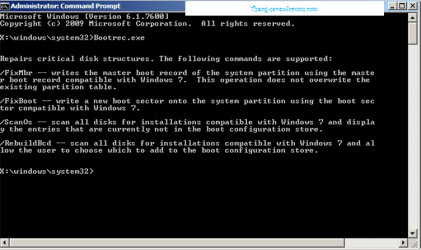
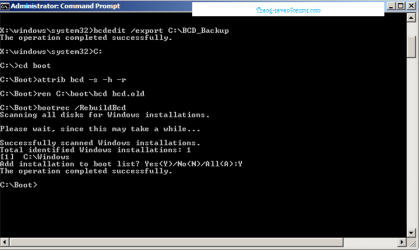
1) Use the Rebuild BCD in this tutorial:
How to use the Bootrec.exe tool in the Windows Recovery Environment to troubleshoot and repair startup issues in Windows

Startup Repair 4.PNG Startup Repair 5.PNG

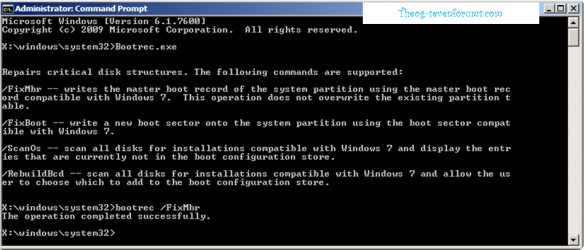
2) FixMBR.

Startup Repair 6.PNG

If you have not made your Startup Repair
http://www.sevenforums.com/tutorials/2083-system-repair-disc-create.html
Do you have a mate with Windows 7 & CD/DVD RW Drive, how could burn one off.


   Information
We always assume you have made your Recovery Disks using the OEM manufacturer's app the first day you had your new PC.& made the Startup Repair CD.​


How to use Dell Recovery Partition,make Recovery Disks & how to order Recovery Disks.
Dell - Support
 

My Computer

OS
ME/XP/Vista/Win7
Back
Top