Plz help with Windows Mail

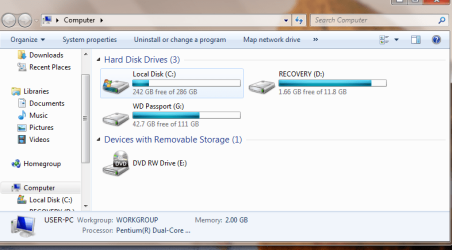
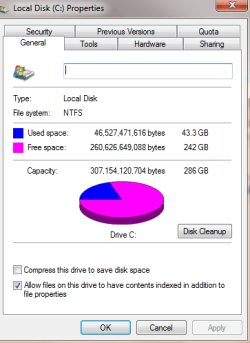
Ok, well here is that image that you asked for and also an image from the properties under general so you can see exactly what the C drive looks like. I went into my Props>tools>error-checking. It said that on my next reboot it would check the hard drive. When I do so before going to windows log in, it went to CMD and did CHDSK check for my C drive. now that i have logged on it appears that i can transfer my music files from my old comp without getting a message of no space left on disk. Im also currently running a program from Windows Mail recovery v.3.0.0, It seems to be finding the missing emails in the scan. Seems to be working, except, i dont know what happened to all those old recovery points? also why cant i get on that prompt to do a system recovery or boot in safe mode, etc. by pressing F8, it doesnt make any sense? If you know any tips,hints, and tricks for save recovery of system or files that might help me prevent another glitch like this from happening again.
 

Attachments
  • Disk Prop.PNG
    Disk Prop.PNG
    12.4 KB · Views: 4
  • My comp image.PNG
    My comp image.PNG
    33.7 KB · Views: 6

My Computer

Computer Manufacturer/Model Number
Compaq
OS
Windows 7 64bit Home Edition
Not much information from the screen shot. Try this go to the website of you HD mfg. Take the test for a failing hard drive. The lacke of capacity could be an indication as well as the lost email. Even new HD can be defective.
 

My Computer

Computer type
PC/Desktop
Computer Manufacturer/Model Number
Dell XPS 420
OS
Windows 10, Home Clean Install
CPU
Intel Core2 processsor Q8200(2.33Ghz 1333FSB) Quad Core Tech
Motherboard
Dell
Memory
6 gb
Graphics Card(s)
ATI Radeon 256MB HD3650
Sound Card
Intergrated 7.1 Channel Audio
Monitor(s) Displays
Dell SP2009W 20"
Hard Drives
640 GB Serial ATA Hard drive
Cooling
Fan
Keyboard
Dell USB Keyboard
Mouse
Dell Premium Optical USB
Internet Speed
DSL 2.85
The website is timed out right now. Do you have any other suggestions?
 

My Computer

Computer Manufacturer/Model Number
Compaq
OS
Windows 7 64bit Home Edition
Well, didnt manage to recover mail. External Hard drive is reformatted. I reinstalled windows using the original factory install. Scanned again using malwarebits and found some 230 trojans everything seems to be running fine.
 

My Computer

Computer Manufacturer/Model Number
Compaq
OS
Windows 7 64bit Home Edition
Sorry that you lost the mail, but the advice now will be worth its weight in gold, down the line.

Run the AntiVirus and malwarebytes scan at least once a week.

Now that you are happy with the OS, make a system image right now and put it on a separate hard drive and put it away. Update once a month or so, depending on your use.

Make system restore points a few times a week.

Use Backup and restore at least 2 times a week. It backs up your documents and pics.

Follow these instructions and no matter what happens in the future you will be able to resolve it quickly and correctly.

Here is the index to our great tutorials, for you to use.
http://www.sevenforums.com/tutorials/257-windows-7-tutorial-index-2.html?filter[2]=General Tips
 

My Computer

Computer type
PC/Desktop
Computer Manufacturer/Model Number
Dell XPS 420
OS
Windows 10, Home Clean Install
CPU
Intel Core2 processsor Q8200(2.33Ghz 1333FSB) Quad Core Tech
Motherboard
Dell
Memory
6 gb
Graphics Card(s)
ATI Radeon 256MB HD3650
Sound Card
Intergrated 7.1 Channel Audio
Monitor(s) Displays
Dell SP2009W 20"
Hard Drives
640 GB Serial ATA Hard drive
Cooling
Fan
Keyboard
Dell USB Keyboard
Mouse
Dell Premium Optical USB
Internet Speed
DSL 2.85
Back
Top