Pointer Problem

nhp911

New member
Local time
12:57 PM
Messages
9
Solved!!!!!

Solved problem!!!!!

1) Go to Ease of Use Center
2) Go to make the mouse easier to use
3) Look for make it easier to use window
4) Take the check mark off of Activate a window by hovering over it

Ta Da

Hi, Hope you can help?

My pointer bring up the open window page when I pass over it if there are several open I cannot get to the ones I need without closing or stacking. This becomes a problem when there are small dialogue boxes open I have to minimize all the windows but the small dialouge box. Also I cannot move my pointer fast enough to click on the thumbnails in task bar.

Thanks
 
Last edited:

My Computer My Computer

Computer Manufacturer/Model Number
Maingear
OS
windows 7
CPU
I790
Motherboard
mx58 asus rampage II gene
Memory
12 gig
Graphics Card(s)
ati 5870
Sound Card
audio intergrated with asus rampage
Monitor(s) Displays
acer x 2
Hard Drives
wd100fals-1tb x2
Case
xcube
Cooling
water cooled
Welcome to the SevenForums nhp!

Even after reading your post twice I am unsure what your problem is.

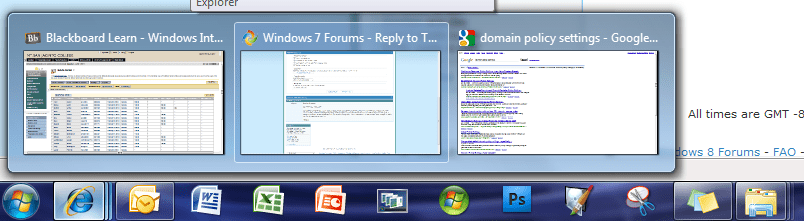
From what I gathered... you see the open wndows such as aero peek shown below, but you cannot click on any thumbnail to open a minimized one? Is that correct?

Aero Peek.png

Also, your systems specs state an impressive system... speed should not be an issue! And you failed to mention which version of Win7, and where you acquired it...???
 

My Computer My Computer

Computer Manufacturer/Model Number
Homebrew PC - "Alpha_Dawg"
OS
Windows 7 Ultimate 64 bit Steve Ballmer Signature Edition
CPU
Intel Core 2 Quad - Q9550 - 2.83GHz stock - OC'd to 3.6GHz
Motherboard
Gigabyte EP45-UD3P
Memory
4GB DDR2 800MHz (PC6400) OCZ Reaper
Graphics Card(s)
Nvidia GE Force 8800 GTS
Sound Card
Asus Xonar DX
Monitor(s) Displays
Samsung SyncMaster 2333HD
Screen Resolution
1920 x 1080
Hard Drives
WD Caviar Black 750GB - 7200RPM - 32MB cache
WD Caviar Green 1.5TB - 5400RPM - 64MB cache
WD Caviar Green 2.0TB - 5400RPM - 64MB cache
PSU
PC Power & Cooling Silencer 750
Case
Gigabyte 3D Aurora
Cooling
Case is Air - 5ea. 120mm fans (mix of Arctic and Xigmatec)
Keyboard
MS Natural Wireless KB
Mouse
MS Wireless Mouse
Internet Speed
50 mbps down/5 mbps up
Other Info
AVerMedia - AVerTVHD G2 Dual Tuner Card
When I move my pointer to the one I need it disappears back to the taskbar or by the date in window 7 it shows time and that I have unresolved issues I click on the box that open the action center and it appears but when I try to click on open action center it disappears before my pointer can get to it. Lets say I have three windows open on my desktop of different sizes as I try to pass the arrow over the larger ones to get to the smaller one it activates the first window and hides the smaller one behind it. I then have to minimize the larger ones to get to the smaller one.

I hope this helps
 

My Computer My Computer

Computer Manufacturer/Model Number
Maingear
OS
windows 7
CPU
I790
Motherboard
mx58 asus rampage II gene
Memory
12 gig
Graphics Card(s)
ati 5870
Sound Card
audio intergrated with asus rampage
Monitor(s) Displays
acer x 2
Hard Drives
wd100fals-1tb x2
Case
xcube
Cooling
water cooled
Is this a new install of Win7 or has this been an issue for a while?

Also... Which version of Windows 7, and where you acquired it...???
 

My Computer My Computer

Computer Manufacturer/Model Number
Homebrew PC - "Alpha_Dawg"
OS
Windows 7 Ultimate 64 bit Steve Ballmer Signature Edition
CPU
Intel Core 2 Quad - Q9550 - 2.83GHz stock - OC'd to 3.6GHz
Motherboard
Gigabyte EP45-UD3P
Memory
4GB DDR2 800MHz (PC6400) OCZ Reaper
Graphics Card(s)
Nvidia GE Force 8800 GTS
Sound Card
Asus Xonar DX
Monitor(s) Displays
Samsung SyncMaster 2333HD
Screen Resolution
1920 x 1080
Hard Drives
WD Caviar Black 750GB - 7200RPM - 32MB cache
WD Caviar Green 1.5TB - 5400RPM - 64MB cache
WD Caviar Green 2.0TB - 5400RPM - 64MB cache
PSU
PC Power & Cooling Silencer 750
Case
Gigabyte 3D Aurora
Cooling
Case is Air - 5ea. 120mm fans (mix of Arctic and Xigmatec)
Keyboard
MS Natural Wireless KB
Mouse
MS Wireless Mouse
Internet Speed
50 mbps down/5 mbps up
Other Info
AVerMedia - AVerTVHD G2 Dual Tuner Card
This is a new computer from maingear wind 7 home premium 64
 

My Computer My Computer

Computer Manufacturer/Model Number
Maingear
OS
windows 7
CPU
I790
Motherboard
mx58 asus rampage II gene
Memory
12 gig
Graphics Card(s)
ati 5870
Sound Card
audio intergrated with asus rampage
Monitor(s) Displays
acer x 2
Hard Drives
wd100fals-1tb x2
Case
xcube
Cooling
water cooled
Maingear is an outta the box overclocked PC, right???
 

My Computer My Computer

Computer Manufacturer/Model Number
Homebrew PC - "Alpha_Dawg"
OS
Windows 7 Ultimate 64 bit Steve Ballmer Signature Edition
CPU
Intel Core 2 Quad - Q9550 - 2.83GHz stock - OC'd to 3.6GHz
Motherboard
Gigabyte EP45-UD3P
Memory
4GB DDR2 800MHz (PC6400) OCZ Reaper
Graphics Card(s)
Nvidia GE Force 8800 GTS
Sound Card
Asus Xonar DX
Monitor(s) Displays
Samsung SyncMaster 2333HD
Screen Resolution
1920 x 1080
Hard Drives
WD Caviar Black 750GB - 7200RPM - 32MB cache
WD Caviar Green 1.5TB - 5400RPM - 64MB cache
WD Caviar Green 2.0TB - 5400RPM - 64MB cache
PSU
PC Power & Cooling Silencer 750
Case
Gigabyte 3D Aurora
Cooling
Case is Air - 5ea. 120mm fans (mix of Arctic and Xigmatec)
Keyboard
MS Natural Wireless KB
Mouse
MS Wireless Mouse
Internet Speed
50 mbps down/5 mbps up
Other Info
AVerMedia - AVerTVHD G2 Dual Tuner Card
Yes
 

My Computer My Computer

Computer Manufacturer/Model Number
Maingear
OS
windows 7
CPU
I790
Motherboard
mx58 asus rampage II gene
Memory
12 gig
Graphics Card(s)
ati 5870
Sound Card
audio intergrated with asus rampage
Monitor(s) Displays
acer x 2
Hard Drives
wd100fals-1tb x2
Case
xcube
Cooling
water cooled
using microsoft 5000 wireless mouse and keyboard
 

My Computer My Computer

Computer Manufacturer/Model Number
Maingear
OS
windows 7
CPU
I790
Motherboard
mx58 asus rampage II gene
Memory
12 gig
Graphics Card(s)
ati 5870
Sound Card
audio intergrated with asus rampage
Monitor(s) Displays
acer x 2
Hard Drives
wd100fals-1tb x2
Case
xcube
Cooling
water cooled
(this is weird - I posted quick reply then returned here after 5 minutes and it's gone. Here goes again.)

Not sure exactly what's happening, but I'll take a stab at a guess:

When you hover your mouse over a tile in the task bar, you should see the thumbnails of associated windows down by the task bar. If you move your mouse straight up over a thumbnail, you should be able to move your mouse back and forth (without any particular speed or effort) over the thumbnails without them disappearing.

If you hover a thumbnail for a second or two, that window should appear on the screen. If you move your mouse to another thumbnail or off the thumbnails entirely, the window will disappear if it was not the previously promoted window. If you click a thumbnail, its window should be promoted and stay put.

Hope this helps,
Greg
 

My Computer My Computer

OS
Windows 7
Thanks Greg,

I have no problem with that thanks!!!! But try this if you use your mouse pointer and hover over the action center by the clock time on the task bar it bring up a menu. I then request that the action center open which it does right above the task bar. But if you look close you will see the desktop between the open action center and task bar before I can point to the action menu it disapears and brings the desktop forward. I've been doing some research and for some reason other's are experiencing the same thing but they are saying when their mouse pointer passes over a window it is automaticly clicking on the open window and bring it to the foreground of the desktop when they really want another window that is now behind the window brought to the forefront. I've also heard their may be a virus but I've had this computer protected from day one.

Anyway thank you and if you have any other ideas please post.
 

My Computer My Computer

Computer Manufacturer/Model Number
Maingear
OS
windows 7
CPU
I790
Motherboard
mx58 asus rampage II gene
Memory
12 gig
Graphics Card(s)
ati 5870
Sound Card
audio intergrated with asus rampage
Monitor(s) Displays
acer x 2
Hard Drives
wd100fals-1tb x2
Case
xcube
Cooling
water cooled
nhp:

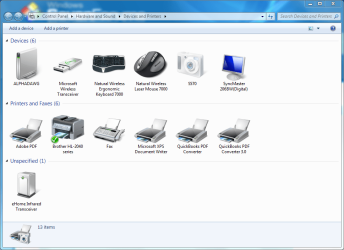
The MS mice and keyboards are very sensitive on drivers... what do you see in Devices and Printers? Here's mine showing my MS 7000 kb/mouse:

Devices and Printers.PNG

You can get the drivers/sw here: Download Software

Hope this helps...
 

My Computer My Computer

Computer Manufacturer/Model Number
Homebrew PC - "Alpha_Dawg"
OS
Windows 7 Ultimate 64 bit Steve Ballmer Signature Edition
CPU
Intel Core 2 Quad - Q9550 - 2.83GHz stock - OC'd to 3.6GHz
Motherboard
Gigabyte EP45-UD3P
Memory
4GB DDR2 800MHz (PC6400) OCZ Reaper
Graphics Card(s)
Nvidia GE Force 8800 GTS
Sound Card
Asus Xonar DX
Monitor(s) Displays
Samsung SyncMaster 2333HD
Screen Resolution
1920 x 1080
Hard Drives
WD Caviar Black 750GB - 7200RPM - 32MB cache
WD Caviar Green 1.5TB - 5400RPM - 64MB cache
WD Caviar Green 2.0TB - 5400RPM - 64MB cache
PSU
PC Power & Cooling Silencer 750
Case
Gigabyte 3D Aurora
Cooling
Case is Air - 5ea. 120mm fans (mix of Arctic and Xigmatec)
Keyboard
MS Natural Wireless KB
Mouse
MS Wireless Mouse
Internet Speed
50 mbps down/5 mbps up
Other Info
AVerMedia - AVerTVHD G2 Dual Tuner Card
Solved the problem !!!!!!!

1) Got to Easy of Axcess Center
2) Click on Make the Mouse Easer to Use
3) Under make it easier to manage windows
4) Un-check Activate a window by hovering over it with the mouse
 

My Computer My Computer

Computer Manufacturer/Model Number
Maingear
OS
windows 7
CPU
I790
Motherboard
mx58 asus rampage II gene
Memory
12 gig
Graphics Card(s)
ati 5870
Sound Card
audio intergrated with asus rampage
Monitor(s) Displays
acer x 2
Hard Drives
wd100fals-1tb x2
Case
xcube
Cooling
water cooled
Solved

Solved problem!!!!!

1) Go to Ease of Use Center
2) Go to make the mouse easier to use
3) Look for make it easier to use window
4) Take the check mark off of Activate a window by hovering over it

Ta Da!
 

My Computer My Computer

Computer Manufacturer/Model Number
Maingear
OS
windows 7
CPU
I790
Motherboard
mx58 asus rampage II gene
Memory
12 gig
Graphics Card(s)
ati 5870
Sound Card
audio intergrated with asus rampage
Monitor(s) Displays
acer x 2
Hard Drives
wd100fals-1tb x2
Case
xcube
Cooling
water cooled
Great to hear it!

Good job!
 

My Computer My Computer

Computer Manufacturer/Model Number
Homebrew PC - "Alpha_Dawg"
OS
Windows 7 Ultimate 64 bit Steve Ballmer Signature Edition
CPU
Intel Core 2 Quad - Q9550 - 2.83GHz stock - OC'd to 3.6GHz
Motherboard
Gigabyte EP45-UD3P
Memory
4GB DDR2 800MHz (PC6400) OCZ Reaper
Graphics Card(s)
Nvidia GE Force 8800 GTS
Sound Card
Asus Xonar DX
Monitor(s) Displays
Samsung SyncMaster 2333HD
Screen Resolution
1920 x 1080
Hard Drives
WD Caviar Black 750GB - 7200RPM - 32MB cache
WD Caviar Green 1.5TB - 5400RPM - 64MB cache
WD Caviar Green 2.0TB - 5400RPM - 64MB cache
PSU
PC Power & Cooling Silencer 750
Case
Gigabyte 3D Aurora
Cooling
Case is Air - 5ea. 120mm fans (mix of Arctic and Xigmatec)
Keyboard
MS Natural Wireless KB
Mouse
MS Wireless Mouse
Internet Speed
50 mbps down/5 mbps up
Other Info
AVerMedia - AVerTVHD G2 Dual Tuner Card
Back
Top