
Pop-Up Text Size causes distortion

TheBoojum

New member
Local time
4:41 PM
Messages
3
Since moving to Win7 the pop-up in several products have a text size and font that does not match the Segoe UI 9 standard. I followed all the display personalization, then window color and advanced appearance settings suggestions, but changing the font from segoe UI and back or the font size in all of the various fields had no effect. I checked that all the display settings were Segoe UI at 9pt. I tried changing these to another Font and Size but this had no effect on the bad pop-ups except for the header line. I then changed them back to the Win7 default of Segoe UI/9. I also went back 2 versions on the Display driver and then back up to the latest version. None of these made any difference. Have attached a screenshot. The one on the left is how it should look and the one on the right is how it looks on my system. The strange thing is this bug only seems to affect about 50% of the pop-ups. I have lots of products that are working fine and many that are not. I looked all over the web for a solution and tried numerous things, but up until now nothing has worked. Upload of jpg file does not work. Upload OK but cannot close window to accept the upload.
Upload/close does not work in FireFox
 

Attachments
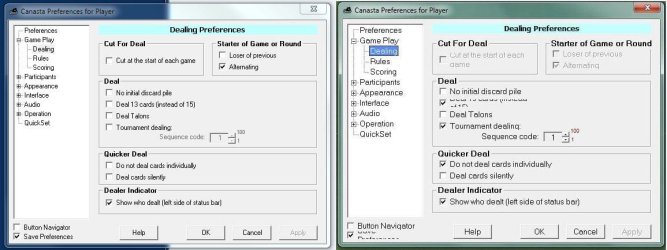
  • Capture.JPG
    Capture.JPG
    85 KB · Views: 69

My Computer My Computer

Computer Manufacturer/Model Number
HP Pavillion dv8
OS
Windows 7 Home Premium (x64) Service Pack 1 (build 7601)
CPU
1,60 gigahertz Intel Core i7 Q 720
Motherboard
Board: Hewlett-Packard 7001 35.24
Memory
8gb
Graphics Card(s)
NVIDIA GeForce GT 230M [Display adapter]
Sound Card
Realtek PCIe GBE Family Controller
Monitor(s) Displays
Generic PnP Monitor (18,5"vis)
Hard Drives
4000,58 Gigabytes Usable Hard Drive Capacity
2081,26 Gigabytes Hard Drive Free Space

hp BDDVDRW CT21L [Optical drive]
SAC Virtual Cdrom USB Device [Optical drive]

HP Photosmart C7200 USB Device [Hard drive] -- drive 4
SAC SAC-Click free USB
PSU
?
Case
?
Cooling
?
Have you changed your DPI scale? I have this problem frequently because I changed my DPI scale to the higher number, and this is, unfortunately, the price I pay to have the larger font and image size on the screen. Could this be your problem too?

Often, what I have to do when the text is too large to be able to read in the message box, is to temporarily lower my DPI scale, go back into the text box --- complete whatever I'm doing there, and then going back into DPI to increase it again. A pain in the behind, but it's worth it if you need the larger fonts and images.
 

My Computer My Computer

Computer Manufacturer/Model Number
HP Pavillion dv5t (generation 1)
OS
Vista 64 bit and 32 bit (SP2)
CPU
Intel(R) Core(TM)2 Duo Processor T9400 (2.53 GHz
Memory
4GB DDR2 System Memory (2 Dimm)
Graphics Card(s)
512 MB NVIDIA GeForce 9600M GT
Monitor(s) Displays
15.4" diagonal WSXGA+ High-Definition HP BrightView Widescre
Screen Resolution
1680 x 1050
Hard Drives
320GB 5400RPM SATA Hard Drive with HP ProtectSmart Hard Drive Protection
Keyboard
Built-in HP
Mouse
Built in - Synaptics TouchPad V6.5 on PS/2 Port
Internet Speed
Max
Other Info
~ Intel Next-Gen Wireless-N Mini-card w/Bluetooth ~ Blu-Ray ROM DVD+/-R/RW ~ Integ. HDTV Hybrid Tuner ~ 12 Cell Battery ~ MS Office (Home Premium) 2007 ~
Have tried all the standard Win7 settings from Small through Medium to Large. The problem remained the same, just got larger.
 

My Computer My Computer

Computer Manufacturer/Model Number
HP Pavillion dv8
OS
Windows 7 Home Premium (x64) Service Pack 1 (build 7601)
CPU
1,60 gigahertz Intel Core i7 Q 720
Motherboard
Board: Hewlett-Packard 7001 35.24
Memory
8gb
Graphics Card(s)
NVIDIA GeForce GT 230M [Display adapter]
Sound Card
Realtek PCIe GBE Family Controller
Monitor(s) Displays
Generic PnP Monitor (18,5"vis)
Hard Drives
4000,58 Gigabytes Usable Hard Drive Capacity
2081,26 Gigabytes Hard Drive Free Space

hp BDDVDRW CT21L [Optical drive]
SAC Virtual Cdrom USB Device [Optical drive]

HP Photosmart C7200 USB Device [Hard drive] -- drive 4
SAC SAC-Click free USB
PSU
?
Case
?
Cooling
?
Have tried changing the DPI sizes and re-displaying the Pop-up, but nothing seems to affect the text size in the box.
 

My Computer My Computer

Computer Manufacturer/Model Number
HP Pavillion dv8
OS
Windows 7 Home Premium (x64) Service Pack 1 (build 7601)
CPU
1,60 gigahertz Intel Core i7 Q 720
Motherboard
Board: Hewlett-Packard 7001 35.24
Memory
8gb
Graphics Card(s)
NVIDIA GeForce GT 230M [Display adapter]
Sound Card
Realtek PCIe GBE Family Controller
Monitor(s) Displays
Generic PnP Monitor (18,5"vis)
Hard Drives
4000,58 Gigabytes Usable Hard Drive Capacity
2081,26 Gigabytes Hard Drive Free Space

hp BDDVDRW CT21L [Optical drive]
SAC Virtual Cdrom USB Device [Optical drive]

HP Photosmart C7200 USB Device [Hard drive] -- drive 4
SAC SAC-Click free USB
PSU
?
Case
?
Cooling
?
Back
Top